

Introduction
Updated 12/23/2011: Corrected thermal pad info. Added V1 2 stream retest charts.
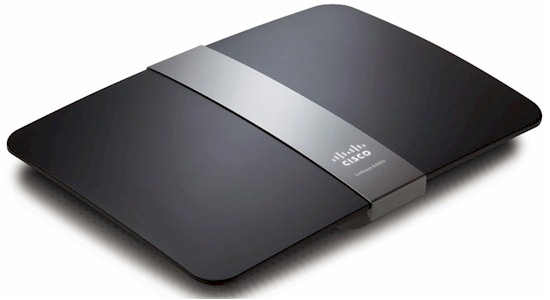
| At a glance | |
|---|---|
| Product | Linksys Maximum Performance Dual-Band N N900 Router (Linksys E4200V2) [Website] |
| Summary | Marvell-based dual-band, dual-radio N router with Gigabit ports, USB drive sharing/media serving and three-stream N (450 Mbps) support on both bands. Same router as Linksys EA4500. |
| Pros | • 20+ MB/s file sharing • Gigabit ports |
| Cons | • Half-fast FAT32 file writes • Can’t block outbound service (port) access • Possible reduced range for 2.4 GHz dual-stream clients |
Typical Price: $90 Buy From Amazon
When I started getting requests to review the V2 version of Cisco’s top-of-line Linksys E4200 router [reviewed], I didn’t give them much thought. Unless manufacturers really mess things up, most product revisions are more focused on cost reduction than new features or improved performance. So re-reviews aren’t really worth the effort.
So I was surprised when I checked with Cisco and found that the E4200V2 is actually a new product, with a complete redesign. I’ll leave why Cisco chose to not give the V2 its own E-series number up to their marketing wizards, but it’s bound to cause some consumer confusion. Or wait, maybe that’s the goal?
At any rate, Cisco tells me they will continue to sell the original E4200 (with an MSRP lowered to $179.99), which I’ll refer to as "V1", along with the V2. So be sure you enter E4200V2 when you go Googling for it…
From the outside, the V1 and V2 are identical, even down to the same Linksys E4200 (without "V2") on the front nameplate. The back panel (shown below) is the same too, with all the same ports and switches. I’m surprised that Cisco didn’t upgrade the USB port to 3.0. From the drive-sharing performance I saw, the V2 might be able to use USB 3.0’s extra bandwidth (more later).
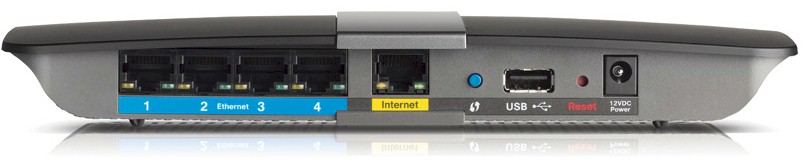
Rear panel
Internal Details
Forum posts had already given me the heads-up that the V2 is based on Marvell silicon. And that’s what I found when I opened up my review sample after testing was done. Without further ado, here’s a comparison of the key components in the V2 and the original.
| E4200V2 | E4200 | |
|---|---|---|
| CPU | 1.2 GHz Marvell Processor (MRVL F6101AW 1114AA C120) |
Broadcom BCM4718 802.11n Simultaneous dual-band router SoC |
| Switch | Marvell 88E6171R 7 port Gigabit |
Broadcom BCM53115 5 port Gigabit |
| RAM | 128 MB | 64 MB |
| Flash | 128 MB | 16 MB |
| 2.4 GHz Radio | – Marvell 88W8063 / 88W8366 – SiGe SE2598L 2.4 GHz P.A. (x3) |
– In Broadcom BCM4718 – SiGe SE2528L P.A. (x2) |
| 5 GHz radio | – Marvell 88W8063 / 88W8366 – SiGe SE2567L 5 GHz P.A. (x3) |
– Broadcom BCM4331 dual-band 802.11n SoC – SiGe SE2594L Dual-band front ends (x3) |
Table 1: E4200V2 and E4200 component summary
The V2 is definitely a beefier design than the V1 since it has a separate 1.2 GHz CPU vs. the V1’s shared (with the 2.4 GHz radio) CPU and much more RAM and flash. I’m not sure exactly what the V2’s processor is, other than it is made by Marvell. So I’ve provided the numbers I found etched on the CPU and perhaps one of our helpful readers will enlighten us.
The same two-device radio (88W8063 Dual-band 3×3 MAC/BB and 88W8366 Dual-band 3×3 MIMO transceiver) is used for both radios, with the difference being the SiGe power amplifiers, which are different for each band. Note that SiGe power amplifiers (P.A.) and RF front-ends were also used in the V1.
The Marvell 88W8063 / 88W8366 aren’t new devices. They first appeared in the Apple Airport Extreme back in 2009 and more recently in D-Link’s DIR-665. Apple switched to Broadcom’s BCM4331 for the Gen 5 Extreme and it’s also the 5 GHz radio in the E4200V1.
The photo below shows a very clean and largely symmetrical design. The 5 GHz radio is on the left and the 2.4 on the right. Antenna placement is not symmetrical, with the 2.4 GHz radio’s antennas more tightly clustered than the 5’s.
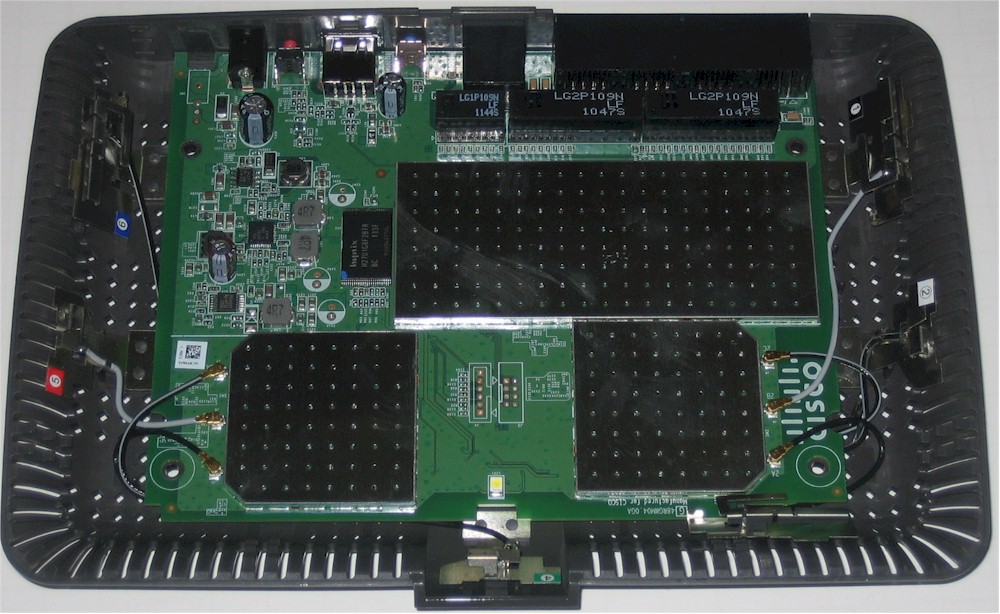
Linksys E4200V2 inside view
Updated 12/23/2011
Popping off the RF can tops revealed the mostly-Marvell innards seen in the photo below. The CPU, RAM and switch were thermally coupled to the top of the RF enclosure via thermal pads that were removed for the photo. The switch chip (right side) was not thermally coupled. The thermal pads don’t seem to have much work to do; the router didn’t generate much heat at all, especially when idle.
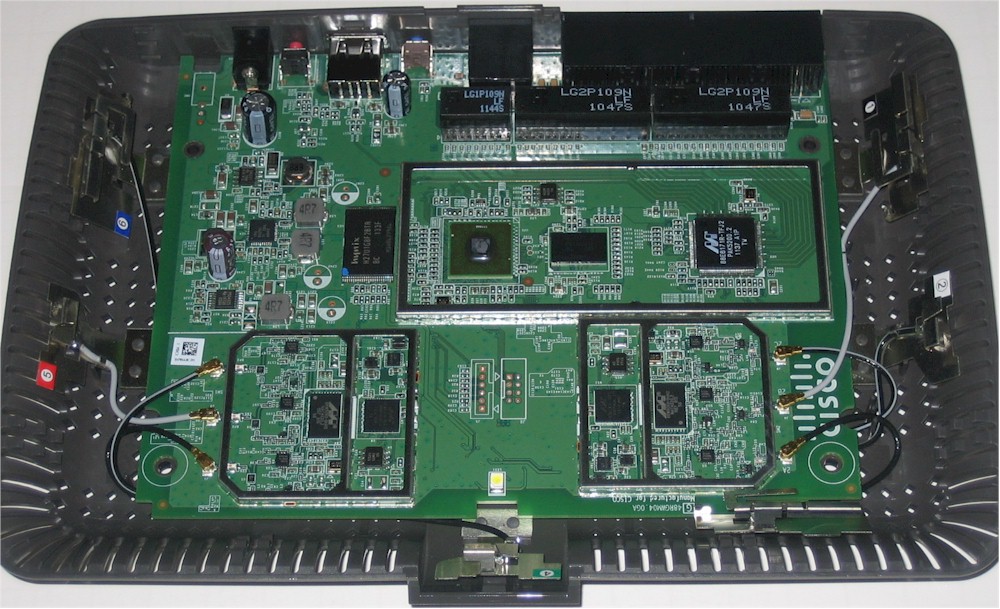
Linksys E4200V2 board
A closeup of the V1’s board is shown below for your reference. Refer to the original review for more commentary.
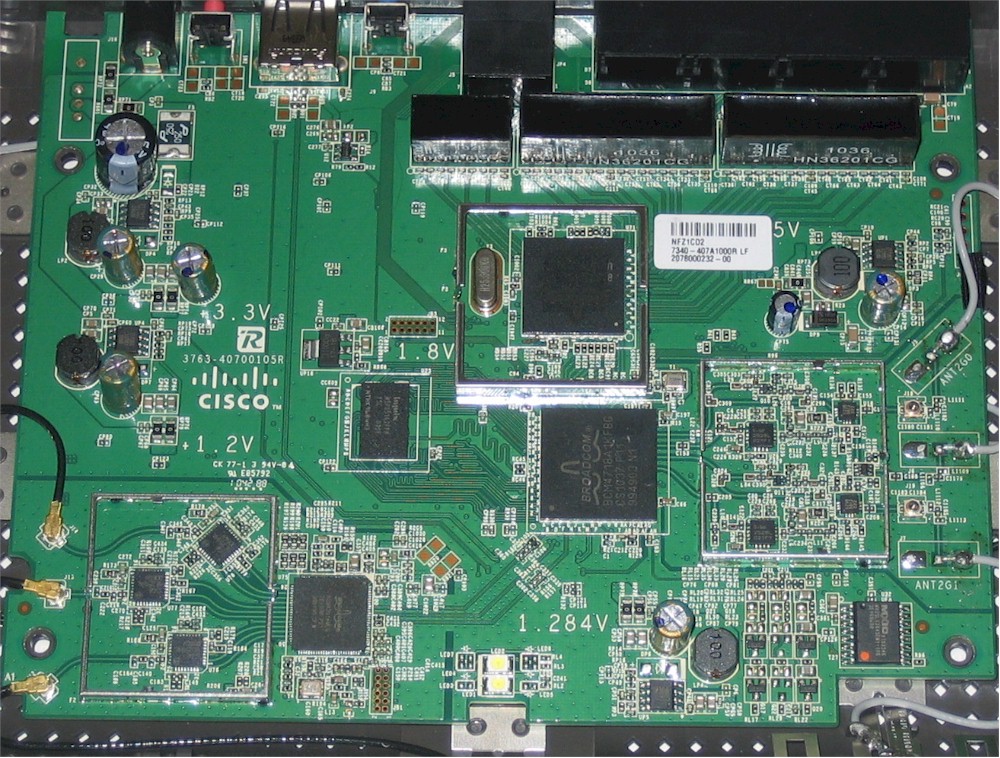
Linksys E4200 inside view – shields removed
Features
Cisco told me that the V2’s firmware is all new and no longer based on ODM’d code. Aside from the different version numbering, many users won’t notice a difference, since the new GUI retains the same organization and look of the old firmware.
The V2’s feature set is essentially the same as the V1’s, but there are key differences I’ll get to shortly. Here’s a quick feature summary. Download the user manual for full details. Differences from the V1 are indicated by italics for adds and strikethrough for deletes.
Routing
- DHCP, Static, PPPoE, PPTP, L2TP,
Telstra CableBridge WAN types - Built-in Dynamic DNS clients for TZO and DynDNS
- Static and dynamic routing
- SPI firewall disable (separate for IPv4 and IPv6), multicast, WAN ping and IDENT filtering,
Proxy, Java, ActiveX and Cookie blocking, NAT redirection for IPv4 only - IPsec, PPTP and L2TP VPN passthrough (enabled by default)
- Single port forwarding and Port Range forwarding with and without triggered ports. Single port forwards can specify external and internal ports
- IPv6 port range forwarding
- HTTPS admin access, remote management (HTTP / HTTPS) enable with IP range restriction and port setting
- SIP ALG enable (default disable), UPnP enable and controls (default enable)
- Incoming, outgoing, Security and DHCP onscreen log access with support for Linksys Logviewer recording
- Parental Controls for 5 computers with eight blocked sites and "school night"/"weekend" internet access blocking
- Uplink (LAN to WAN) only QoS with High, Medium, Normal or Low Priority that can be applied to specific applications (divided into Application, Online Game and Voice Device groups), physical switch ports or specific MAC addresses.
- Ping / Traceroute diagnostics
- Online upgrade option with automatic upgrade option (default enable)
Wireless
- Wi-Fi Protected Setup (default) and Manual setup modes
- Separate radio controls for 2.4 and 5 GHz radios
- Auto channel set (default)
- Home (PSK) and Enterprise (RADIUS) WPA/WPA2 modes
- Individual radio disables, but no scheduled on/off
- WMM (Wireless MultiMedia) (enabled by default)
- Deny/allow MAC address filter
- Guest access for 5-50 users (increments of five) for 2.4 GHz band only, no security
Sharing
- SMB/CIFS file sharing, FTP access and UPnP AV media serving from attached FAT, NTFS or HFS+ formatted drive
There are a few things worthy of note in this new firmware. First, Cisco still prefers you install and use its Cisco Connect program to set up and manage your router. As I found on other recent Cisco/Linksys routers, you can’t access the Internet until you run Cisco Connect or log into the admin screens and check the box acknowledging that you are riding the Internet at your own risk.
In the WAN setup, the Telstra Cable option is gone and there is a Bridge mode added, which turns off all routing features and lets you use the V2 as an Access Point without moving cables and doing the necessary reconfiguration.
In the firewall, you no longer get Proxy, Java, ActiveX and Cookie blocking options. But the bigger deal is that you no longer have the option of switching from the simple Parental Controls to the more advanced Internet Access Policy.
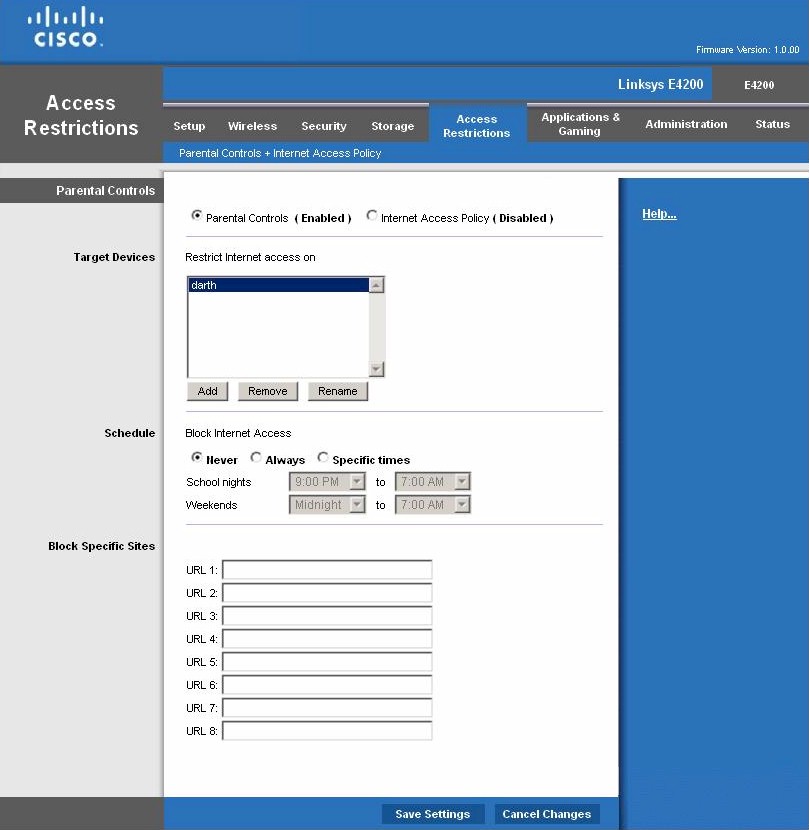
Parental Controls
The Parental Controls screen above is the same on V1 and V2. But the Internet Access Policy screen below is gone in the V2. So the V2 has no way for you to block access to specific services for users.
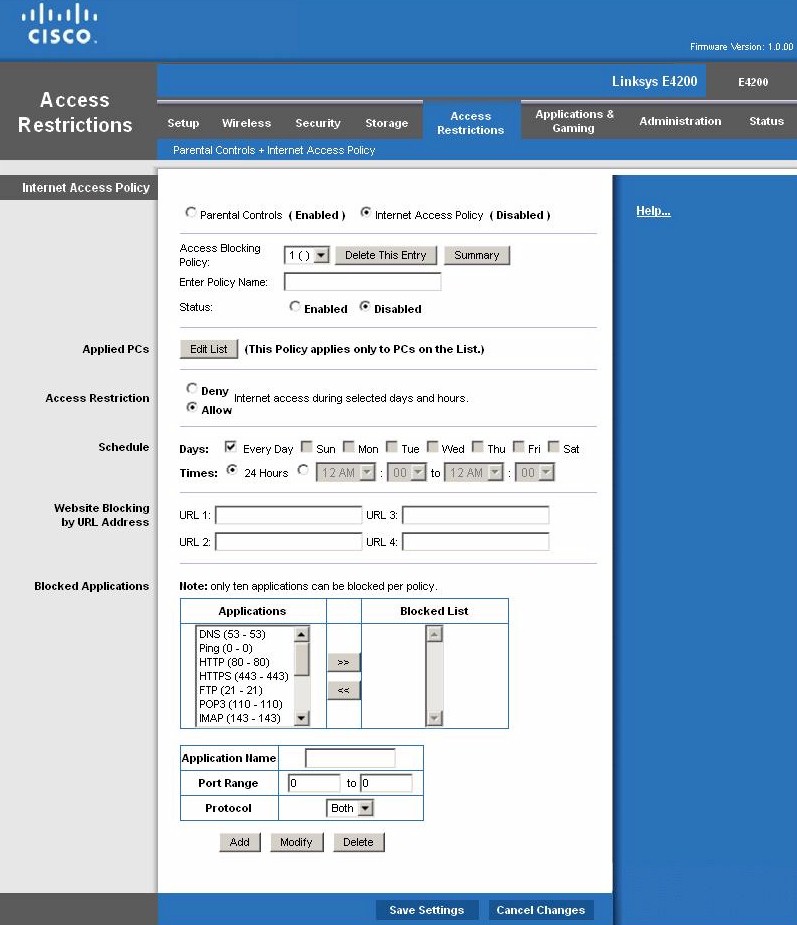
Internet Access Policy
Moving on to wireless features, the V2 defaults to Auto (20 or 40 MHz) bandwidth mode for both the 2.4 and 5 GHz band radios and to using Wi-Fi Protected Setup (WPS) for automatic wireless setup. Either the Wi-Fi Alliance has changed the requirement for 802.11n access points and routers to default to 20 MHz mode only on the 2.4 GHz band or the V2 isn’t defaulting properly.
At any rate, you should change the 2.4 GHz radio to 20 MHz only mode unless you have no neighboring networks and/or don’t mind hogging bandwidth in the way-too-overcrowded 2.4 GHz band. While you’re at it, you’ll probably want to assign different SSIDs to each radio. Otherwise, you’ll have to use controls in your client devices to control the band they use.
Wireless settings are otherwise unchanged as shown in the V1 screenshot below.
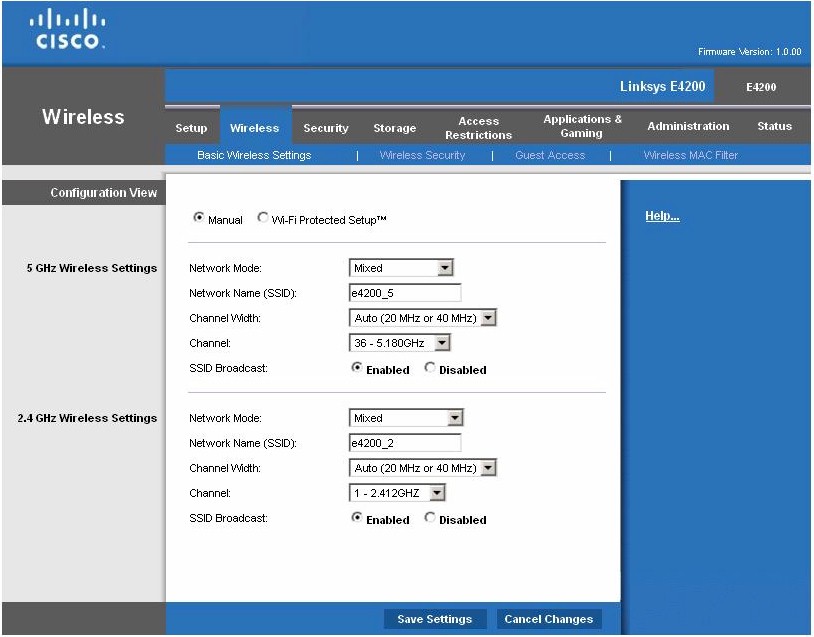
Basic Wireless settings
Both radios default to Mixed mode, with other 5 GHz radio modes of A-only, N-only and disabled. The additional 2.4 GHz radio modes are B/G only, B only, G only, N only and disabled.
Channel width can be set to Auto (20 / 40 MHz), 20 MHz only or 40 MHz only for the 5 GHz radio, but only Auto (20 / 40 MHz) or 20 MHz only for 2.4 GHz.
Like the V1, the V2 doesn’t have any "advanced" wireless controls. There is still no WDS bridging/repeating support, wireless enable/disable schedules or physical wireless on/off switch.
Storage
The Storage features are mostly unchanged from the V1, i.e. SMB file sharing, FTP and UPnP AV media serving. FAT32, NTFS, and HFS+ formatted drives are supported. But the built-in FAT formatter is gone as the screenshot below shows. There still is no support for iTunes serving, Torrent downloading, AFP or Time Machine backups.
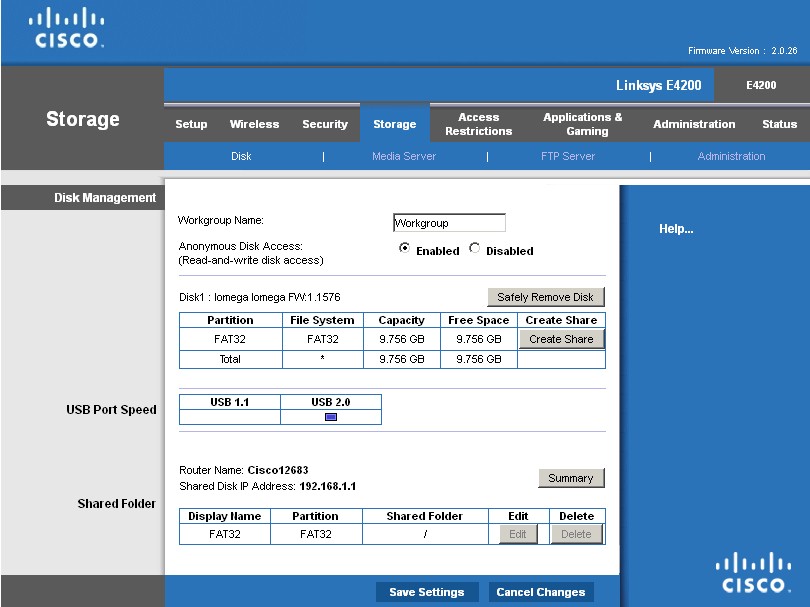
Storage settings
Media server controls are the same, with only server naming and scan controls (folder select, scan time [2 (default), 6, 12, 24, 48 hours], manual scan and folder delete). Checking the .tmp folder auto-created in the USB drive root reveals a wealth of files created by PacketVideo’s Twonky media server. The files include a log file and twonkymedia-config.html. The latter reveals the port for the server, shown in the screenshot below.
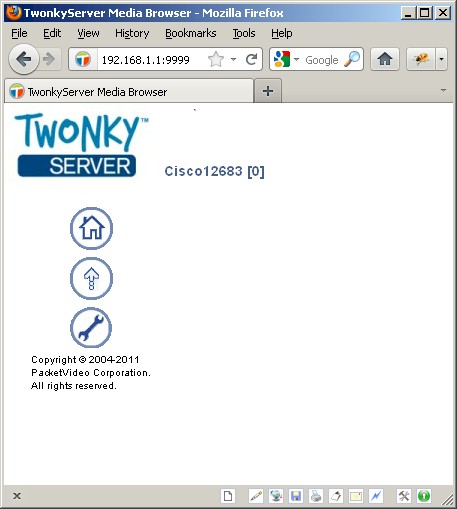
Twonky access
File uploading is enabled, but access to the Twonky configuration screen isn’t.
I was able to successfully mount and test filecopy performance for both FAT and NTFS formatted drives, using our standard Iomega UltraMax Pro drive in RAID 0. V2 and V1 results are summarized in the Table below.
| E4200V2 | E4200 | |
|---|---|---|
| FAT32 Write | 9.8 | 5.9 |
| FAT32 Read | 21.6 | 5.1 |
| NTFS Write | 20.1 | 7.0 |
| NTFS Read | 22.2 | 5.5 |
Table 2: E4200V2 and E4200 component summary
Everything except writes to a FAT32 formatted drive came in over 20 MB/s! I repeated the FAT32 tests multiple times and got the same results. So the low write speed isn’t a fluke.
Routing Performance
Routing performance for the E4200V2 using our standard test method and 2.0.26.124551 firmware (freshly updated) is summarized in Table 3. Even though the V2 uses a much more powerful processor and more memory than the original, routing speeds have been ratcheted down to the mid 250 Mbps range, as have maximum simultaneous sessions, to 8,192.
| Test Description | E4200V2 Throughput – (Mbps) |
E4200 Throughput – (Mbps) |
|---|---|---|
| WAN – LAN |
254
|
687
|
| LAN – WAN |
235
|
689
|
| Total Simultaneous |
253
|
726
|
| Maximum Simultaneous Connections | 8,192 | 34,925 |
| Firmware Version |
2.0.26.124551
|
1.0.00
|
Table 3: Routing throughput
While lower than the V1’s, these speeds are plenty for most users. The composite IxChariot plot of the three routing tests below shows nice and steady routing throughput.
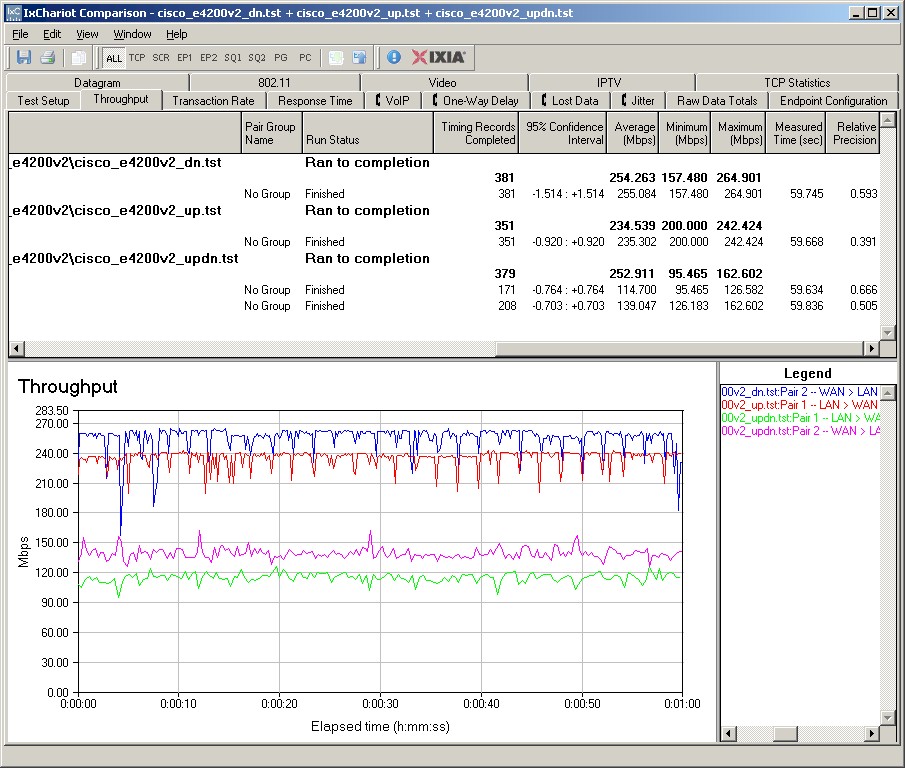
E4200V2 routing throughput IxChariot plots
Use the Router Charts for more comparisons.
Wireless Performance – Overview
With simultaneous dual-band routers that support three stream N, I make a total of eight test runs and that’s a lot of data to absorb. So I’m taking the same approach as in the WNDR4500 review, providing a summary of wireless performance first, followed by detail sections.
I used our updated test method to test the V2’s wireless performance. Three-stream tests were done with our standard Intel Centrino Ultimate-N 6300 test client in a Lenovo x220i Thinkpad running Win 7 Home Premium SP1 (64 bit). Two-stream tests were run with an Intel Centrino Advanced-N 6200 in a Acer Aspire 1810T notebook running Win 7 Home Premium SP1 (64 bit). As usual, I set the 2.4 GHz radio to Channel 1 and the 5 GHz radio to Channel 36. All tests were run with WPA2/AES security engaged.
I successfully ran a Wi-Fi Protected Setup (WPS) session with a Win 7 client by entering the WPS code found on the router’s bottom label. The WPS session completed quickly and resulted in a WPA2/AES secured connection with the same WPA2 pre-shared key set for both radios. As noted earlier, both radios default to the same SSID, so I changed them to different values before beginning to test.
First look at the Benchmark Summary below. As we’ve seen with other three-stream router tests, the overall average difference between two and three stream operation isn’t that striking. That’s because three-stream N can only provide significantly higher throughput under very strong signal conditions (same room or next-room). In addition, protocol overhead and other factors limit throughput for single connections. We’ll see this more clearly next.
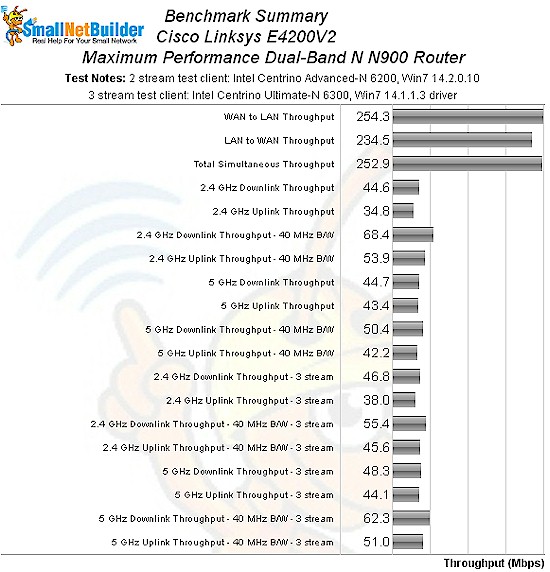
E4200V2 benchmark summary
Table 4 summarizes the highest wireless throughput measured out of all locations in the 20 MHz mode test runs. I’m not calling out the test locations where each best throughput was found because in this case, it was always Location A. Note that the Dn/Up result is the test where I run simultaneous up and downlink tests in Location A. This test usually shows higher throughput than the single-connection tests because of the factors mentioned above.
| Test Group | Max Dn (Mbps) | Max Up (Mbps) | Dn/Up (Mbps) |
|---|---|---|---|
| 2.4 GHz, 2 stream, 20 MHz | 67 | 53 | 86 |
| 2.4 GHz, 3 stream, 20 MHz | 73 | 58 | 85 |
| 5 GHz, 2 stream, 20 MHz | 68 | 54 | 86 |
| 5 GHz, 3 stream, 20 MHz | 67 | 50 | 73 |
Table 4: Highest Throughput, 20 MHz mode
Not a huge difference between two and three stream performance is there? Now let’s look at the same summary, but for 40 MHz bandwidth modes. Table 5 finally shows a significant throughput gain (~18%), but only when two connections are active simultaneously.
| Test Group | Max Dn (Mbps) | Max Up (Mbps) | Dn/Up (Mbps) |
|---|---|---|---|
| 2.4 GHz, 2 stream, 40 MHz | 83 | 74 | 104 |
| 2.4 GHz, 3 stream, 40 MHz | 79 | 76 | 122 |
| 5 GHz, 2 stream, 40 MHz | 79 | 65 | 101 |
| 5 GHz, 3 stream, 40 MHz | 84 | 71 | 120 |
Table 5: Highest Throughput, 40 MHz mode
There is both good and bad news here. The good is that it appears that ordinary two-stream clients (at least the one I tested) can get essentially the same throughput for single connections as three-stream clients. The bad news is that you need multiple three-stream clients accessing the router simultaneously to reap the benefit of higher (total) bandwidth from your investment in an "N900" router.
Wireless Performance – 2.4 GHz Two Stream
For performance comparison, I chose the NETGEAR WNDR4500 and Apple Airport Extreme Gen 5, since both have three-stream N radios on both bands. I also included the original E4200, even though it supports three-stream N in 5 GHz only.
The comparison tables are large, so I’m going to provide links that will open them in a new window/tab to make things easier. Let’s start with the Performance Table for 2.4 GHz and 20 MHz mode. In this group of tests, the original E4200 seems to come out on top. But note that it was tested using a different wireless adapter, Intel’s 5300, but with only two antennas connected.
Despite the flakiness that this can cause on downlink connections (explained here..scroll down halfway), the original E4200’s throughput holds up much better than the V2’s as signal levels fall (Locations D-F). In fact, while the client remained connected to the V2 in Location F in all cases, the connection’s throughput was not high or stable enough to run the IxChariot test with the router set to Auto 20/40 MHz bandwidth mode.
I haven’t seen this sort of behavior in a long time, which could be caused as much by the different test client as the router. So I reran some of the tests using an original E4200 that I had in the SNB closet. The combination of original E4200 and new Intel Centrino 6200 client was able to run the Location F tests in 40 MHz mode, although with low throughput.
The throughput of other tests I spot-checked showed performance similar to the V2’s, although with higher throughput in Location D for the original E4200. Here are links to IxChariot plots of retest data:
The IxChariot plot summary below for 20 MHz mode downlink shows generally stable throughput.
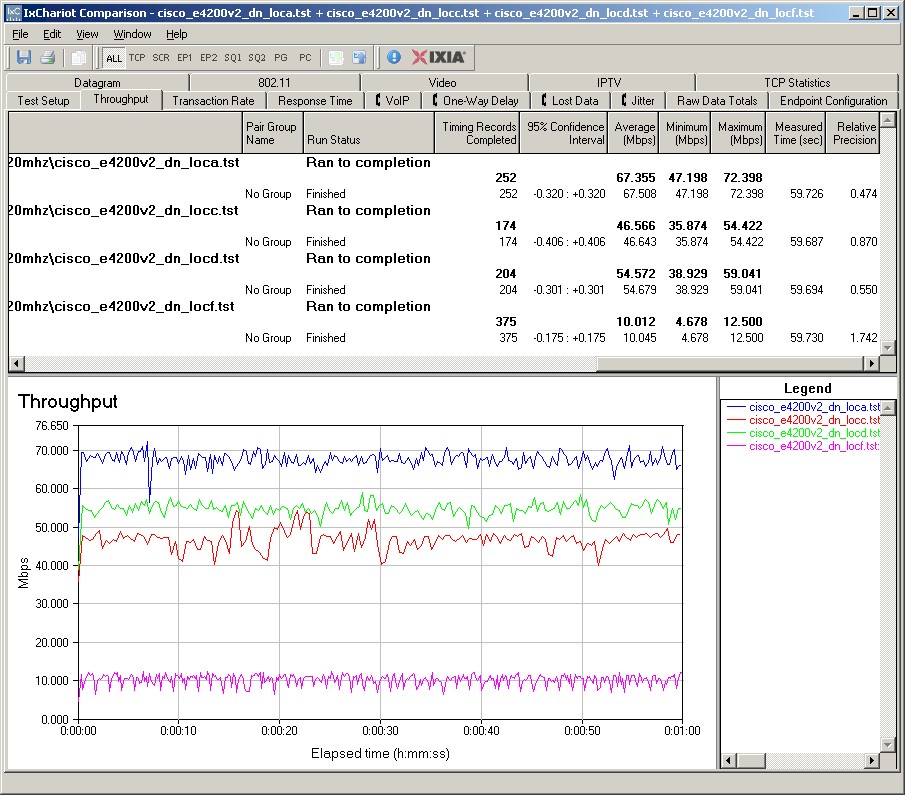
Cisco E4200V2 IxChariot plot summary – 2.4 GHz, 20 MHz mode, downlink, 2 stream
Here are links to the other plots for your reference.
- 2.4 GHz / 20 MHz uplink
- 2.4 GHz / 20 MHz up and downlink
- 2.4 GHz / 40 MHz downlink
- 2.4 GHz / 40 MHz uplink
- 2.4 GHz / 40 MHz up and downlink
Wireless Performance – 2.4 GHz, Three Stream
Next, we’ll look at the Performance Table for Three-Stream 2.4 GHz and 20 MHz mode. This time, the V2 was able to connect and run tests in all locations in 20 and 40 MHz bandwidth modes. But Location F throughput is still on the low side. The WNDR4500, which is the only other "N900" router so support all tested modes, generally does better than the E4200V2. But it also won’t give you very high throughput under low signal conditions.
Here are the IxChariot plots for 20 MHz mode downlink in three-stream mode. Throughput is again generally well-behaved, but with higher variation. Clicking through the other plots will also show higher throughput variation.
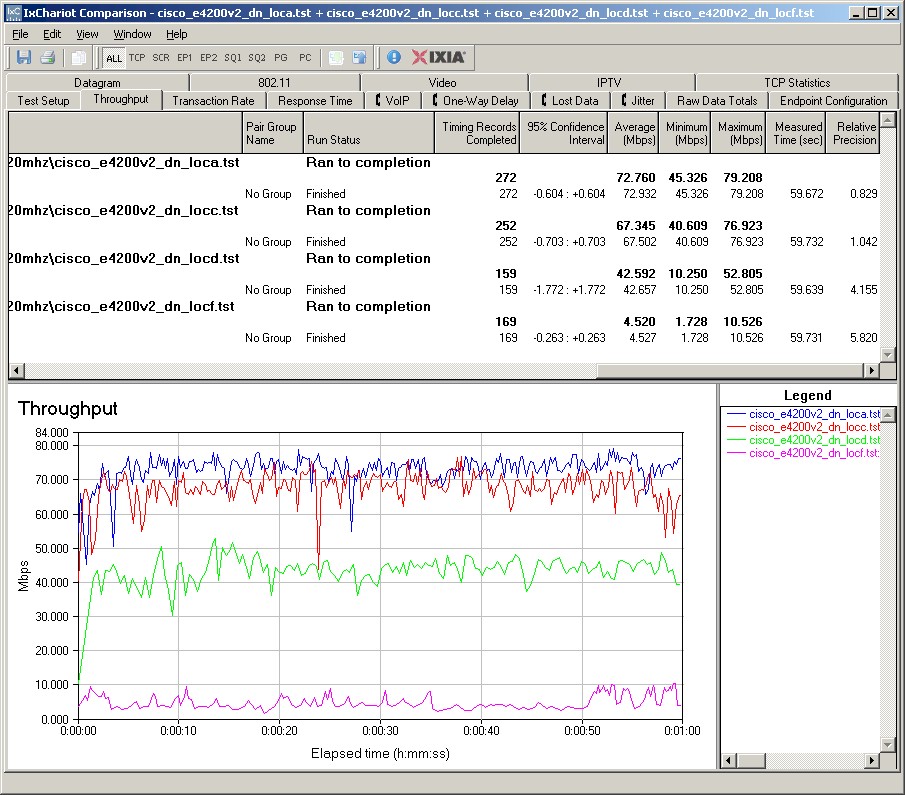
Cisco E4200V2 IxChariot plot summary – 2.4 GHz, 20 MHz mode, downlink, 3 stream
Here are links to the other plots for your reference.
- 2.4 GHz / 20 MHz uplink
- 2.4 GHz / 20 MHz up and downlink
- 2.4 GHz / 40 MHz downlink
- 2.4 GHz / 40 MHz uplink
- 2.4 GHz / 40 MHz up and downlink
Wireless Performance – 5 GHz, Two Stream
Moving up to 5 GHz, here is the Performance Table for Two-Stream 5 GHz and 20 MHz mode. You’ll find it’s pretty hard to call an overall winner in this group. So I’ll instead compare the original E4200 and V2. With only a few exceptions, they perform about the same.
The IxChariot plot summary for 5 GHz, 20 MHz mode downlink in two-stream mode is below and shows surprisingly low throughput variation. The plots of other runs aren’t this flat, but show lower variation than we found with the 2.4 GHz three-stream plots.
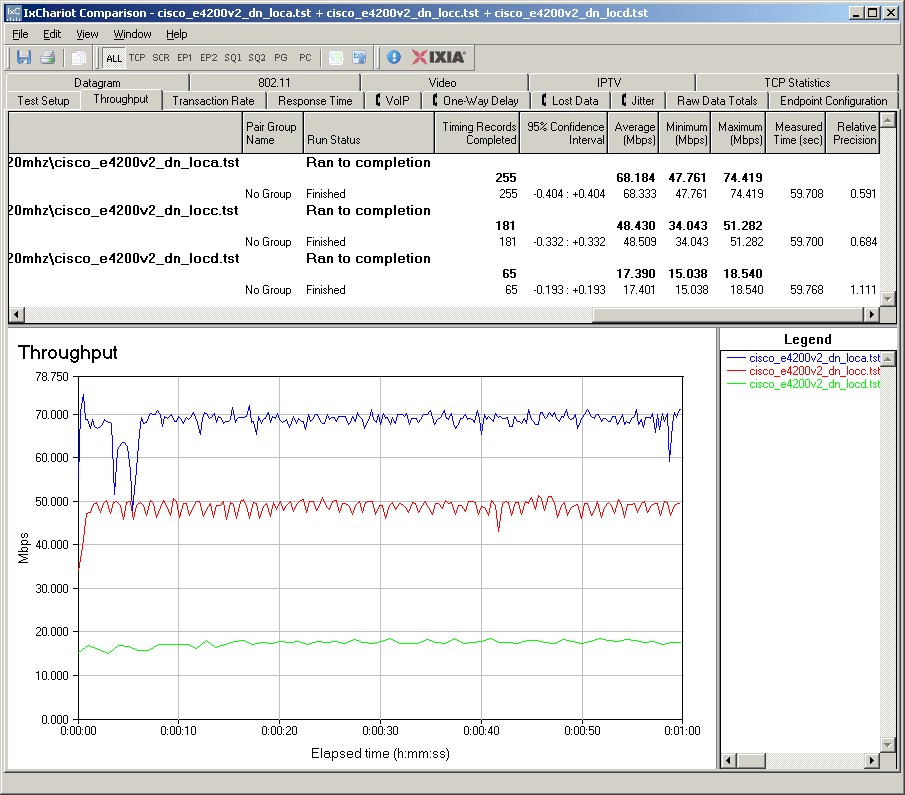
Cisco E4200V2 IxChariot plot summary – 5 GHz, 20 MHz mode, downlink, 2 stream
Here are links to the other plots for your reference.
- 5 GHz / 20 MHz uplink
- 5 GHz / 20 MHz up and downlink
- 5 GHz / 40 MHz downlink
- 5 GHz / 40 MHz uplink
- 5 GHz / 40 MHz up and downlink
Wireless Performance – 5 GHz, Three Stream
Finally, we come to the Performance Table for Three-Stream 5 GHz and 20 MHz mode. Once again, the products are more alike than similar. Good luck calling an overall winner for this group of tests. I can’t.
Here are the IxChariot plots for 20 MHz mode downlink in three-stream mode. Throughput is again, generally well-behaved, but with higher variation. Clicking through the other plots will show consistently higher throughput variation when running uplink.
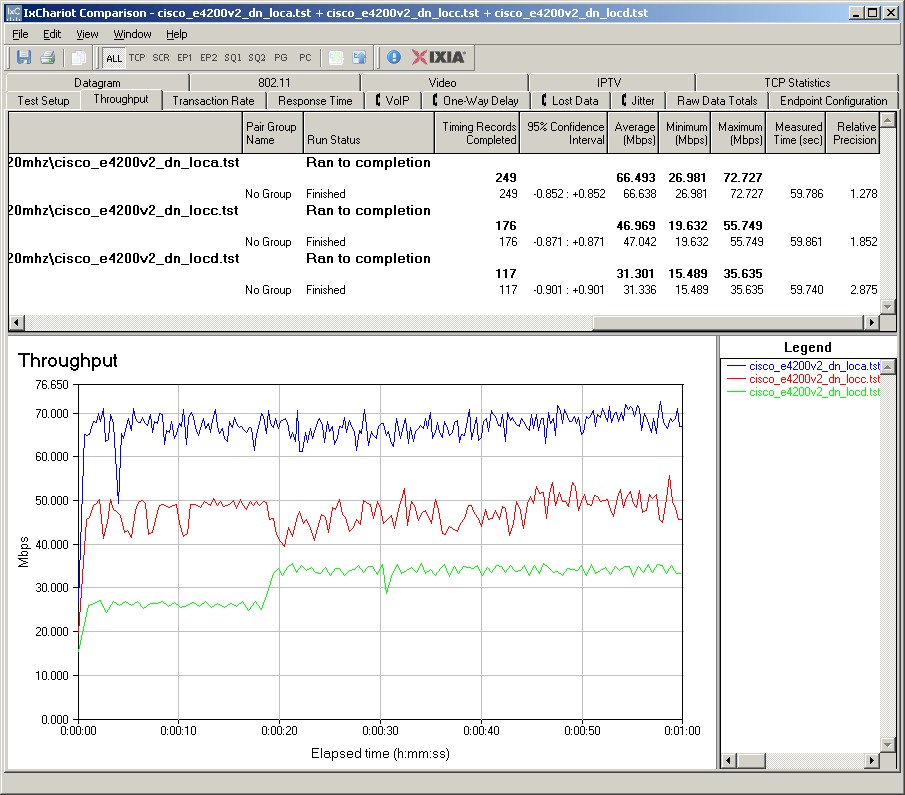
Cisco E4200V2 IxChariot plot summary – 5 GHz, 20 MHz mode, downlink, 3 stream
Here are links to the other plots for your reference.
- 5 GHz / 20 MHz uplink
- 5 GHz / 20 MHz up and downlink
- 5 GHz / 40 MHz downlink
- 5 GHz / 40 MHz uplink
- 5 GHz / 40 MHz up and downlink
Closing Thoughts
There are those who will take one look at the E4200V2’s lower wired routing throughput results and conclude that Cisco screwed up with the V2. They would be wrong. High routing speed doesn’t do you any good unless you have Internet throughput to match, which few of us do. Given the increased processing power of the V2, I don’t know why Cisco chose to crank down routing throughput. But that doesn’t make the V2 a bad router.
On the other hand, the V2 won’t provide a quantum leap (or even a little hop) in wireless performance, despite now supporting up to 450 Mbps link rates on both bands (with three stream clients and with 40 MHz bandwidth mode used).
The only real performance improvement the V2 provides is about twice the speed of the V1 for sharing a USB drive. 20 MB/s is actually pretty good, especially when you consider that’s using an NTFS-formatted drive. If that, plus three-stream N on the 2.4 GHz band, is worth $20 to you, then by all means go for the E4200V2.