

| At a glance | |
|---|---|
| Product | Rosewill Wireless N Router (RNX-N360RT) [Website] |
| Summary | Inexpensive 2.4 GHz N300 router with 10/100 ports based on Atheros chipset |
| Pros | • Decent feature set • Up and downlink bandwidth-based QoS • WDS support |
| Cons | • A bit weak on range • No wireless guest networks |
Typical Price: $50 Buy From Amazon
Introduction
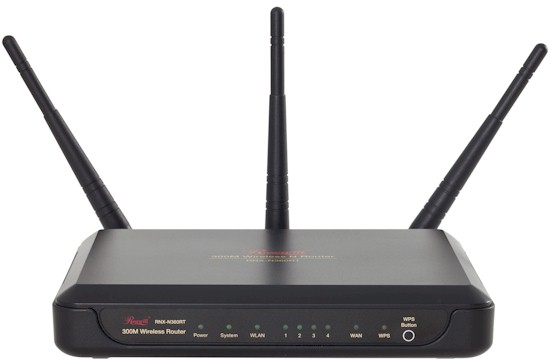
Not everyone lusts after the latest and greatest wireless routers. Some people just want to spend as little as possible when getting their network on the air. For them, a basic single-band N router is just the ticket. And that’s what Rosewill has produced with its RNX-N360RT.
If you’re a DIY computer builder, you’re probably familiar with Rosewill as a maker of cases, power supplies and the other sundry items needed to roll your own PC. But Rosewill has a small, but growing line of networking products, mostly focusing on low price as the value proposition.
Why Not N150?
N150 (single-stream N) was intended for mobile client devices that have space and power constraints, not for use in routers and access points. These routers can’t be Wi-Fi Certified as a result. These are ok if you’re looking for a mobile router to support multiple devices in a hotel room or a powerline-connected mini access point to extend your wireless LAN’s range. But otherwise you’re better off buying a lesser-known N300 router or a refurbished name-brand one.
The router comes in a box that has a low-price feel, an impression reinforced by the one foot network cable Rosewill throws in. The router itself has an all-plastic housing that’s designed to sit flat on a desk. There are mounting slots on the bottom, however, if you want to wall or ceiling mount it.
The 360RT’s front panel does have a full complement of status indicators, though, something that many high-end routers have dispensed with in an effort to gain higher WAF.
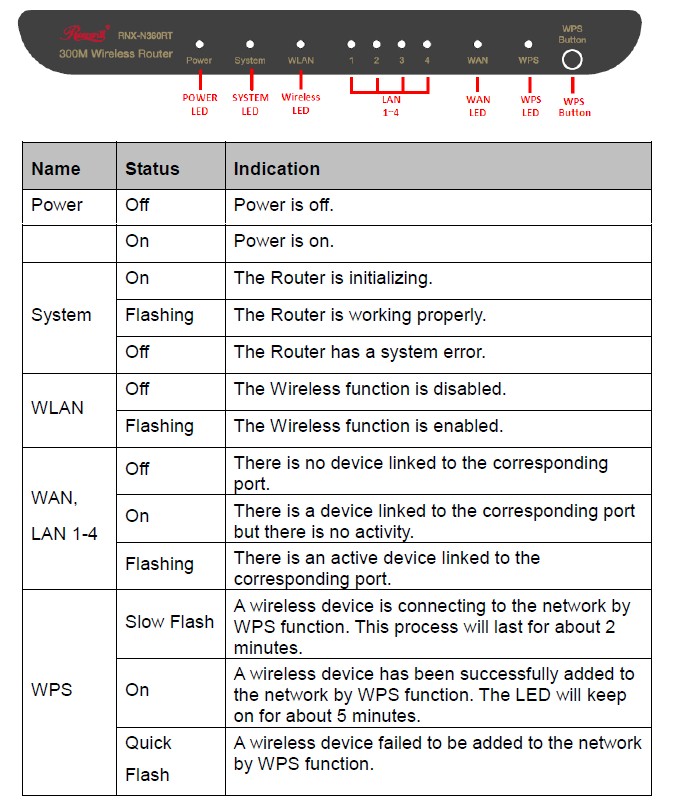
Front panel lights
The rear panel Ethernet jacks have no link/status lights and are all 10/100. The three 2 dBi antennas attach via RP-SMA connectors, so you can attach higher-gain antennas if that’s your pleasure.
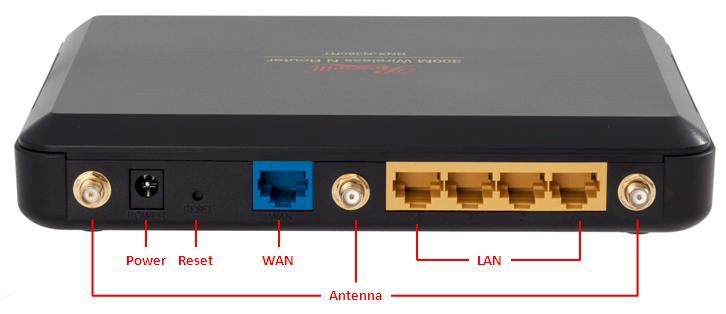
Back panel
Inside
The key components of the 360RT are summarized in the chart below. The basic design is similar to the first generation NETGEAR WNR2000 I reviewed back in 2008. But a more recent separated-at-birth low-price-focused router is TP-LINK’s TL-WR1043ND, that Craig reviewed just last year.
| Rosewill RNX-N360RT | |
|---|---|
| CPU | Atheros AR9132 SoC |
| Switch | Marvell 88E6060 Low power 6 port 10/100 switch |
| RAM | 32 MB |
| Flash | 4 MB |
| 2.4 GHz Radio | Atheros AR9103 (3T3R) |
Table 1: Component summary
The main difference between the TP-LINK and Rosewill is that the TP-LINK uses a Realtek RTL8366RB Gigabit switch instead of a Marvell 88E6060 10/100 switch. The TP-LINK also shares a USB drive via FTP.
The FCC ID photos were fuzzy, so I took my own shot below. The RF shield was soldered in place, so I had to ask Rosewill what was under it (the Atheros AR9103 radio).
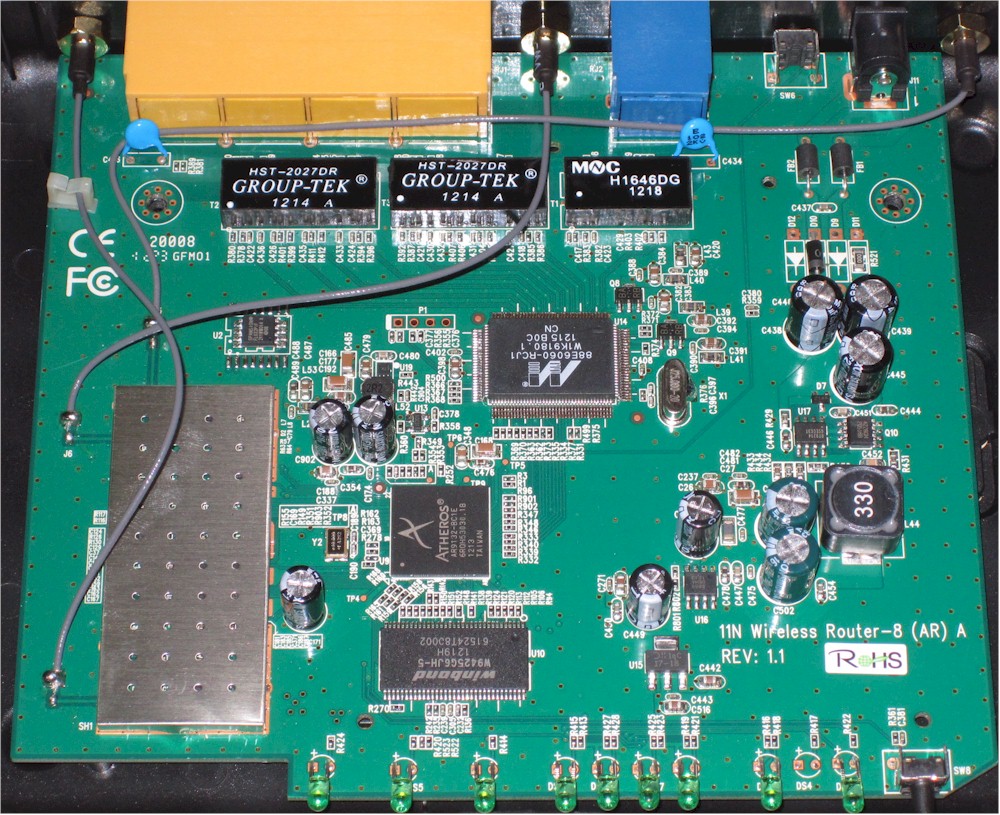
Rosewill RNX-N360RT board
While trying to identify the chip on my own, I came across this photo of TP-LINK’s TL-WR941ND, which is eerily similar, no? I don’t know who is OEMing to who, but someone is or both TP-LINK and Rosewill are buying from the same OEM.
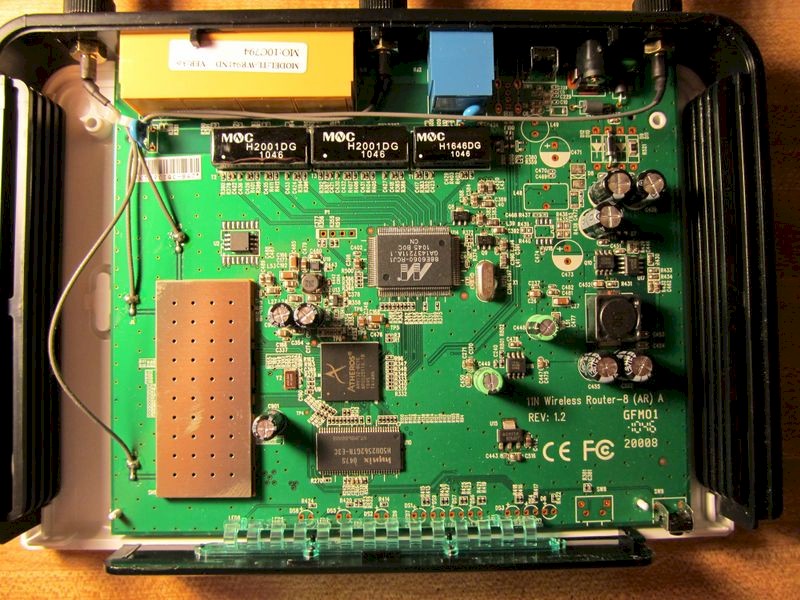
TP-LINK TL-WR941ND board
(courtesy of WikiDevi)
Even though there are three antennas and a 3T3R radio is used, the 360RT is strictly a two-stream "N300" router, supporting a maximum link rate of 300 Mbps when operating in 40 MHz bandwidth mode.
Setup
Setting up the 360RT is as easy as for any other modern router. There is a built-in "Quick Setup" wizard. But it only presents WAN type and wireless setup screens without offering up time and admin password change options. I didn’t even have to bother with the wizard, since it automatically grabbed what it needed from my main router and had me connected to the Internet without having to change a thing.
There is also a mini-CD in the box with quick installation guide and user manual PDFs on it. The QIG is also provided in printed form.
When you log into the router, you land at the Status screen shown below. The three-column format is one we’ve seen before, most notably in the TP-LINK TL-WR1043ND
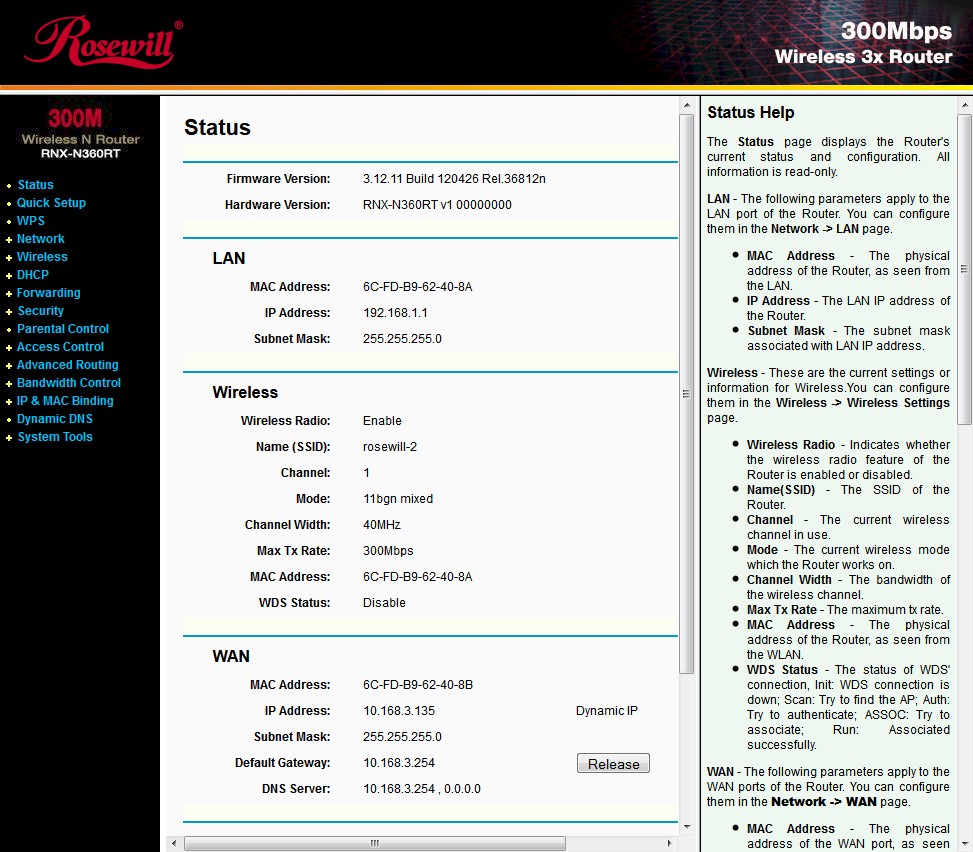
Rosewill RNX-N360RT Status screen
Features
The 360RT has a decent set of features that are summarized in the bulleted list below.
Routing
- Static IP, Dynamic IP, PPPoE, PPTP, L2TP, Big Pond WAN connections
- MAC address cloning
- MTU adjustment on all but PPPoE
- DHCP server w/ range, lease time, default domain, DNS and default gateway settings
- DHCP client table
- DHCP reservations
- ARP (IP-MAC) binding
- Dynamic DNS client for DynDNS.org, no-ip.com, comexe.cn
- Up and downlink bandwidth-based QoS by service and IP address/range
Firewall / Security
- NAT+SPI firewall
- SPI disable
- DMZ (Demilitarized Zone) Host Support
- L2TP & PPTP VPN servers
- VPN pass-through (PPTP, L2TP, IPSEC)
- ALG (Application Layer Gateway) Support for FTP, TFTP, H323, RTSP
- Static Routes
- DoS protection
- ICMP, UDP, TCP-SYN flood filtering
- Block WAN ping
- Block LAN ping
- Port Forwarding (single port and port range, same public and private ports)
- Port Triggering
- UPnP disable
- UPnP in-use port display
- Schedulable allow/deny outbound port filters
- Schedulable web access blocking (8 domain names) by MAC address
Wireless
- One SSID
- Wi-Fi Protected Setup (PIN and pushbutton methods)
- WDS bridging and repeating
- WEP, WPA / WPA2 Personal and Enterprise Radius support
- Transmit power control (high [default], middle, low)
- Beacon and DTIM interval, RTS and Fragmentation Threshold settings
- WMM enable [default enable]
- Short GI enable [default enable]
- AP isolation [default disable]
- Transmit maximum data rate
- Wireless Modes: B only, G only, N only, B+G and B+G+N (default)
- Wireless MAC address filtering
Management
- Local admin access restriction (by MAC address)
- Remote admin access port change
- Remote admin access IP restriction (single IP)
- Remote reboot
- Configuration save and restore
- Schedulable log emailing
- Save and clear log
- Log filtering by type and level
- Byte/packet traffic statistics
While the feature set is good, some shoppers will be disappointed by the missing feature list below.
- IPv6
- HTTPS admin
- Outbound port filtering
- Scheduled wireless on/off
- Wireless guest networks
Of the features that are supported, you’ll most likely be disappointed by the Parental Controls. You can set up multiple profiles, but each profile can hold only eight allow-only domains. You’d be better off with even a free OpenDNS Home account.
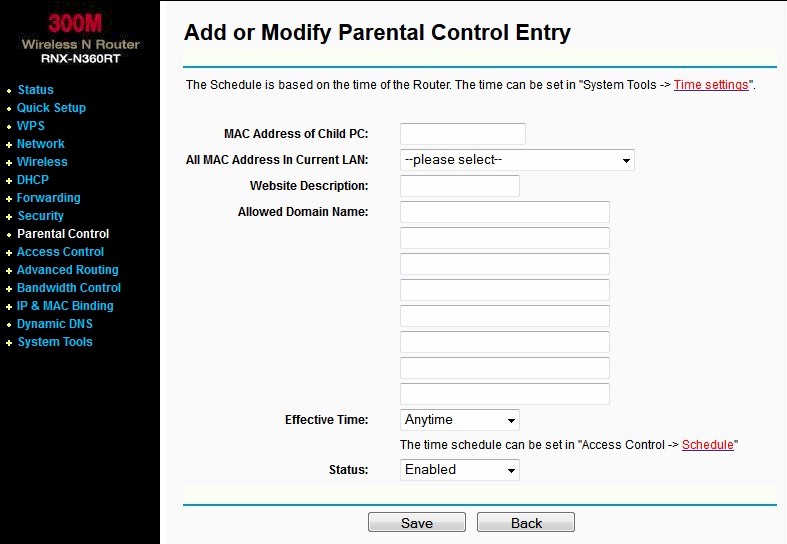
Rosewill RNX-N360RT Parental Control setup
Table 2 summarizes key wireless settings. Note that both Personal and Enterprise (RADIUS) forms of WPA/WPA2 security are supported. Note that there is a Region control exposed on the main wireless settings page. It generally isn’t a good idea to let users bypass local regulations for frequencies and transmit power levels.
| Setting | Options |
|---|---|
| Channel | Auto, 1 – 11 |
| Mode | 11bgn mixed (default), 11b only, 11g only , 11b/g, 11n only |
| Bandwidth control | Auto [default], 20 MHz, 40 MHz |
| Security | WEP: Open System, Shared Key, Auto WPA PSK (Personal): Auto/WPA/WPA2, Auto/TKIP/AES WPA RADIUS (Enterprise): Auto/WPA/WPA2, Auto/TKIP/AES |
Table 2: Wireless settings summary
There is a screenshot of the Wireless Settings screen in the gallery.
There are other screenshots in the gallery if you want a bit more of a feel for the feature set. You can also read Craig’s commentary in the TP-LINK TL-WR1043ND review, since many of the features (and screens) are the same.
When you log in you land at the Status screen
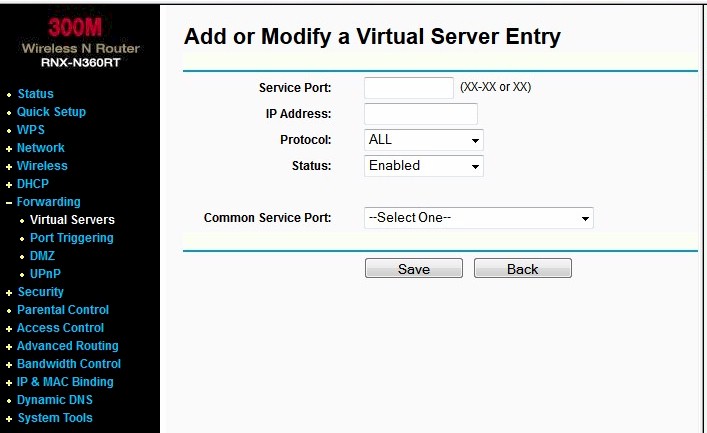
This screen allows single or ranges of ports to be forwarded. Note you cannot set different public and private ports.
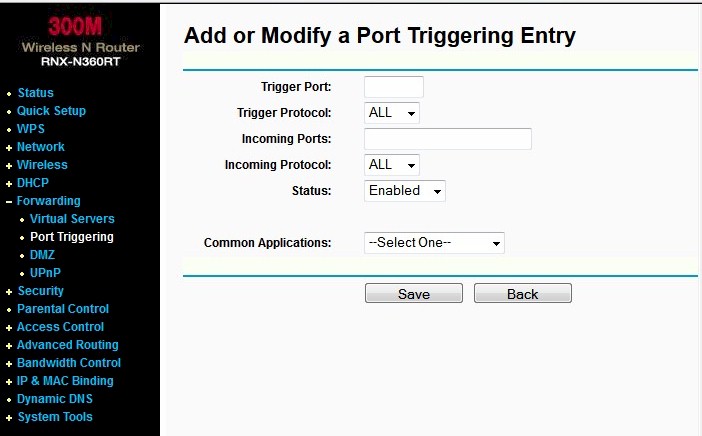
You can also define triggered forwarded ports
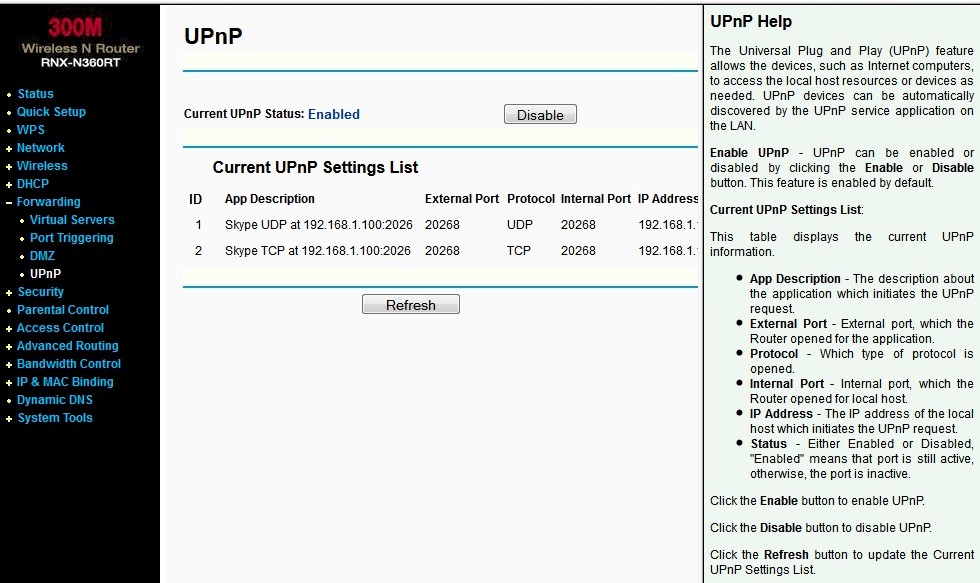
UPnP is enabled by default. Note that Skype ports were automatically opened
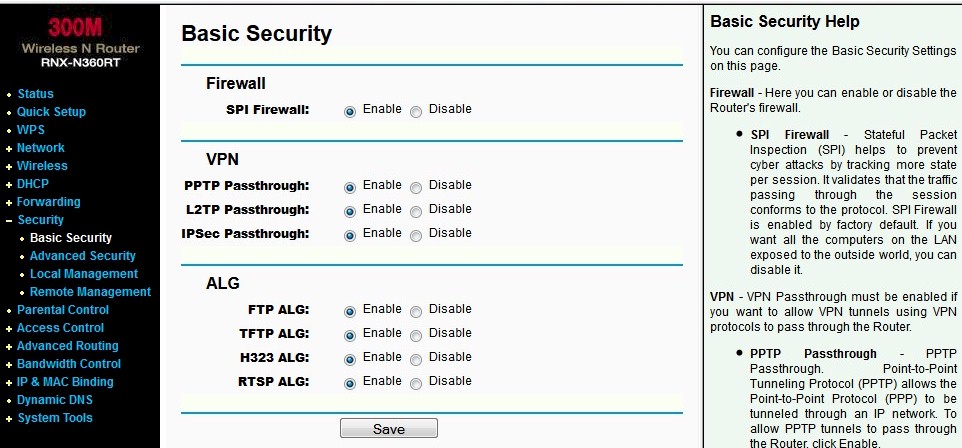
You get a typical selection of VPN passthroughs and ALGs.
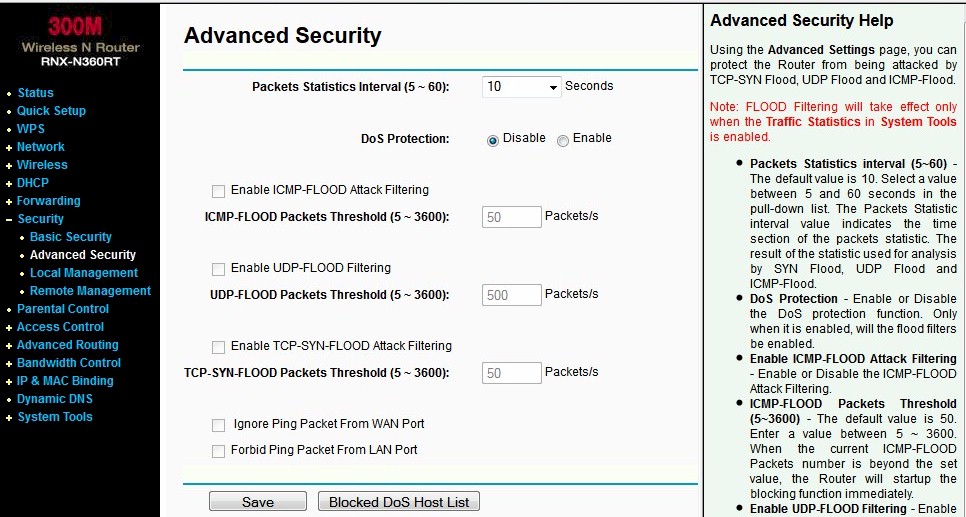
Advanced security deals more with things most users will not need to worry about
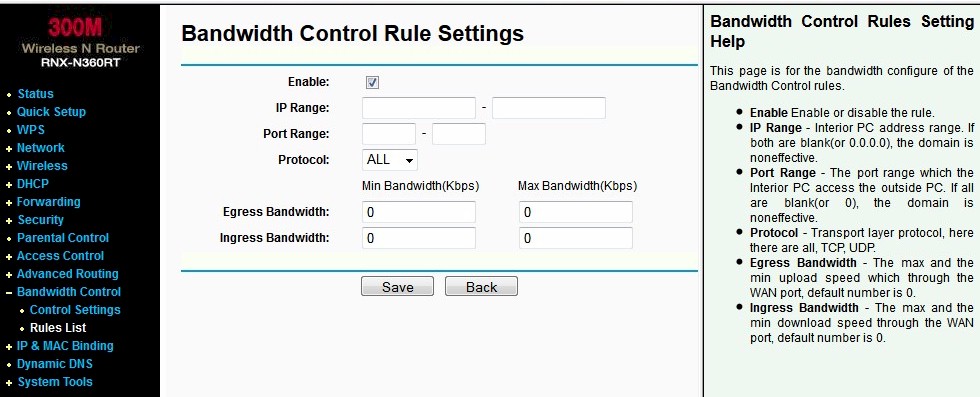
QoS lets you limit bandwidth use by IP and by service (port) in both up and downlink directions
Parental controls are too simple for most needs, providing only eight allowed domains per user.
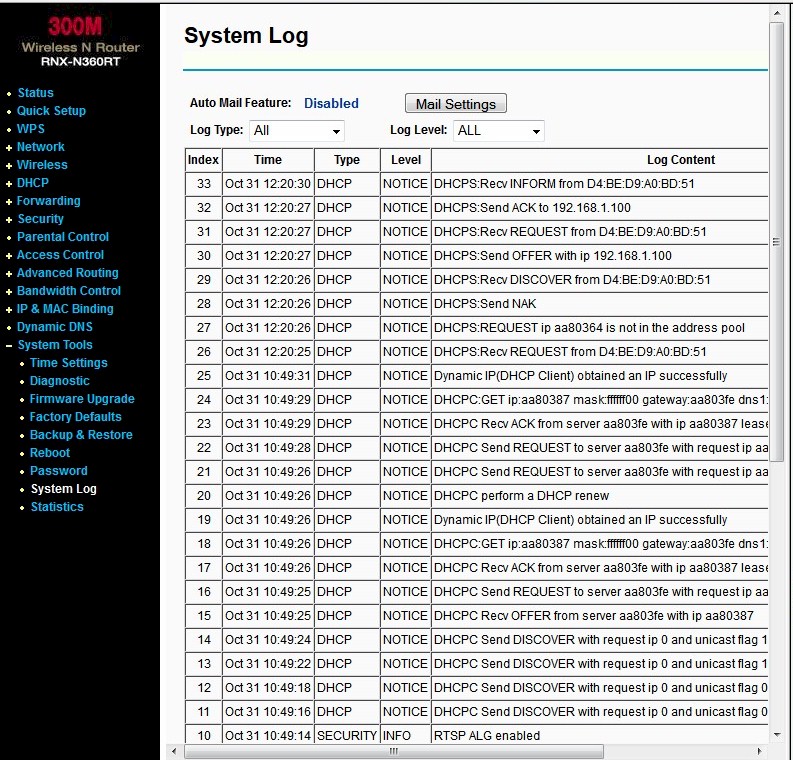
The log is pretty comprehensive and can be filtered for event type and severity
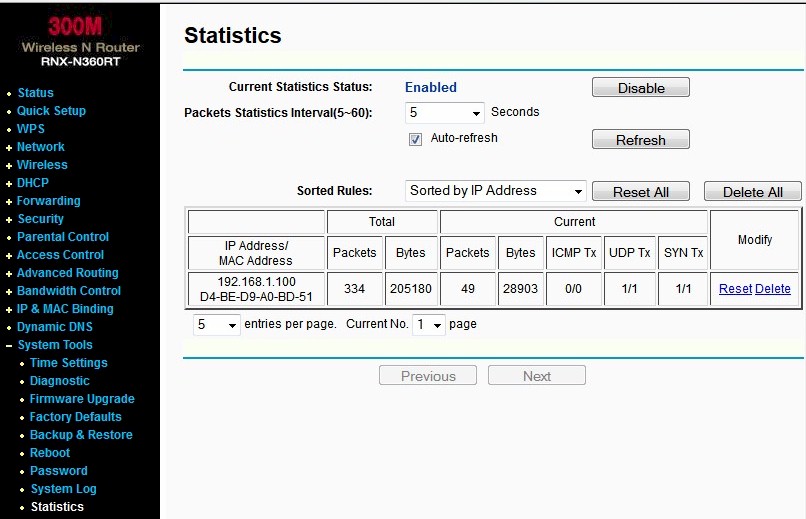
You get a pretty standard traffic stats screen. You cannot set limits or alarms and there are no pretty graphs
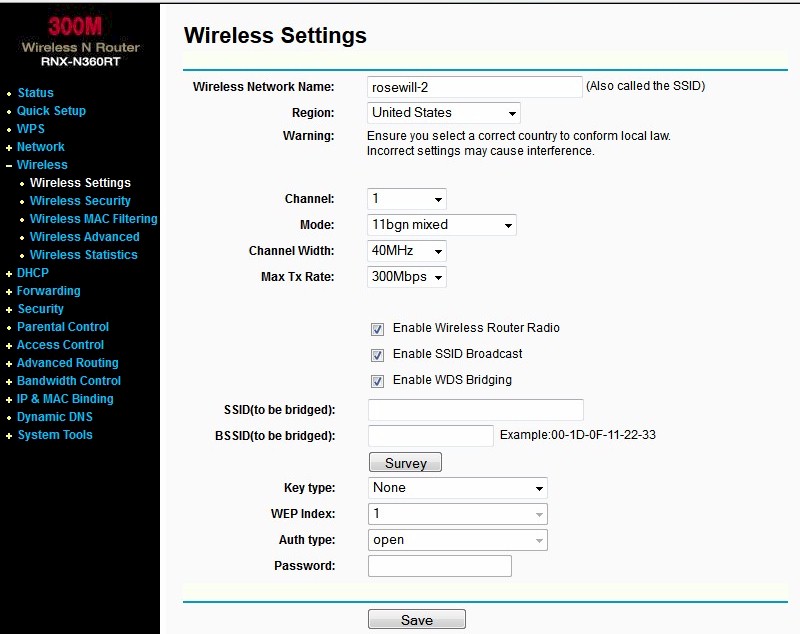
There are no guest networks in the wireless settings. But WDS is supported
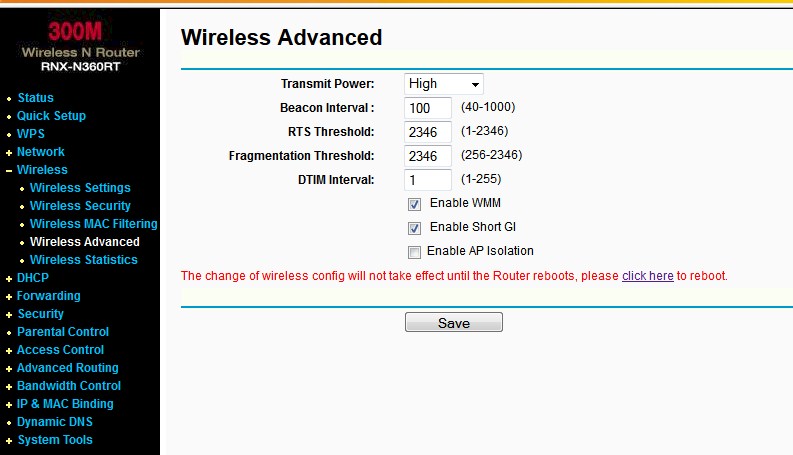
The most useful settings here are transmit power adjust (3 levels) and AP (actually client) isolation.
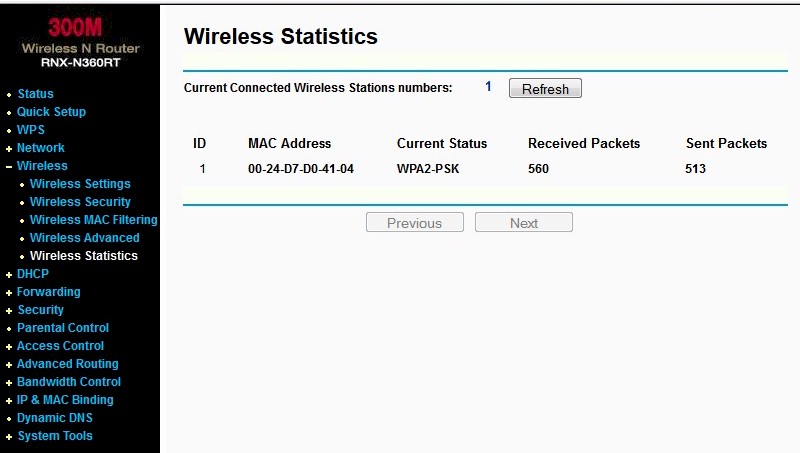
Wireless stats are pretty simple. RSSI would be nice, but is not provided.
Routing Performance
Routing performance for the 360RT using our standard test method is summarized in Table 3. The results show that the router is basically capable of 100 Mbps wire-speed in both directions. ~5,000 maximum simultaneous connections aren’t the highest we’ve seen, but they should be plenty for most users.
| Test Description | RNX-N360RT |
|---|---|
| WAN – LAN | 91 Mbps |
| LAN – WAN | 91 Mbps |
| Total Simultaneous | 89 Mbps |
| Maximum Simultaneous Connections | 5,095 |
| Firmware Version | 3.12.11 |
Table 3: Routing throughput
The IxChariot plot for the routing tests shows very stable throughput in each direction. But there is some interaction when running simultaneous up and downlink tests that caused total throughput to drop a bit from the unidirectional numbers.
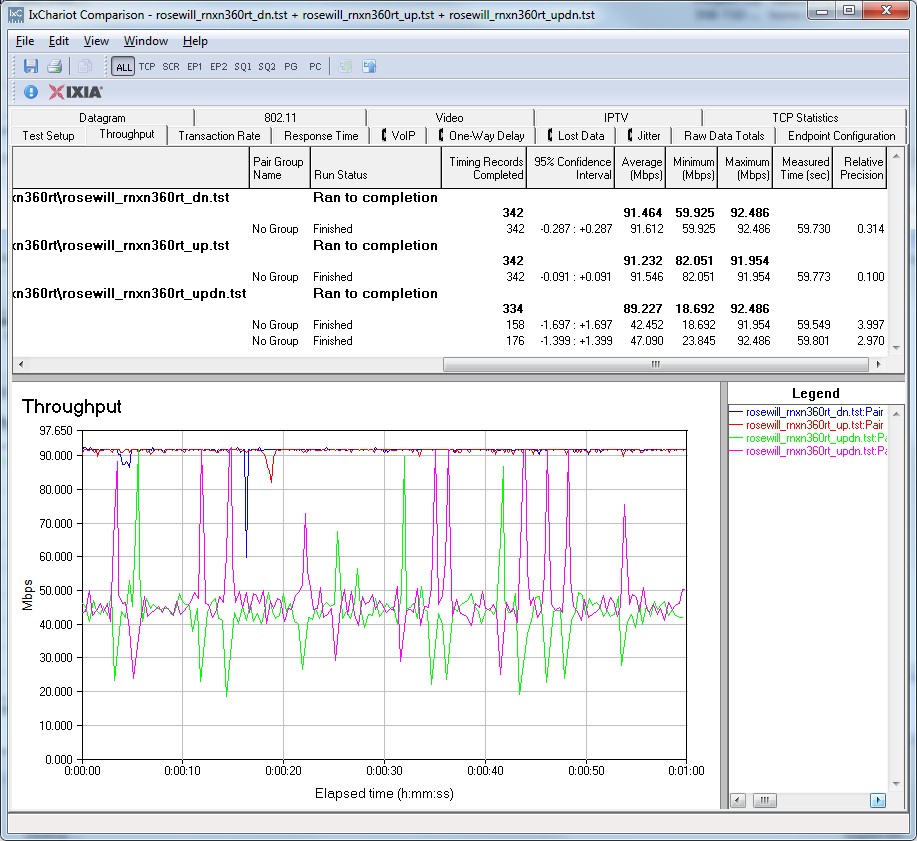
RNX-N360RT Routing throughput IxChariot plot summary
Wireless Performance
The RNX-N360RT is not Wi-Fi Certified. It defaults to Auto (20/40) Channel Width and auto Channel on power-up. Wi-Fi Protected Setup (WPS) is enabled by default and caused my Win 7 client to prompt for PIN entry on its first connection attempt. Completing the WPS process resulted in a WPA2/AES secured connection, which was used for performance tests.
I ran 40 MHz Coexistence and Fat channel intolerant tests to see if the 350RT properly refrained from switching into 40 MHz bandwidth mode. It didn’t, even after I waited three minutes to see if it would switch to 20 MHz. The router also failed to fall back to 20 MHz bandwidth mode when the client had its Fat Channel Intolerant bit set. So if you decide to be a bandwidth hog, the 360RT will play right along.
I used our Intel Centrino Ultimate-N 6300 in a Lenovo X220i notebook running Win 7 Home Premium SP1 (64 bit) standard test client for all testing. As is our standard practice, all tests were run using WPA2/AES encrypted connections using Channel 1.
Each entry in the Benchmark Summary below shows the average of throughput measurements made in all test locations. Results show there is essentially no difference in overall performance between 20 and 40 MHz bandwidth modes for either down or uplink. But there is a 20% gain between the 20 and 40 MHz simultaneous up/downlink tests, which are run in Location A (strongest signal) only.
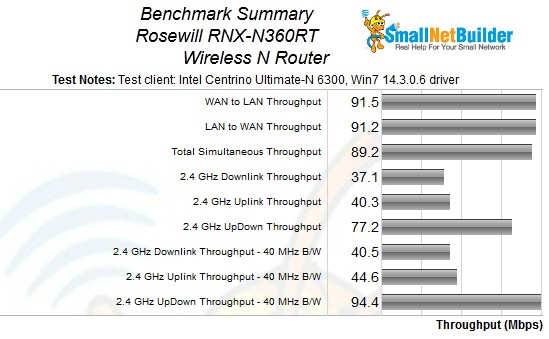
RNX-N360RT Benchmark Summary
For performance comparison and more detailed look, I chose three other 2.4 GHz N300 routers based on the Atheros AR9132/AR9103 platform: TP-LINK’s TL-WR1043ND; Buffalo’s WZR-HP-G300NH; and NETGEAR’s WNR2000. The Performance Table is fairly large, so you can open it up here in another tab/window and follow along.
Since the Buffalo and NETGEAR results were obtained using different test procedures with, most notably, different clients, they can’t be directly compared. Although it looks like the Buffalo wins in this comparison, some of the difference could be the different client and notebook. used.
Even though it has Gigabit ports, the TP-LINK’s results are most directly comparable to the Rosewill’s, so I’ve created a comparison table with just those two products for a fairer and clearer comparison. In this matchup, the TP-Link appears to do better than the 360RT running downlink, but the tables turn in favor of the Rosewill for uplink.
In this table, you can also see a significant throughput gain with 40 MHz mode only for the strongest-signal Location A test and really only for uplink. Once signal levels drop even moderately, the throughput gain from bandwidth-hogging 40 MHz mode disappears. I’ll also note that throughput in Location F in 40 MHz mode was significantly lower.
The IxChariot plot summary below for 20 MHz mode downlink shows relatively stable throughput for the stronger signals in Locations A and C, with more variation in Locations D and F.
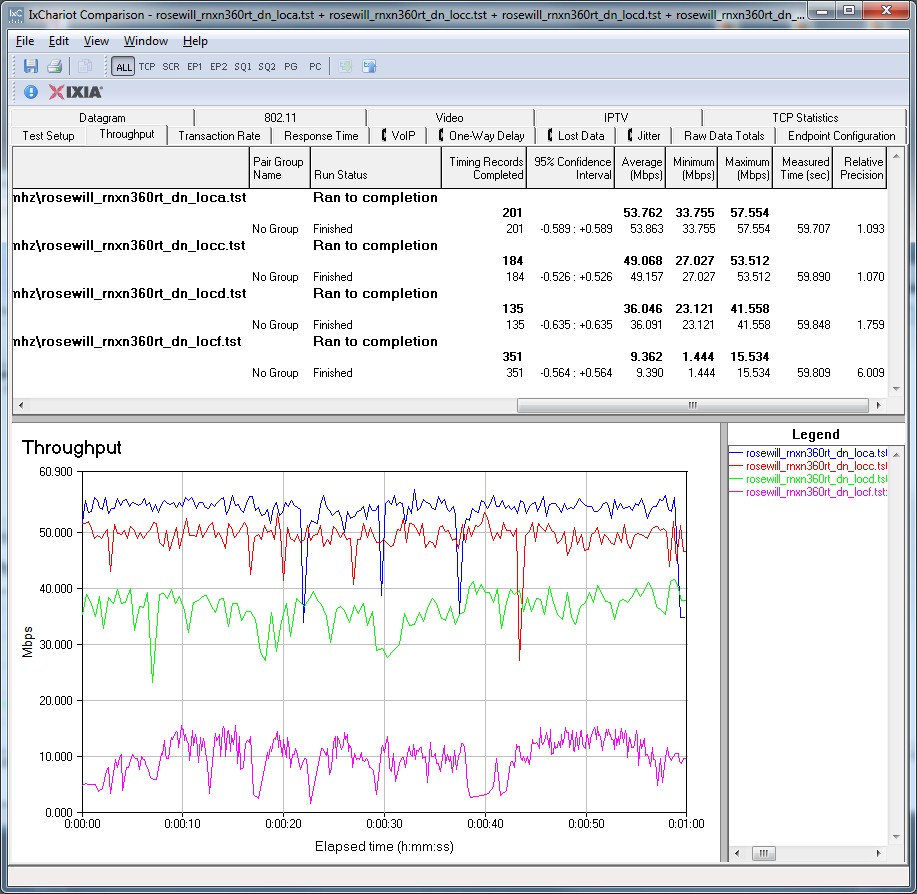
RNX-N360RT IxChariot plot summary – 2.4 GHz, 20 MHz mode, downlink
Some of the other charts linked below show very short spikes down to zero, These are artifacts from IxChariot and are not included in the average throughput results reported, so can be ignored.
- 2.4 GHz / 20 MHz uplink
- 2.4 GHz / 20 MHz up and downlink
- 2.4 GHz / 40 MHz downlink
- 2.4 GHz / 40 MHz uplink
- 2.4 GHz / 40 MHz up and downlink
Closing Thoughts
For $40, the RNX-N360RT isn’t that bad a deal. But with frequent specials on better-known brands, clearances on older models and factory refurbished stock competing in a race to the borrom for pricing, there are many other similar products to be had for $5 to $10 less.
If you’re ok with the price and with going with a lesser-known brand (in networking, that is), the Rosewill RNX-N360RT should serve you well enough. If I were you, though, I’d look to get it at closer to $30.