

Introduction
Update 12/2006: McAfee Wireless Home Network Security is no longer available:
Setting up a small LAN isn’t always easy for the newbie. While both Microsoft and Apple have made big strides in their latest operating systems with respect to sharing folders and printers, it still can be a daunting task, especially if you are using earlier OS versions or mixing non XP and MacOS X systems into the network. Two companies are trying to make it even easier with some software solutions. And while they get points for trying, they both still have a long way to go before network setup is as easy as turning on your computer.
The two products are Network Magic from Pure Networks and Wireless Home Network Security from McAfee Software. Both products work with all versions of Windows since 98 SE, which is a definitely plus if you are dealing with the older OS versions and their less capable (not to mention less familiar or forgotten) networking features. They do different things, but they try to accomplish the same task: making the operations of your network router / firewall / gateway / wireless access point transparent to the least skilled person who happens to be administering the network.
Of the two, Network Magic has more going for it. You can easily see who is connected to your network, where your shared folders and printers are located, and even see your files across the Internet if you can set up a special feature that shares the files out from your LAN and across a broadband connection. It doesn’t have any wireless-specific features, however.
On the flip side, Wireless Home Network Security’s only adds value to wireless networks, where its sole focus is to automate the process of setting up a WEP or WPA-secured WLAN.
Network Magic – Overview
Setting up Network Magic was simple, and the only issue we had was that it took some time for it to recognize the configuration, router models, and gather information for the network map. But once it did it worked fine. Also, if you install Network Magic on a laptop and that laptop travels between two or more networks, it will need to re-orient itself to the new network configuration, which is what you would expect.
When you install the product, you will see a screen with five buttons across the top: What’s New, Network Map, Shared Folders, Net2Go Manager, and Printer Manager. All are fairly obvious and will take you through their associated tasks with a minimum of fuss.
The What’s New screen (Figure 1) lists recent network activity (computers joining or leaving the network, especially handy for wireless networks), a list of shared folders and printer shares, and the network status box.. The latter is a nice feature – the product will constantly monitor your broadband Internet connection, and tell you when you aren’t connected, handy for debugging cable and DSL modem issues.
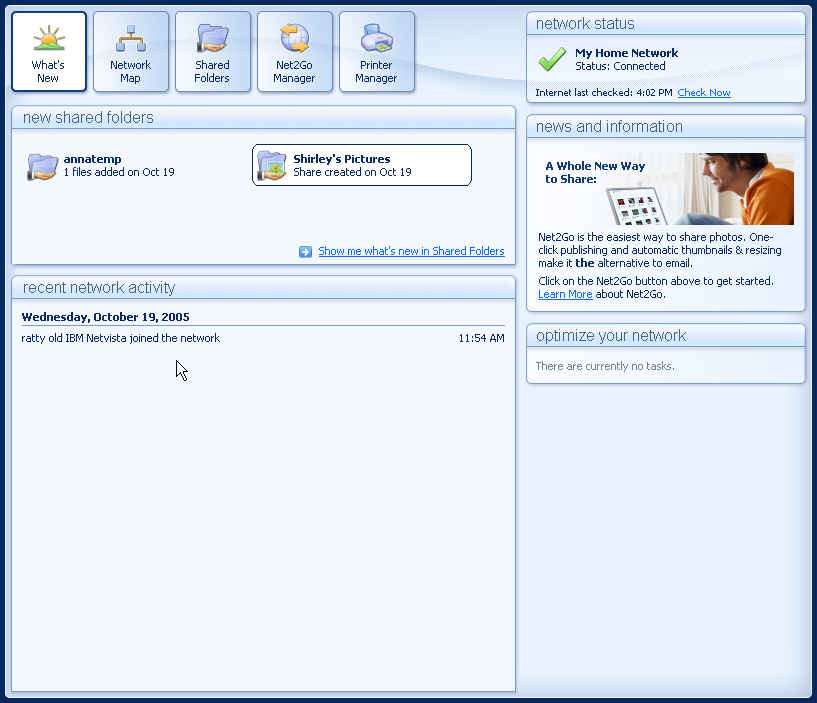
Figure 1: What’s New Screen
(click image to enlarge)
The software’s main feature is a map of your network (Figure 2), where you can click on each device’s box and find out more details such as IP address, firmware version, and even vendor contact information if the software recognizes your device.
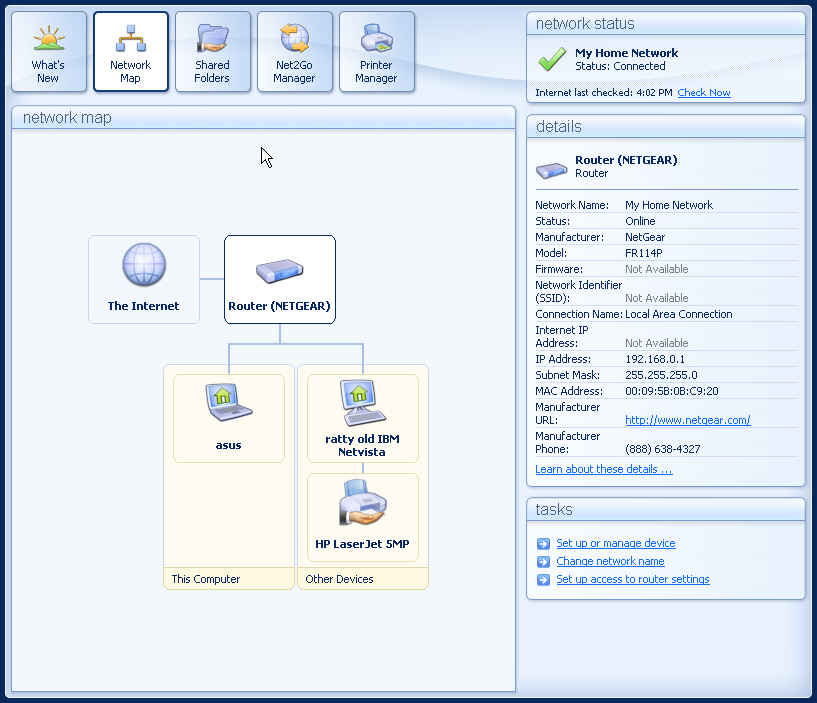
Figure 2: Network Map
(click image to enlarge)
As you can see in Figure 2, the software almost recognized our router, a Netgear FR114P. But because the router was running somewhat older firmware, it couldn’t detect the actual version.
You might think that keeping track of the dozens or hundreds of different low-end routers that consumers have installed on their networks is a huge task, and you would be right. Pure Networks has a list of several routers that they support, but we, of course, managed to find plenty of routers in our offices that weren’t recognized by the software.
Network Magic – Key Features
There are two major things that Network Magic has going for itself. Thing #1 is a service called Net2Go, which allows you to share your files outside of your little LAN and across the big bad Internet, via a Web browser and some sophisticated software. When it works it is pretty impressive, as basically the product will poke a port through your router and allow anyone with the right username and password to view your shared directory of files. When Net2Go works, it is a good and wonderful thing: how many of us have left files on our home PCs when we are at work and had to wait until we got home to retrieve them?
But Net2Go will only work with these routers and has been tested to work with only specific firmware versions listed. We were able to get it working with a more recent release on our Netgear and Linksys routers, however, but weren’t able to get it working with an older US Robotics router. Now, granted this list is a rather long one of more than 100 devices, but still: if yours isn’t on it, you won’t be able to take advantage of this cool feature.
Thing #2 is a boost in security practices without too much need for understanding the underlying issues, including situations that you don’t normally anticipate.
Let’s take a look at two possible security scenarios. Scenario #1 is where you have two network adapters in your PC, such as a wired and wireless connection, and you are connected to both concurrently. In this case, you could have a shared folder that has files that you may not want the rest of the world (or the world that can access your wireless NIC) to know you have.
This situation is easy to encounter, especially in notebooks with built-in wireless, and before you can remember to fix it, you might not have realized that you have compromised your security by turning on your wireless NIC. Network Magic is very good at warning you of this situation and blocks your network shares with the warning message shown in Figure 3.
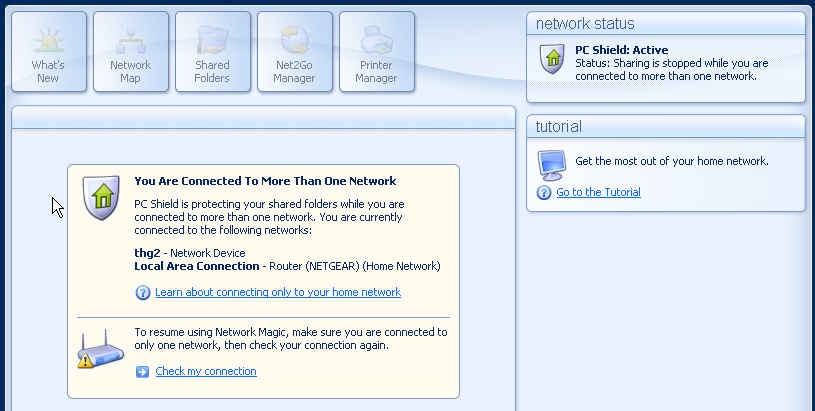
Figure 3: Security Warning
(click image to enlarge)
Scenario #2 is when you have set up a wireless AP on your network and don’t realize that others, such as your neighbors, have connected to it. Again, a possible security compromise. Network Magic can alert you to who has joined your network (Figure 4), and you can track their comings and goings as an “intruder” if need be:
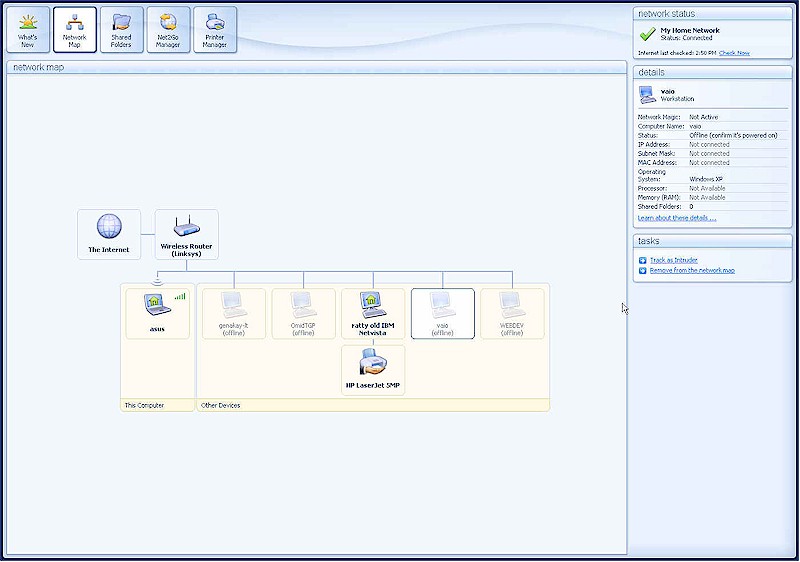
Figure 4: Wireless client monitor
(click image to enlarge)
Given the frequency of unauthorized wireless “borrowing” and its potential for network security breaches, this feature alone could make Network Magic a very smart purchase!
Network Magic – The Negatives
While these are good things, there are several drawbacks to Network Magic. First, if you have any print servers currently installed on your network, or ever had any in the past installed on any of your computers, the software will pick up these devices whether or not they are current and working. Figure 5 shows see a print server connected to our IBM PC.
Figure 5: Long gone print server
(click image to enlarge)
However, that print server has long been gone from our network, and any attempt to send a print job to it will result in an error. It would be nice for Network Magic to figure this out before including it on the network map and according to Pure Networks a fix is in the works for this bug.
Second, Network Magic does not properly report applications added to your LANs PCs after Network Magic itself is installed. For example, if after you get it going you decide you want to further protect your PC with a software firewall, Network Magic will get confused and not report properly what is going on. The folks at Pure Networks indicate that they will fix this in the next version.
We had some other minor issues with the product, including the link to the “Install Network Magic on another PC”. This is really asking the question “Do you want instructions on how to do it” rather than actually executing the installation. It would be nice to actually do the deed, rather than tell you about it – one of the big benefits of Network Magic is having it running on all of your network clients, and spreading its cheer and features around. But first, you have to do the running around yourself and install the software.
Finally, if you don’t have a supported router, or if you go through more than one router to get to your Internet connection (such as two routers both doing NAT), you will likely be hard-pressed to make the Net2Go feature work and receive something like this less-than-useful error message:
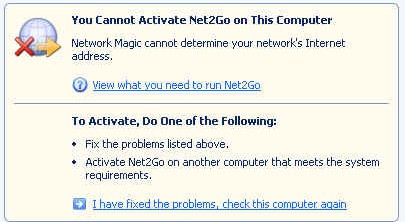
Figure 6: Unhelpful error message
(click image to enlarge)
There are workarounds for this, but they aren’t pretty and will take time and the knowledge to poke holes in specific ports to get to the outside world.
Wireless Home Network Security
Update 12/2006: McAfee Wireless Home Network Security is no longer available:
McAfee’s Wireless Home Network Security (MWHNS) covers both a narrower feature set and also delivers less. But we include in this review because it attempts to go in a similar direction to Network Magic: to make networks, albeit wireless-only LANs, more usable to the average citizen.
The sole issue that MWHNS addresses is that setting up encrypted keys is still far beyond what most ordinary folks can handle. While several vendors have stepped into this area in an attempt at making it easier, they have only partially succeeded.
We have already done reviews of two vendor-specific products that secure wireless setups with the push of a button and some software and hardware tricks. Linksys has their Secure EZSetup and Buffalo Technology has AOSS, but neither works completely effortlessly. MWHNS is an attempt to bring easy set up of a secure wireless LAN to a wider range of devices, but it succeeds only partially as well.
MWHNS is based on the WSC Guard product that we reviewed about two years ago and that came along with McAfee’s acquisition of Wireless Security Corporation earlier this year. We tried the latest version with one router each from Linksys, Netgear and Belkin. All are on the recommended list of products published by McAfee – a list that includes only about a dozen or so products.
All three worked well. In the case of a router fresh out of the box, the software is smart enough to know the default username and password to set up the router. In the case of an older router that we had already changed this information on, it prompted us for the new authentication credentials and moved along its setup without any issues.
Once the setup completes, you will get a screen similar to Figure 7 below. You’ll see three buttons down the left side that show the summary of your connection, a list of wireless APs that are in range, and advanced options.
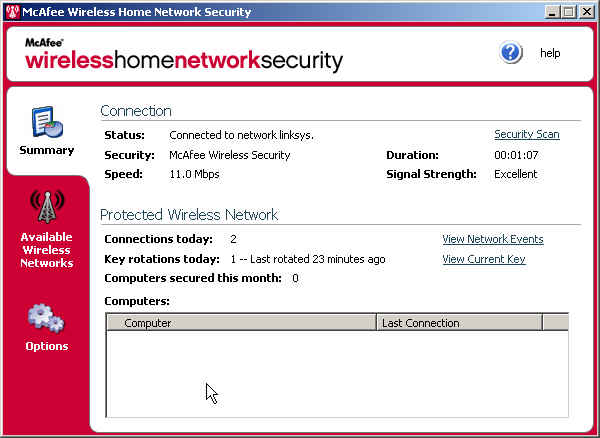
Figure 7: McAfee Wireless Network Security main window
(click image to enlarge)
The summary screen shows you whether or not you are connected to an AP that is protected by the software, and other data about your signal strength. Also listed here is how often you have changed your encryption keys on the network. The nice thing about the McAfee software is that it will also periodically change the keys used to encrypt traffic on your network.
Once you get everything working, you pretty much leave the software alone to do its job. If you are interested, you can see that your network is protected with the following status screen (Figure 8).
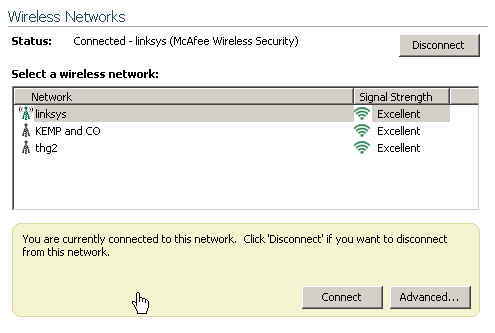
Figure 8: Available Wireless Networks
(click image to enlarge)
Note that the Linksys router has a different antenna icon next to it, indicating that it is one of the flavors of Access points supported by MWHNS.
Wireless Network Security – Negatives
We have a few nits to pick with McAfee though. Nit #1 is that the default setup is WEP, which has been repeatedly shown to be relatively easily compromised. Given that our WEP Cracking How To showed that even a 128 bit WEP key can typically be cracked in under an hour, we would like to see MWHNS rotate keys more often that its current twice-a-day frequency and also allow the user to control the frequency of rotation.
Once you have initially set up your WLAN you can change it to the stronger WPA method. However, to do so requires you to first go into the Options tab and then into the “Advanced Settings” screen as shown below to make the switch. Note that the more recent WPA2 is not among the Security Mode options, which is disappointing for a product whose sole purpose is to help secure wireless networks.
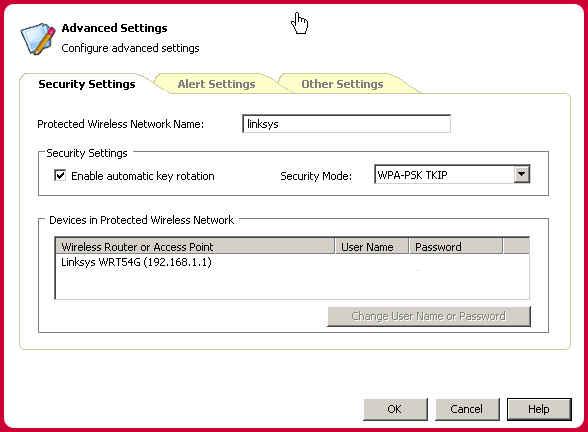
Figure 9: Changing the Security Mode
(click image to enlarge)
Nit #2 is that you need to set up the software by running it on each wireless PC that is to be protected. It would also make some sense to be able to run the setup on a PC that is wired directly to the AP, and then propagate the keys accordingly. Under the Options tab (Figure 10), you can see the notation for protecting another PC on your wireless network. But all that does is bring you to a Help screen that guides you through the required steps. As noted with Network Magic, we would rather have the software do the install rather than describe how to do it!
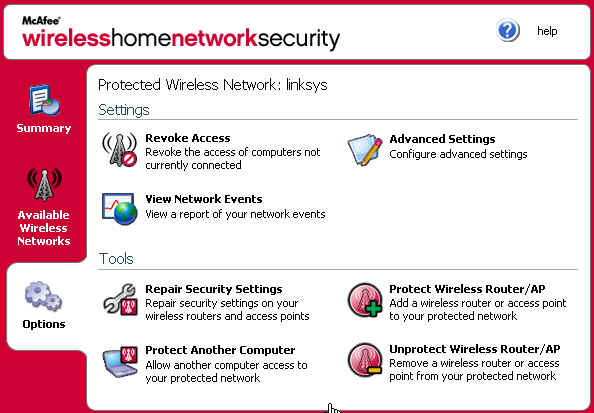
Figure 10: Options Tab
(click image to enlarge)
Nit #3 is that MWHNS also installs McAfee’s desktop suite, which you may or may not desire. If you are running other McAfee products, all the better, but if not, then this is superfluous.
And finally, Nit #4, which might not have been a nit if we hadn’t seen Network Magic first. One of MWHNS’ biggest drawbacks is that it doesn’t have the network mapping features that are part of Network Magic – and especially Network Magic’s ability to show who is currently connected to the network. We wish McAfeee would incorporate both features, even though one could argue the limited utility of the “who’s connected” feature. After all, if you’re running MWHNS, then only authorized users should be on your wireless LAN! But nothing’s perfect and the “who’s connected” feature would still be handy for monitoring WLAN usage.
Conclusions
So, is either product worth parting with fifty of your hard-earned dollars? If you are already comfortable with the ins and outs of Microsoft networking, can create network shares from the command line, and can fearlessly navigate the series of dialogs to set up IP printer servers and your SOHO routers, then no, Network Magic isn’t the product for you. But most of us aren’t so adept in at least one of these areas, and that is where the product can help.
Also, if you routinely support family and friends who are also less than skilled in the mysteries of networking, then this might be the ticket towards spending a peaceful evening with your family, rather than running around town as Johnny Network Appleseed fixing broken installations.
As for McAfee’s Wireless Home Network Security, if you aren’t already running an encrypted wireless LAN, then this is as good a place as any to start down the WPA path. And while we would love to see support for a much longer list of access points and routers, as well as the more recent WPA2, MWHNS is a good first attempt. Network Magic can also prevent some of those user distress calls in the middle of the evening, but only if the callers are wrestling with problems related to securing their wireless LAN.