

Introduction
Updated August 13, 2005
Way back in March, I gave you plans on how to build your own “BlueSniper” rifle in How To: Building a BlueSniper Rifle Part 1. With the BlueSniper rifle, you can discover Bluetooth devices and perhaps perform exploits such as copying an address book. But the physical construction of the rifle is only half of the battle.
In this installment, I’ll cover the software side of construction by providing a step-by-step for building a custom Linux kernel for the rifle. I’ll then guide you through transferring that kernel to the Gumstix computer that makes up the heart of the rifle and storing it in the Gumstix’ flash memory. Finally, I’ll show you how to use some of the basic Bluetooth tools that are built into the kernel.
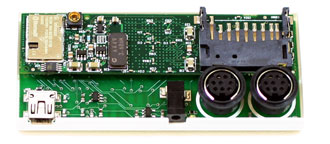
Figure 1: Gumstix Computer – Actual Size!!
You will need six things to get started:
- The Gumstix Computer (either the waysmall 200st-bt or waysmall 400st-bt models)
- A computer with Linux installed (I used Fedora Core 2)
- A fast Internet connection to download the tools
- Serial null-modem cable (from gumstix.com) which connects the Gumstix to your computer
If you computer doesn’t have a serial port, you can use a USB / Serial Adapter - Either the rubber-duck antenna from Gumstix or the antenna purchased in Part I of Building a BlueSniper Rifle
- At least one Bluetooth device that can be placed into discoverable mode
The major steps in the process you’ll be following are:
- Install the Subversion version control client
- Build the toolchain library tree
- Edit the makefile to add Bluetooth
- Compile the kernel
- Transfer the kernel image to the Gumstix RAM
- Flash the Gumstix with the new kernel
Let’s get going!
NOTE: While building the custom kernel, please follow all the steps and enter commands EXACTLY as given, because Linux is not very forgiving with spaces and misspelled letters. In addition, take the same care in transferring the image to the Gumstix as you would in flashing any firmware. Loss of power or data connection during the flash can result in a dead Gumstix!
Building Your Toolchain
Using a Linux computer, you will be downloading all the necessary packages and then cross-compiling a custom ARM-compatible image. It is essential that your Linux computer be quite fast, as cross-compiling translates the C code into ARM-compatible code and it’s pretty compute intensive.
Tip: While you can use CoLinux and build a custom kernel from within Windows, I don’t recommend it. You’re better off using a native Linux distro.
You will need to install a Subversion client on your Linux box, which you can get here. Subversion is an open source version control system alternative to CVS that will build a catalog of necessary files for the build and then download them from a central repository on the Internet. You’ll then make a custom Linux distribution for the Gumstix ARM processor from those files. Subversion will also install files necessary for you to cross-compile the Bluetooth hacking programs, which are described later in this article.
After you install Subversion, issue the following command from a shell prompt to start building the library tree:
svn co http://svn.rungie.com/svn/gumstix-buildroot/trunk gumstix-buildroot
The Subversion client will make a directory called gumstix-buildroot. Go into the directory by typing in the following.
cd gumstix-buildroot
Now, you need to change the make file to add in the Bluetooth-libs and utils. Edit the make file with a text editor of your choice (I used EMACS).
emacs Makefile
Find
#For Bluetooth
within the makefile, and change the line following it to
TARGETS+=bluez-utils bluez-libs
Figure 2 shows the changed line. This will substitute the newest BlueZ drivers for the standard Bluetooth modules. After making the edit, save the file and exit.
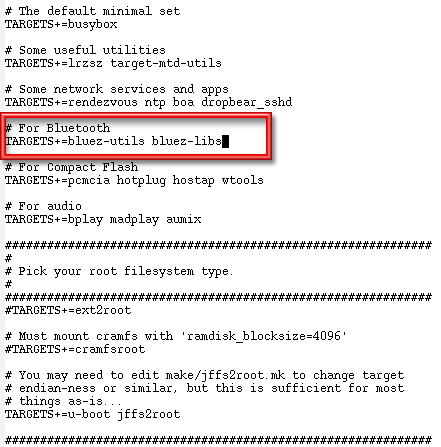
Figure 2: Modifying the make file
(click image to enlarge)
Update August 13, 2005
Two additional Bluetooth applications – btscanner and carwhisperer – have been added to the buildroot. The TARGETS line described above and shown in Figure 2 should be modified to be:TARGETS+=bluez-utils bluez-libs btscanner carwhispererto include these applications, which are described in the Finishing Up section.
It is also a good idea to add PERL support on the Gumstix, which will allow you to run and make your own Bluetooth PERL scripts. Add in the following line to the make file.
TARGETS+=perl
You can add this line right after the edited Bluetooth line and add a comment above it. Remember to start the comment line with a “#”!
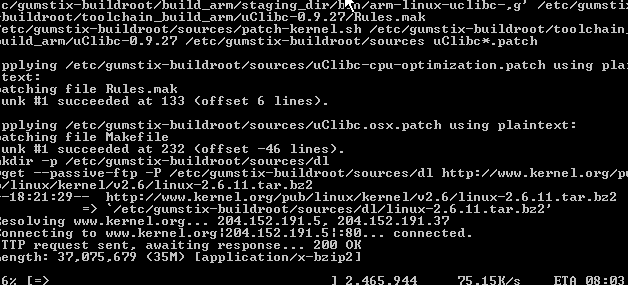
Figure 3: Make in progress
(click image to enlarge)
You’re now ready to start the “make” or compile. Type in
make
and gcc will start compiling the custom kernel. It will take around an hour or so for make to download and compile the files, so you may want to grab lunch. After the compile is finished, you will have a file around three megaBytes in size called root_fs_arm, located in the directory that you started the make from. This is the file that you will transfer to the Gumstix.
Prepping the Gumstix
Up until this point, you have been making the image on your desktop or laptop computer and haven’t even touched the Gumstix. But now you will transfer the compiled image to the Gumstix computer via a serial link.
First, we will transfer the image into the 64 MB RAM of the Gumstix. Then we will copy the information from RAM into the Gumstix’s flash memory, which will make the changes permanent – at least until the next flash!
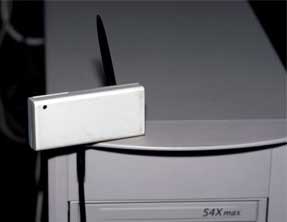
Figure 4: Gumstix connected via Serial cable
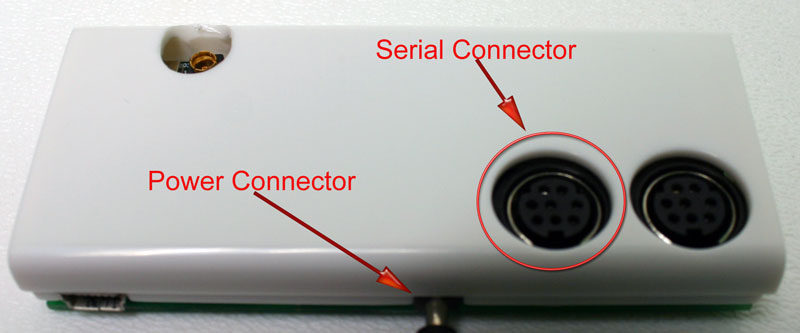
Figure 5: Gumstix power and serial connectors
(click image to enlarge)
Start by plugging both the power and serial connectors into the Gumstix’ jacks, but leave the Gumstix’ power wart unplugged.
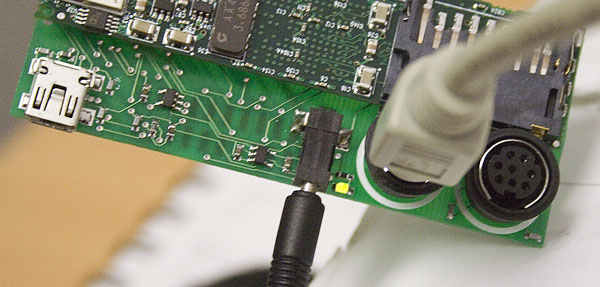
Figure 6: Gumstix power and serial connectors connected
(click image to enlarge)
Fire up the minicom terminal program on your LInux machine by typing
minicom
at the command prompt of your Linux machine. Plug in the power to the Gumstix and its green power light will turn on. The Gumstix will start booting, and in a few seconds you should see startup messages on the screen of your Linux machine. You need to interrupt the boot process and enter what is called the “U-Boot” mode, by hitting any key during the boot sequence (Figure 7).
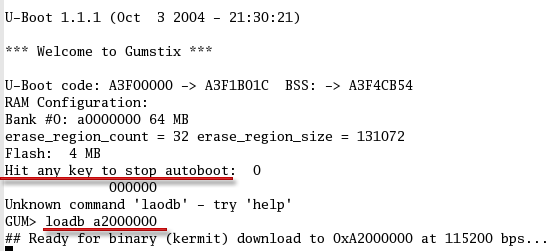
Figure 7: Gumstix boot messages
(click image to enlarge)
The default settings in minicom should get you connected to the Gumstix, but If you are having trouble and need to change the settings, press Control+A and then Z, after starting minicom. This will take you to the settings configuration screen where you can change the settings to the following:
115200 baud
8N1
NOR
VT102
no parity
no flow control
terminal settings - ANSI
Backspace - BS
status line - enabled
D - Newline delay - 0 ms
According to this Gumstix Wiki page, u-boot is the Gumstix’ built-in bootloader that performs first-pass initialization of the hardware, and then loads and jumps to the Linux kernel. u-boot provides a low-level way of accessing various devices on the gumstix before the full operating system is loaded.
Type in
loadb a2000000
which tells the Gumstix that an image is about to be transferred via kermit. At this point you can exit the minicom program.
Transferring and flashing the Image
It’s now time to transfer the image to the Gumstix RAM and then copy the image to its flash memory. This two step process is much safer than directly transferring into flash. Do the following:
1) Start Kermit by typing kermit at the command prompt on your Linux machine
2) In the Kermit command-line configure the serial port by entering each of the following commands at the command prompt. Enter the commands exactly as shown and press the “enter” key after each line:
set prefixing allset file type binaryset parity noneset carrier-watch offset speed 115200set line /dev/ttyS0connect3) Go back to the Kermit command line via ctrl+C
4) Enter
send root_fs_arm
Kermit will start transfering one packet at a time (Figure 8).
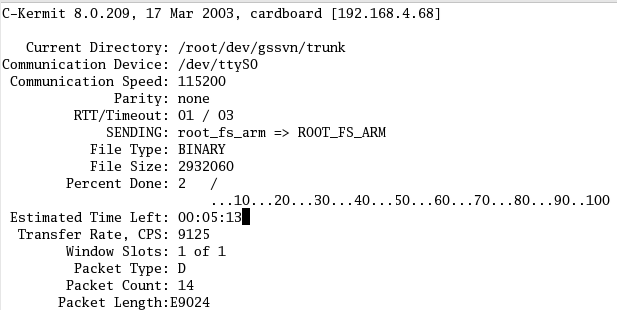
Figure 8: Transferring the image
(click image to enlarge)
Since the transfer is running only at 115200 kilobits per second, it can take several minutes to complete. When the transfer is done, you can exit kermit. The kernel image is now sitting in the Gumstix’ RAM.
Since the Gumstix ships with a preloaded flash, you will have to erase it. Start minicom again and at the GUM> prompt enter (Figure 9)
era 1:2-31
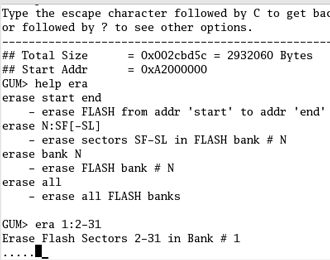
Figure 9: Erase the flash
After the flash is erased, flash the new kernel via the following commands:
cp.b a2000000 40000 ${filesize}fsload a2000000 boot/uImage
Make sure you enter the correct number of zeros!
After the kernel is loaded, type
reset
to reboot the Gumstix.
With the serial cable still connected and minicom running, you will see the bootup screen after restarting the Gumstix. The login is root and the password is gumstix. At the prompt, you will be able to do most everything that you can do in Linux, such as entering an ls to view a directory.
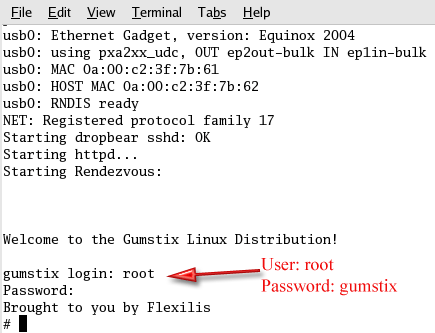
Figure 10: Logging in for the first time
(click image to enlarge)
Exploring the Bluetooth apps
At this point, you have an operational Linux computer, with a few Bluetooth utilities built into the Linux distro you created. There is a decent command line Bluetooth scanner built into the BlueZ protocol stack that was compiled into the kernel. This scanner, called hcitool, will find all Bluetooth devices that have been placed in discoverable mode. The hcitool man page is here.
Typing in “hcitool inq” will display the physical addresses, clock offsets and classes of found items. Typing in “hcitool scan” will display the physical address, make and model of the found devices.
With the “rubber duck” antenna attached, the Gumstix detected my paired Blackberry 7520 and Jabra headset from about 20 feet away (Figure 11). You can expect far greater ranges and more directionality once the Gumstix is connected to the high-gain antenna on the BlueSniper rifle itself.
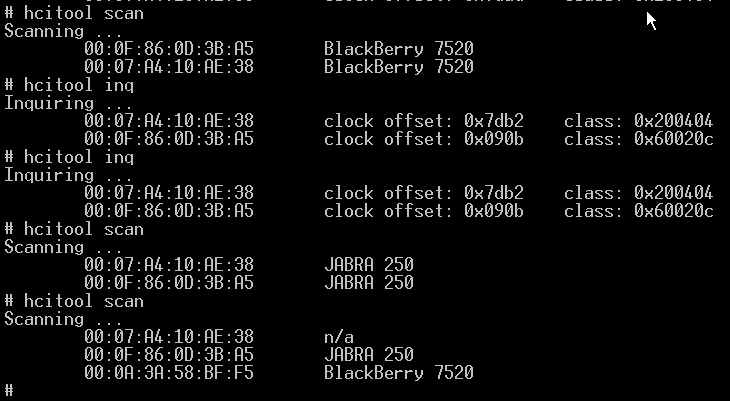
Figure 11: Using hcitool to find devices
(click image to enlarge)
Careful inspection of Figure 11 reveals that each make / model description doesn’t always map to the same MAC address. In other words, if you run “hcitool scan” multiple times in an environment with many paired Bluetooth devices, you will see different MAC addresses reported for each Bluetooth device. I’m not sure whether this is due to the way hcitool or Bluetooth itself works, but am highlighting it so that you won’t think that something is wrong when you see it.
Note that due to the channel-hopping nature of Bluetooth, you will not get the instant gratification that you would get from Wi-Fi wardriving. It takes several seconds to detect discoverable devices. Note also that If you decide to “BlueSnipe” around town, you may be disappointed. Bluetooth scanning is still in early stages and there are few tools that can detect devices set to non-discoverable mode (more on this shortly).
Another command built into the BlueZ protocol stack is l2ping, which is the Bluetooth version of the venerable ping command. You will need to know the Bluetooth MAC address of an in-range device in order to l2ping it. Fortunately, the hcitool scan and inq commands provide MAC address info. Of course, if you didn’t find any devices with hcitool, then l2ping will not do anything for you.
Here’s how you’d ping a Bluetooth device with MAC address 01:02:03:ab:cd:ef:
l2ping -f 01:02:03:ab:cd:ef
If the ping is successful, you will receive a response back that looks similar to the one below. Do a control+c to stop the pings.
l2ping 01:02:03:ab:cd:ef
Ping: 01:02:03:ab:cd:ef from....... 0 Bytes from 00:60:57:75:7C:36 id 200 time 37.89ms
0 Bytes from 00:60:57:75:7C:36 id 201 time 19.96ms
0 Bytes from 00:60:57:75:7C:36 id 202 time 12.25ms
0 Bytes from 00:60:57:75:7C:36 id 203 time 12.18ms
0 Bytes from 00:60:57:75:7C:36 id 204 time 11.80ms
For other devices just replace the 01:02:03:ab:cd:ef with the MAC address of the target device. The l2ping man page is here.
Finishing up
With the completed BlueSniper rifle, you should be able to find Bluetooth devices, display their physical addresses and manufacturer names. There is no doubt that hackers will port more Bluetooth tools to the Gumstix platform, and it’s probable that entirely new software will be released in the future. But for now, available applications are sparse.
Recently, Craig Hughes from Gumstix and Dave Smith helped me port over a few more Bluetooth scanning applications. The first application, called BTScanner, was tough to build for the Gumstix, but it appears that Dave Smith has succeeded. BTScanner will show the link status and available services to a Bluetooth device that has been placed in discoverable mode. You can download the files here (under the sources link).
Dave Smith has also ported over Car Whisperer, a recently released tool from the guys at Trifinite.org. This handy little app can record and transmit audio to / from passing Bluetooth headset devices. While I haven’t played around with Car Whisper yet, I plan to brush off my 23 dBi parabolic antenna and give it a spin in the future. You can download the Gumstix port here (also under the sources link).
Update August 13, 2005 Both BTScanner and Car Whisperer have been incorporated into the buildroot.
It is possible to scan for devices that have been placed in non-discoverable mode with Redfang and Bluesniff, but so far I haven’t seen these apps ported to the Gumstix. Redfang can brute force through MAC address space and find almost any Bluetooth device (given enough time). Bluesniff is actually a front-end for Redfang that formats the information in a more readable format. If you have seen these tools ported to the Gumstix, or if you have ported them yourself, I would love to hear from you. You can contact me at [email protected].

Please play responsibly with your new BlueSniper rifle and target only your own Bluetooth devices. And for God sakes, don’t point the rifle at anyone or act in a suspicious manner with it. You don’t want to be on the receiving end of real gunfire!