

Introduction
| At a Glance | |
|---|---|
| Product | Sondigo Sirocco Wireless Audio Bridge (Sirocco) |
| Summary | Easy-to-use wired/wireless audio adapter with 5.1 Dolby and SPDIF support, but no control features |
| Pros | • Plays any digital format including DRM’d files • Easy to set up • Good sound quality • Supports 5.1 Dolby Surround • Analog and SPDIF output |
| Cons | • Windows-only • Some audio dropouts due to buffering method • No ability to remotely control music selection |
Over the last few years, a number of network multimedia players have been introduced. While they are designed to enable you to send multimedia files from your computer to your entertainment center using a home network, a couple of hitches always come up when you’re dealing with music files.
Encrypted music files such as those purchased from the Apple iTunes Music Store cannot be played on most network multimedia players since the players aren’t authorized to decrypt the files. In addition to this limitation, not every multimedia player supports every type of file in which you could store your music.
All the multimedia players that I’ve reviewed have had these limitations, so when I heard about the Sondigo Sirocco Wireless Audio Bridge, a new device that claimed to handle all encrypted files and in all formats, I wanted to check it out and see how it worked.
The Sirocco gets around DRM issues by acting as a “normal” Windows sound card. This approach lets applications such as Microsoft Media Player, iTunes, and others handle the DRM duties. The Sondigo driver only has to do is encode the audio for network transmission and the Sirocco handles the decoding on the other end. Sondigo says they use lossless encoding that results in around a 1 Mbps rate for stereo content.
Obviously a big benefit for the Sirocco method is that it is able to play any audio that your computer supports such as encrypted music, video soundtracks, games, and so on. But the bad news is that you have to use a Windows PC as part of the loop whenever you feel the urge to listen to music. This means no using media server equipped NASes or other streaming server appliances. You also don’t get any form of remote management interface, which means a trip back to the computer providing the audio content whenever you want to change what’s playing.
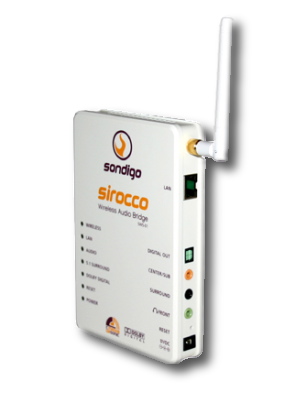
The Sirocco, shown in the figure above, is the size of a paperback book with a single antenna for an 802.11 b/g wireless connection. Along with a 10/100 Ethernet port and a power connector, the Sirocco contains a number of ports located in the back (rear) panel for audio connection: analog, optical, center, surround, plus a reset button (Figure 1). If you appreciate LEDs, you will be pleased with the seven different lights that are located in front, which signal the status of the LAN, power, audio, and so on.
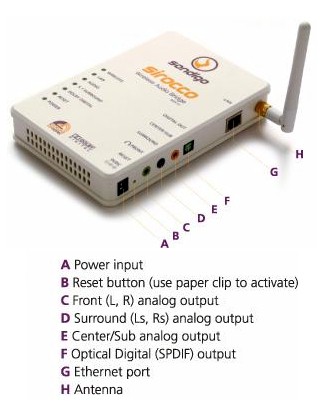
Figure 1: Sirocco’s Connections
Setting Up
The instructions said that before installing the software and setting up the Sirocco, to connect the device to a PC using the provided Ethernet cable. Later, after you have finished setting up and no longer need the wired connection, you can unplug the device from Ethernet and use it wirelessly. Instead of following their instructions for connecting the device directly to a PC, I connected the Sirocco to my LAN via a router Ethernet port and installed the software. Figure 2 shows the Sirocco’s software installation screen.
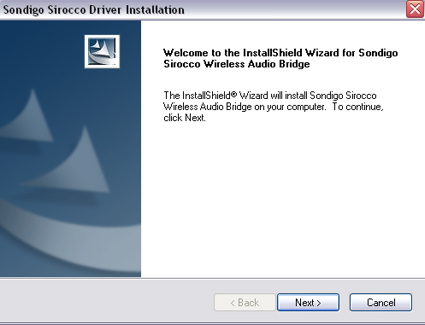
Figure 2: Software Installation
Once the software was installed, the Setup Wizard appeared, allowing you configure the device for your network. Figure 3 shows the Setup Wizard where you can select the Device Configuration button.
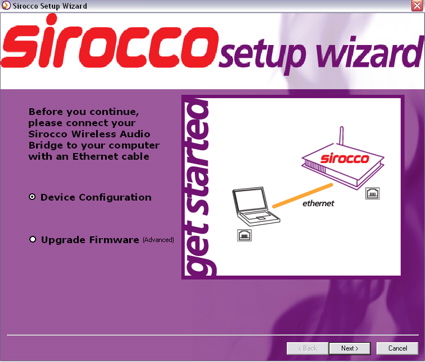
Figure 3: Setup Wizard
The initial step of the setup was in locating the Sirocco device on my LAN. Once the Sirocco was located, it appeared under the list of available devices (Figure 4).
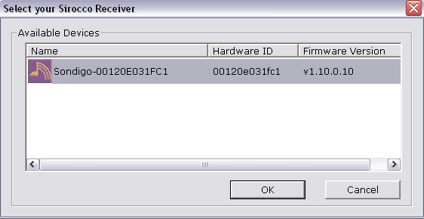
Figure 4: Device Selection
If you have more than one Sirocco on your LAN, you can separately select, configure, and name the devices. Figure 5 shows the screen in which you can rename your Sirocco so that you can identify it if you have more than one.
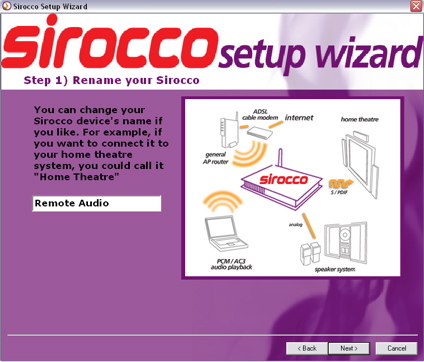
Figure 5: Device Naming
Setting Up – more
To help configure the Sirocco’s wireless capabilities, a site survey is run to determine the access points that are in range. Figure 6 shows my case as an example in which two access points were located.
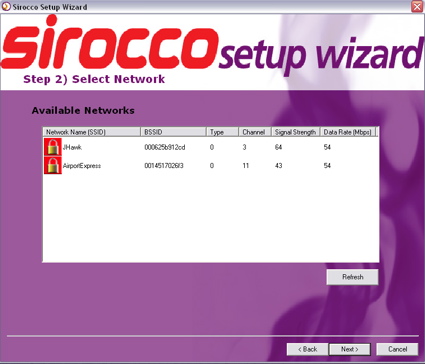
Figure 6: Site Survey
When I selected my Linksys WRT54G, a password-entry screen appeared, prompting me for an input and a confirmation (as shown in Figure 7). Both WEP and the more secure WPA/WPA2 encryption are supported.
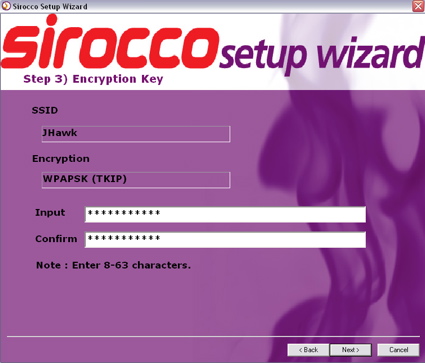
Figure 7: Wireless Initialization
After I entered the encryption key for my router, I continued through to the end of the Setup Wizard screens. When the basic setup was complete, my information was saved to the Sirocco. At this point, I unplugged the device from my router and moved it to my entertainment center so I could plug it into my AV receiver.
As I was plugging it in, I was pleased to find that Sondigo included an optical audio cable with the device. This was the first audio device I’ve tested that included one, and I have found that with my setup, optical audio (SPDIF) does make a difference in the sound quality. My local retailer typically charges $15-$20 for this type of cable, so having a cable included as part of the device was a nice bonus.
In Use
When I had everything connected, I powered the Sirocco back up and the Control Panel appeared (Figure 8).
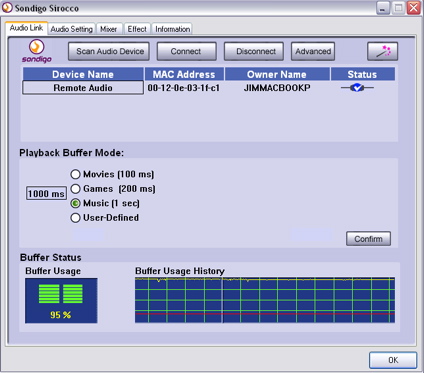
Figure 8: Control Panel
From the Control Panel’s main screen, I selected my remote Sirocco device and clicked the Connect button. Figure 8 shows the main screen with a single Sirocco device on my LAN. The main screen also showed that a good connection existed for the Windows XP SP2 install running natively on my MacBook Pro. Once you’re connected, all audio from your computer is directed to the remote device. All applications such as iTunes, games, and DVD playing are supported normally.
For managing the sound playback parameters, Sondigo provides a number of configuration screens in which to adjust your settings. Figure 9 shows a Mixer menu where the balance and other settings can be adjusted.
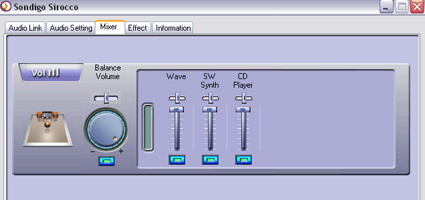
Figure 9: Mixer Menu
Figure 10 shows the Effects menu, a more complicated menu where you have more control over the sound. In this menu you can adjust for the room size or adjust an equalizer, either with predefined values or manually.
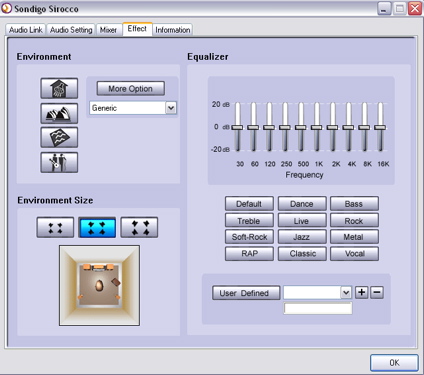
Figure 10: Effects Menu
Figure 11 shows the Audio Setting menu where you can define the type of speaker system you have and the use of digital and analog output for the device.
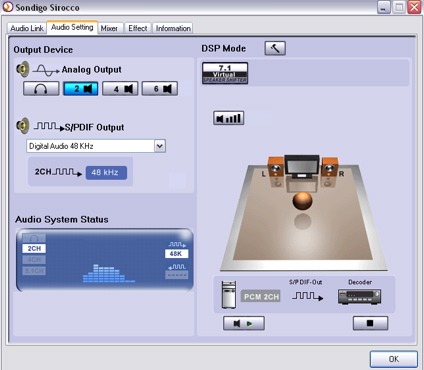
Figure 11: Audio Setting
A quick wireless range test of the Sirocco showed that it worked well in my house. My access point is located in a poor location. It is in the basement around a lot of metal ductwork, around 7 feed and a floor away from my entertainment center. But I found I could use the Sirocco in most places in my home. Of course the poorer your signal, the more chance you’ll have audio dropouts. The only signal strength meter shown was during the initial configuration when the device was connected via Ethernet. If you need to move the Sirocco around later, you may have to do some guesswork about the signal strength.
Another issue with the “Decode on the Computer” method used by Sondigo is buffer handling. It becomes difficult to feed a continuous stream of decoded music across a wireless LAN without occasional breakup. To address this, Sondigo provides a method to define the cushioning playback buffer size as shown back in Figure 8.
In my testing with the default one second buffer, I heard a (very) occasional “pop” that probably indicated that the buffer had run dry. Increasing the buffer size would address this issue for music, but trying to have a large buffer while playing a game or watching a movie would mean that the sounds would be out of synch with the action on the screen.
I’ll also note that once I heard a slight “pop” from my speakers when I had no music playing at all. The Sirocco can also be used on a wired network, so if you have issues with the buffer running dry on your wireless network, and you have Ethernet available, my testing showed you’ll likely get better performance with fewer dropouts using an Ethernet connection.
Under the covers
Figure 12 shows the main board of the Sirocco. You can see a C-Media audio chip and a RealTek chip, which are used for Ethernet support. The wireless chip is hidden under some shielding. The main CPU is covered by a heat sink, but Sondigo’s documentation states it is a 200Mhz RealTek RTL8722 MIPS-based processor.
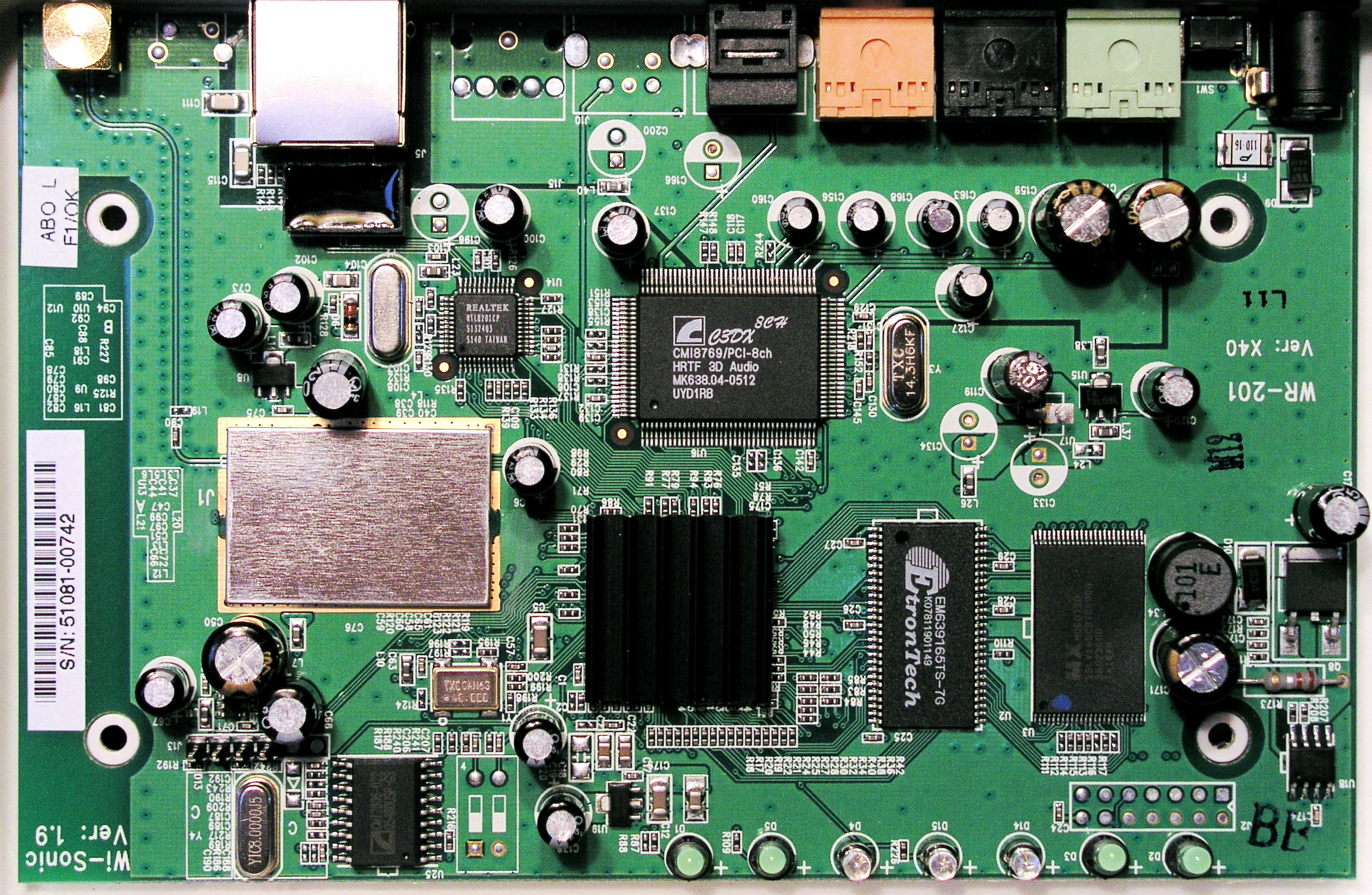
Figure 11: Main Board (Click to enlarge)
To see what software was running on the device, I first used a port scan. A fingerprint ID revealed that the TCP/IP stack was from a Linux 2.4 or 2.5 kernel. The scan also showed me that the standard HTTP port of 80 was open on the device. To investigate further, I decided to use my web browser. When I connected, I was greeted with the menu shown in Figure 13.
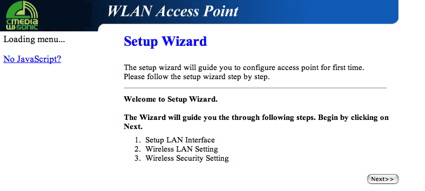
Figure 13: Access Point Wizard
I double-checked the documentation, but I could find no reference to any configuration that could be performed using a web browser. It’s fairly common for these devices to have a native application for some configuration and a web interface for others, but it’s almost always documented. I also found a logging feature that gave me a lot of information on the device’s internal workings.
Like many embedded consumer devices, it was running Linux and using Busybox for utilities. I could see all the boot messages, which told me that there was 16 Meg of memory and that ext2 was used for the internal RAM disk. I identified two Ethernet devices and an RS-232 console. As I continued to play with the menus, I noticed something very odd that I had first taken to be an alternate configuration method. As I examined the menus closer, I saw that the options didn’t make sense for a device that was designed to be a wireless client.
Figure 14 shows a screen that was more geared toward setting up an access point. As I reread the initial menu, back in Figure 13, I noticed that it also mentioned setting up “your Access Point”. Strange.
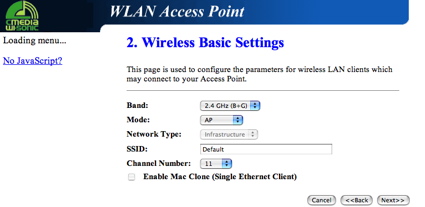
Figure 14: Access Point Setup
Maybe this menu was left over from another similar device by the same OEM manufacturer. To see how far I could go, I started configuring the Sirocco as a wireless access point. I plugged my Ethernet cable back in, and I went through all the menus, defining my SSID, my DHCP parameters, my channel, and so on. When I completed the procedure, rebooted the device, I had a new useable access point on my LAN. Cool.
But would my audio capabilities still work? I went back to the Sirocco Control Panel. Everything looked “normal.” When I used it, it worked as it had before. Interesting. Everything appeared to work fine, but maybe Sondigo didn’t want to support this configuration or perhaps they feared that making the device do double-duty as both an access point and a wireless bridge would magnify audio buffering problems. In case this “feature” is dropped in the newer firmware releases, don’t count on it or expect Sondigo to support you if you use it.
My investigating did show a couple of issues that Sondigo needs to address. First, the undocumented access point configuration could allow someone on your LAN to take over your Sirocco and reconfigure it for their purposes. No password prompts appeared when I connected. I could set one when I configured, but by default you weren’t prompted for one. This wouldn’t be an issue for most home users on a closed LAN, but Sondigo should still address the issue. The other issue was the GPL license. Sondigo used a lot of GPL-licensed software in their product, and I could not find an offer for the source code as required by the license. Hopefully this was an oversight that they plan to address soon.
Conclusion
I found the Sirocco an interesting little device. It was easy to set up and fun to play all of my PC-based audio out through my stereo without hassling with DRM. And I was also pleased to find its undocumented ability to be an access point, but there’s no guarantee that that functionality will stick around with firmware updates. I would have liked to see Apple support on the device, and I heard a couple of audio dropouts while using it, but that’s hard to completely avoid any time you’re wirelessly streaming audio.
As far as a comparison to other devices, the most direct comparison would be to the Apple Airport Express. Both devices have similar wireless client capabilities, lack an interface on the remote side, and rely on the computer for selecting and playing back audio. The Airport Express is available for both Windows and Mac OS systems, whereas the Sirocco is Windows only.
Like the Sirocco, the Airport Express a no-brainer to use. It is directly incorporated into iTunes and requires only a single menu selection to turn it on. But the Airport Express’ iTunes integration also limits it to only that application, where the Sirocco can play any audio that can come out of your PC’s speakers.
In addition to its audio capabilities, the Airport Express officially supports configuration as an access point and has the ability to be a print server. But if your main focus is audio, the Sirocco has digital audio output, compared to the analog-only Airport Express.
I’m an iTunes-only user with both Windows and Macintosh systems on my LAN. I appreciate the seamless integration and flexibility of the Airport Express, so for me it’s a better fit, and I’d have no problem recommending it. But if you’re a Windows user looking for a way to play a mixture of audio sources to your stereo, the Sirocco is the clear winner. It can play audio that the Airport Express can’t and its digital capabilities give it a sound-quality advantage.