

Introduction
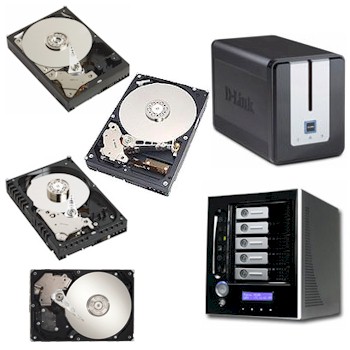
BYOD (Bring Your Own Drive) NASes can help control the cost of your NAS investment and provide a way to put leftover drives to use. But then you’re left to answer the question of which drive(s) to choose. For example, is the WD Raptor worth the extra money if you use it in a NAS? Or how should you choose drives with 16 vs. 8 MB of cache? With the huge selection of drives available today, a BYOD NAS buyer is faced with a dizzying array of choices. So I set out to see the effect that hard drive performance has on NAS performance.
The Approach
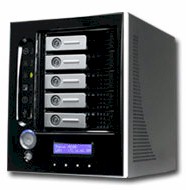
We used our NAS Performance chart to choose the fastest NASes with gigabit Ethernet in order to not have the hardware limit performance. The Thecus 5200 was an obvious choice, but did not support 3 Gbs SATA drives or Native Command Queuing (NCQ), both of which could potentially provide a performance edge. So after some checking with manufacturers, we settled on the D-Link DNS-323 as a second test platform because it supports both features. Even though both NASes are RAID capable, we decided to keep the test simple by testing single drives.
 |
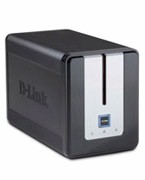 |
| Thecus 5200 | D-Link 323 |
Figure 2: NAS Test Platforms
Drives were chosen by consulting the Tom’s Hardware Hard Drive Charts and StorageReview’s Performance Database. We then approached Seagate and Western Digital, explained what we wanted to test and asked for drives with a range of performance levels. Seagate agreed to provide one drive and WD two. A fourth, a Hitachi drive, was just sitting around my office, so I tested it as well. I didn’t try more drives because I felt that I could do an initial experiment with just this small set and expand the test if the results merited it. The four drives tested are listed in Table 1 along with their key characteristics.
| Drives | Size GB | RPM | Interface | Cache |
|---|---|---|---|---|
| WD1500ADFD "Raptor" | 150 | 10,000 | SATA 1.5Gb/s, NCQ | 16 |
| WD5000YS | 500 | 7,200 | SATA 3Gb/s, NCQ | 16 |
| ST3750840AS | 750 | 7,200 | SATA 3Gb/s, NCQ | 8 |
| HDS722525VLSA80 | 250 | 7,200 | SATA 1.2Gb/s | 8 |
Table 1: Drives Tested
The test machine was an AMD Athlon 64 3200+ socket 939 processor in a Foxconn 761GXK8MB-KRS motherboard with SIS 761GX and 965 chipsets with 2 GB of RAM (at the suggestion of SNB readers) and a 238 GB SATA drive.
Each drive was installed in each NAS and then tested with the Iozone benchmark program (See how we test for specifics). The iozone machine was running Windows XP Pro with all default updates installed and connected to each NAS via a dedicated gigabit switch (TRENDnet TEG-S50TXE).
The Iozone 3.263 benchmark was run on the target NAS and drive four times. I ran the benchmark multiple times and averaged the results to smooth out variation in run-to-run results for Iozone.
Jumbo frames were not used because they don’t seem to affect performance that much (less than 5% in my experience and often limited to smaller file sizes), and I feel they will rarely be used by home NAS users.
Results
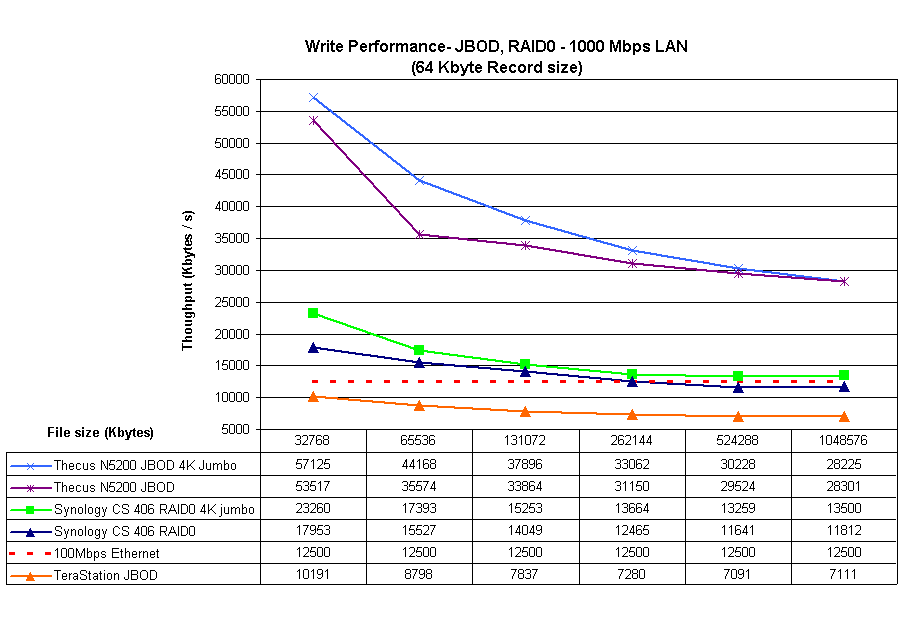
In both Figures 2 and 3, horizontal lines are provided to provide a frame of reference on the NAS/Hard-disk speeds. The bottom line is black and represents the speed of 100 Mbps Ethernet. The second line from the bottom is red and represents the speed of Firewire 400 (to give a comparison for directly attached storage throuput). The top line is orange and represents the speed of 1000 Mbps Ethernet. Including the gigabit Ethernet line made the separations between lines meaningful in judging the relative speed differences.
Each figure has two groups of four lines: Thecus 5200 was faster and its results are on top, D-Link 323 is on bottom. Each line within a group represents one hard drive’s performance averaged over four trials.
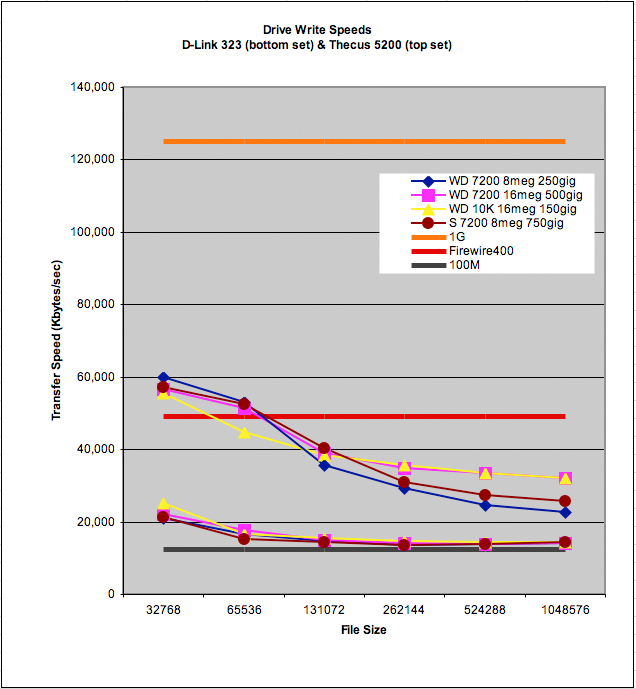

Figure 2: Write test results
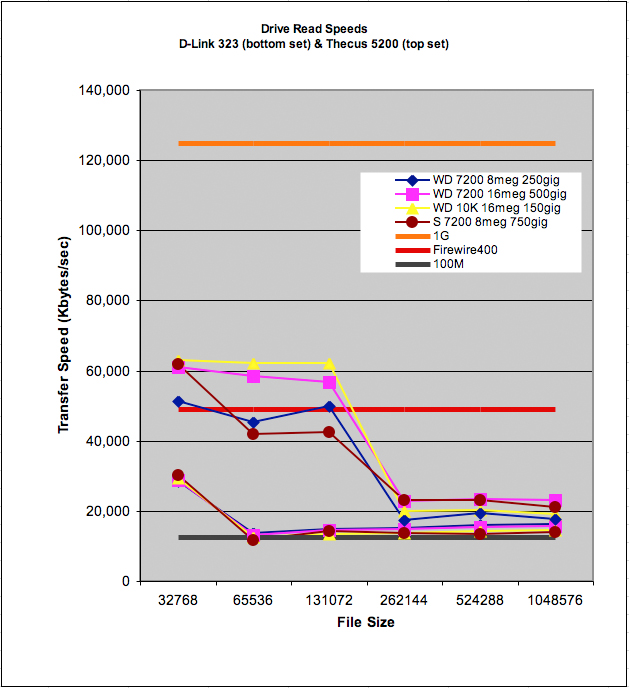
Figure 3: Read test results
Discussion – DNS-323
Question: Does hard drive speed matter in the D-Link DNS-323?
Answer: No.
None of the hard drives was able to distinguish itself from the pack in the DNS-323. The D-Link was rated pretty highly in performance when Craig Ellison reviewed it, but it can’t compete with the 256 megabytes of cache, and Celeron processor of the Thecus 5200. At least to me, since both units use the same Ethernet chips (Marvell 88E1111 "Alaska"), it looks like the difference comes down to cache and CPU.
The effect of the cache can be seen I think on the vertical separation between the D-Link and Thecus 5200 in the 32 MB (32768), 64 MB (65536), and 128 MB (131072), file sizes. The 256 MB of cache have the effect of pulling the Thecus disk performance up significantly (approximately 35,000 Kbytes/sec). Once the file size fills the cache, however, performance falls off. But even when out of cache, the Thecus is faster than the D-Link.
This, I think, is the result of the faster processor. Even for the 256 MB (262144), 512 MB (524288), and 1 GB (1048576) file sizes, the Thecus is significantly faster than the D-Link. At these file sizes, the Thecus’s performance is significantly better, but it is no longer anything to get excited about (approximately 2,000 to 8,000 Kbytes/sec).
Aside On Cache:
You don’t measure disk throughput for long before you get a vague suspicion that RAM anywhere in the system is trying to undo your efforts to measure raw hardware performance. Motherboard makers, operating system makers, and NAS makers are all trying to squeeze as much performance as they can from the lowest cost designs they can come up with. One cheap way to make a design perform better is to add cache and to work hard to utilize the cache effectively.
The effect of cache on throughput creates two camps among SNB readers (at least the ones I’ve heard from). One camp wants us to take all the RAM out of the test computers so that they can see how fast the bare disk hardware performs. In answering the proverbial question: Which came first, the chicken or the egg? I see the lose-the-cache people as egg advocates.
The other camp wants us to put all the RAM that is practical into the test computer so that they can get an estimate of the maximum real-world performance they can expect from a piece of equipment. These readers look to me, like chickens.
We at SNB see both points. We love to open up the case and see the hardware ("Oh baby, look at them eggs!"). But, we also like understand the value users will receive in real life from the products we review ("Is this chicken going to be worth the money? Is there another chicken that would make me happier of the lifetime of this product?"). So we try to strike a balance in our reviews.
For the Thecus 5200, that balance is struck between 128 MB (131072) and 256 MB (262144) file sizes in the Iozone test suite. On the left hand side of that line, "chickens" can see what ideal performance is like if they load up the RAM on their client machines and NASes. (I asked, but Tim Higgins would not let me hot-rod the Thecus 5200’s RAM above 256 MB).
Once file sizes go beyond 256 MB, the "egg" advocates get to see what happens when the Thecus NAS cache runs out of gas and the hardware starts crawling along on its hands and knees.
Discussion – Thecus N5200
Question: Does hard drive speed matter in the Thecus 5200?
Answer: Probably not.
If you are serving large media files (say, larger than a gigabyte), then no, the disk performance does not matter. But, if you are using smaller files (128 MB or less) then the Western Digital Raptor does provide some benefits in read-intensive applications. And, although the Raptor does not have across-the-board write superiority, I really like the smooth consistent write speed profile it has in Figure 1. So I’d think about the Raptor fondly, but probably wouldn’t buy it for a NAS application.
Two reasons I would not opt for Raptors are shown in Figures 4 and 5. These two figures superimpose the write and read speeds of the Norco DS-500 software RAID 0 (thick black dashed line) (from NAS too Slow? Try DAS) and of a simple Western Digital Firewire 400 drive directly attached hard drive (thick solid blue line).
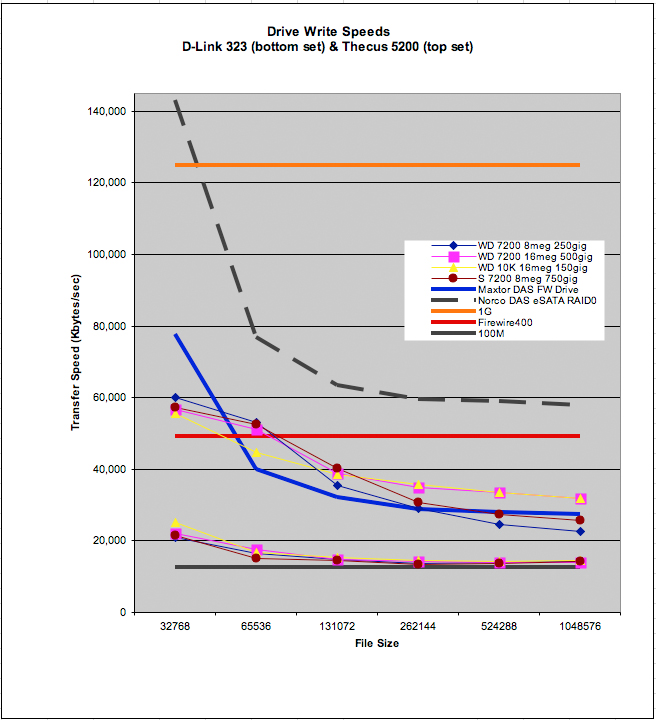
Figure 4: DAS vs. NAS Write
If you are willing to pay for performance in writes and reads, your money is better spent on a Norco DS-500 (or similar direct-attached product) than on a Thecus 5200. The Norco unit costs a little less than the Thecus 5200, but provides about twice the write performance and more than ten times the read performance.
Note how in Figure 5, the read performance of the Firewire drive and Norco DS-500 drive the Y-axis skyward. The orange gigabit ethernet baseline is compressed to the bottom of the diagram along with NAS performance. This is a performance difference that matters.
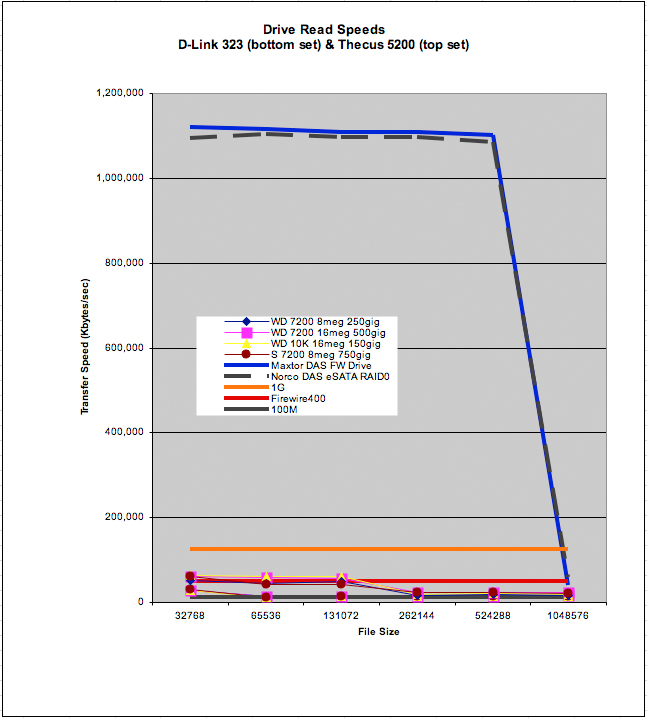
Figure 5: DAS vs. NAS Read
Conclusions
Is the WD Raptor or other high performance hard drive worth the extra money over lower performance drives for a NAS? This experiment has shown that the answer, as you might expect, is "it depends". The most interesting finding in this test was that although the D-Link DNS-323 supposedly is set up to take advantage of both SATA 3 Gb/s drives and NCQ, neither appeared to affect performance.
And while the Thecus N5200 isn’t set to take advantage of either of these performance-enhancing SATA drive options (at least according to Thecus), it did show performance differences that roughly tracked hard drive performance. But the Thecus is clearly currently in a performance class by itself (for gigabit LAN writes), so it is unlikely that other current NASes would notice the difference among drives.
I personally would probably not pay extra for 16 MB of drive cache. Because, in performance per dollar terms, directly attached drives are going to get you about the same write and 10x the read performance of a WD Raptor in a Thecus 5200.
Two key thoughts I am left with after running this experiment are:
- "How can I get 4 GB of RAM into a NAS?"
- "How much is 8 GB of RAM going to cost for my desktop?"
The best place to put your money to optimize NAS performance is to beef up the RAM on a NAS and each networked client. The $450 price premium of putting 4 or 5 Raptors into a NAS will pay for 8 GB of RAM for one client. It would also pay for an eSATA or Firewire direct-attached disk system, but that brings a different set of tradeoffs. And while you usually can’t upgrade a NAS’ RAM, you can use our NAS Feature Charts to check out the processor and RAM used on the products you’re interested in.
I understand this is a "chicken" position, but it looks like the current state of the art in NAS performance follows the first 3 laws of finance: get the cache, get the cache, get the cache.