

Introduction
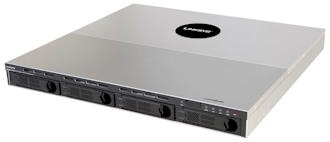
| At a Glance | |
|---|---|
| Product | Linksys 4 Bay Gigabit Network Storage System (NSS4000) |
| Summary | Four drive rack-mounted BYOD RAID NAS for SMB users with hot-swap drives and optional redundant power supply |
| Pros | • RAID 0/1/1+Spare/5/5+Spare/10 • Dual gigabit Ethernet w/ VLAN, Link Aggregation support • Hot Swappable Drives |
| Cons |
• Hard limits on simultaneous users • No command-line access • No Backup Software included |
I’ve long been a fan of Linksys products around my home and have numerous Linksys switches and hubs. I use an upgraded WRT54G for my wireless needs, and I have a couple of modified NSLU2s for network storage. And I’m not alone. Plenty of Linksys products fill the shelves at all the big-box electronics stores and find their way into homes and offices across the world.
But Linksys isn’t just for home use any more. The company’s "Business Series" line aims at bridging the gap between consumer-level devices and big-business products sold under the Cisco brand. In this review, I’ll check out the NSS4000, a small business, quad-drive Network Attached Storage (NAS) product that includes RAID support, hot-swappable disks, dual gigabit network connections and more.
The NSS4000 is a rack-mountable Bring Your Own Drive (BYOD) product, but is also available populated with four 250 GB drives as the NSS4100. The NSS line also includes "Advanced" versions dubbed the NSS6000 and NSS6100 (BYOD and 1TB), which use a different, more powerful chassis.
The 4000 comes with four easily removable disk trays to which you mount your drives. Linksys even supplies the screws, making drive installation quick and easy. Note that the drive trays do not have a locking mechanism, which can be a good or bad thing, depending on your approach to serviceability and security.
Although it’s hard to see in Figure 1, each tray has an LED that uses color (red/green) and blink rate to communicate its status. The other status lights are in a cluster above the right-most drive along with a USB 2.0 port (labeled Flash) and Reset-to-Factory-Defaults button. Note that there is not a power switch to be found on the NSS. So as soon as you plug it in, it will begin to boot.
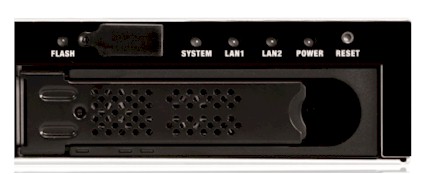
Figure 1: NSS4000 Front Panel (detail view)
Shutdown is done by logging in, navigating to the Admin > Maintenance page and clicking the ShutDown System button. The poorly-designed alternative is to press and hold the Reset switch until the Power LED starts flashing. The press-and-hold technique is commonly used with front-panel power switches on NASes to initiate a clean shutdown. Using a "reset" switch for this purpose is definitely not intuitive. Note that even when "shut down" the NSS’ fan still runs. The only way to shut it completely off is to pull the plug. Also note that there is no scheduled shutdown / startup feature, but you can set idle drive spindown time.
Figure 2 shows the back panel of the box where the dual gigabit network ports can be seen along with a fan vent, dual gigabit Ethernet ports and power inlet. The connector marked "RPS" is where an optional RPS1000 Redundant Power Supply can be connected. This is a clear sign of the 4000’s product positioning as a business product and is intended to address the second most common failure mechanism of NASes—the power supply. There’s a USB port behind the plastic flap marked "UPS", where you can connect a "Smart" UPS, such as those produced by APC and others.

Figure 2: NSS4000 Back Panel
And speaking of fans, on startup, the NSS screams like a jet taxiing for takeoff. But after boot is completed, it settles down to a much lower, but still noticeable noise level. Compared to other four-drive NASes, however, the noise level is about the same, if not a bit quieter. As for power, when the unit is running it draws around 55 Watts, which is a little better than other four-drive NASes we’ve seen.
Setting the device up is fairly straightforward. Once the unit is powered up, a Windows-only utility is used to find the device on the LAN. Then all configuration is done via web browser using either HTTP or HTTPs. Alternatively, the 4000’s IP address is also advertised both via UPnP and Apple’s Rendezvous. So even without the utility, finding the device on your LAN should be a piece of cake.
 Check out the slideshow for an admin interface tour.
Under The Covers
Figure 3 shows the main board of the unit. Processing is provided by a
pair of PMC-Sierra chips, the PM8172
System Controller and RM7035c MIPS processor.
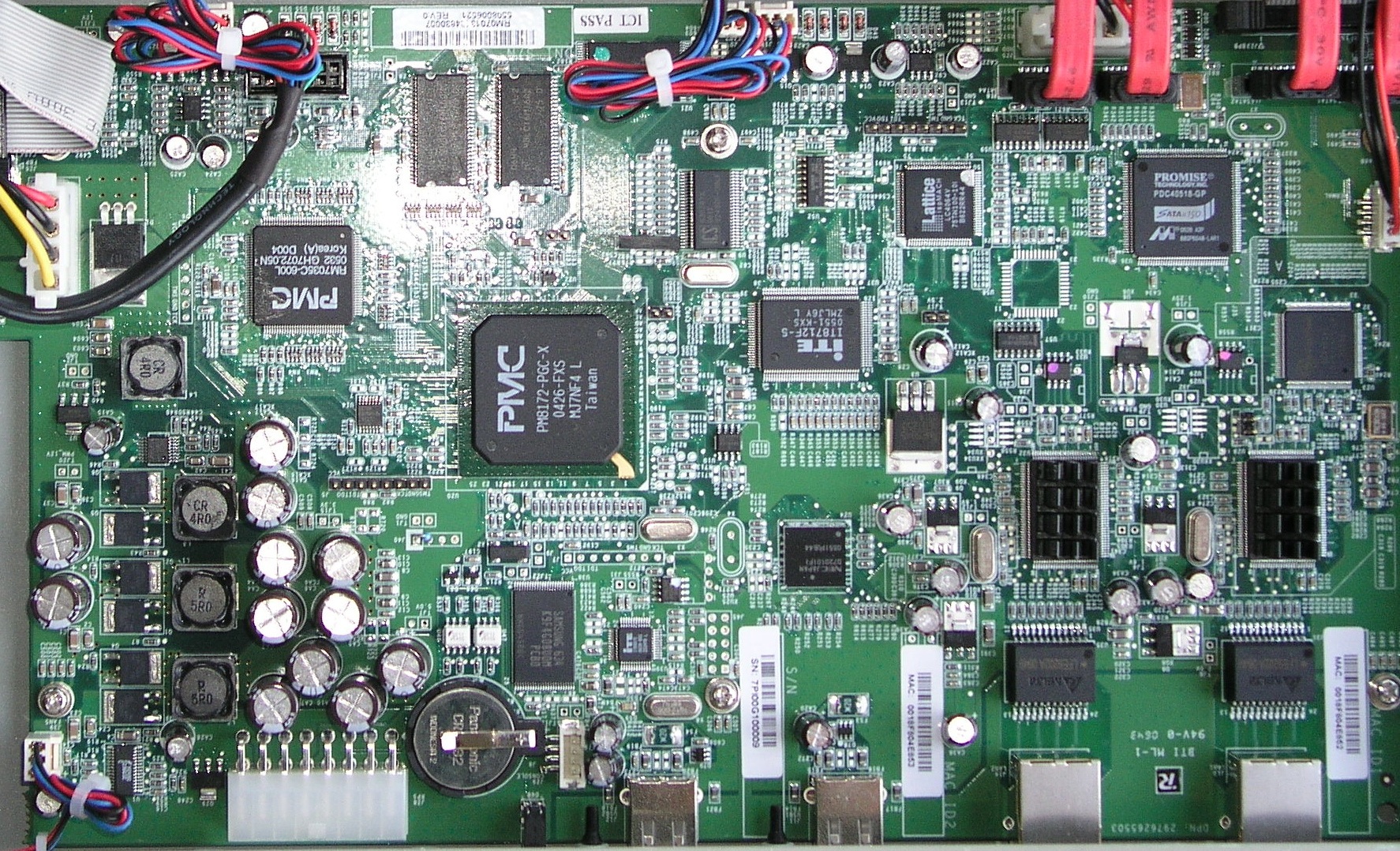
Figure 3: NSS4000 Main Board
The SATA controller on the unit is a PDC40518 from Promise Technology. I couldn’t make out the chips providing the gigabit Ethernet support as they were covered by heat sinks.
As for software, Linksys advertises that the unit runs Linux internally so that is no secret. Linksys also has a GPL download web site so you can explore the components included on the box. The Linksys NSLU2s I use have had their firmware heavily modified, so I wondered if the NSS400 could be similarly customized. To check it out, I downloaded a firmware image from Linksys and noticed it was a simple compressed tar file. Expanding the tar file revealed a couple of familiar files: a Linux kernel and a Linux root filesystem image.
There was also another tar file that when uncompressed revealed some standard Linux
startup scripts and a script that appeared to be run at firmware installation time. Digging
into this script revealed that there was an embedded-ssh server, dropbear, on the box.
A network probe of the box showed that it wasn’t running, but a “gpio.conf” file included in
the firmware seemed to indicate that the server would be started if a jumper was placed
on a particular GPIO pin. I didn’t have time to investigate this further. But Terry Kennedy’s blog page identifies the enabling jumper as J34 and has other details on the NS4000’s innards.
Feature Tour
As I mentioned earlier, Linksys is targeting the small biz crowd with the NSS product line and has packed the product with features designed to put a smile on the face of users who are accustomed to putting their NASes in racks instead of on desktops. A more complete tour of the 4000’s admin interface can be found in the slideshow. So I’ll just hit the highlights here and provide some commentary.
Check out the slideshow for an admin interface tour.
Figure 4 shows the initial System Status screen displayed after logging in. This screen gives an overview of the state of the system showing RAID status, disk capacity, server status, etc. One important thing not shown here, however, is the resyncing status of the RAID array. For that, you need to drill down into the Storage Status page.
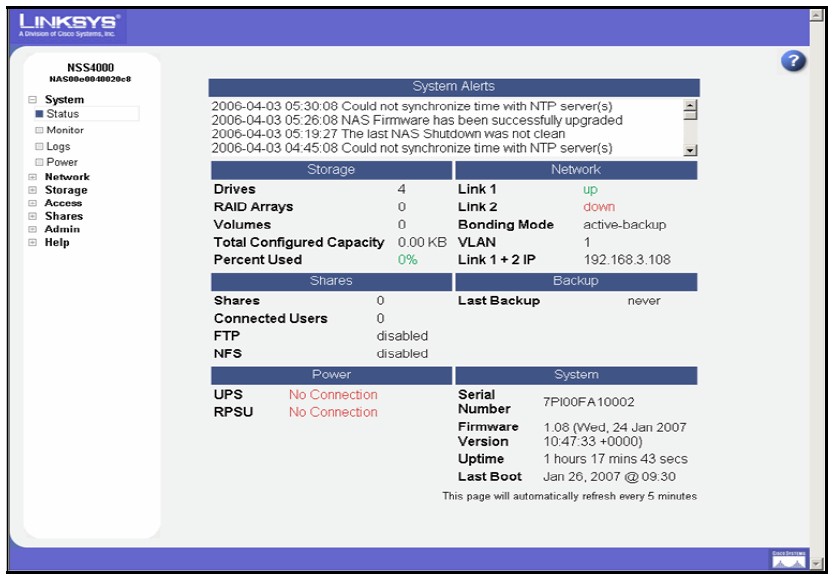
Figure 4: Status Screen
You can also see the organization of the admin interface in Figure 4. While it gets the job done, I found moving from screen to screen to be frustratingly slow in general. Online Help is available both via the Help menu item and by clicking the ? icon found on the upper right of each page for context-sensitive help.
The Monitor page provides readouts of power supply voltages, FAN speeds and drive, drive area ambient and motherboard temperatures. Logs are separated into Admin, Web Access, CIFS Sharing and FTP views or combined into one for downloading or sent to a syslog server. Each log category can also be downloaded separately or deleted. The Power page provides status information about the optional redundant power supply or attached UPS.
There is a surprising abundance of features not normally found in NASes under the Network menu. Network Status is a display of the current network status including any VLANs that have been defined. The MTU value is shown but you can’t see whether the two ports are bonded. Network Properties is where you can configure the two gigabit Ethernet ports for aggregation or failover, set MTU value (up to 9K Jumbo frames are supported) and UPnP / Bonjour advertisement.
You use the VLAN page to join the NSS4000 into a virtual LAN. 802.1p priority tagging is supported as well as VLAN labels. Each port can be assigned to a different VLAN. Network Identification is where you configure the network identity of the NSS, including the hostname and domain membership. Network Ports can change the port on which supported services run. When you disable WAN access for a given service, only hosts on the same subnet as the NSS may connect to that service.
The Storage menus are used to set the RAID level, set up Volumes and access the Virtualization features. Storage Status is a display of the current status of the drives used in the system. The Get Detail buttons show a detailed log of the SMART status for the drive. Locate will blink the LED on the corresponding drive.
RAID level is set on the RAID screen with levels RAID 0 / 1 / 1+Spare / 5 / 5+Spare / 10 supported in addition to JBOD. Linksys says that the NSS’ current firmware can support RAID arrays larger than 4TB. (Most RAID 5 NASes are currently limited to 1TB arrays with support for 2TB coming soon.)
Once established and sync’d, additional drives can be added to an array. RAID migration, i.e. moving drives to another NSS is also supported, but you can’t do this by hot-plugging drives. Once the RAID array is configured the Storage > Volumes page is used to partition it. AES 256 encryption can be enabled only when a volume is created and can’t be disabled once enabled. You can, however, expand Volumes after creation, provided there is space available in the RAID array.
The Storage Options screen holds some interesting settings, including a RAID rebuild priority, which is set to Medium by default. RAID arrays are configured and available for use relatively quickly, but it took over 12 hours to completely sync a 1TB RAID 5 array, even with the RAID Rebuild priority set to high. Note that while an array is syncing, performance is degraded and disk failure will result in data loss.
I mentioned the Virtualization feature earlier, which can be used to build very large JBOD volumes consisting of drives in multiple NSSes. The NSS4000 can only be configured as a "slave" device, with the NSS6000 as master. Of course, since data transfer for the "virtual" drives is across gigabit Ethernet, those huge JBOD volumes are going to be much slower than ones built from drives residing in a single NSS.
The NSS lets you locally establish User and Group level permissions, import them from Active Directory, NTv4, or NIS domains or use a mixture of both. Any imported items are read-only, however. Quotas can be set for both Users and Groups with warning levels and hard limits. You can set "grace periods" for how long a user will be warned after they exceed their warning level before access is denied if usage is not reduced below the warning level.
There is also a built-in firewall with access filters (Figure 5) that be set to allow / deny access to specific NSS services to all users or programmed IP or MAC addresses.
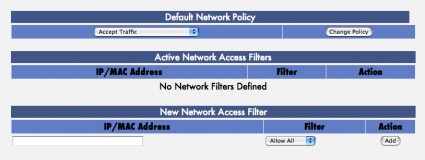
Figure 5: Network Policy / Access Filters
The Shares menu also where you’ll find pages for CIFS, NFS and FTP server configuration. Each of these protocols can be enabled on a per-share basis. Unlike the competition, Linksys has set hard limits on the number of simultaneous users for each service. Only 15 users can simultaneously connect via CIFS, 20 via NFS and a paltry two for FTP. Linksys said the limits were done to avoid performance degradation due to swapping (a result of relatively limited RAM).
Finally, shares can be backed up to either another share or to a remote CIFS Server. But Linksys didn’t include any client backup software, so you’re on your own for that.
Performance
Since we received one of the first NSS4000’s available for review, Linksys had to scramble a bit to provide it with four drives for our testing. Figure 6 shows the mix of drives provided. We used our standard procedure and ran tests in JBOD and RAID 5 modes with 100, 1000 Mbps and 1000 Mbps with 4k jumbo frames LAN connections.
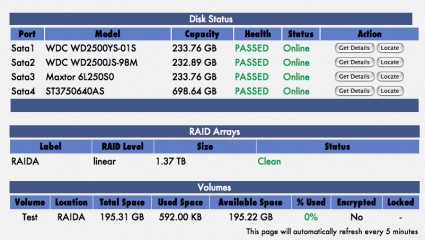
Figure 6: Drive configuration for performance test
Figure 7 shows the RAID 5 Write results for the NSS compared with the Thecus 1U4500 and Infrant 1100 rackmount NASes, with a gigabit 4k jumbo frame LAN connection. A line for maximum 100 Mbps Ethernet throughput is included for reference. The NSS has the lowest write performance for all file sizes except 32 MB.
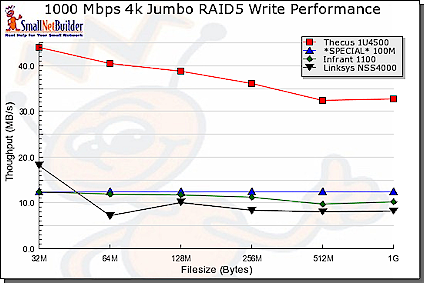
Figure 7: 1000 Mbps 4k Jumbo RAID 5 Write performance comparison
Read results are a bit better, with the NSS holding its own with the Thecus for both 32 and 64 MB file sizes. But for 128 MB and larger files, it again drops to last place.
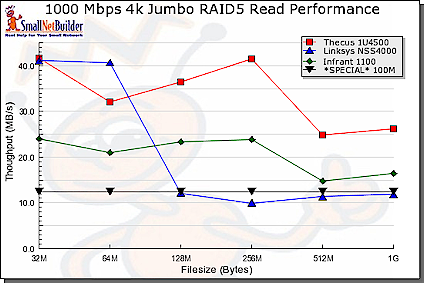
Figure 8: 1000Mbps 4k Jumbo RAID 5 Read performance comparison
Some readers have expressed interest in NAS performance using smaller file sizes than the 32 MB to 1 GB that we have used to date. So, even though small file size performance is more of a reflection of OS and NAS cache performance, we recently added a new mode to the NAS Performance Charts. This "Small File size" mode shows data using file sizes from 64 KB to 16 MB, which is reflected in Figures 9 and 10.
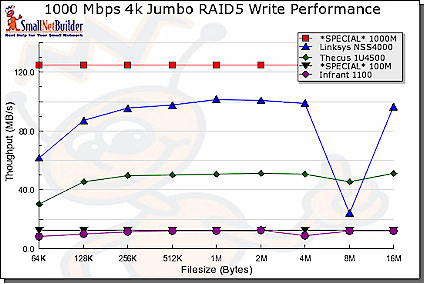
Figure 9: 1000Mbps 4k Jumbo RAID 5 Write performance comparison – small file sizes
Using the smaller file sizes produces dramatically different results, with the NSS taking a large write performance lead over the Thecus 1U4500. The Thecus takes the lead when reading, however, with the NSS in close pursuit.
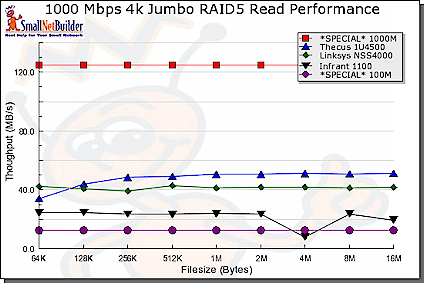
Figure 10: 1000Mbps 4k Jumbo RAID 5 Read performance comparison – small file sizes
You can use explore how the NSS stacks up against other NASes or just explore other modes and LAN speeds by creating your own comparative charts using the NAS Performance Charts.
Closing Thoughts
It took Linksys a long time to finally retire its EFG120 and EFG250 NASes with products that can compete with the current crop of RAID NASes. But it appears that the wait was worth it. The NSS4000 is a business-oriented RAID NAS with features such as its optional redundant power supply, virtualization, VLAN support and dual gigabit Ethernet LAN ports that set it apart from the increasingly crowded pack.
The one standard feature I would have liked to have seen is the ability to do a ssh login to a command-line interface. If I’m a business trusting my valuable data to this device, I’d be much more comfortable if I had the capability to bypass the web interface if anything went wrong. But maybe that’s just me.
The other thing that might give buyers heartburn is the hard limits on number of simultaneous users. The numbers are set reasonably high (15 CIFS / 20 NFS) such that small offices might never encounter a problem. But in larger shops, this could provide some agita for system admins.
But otherwise, the NSS4000 is about as full-featured as you can get for a business-class NAS and should be a big seller for Linksys.