
Lost Password? No account yet? Sign up! Why bother?
  • Narrow screen resolution
  • Wide screen resolution
  • Auto width resolution
  • Increase font size
  • Decrease font size
  • Default font size

SmallNetBuilder - Small Network Help

  
Home arrow Other arrow Other Features arrow Our Charts get Filters
Our Charts get Filters Print E-mail
Tim Higgins   
July 23, 2007

Our Router and NAS Charts just keep on growing and are the best source of solid performance information for these products that you'll find anywhere. But the chart listings have become so large, that, frankly, they are even hard for us to quickly find what we're looking for. So we've made a few improvements that we hope that you'll find useful.

The first change actually rolled in about a month ago and is the flag that you'll find next to products that have have been added in the last 30 days. So, if you just want to see, uh, what's new, you can now tell at a glance.

But the bigger change is the addition of filters to both charts. Figure 1 shows the NAS Chart page with the new filter module.
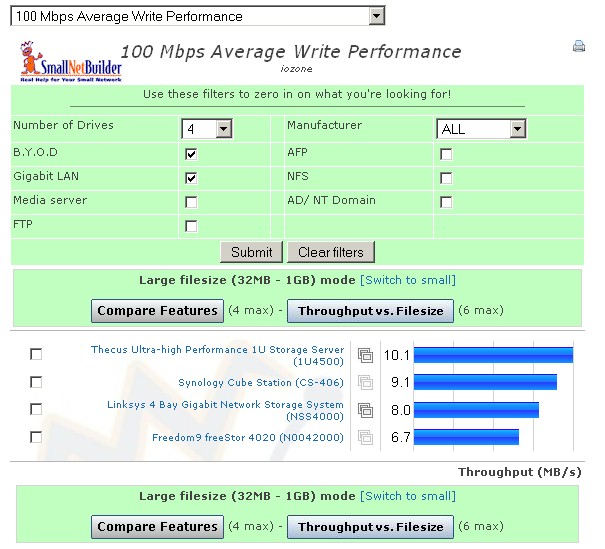
Filtered NAS Chart
Click to enlarge image

Figure 1: Filtered NAS Chart

The filters are cleared by default so that you'll see all available products when you first hit the page. The example shows the results for all four-drive BYOD NASes with gigabit LAN ports, but you can use any or all of the filters to home in on what you're looking for.

Of course, even in the filtered view, the Compare Features and Throughput vs. Filesize buttons work as usual. The filters can be applied to any of the charts, but are cleared when you switch between benchmarks.

Figure 2 shows the Router Chart page with its filtering options and gigabit LAN and WLAN filters applied. The options are a bit sparse right now, but we'll be adding other options once we receive your feeback.
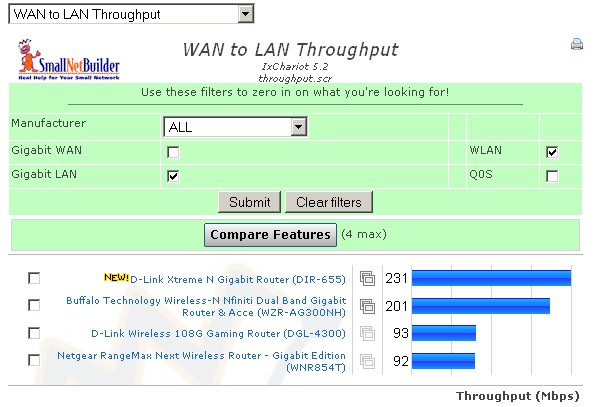
Filtered Router Chart
Click to enlarge image

Figure 2: Filtered Router Chart

And speaking of feedback, please drop us a line or post a comment and share your thoughts on the new filters. Enjoy!

Tags: NAS, router,

Related Articles:

Performance Charts Get Improved
Our Charts get an Extreme Makeover
Introducing Our Wireless Charts
New! Hardware Router Charts Go Interactive
NAS Chart improvements
 

Most Read


Over At The Forums

Wireless Setup for Bed and Breakfast
Thanks in advance for any suggestions. I have a bed and breakfast with 8 rooms in two buildings and have used Linksys WRT54G (old versions with...

Dlink (DIR-655) and VOIP problem
Hello, I can't get a Siemens C450IP VOIP phone working together with a DIR-655. The phone is working without a problem on a USRobotics USR5463 using...

Mini-ITX NAS build
I'm currently looking for some ideas on a fast NAS motherboard at home. Looking into a Mini-ITX because of size and low power. Some requirements...

Dlink DIR-655 Vista Security Issue
I've used the DIR-655 router for quite some time and without hiccup. However, recently I have installed Vista (what a mistake), and under the Network...

DIY NAS User GUIs
Hello all, I have a small network that can vary between 4 and 15 users on any given day, and needs about 1.5-2.5TB of data stored,...

Slideshows

Western Digital ShareSpace QNAP TS-509 Pro D-Link DNS-343 4-Bay Network Storage Enclosure Thecus N3200 RAID 5 NAS D-Link DIR-628 RangeBooster N Dual Band Router Adtran NetVanta 3120 More

Win This!

Enter to Win!

You could win a Promise NetStor NS2300N NAS.

Learn How!


Ldr:0.00184488296509, Rct:0.040874004364, Sky:0.0448470115662, Tlink:0.247012853622, TopPG:0.2471139431, GQV:0.24730682373 seconds to load.