

Introduction

Figure 1: Students using a Wi-Fi hotspot.
If you’ve ever tried to set up a Wi-Fi HotSpot, you may have already discovered that you need more than a broadband Internet connection and wireless router or access point. Off-the-shelf routers and APs don’t provide the "captive portal" function needed to either authenticate users or just let them know who to thank for their free connection. Nor do they usually provide other features such as billing support, bandwidth limiting and user isolation. To obtain hotspot-specific features and capabilities, you must use a device commonly referred to as a hotspot gateway.
If you have already figured out that you need a hotspot gateway to set up a Wi-Fi hotspot, you might not know about the great benefits open-source projects offer in this realm. The focus of this How To is to get you up to speed on open-source resources and walk you through a simple configuration example.
Alternative Firmware – Pros and Cons
Many wireless routers are based on open source operating systems and tools, which open the door to enterprising developers to either provide minor tweaks, or entire alternative firmware distros. These alternative firmwares open up features not usually available in inexpensive SOHO routers, including hotspot features such as captive portal and bandwidth limiting.
Whether youÂ’re setting up wireless Internet access at a public venue (such as a small B&B, store or restaurant) or in an office building (for visitors, consultants, and salespeople), open source firmware offers an alternative solution for your hotspot needs. Before you take the plunge, you should be aware of the negatives, along with the benefits you can reap, shown in Table 1.
| Pros | Cons |
|---|---|
| Saves money | Voids factory warranty |
| Enterprise features | No guaranteed support |
| Customization | More complex setup |
Table 1: Pros and Cons of Alternative router firmware
Saving money is one of the greatest benefits. You can spend just $40 to $60 for a simple router and load it with free firmware to gain functions similar to those in a "real" hotspot gateway costing hundreds more.
Additionally, the third-party firmware gives you the ability to use features usually available only in enterprise devices, such as VLANs, virtual/multiple SSIDs, VPN server, bridging and Quality-of-Service (QoS) capabilities. Another benefit is being able to customize the functionality of the router even beyond whatÂ’s provided by the open-source firmware—if you know your way around coding and networking.
On the minus side, using third-party firmware will definitely void your warranty. So if you have problems, you can’t tap your product’s vendor for help or product replacement in case of failure. And given that youÂ’re essentially messing with the "brains" of electronic equipment, setup is a bit more complex than using off-the-shelf hotspot gateways, which are specifically designed for hotspot solutions.
Fortunately, the more popular alternative distributions, like the one we’ll use, tend to have active user communities with wikis, forums and other lifelines that you can grab onto in case of problems. But if you’re the type who needs to be able to call someone when you run into a problem, then alternative firmware probably isn’t for you.
The Projects
There are three popular general open-source firmware projects offering hotspot capabilities:
- DD-WRT: Offers many firmware versions to support many different routers. Along with adding new general features, open-source projects designed specifically for hotspots are intergraded.
- Sveasoft: Also offers multiple firmware versions, including a free public release supporting the ubiquitous Linksys WRT54G/GS routers and more advanced editions supporting additional routers. It includes hotspot specific features, but requires a yearly $20 subscription fee.
- OpenWRT: Unlike most other firmware replacements, setting up hotspot features and a web-based GUI interface requires advanced knowledge and additional installation.
There are also many open-source projects specifically developed for hotspot solutions, including the following (which I discuss later):
If you’re designing large public networks, there are also firmware replacements designed for mesh networking, such as
freifunk and
Roofnet.
Setting Up DD-WRT For Hotspot Use
IÂ’ve chosen to cover setting up DD-WRT, as itÂ’s a well-rounded, feature-rich firmware replacement offering many hotspot solutions. The following steps will walk through the process of installing and setting up DD-WRT for a public hotspot solution.
Step 1: Get a Supported Router
The first step is to round up a supported 802.11g wireless router, such as the following:
- Linksys WRT54G/GL/GS
- Buffalo WHR-G125 and WHR-HP-G54
- Asus WL-500G and WL-300G
You can also view the
full list of supported devices on the DD-WRT website, along with a great
comparison chart and list of top routers.
Note: You should try to avoid devices with only 2MB of flash memory (such as WRT54G/GS v5.0/6.0) because youÂ’ll only be able to run the micro version of DD-WRT. You should also note the Asus WL-500G premium is only supported by v23 SP3 and later releases.
Step 2: Get the DD-WRT Firmware
Next you need to download the firmware, based on the particular router youÂ’re using and your desired features, from the
collection on the DD-WRT website.
Before you start browsing the collection, however, you should familiarize yourself with the firmware naming and organization schemes. YouÂ’ll see the firmware organized into three different sections: stable, release candidates, and beta. As you can perhaps infer, the stable section is your best bet, providing thoroughly-tested firmware releases.
Each firmware release offers a common set of versions (see Figure 2 for a comparison) which provides more control over the features included in the firmware to conserve router resources, and to support routers with smaller memory sizes. In most cases, the Standard version is the best choice for hotspots, as it embraces all the features except the special VoIP and VPN components.
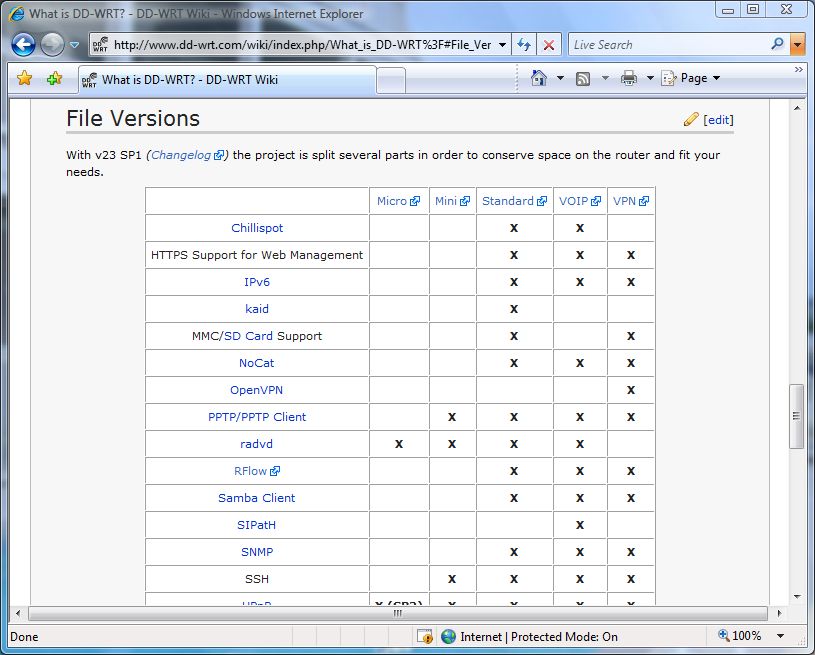
Figure 2: Comparison of DD-WRT firmware file versions.
There are also different firmware types:
- ASUS: For the WL-300/500G models.
- Generic: For routers that donÂ’t require their own version and for special cases.
- Linksys specific: Specific firmware versions for the particular models, beginning with wrt.
- Motorola specific: For micro and mini file versions only, and identified by moto.
Tip: When flashing from original Linksys firmware, you must first use the mini version; then you can upgrade/flash to another version. When using the web interface method, you must use the generic firmware types.
When browsing through the firmware collections, youÂ’ll see file names in the following format: dd-wrt.vXX_set_type.bin. The XX identifies the firmware version, set defines the firmware collection (such as micro or VOIP and is displayed for only nonstandard sets), and type identifies the hardware type (such as ASUS or Generic).
Step 3: Flash Router with the DD-WRT Firmware
There are two basic methods to flash a router: Trivial File Transfer Protocol (TFTP), a simple file transfer method using a command line interface, and using a router’s web interface firmware upgrade feature. Flashing via the web interface is easier and supported by most routers. The exception is Buffalo devices, where you must use TFTP.
|
Since the exact flashing procedure can vary depending on the router manufacturer vendor and model, you need to reference the
flashing directions on the DD-WRT website.
Step 4: Setup a Hotspot Solution
As touched on before, DD-WRT integrates many independent open source projects specifically designed for hotspots into its firmware, including the following:
Sputnik: Integration with a
free/paid hosted service from Sputnik that provides user authentication and device management for use with free or pay access hotspot solutions. Although you may pay for the service, itÂ’s a bit more user-friendly than the other solutions, which are all open-source.
Wifidog:
Integrated into the firmware, providing advanced captive portal and content management features for free access hotspots. You must set up an external server with their proprietary software which requires some advanced web development skills and knowledge.
Chillispot: Enables hotspot user authentication and management for free or pay access hotspot solutions, but requiring an external RADIUS server. Hosted servers, however, provide an easily way to obtain the advanced hotspot features and functionality. HereÂ’s a few places that offer free/paid hosted services for use with this solution:
NoCatSplash: Provides only a simple captive portal (splash screen) feature with a few filtering options, however is excellent for giving away free access (or even paid access with some work) when user tracking and advanced hotspot management isnÂ’t necessary. ItÂ’s best to have some web development experience, as you must create your own splash screen. Otherwise itÂ’s fairly straightforward.
Now that you have chosen a solution, here are the basic steps (in v23 SP2) to set it up:
- Login to the web interface (figure 3 shows an example) using the routerÂ’s IP address (by default 192.168.1.1).
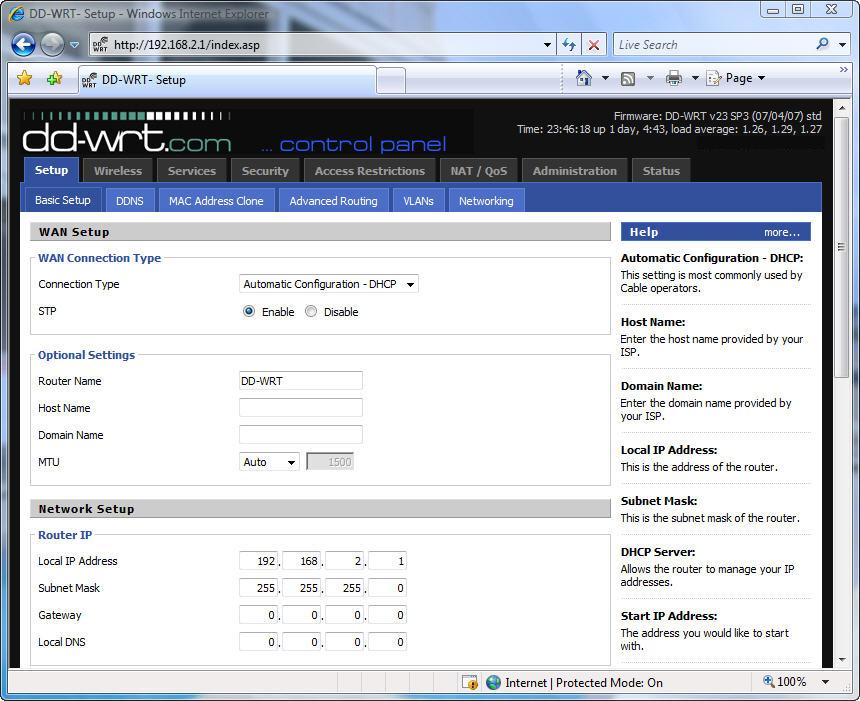
Figure 3: Example of the DD-WRT web interface.
- Click the Services tab.
- Enter the routerÂ’s username and password (by default root and admin) into the dialog box.
- Click the Hotspot tab. Figure 4 shows an example of this page.
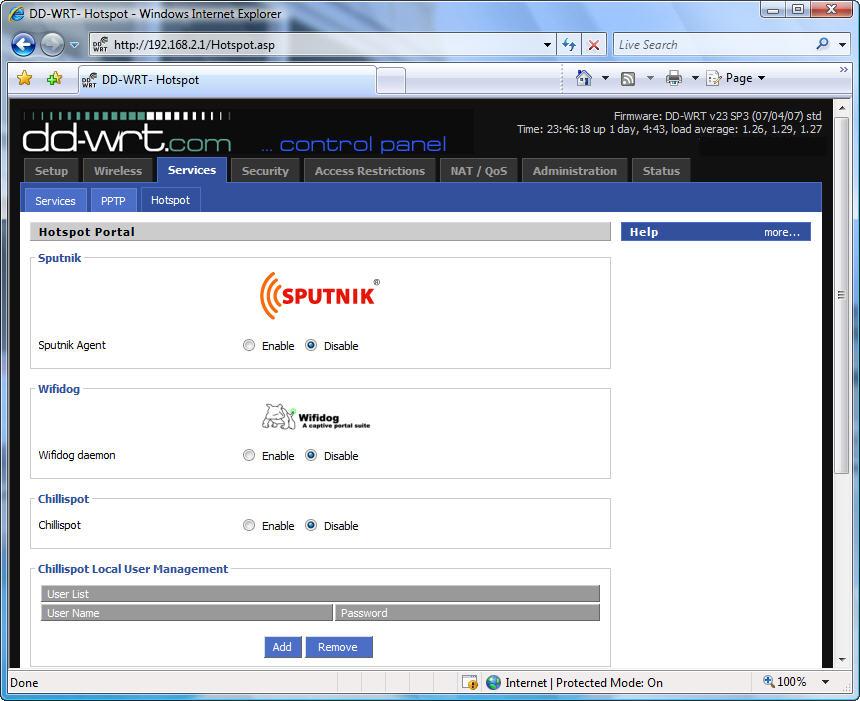
Figure 4: Example of the hotspot settings page in DD-WRT.
- Enable one of the hotspot solutions, configure the settings, and click Save Settings.
Although we wonÂ’t discuss configuring each solution, most of the bullets given earlier offer links to configuration instructions or at least the website of the project where you can obtain help.
Setting Up NoCatSplash
So that you end up with at least one working solution from this How To, I’ll walk through setting up NoCatSplash.
Before configuring the settings, you need to create a web page (.html file) for the splash screen. You can then upload it to the router or host it on a website. After connecting to the hotspot, a user must click the button (such as I agree) on your splash screen before browsing the web.
Use code similar to the following to create a form on the splash page:
<p><b><font size="5">Welcome to $GatewayName!</font></b></p>
<p><b><font size="2">Read the following terms and conditions,
and hit the I Agree to proceed.</font></b></p><p><font size="2">...</font></p>
<form name="login" method="post" action="http://192.168.1.1:5280/">
<input type="hidden" name="accept_terms" value="yes" />
<input type="hidden" name="redirect" value="$redirect">
<input type="hidden" name="mode_login">
<input type="submit" value="I Agree">
</form>
You can use the $redirect variable to send users to a site of your choice (instead of the URL they originally tried to access) after they "authenticate" by clicking the "I Agree" button.
Another optional variable is $GatewayName, which displays the value of the Gateway Name (defined later in the settings) on the splash page.
Now you need to configure the settings:
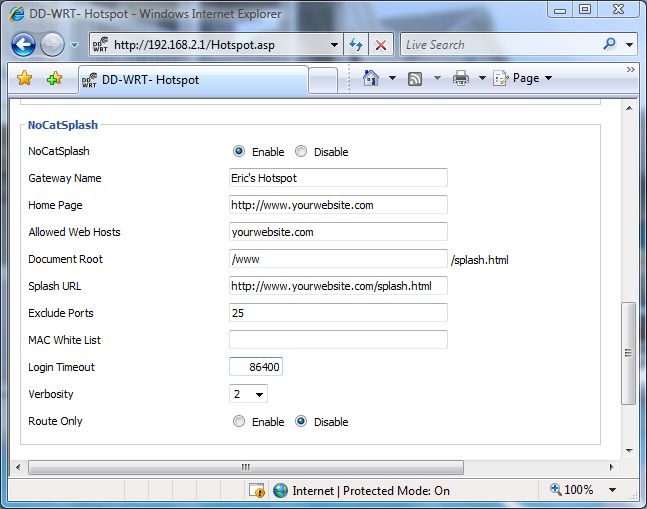
Figure 5: Example of the NoCatSplash settings in DD-WRT.
Gateway Name: This value can be displayed on the splash page when using the optional variable, $GatewayName.
Home Page: Enter your website address, if you have one.
Allowed Web Hosts: List of domains (separated by a single-space) that users can access before hitting the button. If the splash page is on a website, you must enter its domain.
Document Root: The directory on the router where the SplashForm (or splash webpage) is located. If youÂ’re hosting the splash page on a website you can ignore this field.
Splash URL: Enter the webpage address of your splash page, if hosting on a website; otherwise leave blank if uploading to the router.
Exclude Ports: Specify TCP ports (such as 25 for SMTP) to block from the hotspot users. Separate each port number by a single-space.
MAC White List: List of MAC addresses (separated by a single-space) that have unrestricted access. You can for example, enter the MAC addresses of your radio cards so you are not blocked from any ports youÂ’ve excluded.
Login Timeout: Specifies how often (in seconds) the splash screen is displayed. For example, you could set this to 86400 seconds, so every 24 hours the user will see the splash page and have to click the button again.
Verbosity: This specifies the amount of actions thatÂ’s written to the syslogd log. The default value of 5 logs most actions and should be fine for most situations. However to log everything set this to 10, or 0 to disable logging.
Route Only: When enabled, your router wonÂ’t run NAT. Unless you have a strictly routed network, the default setting (disabled) should be fine.
Figure 6 shows the end result of the splash page created with the code given earlier and the settings configured in Figure 5.
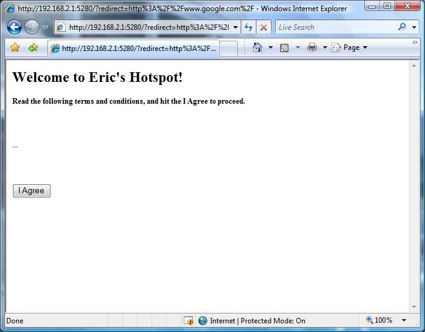
Figure 6: Example of the DD-WRT splash page.
Step 5: Configure Additional Settings
To better adapt your DD-WRT powered router for hotspot use, you should think about making these changes:
- Enable Info Site Password Protection: By default, a page showing status details of the router is displayed (Figure 7) without requiring a password, when a user accesses the router’s admin IP address. Although, the information isnÂ’t particularly sensitive, you should prevent public access to it. Go to the Management settings on the Administration tab and refer to the Web Access section.
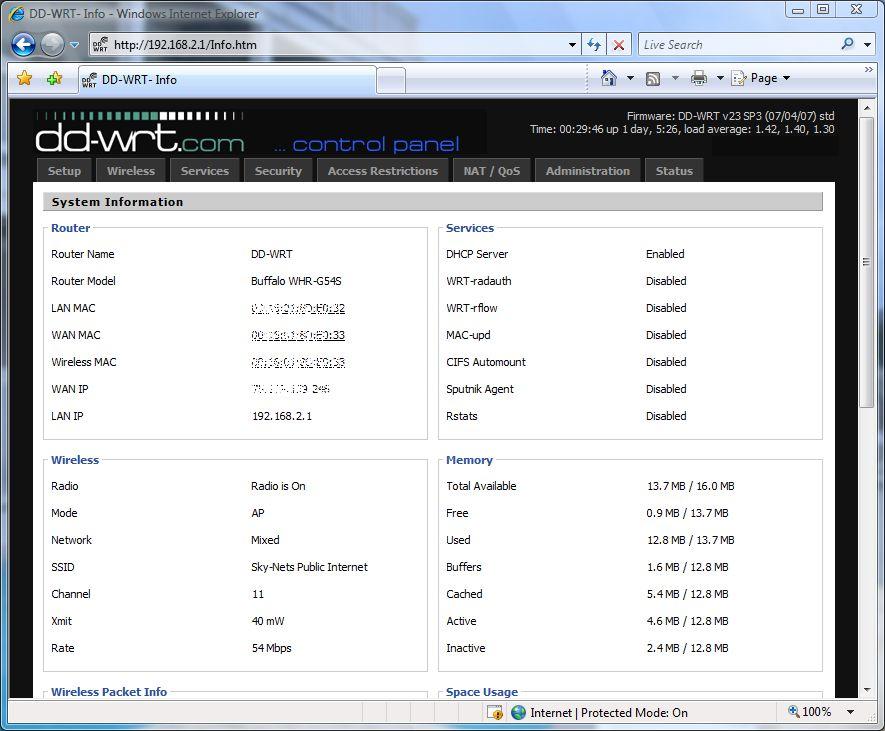
Figure 7: Example of the Info Site page in DD-WRT.
- Filter SMTP traffic: To prevent users from sending SPAM using your Internet connection, you can block SMTP traffic. Refer to the Blocked Services section on the Access Restrictions tab. Depending on the solution you use, this can also generally be set using your hotspot management settings.
- Enable AP Isolation: Prevents communication (i.e. file sharing) between the hotspot users which helps secure users that forget to disable sharing. Go to the Advanced Settings on the Wireless tab.
- Configure QoS: To control the bandwidth each person uses on the hotspot you can configure QoS. Go to the QoS Settings section of the QoS subtab of the NAT/QoS tab. Depending on the solution you use, you may also be able to control this with your hotspot management settings.
Conclusion
In this article, we discussed how you can take advantage of the open-source community when it comes to setting up a Wi-Fi hotspot. You can use third-party firmware on simple off-the-shelf routers, instead of buying a commercial hotspot gateway. Although requiring some extra time and a bit more risk, our solution saves hundreds of dollars.
Among the three general firmware solutions discussed, DD-WRT is most likely the best bet for open source and Linux beginners. In addition, it is intergrated with the most popular open source hotspot solutions.
Have fun with your new hotspot!