

Introduction
| At a Glance | |
|---|---|
| Product | Zyxel Network Storage Appliance (NSA-220) |
| Summary | Two-drive RAID 1 NAS with jumbo frame gigabit Ethernet and Torrent downloading |
| Pros | • Compact, solid construction • Gigabit Ethernet with jumbo frame support • Decent performanace • Quiet |
| Cons | • No email alerts • Windows-only backup software |
There are a lot of home Network Attached Storage (NAS) devices on the market these
days, and in this review, I’m going to check out a relatively new one from ZyXEL. The
NSA-220 is a dual-drive, RAID capable, NAS device with gigabit
Ethernet support, media-serving capabilities and BitTorrent download features.
The 220 is designed to hold one or two user-supplied SATA disks, but for
the purpose of this review, ZyXEL provided me with a unit pre-configured
with two 250 GB Western Digital drives. If you’re installing drives yourself, the
procedure was well documented and involves unscrewing the back panel and attaching drives
to slide-in trays. The use of SATA drives make connecting much easier than
the old IDE drives, since there is no cabling involved. The drives, however, are not hot-swappable, so make sure you power everything down when changing drives.
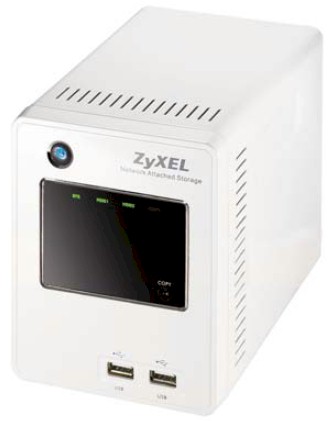
The 220 is packaged in an attractive, solid-feeling, white metal
case, measuring a fairly compact 8" by 4.5" by 5.5". You can see in the photo above that the front
of the device has two USB 2.0 ports, a power button, a
“one-touch” copy button and a number of status LEDs. Figure 1 shows the back panel, where you can see a fan vent, 10/100/1000 Ethernet port that supports up to 9k jumbo frames, a reset button and a power connector.
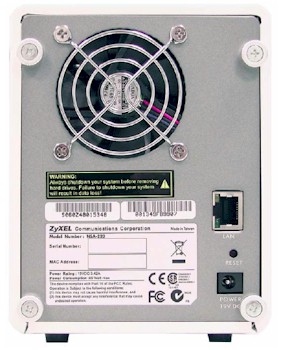
Figure 1: ZyXEL 220 Back Panel
The fan vent is large to accomodate the relatively large 3.5" fan and the 220 ran very quietly, which was much
appreciated since I’ve reviewed some noisy NASes lately. As far as
power consumption, the unit drew about 21 W when in use and 8 W when its drives spun down.
You’ll note that there are no USB ports on the rear; there are only the two
front-panel ports. Front-panel ports are handy when you’re
plugging in storage devices temporarily. But if you want a device permanently attached,
or if you want to make use of the print-server capabilities of the product, you’ll be stuck with cables sticking out the front.
Setting up the 220 was fairly straightforward. For Windows users, ZyXEL supplies an installation CD that provides software that first locates the device on the network and then spawns a web browser for configuration.
For Linux and Apple users, ZyXEL documents that users should locate the device on the
network using its Windows NetBIOS name. Since I was on my Mac, this is what I tried, but
unfortunately on my network, Windows Net BIOS names are not resolvable. So I had to resort to finding the device by checking out the DHCP logs in my home router.
When I saw a new device, I connected to it with my browser and logged in using the default admin user and password. The next screen presented (Figure 2) was a bit unusual for these devices.
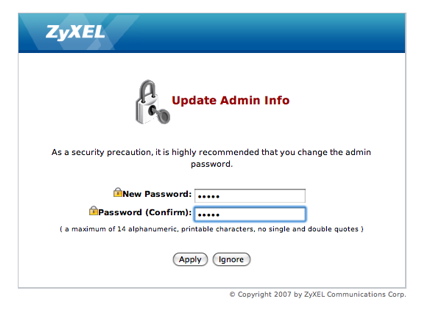
Figure 2: Password change screen
Upon first login, a prompt is given to reset the default password. This is a good idea,
as security professionals are now starting to recognize that home network devices using
default usernames and passwords could be modified by viruses even if they are only reachable from
within the local network. Once I had changed the password, I was greeted with an attractive configuration and status screen as shown in Figure 3.
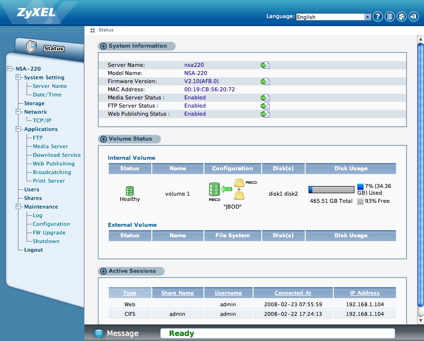
Figure 3: NSA-220 Configuration and status menu
In Use
As I checked out the options in the various menus, I noticed that it had a “Web 2.0”
feel with heavy usage of AJAX type interactions, that allowed me to make changes and
selections without a whole page refresh. The menus were nicely done, and overall the user interface was smooth, consistent and attractive.
The one complaint I did have regarding the interface was its timeout behavior. The
interface is designed to time out forcing you to re-enter your password if
it sits idle for a while, but I found its behavior to be inconsistent. Sometimes it
appeared to timeout while I was actively using it. Other times it wouldn’t time out even when I left it alone for an extended period of time.
As far as setting the product up, the basic options are what you would expect for a home
NAS device. I could set up the IP address to be static or dynamic, select the server
name, workgroup name, etc. For setting up the time, I could opt to manually set it up or
to set it via a NTP server. The one curious “feature” on this screen (Figure 4) was the manual setup for daylight savings dates.
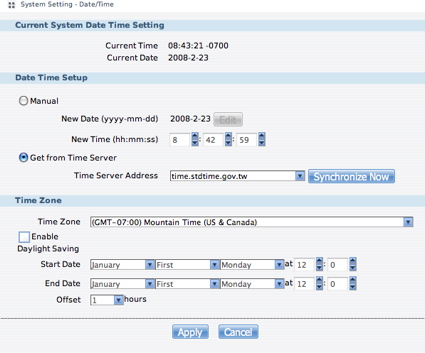
Figure 4: Time setup
Evidently, ZyXEL’s programmers gave up on automatically keeping track of the dates when Daylight Savings stops and ends. But as a user, I really don’t want to stop and track down values that could be looked up in a table by the software.
 See the slideshow for an admin interface tour
RAID
One of the key features of the 220 is its RAID capabilities, and if you have more than one internal disk, you’ll need to decide the best configuration for your intended use. Figure 5 shows the RAID configuration page.
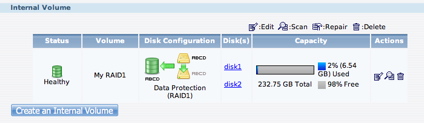
Figure 5: RAID configuration
You can see in this figure that I have chosen to set up my two drives in a mirror
mode, i.e. RAID1. This cuts my capacity in half, but gives me the ability to recover my
data if a drive dies. The 220 also supports setting the drives in striping or RAID 0 mode
for added performance, but no protection in case of disk failure. And as a final option,
you can set your disks up in “Just a Bunch of Disks” (JBOD) mode where both drives are logically combined to form a single disk.
One test I always run on RAID NASes is a “failure mode” test to see how the
product reacts to a failed drive. To test this, I carefully opened up the back panel and
slid out one of the drives while the system was up and running. The first reaction I saw
was a red LED appear on the front panel. When I checked the status page, I saw an indication that the system was now in a “degraded” mode (Figure 6).
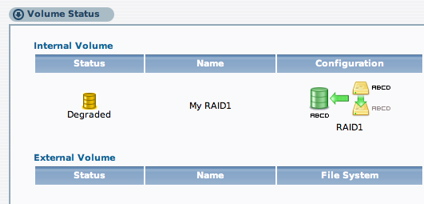
Figure 6: Degraded mode
A quick test showed that all my data was available, as it should be. The 220 also has a “system log” type feature where significant events are recorded. In this case, the log reported that a disk had been disconnected.
One thing that the 220 is missing, however, is an
email-alert function. I like to keep my NASes down in my basement
and out of the way, so I might not notice the red LED or think to go check the status of
the system. I’d like to receive an email when an event like this occurs, but the 220 has no way to send out notices via email.
The 220 is not advertised as a hot-swap system, so to put it back in
order, I shut it down, re-inserted the drive and powered it back up. On some
systems, this is enough to start an automatic re-build of the RAID array. But on the 220, the rebuild has to be manually initiated. Once I selected the
“repair” button from the volume status menu, the system started re-building my array (Figure 7).
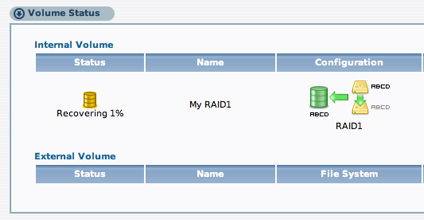
Figure 7: RAID recovery
In my case, I had two Western Digital 250GB drives and RAID recovery period lasted a couple of hours. During this time, I was still able to access my data, but at reduced performance.
Share Management
For granting access to the system, the 220 has the ability to create user accounts. Figure 8 shows the user creation screen.
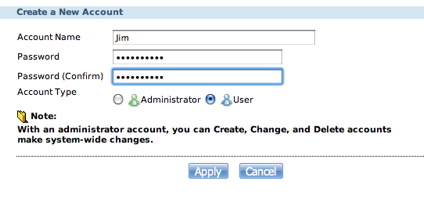
Figure 8: User Creation
Note that the created users can be designed as either a normal user or an administrator, who has access to the 220’s configuration pages. Note that the creation of User Groups is not supported.
Once you have the disks configured, you can set up logical shares such as Music, Video, Backup, etc. within the disk and give your users access to those shares. Figure 9 shows the share creation screen.
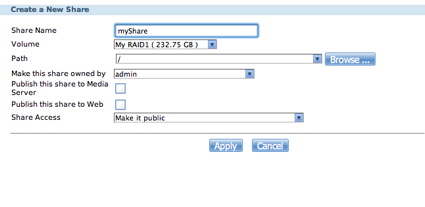
Figure 9: Share Creation
The only network disk sharing protocol on the 220 is SMB. Although SMB is typically a
Windows protocol, it’s supported on nearly every operating system these days. But for
better interoperability, It would be nice to see the use of NFS which is natively used on Linux and Mac OS X.
FTP
Under the “Applications” menu of the 220, you can find configuration pages for a number of protocols. Figure 10 shows the setup screen for FTP.
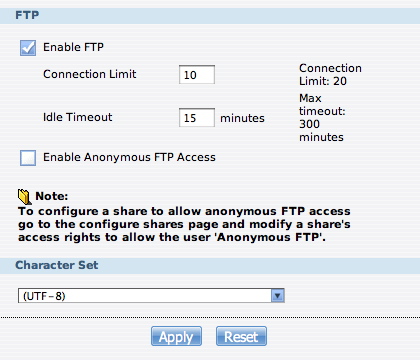
Figure 10: FTP Setup
From this screen, you can see various parameters such as timeout values, maximum simultaneous users, character set, etc. Note that the default network port cannot be changed.
Multimedia
The 220 also includes a couple of ways to share multimedia across the network. The first I checked out was its ability to act as an iTunes server. Figure 11 shows a portion of my iTunes app on my Mac after I had connected to the server on the 220.
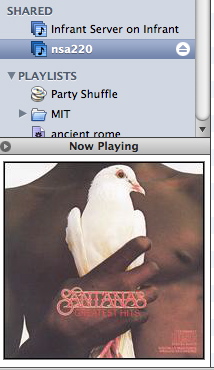
Figure 11: iTunes Server
From this screen-capture you can see that iTunes located, connected to,
and displayed album-art from the server on the 220. This feature worked well
and had no trouble with any songs I tried, including DRM restricted music purchased from the iTunes music store.
The other multimedia capability that the 220 has is a UPnP A/V server. Using this capability, you can serve content from the 220 to various networked media players that support the protocol. If you don’t have a stand-alone device, ZyXEL supplies a Windows UPnP client so that you can play content on your PC (Figure 12).
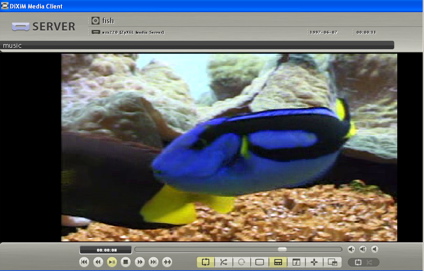
Figure 12: UPnP A/V Client on a PC
I found the client supplied from ZyXEL a bit cumbersome and confusing to use, with only
limited format support. But this is the first time I’ve seen a manufacturer even try to
supply a UPnP media player client. Usually, you’re on your own and expected to use only a UPnP A/V device.
Download Services
The other capabilities found under “Applications” were a bit interesting. The first is a general-purpose Download Service that supports queued downloading from Torrents or FTP and HTML servers.
Figure 13 shows a BitTorrent
download of the classic movie Teenagers from Outer Space (aren’t they all?).
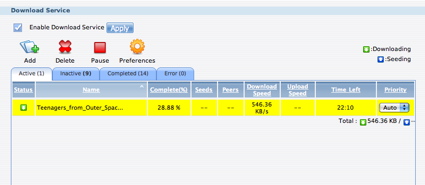
Figure 13: Download Service
This capability worked well and it was nice to have a fire-and-forget client. I loaded up a couple of obscure Torrents that were scheduled to take a week or so to complete, left the 220 alone and eventually they finished successfully.
The other download feature
is a broadcatching client, which is a protocol I wasn’t familiar with. The basic idea is that you
subscribe to an RSS channel, which is composed of links to video and audio content. But be careful when you sign
up. I selected a channel of public domain movies and was quickly inundated with a couple of hundred movies that immediately started downloading, ten at a time (Figure 14).

Figure 14: Broadcatching download
I was getting everything from Refer Madness, to the classic Nosferatu,
to Jesse James meets Frankenstein’s Daughter (really quite good, with a plausible
story-line, sophisticated dialogue and intriguing plot twists). Subscribe to
a few broadcasting feeds, turn on the media sever and you’ll never be lacking for something to watch.
If you’re willing to skirt copyright laws a bit, you can even
subscribe to current television shows to catch up on your favorite program. You can set
an option to download only selected items from the RSS feed, but the default is to grab everything.
When the Broadcatching items start downloading, they show up in the Download Service screen where they can be managed like other downloads.
There a few other features that I won’t cover in detail, but note briefly below:
- Print-server – plug your USB printer into one of the ports and share it across the network.
- Web server – share selected folders via a web server on a user-specified network port.
- One-touch copy – plug a USB drive into the front-panel, hit the one-touch button and make a copy of it.
- Save and restore the configuration settings
- Access to folders – Browse your shares via a web interface.
- Backup – ZyXEL supplies a Windows-only backup client to allow you to backup your data to the 220
Performance
SmallNetbuilder’s performance
charts can provide an almost infinite variety of performance comparisons. But to give you a head start, I chose a few other midrange, two-drive Bring Your Own Drive (BYOD) NAS
devices for comparison: the Thecus YES Box N210; Qnap TS-209 and the D-Link DS-323. The TS-209 is quite a bit more expensive than the others, but I threw it in as a high-end comparison.
What I don’t show are some of the two-drive products that come with
drives included, because it’s hard to do a price comparison with these. If you want to do
this comparison yourself, check out the NAS charts and include them in your run.
 NOTES:
- The maximum raw data rate for 100Mbps Ethernet is 12500 KBytes/sec (12.5 MBytes/sec) and 125000 KBytes/sec (125 MBytes/sec) for gigabit
- Firmware version tested was V2.10(AFB.0)
- Drives used were WDC WD2500JS-60MHB5 Caviar SE 250 GB, 3 Gb/s, 8 MB Cache, 7200 RPM (vendor supplied)
- The full testing setup and methodology are described on this page
- To ensure connection at the intended speeds, the iozone test machine and NAS under
test were manually moved between a NETGEAR GS108 10/100/1000Mbps switch for gigabit-speed testing and a 10/100 switch for 100 Mbps testing.
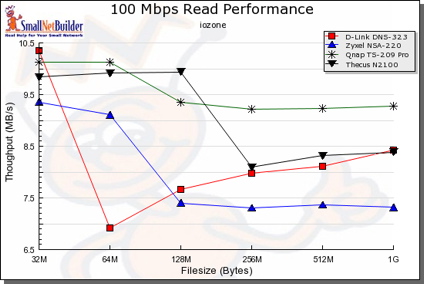
Figure 15: 100 Mbit LAN, comparative read test
You’ll find that the 220 outperforms these devices in many cases. But the Qnap TS-209 has the performance edge among this selected group, as it should since it’s almost twice as expensive as the 220!
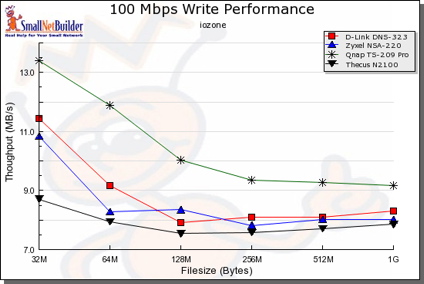
Figure 16: 100 Mbit LAN, comparative write test
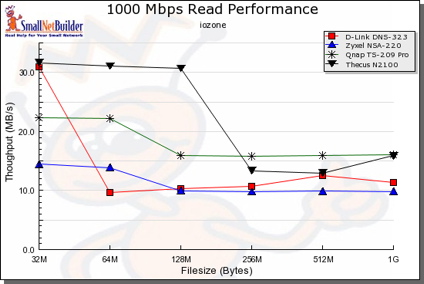
Figure 17: 1000 Mbit LAN, comparative read test
The more interesting comparison is against the D-Link DNS-323, which has consistently generated the most interest among SmallNetBuilder readers. A look at the 1000 Mbps performance charts shows that the 220 holds its own against the DNS-323. But the 220 has the added advantage of supporting up to 9K jumbo frames, which provides a performance edge over the 323.
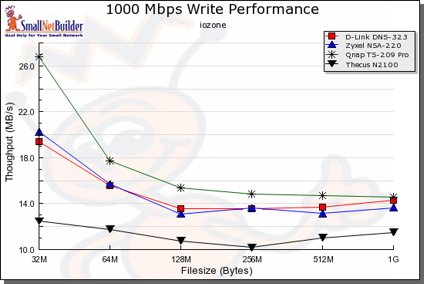
Figure 18: 1000 Mbit LAN, comparative read test
For a “real-world” test, I did a simple drag-and-drop test moving files back and forth
to the 220. For this, I used my MacBook Pro, 2 GHz Intel Core Duo with 1.5 GB of RAM
running a native copy of Windows XP SP2. The directory tree I copied contained 4100 files using just over a gigabyte.
| 1000 Mbps LAN | 100 Mbps LAN | |
|---|---|---|
| Write to NSA220 | ~ 155 sec (6.45 MB/s) | ~ 255 sec (3.9 MB/s) |
| Read from NSA | ~ 205 sec (4.9 MB/s) | ~ 230 sec (4.3 MB/s) |
Table 1: NSA220 Windows XP Drag-and-Drop Filecopy times
Table 1 shows that the gigabit connection is a big help for write, but not so much for read.
Under the covers
Figure 19 shows a photograph of the main board on the 220.
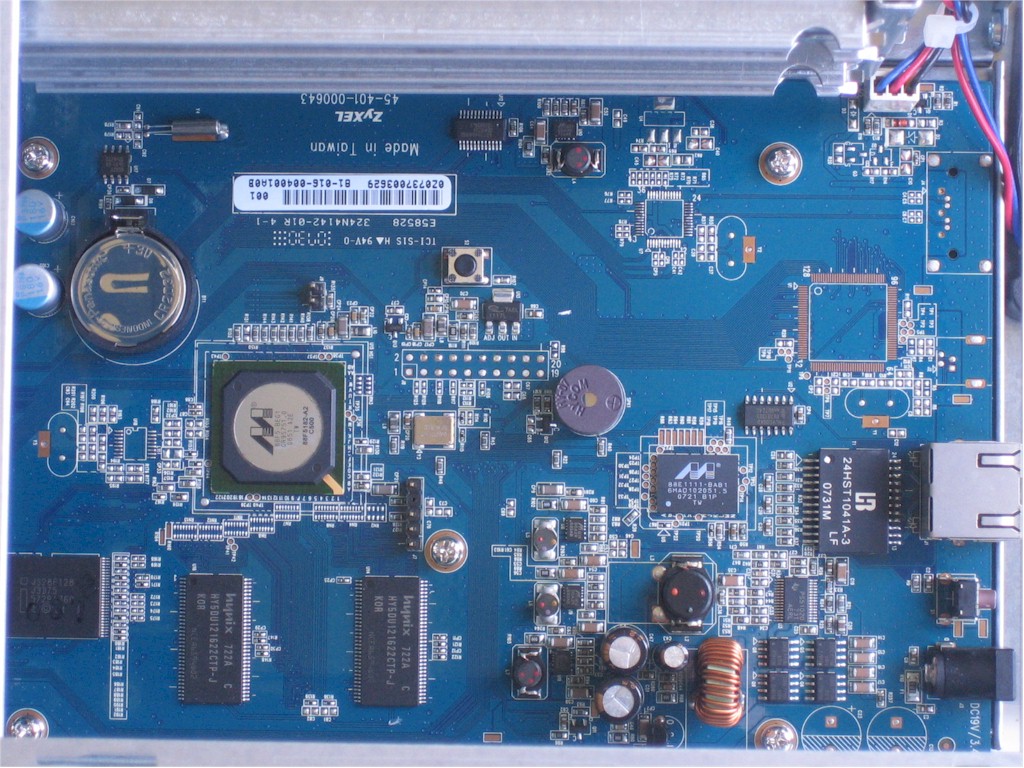

Figure 19: NSA-220 Main Board
In this photo, you can see that ZyXEL is using the Marvell 88F5182 Orion processor at 500 MHz, gigabit Ethernet comes via a Marvell 88E1111 and there is 128MB of RAM and 16MB of flash.
See the slideshow for more inside photos
As far as software on the box,
there are few hints found openly. A port-scan of the box turned up nothing much out of
the ordinary and an attempt to fingerprint the OS was inconclusive. To try and get
command-line access to the box, I broke out my usual bag of tricks such as using a
argument-modifying web proxy. But this time, I was unsuccessful. ZyXEL has
done a good job of locking down the user interface and filtering internally for bad input.
By examining the source to the web interface, I did find that it was written using the
dojo toolkit. So my last attempt to poke
at the internals was to grab a firmware image from ZyXEL and run “strings” on it. This turned up a few clues.
It showed that the box is running a Linux 2.6.12 or a 2.16.18 kernel (both strings were present in the image). There was also an indication that a serial console was present on the 220, so someone with a bit of hardware knowledge, and more time than I, could likely hook up a serial connection to get a command prompt.
Since the product is using GPL-licensed Linux, there should be source code available at the ZyXEL web site or on the CD that accompanied the product, but I couldn’t find it. Hopefully, this was just an oversight by ZyXEL that will be corrected soon.
Closing Thoughts
It’s clear that ZyXEL put some thought and effort into the NSA220. It has solid
construction, decent performance, a nice feature set and a user interface
that is the best I’ve seen in this class of device. While I did have some small issues with the product, there were no showstoppers. The one thing I really would have liked to have seen is an email alert mechanism.
As far as a comparison to other devices in its class, the 220 stacks up pretty well, especially in comparison to the D-Link DNS-323. The 220’s advantages over the 323 are primarily its jumbo frame support for improved performance, Download Service that includes Torrent support and interesting "Broadcatching" service.
The lowest price I found online was around $210, which is slightly higher than the DNS-323. Other two-drive NASes, such as the Qnap TS-209 have a larger feature set and better performance, but you’ll pay in the neighborhood of $350 for them.
So as usual, you’ll need to decide what’s important for your intended usage. But if the NSA-220 has the features you’re looking for and is in your price range, you won’t go wrong in checking it out. Recommended!