

Introduction
Part 1 of this series covered VoIP basics and introduced the topic of Quality of Service. This time, I’ll look at Traffic Shaping and Power Considerations.
My experience has been that the QoS mechanisms covered previously don’t
provide a complete solution to the need for assured bandwidth when
using VOIP over DSL. When the connection to the ISP becomes saturated
for any reason VOIP traffic can be delayed, which is always a problem.
When managed QoS was combined with "traffic shaping" our VOIP phone
service became much more reliable. This has proven to be true even on a very busy connection to my ISP.
Like the QoS mechanisms covered previously, traffic shaping is an
edge process that occurs in your router. Traffic shaping is actually a
process of reserving bandwidth specifically for selected applications.
That bandwidth will not be used for other forms of internet access. As
before, this tends to be most critical with outbound traffic where
available bandwidth is most limited. It’s also true with inbound traffic, but this tends to be less of an issue.
By the time I was ready to put my Asterisk server into production I had shifted to using m0n0wall [reviewed] as my router. m0n0wall is simply outstanding. It’s a router based upon FreeBSD and using a PHP-based GUI that’s accessed as a web site.
It’s available for a variety of hardware platforms including:
- Generic PC
- Soekris Net 4501 single board embedded computer
- Soekris Net 4801 single board embedded computer
- PC Engines Wrap series of single board embedded computers [review]
- PC Engines Alix series of single board embedded computers
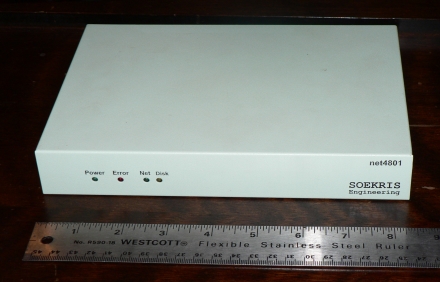
Soekris Net 4801 embedded platform
I decided to use a Soekris Net4801 as the host platform for my
m0n0wall. This is a small system based upon a National Semiconductor
Geode 266 MHz CPU. It boots from a CF card and stores the router configuration on a USB key.
The Net4801 has three on-board Ethernet ports. These are typically used as; WAN, LAN and DMZ.
By default, the traffic shaping feature on m0n0wall
is disabled. Before going about its setup, you need to know for certain
what your actual upload and download speeds will be. To measure your
internet access speeds, use a reliable series of speed test tools such
as those found at Broadband Reports. It’s also a good idea to take
measurements at various times of day to see if there is any significant variability.
The online documentation for the traffic shaper is a little thin but can be found here.
Traffic Shaper Theory
The available bandwidth is forcibly divided into "pipes". Traffic
may be buffered into a pipe by one of a series of "queues". Finally,
"Rules" define what kind of traffic is directed into which queue or pipe.
Confused?
Don’t be.
It looks something like this.
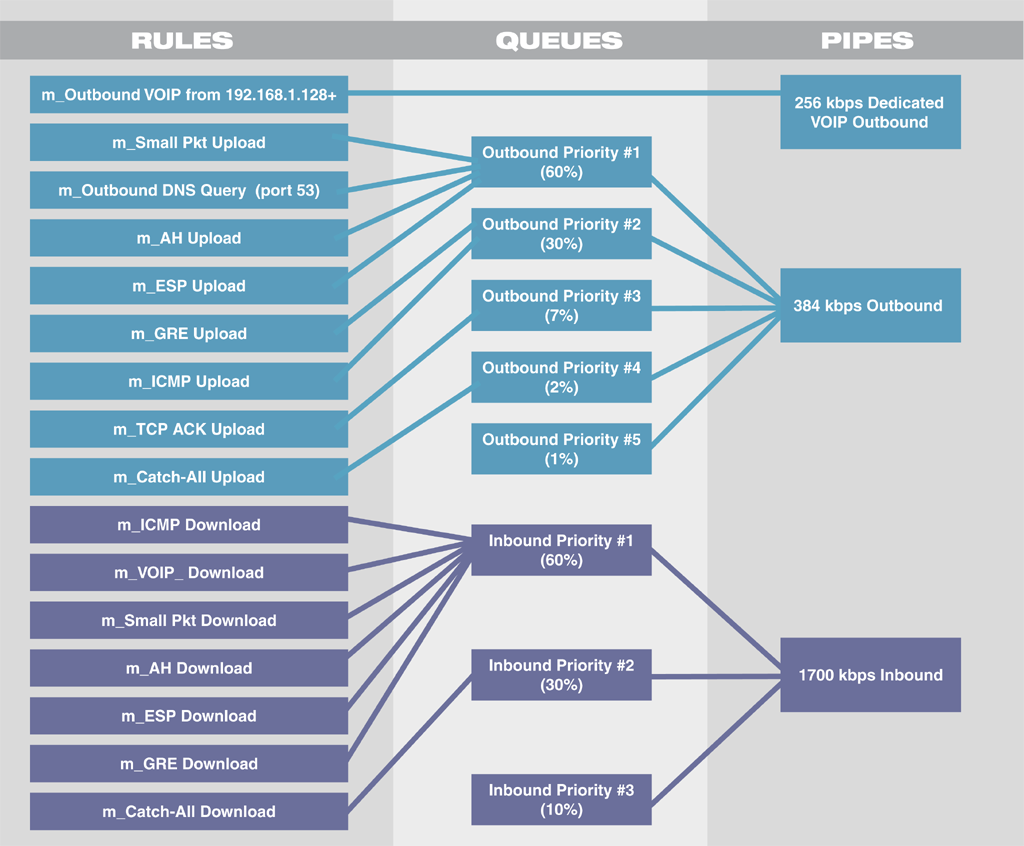
Flow diagram describing the m0n0wall traffic shaper
The theory behind traffic shaping is fairly simple. You will create
several "pipes" which are essentially separate paths through the
router. Each pipe is assigned a certain slice of the available
bandwidth. In my case, I have two pipes for outbound traffic and one for inbound traffic.
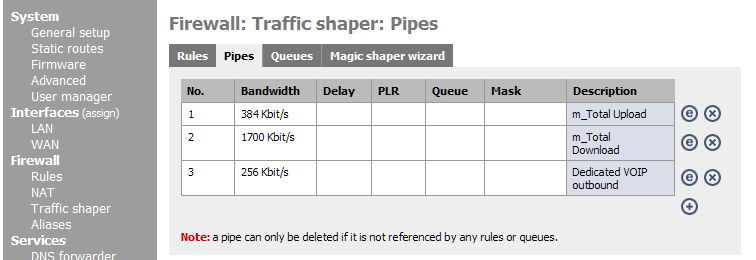
m0n0wall traffic shaper pipes menu
The sum of the bandwidth assigned to all the outbound pipes should
be slightly less than your worst measured outbound connection speed. By
doing this, you ensure that you will never actually saturate your
outbound connection. As long as the connection is not saturated, the router is the defining factor in what traffic gets out first.
In addition to the pipes, you also establish queues within the
router. Queues let you assign varying priorities to different types of
traffic. Each queue can be directed to a specific pipe and assigned a “weight”.
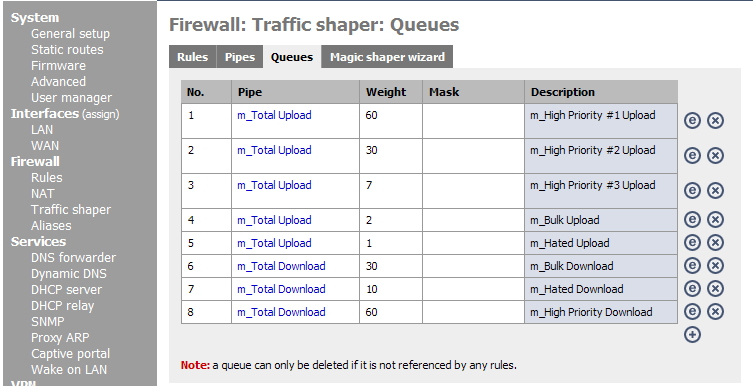
m0n0wall traffic shaper queues menu
Queues, by their nature, are buffers to handle traffic that is being
delayed as it is passes through the router. You can select to direct
VOIP traffic directly into a pipe, with no associated queue. This will assure minimum latency for VOIP traffic.
Traffic shaper rules are created to direct traffic based upon the
properties you select. A rule can direct all traffic from a specific
source or destination IP address, or in my case, IP range, into a
particular queue & pipe. Selectivity can also be based upon port, protocol, network interface, etc.
It’s also worth noting that this is the menu in m0n0wall
where you can direct traffic based upon TOS (Type of Service) tags. So the basic
mechanism of DiffServ QoS is actually a facet of the traffic shaper.
This gives a lot of flexibility, which may be enough of a reason to go the extra cost of m0n0wall over a lower-priced consumer router.
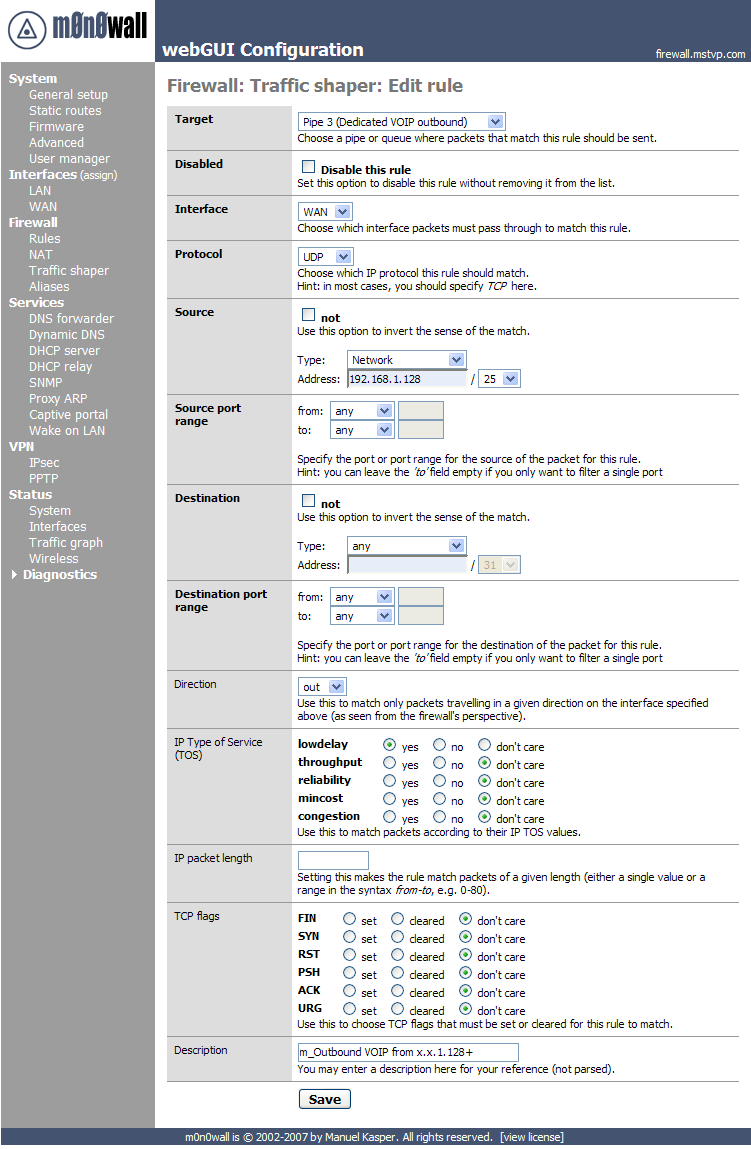
m0n0wall traffic shaper rule editing menu
Magic Shaper
If all this seems a little much to understand, you’re in luck. m0n0wall
provides an automatic setup tool called "Magic Shaper". You only need
to tell it the measured connection speeds. This function will then establish all the required pipes and queues.
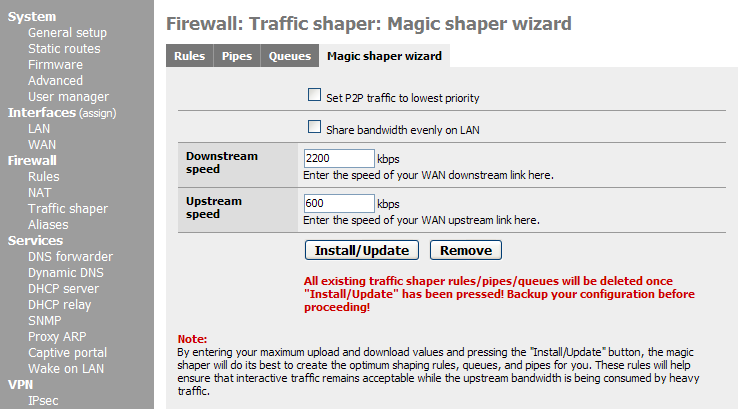
m0n0wall traffic shaper Magic Shaper Wizard menu
My World Of Imperfection
My installation still has the dregs of the magic shaper process in a
couple of ways. There is a "hated" outbound priority #5 that I don’t
use. Since it is assigned only 1% of the available bandwidth, I just
left it in place. There’s also a low priority download queue that goes unused.
Both of these are aspects of the magic shaper process that are part
of a strategy for handling P2P programs. I don’t use any P2P file
sharing programs, so this goes unused. The queue is directed at the sole
download pipe so its presence does not cost me any loss of download
speed. The two higher priority queues access the same pipe and can fully saturate it when required.
Local Asterisk & Hosted PBX
My office may be a little unusual in that I have my own Asterisk
server (several actually) and I rely upon an externally hosted IP-PBX.
I also have a number of SIP hard phones and ATAs around the office and house.
Given the number of VOIP devices and services, I found the easiest
way to direct VOIP traffic to the high priority outbound pipe was on
the basis of IP address. I let each SIP device gets its IP address from
the routers DHCP server. I then use MAC reservations to set all those
IP addresses into 192.168.1.128 and higher. The traffic shaper rule for
VOIP outbound traffic specifies that this address range connects to the high priority outbound pipe.
This arrangement also makes it very easy for me to add VOIP devices
under test and know that they fit into my bandwidth management scheme.
As long as they have IP address in the upper range, call quality is assured.
The only circumstance that isn’t well handled by the arrangement is
when I use a soft phone on my desktop. Since the desktop PC is in the
lower IP address range, its traffic is not treated the same as the VOIP
devices. Happily, I don’t need to do this very often. Plus it’s kind of
gratifying to think that my VOIP traffic get priority even over Skype, which I use only reluctantly.
Within m0n0wall,
dealing with things like IP address ranges uses CIDR notation. This was
not something that I was familiar with previously. I posted a inquiry
to the m0n0wall user list, which met with a great response from one of the project’s lead developers. He posted some provisional documentation here.
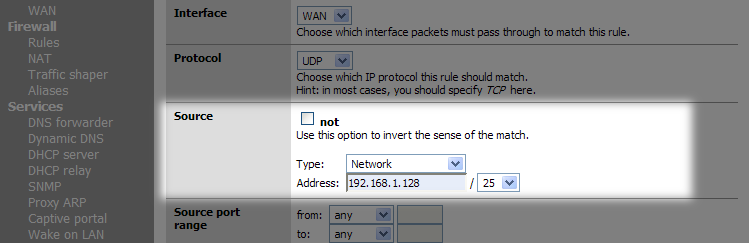
m0n0wall CIDR notation example
It is also possible to assign priorities based upon ports & protocols. I’ve done this in the past, but I have no need of this any longer.
VLANs
There is a lot of VOIP oriented information available online
regarding virtual LANs, a.k.a. VLANs. VLANs are a means of separating
network traffic over the same wire as if there were physically separate networks.
Each VLAN is treated as a separate segment on the LAN, even thought
the traffic is all on one wire. With the traffic virtually separate
there is then a means of establishing varying priorities for VOIP
traffic by giving preference to traffic on the VOIP specific segment.
This requires a router capable of VLAN functionality and some depth of knowledge in its configuration.
Much of the recent attention paid to VLANs in the VOIP space has been highlighting the fact that VLANs should not be considered a security mechanism. This is a little contrary to the common practice.
- Isolation vs. Integration by Dustin D. Trammell
- Telecom junkies Podcast, VoIP Hacking 2: The VLAN Hop
- VoIP Hopping: A Method of Testing VoIP security or Voice VLANs by Jason Ostrom, John Kindervag at Security Focus
In my office, I’ve managed to avoid the complexity of using VLANs. I am of the opinion that such solutions are more appropriate for enterprise installations than SOHO circumstances.
Alternatives to m0n0wall
While I’ve been using m0n0wall, you might also consider pfsense.
m0n0wall is intended for small format hardware like the Soekris boards
and its author has been very careful to avoid code bloat resulting from adding a myriad of features. pfsense is based on m0n0wall, but has a larger feature set and targets more capable hardware.
Astlinux is another interesting alternative. Astlinux
is a full Linux & Asterisk distro build from the ground up for
small form factor hardware. It runs happily on a Soekris Net 4801,
booting from a CF card and storing the system config and voicemail on a USB key. Astlinux includes a built-in routing capability based upon iptables. Thus, using Astlinux, your phone server can actually be your router. The built-in router includes QoS and traffic shaping.
Some time ago, I wrote an article describing building an Astlinux server using a Net4801. While a little dated now, that article can be found here.
As stated at the outset, these articles describe my home
office setup where every call placed or taken is handled over IP. It’s
not uncommon for me to have three simultaneous calls on the go (one on the home line, two in the office) and occasionally four or five.
By using G.729a when possible, combining QoS and traffic shaping I
no longer have any trouble with call quality due to non-VOIP network
activity. I can upload files via FTP or send and receive email while making calls without any problems at all.
Power Considerations
One
of the great things about the traditional PSTN is that it keeps working
when the power goes out. I’ve repeatedly read articles recommending that
people sustain traditional POTS service, at least in part because of
this fact. Their theory being that VOIP service isn’t sustained during
a power outage. But this need not be the case, given just a little forethought.
Prior to migrating to Asterisk, we had been using a Panasonic KX-TG4000 KSU (below). This phone system has four FXO interfaces for analog lines.
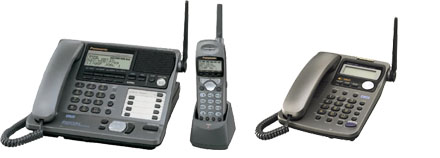
Panasonic KX-TG4000B KSU with built-in battery backup
It also features a built-in battery backup so our
phones stay up through power outages. In migrating to VOIP within our
home and office, I felt it necessary to strive for this kind of reliability. It has certainly made my wife happier.
There are a number of factors involved in my consideration of power for the phone system as a whole.
Asterisk Servers
I have long been a believer in embedded systems and my Asterisk
servers reflect this fact. During my initial experimentation with
Asterisk, I ran it on traditional PC hardware. But eventually I migrated
to a mini-itx system, and then later to embedded systems like the Soekris Net 4801 and HP T5700 thin clients.
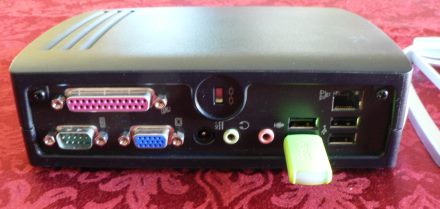
Rear view of a H-P T5700 Thin Client
The embedded systems offer a number of advantages, but two of the
biggest are low noise and low power consumption. Both of the embedded
platforms mentioned draw less than twelve watts. That means that they can be kept running a long time from a relatively low cost UPS.
Along with low power consumption comes the added benefit of low heat
output. This can be important if you lose power and your air
conditioner stops running. Living in South Texas when the AC unit stops, the whole place can heat up quickly.
UPS Power For Network Components
Various key network devices also need to be on UPS power. In my case this includes:
- DSL modem
- Router
- Netgear 24 port gigabit switch
- Power over Ethernet insertion devices
- Wifi access point
- Charging cradle for Aastra cordless handset
I recommend that you keep your phones and network components on
their own UPS. All of the devices listed have very low power
requirements. This means that an inexpensive UPS (1500 KVA, approx. $120) can keep the entire network running for a good long while.
My office is actually in what some people would call the “Garage
Apartment". I prefer to think of it as the “Carriage House" or
“Executive Suite". There are a couple of underground CAT 5 runs from the office to the house, so it’s all one network.
There is a small networking cabinet in the house that contains a 16
port switch and a Linksys ATA for the home phones. This gear needs to
stay powered up 24/7 /365 so I also had to provide a second, smaller UPS (700 KVA) in the house.
Power Over Ethernet
In my opinion, this is one of the most overlooked conveniences in
SOHO networking. Providing power-over-Ethernet (POE hereafter) is
tremendously useful. It lets me keep my Polycom and Aastra phones
powered by the same UPS as the rest of network closet. If ever I need
to replace my ATAs, I will definitely seek new units that are POE capable.
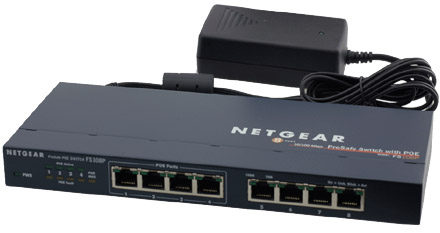
A small Netgear switch capable of POE
I especially feel that POE is useful for Wi-Fi access points. It lets
you position the AP in a location that is selected for ideal wireless
propagation (even outside in a weatherproof housing), without concern
for providing an AC outlet. It also makes it easy to provide physical
security for your WLAN from the wiring closet. That is, when I’m out of
office for a week, the AP is powered down by simply unplugging the cat 5 jumper running to the AP.
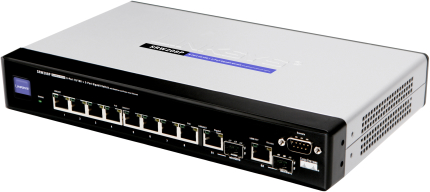
A small Linksys switch capable of POE
POE can be provided by careful selection of your network switch. Some low cost 8 and 16 port switches provide POE on a limited number of ports, ideal for SOHO use.
It’s also possible to add POE via “mid-span insertion". This
involves placing a small power insertion device on the network line,
between the switch and the device to be powered. This is how I started
using POE, as my Aastra 480i phones came with POE insertion devices. I
was so happy with them that I purchased a couple more for my Polycom phones.
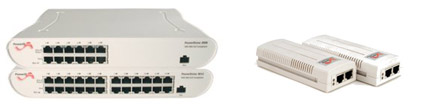
Midspan POE Inserters
Mid-span POE insertion devices come in single and multi-port models.
The single port models look like “line bump” power supplies but with
two RJ-45 jacks. Multi-port POE insertors look a lot like network switches.
POE capable switches are definitely more expensive than non-POE
switches. If you shop wisely, you may find a POE capable switch that
meets your needs, while superficially more expensive, is actually
cheaper than a non-POE switch and a mid-span insertion device.
If you only need a few POE ports, then using mid-span insertion is typically less expensive.
In examining POE insertors or POE capable switches, it’s worth noting
how much current each port can provide. The Linksys 8 port switch
pictured above, for instance, provides 15 watts per port when 4 ports are powered or only 7 watts per port when all 8 ports are powered.
You
need to be aware of the power requirements of each of your upstream
devices and be certain that the POE power source can handle all of
them. Phones are not generally a large power draw. Wi-Fi access points and security cameras draw a little more.
The standard for POE is referred to as 802.3af and specifies not only the wiring standard, but also a protocol for POE power sources to detect if the upstream device is also POE capable.
Prior to this standard becoming widespread several manufacturers
made equipment based upon their own standards. This is especially true
for older Polycom and Cisco IP phones. These may require special network adapter cables to be powered by standard POE power sources.
Alternatively, some larger midspan POE inserters (ex Belden Power Sense) can switch between standard and device specific POE on a per-port basis. That can be very handy if you need to power a variety of devices.
While 100% VOIP, we are still able to keep our phones, our entire network for that matter, running when the power fails. The combination of a decent UPS and POE makes this possible.
Perhaps one day I’ll pull the plug on the UPS and see how long everything runs. Its never been needed for more than 10-15 minutes at a time.
It’s a truly amazing and wonderful thing to be sitting at my desk
when the power goes out suddenly. Then, in the silence created by the
total lack of PC noise, I find myself basking in the faint glow of the
backlight from an Aastra 480i. The silence is shattered by the ringing
of my phone. It’s my wife calling from the house telling me that the power is out.
It’s even more amazing when the entire network stays up throughout a power outage and I’m able to easily transition to working on a laptop complete with internet access over Wi-Fi.