

Introduction
A question that is on many WLAN buyers’ minds is whether to make the move to draft 802.11n gear. There’s a lot of it out there and prices are even reasonable (at least for wireless routers, not adapters)—in some cases not that much more than 802.11g gear.
But the IEEE Task Group n is still making changes to 802.11n and there are no guarantees from any networking product vendor that the gear you buy today will be upgradeable to the standard when it is finally approved in mid-2009 (by the current schedule).
And even if your current draft 11n gear were upgradeable, whether you would want to upgrade it is another question. Some chipmakers are into their second generation of 802.11n chipsets and will likely be into their third or fourth by the time 11n is released. The biggest push is to reduce cost, but performance improvements are also probably quietly being worked in.
The other question is when upgrades would be available for the stuff you’re using today. If past upgrades are any indication—WEP to WPA, WPA to WPA2, WPS—your gear might never make the cut. No matter how large the company, resources aren’t unlimited. Pumping out new products is usually where the time and energy goes because it brings in new revenue. Fixing old stuff just isn’t profitable.
Purchasing from a "name" vendor doesn’t seem to raise the odds that you’ll be upgraded, either. Just look at Linksys‘ popular WRT150N. Even though it was born with a WPS pushbutton perched proudly on its top cover, Linksys appears to have no plans to add WPS support. Heck, they haven’t even fixed the fact that it defaults to Auto 20/40 bandwidth mode (due to a now-closed hole in the Wi-Fi Certification process) instead of the 20 MHz mode that is a Wi-fi Certification requirement.
But enough of my complaining. What should you do if you’re thinking of buying draft 11n gear? Up until now, I have recommended moving to dual-band when moving to draft 802.11n. The reason for this was to provide the option of accessing the relatively uncrowded 5 GHz band to escape interference from neighboring WLANs. The 5 GHz option provides 8 – 12 non-overlapping channels vs. the three you get in the 2.4 GHz band.
Those extra channels not only provide more options for avoiding your neighbor’s network, but are also needed to take advantage of 11n’s throughput-boosting channel-bonding mode. Enabling channel bonding (usually referred to as Auto 20/40 mode in draft 11n router configuration interfaces) in the 2.4 GHz band takes up two of the available three non-overlapping channels (1, 6, 11) and usually means that you’ll be interfering with neighboring wireless LANs. This is why the Wi-Fi Alliance requires that draft 11n routers default to 20 MHz bandwidth mode in order to be Certified. And some companies, such as Apple and Intel, have locked out 40 MHz mode in 2.4 GHz altogether in their draft 11n products.
But the industry has been slow to produce dual-band gear and dual-band, dual-radio products, in particular. And the relatively few products they have produced command prices ($150 and up) that cause most consumers to give them a pass.
So I’m changing my recommendation.
Let’s Compare
The main thing that draft 11n brings to the table is higher throughput. After all, the official name of the IEEE Task Group n is "Standard for Enhancements for Higher Throughput". What is higher? Figures 1 and 2 show a throughput vs. path loss (signal level) comparison of four Linksys products that use Broadcom wireless chipsets.
The WRT54G [reviewed] is Linksys’ ubiquitous standard 802.11g router. The WRT54GS [reviewed] is 802.11g enhanced with Broadcom’s "Afterburner" non-standard 802.11g throughput-enhancement technology. The WRT160N [reviewed] is a two-antenna, 2 Transmit, 2 Receive (2T2R) entry-level draft 11n router. And the WRT600N [reviewed] is Linksys’ top-of-the-line, dual-band dual-radio three-antenna draft 11n router.
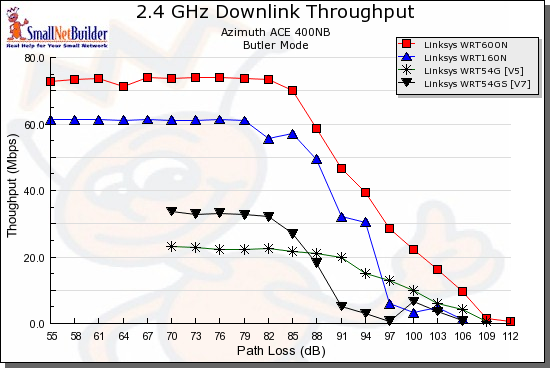
Figure 1: Downlink throughput comparison – Linksys
The gist of Figure 1 is that standard 802.11g will deliver 20-25 Mbps, while Broadcom’s speed enhancements will boost that about 10 Mbps. Moving up to a relatively inexpensive entry-level draft 11n router will about double the "GS" throughput to around 60 Mbps. But making the final step up to a top-of-the line draft 11n router provides a boost similar to the G to "GS" step, i.e. ~10 – 15 Mbps.
One important factor is that, aside from standard 802.11g products, you get these best-case results only with matching wireless adapters. "Matching" means a wireless adapter that uses at least a chipset from the same manufacturer and product family. 802.11g throughput enhancement techniques used by different chipmakers while similar, are proprietary and don’t usually interoperate. And, until the "draft" drops from in front of "802.11n", you can’t be sure that a router and client are operating at optimum performance.
To illustrate the point, Figure 2 compares D-Link products that use Atheros wireless chipsets. The WBR-2310 [reviewed] actually uses an Atheros "Super-G" (its proprietary throughput enhancement technology) chipset, but defaults to the "Turbo" (channel bonding) part of Super G turned off. The DGL-4300 [reviewed] is also Super-G based, but defaults to having "Turbo" enabled. The DIR-625 [reviewed] is an entry-level two-antenna draft 11n router and the DIR-655 [reviewed] is D-Link’s current top-of-the-line three antenna draft 11n router.
You can once again, see a similar pattern of throughput improvement as you move from standard 11g, to "enhanced" 11g, to two-antenna draft 11n, to three-antenna draft 11n.
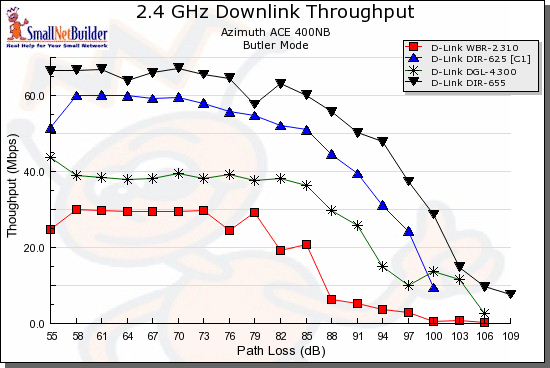
Figure 2: Downlink throughput comparison – D-Link
Figures 3 and 4 are the uplink equivalents of Figures 1 and 2 for the Linksys and D-Link products, respectively. Look kind of different than the downlink, don’t they?
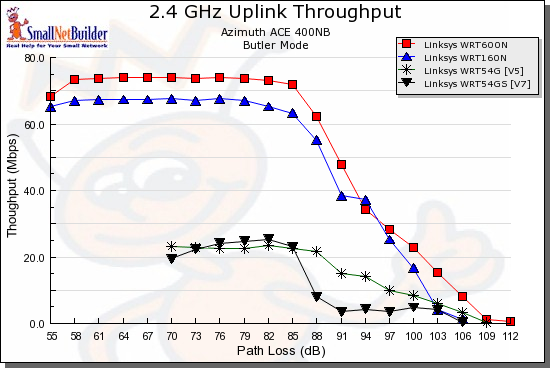
Figure 3: Uplink throughput comparison – Linksys
I included these to show how products can behave very differently between up and downlink performance. Some applications, such as video streaming primarily require a fast downlink connection. But others, such as general file sharing and transfer, require high bandwidth in both directions.
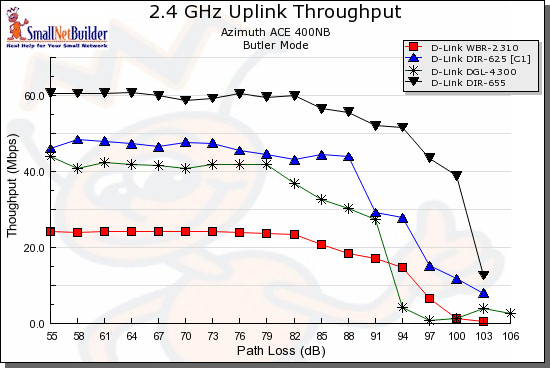
Figure 4: Uplink throughput comparison – D-Link
You might think that draft 11n products have longer range, and that’s just what manufacturers would like you to believe. But if you look carefully at their claims, they usually refer to "coverage", with dimensionless charts that imply that you’ll be able to connect at a longer distance, but don’t provide any numbers to back up the implications.
A look at the charts above shows a more accurate comparison of the "range" performance of the four Wi-Fi technologies. If draft 11n products really provided longer range, their curves would end at a higher path loss value (lower signal level). But the data shows that they actually stay connected to similar signal levels. And, in some cases, the draft 11n products actually disconnect earlier than 11g and "enhanced" 11g products. You can find many more examples by running your own plots using the Wireless Chart tools.
The New Recommendation(s)
The bottom line is that I’m no longer recommending that you go for dual-band dual-radio products if you want to move now to draft 11n. The main reason is that the potential upside isn’t enough to justify the high cost, especially if you have a large installed base of 802.11b/g devices. As I showed in this article, you’re likely to create more problems than you’ll solve by trying to run a mix of 11b/g and draft 11n devices on one router.
In fact, if you have an installed base of 802.11b/g clients and devices, I’d recommend that you just buy an 802.11g router if the one you have gives up the ghost on you. They’re cheap, the selection is wide and you won’t have the compatibility hassles that introducing a draft 11n router can bring.
If you want to try draft 11n, try an entry-level two-antenna model. I liked the D-Link DIR-625 in our recent round-up of entry-level draft 11n routers, but there are also other good choices in the group. An inexpensive draft 11n router will give you most of the performance gain that there is to be gotten from draft 11n.
Because you won’t have dropped a bundle on your first draft 11n router, you won’t much care about upgrading it when the standard is released in 2009. By then, dual-band products will have dropped in price (both single and dual radio), so you’ll be able to buy a "finished" (not that these things ever are) product. Much better than waiting for your manufacturer to squeeze out an upgrade.
If you like your current router, but just want to see if draft 11n wireless can provide a benefit, go ahead and buy a draft 11n router and just turn it into an access point using this simple how-to. And definitely run both the old 11g and new draft 11n WLANs side by side if you have a mix of "legacy" and draft 11n clients.
If you really need to move to 5 GHz, then buy a single-radio model, unless prices drop so that the dual-radio price premium isn’t so high. As I was writing this, it looks like Linksys might be moving in that direction, with a $160 street price for its dual-radio WRT600N. And for those of you pining for the D-Link DIR-855, buy something else and get on with life!