

Introduction

| At a Glance | |
|---|---|
| Product | Untangle Gateway Platform (untangle) |
| Summary | Commercial-grade open source solution for blocking spam, spyware, viruses, adware and unwanted content. |
| Pros | • Key features are all free • Option for paid support • Install on your own hardware or VMWare • Very active and helpful support options, forums, phone |
| Cons | • Steeper horsepower requirements compared to other open source routing distros • Can be finicky with hardware compatibility • Lots of scrolling required in the GUI |
More and more small business networks are desiring something more robust than just a plain old off-the-shelf NAT router. Years ago, many businesses enjoyed high speed Internet by utilizing a broadband router. This allowed them to share a broadband Internet connection, and give them basic hardware firewall inbound protection through its NAT.
As time went by, more and more demands were put on the small business network. Heavier loads, remote access, removing spam from e-mail, additional antivirus protection, basic content filtering along with the desire to limit some employee computer abuse. Enter Unified Threat Management (UTM) appliances. These have become relatively commonplace in big enterprise setups. But they often also come with big enterprise prices, thus remaining out of grasp of the smaller business networks (~ 10-100 nodes). Not only can the initial cost of the appliance be high, but the annual support/renewal costs make it a show-stopper.
For quite a few years, I had become interested in the many Linux distro routers out there. IPCop, m0n0wall, Smoothwall, PFSense; there are quite a few that I enjoyed installing and fiddling with. Now I’m a Windows guy (awaits the boos and hisses)…I really have no knowledge of Linux at all. So at first, that may have kept me from trying them out.
However, after I tried the first one, I found that they are wonderfully easy to set up. You download an ISO, burn it to CD, dig up an old PC that has two fairly standard network cards, boot from the CD, and follow the hand-holding install wizard. Once done, you log into the router using a web browser from another PC on your network. It is managed through this web interface, much like any other home-grade router you may be familiar with.
I soon stumbled upon an add-on for IPCop…called Copfilter. I thought it was pretty cool because it added antivirus and spam filtering to traffic running through it. I then learned of another package called Endian. Endian is built on top of IPCop with the Copfilter add-on, but in a much more polished package. I had a few small business clients who were complaining about spam and Endian helped shrink their Exchange server inboxes—for no cost!
A little over a year ago, at one of the network propeller-head forums I haunt, I learned of a new distro called Untangle Gateway. I quickly headed over to the site and was soon eagerly downloading the ISO and anxious to try it out. I couldn’t believe all the features it had:
- Webfilter
- Spam Blocker
- Spyware Blocker
- Protocol Control
- Virus Blocker
- Phish Blocker
- Intrusion Prevention
- Attack Blocker
- Firewall
- OpenVPN
- Reports
- Routing and QoS
All of these are based on existing open source products, which have been customized a bit by the Untangle crew.
There are also some additional components that you can purchase:
- Live Support
- Active Directory Integration
- A Policy Manager
- Kaspersky Antivirus as a second scanning engine
- PC Remote
- Remote Access Portal
Some of these are available in a "Professional Bundle", which includes support, the AD Connector, Policy Manger, and the Remote Access Portal. Or you can purchase features a la carte.
Requirements
I began my download and started reading the FAQs. The first thing I noticed was that Untangle had some rather steep horsepower requirements;this isn’t going to run on your old leftover P2 like IPCop does. But I had already anticipated that requirement, having previously worked with Copfilter and Endian.
I had found that UTM distros work harder and so require more horsepower under the hood. Untangle wants at least a 1.0 GHz processor, and a minimum of 512 MB of RAM to handle just a couple of clients. If you have a larger network with heavier loads, you’re going to want to start in the P4 range, with at least a 1 GB of RAM.
Untangle Gateway Platform runs on layer 7 of the OSI model. So each individual application (or "Node") that you have in Untangle is run virtualized within the Untangle server. Traffic routes through the virtual network, passing through a node, then re-entering the virtual network stream and moving on to the next node.
You can add and remove nodes as you wish, depending on how you intend to use your Untangle box. Its main use is as a primary firewall device, with its outside network card plugged into your broadband modem and grabbing a public IP address.
But Untangle can also be run in transparent bridge mode, since some businesses may already have a primary firewall/router and just want Untangle to, say, scrub inbound email before it reaches their Exchange server. Untangle is able to accommodate this (and for email you’d probably want to run the anti-virus and anti-spam nodes, too).
If you don’t want to build your own box, Untangle sells pre-configured units and will ship you an Untangle Gateway box ready to plug into your network.
Installation
But since I wanted to roll my own, I grabbed an older HP/Compaq Business Desktop small form-factor model with a 2.4 GHz Pentium 4, 1 GB of RAM and onboard Intel 10/100 NIC. I dug through my chest full of parts to dig up a second PCI NIC.
I booted from the CDROM and was quickly impressed by the setup routine. No boring monochrome screen like other *nix distros! The splash screens for this setup made me think more of building a server from an HP SmartStart CD; even fancier than that.
You are presented with a page that looks like a registration page, asking you how many PCs will it protect, contact info, etc. I hesitated at first, worried about getting sold to some spam mailing list. But it was unwarranted. The email part is tied in with your "Library" if you wish to purchase additional components.
After finishing the setup, which also includes a quick connection wizard, I rebooted and was presented with the standard screen. Unlike many other Linux distros, Untangle allows you to manage it right from the computer you installed it on, via a Java-based utility.
Note: You can use this Live GUI preview to explore more of the Untangle’s features. It’s a 7 MB download that requires Java installed on your local machine.
Untangle uses the interface model of an equipment rack, into which you install applications (nodes) that implement different networking functions. The Library column on the left side of the screen contains the Commercial Add-ons that can be purchased and downloaded for use in your Untangle installation. The next tab is called My Apps, which contains the open source applications that can be downloaded (no charge) to your Untangle box. The space on the right is the "Rack".
Once nodes are installed, they appear in the Rack (Figure 1).
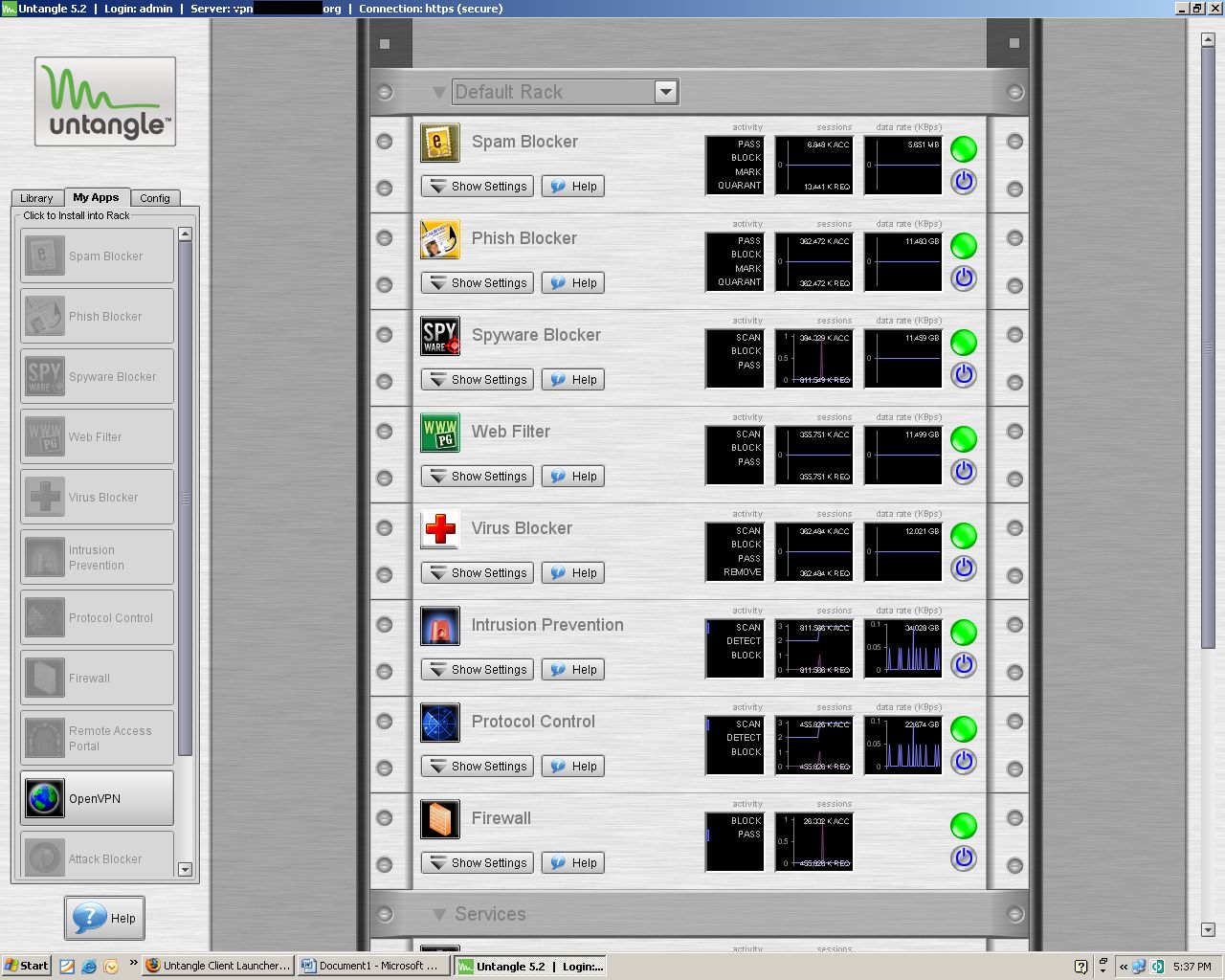
Figure 1: Untangle Rack with installed Nodes
The third Config tab allows you to manage configuration of some of the rack components through a browser interface called Alpaca (Figure 2).
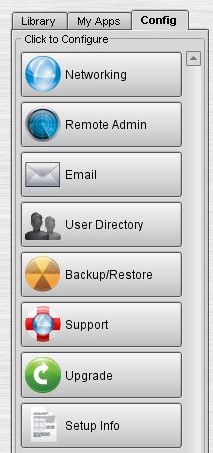
Figure 2: Untangle Config Tab
For example, the Networking configuration brings you to some of the features you’d see on common home grade routers such as Port Forwarding, WAN and LAN Interface configuration, DHCP, DNS, Packet Filter, Routes, etc.
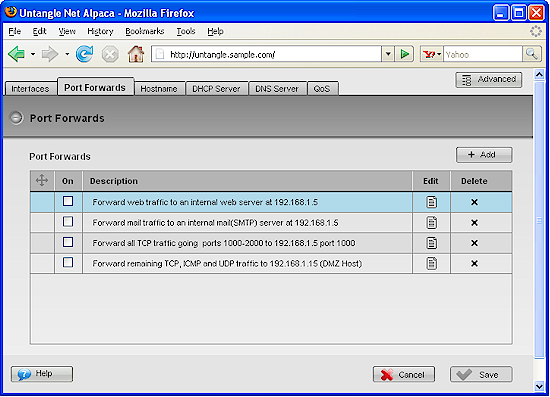
Figure 3: Networking Port Forwards
Each node within your rack can be expanded to fine tune settings within the node. For example, the Spyware Blocker controls in Figure 4 allow you to get fairly granular with setting exceptions, blocking ActiveX, etc.
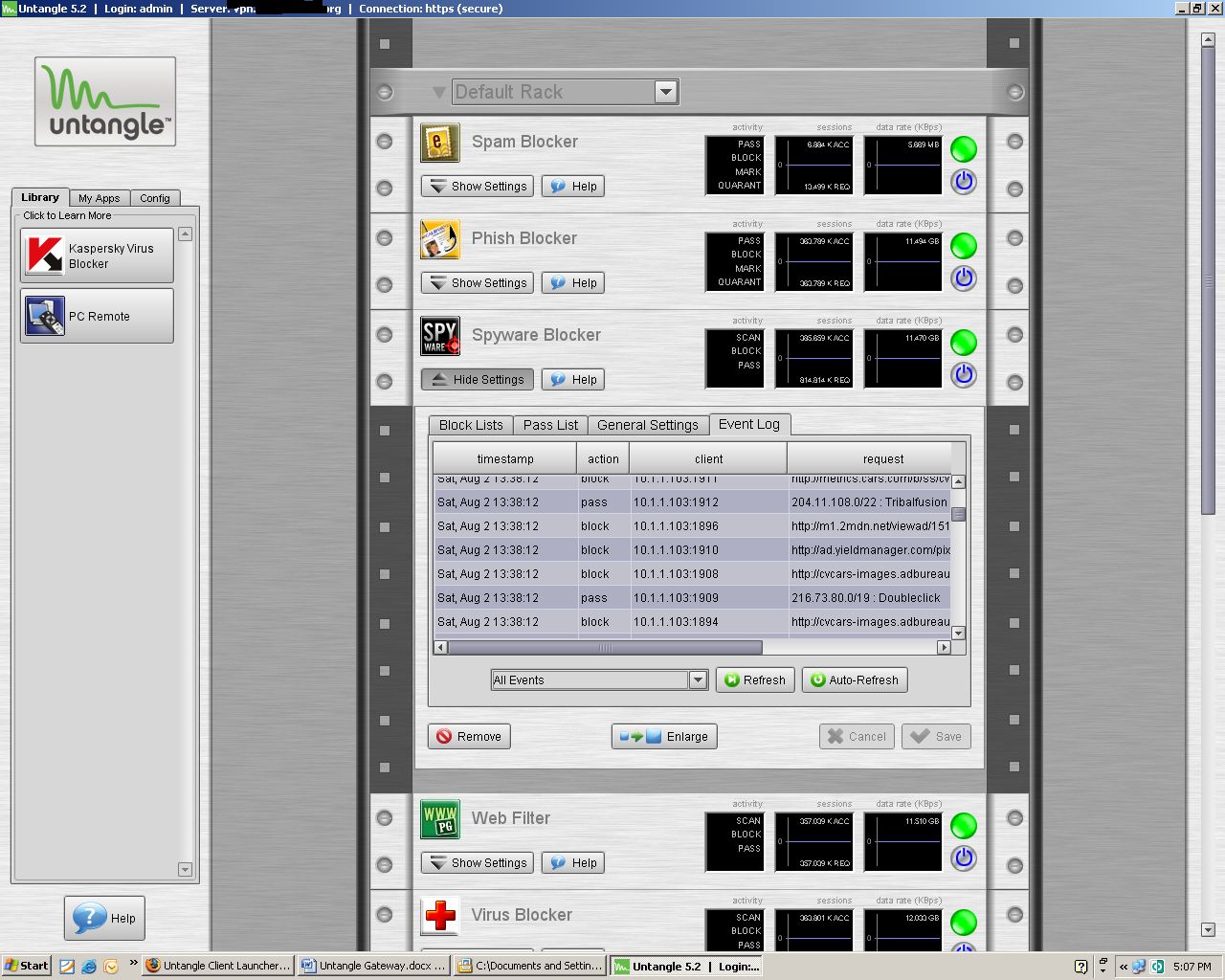
Figure 4: Spyware Blocker Settings
Free Features
Untangle has way too many features for me to cover in detail. So I’ll just try to summarize the key points of each application. I’ll include a link to Untangle’s web page for each application to make it easier for you to explore further.
Spyware Blocker works by checking web traffic against a few dozen community blacklists, combined with ClamAV. It also prevents known bad cookies and ActiveX programs from coming into the PC. You are allowed to customize this and make exceptions if you wish.
The Web Filter node allows content control based on URLBlacklist.com, allowing you to get quite granular in your rules and allowing passing or blocking as you see fit. You can create policies, and if you purchase the optional ($) Active Directory connector for Untangle, you will be able to create policies for separate users.
Spam Blocker is one of the big features many will enjoy. This will transparently scan mail traffic for spam, and based on your choices can block, quarantine, or mark spam. It is based on a collection of technologies: Spam Assasin; Vipuls Razor; Bayesian filters; DNSBL/RBLs; OCR for image based spam; tar pitting; as well as custom tools and constantly updated lists from Untangle.
You can manage your own per user and global safe lists and adjust the scan strength. End users have the option of being emailed a quarantine digest from which they can manage their own quarantine and release any false positives that were caught by accident.
Protocol Control allows you to block unwanted protocols from entering or leaving your network. Untangle includes a long list with pre-built definitions you can block many instant messenger and peer to peer file sharing applications. Since this works on Layer 7, Untangle claims it is able to keep up with users who think they are smart by changing default application ports. So it’s able to keep up with "port hopping"and maintain the application blocks.
Virus Blocker starts with ClamAV in the free node and you can purchase additional protection through the Kaspersky add-on. The Kaspersky node brings the added protection of one of the best antivirus products out there. Common email protocols are scanned, as well as HTTP and FTP traffic. Kaspersky adds archive scanning, too, with a wide range of archive formats. Both nodes come with automatic updating.
The Phish Blocker node protects both email and web traffic. It is based on the ClamAV engine, combined with a constantly updated phishing signature database.
Intrusion Prevention blocks hacking attempts before they reach your network. Untangle created their own custom scanning engine which is based on Snort IDS and comes with automatic updates. It is able to identify malicious traffic patterns and exploits based on signature detection, and stop them before your servers get hit.
The Attack Blocker is Untangle’s own proprietary creation. It examines the behavior of computers that access your network, and either passes them, or blocks them if it determines the behavior is malicious. Attacks detected include DOS attacks, SYN flooding, and port scanning.
The Firewall node allows you build additional firewall rules. Working alongside the port forwarding section, you can get much more granular than the basic port forwarding section allows. You can create a DMZ, build ACLs, control traffic by protocol and source / destination address and port.
In addition to the firewall, there is a separate Routing and QoS Networking component, which allows you to create additional NAT spaces, and tweak your QoS.
A common VPN option found on *nix distros is OpenVPN. Untangle includes this package, so you can use SSL VPN to allow remote users to securely access network resources, as well as build router-to-router VPN tunnels to create wide area connections.
With Untangle Reports (Figure 5), you can view reports from the management console, and/or have them emailed to you. Available in both HTML and PDF formats, Reports provide access to information in summary and detail levels (even per user), as well as information of each node that you run. Reports provides essential information for managing your network and tuning other nodes.
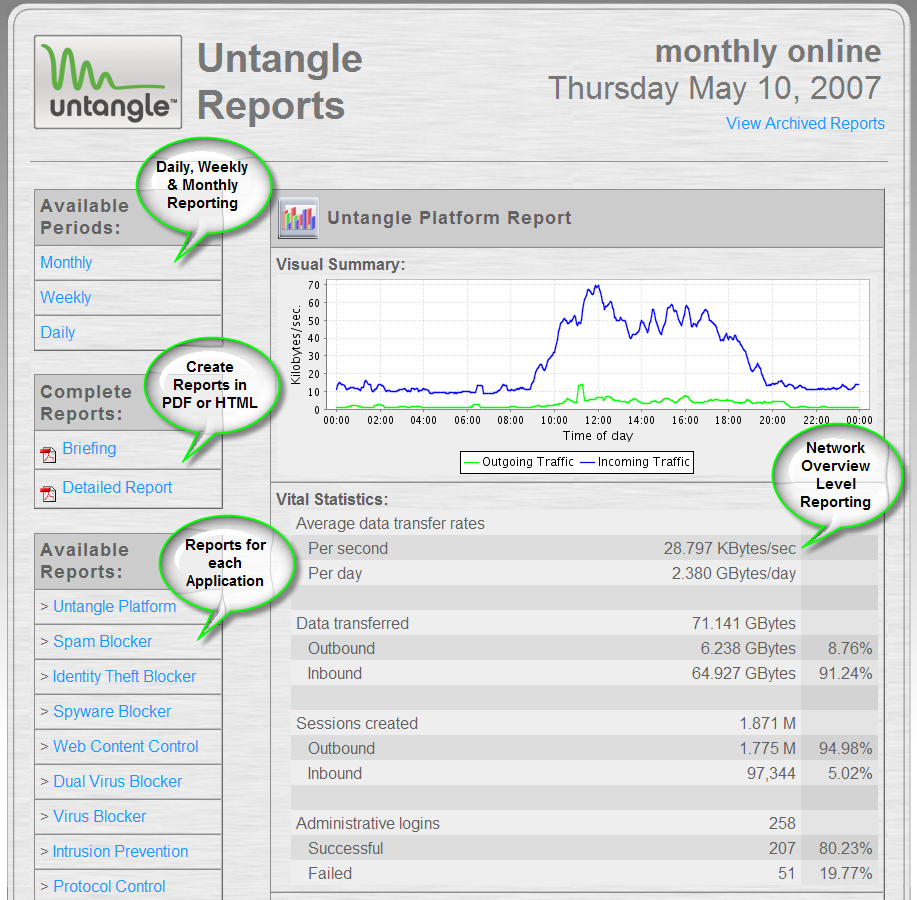
Figure 5: Untangle Reports
A very nice feature is that when new versions of Untangle are released, they show as an available update. You can set the server to either upgrade automatically, or manually (I always prefer the latter). Updates for nodes such as phishing, antivirus, spyware, are all automatic and continuous.
Add-On Features
Although you could get by quite nicely with just the free features, Untangle’s Commercial Add-ons can help lock down your network even further. Pricing is per month, for 10, 50, 150, and 150+ users. I’ll provide the monthly pricing for 1-10 users for reference.
PC Remote ($20) enables remote connection to hosts behind the Untangle firewall through RDP or VNC. Great for consultants and administrators.
The Remote Access Portal ($10) is a clientless SSL VPN tool. It allows access to internal resources such as webmail or network shares. It’s almost like the Remote Web Workplace you find in Microsoft’s Small Business Server. It can authenticate against a local user list you make on Untangle, or AD if you use the Active Directory connector.
Active Directory Connector ($7) allows use of an AD server with the Remote Access Portal. It simplifies policy management, such as web filtering and can generate usage reports by username. Untangle tracks computers by username by running a script through a GPO you create on the AD Domain Controller
Policy Manager ($5) allows you to manage large networks by creating network access policies that apply to user names or groups. It basically provides Microsoft ISA Server-like features.
Hosted Config Backup is available only as part of the Professional Package ($25) that also bundles Live Support, Active Directory Connector, Policy Manager and Remote Access Portal. It constantly backs up your Untangle configuration and is a great feature when you have spent the time to customize your installation. It provides a quick rebuild or restore of your setup if disaster strikes, or if you decide to upgrade your Untangle hardware platform.
In Use
My experience with Untangle has been good so far. Although it’s not really designed for a home network user, I did run it at home. The only hiccup I ran into was when playing Battlefield 2 online when the logins took a long time to establish due to the Attack Blocker node. Fortunately, Untangle’s support forum was quick to provide a fix for this.
But Untangle is primarily designed for the business/enterprise network. Not many home users would want to invest in a high horsepower box to run this at home and it is much more than the average home user would want.
This line of thought is also why I decided to skip giving Untangle a Performance Test. Since Untangle is installed on so many different hardware platforms with varying processor speed, RAM, network cards, hard drives, etc. it’s hard to provide meaningful performance data.
I will say that Untangle isn’t primarily focused on routing throughput, but that doesn’t mean that the product is slow. For example, an Untangle staffer reported in their forums a version or two ago that Untangle’s throughput on a higher-end server was 68 Mbps. This doesn’t match the fastest routers in the SmallNetBuilder Router Charts. But it’s more than enough to keep up with the business broadband connection that it is likely to be protecting. I have installed Untangle on a new Dell PowerEdge R200 1U rackmount server with 2 GB of RAM and a pair of 80 GB SATA drives in RAID 1 and it runs smooth as butter.
One specification worth mentioning is that Untangle is coded to allow up to 10,000 concurrent sessions, which is in keeping with its target audience of business networks. Untangle was designed to service networks of up to 250 users, although on the forums I have seen end users report implementing it in networks much larger.
I have installed Untangle at two of my clients so far, and based on my experience with it, I plan on using it more and more. One client has an Internet connection that bursts up to 20 Mbps, a network of 7 servers so far and approximately 70 workstations. I’m happy to report that Untangle has not been a bottleneck in that setup and has been very stable. I installed it last January and I have only rebooted it once, and the reason for that reboot was to upgrade it from 5.1 to 5.2.
With this client, since installing Untangle, I have not had a single instance of hijacked browsers or malware infestations, which is a testimony to the effectiveness of the Spyware blocker. Anyone who supports networks is I’m sure familiar with the outbreak of the ZLob/Virtumond/Smitfraud Trojans over the past several months and rogue "antivirus" products such as Defender2008, XPAntivirus2009, etc.
I have found Untangle’s Spam Blocker to be aggressive, perhaps a bit too aggressive, at default settings. But it was fine once I backed off the settings a bit. And the quarantine digests sent to users are very easy for them to use. I have to step into the picture only if it keeps bagging legitimate email. And then I just enter a wizard to add a sender’s domain to the whitelist.
Closing Thoughts
I believe Untangle is a serious contender in the small to medium business firewall / UTM market. They are marketing their product well and getting involved with SMBNation.com (a smart move IMO). The product is aggressively improved upon, with a steady release of product upgrades. They also listen to the users on their forums and take feedback and feature requests well.
My experience with Untangle’s support has also been favorable so far and their support forums are very quick and responsive. I recently had to call their support for an issue on a recent installation and I got a live person on the phone right away.
He was very helpful and quickly remoted into the Untangle server, looked at my setup, did a few tweaks and remained on the line while I tested the fix. Phone support people are usually in a rush, anxious to hang up the phone with you as soon as they think the issue is fixed. But that was not the case with Untangle support.
Untangle’s website has a great support section, including Forums, a great Wiki, detailed hardware compatibility list (because people are installing it on so many different hardware platforms), and very detailed step-by-step guides on configuring the Untangle Gateway, and all of its nodes. They also have separate downloads to virtualize Untangle in VMWare.
With the free version, you get several great features including antivirus scanning, Spyware blocking, spam filtering of your e-mail, content filtering, and reporting. And when you add the reasonably-priced Add-ons, you gain live support, configuration backup, and choices of remote access, active directory integration, and better policy management and control.
The bottom line is that Untangle gets two thumbs up from me!