

Introduction
8/20/2008: Corrected system info
Many things have changed since the first version of this tutorial was written in 2003. Computers and their internal busses have gotten a lot faster and file sizes have gotten a lot larger. But oddly enough, gigabit LAN ports have not become standard in consumer networking gear. Notebooks may come with the latest draft 802.11n wireless. But they may also come with only a 10/100 Ethernet port.
So consumers are left on their own to determine whether to shell out the additional cost to move to an all gigabit network. This Need To Know is aimed at helping you make that decision.
What is Gigabit Ethernet?
Gigabit Ethernet, also known as “gigabit-Ethernet-over-copper” or 1000Base-T, is simply a version of Ethernet that runs at speeds up to 1,000 Megabits per second, i.e. 10 times faster than 100Base-T.
The ruling IEEE standard for gigabit Ethernet, 802.3z, was approved in 1998, but it wasn’t until June 1999 that the 1000BASE-T standard (IEEE 802.3 Ethernet Standard for Gigabit Ethernet on Category 5 copper) was approved. It was this standard that moved gigabit Ethernet out of the server rooms and backbone closets and enabled it to be run pretty much anywhere that 10/100 Ethernet is run today.
Before 1000Base-T, gigabit Ethernet required using either fiber-optic or special shielded copper cables, neither of which was practical for everyday LAN construction. These versions (1000Base-SX, 1000Base-LX, and 1000Base-CX) are still in use today in specialized applications, but we won’t be focusing on them in this article.
The 802.3z Gigabit Ethernet task did their work well, and were able to come up with a standard that is, for all intents and purposes, a ten times faster version of 100Base-T. 1000Base-T was also designed so that it is backward-compatible with 10/100 equipment, and uses CAT-5 (or better) wiring (the stuff that you’re using for your current LAN).
Do I Need it?
Most of the early sales literature for gigabit Ethernet contained pitches focused on the “enterprise” market, and usually aimed at the data center manager. Since gigabit Ethernet provides a 10 times larger “pipe” for data flow than 100Base-T, the natural first applications were at the points of highest bandwidth need. Server-to-server, switch-to-switch, and “backbone” applications were all named as candidates for gigabit Ethernet, and there are white papers and case studies a’ plenty to show that gigabit Ethernet is a good investment in these cases.
As gigabit gear prices have followed their natural downward march, vendor pitches have widened to include gigabit deployment to desktop machines of “power users” and workgroups with “bandwidth intensive applications”.
Since some small networks’ data needs are much more modest, it’s fair to ask whether a small network would ever need the capacity that a 1000Base-T network provides. Let’s look at some of the applications that are commonly used in a small network and see if they need what gigabit Ethernet can provide:
- Gaming
Since most networked games are designed for over-the-Internet play, they’re pretty smart about the amount of data they send across the network. The games rely on local processing power for the heavy lifting and send only what they have to across the network, so that they are playable under the wide range of network conditions encountered on the Internet.
Although in gaming, faster is always supposed to be better, gigabit Ethernet won’t provide any advantage in networked frag-a-thons. Response time is the important factor for networked gaming, but anything much below 10ms doesn’t provide any advantage, and you’ll get that from even a 10Base-T network. So, again, gigabit Ethernet’s extra capacity will just be wasted for this application. -
Streaming video
This is one area where the requirements have changed since 2003 and continue to evolve. Two forces are at work and are pulling in opposite directions.IPTV (Internet Protocol Television) has been a big force in Europe where telcos are moving into providing TV service. The target bandwidth requirement is around 5 Mbps for standard definition programming. YouTube and other web-based video, including all the major U.S. broadcast networks, are also competing for eyeballs. Bandwidth requirements vary due to a wide range of formats and distribution methods.
But since these services are trying to reach the widest audiences through the relatively slow connections that pass as "broadband" in the U.S., bandwidth requirements are again kept low. 3 – 5 Mbps is again the sweet spot, with smaller picture formats using even less bandwidth. Most of the content is standard definition, with only a few sites experimenting with streaming "high definition" content.
Pulling in the other direction is the move to High Definition TV that will culminate in the U.S. broadcast switchover in February 2009. As demonstrated in HD Streaming Smackdown: Draft 11n vs. Powerline, even 720p with very efficient H.264 encoding has bandwidth peaks commonly over 20 Mbps. True 1080p streams would average closer to 20 Mbps, with peaks into the 30s.
The net result is that, unless you’re a video production house, or have the need to provide more than four or so simultaneous HDTV streams, a 100Mbps LAN will handle streaming video just fine.
 TIP: See this article for a good description of the bandwidth requirements of the popular MPEG standards.
 - Moving large files across the network
This requirement used to be more often encountered in a small-office situation, especially in graphic-design houses, architectural firms, and other businesses that routinely deal with file sizes in the 100 MB to multi-GB range. But with a growing number of consumers building large video libraries through DVD ripping and P2P filesharing, folders in the tens to hundreds of gigabytes are becoming more common.Although a quick cut at the math would have you think that a 100 MB file would take only 8 seconds to move across a 100 Mbps network [ (100MByte X 8 bits/Byte) / 100Mbits/sec ], in reality, many factors conspire to make the actual transfer time much longer. Some of the factors that come into play are OS used, applications you’re running, amount of memory in your machines, and their processor speed and age. (The age is an indicator of motherboard bus rates.)
The good news is that modern computers and LAN cards can achieve close to 100 Mbps "wire speed" throughput. But once again, operating systems can slow things down significantly, increasing "drag and drop" file transfer times significantly.
Fortunately, moving large files is something that gigabit Ethernet can really help with, although you won’t see a 10X improvement!
- Network backup
This can be thought of as a variant of the “large files” case. If your LAN is set up to back up all its machines to one system that acts as a fileserver, a gigabit LAN can help speed the process. However, this is another case in which widening the “pipe” to the backup server may have no effect if the server (and especially the backup medium) can’t keep up with the incoming flood of data.If this is your application, you’ll need a speedy server with plenty of memory, and be backing up to a fast hard drive, not tape or CDROM, in addition to upgrading your network to gigabit.
- Server based applications
Another scenario more likely to be encountered in a small business vs. a home LAN is one in which a lot of data frequently moves between a client and server due to a server-based application. But again, you need to analyze the amount of network data to see whether “a lot” would be enough to see an improvement from a switch to gigabit speeds.
But let’s say that you’re still not ready to buy, but don’t want to rule out the possibility of an upgrade in a year or two. Is there anything that you need to do now to prepare? The next section will examine what you need to do for what is frequently the most expensive, and hardest to change part of your network – the cabling.
Cabling for Gigabit
As I briefly mentioned in the Introduction, one of the key requirements for the 1000Base-T standard was that it work with existing Category 5 (CAT 5) cabling. After all, what good was a copper-over-Ethernet standard if it couldn’t run on most of the copper that’s already in the walls, network closets, and ceilings of corporate America? So the good news is unless your network was installed in 1996 or earlier (the standard was revised during 1995), you’re probably ready to rock when you decide it’s time to move up to gigabit speeds.
But before you move on to the next section, there are some issues that you need to be aware of:
Four pairs required
1000Base-T uses all four twisted pairs of the Category 5 (or higher) cable to create four 250 Mbps channels. (A different encoding scheme – 5 level PAM – is also used so that the signals stay within the 100MHz bandwidth rating of CAT5 cabling.) These two features result in the ability to achieve full gigabit bandwidth while using existing CAT5 cabling.But since 10/100Base-T required only two of the four CAT-5 cable pairs, some people didn’t bother to connect the unused pairs when doing their own cabling. In other cases, the unused pairs might have been used for telephone or Power-Over-Ethernet (POE). Fortunately, gigabit Network Interface Cards (NICs) and switches are smart enough to automatically fall back to 100Base-T operation if they determine that all four pairs are not available for use. So your network will still work with gigabit switches and adapters, but you won’t be getting your money’s worth!
I can’t tell you the hours I have wasted trying to track down why I wasn’t getting a gigabit connection, only to find that I was using a patch cable with only two pairs connected! Check your connector ends carefully to make sure that you see wires crimped in all eight positions! If you find any two-pair-only cables, do yourself a favor now and throw them out!No bad crimps and no cheap jacks
Another problem that do-it-yourself cablers may find is that poor crimps and inexpensive wall jacks can lower the maximum achievable bandwidth of their gigabit network. These issues can cause impedance mismatches which cause Return Loss, which can cause lower bandwidth. Although you can try “shotgunning” (blindly changing things) the problem if you run into bandwidth problems, you’ll need to either have a qualified network installer test your network for Return Loss and Crosstalk to qualify it for gigabit operation, or just live with the lower speed.Length and topology limitations
1000Base-T is limited to the same 100 Meter maximum length as 10/100Base-T. This rule also means that there is a 200 Meter maximum distance (Network Diameter) from one computer to another that is connected to the same switch.In general, 1000Base-T network topology rules are the same as for 100Base-T, except that only one repeater is allowed per LAN segment (or to be more exact per “half-duplex collision domain”). But since gigabit Ethernet products don’t support half-duplex operation, the last point can be safely ignored. Basically, if your LAN is working with 100Base-T, you shouldn’t have to rearrange things for gigabit operation.
For new network installations, the general recommendation is to use CAT5e cable. Although CAT5 and CAT5e cabling both have a 100MHz bandwidth, CAT5e cable is manufactured so that additional parameters that are important for high frequency data signals are better controlled.
– Installation Effects Upon Alien Crosstalk and Equal Level Far End Crosstalk
Although CAT5e cable should work just fine for gigabit-capable networks, many people like to buy "insurance" by using CAT 6 cabling instead. (CAT6 was added to the TIA-568 standard in June 2002 and has a 200MHz bandwidth.) It’s your money, but CAT6 is really needed only if you are going to run a 10G network. If you’re going to run the cable, however, make sure you also use CAT6 connectors.
If you really have money burning a hole in your pocket, a better way to spend it would be to hire a network installation pro with gigabit Ethernet experience to either install your gigabit Ethernet cabling, or test your existing installation to qualify it for gigabit operation. I definitely recommend hiring the pro if you’re installing CAT6, since things like cable bend radius, and number and quality of connectors are essential for achieving the high throughput that you’re paying for!
My experience, at least with home installations, is that you are more likely to hit a bandwidth wall due to the devices on the network, not the cabling. So let’s look at that next.
Gigabit Gear
Manufacturers haven’t made gigabit standard (they say it’s because gigabit parts cost significantly more and they don’t think they can recoup the cost in the form of more expensive products). But prices have come down to the point where, even though they are still expensive relative to 10/100 gear, they are cheap enough that you don’t have to agonize over the decision.
PCI gigabit NICs can be found for around $15 (vs. $5 for 10/100) and the Intel Pro/1000’s are a popular choice. The PRO/1000 GT Desktop for PCI slots pictured below, runs a little less than $30. If your computer has a PCIe X1 slot, the PRO/1000 PT (~$35) is a better choice, as we’ll see shortly.
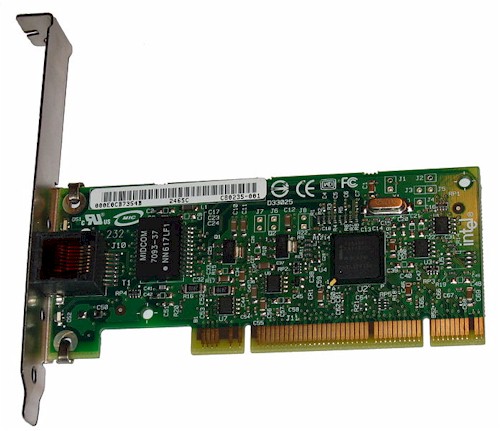
Figure 1: Intel PRO/1000 GT gigabit NIC
5 port gigabit switches start around $30 (vs. $10 for 10/100). Table 1, taken from the 8 Port Gigabit Switch Roundup, shows that 8 port gigabit switches are even a reasonable buy. (It also shows that it pays to shop around!)
| Product | Price | Ports | Switch Chip |
|---|---|---|---|
| Belkin F5D5141-8 [Website] |
$72.42 – $222.59 Check price |
Rear | Vitesse VSC7388 |
| D-Link DGS-2208 [Website] |
$48.48 – $82.63 Check price |
Rear | Vitesse VSC7388 |
| Linksys SD2008 [Website] |
$60.08 – $119.99 Check price |
Rear | Broadcom BCM5398 |
| Netgear GS108 [Website] |
$60.20 – $134.48 Check price |
Front | Broadcom BCM5398 |
| Netgear GS608 [Website] |
$54.99 – $125.88 Check price |
Rear | Broadcom BCM5398 |
| Trendnet TEG-S8 [Website] |
$35.99 – $53.00 Check price |
Rear | Broadcom BCM5398 |
Table 1: Switch Feature Summary
Go for PCIe
Even today’s most inexpensive computers have no problem meeting the rough rule of thumb of 1Hz of processor speed for each bit per second (bps) of TCP/IP network traffic. You don’t need to worry about the processor, as long as it is clocked at 1 GHz or higher. What matters more, however, is whether it has either a PCIe (PCI Express) X1 slot or an onboard NIC that connects via PCIe to the CPU.
The reason for this is shown in Figures 2 and 3. They show the results of an IxChariot throughput test between the machines listed in Table 2. The computers were connected via a NETGEAR GS108 8 port gigabit switch, which automatically supports up to 9K jumbo frames. I used the default settings provided by the latest Intel drivers, changing only the jumbo frame setting.
8/20/2008: Corrected system info
| CPU | OS | Memory | |
|---|---|---|---|
| Computer 1 (BigNAS) |
Intel Core2 Duo E7200 | Windows Home Server SP1 | 2 GB |
| Computer 2 (Darth) |
Intel Core2 Duo E4400 | Windows XP Pro SP2 | 1 GB |
Table 2: Gigabit throughput test computers
Figure 2 shows throughput with an Intel PRO/1000 MT PCI adapter in each machine combining runs without jumbo frames enabled and with 4k and 9K jumbo frames used. You see average throughput of only around 530 Mbps for a 30 second test with no jumbo frames. Performance improves to just shy of 600 Mbps (around 11%) with 4K jumbo frames with increased variation, but actually drops back down to around 540 Mbps when 9K jumbo frames are enabled. I also ran tests in the other direction, with similar results.
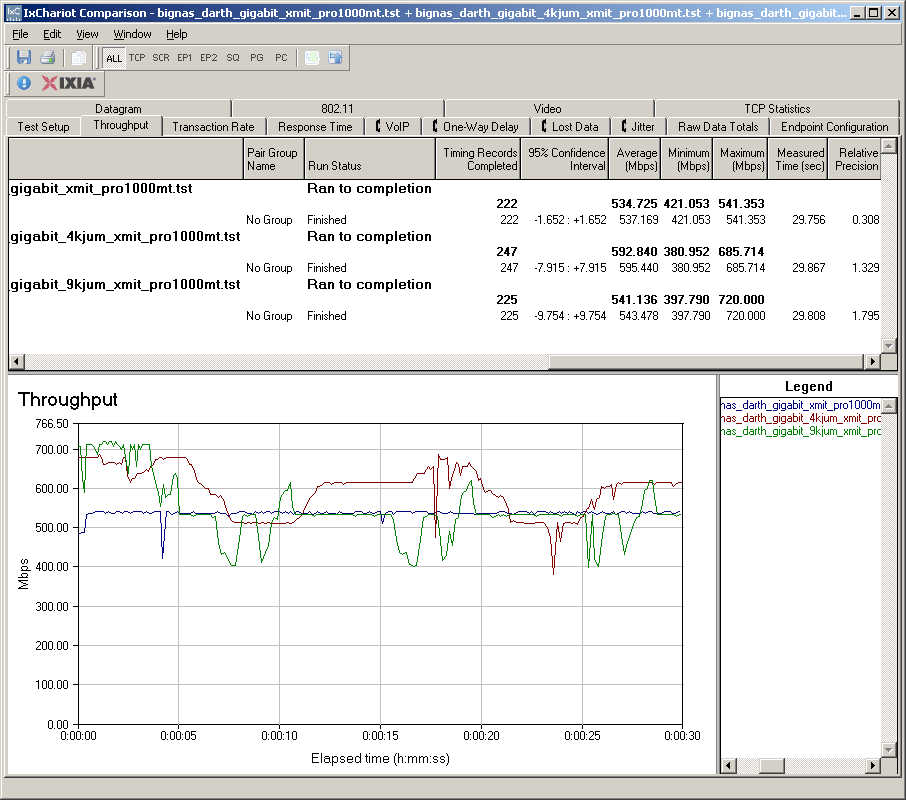
Figure 2: 1000 Mbps throughput – PCI adapters – no, 4k and 9K jumbo frames
Figure 3 shows throughput using onboard Ethernet that uses Intel’s 82566DM-2 PCIe gigabit Ethernet controller. Quite a difference, eh? The PCIe NICs got me much closer to gigabit wire speed, yielding slightly over 900 Mbps. Enabling 4K jumbo frames didn’t really make a difference, but using 9K jumbo frames actually significantly reduced throughput to around 650 Mbps—almost 30%
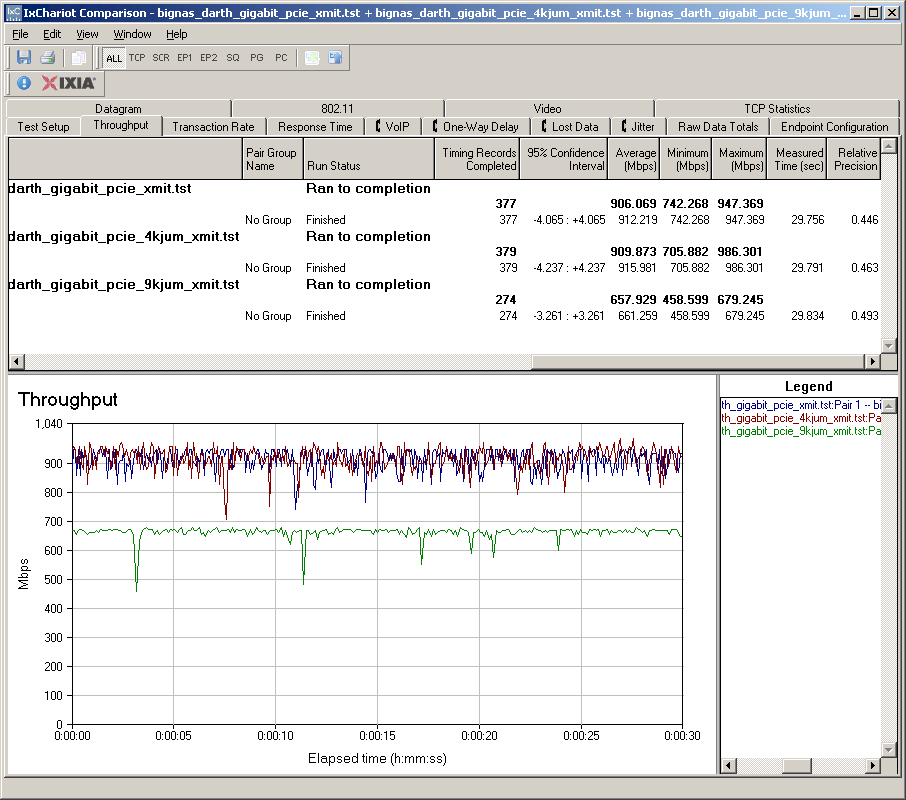
Figure 3: 1000 Mbps throughput – PCIe adapters – no, 4k and 9K jumbo frames
I also ran simultaneous bi-directional tests and got around 640 Mbps total throughput using the PCI adapters, which is consistent with the unidirectional throughput. But the PCIe bidirectional test came in around 1.3 Gbps total, instead of the 1.8 that you might expect from the unidirectional results.
These results confirm the discussion in our Forums about gigabit Ethernet. If you want to achieve top speeds, PCIe adapters or on-board NICs are the way to go. Table 3 lists some of the Ethernet controller chips commonly seen and whether they connect via PCI or PCIe bus.
| PCI | PCIe |
|---|---|
| Realtek 8110SC | Realtek RTL8111B |
| Intel 82566 | |
| Marvell 88E803X | |
| Marvell 88E805X | |
| Marvell 88E8062 |
Table 3: Gigabit Ethernet controllers
Closing Thoughts
If you’re moving a lot of large files around, moving to gigabit Ethernet is a no-brainer. Otherwise, 100 Mbps networks will continue to do you just fine. But if you do decide to make the move to gigabit, you should make sure your gigabit adapters use a PCIe connection to get the most from your investment.