

Introduction
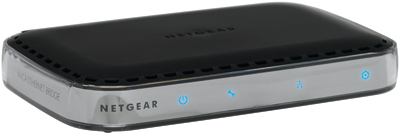
| At a Glance | |
|---|---|
| Product | NETGEAR MoCA Coax-Ethernet Adapter Kit (MCAB1001) |
| Summary | Two-adapter kit that uses your TV coax to extend a 10/100 Ethernet network |
| Pros | • ~70 Mbps maximum for a single TCP/IP stream • ~140 Mbps for multiple streams • Unaffected by RF and powerline noise • Low latency (ping time) |
| Cons | • ~70 Mbps maximum for a single TCP/IP stream • Doesn’t work with satellite TV • Doesn’t appear to prioritize media over data |
Ever since Entropic went public about four years ago with its MoCA Multimedia over Coax technology for using TV coax to extend Ethernet, I have been trying to get my hands on product to test. Each year I would show up at the MoCA booth at CES to ask for product to evaluate and each year come away with nothing.
I really thought I would be writing this piece two years ago, when Actiontec announced its ECB1500 MoCA to Ethernet adapter to go along with its MI424WR router, which was one of the first to be deployed for Verizon’s FiOS service. But Actiontec never came through with product for me to test, although I hear that they have shipped it via service providers.
Then I thought last year would be the year, when D-Link announced its DXN-221 Coax Ethernet Adapter Kit. But 2008 came and went, with no DXN-221. D-Link then re-announced the DXN-221 at January’s CES, but then said they have decided to not put the product into retail.
Which brings me to NETGEAR, who finally came through with the MCAB1001 MoCA Coax-Ethernet Adapter Kit for me to review and appears to be going to actually ship it.
The reason for this quest is that both powerline and wireless LANs—even draft 802.11n—have proven inadequate for reliable HD video streaming and online gaming. While some people have had success with both technologies, there are plenty of others who have tried them and found them wanting.
MoCA’s advantage has always been its coax-cable transmission medium. A coax cable is a shielded, controlled impedance electrical environment, which is exactly what you want for high-speed data transmission. And while it is not terminated like 10Base2 for optimal high-speed signal handling, RG6 coax is a hell of a better transmission medium than your home’s power line wiring or the interference-laden 2.4 GHz radio band.
I’m not going to provide a technical primer on MoCA. You can hit the FAQ on the MoCA site if you want more details. But there are a few key things you should know:
- MoCA doesn’t work with satellite TV
More correctly, NETGEAR says that the MCAB1001 kit won’t work with satellite TV installations. The reason is due to the frequency bands that MoCA, cable and satellite TV use (850-1550 MHz). MoCA actually can be configured to work with satellite TV installations. But it is not an exercise that the average consumer could pull off, hence, NETGEAR’s "no satellite TV" position. - It can work through splitters
The MoCA FAQ says that "MoCA can work effectively through a significant number of splitters". It also says that it can work backward through splitters and from output to output. It won’t work backwards through amplifiers, however. - It works through a lot of cable
The MoCA FAQ quotes 100 Mbps "at distances of more than 300m". I believe ’em on the distance. But the throughput numbers, like all that vendors quote, is squishy. - You don’t need to use RG6 coax
The MoCA FAQ says "if you can receive a TV signal from the outlet, it can support MoCA". But if you have a long run of cheap RG58 with lots of stubs and corroded / loose connections, you probably won’t get maximum throughput. - 16 nodes maximum
MoCA 1.0 supported only 8 nodes. But 1.1, which the MCA1001 is certified to, supports 16.
Product Overview
Like powerline adapters, the MCA1001 (that’s what the actual adapter is called) isn’t too complicated. Figure 1 from the User manual shows the front panel indicators.
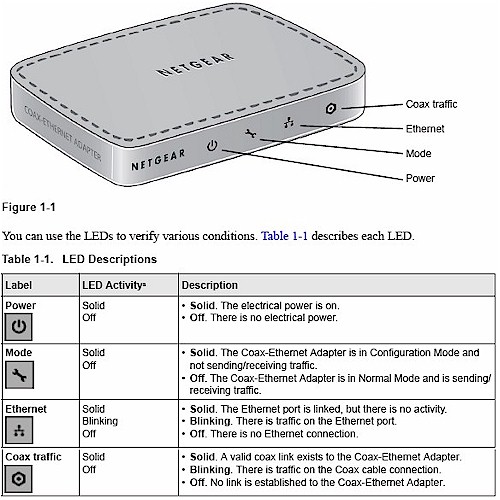
Figure 1: MCA1001 Front Panel
While Figure 2 shows the back panel. Note the two built-in coax connectors so that you don’t have to provide a splitter.
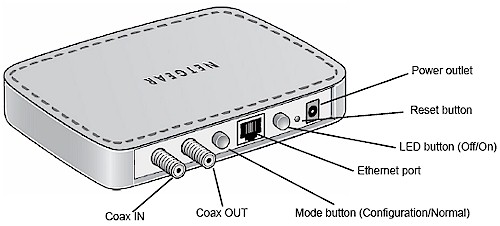
Figure 2: MCA1001 Rear Panel
The Ethernet port is 10/100 Mbps Auto MDI/X, not gigabit, even though the max data rate spec’d is 270 Mbps. You’ll see why in the Performance section later. NETGEAR has thoughtfully included an actual button so that you can kill all of the front panel lights.
The other (Mode) button is used to put the adapter into Configuration mode. I found this annoying, since it means you can’t look at statistics while the adapter is in operation. You also have to be directly plugged into the adapter, with the Mode button set to Configuration mode in order to access an MCA’s built-in admin web server.
You don’t have to access the admin pages to get up and running, though. All I did to run my initial tests was to connect one of the two 1 M RG6 coax cables in the kit from Coax In to Coax In on the two adapters, connect one adapter to my LAN’s switch (and DHCP server) and the other to a test computer. After less than a minute, the Ethernet and Coax Traffic LEDs lit up on both adapters, my computer obtained a DHCP lease and I was up and running. If you want, however, you can set up an Encryption key (12 to 17 numbers only) on the adapters to ensure your privacy.
Inside View
Figure 3 is a picture of the MCA1001’s board. The RF section is under the shield and I didn’t muck with it. But there is probably an Entropic EN1010 RF Interace chip under there somewhere. You can clearly see the Entropic EN2210-BG2 c.Link Coaxial Network Controller that does the MoCA 1.1 heavy lifting.
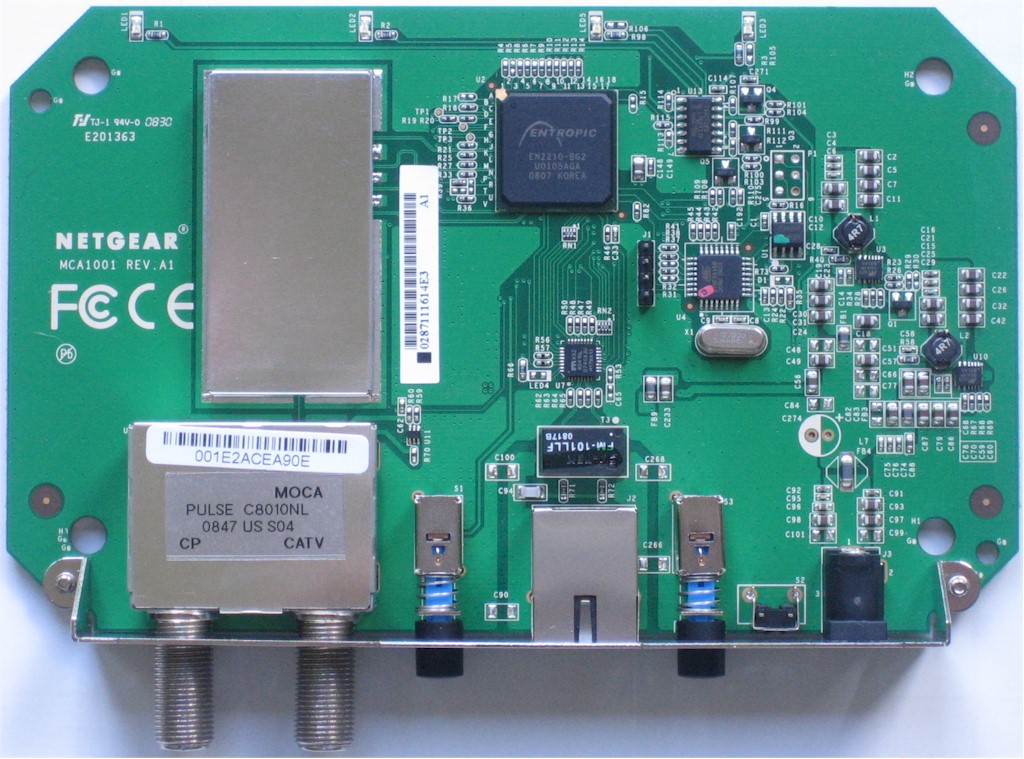

Figure 3: MCA1001 board
The other two devices of interest are the Micrel KSZ8041NL 10/100 Ethernet PHY and Atmel ATMEGA168 AVR Microcontroller with 16 KB Flash, 1 KB RAM and 512 B EEPROM.
Administration
As I noted above, there are not a lot of knobs to twiddle on the MCA1001. Figure 4 shows the Coax screen, which is the only place where you can affect performance. The default settings are shown. The Diplexer Mode setting warns that using the All Pass setting (the only other one available) will block all signals from the Coax Out.
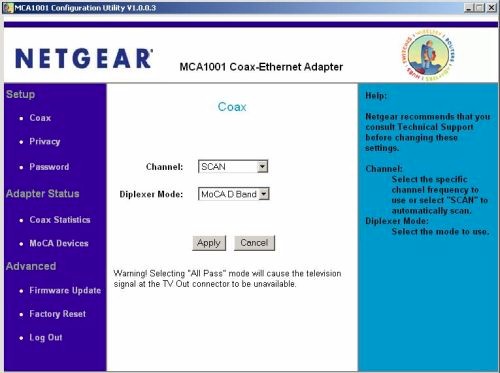
Figure 4: Admin – Coax screen
The user manual says the Channel setting can be used if "TV quality is reduced" by the adatper’s installation. Figure 5 elaborates on the Channel selector options.
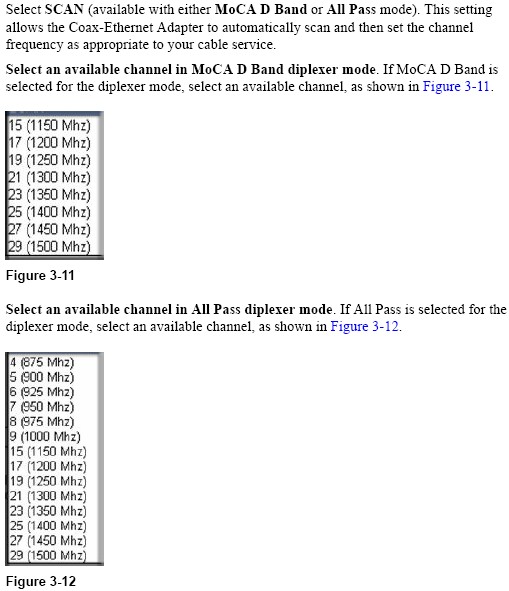
Figure 5: Channel setting explanation
Figure 6 is the Privacy screen, where you can enter a numerical encryption key. You need to enter the same key on all MCAs that you want to communicate privately.
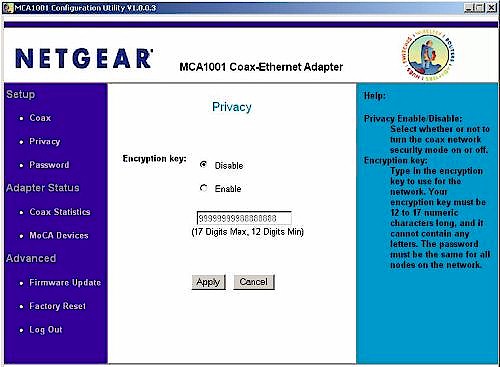
Figure 6: Admin – Privacy screen
Figure 7 shows the Statistics screen, which as I explained earlier is not real-time information. Good luck troubleshooting any intermittent problems with it!
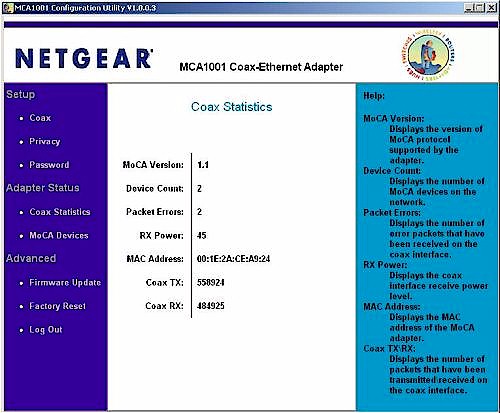
Figure 7: Admin – Statistics screen
Figure 8 provides a snapshot of the MoCA devices seen by the adapter. You only get the transmit and receive rates for the adapter you are plugged into. Again, not very handy for troubleshooting.
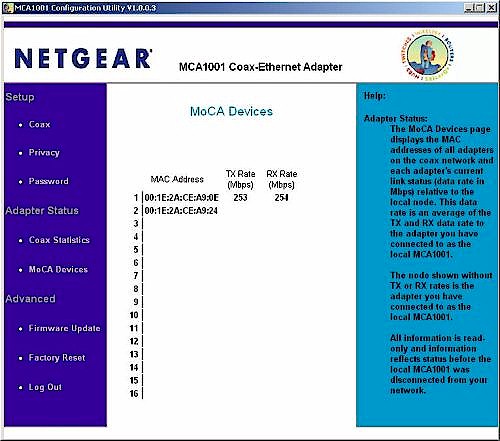
Figure 8: Admin – MoCA Devices screen
Performance – Bench Throughput
I first set up the pair of MCAs on my bench, with one of the 1m RG6 coax cables supplied in the kit connected between the Coax In jacks, one of my trusty test desktops connected to one of the MCA’s Ethernet jacks and the other MCA’s Ethernet connected to another test machine via one of my LAN’s switches.
I then ran a series of IxChariot tests through the pair using the throughput.scr, TCP/IP and changing only the test file size from its default of 100000 to 3000000 Bytes. I also ran reference tests using a 10/100 Ethernet connection between the two test machines.
Figure 9 shows a composite of transmit tests through the MoCA and Ethernet connections, where we see that only around 70 Mbps of the touted 270 Mbps is actually delivered as usable throughput. Receive results are virtually identical, but you can see for yourself here.
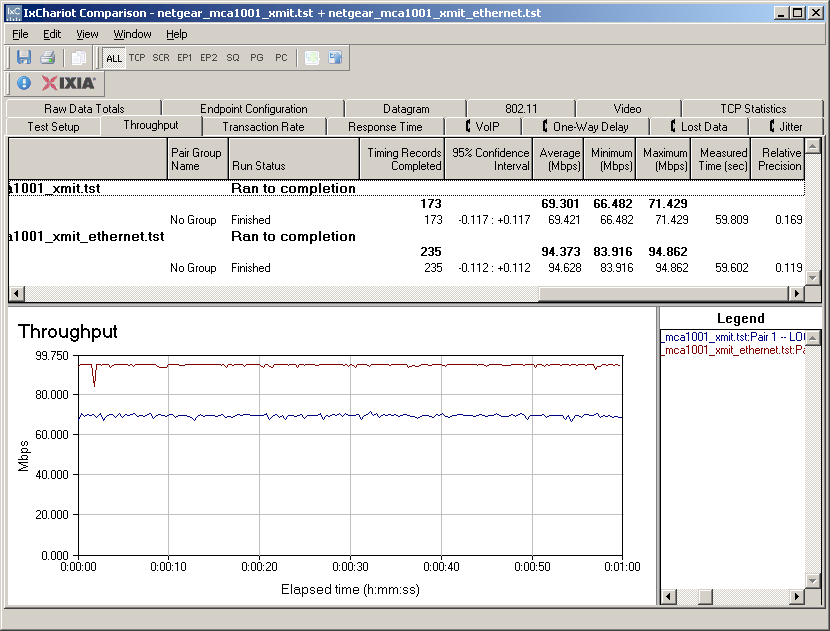
Figure 9: Comparison of MoCA and Ethernet transmit throughput
I next checked to see how a simultaneous transmit / receive test fared, which is shown in Figure 10, once again with Ethernet and MoCA results included. Both the Ethernet and MoCA results sacrifice some throughput in the individual receive and transmit connections. But note that aggregate MoCA throughput moved up to 110 Mbps.
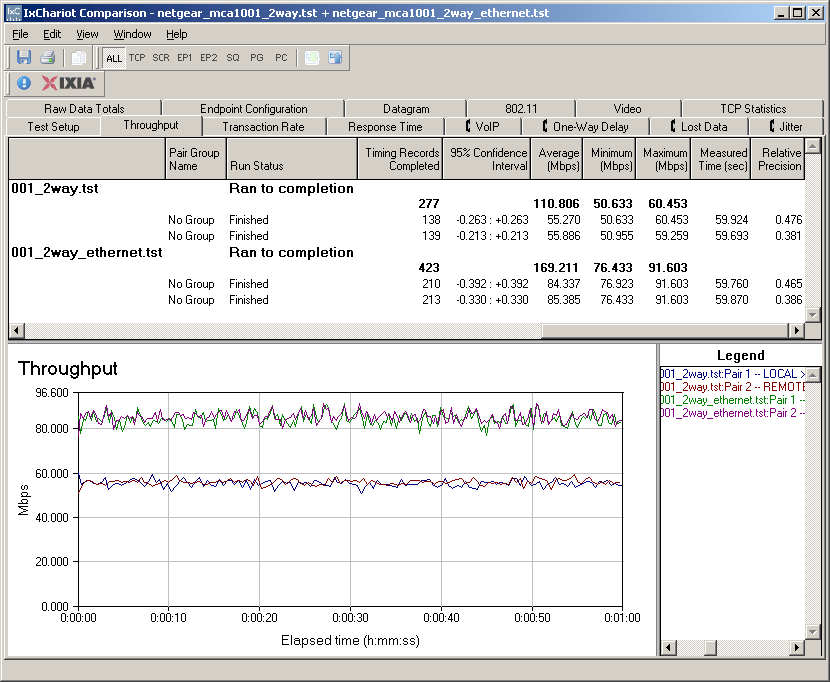
Figure 10: Comparison of MoCA and Ethernet transmit / rcv throughput
I was curious to see if there was any more throughput to be gained from adding more connections to the test. So I ran test with up to 10 connections (5 transmit / receive pairs). Figure 11 shows the three connection test, with 128 Mbps of aggregate throughput.
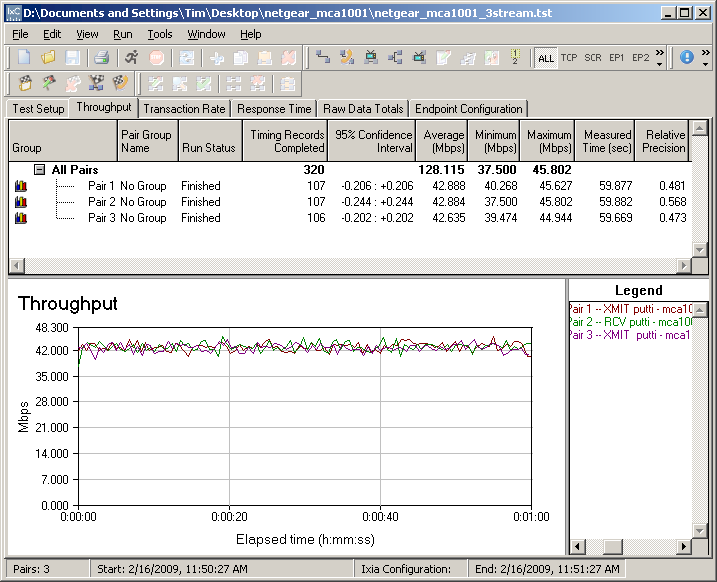
Figure 11: Three connection throughput
And Figure 12 shows 4 connections, which provided just shy of 138 Mbps of aggregate throughput, which turns out to be the most that I could coax from the connection. Note, however, that Pair 2 has much higher variation and about 15 Mbps lower average throughput than the other three pair.
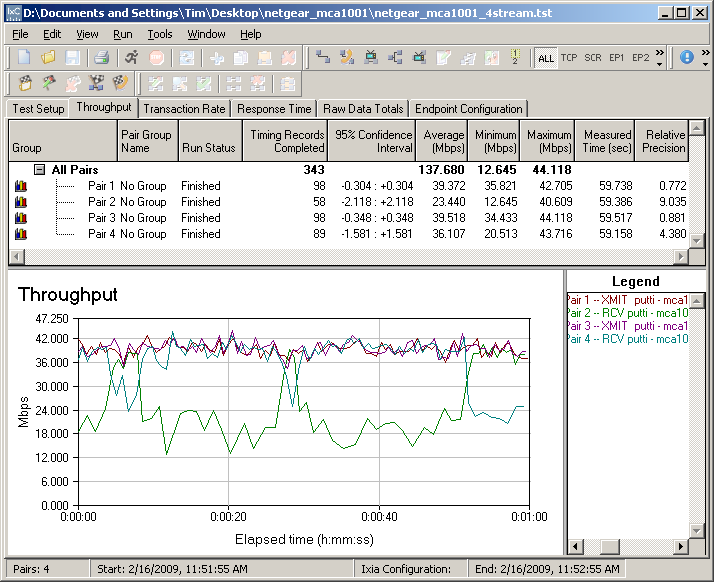
Figure 12: Four connection throughput
I poked at this a bit more and Figure 13 shows a 10 connection test. Although aggregate throughput remains up near 140 Mbps, clearly there is a battle for bandwidth occurring. The nice steady throughput found with 3 connections has turned into a mess more like what I see with draft 802.11n connections. I think you would be hard-pressed to get a reliable 720p HD stream with variation like that.
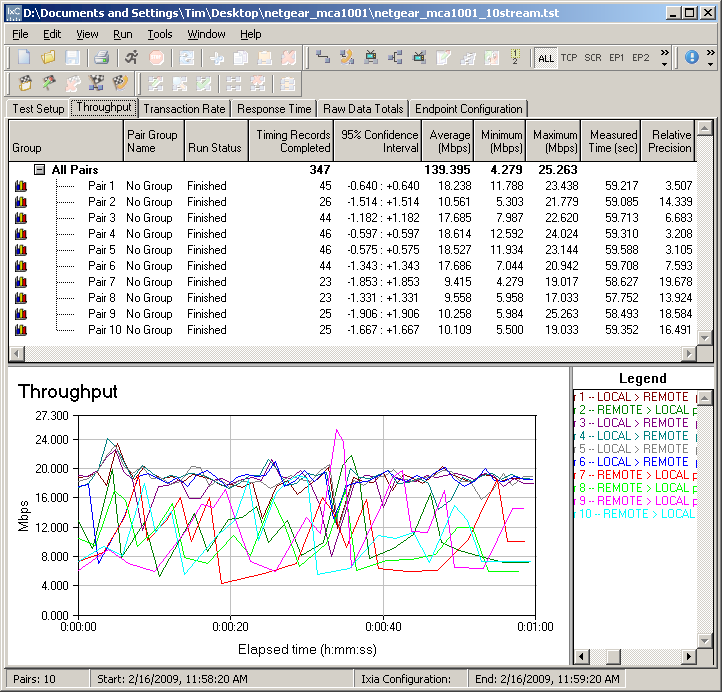
Figure 13: Ten connection throughput
I also ran some ping tests to check for latency. Figure 14 shows a consistent 3 to 4 ms ping time, which says latency won’t be a problem.
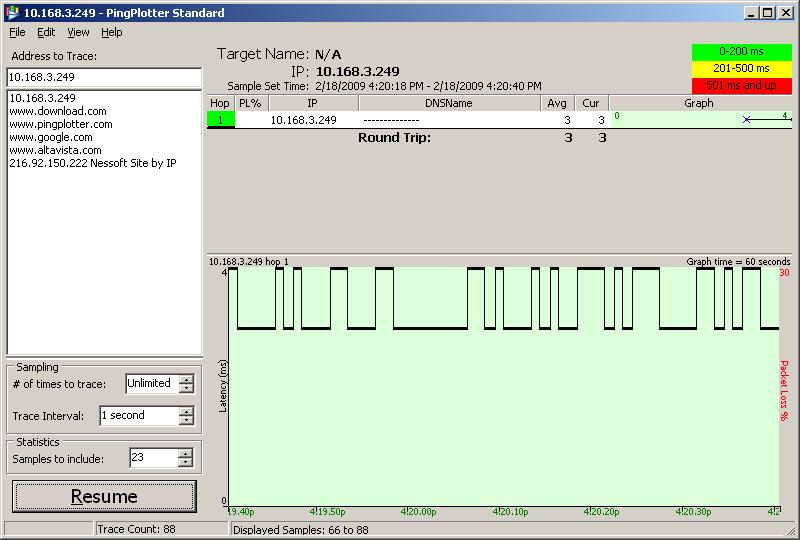
Figure 14: MoCA direct connection ping test
Performance – In House Throughput
So with only 3 feet of cable and no RF in the picture, things look pretty promising for getting enough bandwidth for HD streaming through the MoCA adapters. But I now had to see what happened when the MCAs were connected into a home’s coax system.
When my home was built, we had RG6 coax home run to a basement utility room along with CAT 5e for data and phone. We don’t have access to cable TV, but instead have two DirecTV DVRs—one HD, one SD— that have dedicated dual coax connections back to our dish’s multiswitched LNB that run through the utility room path panel.
So the good news is that I could set up a coax connection for the test pretty easily. But the bad was that it wouldn’t have any RF involved. But fortunately, I also have an off-the-air (OTA) antenna to receive a (very) few local HD stations.
The antenna line runs from the attic, down to the basement, through a cheapo amplifier that came with the antenna, into the patch panel that then runs the signal up to the HD DVR in the living room. I was able to dig up a two output splitter from my pile o’ parts and in no time I had the test setup shown in Figure 15 configured (please excuse the crude drawing). Each of the runs from splitter to MCA has around 50 feet of RG6 coax.
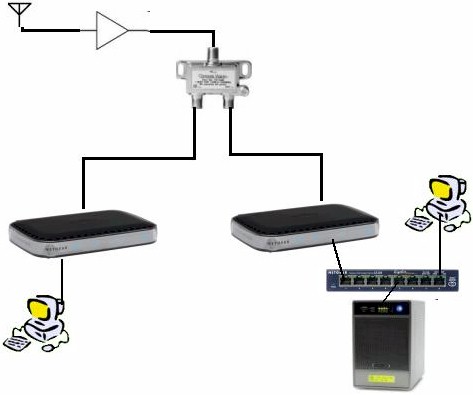
Figure 15: In-house test setup
I reran the IxChariot test and found…essentially the same performance. I really could not tell much of a difference between the back-to-back tests and the tests run with the MCA’s connected as shown above. Figure 16 shows a receive/transmit test which is essentially identical to the upper traces in the direct-connected tests shown in Figure 10.
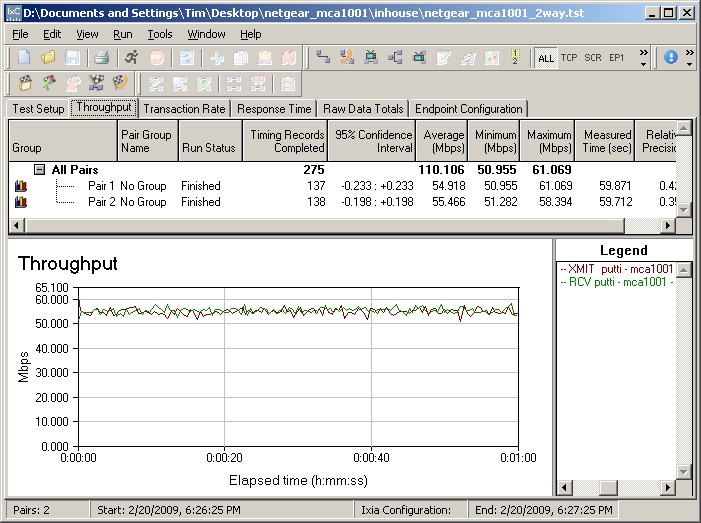
Figure 16: MoCA connection ping test
I also ran a ping test, whose results are shown in Figure 17. Aside from the one 9 ms measurement, this looks just like the direct-connected results.
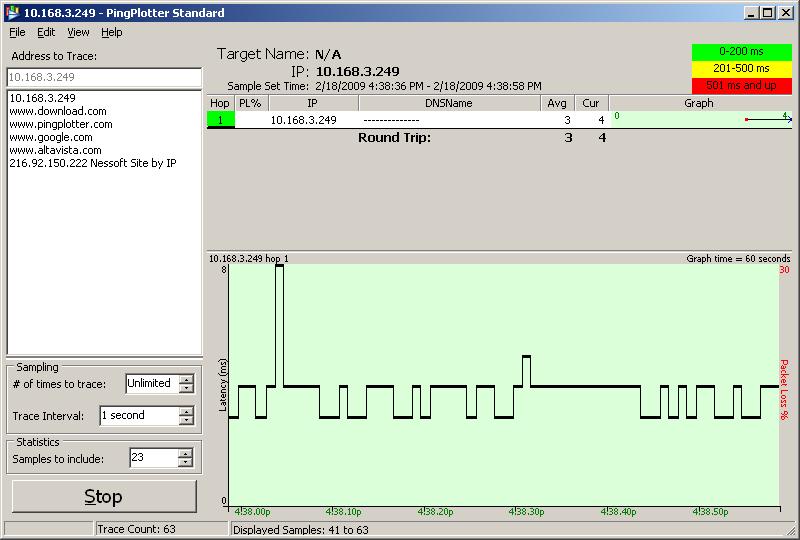
Figure 17: MoCA in-house connection ping test
Performance – Viewing
But you don’t buy this stuff to run throughput tests on it. So I figured I had better see how it did with actual HD streaming.
The rule of thumb for reliable HD streaming is that you need at least 20 Mbps of steady bandwidth. In HD Streaming Smackdown: Draft 11n vs. Powerline I used a few 720p HD clips downloaded from Apple’s HD Trailer website. Peak bandwidths in the collection of clips ranged from 13 to just shy of 23 Mbps. I also used these clips when I started to run viewing tests on the MCA.
The test files streamed from an old Infrant (now NETGEAR) ReadyNAS NV+ connected into my LAN gigabit switch. I used my main Dell Optiplex 755 E4400 Core2 Duo machine running XP with an ATI Radeon HD 2400 Pro video card to view the videos.
I started the test using a NETGEAR EVA8000 for video viewing. But it seemed to have problems playing the Quicktime 720p videos reliably. So as not to unnecessarily penalize the MCAs, I switched over to using my desktop machine with the VLC media player (0.9.8a), which reliably played all videos.
I viewed all videos first using a 100 Mbps Ethernet connection and verified that they played without problems. Then I switched over to the MoCA connection and was able to play all the videos without a problem!
I then kicked things up a notch and started the bi-directional IxChariot test file that I had used earlier for throughput testing. This essentially soaked up 54 Mbps of transmit and receive bandwidth. I then tried playing the 720p clips and they played ok…until the clip hit the peak bandwidth points, where the video stuttered, then froze. But this shouldn’t be surprising since I found that 70 Mbps is the max rate for a single connection and the video peak bandwidth was over 20 Mbps.
The more important discovery, however, was that there didn’t appear to be any QoS kicking in to dial back the bandwidth on the data stream to give more to the video stream.
I then decided to try some 1080p Quicktime clips and found they played just fine—without the IxChariot test running, of course. Figure 18 shows the bandwidth profile of one of the clips, which peaks at around 35 Mbps.
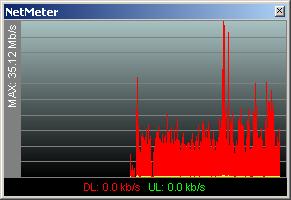
Figure 18: 1080p test clip bandwidth profile
My last test consisted of running the IxChariot bi-directional data test, watching a ripped DVD (around 3 Mbps data rate) and running clips from nightly.msnbc.com in a Firefox window. Everything ran just fine, which I suppose I should have expected since total bandwidth was well below 70 Mbps.
Conclusion
Simply put, MoCA is the only "alternative networking" technology that I have laid hands on that can reliably stream HD video—even 1080p. Of course, my limited test enviroment in no way presented a difficult test environment. But then again, my wireless environment is clean and so is my powerline. And neither of those technologies have been able to do what the NETGEAR MCA1001s did.
Which makes me wonder why NETGEAR is the only company that is putting a MoCA product into retail? Is there some nasty secret that I haven’t found? Or do companies fear that consumers will balk at the almost $200 price tag for a pair of MoCA adapters? Or is there more profit in selling wireless and powerline products?
I don’t know the answers to those questions. But I do know this. If you need to get an HD capable Ethernet outlet somewhere, can’t or don’t want to run Ethernet, but have TV coax between the locations where your Ethernet is and where you need it to be, then go get a NETGEAR MCAB1001 kit. You may not like the price. But you’ll love the performance.