

Introduction
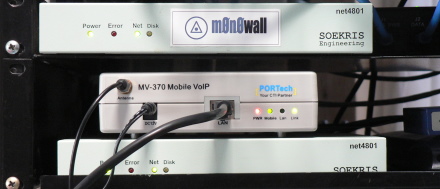
Our Asterisk based home/office phone system provides tremendous flexibility in handling our phone calls. It gave us the opportunity to migrate away from using analog phone lines from a traditional carrier. We now send and receive all calls via IP over our DSL. Of course, the monthly cost of our calling is a lot less. However, it’s not a prefect system – yet.
From the outset, we have worked to make the system more robust. This we have done in many ways, including providing various redundancies in hardware and configuration. Most recently, we have added a cellular trunk to ensure calling capability should our DSL service fail. The process involved in arriving at this decision has proven interesting.
VOIP systems are more than just a phone line coming into the office/home, so there is more potential for problems. To prevent issues from occurring, it is best to address the potential problems before they happen. In our system, our VOIP has a number of redundancies built in to increase its reliability.
To begin with, the phones themselves, a combination of Polycom and Snom SIP phones, are registered both to the local Asterisk server and a remote service. The phones automatically failover, so if the local server is unresponsive, we can still make outgoing calls.
In addition, our phone numbers (aka DIDs, for Direct Inward Dialing numbers) provided through an online service provider also provide a failover system. My preferred service providers offer failover to a normal phone number, which I generally point to my cell phone.
Our Asterisk server provides it’s own form of redundancy as well. It is registered with three commercial service providers and a couple of free VOIP services including Free World Dialup. If any service provider is not available, it will cascade to another, and then a third. This is really only useful, however, when making outgoing calls.
Redundant Asterisk servers are, I think, a little beyond the scope of a typical home or home office environment. The sort of Linux clustering skills required to set this up are certainly beyond my present skill set. Also, redundant servers are more than a little inconsistent with my use of appliance-like Asterisk embedded systems.
Another area of redundancy that I need to address is connectivity. Some might assume this to imply network / Internet connectivity. But that’s only one possible connection methodology.
The simplest and probably most common approach here would be to keep one or two analog phones lines (POTS, for “Plain Old Telephone Service”) and connect them to FXO interfaces on the Asterisk server. These are often called analog trunk lines. When so configured, calls could proceed via traditional wire-line service if IP connectivity was lost.
This is not an approach I choose to deploy for three reasons. First, analog FXO interfaces have, in my experience, been fiddly and unreliable, to be avoided if at all possible. Admittedly this opinion was something that I arrived at some time ago, before the most current crop of Sangoma, Pika and OpenVox hardware was available. Even so, the extra hardware would add to the cost of the implementation and would force us to use a larger host platform that can handle a PCI card.
Secondly, the monthly carrying cost of POTS lines is not inconsiderable, especially if you add a few “extra calling features” such as caller ID. One of the many sorry aspects of the 1996 Telecom Act was the deregulation of fees for ancillary services like caller id, directory service, listing services, etc.
Finally, the only provider of analog lines in our area is AT&T, a company that I have decided I’d rather not give my business to for personal reasons. So it was that some time ago we decided to drop our analog lines and move to a 100% VoIP phone system, whatever that might entail.
Redundant IP Connectivity
On the surface, redundant IP connectivity would seem to make sense. But one fact of VOIP life is that certain things about networking can be more difficult than they should be.
For example, the SIP protocol can make firewall and NAT traversal troublesome. Making an Asterisk server load-balance across two ISPs is even more complex. At the root of this is the fact that the end-point source and destination IP addresses are passed in the VoIP traffic. The Asterisk server itself is expected to have only one IP address, not two.
Voice-over-broadband providers themselves go to significant effort to load balance traffic. Like clustering Asterisk servers, this takes more effort than makes sense for a home office. So on my case, even though I have both DSL and cable modem service at my location, it appears that my VoIP traffic will use only one of these connection, at least for now.
There is an often overlooked third connectivity mechanism that we can leverage—wireless via a cellular carrier. This can effectively create a digital cellular trunk into Asterisk and potentially solves a number of problems. This is the thrust of the rest of this article.
VoIP Service Providers
Most people who decide to move to VOIP based home phone service do so via one of the various VOIP-over-broadband service providers offering what has come to be known generically as “Digital Phone” services.
There are now literally hundreds of companies both large and small offering VoIP-over-broadband service. The leading independent provider of this sort is Vonage. The major cable companies and telcos also have some form of residential VOIP service offering. We might refer to these as the retail providers. Table 1 lists the major U.S. companies.
| Company | URL |
|---|---|
| Vonage | www.vonage.com |
| AT&T CallVantage | www.usa.att.com/callvantage |
| Verizon VoiceWing | www22.verizon.com/ForYourHome/VOIP/VOIPHome.aspx |
| Comcast Digital Voice | www.comcast.com |
| Time-Warner Digital Phone | www.timewarnercable.com |
| Nuvio | www.nuvio.com |
| Cox Digital Telephone | www.cox.com/telephone/default.asp |
| Charter Telephone | www.charter.com/Visitors/Products.aspx?MenuItem=4 |
| Packet8 | www.packet8.com |
| Lingo | www.lingo.com |
| VoicePulse | www.voicepulse.com |
Table 1: Major US Retail Voice-Over-Broadband Services Providing 911 Service
This group, by definition, provides their customers with access to 911/E911 and 411 services. The FCC, which regulates communications across the U.S., mandates that 911 service be provided by voice-over-broadband companies in the retail residential marketplace.
The most common pricing model among the large retail providers tends to involve xxx minute/month/line domestic long distance calling for a flat monthly rate. Some offer “unlimited” calling for a fixed monthly fee. Often “unlimited” really means some unstated but arbitrarily high number of minutes beyond which they consider that you are abusing the account.
There is yet another group of providers that target the small business, small office, home office and hobbyist marketplace. Their service offering may be wrapped in an application context as a “Hosted IP-PBX” or offered on a raw form as outbound call termination and inbound calling (aka DIDs)—all delivered via IP.
This tier of VoIP service providers is a wholly different class of companies. Not quite wholesale carriers, but not quite retail either. The generic term for these companies is “Internet Telephony Service Provider”, aka ITSP.
They run the gamut from very small players operating on an offer of super-cheap service, to larger companies in the broader networking space and providing SIP trunking to SMBs. Table 2 lists some of the U.S. based players.
| Company | URL |
|---|---|
| Nufone | www.nufone.net |
| Voicepulse Connect | connect.voicepulse.com |
| Voxee | www.voxee.com |
| Junction Networks | www.junctionnetworks.com |
| LES.NET | http://Les.net/ |
| Sixtel.Net | http://www.iax.cc/ |
| VOIPJet | www.voipjet.com |
Table 2: Sampling Of US Based Internet Telephony Service Providers
In this space, some players, VOIPJet for example, only offer one direction of service. That is, they may accept outgoing calls for termination afar, but do not provide any way to receive incoming calls. Many offer a diverse range of services at prices that make them extremely attractive to cost-conscious small business owners.
There are various pricing models among these providers. Some provide service based solely on cost per minute of calls placed with fixed no monthly fee. Some charge per minute for all calls, even local calls. Some charge fixed monthly fees per end-point (phone), while others charge per user.
One of the most significant differences between large retail players and smaller ITSPs is the ability to deliver 911 emergency calling service and 411 directory services.
In migrating my home and home office to a 100% VoIP system, we had to weigh many considerations, availability of 911 service key among them. If it was worth installing a UPS to keep the DSL, network and IP phones running during a power outage, then it follows that 911 service should be provided if possible. Yet none of the ITSPs we prefer to use provide 911 or 411 service.
Since we have several cell phones in the house, it, at first, didn’t appear that 911 service on the home phone line was an absolute necessity. Our cell phones could be used if the need arose. However, what about those times when a guest was at our home and without a cell phone? Further, would our household insurance provider look kindly upon not having 911 service?
Ultimately, my wife decided that a pure VoIP solution without 911 service was simply out of the question. What can I say? This is the Spousal Approval Factor that I have to live with.
Even 411 directory service can be important. My wife uses it with startling regularity and tends to find it very annoying if it’s not available. We have tried the free directory services such as TellMe, but found them wanting. They are interesting technology presentations, but don’t generally pass our internal spousal approval test.
Finally, we live in Houston, where we also have 311 service. This is a direct access number that reaches a call center run by the city government. It’s a non-emergency access line that can be used to report street lights out of order, fallen trees, leaking fire hydrants, etc. Sadly, access to 311 service is not provided by cellular providers in our area.
So a wireless cellular trunk sounds interesting. The next step is to examine the common cellular networks and devise a strategy for interface between them and the SIP domain.
Cellular Networks and Gateways
There are two major types of cellular networks: CDMA and GSM. GSM is more common globally, CDMA is more common in the U.S. (Table 3) In the end, your choice of cellular carrier will decide the type of gateway device you require. Since T-Mobile is my cellular carrier I was going to need a GSM-based gateway.
| Carrier | Network Type |
|---|---|
| AT&T / Cingular | GSM |
| T-Mobile | GSM |
| Sprint | CDMA |
| Nextel | iDen (Motorola proprietary) |
| Verizon Wireless | CDMA |
| US Cellular | CDMA |
| Alltel | CDMA |
Table 3: Network Types used by U.S. Cellular Carriers
Cellular gateways come in a range of sizes and capabilities. In searching, I found cellular gateways, sometimes called fixed cellular terminals, from one to dozens of ports. The larger gateways are carrier class devices that connect the cellular networks to large scale PBXs.
Portech, for example, makes a large gateway that provides an E-1 or T-1 interface at the PBX end, and can provide up to 30 simultaneous calls. Larger gateways, such as the Hypermedia HG-4000 shown in Figure 1, tend to be modular, so that an installation can be scaled to fit exact requirements.
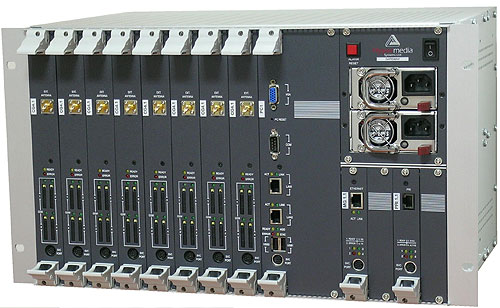
Figure 1: Hypermedia HG-4000 GSM Gateway
Like most carrier class equipment, these devices are built to be extremely reliable, and they are priced accordingly. These are well beyond the scope of any home office.
For some applications, it may be desirable to have a handful of cellular trunks available. There are several mid-sized gateways that accommodate this, providing 2-8 ports. These usually target companies that would like to add wireless trunks to an existing commercial PBX. The cellular lines are exposed either as a number of analog line jacks or as SIP trunks access via IP.
While still costly, these smaller gateway devices are often priced so as to be practical for a business that would value the ability to keep their phones operating even while all land line and IP connectivity was lost.
My installation would be the smallest practical…just one trunk line…a single port. Even so, there are various approaches embodied in the various available products.
The least expensive models ($125-250), such as the Ericsson gateway shown in Figure 2, present a standard analog phone line jack as their means of connection to the PBX. This would require the addition of an analog FXO interface card to bring the line into in my Asterisk server.
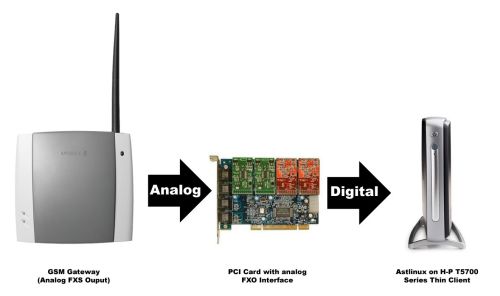
Figure 2: Connecting GSM to Asterisk – Method 1
Somehow bringing the call from the digital domain, back to analog, then converting it to digital again in the cellular space seems less than ideal. Such transit would yield plenty of opportunity for call quality issues. The requirement for the analog line card also adds cost. As mentioned previously my experience with Asterisk and analog FXO interfaces was less than thrilling.
Within the Asterisk user community, two modules are available to allow the use of cell phones as the equivalent of analog trunks; chan_bluetooth and chan_mobile. These have the ability to bridge a call from the Asterisk server to a cell phone via Bluetooth.
From a hardware perspective, this is certainly a low cost approach. But it implies that I’d need to leave a Bluetooth-capable phone near the server at all times. It might be workable, but I would prefer a more elegant solution.
I eventually selected the Portech MV-370 SIP-GSM gateway (Figure 3). This gateway is a SIP device, so the connection between the PBX and the gateway would be via IP. By keeping the data path digital end-to-end, superior call quality is possible. Also, the configuration in Asterisk is simplified. The gateway just appears as a SIP peer, just like any of my SIP phones.
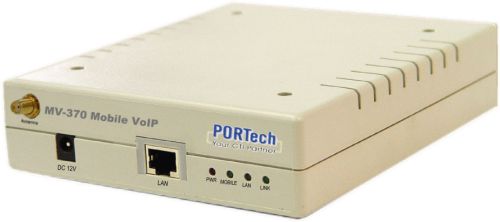
Figure 3: Portech MV-370 SIP-GSM gateway
In fact, I hunted around various Asterisk related web sites and found that configuration of the Portech GSM gateway was already well documented. This supported my decision to order the gateway directly from the manufacturer in Taiwan.
How About Skype?
There are a number of gateway devices available that are specifically designed to interface the cellular networks to the popular Skype IP communications service. However, while very popular, Skype is a completely proprietary system that doesn’t interoperate with IP-PBX systems, except through dedicated gateways.
The inexpensive single-port versions of these devices often require a connection to a PC running Skype software. In this way, Skype allows third-party integration while maintaining a completely closed architecture. The gateway doesn’t communicate with the Skype P2P network directly. It only acts as an audio device for the Skype client software. Communication is via Skype’s published API, not by using the Skype protocol directly. Multi-port cellular-to-Skype gateways are available from a few sources.
So that’s how I came to want to add a cellular-based alternative to my VoIP system and select the PORTech gateway. In Part 2, I’ll describe how to install and configure the Portech GSM Gateway to operate with my Asterisk system.