

Introduction
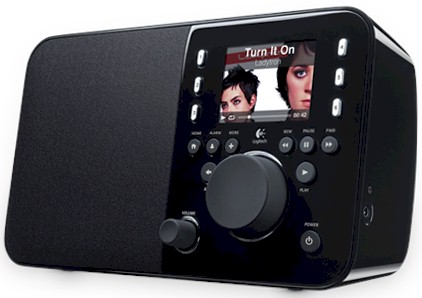
| At a Glance | |
|---|---|
| Product | Logitech Squeezebox Radio (930-000101 [black]) |
| Summary | Lower-cost version of popular networked music player |
| Pros | • Easy to set up and use • Handles local music and Internet music sources • Improved user interface (over Squeeze Boom) |
| Cons | • No tone control • No remote included |
I’ve been enjoying my Squeezebox Boom since I got it last spring, both with and without the iPeng remote iTouch / iPhone app. I’ve hauled it out to the porch and patio during parties and when friends have come to visit and connected it to my home entertainment system for background music during family dinners.
So when Logitech trotted out the new Squeezebox Touch and Radio a few months back, I was eager to get one in so that I could decide whether to make it part of my Christmas self-gifting. But when I contacted Logitech to request a review sample, I found I was too late to the party and ended up on a wait list. Fortunately, the Radio was frequently discounted during the holiday buying season. So I took the plunge and bought one anyway. As it turns out, I’m very glad I did.
You can think of the Radio as a smaller, mono version of the Boom (about half as wide, in fact) with an improved user interface that includes a 2.4" color LCD and a few more front panel controls that make it a bit more intuitive to use. It comes housed in a glossy plastic fingerprint-magnet case in your choice of black or red. (The front panel is the same black for both versions.)
Figure 1 calls out the front and rear panel controls and connectors, which include both line-in and headphone output jacks. Like its siblings, the Radio connects to your network via 10/100 Ethernet or 802.11b/g wireless and setup for either is quick and easy (more shortly).
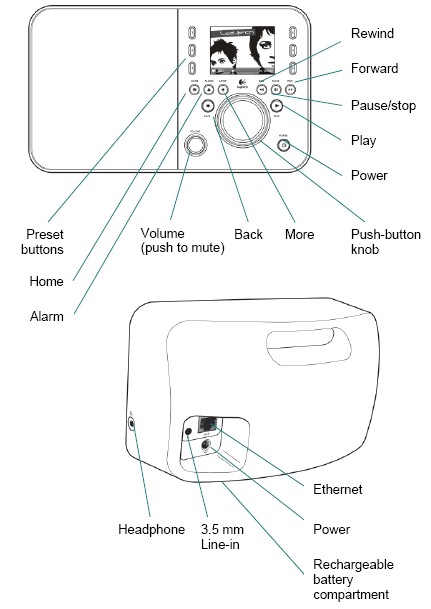
Figure 1: Squeezebox Radio front and rear panels
Another improvement from the Boom is a compartment for a rechargeable battery. This makes the Radio truly portable vs. the Boom, which has no battery option. You’ll need to wait for early next year (March 2010) to order the optional battery pack, however. But if you want an infrared remote, which doesn’t come with the Radio, you can order the Boom’s remote right now.
Inside Details
It’s easy to pry off the speaker grille and remove the two Torx screws that are then revealed. But my gentle prying of the right-hand control panel didn’t yield and I didn’t want to risk breaking my spouse’s new Kitchen entertainment center. So Figure 2 is taken from the FCC ID docs and shows the Radio partially disassembled. It also shows the sizable and not-yet-available optional 18 V battery pack.
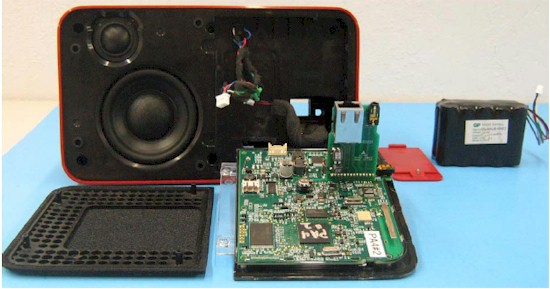
Figure 2: Squeezebox Radio opened up
The bi-amped dual speakers are clearly visible and powered by a Class D 10 W amplifier. The Radio can’t match the Boom’s ability to fill a large room with ample volume from its 30 W amplifier and two sets of speakers. But the Radio’s sound was more than adequate for the large Kitchen where we use it and would be loud enough for most other rooms. It probably wouldn’t be able to overcome the crowd noise at even a small party, however.
Figure 3 is a closeup of the board, but not close enough to make out all of the parts. The light-colored device just underneath the single antenna is an Atheros single-chip ROCm 802.11b/g radio. The Realtek Ethernet interface is to the left, next to the connector board and I can make out Samsung flash and RAM devices.
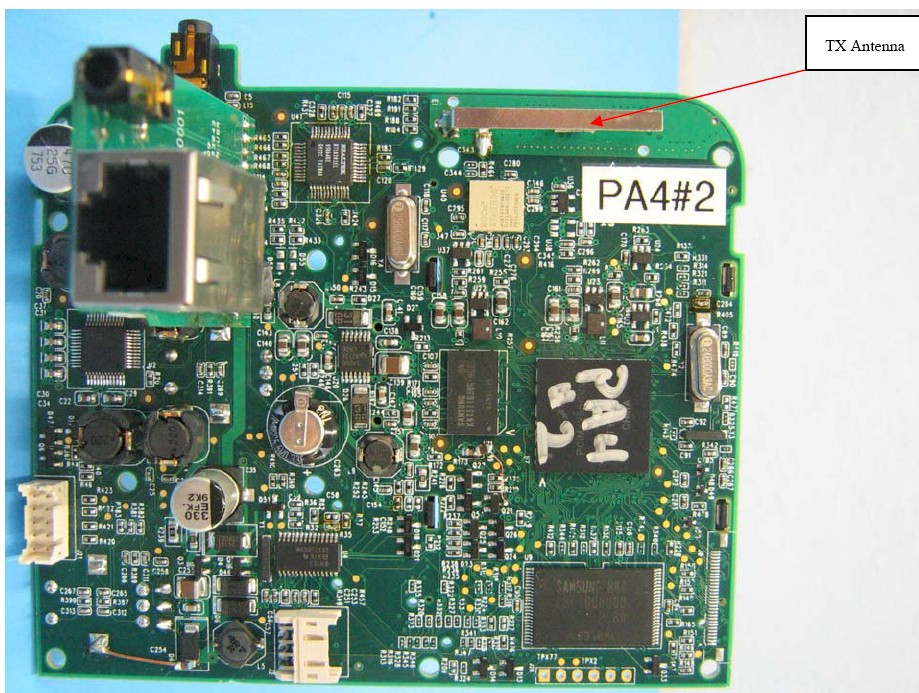
Figure 3: Squeezebox Radio board
I can’t tell what the large device is with the "PA4" obscuring the part number. But the design appears to not be based on the Ubicom IP3K CPU / TI TAS3204 DSP combination used in the Boom. (The obscured part number appears to start with PCiMX255.)
In Use
Logitech has streamlined the Radio’s setup, with no mention of installing its Squeezebox Server software. In fact, there’s no install CD that comes with the Radio. All you get is a printed Setup Guide poster that uses diagrams and minimal text to guide you through connecting the power supply and turning it on. As is fitting for a device dubbed a "Wi-Fi Internet Radio", you will need a working Internet connection.
Once booted, the Radio will automatically grab its IP address information via DHCP if it’s plugged into Ethernet. Otherwise, it will find all 2.4 GHz in-range wireless networks and prompt you to select one. If the network is secured, you’ll then be asked for a WEP key or WPA / WPA2 passphrase, which you enter using the push-button knob to scroll through and enter the password characters. Once connected, the Radio immediately contacted the Logitech mother ship and downloaded and installed a firmware update. After that was done, I was set to go.
If the Radio is your first Squeezebox, you’ll want to head over to mysqueezebox.com, the home of all things Squeezebox (Figure 4). Once you create a free account, you can peruse the numerous services available via the App Gallery.
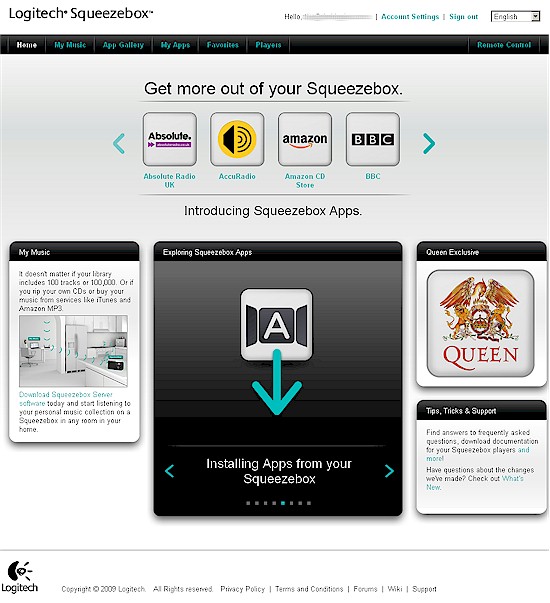
Figure 4: mysqueezebox.com Home
One of the things I really like about the Squeezeboxes is that they can access a lot of free (and pay) Internet music services including BBC, Classical.com, Last.fm, Mediafly, Napster, Pandora, Slacker, Rhapsody and SIRIUS Internet radio. Squeezebox support for general Internet radio access is also top-notch. You can browse by Genre, find a station by geographic location or use the general search function. The Local feature is also handy, automatically providing a list of streaming stations in your local area.
The LCD display not only helps with navigation, but it also displays album art (if the service you are listening to supports it). You can also install the Flickr app and view your own photos or your friends’. Not so useful is the Facebook app, which will post the song you’re listening to on your Wall at the press of a button.
mysqueezebox.com’s Remote Control feature (Figure 5) is a bit more useful, letting you control multiple Squeezeboxes from a handy browser window. If you have an iTouch or iPhone, don’t get too excited about this feature, though. I couldn’t log into my account when using an iTouch and there didn’t appear to be a mobile browser-optimized interface.
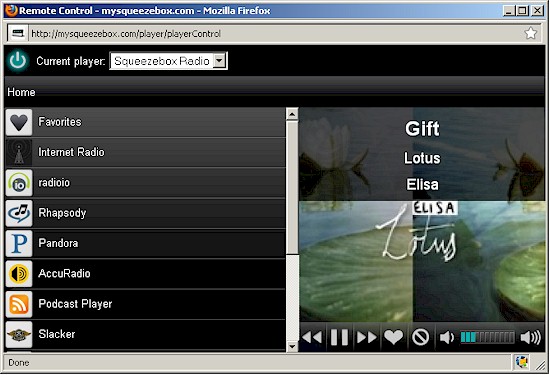
Figure 5: mysqueezebox.com Remote
The last thing the browser interface helps with is configuring your Squeezebox. It’s not as useful for the Radio as for the Boom, however, since there are fewer knobs to twiddle (Figure 6).
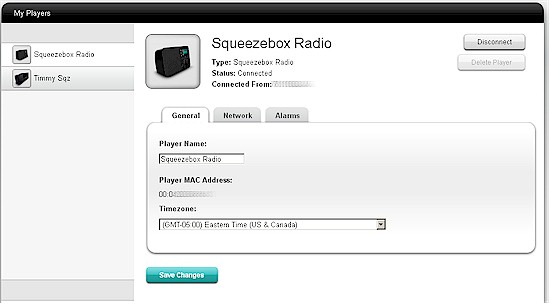
Figure 6: mysqueezebox.com My Players
If you want to access your own digital music, you’ll need to download and install the Squeezebox Server. There are versions for Windows, Mac OS X, NETGEAR’s ReadyNASes, Windows Home Server, Debian / Ubuntu as well as Linux RPM and Perl code.
I’ve used Squeezecenter installed on a ReadyNAS NV+, QNAP and Synology NASes and they all work fine (although some past QNAP installs have been relatively painful). An annoyance that I found is that once you select a local Squeezebox server, you can’t go back and select mysqueezebox.com as your server without resetting the Radio to factory defaults.
Once I did get set up, operation was pretty much trouble-free. I didn’t mind the mono speaker vs. the Boom’s stereo, since the Boom’s speakers are too close together anyway for creating a wide soundstage. Speaking of soundstage, you should know that the StereoXL, Line In and Out and tone controls available in the Boom are missing from the Radio. All the Radio provides are Crossfade and Volume Adjustment controls for controlling song-to-song transitions and volume level.
I initially was disappointed by not finding any indication in the Radio’s documentation that the headphone jack could be used as a line-out. But when I connected the Radio up to my receiver’s Aux input, I found that it worked just fine. I just had to crank up the Radio’s volume to almost full to get a good volume range from my receiver. But I detected no trace of distortion using the headphone jack as line-out and was pleased to find a stereo (vs. mono) signal too.
Finally, the six preset buttons worked just like a car radio’s—a press-and-hold while listening to a station automatically linked it to the button.
Closing Thoughts
The Squeezebox Radio is another in a well-designed line of networked music players from Logitech. It’s easy to set up and use and when paired with the iPeng iTouch / iPhone app, can rival much more expensive systems like the Sonos and Cisco / Linksys Wireless Home Audio System. The only bad news (for Logitech) is that the Radio pretty much kills the market for the $100 more expensive Boom, since the Radio has all of the Boom’s essential features and a nice color LCD for displaying album art while you listen.
As with the Boom, I liked the Radio so much that I took advantage of holiday sales and bought two, both for $50 under the $199 MSRP. I can’t guarantee it, but if you set a FatWallet alert, I’ll bet it won’t be long before you see the Radio available around $150.
If you’re looking for a multi-talented networked music player that can stand alone, be connected into your entertainment system or used as part of a whole-house music system, the Logitech Radio is hard to beat.