

Introduction
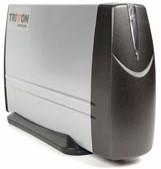
| Tritton Simple NAS | |
|---|---|
| Summary | BYOD enclosure to turn a 3.5″ IDE drive into a SAMBA-based NAS drive |
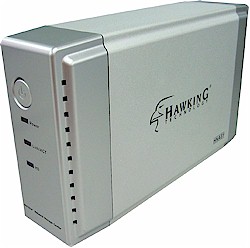
| Hawking Net-Stor Network Storage Center | |
|---|---|
| Summary | BYOD enclosure to turn a 3.5″ IDE drive into a SAMBA-based NAS drive |
I’ve looked at a number of disk-included Network Attached Storage (NAS) devices lately, but this time I’m going to take a look at a couple of “bring your own disk” (BYOD) boxes.
After my last review of Maxtor’s Shared Storage Drive, a reader pointed out an issue that I had not considered. With some of the devices that include a disk, if the disk fails out of warranty, the device becomes useless. The consumer can’t replace the disk with a new one because often the disk itself contains part of the operating system.
But with a device where the drive is not included, the consumer can always replace or upgrade the disk because by definition, the firmware has the ability to initialize a new disk. BYOD devices can also help you save a few bucks, especially if, like many of us, you have a spare IDE drive (or two) lying around or salvageable from a retired PC.
In this review, I’m going to compare two inexpensive BYOD devices – the Tritton Simple NAS and the Hawking Technologies Net-Stor. Both of these companies sell these products either with or without an included disk. But for my review, I’m going to look at the versions that don’t include a disk.
Tritton Simple NAS – Basics
The Tritton Simple NAS is very small. When I first took it out of the box, I thought that maybe I had been shipped a model designed to hold a laptop 2.5″ hard drive. But after reading the instructions, it was clear I had the right one.
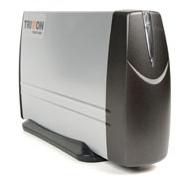
Figure 1: Tritton Simple NAS
The box is designed for a standard 3.5″ drive (up to 400GB supported) and is only 7 1/2″ long by 4 1/2″ high. Looking it over, I saw a fan vent on the back along with a power connector, a 10/100 Ethernet jack and a power button. There was also a punch-out space for a USB connector, but it was not open.
Also included in the box is a power adapter, short UTP network cable, and a CD containing software to assist in data backup to the device. Although Tritton advertises Macintosh support, the backup software runs under Windows only. All of the other NAS I’ve looked at have used a USB 2.0 port for additional disks or for a printer. But Tritton has chosen to limit this device to be a single-disk file server and nothing else.
The case is made of medium-weight aluminum with a plastic front sporting a single Status LED that indicates both power and disk access. There is no light to indicate a problem with the drive, nor is there an “Disk Full” indicator. When I opened the device up to install my hard-drive, I initially thought I was missing some parts that I would used to attach my drive. There was nothing more than the case and the main circuit board with the attached back panel. But when I read the directions, I found that installation was a matter of screwing the hard drive directly to the plastic edge surrounding the main circuit board and sliding it into the aluminum case.
This made me a bit nervous that I’d short something out, but Tritton has designed it so that everything is properly isolated. There is also a cable that runs from the main board to the LEDs on the front. It wasn’t a problem plugging this in, but when I took the box apart later, it was a real pain to unplug. So it appears as if the Simple NAS is designed for one-time assembly.
Once I had the device put together, I plugged in a network cable, power cord and turned it on. I immediately noticed that the box was louder than any other of my NAS units. Perhaps a side-effect of having such a small case caused Tritton to go with a more powerful fan.
Like all other NAS devices I’ve looked at, this one acquires an IP address via a standard DHCP request and then is configured via web browser. Tritton advertises support for both Windows and Macintosh, but I started with my Windows laptop. The instructions indicated that the web browser should be directed to http://storage/ and this worked fine from my Windows system, but my Apple OS X system failed to resolve the URL.
Tritton Simple NAS – Features
Once I connected to the Simple NAS under Windows and determined its IP address, I could configure it using either my Windows or my Mac OS X machines (Figure 2). The first operation required when configuring the box is initializing the hard drive. The menu used to do this appeared to work fine, but I had to reset the device and repeat the initialization once before it seemed to take.
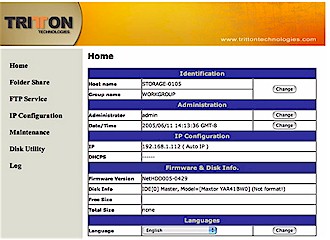
Figure 2: Simple NAS Initialization
Other options include standard network address and password setup, a log that showed daily file transfer activity, disk check utility, and a programmable spin-down time for the drive. The spin-down setting is a nice feature that all of these types of devices should have. My NAS gets used only sporadically, so having the drive shut down when it’s idel helps to reduce noise and drive wear-and-tear.
Another nice feature I explored was the FTP server (Figure 3). Menus are provided for creating FTP users (up to 5 simultaneous users) and setting up permissions. The screen layout for this menu was a bit off, but FTP seemed to work fine. Note that you can change the port that the FTP server operates on from its default of 21, but you can’t change the HTTP port for the admin webserver from its default of 80.
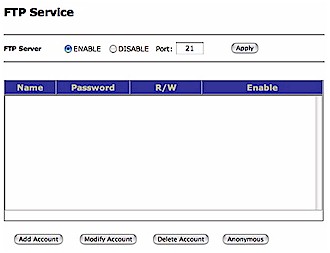
Figure 3: Simple NAS FTP Setup
I next explored the file sharing capabilities, which is the main use for the box. The Simple NAS provides a menu for basic management such as creating folders to share, renaming folders, deleting folders, setting password protection, etc. Tritton says the Simple NAS supports up to 64 simultaneously-connected users.
But unlike the FTP server, there are no options for creating different users or groups of users for file sharing. So folder permissions apply to anyone accessing a share. By the way, the Folder Share menu was displayed improperly, with its values misaligned under the column headings (Figure 4).
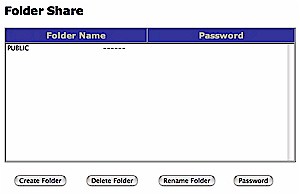
Figure 4: Simple NAS Folder Management
Once I set up my shares, I was ready to try them out. But I quickly ran into some problems. Mounting and using the shares under Windows was straightforward and well-documented. But trying to mount the shares on my iBook, using my newly-upgraded OSX Tiger operating system failed. All I would get is a seemingly “hung” Finder, which is something I’ve never seen on any of the other NAS I’ve tested.
I had better luck mounting a share from a terminal using the OSX “mount_smbfs” command. But when doing the mount, I saw several warnings complaining about an “incomplete copy” and a busy resource. Despite the warnings, however, the share mounted and seemed to work fine. Fortunately, when I checked with Tritton about this, they sent me new firmware (version 5-0607 June 08, 2005) that fixed the problem.
Hawking Net-Stor – Basics
The Net-Stor is larger than the Simple NAS, with a length of nearly 9″ and a height of just over 5″. Its rear panel is similar to the Simple NAS with a fan vent, power connector, 10/100 Ethernet port and no USB port for drive expansion. The front of the device has a power button along with Power, Link / Act (for the LAN connection) and HD (for disk access) LEDs. As with the Simple NAS, there are neither general trouble nor disk-full indicators.
The case is made of medium-weight aluminum with plastic front and rear end-caps and ships with a UTP network cable, power adapter, and installation CD. But unlike the Simple NAS, the Net-Stor doesn’t include any backup software.
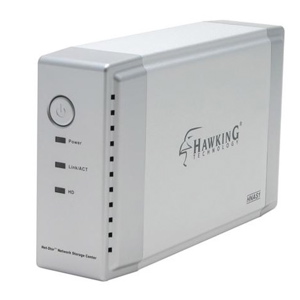
Figure 5: Hawking Technologies’ Net-Stor
Installing a 3.5″ drive (up to 250GB is supported) was straightforward and quickly accomplished. The Net-Stor is constructed more traditionally than the Simple NAS. A metal frame is positioned on top of the circuit board and tabs on the frame are used to secure the drive. Once I had everything assembled, I connected a network cable and the power adapter, then plugged it in.
Once the box booted up, I noted that, much like the Simple NAS, the Net-Stor was also loud. I’m not sure which of the two was louder, but both were a lot louder than either the Kuro Box or the Maxtor Shared Storage drive they were sitting next to.
When I went back to my Windows laptop to start configuration of the Net-Stor, I noticed I had lost outside network connectivity. Thinking that my cable modem was down, I rebooted it, but the problem remained. Resigning myself to enduring a problem with the cable company, I continued with the configuration. The included Windows-only CD had an installation wizard that searched for, and located the Net-Stor on my LAN.
Once the device was located, a web browser was spawned for configuration. When the web browser came up, I noticed that it had connected to 192.168.1.1 which is the IP address of my router. No wonder I had lost network connectivity, since the Net-Stor had assumed the IP address of my router rather than acquiring a new one via DHCP.
I went into the network configuration screen to change the address (Figure 6) and noticed that there isn’t an option for getting an address via DHCP rather than using a static address. This is quite odd, and unique among all of the different NAS and networked multimedia devices I’ve worked with.
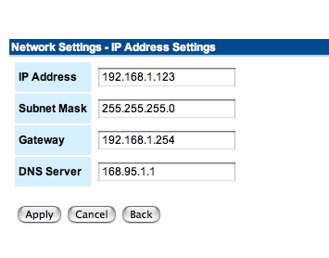
Figure 6: Net-Stor IP Address setup
Once I connected to the device, I manually setup the network parameters by changing the IP address and the gateway. I also changed the DNS server address from the default, shown in Figure 6, to my ISP’s DNS server. With this done, I verified that I again had outside Internet access and could access the Net-Stor at its new address.
Hawking Net-Stor – Features
As with the Simple NAS, the first thing that has to be done is to format the disk drive, which was done in short order using one of the admin menus. Once I had the drive formatted, I explored the configuration options available. I found controls for setting the time zone, changing the administration password, creating shared folders, etc. Hawking says the Net-Stor will support five simultaneously-connected file-sharing and five FTP users.
The user options are richer than the Simple NAS’ (Figure 7). You can create users and individually assign them read and write privileges to shares, but can’t assign per-user disk-use quotas. You also can’t create groups of users, but there is a concept of “Supervisor” user vs. “General” user. However, it isn’t clear what additional privileges a “Supervisor” user has.
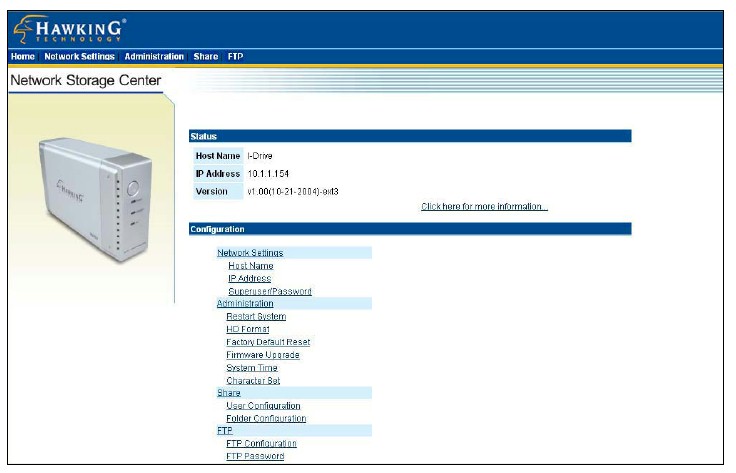
Figure 7: Net-Stor Main Menu
(click image to enlarge)
Users can also be given FTP access to the box (Figure 8). Anonymous FTP is supported and so is the ability to automatically log out idle users (default is 15 minutes). Note that as with the Tritton Simple NAS, you can change the port that the FTP server operates on from its default of 21, but you can’t change the HTTP port for the admin webserver from its default of 80.
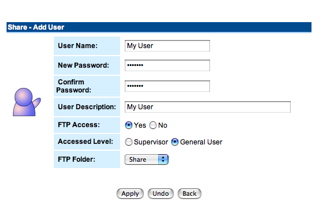
Figure 8: Net-Stor User setup
One important (at least to me) feature missing is setting of the drive spin-down time. Unless the device has a default non-changeable setting, the drive will run continuously regardless of usage patterns. There is also no logging whatsoever, so you won’t be able to track logins for either file sharing or FTP users.
Once I had the Net-Stor configured the way I wanted it, I was able to mount and use the network shares normally from my Windows notebook. And even though the device is not advertised to support Apple’s OS X, I was also able to use the network shares without problem from my iBook. Of course, I was also able to log in to the FTP server and transfer files back and forth using both flavors of machines.
Performance
To check performance on the two products, I ran the iozone tool using the test methodology described here. In my specific case, iozone was running under OSX version 10.4.1 on my iBook, which is loaded with 640 MB of RAM. The disk I used is a 120GB Maxtor DiamondMax Plus 9 7200 RPM drive with 8 MB of cache and ATA/133 interface. As you peruse the results, keep in mind that the maximum raw data rate for 100Mbps Ethernet is 12500 kBytes/sec.
First, I ran iozone against the Net-Stor, with Figures 9 and 10 showing read and write runs respectively.
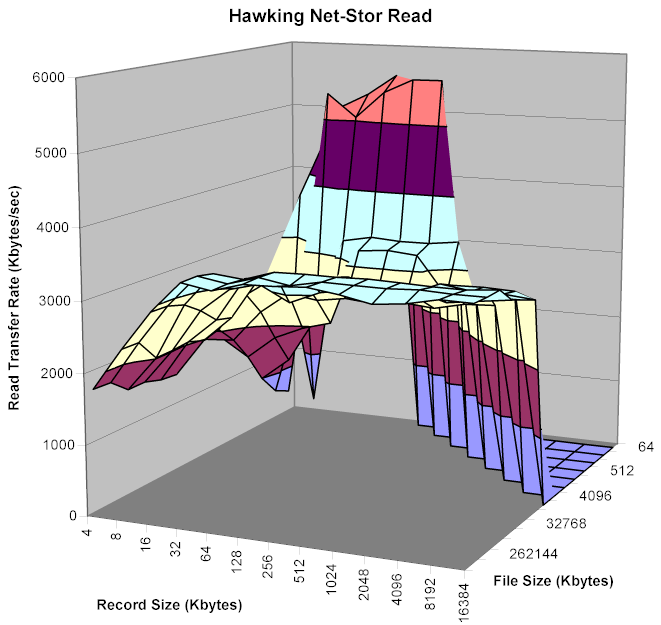
Figure 9: Net-Stor Read Performance
(click image to enlarge)
The tests show the performance is lower than the other drives I’ve tested, which typically have speeds between 6-8 kBytes/sec for read and 5-6 kBytes/sec for write.
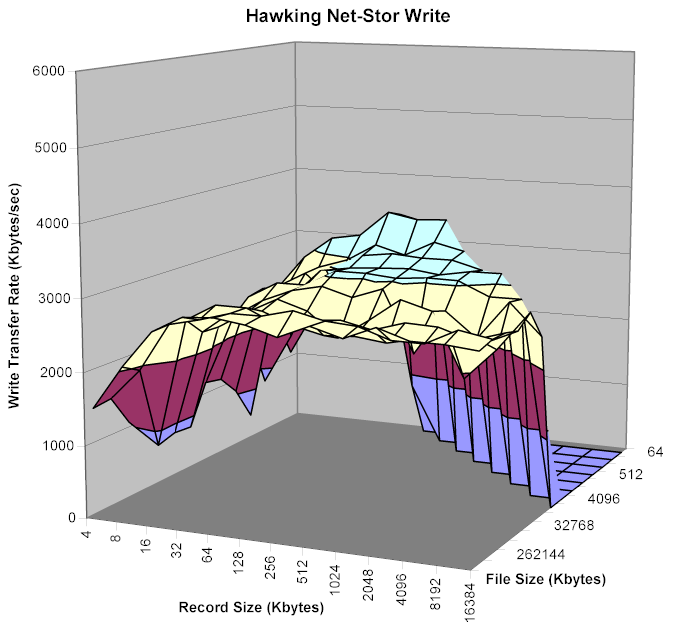
Figure 10: Net-Stor Write Performance
(click image to enlarge)
Running the same tests against the Simple NAS, however, shows even poorer performance (Figures 11 and 12). Especially of note is that read performance is worse than write – the opposite of what I’ve observed with other drives.
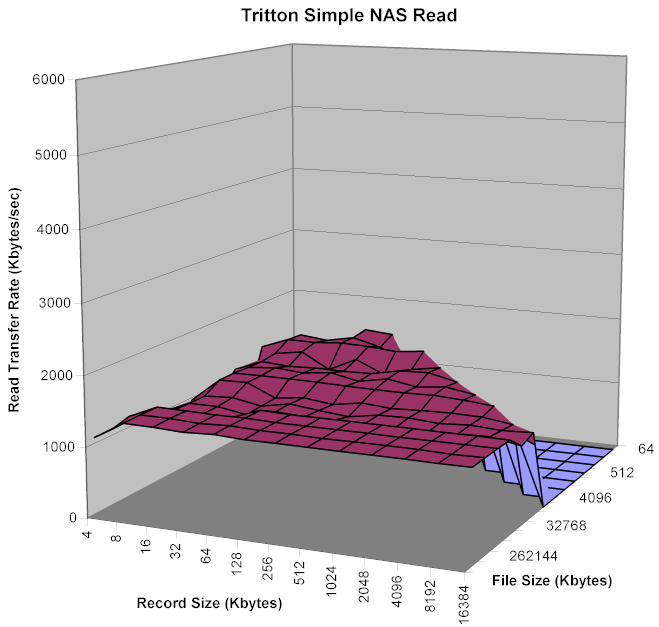
Figure 11: Simple NAS Read Performance
(click image to enlarge)
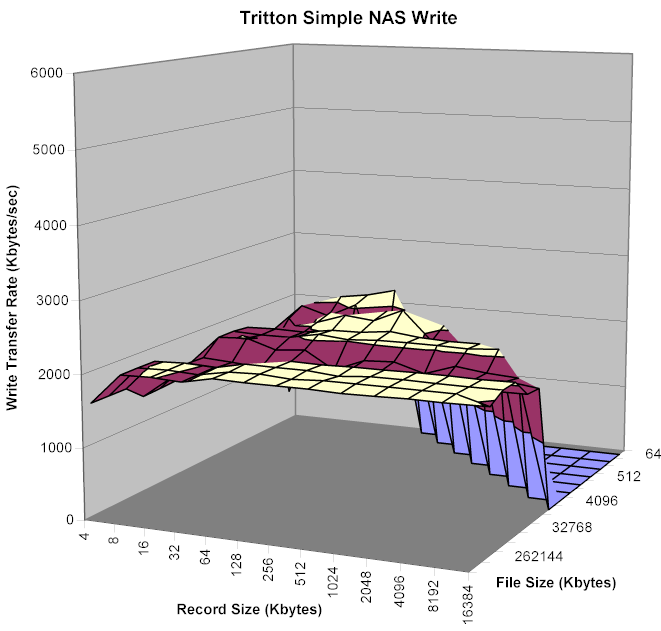
Figure 12: Simple NAS Write Performance
(click image to enlarge)
Performance, Continued
The performance of a network file system, i.e. how fast your computer can read / write data to a network drive, depends on factors specific to the system running the test. So put the results in perspective, I compared the iozone results against a Linksys NSLU2, Buffalo Technology Kuro Box, Simple Tech SimpleShare, Synology Diskstation and Maxtor Simple Share.
The plots in Figures 13 and 14 show read and write speeds respectively for a fixed file size of 128 MBytes and record sizes from 64 to 16384 kBytes. Experience has shown that a file size of 128 MBytes usually shows performance free of caching effects and therefore more indicative of what the product itself is capable of. Since the same test computer and network connection was used for all tests shown, the results are about as apples-to-apples as you’re gonna get.
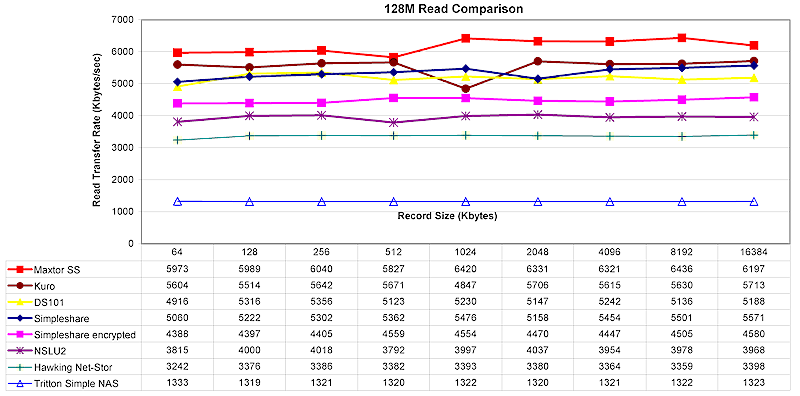
Figure 13: 128 MByte file Read comparison
(click image to enlarge)
The plots show both the Net-Stor and Simple NAS at the bottom of the pack for both read and write, with the Tritton Simple NAS taking the prize for poorest performance seen to date!
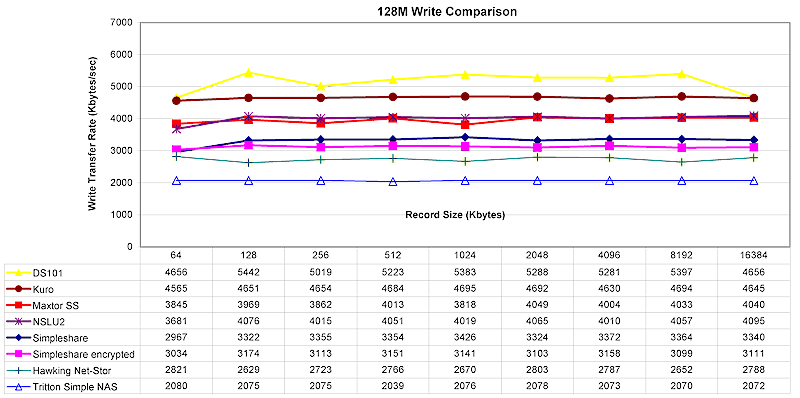
Figure 14: 128 MByte file Write comparison
(click image to enlarge)
Under the Covers
Figure 15 shows the main board of the Net-Stor. The main processor chip is a a Brecis (now owned by pmc-sierra) MSP2006 Multi-Service Processor that includes a MIPS processor and 10/100 Ethernet LAN interface. The ITE T8212F chip provides the IDE controller for the box.
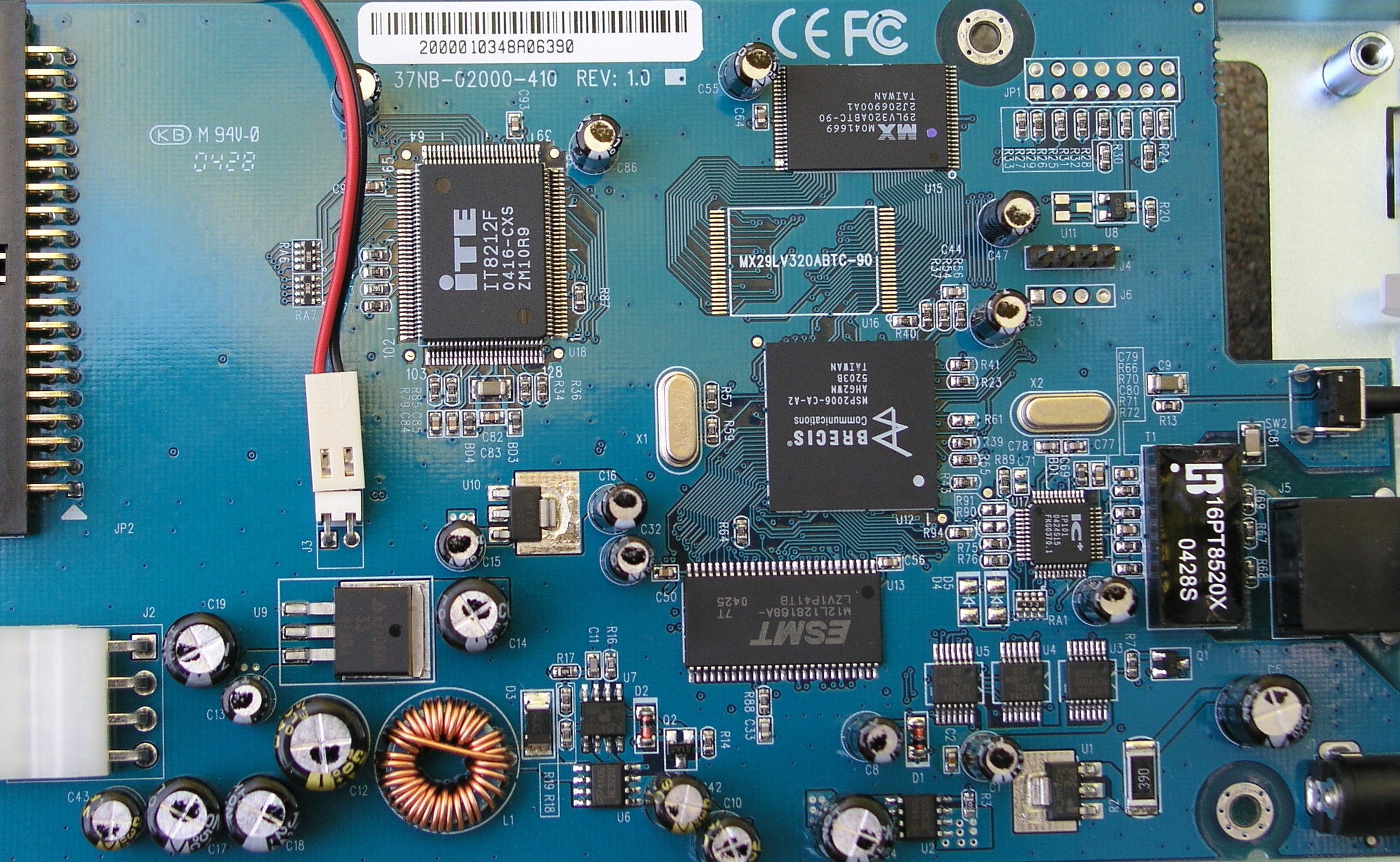
Figure 15: Hawking Net-Stor main board
(click image to enlarge)
Like all of the other NAS devices I’ve reviewed up to now, the Net-Stor was clearly running Linux. The format-disk menu referred to EXT3 which is the native Linux filesystem, and there were several references to “Samba”, a Linux/Unix implementation of the Windows file sharing protocol.
As further evidence, I found that the device was running a Telnet server accessible using the default administration user name and password. Telnetting in didn’t yield a command prompt, but it did give a long advertisement for a Brecis.com Linux implementation. The message also told me that the Linux kernel version was 2.4.20-br251 and the processor was reported to be an embedded, MMU-less MIPS.
Since the device runs Linux and apparently other GPL-licensed software, source code should be available from Hawking, but I couldn’t find it. Hopefully, this is just an oversight and it will be corrected soon.
Figure 16 shows the main board of the Simple NAS. I couldn’t find a whole lot of information on the processor, an RDC R2881. But from what I could find, it appears to be a 16 bit RISC-based, 80186 compatible processor. The IDE controller is a Acard ATP865.
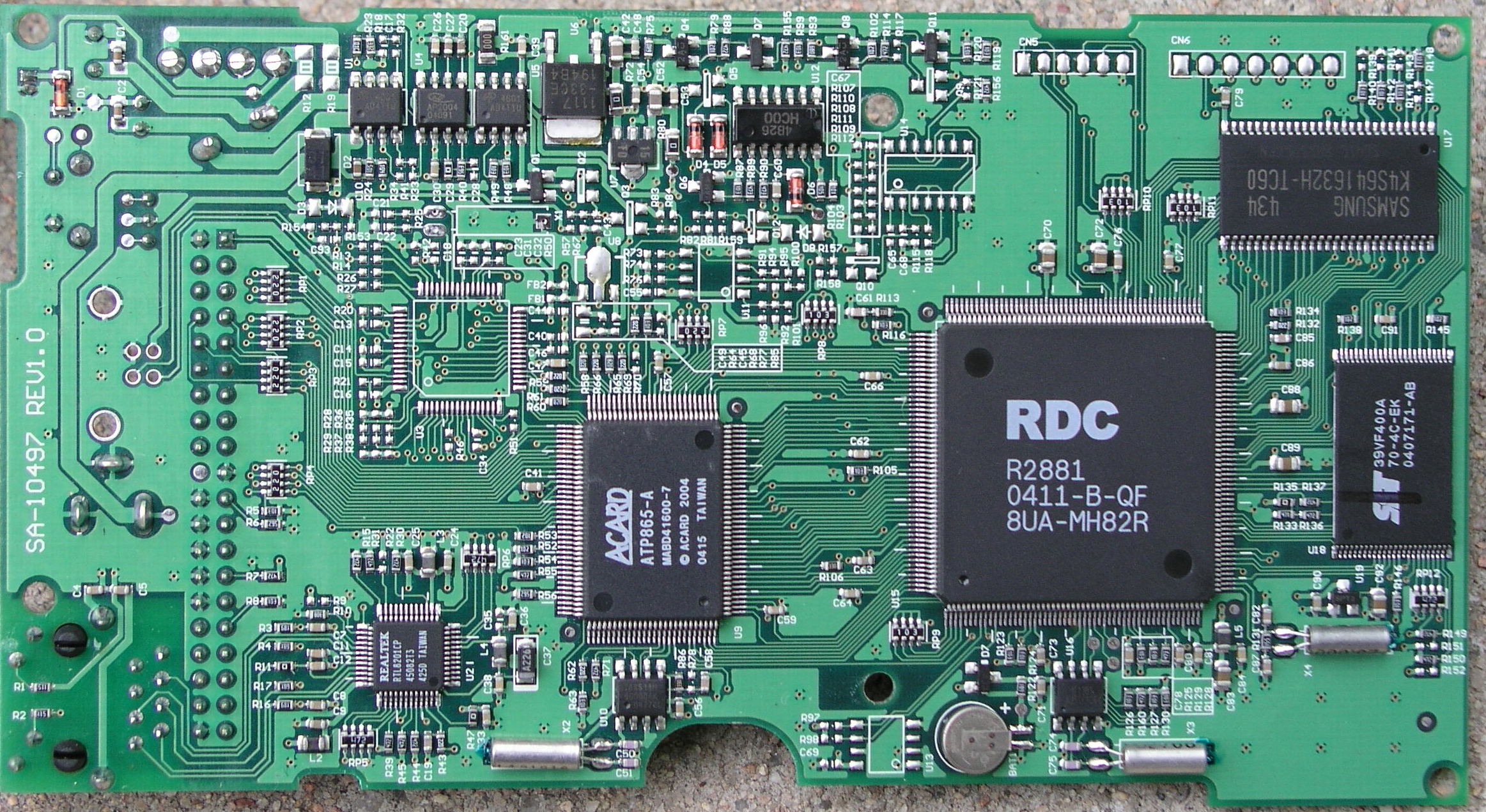
Figure 16: Tritton Simple NAS main board
(click image to enlarge)
The Simple NAS appears to be the first NAS box I’ve reviewed that doesn’t run Linux internally. Poking around with the device, I found it also has a Telnet interface but also has a simple command prompt. The syntax of the command prompt is reminiscent of DOS, complete with references to a C: drive. The drive format appears to be FAT 32, while a status command told me that the device is running at 125 MHz. The DOS operating system, the relatively slow speed and the 16 bit architecture may explain the Simple NAS’ unimpressive performance.
Closing Thoughts
The advantage of both the Simple NAS and Net-Stor over most other consumer NAS is that you won’t be stuck with a brick if your NAS’ hard drive dies. All you need to do is replace the dead drive with a new one, format it, restore your backup (you do have one, don’t you?) and you’re on your way.
In addition, both products are also among the least expensive NAS alternatives around. The low cost comes from the cost of the products themselves and due to the fact that they use relatively inexpensive 3.5″ drives. BYOD alternatives such as the Linksys NSLU2 and ASUS WL-HDD 2.5 are slightly less expensive for the boxes, but require more expensive USB and 2.5″ IDE drives respectively.
But sometimes you get what you pay for. Both devices have smaller feature sets, lower performance and noisier fans than more expensive alternatives. The Net-Stor also lacked backup software, timed drive spin-down and even the ability to get IP information from a DHCP server. And the Simple NAS’ inability to set user-level privileges and very slow read / write speed won’t impress many buyers.
If you’re on a budget and you only have light-use requirements from your networked storage, either one of these boxes might do the job. But more demanding users would be better served (!) by more fully-featured models.