

Introduction
Those of you who have slogged through the entire Performance test sections of our draft 802.11n product reviews already know the "dirty little secret" that I’m about to describe. So, if you get cranky when you feel that your time has been wasted, you can move along…there’s nothing here to see.
But for the rest of you contemplating taking the plunge on a year-end draft 11n upgrade, I’m going to give you a few reasons to think about keeping your current 11g router and running it along with your shiny new draft 11n purchase.
The secret is that the current crop of draft 11n consumer routers handle two things quite badly: mixes of draft 11n and 802.11g clients; and any security option other than WPA2.
Separate your N’s and G’s
Figures 1 through 3 show what happens when draft 11n and standard 11g clients (STAs) are both associated with a draft 11n wireless router. Figure 1 shows a D-Link DIR-655 Xtreme N Gigabit Router [reviewed] associated with its matching D-Link DWA-652 Notebook card and a Linksys WPC54G Notebook card. The DIR-655 and DWA-652 use Atheros XSPAN draft 802.11n chipsets, while the WPC54G is based on the Broadcom Airforce 802.11g chipset.
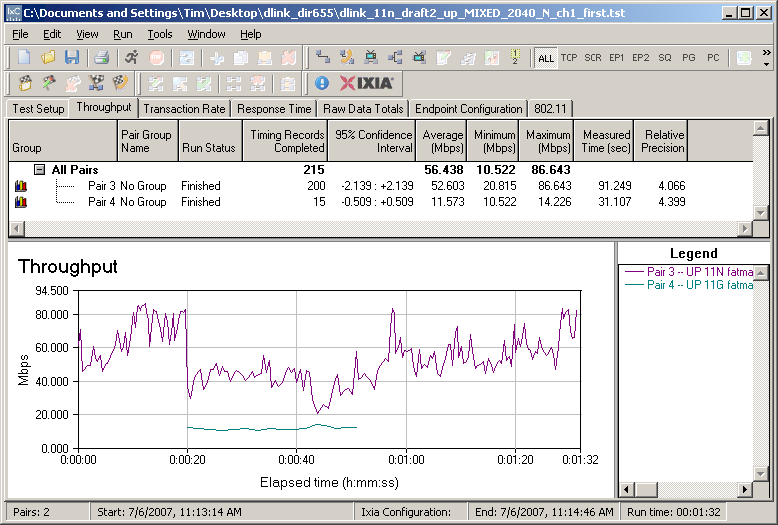
Figure 1: D-Link DIR-655 – Mixed 11n, 11g STAs – Uplink
You can see that the draft 11n and 11g STAs each take around a 50% throughput hit, which is a pretty high price to pay for using a single 11g client. At least the 11n STA gets hit only when the 11g STA is active and not when it is just associated, but idle.
Figure 2 shows a Linksys WRT600N with WPC600N Notebook card, both based on Broadcom’s Intensi-fi draft 11n chipset, and the WPC54G 11g card associated. This time, the 11g STA gets knocked down to around 4 Mbps from its normal ~20 Mbps—around an 80% hit! In this case, the 11n STA fares a little better, reduced to around 50 Mbps.
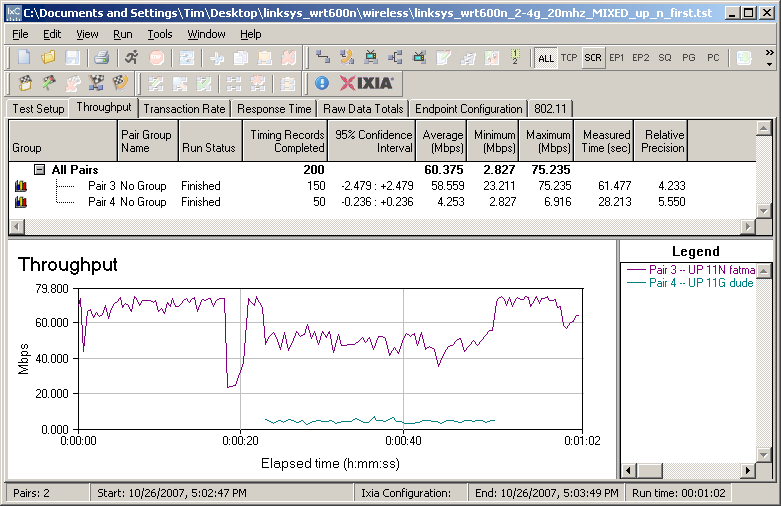
Figure 2: Linksys WRT600N – Mixed 11n, 11g STAs – Uplink
The last example shows the Netgear WNR854T, which uses the Marvell TopDog draft 11n chipset. I used Netgear’s recommended WN511B Notebook card in this test, which uses the Broadcom Intensi-fi chipset. Once again, 11g throughput is knocked down to around 4 Mbps—just like you used to get with 802.11b!
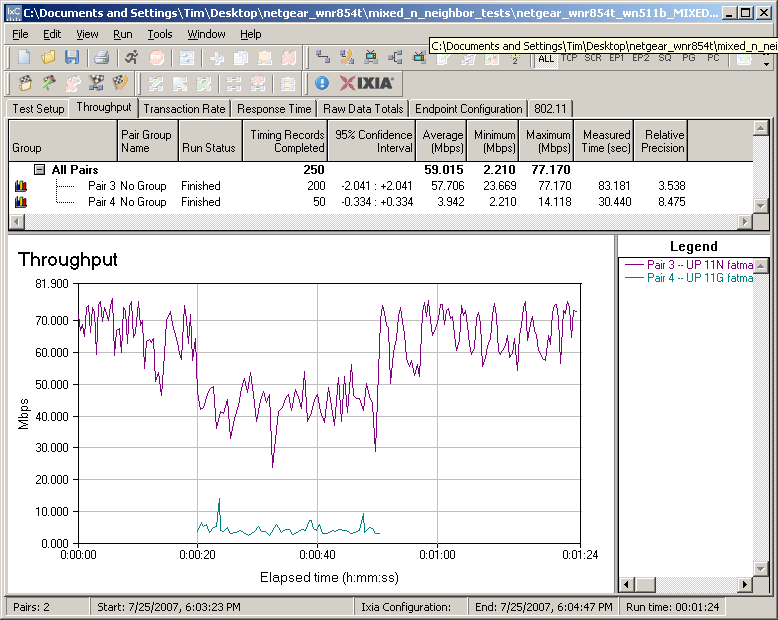
Figure 3: Netgear WNR854T – Mixed 11n, 11g STAs – Uplink
Note that these examples were run under best-case conditions with the STAs and wireless routers sitting in the same room only about 10 feet apart!
Security Slowdown
I already covered the second "secret" in this article, but it bears repeating. In the pre-11n days, I had stopped testing wireless products for WEP-enabled throughput reduction. The reason was that all products had built in the hardware encryption engine needed to handle the heavier calculations required by WPA and WPA2. So I no longer was able to find a throughput reduction greater than my measurement technique could detect.
But all that changed with draft 11n.
My testing has shown a 28 to 75% reduction in draft 11n product throughput with WEP enabled, with the Atheros chipset turning in the highest reduction (Figure 5) and the Marvell the least (Figure 4).
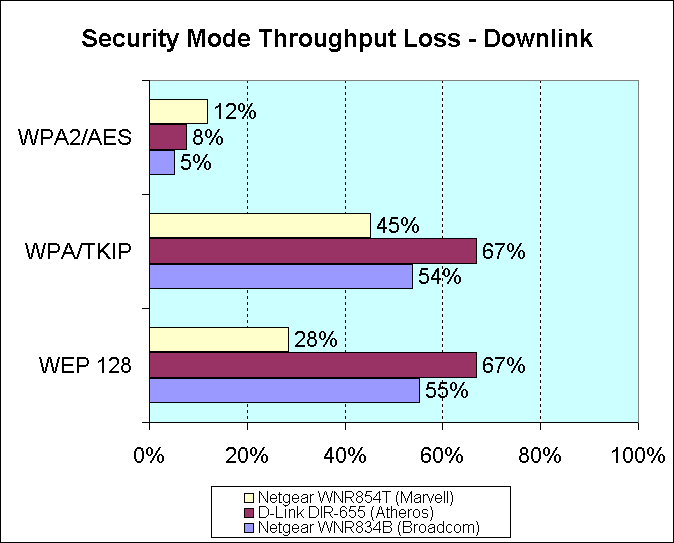
Figure 4: Security mode throughput loss – downlink
Even WPA/TKIP has shown throughput hits of 35 to 77%. The Atheros and Marvell chipsets again turn in the highest and lowest throughput reductions respectively (Figure 5).
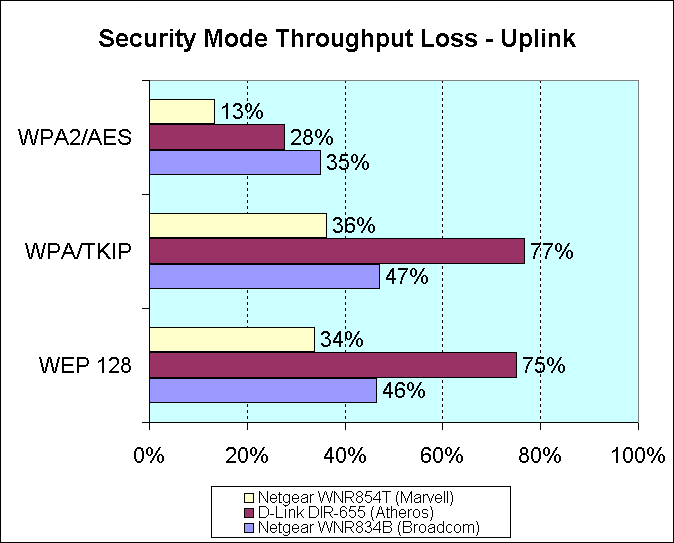
Figure 5: Security mode throughput loss – uplink
So it would seem that WPA2 which uses AES, is the only way to go for draft 11n wireless security. But, even then, the data shows that uplink throughput loss with WPA2 can still be significant, i.e. up to 35%!
In contrast, Figure 6 shows security mode performance that you can expect from a typical < $50 802.11g router. The plot shows a comparison of throughput with WEP 128, WPA/TKIP, WPA2 and no encryption for a Trendnet TEW-452BRP router and matching TEW-441PPC notebook card. All three security modes have performance within 5% of unencrypted performance, which is within the resolution of the measurement technique.
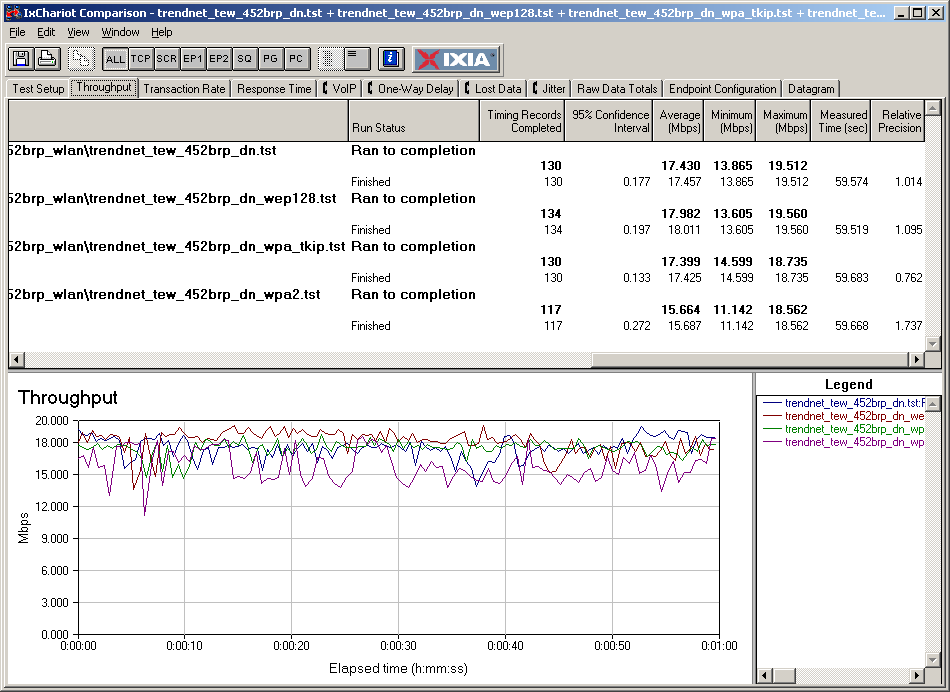
Figure 6: Security mode throughput loss – Trendnet TEW-452BRP
By comparison, Figure 7 shows the same mode comparison for a D-Link DIR-655 draft 11n router and DWA-652 Notebook card.
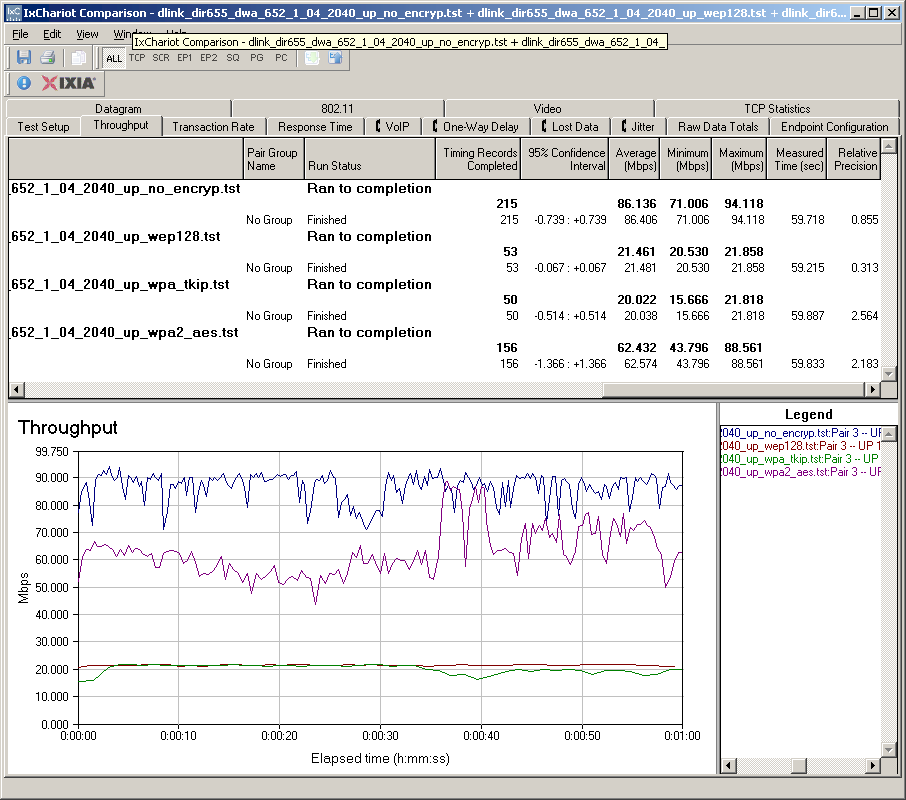
Figure 7: Security mode throughput loss – D-Link DIR-655
This time you see an almost 80% throughput loss for WEP128 and WPA/TKIP!
Conclusion
I think that you can see a compelling argument for keeping your existing router when you decide to move up to draft 11n. And even if you’re upgrading because your old router has finally died, you should pick up another 11g router to replace it, unless you plan to move all of your wireless clients and devices (such as media players, Wi-Fi Skype phones, etc.) to draft 11n.
To set up your two routers, you’ll need to change one of the two routers to act as an access point, so that you don’t end up with clients on two different subnets. Just disable the DHCP server of one of the routers and set its LAN IP to an unused IP outside the range of the other router’s DHCP server. If you need more info, just hit this article.
Of course, you will need to set the APs to different channels, using only 1, 6 and 11, make sure the draft 11n router is using the 11g friendly 20 MHz bandwidth mode and use different SSID’s for each router so that you can tell them apart.
It’s also probably a good idea to not sit the two routers right next to each other, in order to minimize possible interaction between them. You might even try using a pair of HomePlug AV adapters to really get the most out of having a second AP by locating it in one of your home’s dead spots.
But no matter how you do it, setting up a separate 11g wireless network when you bring a draft 11n WLAN online should help make the transition a smooth and satisfying experience.