

| At a glance | |
|---|---|
| Product | ASUS Black Diamond Dual-Band Gigabit Wireless-N Router (RT-N56U) [Website] |
| Summary | Simultaneous dual-band Ralink-based 802.11n Gigabit port router with HTTP / FTP / BitTorrent download and USB drive sharing |
| Pros | • Ridiculously high routing throughput • 2 USB 2.0 ports for sharing storage and printer • WDS bridging and repeating |
| Cons | • A few odd selections for wireless defaults • No guest WLAN / multiple SSID |
Typical Price: $57 Buy From Amazon
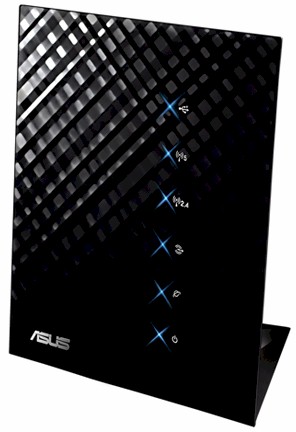
The RT-N56U is ASUS’ new top-of-line wireless router. It is simultaneous dual-band 802.11n with four-port Gigabit switch and two USB 2.0 ports that support storage and printer sharing. It gets its "Black Diamond" nickname from the faceted diamond pattern on its front surface.
The router’s packaging may not be to everyone’s taste. It’s designed to stand upright on the included stand as shown in the product shot above. But in real life all its connecting cables protrude unattractively from the right side.
The front panel holds USB, WAN and wireless indicators for the two radios. You’ll have to look at the lights embedded in each of the Gigabit WAN and switched LAN ports for link status and activity.
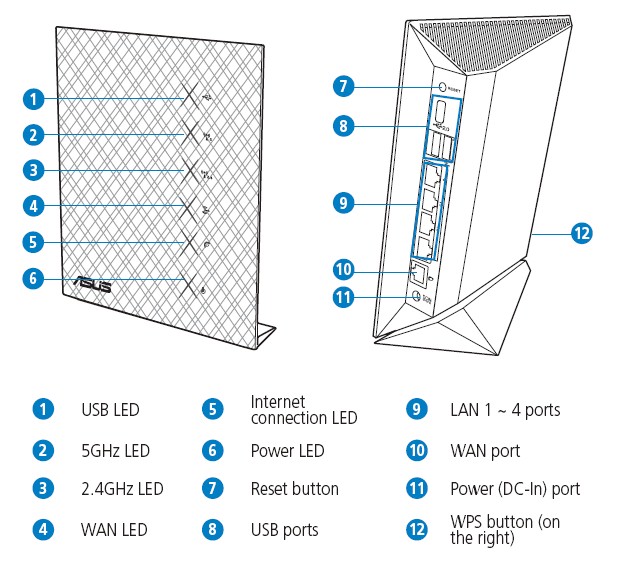
ASUS RT-N56U ports and lights
Inside
Unlike ASUS’ previous top-of-line single-band RT-N16U, which uses a Broadcom-based design, ASUS tapped Ralink to power the RT-N56U. Figure 1 shows all the components encased in an RF shield.
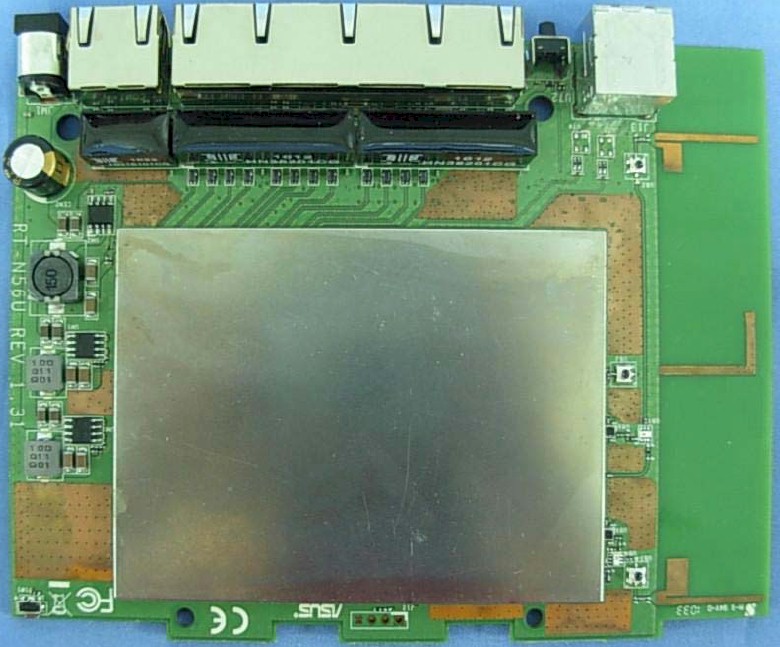
Figure 1: ASUS RT-N56U board
Figure 2 reveals some component details. A 500 MHz Ralink RT3662F SoC serves double duty as the main CPU and 5 GHz radio, while the Ralink RT3092 to its left provides the 2.4 GHz radio. A Realtek RTL8367 provides the four-port Gigabit switch and the single Gigabit WAN port. 128 MB of RAM and 8 MB of flash complete the design.
Note that while ASUS doesn’t spec it, my tests revealed that the Gigabit switch passed 4K jumbo frames just fine. And the RTL8367 spec sheet confirms that it "supports 9216-byte jumbo packet length forwarding at wire speed".
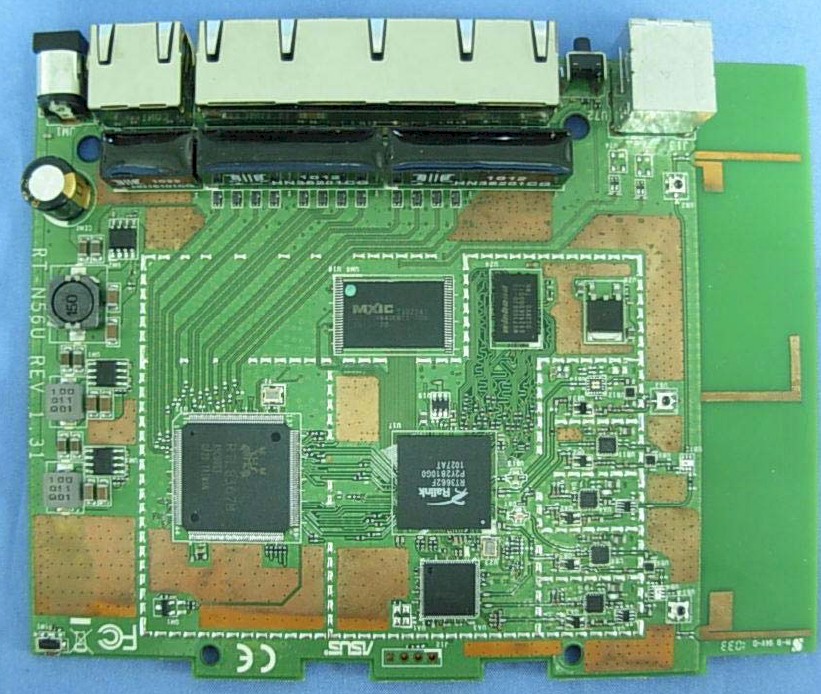
Figure 2: ASUS RT-N56U board
This photo provides a closer view of some of the key components. Note that both radios feed a single set of three printed-circuit dual-band antennas. ASUS told me the 2.4 GHz radio uses two antennas (2T2R) and the 5 GHz radio uses three (2T3R) for a bit more receive gain.
Features
Aside from having two radios to configure, the RT-N56U’s feature set is essentially the same as ASUS’ previous top-of-line single-band RT-N16U. So you can check that review for a detailed feature walkthrough and a peek at the web-based admin GUI. Figure 3 shows the main "Network Map" screen, with a USB drive attached. For those of you who care, there is no IPv6 support.
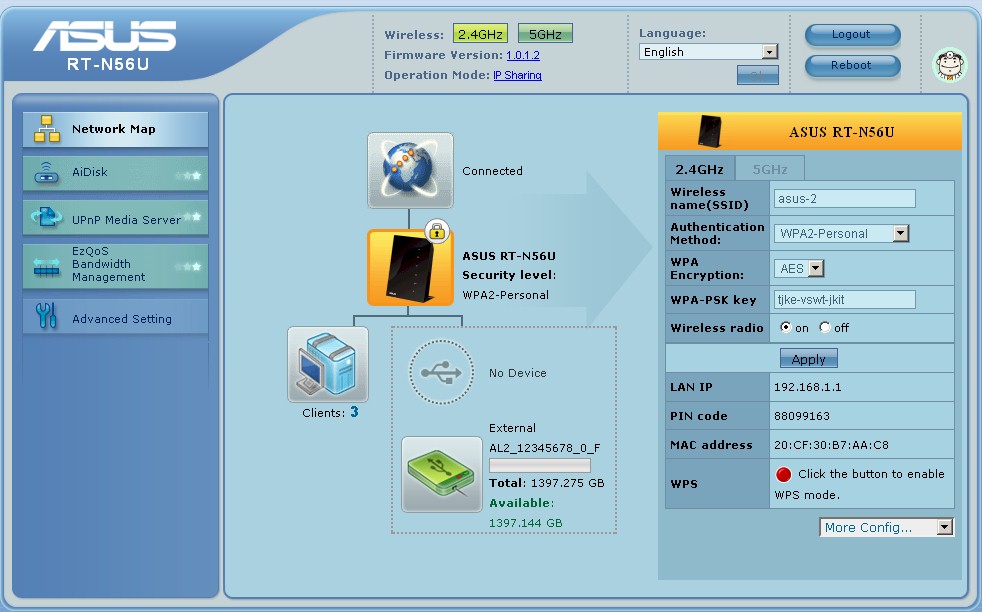
Figure 3: ASUS RT-N56U network map
A key difference from the RT-N16 is that the USB sharing feature supports SMB file sharing as well as FTP. So shares will show up via network browsing with any device that supports SMB. There’s also a built-in UPnP AV / DLNA media server. But there are no controls exposed for the server except for an enable / disable. Note also that if you’re planning to use the HTTP, FTP, and BT "Download Master" feature, it’s a Windows program, not built into the router.
I ran into a few oddities on the Wireless side. The router properly defaulted to 20 MHz bandwidth mode for the 2.4 GHz radio, with the 5 GHz radio defaulting to Auto 20/40 mode. But by default, both radios have the same ASUS SSID, making it impossible to force a dual-band client to a particular band.
The other questionable default is that Wi-Fi Protected Setup (WPS) is off. Enabling it was confusing because it appears that there is only one WPS setting for both radios. But when you bounce back and forth between the 2.4 GHz and 5 GHz screens if looks like you can enable WPS on both bands.
Enabling WPS appears to change the 5 GHz band SSID to be different from the 2.4 GHz radio’s, so at least you can now select a band to connect to. I was able to successfully complete a WPS PIN session with my Win 7 client, which resulted in a WPA2 / AES secured connection.
The Professional tab of the Wireless settings shown in Figure 4 contains enable schedules for each radio as well as AP isolation (client separation) and the ability to flip numerous wireless function switches that are probably best left alone.
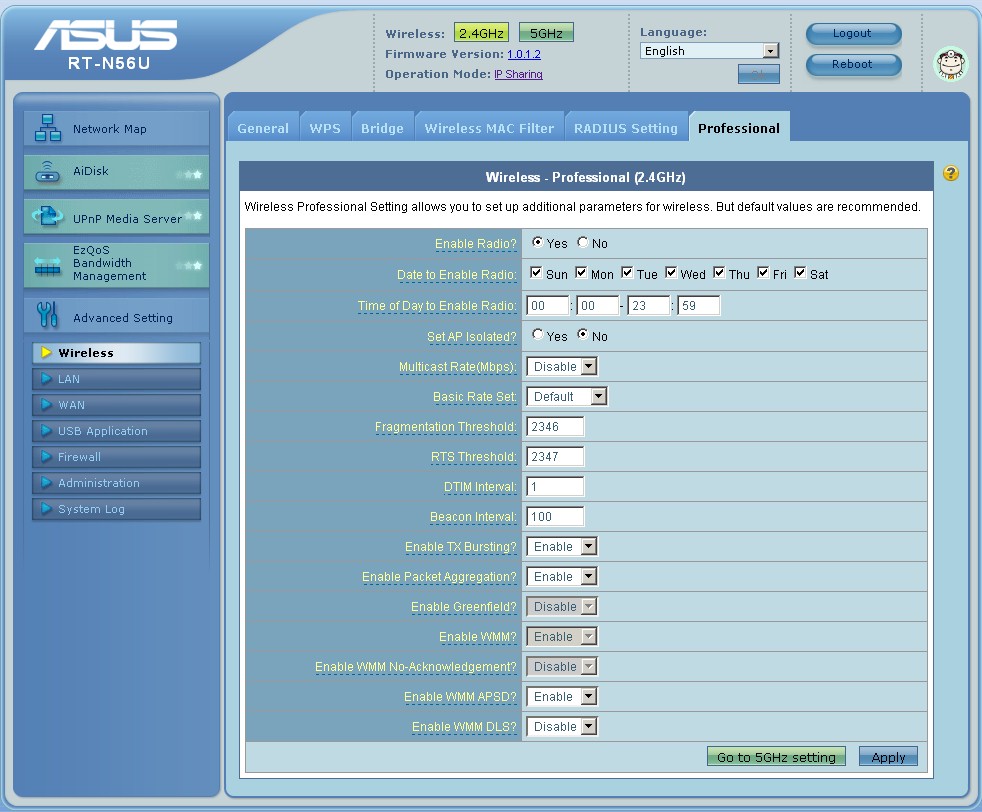
Figure 4: ASUS RT-N56U Wireless Professional Settings
You won’t find any Guest WLAN or multi-SSID features, however, which puts the RT-N56U at a disadvantage to other top-end simultaneous dual-band routers like the Cisco Linksys E4200 and NETGEAR WNDR3700.
Performance – File Sharing
I ran a file copy of our standard ripped-DVD test folder and measured write speed of 7.6 MB/s and 9.5 MB/s with FAT and NTFS-formatted drives, respectively. Reads came in at 13 MB/s for both formats. This performance is typical of embedded router file servers.
Performance – Routing
Routing throughput running the latest 1.0.1.2 firmware and our router test process established new Router chart highs of 802 Mbps WAN to LAN, 862 Mbps WAN to LAN and 1268 Mbps total with up and down tests running simultaneously. The Maximum Simultaneous Connections test maxed out our test capability at 34,925.
The IxChariot plot below (Figure 5) shows significant throughput variation. But that is more an artifact of test file size than the router itself.
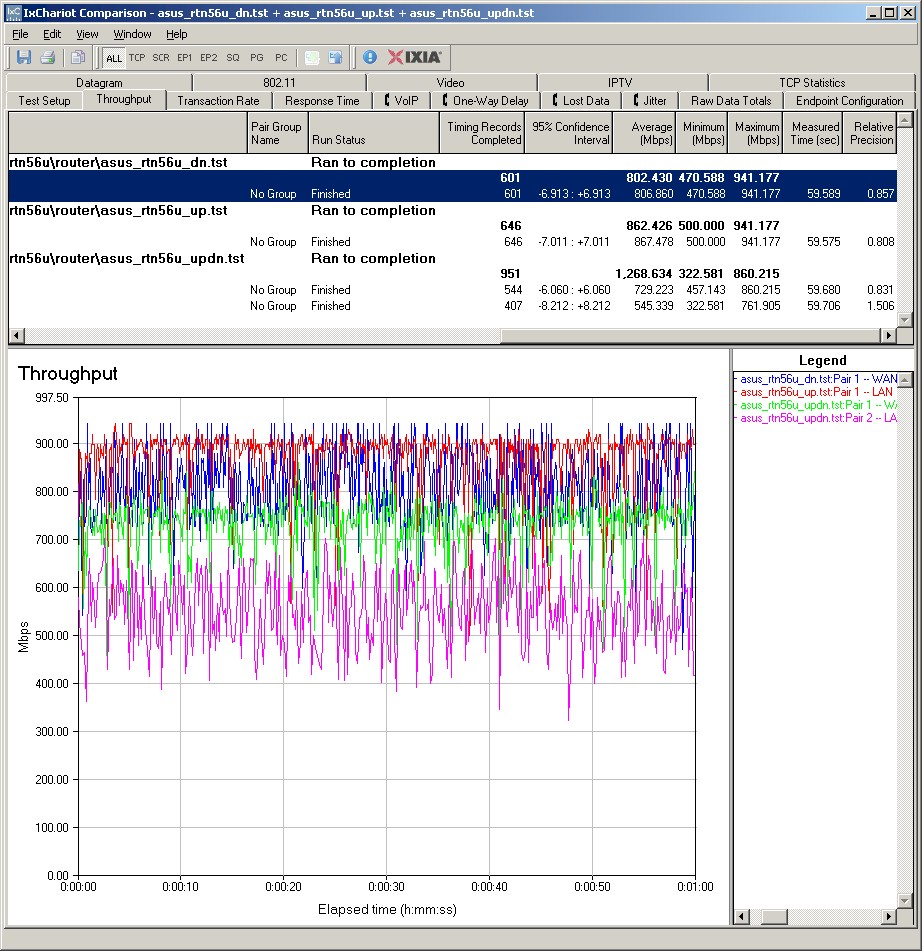
Figure 5: ASUS RT-N56U routing performance
Performance – Wireless
I used our standard open air test method to test the RT-N56U’s wireless performance. As usual, I set the 2.4 GHz radio to Channel 1 and the 5 GHz radio to Channel 36. All tests were run using WPA2 / AES encryption.
The test client was an Intel Wi-Fi Link 5300 AGN mini-PCIe card in an Acer Aspire 1810T notebook running Win 7 Home Premium and Intel’s Win 7 13.4.0.9 driver for the Intel card.
I skipped checking fallback to 54 Mbps link rates when using WEP 128 and WPA / TKIP because the RT-N56U is Wi-Fi Certified and the certification test suite confirms that.
To cut to the chase, check the 2.4 GHz wireless performance table with the RT-N56U compared to the Cisco Linksys E4200 and NETGEAR WNDR3700v2.
Highest throughput for a single stream was 84 Mbps running downlink in 40 MHz bandwidth mode in location A. I was able to measure 100 Mbps running simultaneous up and downlink tests in 40 MHz bandwidth mode in location A.
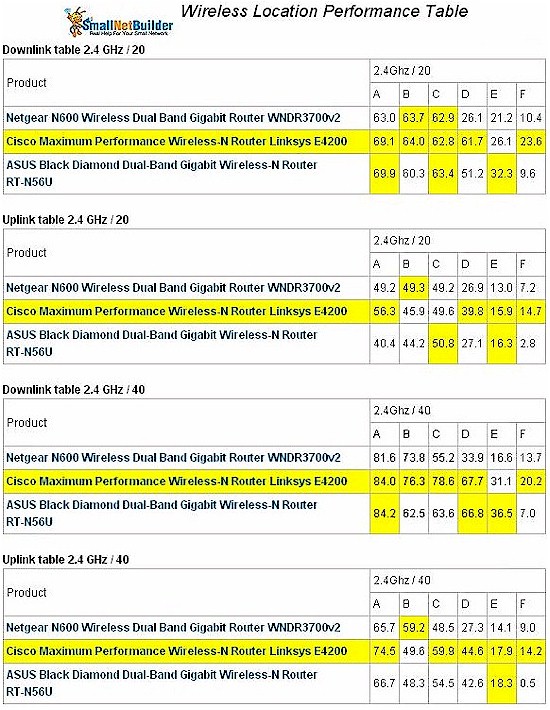
Figure 6: ASUS RT-N56U 2.4GHz Wireless Performance comparison
In general, the three routers are comparable in the strong-signal test locations A – C and the RT-N56U’s performance in the transition location D and weak signal locations E and F tracked closer to the E4200 than the the WNDR3700v2. You can see this more clearly in the example throughput vs. location graph in Figure 7.
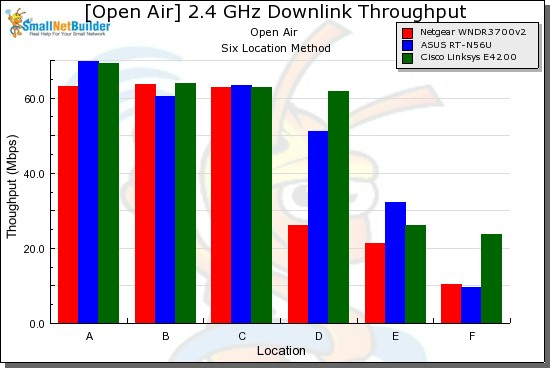
Figure 7: 2.4 GHz throughput vs. location – 20 MHz mode, downlink
The 5 GHz table in Figure 8 shows somewhat stronger performance for the RT-N56U in this band. But none of the routers were able to reach into my 5 GHz dead zone locations E and F. The RT-N56U seems to be a bit stronger in Location D for some tests. But the advantage isn’t consistent enough to be reliable.
Highest 5 GHz throughput measured was 86 Mbps running downlink in location A in 40 MHz bandwidth mode. Running simultaneous up and downlink tests in 40 MHz bandwidth mode in location A was once again able to goose throughput above 100 Mbps to 111 Mbps.
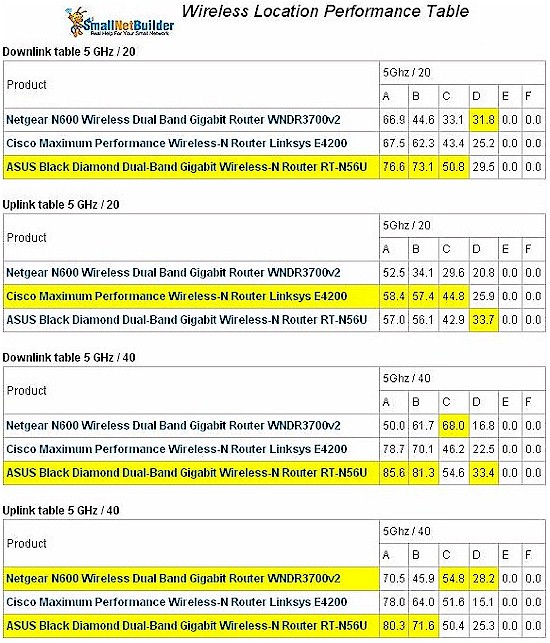
Figure 8: ASUS RT-N56U 5GHz Wireless Performance comparison
Here are links to the IxChariot wireless test plots if you’d like to explore further:
- 2.4 GHz / 20 MHz downlink
- 2.4 GHz / 20 MHz uplink
- 2.4 GHz / 20 MHz up and downlink
- 2.4 GHz / 40 MHz downlink
- 2.4 GHz / 40 MHz uplink
- 2.4 GHz / 40 MHz up and downlink
- 5 GHz / 20 MHz downlink
- 5 GHz / 20 MHz uplink
- 5 GHz / 20 MHz up and downlink
- 5 GHz / 40 MHz downlink
- 5 GHz / 40 MHz uplink
- 5 GHz / 40 MHz up and downlink
Closing Thoughts
The RT-N56U is a worthy successor to ASUS’ RT-N16. It has a solid routing section with more speed than even our friends overseas can use, Gigabit ports and two 11n radios that both support WDS bridging and repeating. But with its Ralink chipset, you won’t be able to run DD-WRT or other alternate distros on it as you can with the RT-N16.
If you’re comfortable with routers that don’t have the name Cisco, NETGEAR or D-Link on them and are looking for a less expensive two-radio dual-band router that can also share a USB printer and drive at the same time, you might want to give the RT-N56U a shot.
Buy Black Diamond Dual-Band Gigabit Wireless-N Router from Amazon