

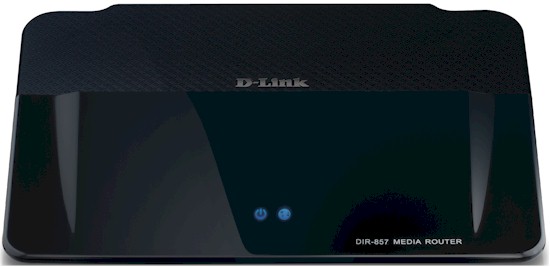
| At a glance | |
|---|---|
| Product | D-Link HD Media Router 3000 (DIR-857) [Website] |
| Summary | Ubicom / Atheros based simultaneous dual band three-stream N router with IPv6 support and USB port and SD card slot for sharing. |
| Pros | • Good routing feature set • IPv6 support • USB 3.0 port for drive and printer sharing |
| Cons | • Only two status lights / indicators • Disappointing wireless performance |
Typical Price: $23 Buy From Amazon
Overview
It took more than a year after announcement, but D-Link finally started shipping the top of its "HD Media Router" family a few months ago. The DIR-857 HD Media Router 3000 is, for all intents and purposes, a three-stream N version of the two-stream N DIR-827 I was finally able to review at the end of last year.
In popular WLAN marketing-speak, the DIR-857 is an "N900" router, i.e. capable of maximum link rates of 450 Mbps on both radios when used with three-stream N clients, while the DIR-827 is "N600", with 300 Mbps maximum link rates on both radios.
Since pretty much everything except the radio is the same as the DIR-827, I’m going to take a quick run through the internals and features and concentrate on reviewing performance.
The indicators, controls and ports shown below are identical to those on the DIR-827 including all Gigabit Ethernet WAN and LAN ports, USB 3.0 port for D-Link’s Shareport Plus drive and printer sharing feature and SD card slot for easy multimedia file sharing.
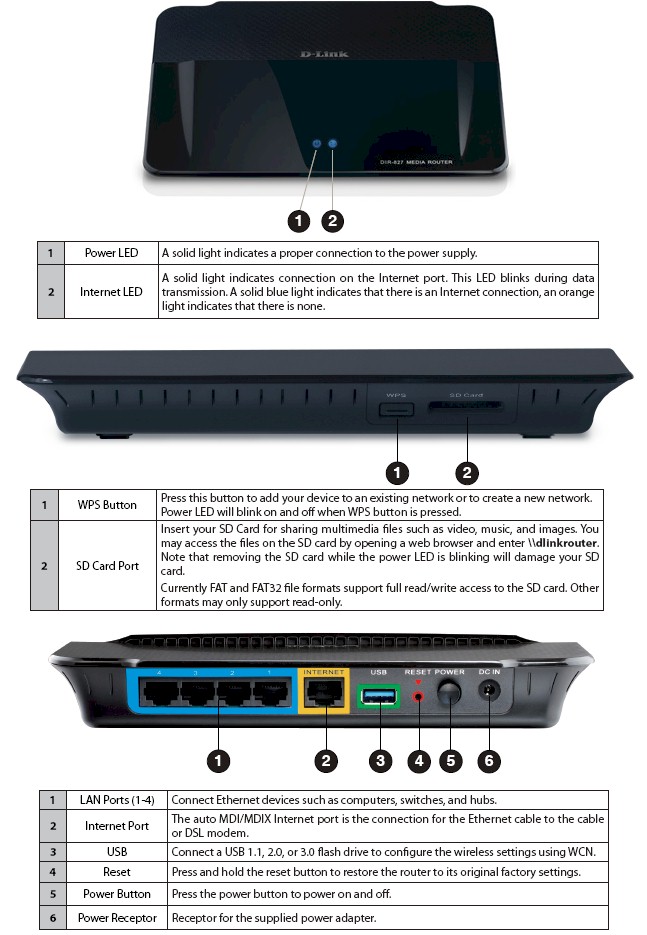
DIR-857 panels
Inside
The FCC ID docs were again not helpful, since the registration is only for the radio module. So after I completed testing, I opened up the 857 for a look. I first thought I was looking inside the DIR-827, since the heatsinking, RF shielding and overall layout is the same.
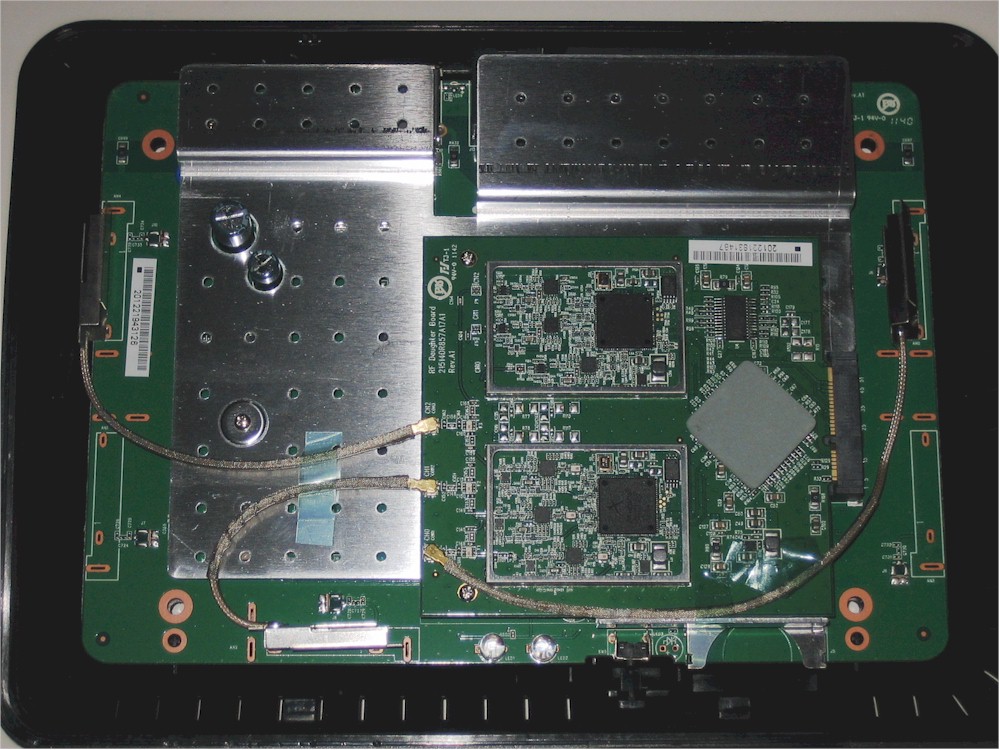
DIR-857 inside
The main difference is the use of three dual-band antennas on the 857 above vs. two on the DIR-827 shown in its internal photo below.
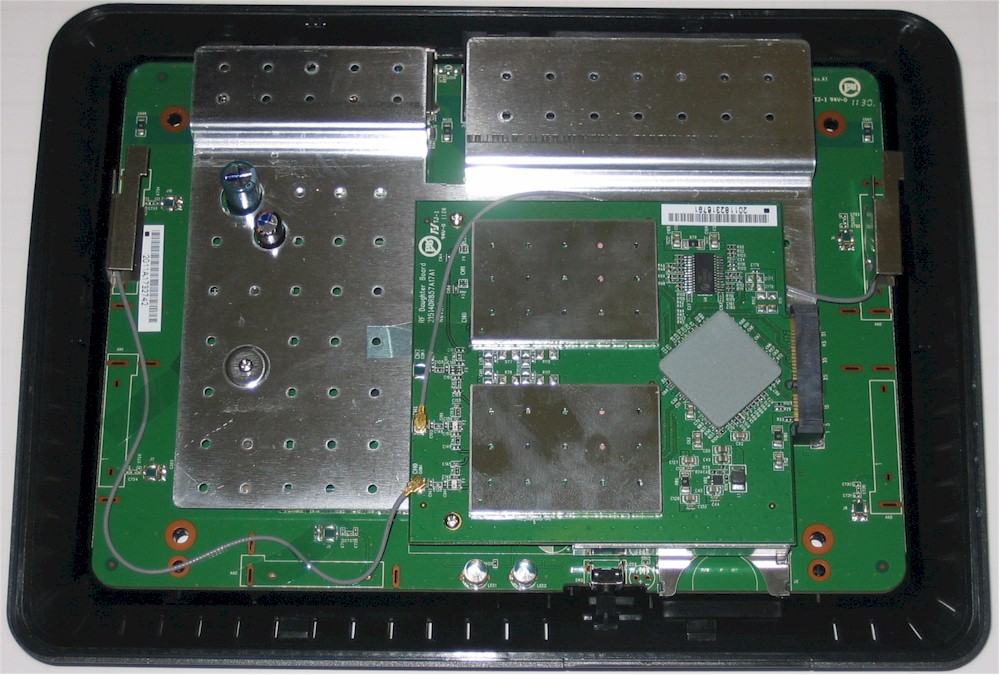
DIR-827 inside
Aside from popping off the tops of the RF cans on the radio module for the DIR-857’s internal photo, I didn’t perform any further disassembly, since I’d seen it all before. And you can too, by checking out the rest of the DIR-827 internal pix. I also checked with D-Link, who confirmed that the same Ubicom IP8000AU SoC processor is used in the 857, but that RAM size has been bumped up to 512 MB from the 827’s 256 MB.
Table 1 compares the key components of all three of the HD Media Router family. The main component difference is that D-Link has swapped out the dual-stream Qualcomm-Atheros AR9382 wireless SoCs for a pair of three-stream AR9380‘s. There is also the RAM size increase mentioned above.
| DIR-857 | DIR-827 | DIR-657 | |
|---|---|---|---|
| CPU | Ubicom IP8000AU | Ubicom IP8000AU | Ubicom IP7160U |
| Switch | Atheros AR8327N | Atheros AR8327N | Atheros AR8316 |
| RAM | 512 MB | 256 MB | 128 MB |
| Flash | 16 MB | 16 MB | 32 MB |
| 2.4 GHz Radio | Atheros AR9380 | Atheros AR9382 | Atheros AR9227 |
| 5 GHz Radio | Atheros AR9380 | Atheros AR9382 | N/A |
Table 1: D-Link HD Media Router family component comparison
Features
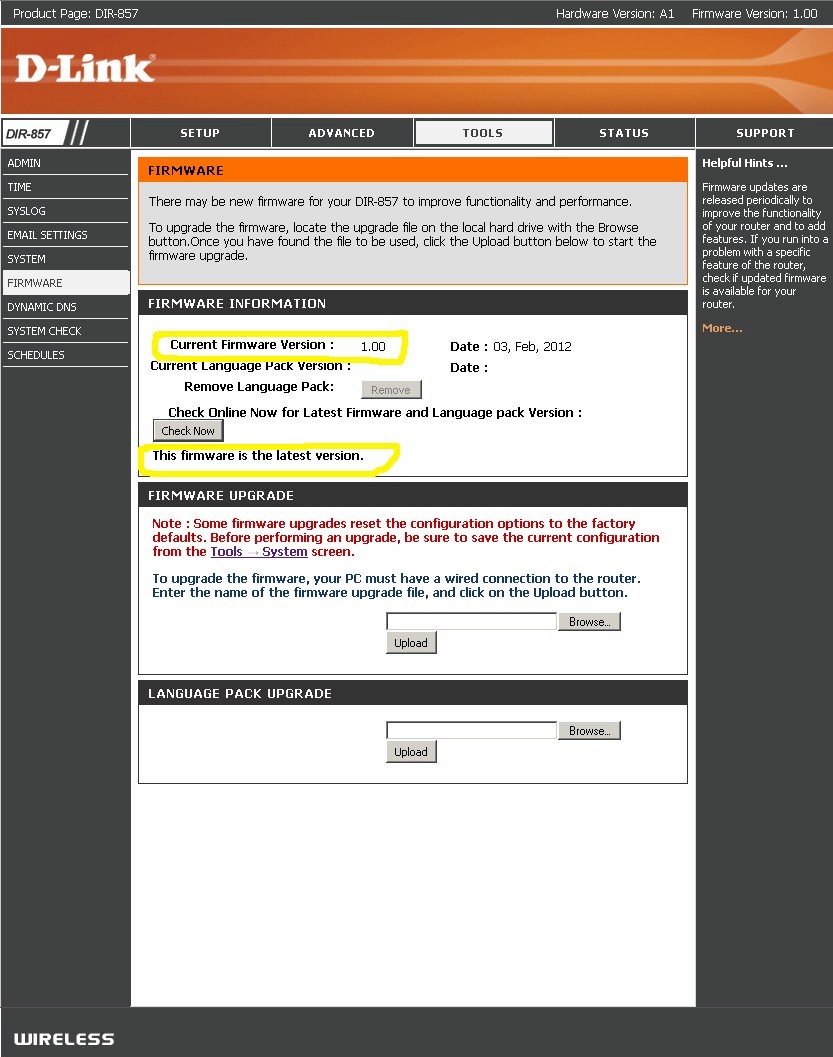
The 857’s feature set is a duplicate of the 827’s. The router came with firmware 1.00 loaded. I used the Tools > Firmware Check Now button to check for updates before I started testing and got the result shown in the screenshot below. After I completed all testing and was writing this review, I happened to check the 857’s support downloads page and found that there actually is a 1.01 version.
DIR-857 Status screen
Fortunately, none of the fixes listed call out performance improvements, so I did not go back and rerun all the performance tests. But D-Link should fix this error, lest paying customers remain unaware of new firmware.
D-Link hasn’t posted an emulator for the 857, but you can use the 657’s if you want a closer look at the admin GUI.
The feature summary below is copied from the 657 and 827 reviews.
Routing
- DHCP, Static, PPPoE, PPTP, L2TP, DS-Lite WAN types
- DHCP server with MAC address reservation, lease time setting and NetBIOS controls
- Built-in dynamic DNS client for dlinkddns.com and dyndns.com free and custom services
- Static routes
- DMZ host
- SPI firewall disable, UDP / TCP endpoint filtering, anti-spoof checking
- WAN ping allow / deny
- Multicast stream enable
- IPv6 support (auto-detect, static, link-local, autoconfiguration (SLAAC/DHCPv6), PPPoE, IPv6 over IPv4 tunnel, 6to4, 6rd)
- IPv6 static routes
- IPv6 port forwarding
- PPTP, IPsec, RTSP, SIP ALG disables
- Schedulable single port, port range and triggered port forwarding. (Can set source and destination ports on single ports [virtual servers])
- Allow / deny (global) MAC address filtering for network access
- Outbound schedulable port filtering by IP or MAC address with selectable web access logging
- 40 domain-based allow / deny (global) Web access filters
- 8 inbound IP range allow / deny (global) filters
- Remote admin access enable, IP access filtering, port setting and graphic authentication enable
- UPnP support
- WAN port speed set
- HTTPs admin access enable
- Syslog support
- Email alerts and log send
- Ubicom automatic uplink QoS with manual / automatic uplink speed detection and manual rule option
Wireless features
- WEP, WPA / WPA2 Personal and Enterprise (RADIUS) support
- Wi-Fi Protected Setup (WPS) support, pushbutton and PIN
- Auto and manual channel set
- Transmission rate set
- SSID broadcast disable
- Wireless modes: b-only, g-only, n-only, mixed b/g, mixed g/n, mixed b/g/n (default)
- High / medium / low transmit power adjust
- Beacon period, RTS threshold, DTIM interval, Fragmentation Threshold adjusts
- Wireless client isolation (from each other)
- WMM disable
- Ubicom WISH automatic wireless traffic QoS
- Short GI disable
Sharing features
- UPnP / DLNA Media server enable
- SharePort Plus drive and printer sharing
- Sharing to/from embedded SD card reader
Missing features
- WDS bridging repeating
- Physical wireless disable button
- AP / Router mode switch
The 60 second saves got old real quick during testing. But at least you can make changes on multiple pages before saving.
Since this is a Ubicom router, all of its "StreamEngine" features are there. Ubicom’s automatic QoS is focused primarily on managing uplink traffic. But it can control downlink speed indirectly by delaying TCP/IP ACKs. Traffic shaping is enabled by default, as is automatic measurement of uplink speed. You still get only 10 sets of rules if you want to tweak Ubicom’s selections.
File Sharing
Like the 827, the 857 includes D-Link’s Shareport Plus drive and printer sharing feature. There are no storage controls in the router’s admin GUI except for a media server enable/disable (enable is default). You need to download the Windows or MacOS Shareport Plus utilities to share printers or if you want auto-discovery of shared drives.
You can reach the drives by opening a Windows Run box and entering \\dlinkrouter. You can also enter \\dlinkrouter in Internet Explorer, but not Firefox or Chrome. Download the Shareport Plus manual for more info.
I ran our standard Windows filecopy NAS test to an attached WD MyBook 3.0 USB 3.0 drive and got the results summarized in Table 2 below along with the DIR-827’s filecopy results. Note that I was able to run read and write tests on both FAT32 and NTFS formatted drives. I can’t find the supported formats documented anywhere and had thought only FAT was supported, hence the reason for no NTFS results for the DIR-827.
| DIR-857 | DIR-827 | |
|---|---|---|
| FAT32 Write (MBytes/s) | 13.9 | 11.5 |
| FAT32 Read (MBytes/s) | 30.9 | 25 |
| NTFS Write (MBytes/s) | 7.7 | – |
| NTFS Read (MBytes/s) | 16.1 | – |
Table 2: File copy throughput
Since the DIR-857 and 827 use the same processor, I attribute the difference in results more to the fact that I ran the test only once instead of my usual three times in each case than to any performance difference between the two products.
I didn’t bother checking media sharing from the SD card since it worked fine last time. Remember that the only Media server control you get is an enable – there is no way to force or schedule an content index or safely dismount either an USB drive or the internal SD card.
Routing Performance
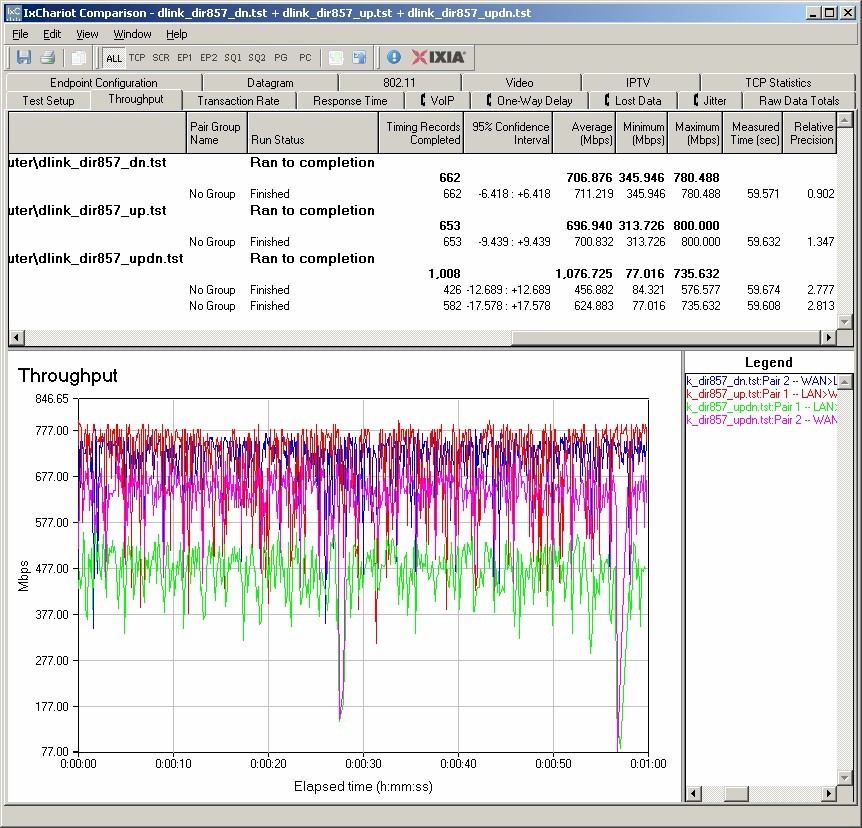
Routing throughput was measured running 1.00 firmware, using our router test process and with QoS/traffic shaping disabled (it’s enabled by default). Table 3 summarizes and compares the DIR-857 and 827’s routing throughput. While there is a slight difference, I doubt you would see any difference in real-world use.
| Test Description | DIR-857 | DIR-827 |
|---|---|---|
| WAN – LAN | 707 Mbps | 680 Mbps |
| LAN – WAN | 697 Mbps | 721 Mbps |
| Total Simultaneous | 1077 Mbps | 1056 Mbps |
| Maximum Simultaneous Connections | 34,925 | 34,925 |
| Firmware Version | 1.00 | 1.01 |
Table 3: Routing throughput
The IxChariot composite plot below is hard to parse given the throughput variation. But looking at the legend for the simultaneous updn test we see upload throughput lower than download
Maximum simultaneous connections maxed out at our test limit of 34,925.
D-Link DIR-857 routing throughput summary
Wireless Performance Overview
The DIR-857 is Wi-Fi Certified and both bands defaulted to Auto 20/40 Channel Width upon power-up. Since this is the new normal for 802.11n products I ran two new tests to see if the 857 properly refrained from switching into 40 MHz bandwidth mode. I’m happy to report that, like the DIR-827, both the 40 MHz Coexistence and Fat channel intolerant tests passed. So you don’t have to worry about the DIR-857 stepping on neighboring WLANs, even when it is set to Auto 20/40 mode.
I successfully ran a Wi-Fi Protected Setup (WPS) session with a Win 7 client by entering the WPS code found on the router’s bottom label. The WPS session completed quickly and resulted in a WPA2/AES secured connection with the same WPA2 pre-shared key set for both radios. All tests were run with this secured connection using our current wireless test process.
The router comes with dlink set for the 2.4 GHz SSID and dlink_media for 5 GHz. But it is important to note that when I entered a network name (SSID) as prompted by the Windows WPS wizard, both radios were set to the same SSID! This isn’t much help if you have dual-band clients, so you’ll have to go back and manually set each radio to a unique SSID so that you can select the band you connect to.
As with all "N-900" routers, we’ll start with an overview, then provide the details for those who want to dig into the details.
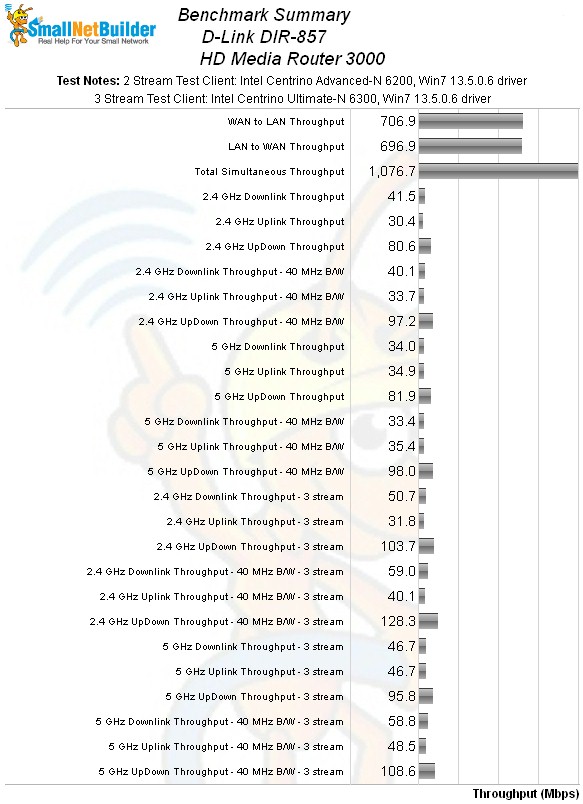
The Benchmark Summary below shows once again that the overall average difference between two and three stream operation isn’t that striking, except for the "up/down" tests that run two traffic streams simultaneously.
DIR-857 benchmark summary
Table 4 summarizes the highest wireless throughput measured out of all locations in the 20 MHz mode test runs. In all cases, the highest throughput was measured in Location A.
| Test Group | Max Dn (Mbps) | Max Up (Mbps) | Dn/Up (Mbps) |
|---|---|---|---|
| 2.4 GHz, 2 stream, 20 MHz | 63 | 55 | 81 |
| 2.4 GHz, 3 stream, 20 MHz | 83 | 60 | 104 |
| 5 GHz, 2 stream, 20 MHz | 65 | 57 | 82 |
| 5 GHz, 3 stream, 20 MHz | 66 | 70 | 96 |
Table 4: Highest Throughput, 20 MHz mode
These results are unimpressive. The highest-performing N routers produce around 80 Mbps best-case throughput in 20 MHz mode as you can see on this maximum throughput chart. The DIR-857, in contrast, only manages 62 Mbps downlink and 55 Mbps up. Simultaneous up/down performance ranks a bit better, measuring 81 Mbps vs. a best case of 94 Mbps.
Perusing Tables 4 and 5 or stepping through the wireless throughput benchmarks with the mode selector set to Maximum tell a similar story. In case after case, the 857 ranks mid-chart or lower vs. other two and three-stream N routers for its two-stream performance. And while there are exceptions, maximum throughput generally doesn’t change much between two and three-stream measurements, except when multiple simultaneous test streams are used.
| Test Group | Max Dn (Mbps) | Max Up (Mbps) | Dn/Up (Mbps) |
|---|---|---|---|
| 2.4 GHz, 2 stream, 40 MHz | 68 | 70 | 97 |
| 2.4 GHz, 3 stream, 40 MHz | 92 | 76 | 128 |
| 5 GHz, 2 stream, 40 MHz | 69 | 66 | 98 |
| 5 GHz, 3 stream, 40 MHz | 78 | 79 | 109 |
Table 5: Highest Throughput, 40 MHz mode
The DIR-857’s story is a bit brighter for three-stream benchmarks. There are a few cases where it ranks near the top of the chart, and one 5 GHz benchmark, where it actually comes out on top.
The overall takeaway, however, is that the DIR-857 is not going to be the router you’ll choose if you’re looking for best wireless performance.
Wireless Performance – 2.4 GHz Two Stream
For performance comparison, I chose two other full "N-900" routers: the ASUS RT-N66U "Dark Knight" and Cisco Linksys E4200V2. And since so many people seem interested in seeing whether draft 11ac routers can out-perform the current crop of 802.11n routers, I threw in Buffalo’s WZR-D1800H into the mix.
The comparison tables are large, so I have provided links that will open each one in a new window/tab to make things easier. Let’s start with the Performance Table for 2.4 GHz, 2 streams. The Dark Knight is the clear winner in this round, taking three out of four comparisons. But the Buffalo draft 11ac router takes the 20 MHz mode uplink benchmark, primarily due to better throughput in the medium-low and low signal level test locations D and F.
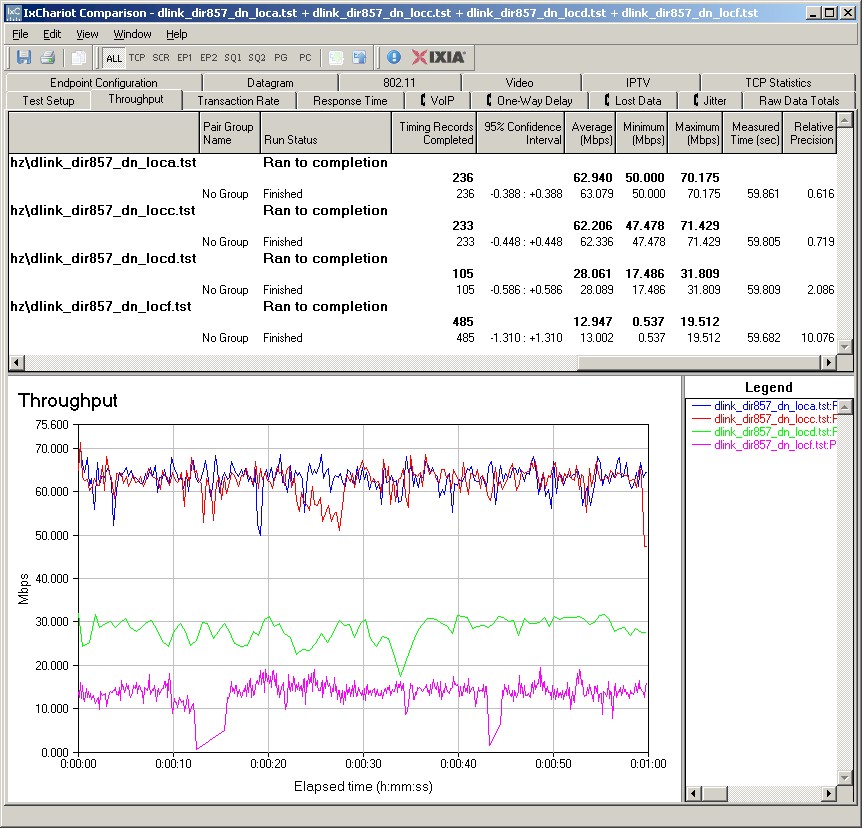
The IxChariot plot summary below for 20 MHz mode downlink shows generally stable throughput, with some moderately long dropouts in the weakest signal location F. You will see this also in the 20 MHz mode uplink plot linked below.
D-Link DIR-857 IxChariot plot summary – 2.4 GHz, 20 MHz mode, downlink, 2 stream
Here are links to the other plots for your reference.
- 2.4 GHz / 20 MHz uplink
- 2.4 GHz / 20 MHz up and downlink
- 2.4 GHz / 40 MHz downlink
- 2.4 GHz / 40 MHz uplink
- 2.4 GHz / 40 MHz up and downlink
Wireless Performance – 2.4 GHz, Three Stream
Next, we’ll look at the Performance Table for 2.4 GHz, 3 streams. The ASUS wins all four tests this time and is significantly better running uplink in both 20 and 40 MHz bandwidth modes. The standout for downlink performance is in the weakest signal Location F, turning in 20+ Mbps with both 2 and 3 stream clients.
The IxChariot plot summary for 20 MHz mode downlink in three-stream mode is below. Once again there is a lot of variation in Location F, which you can also see to a lesser extent in the 40 MHz mode downlink plot.
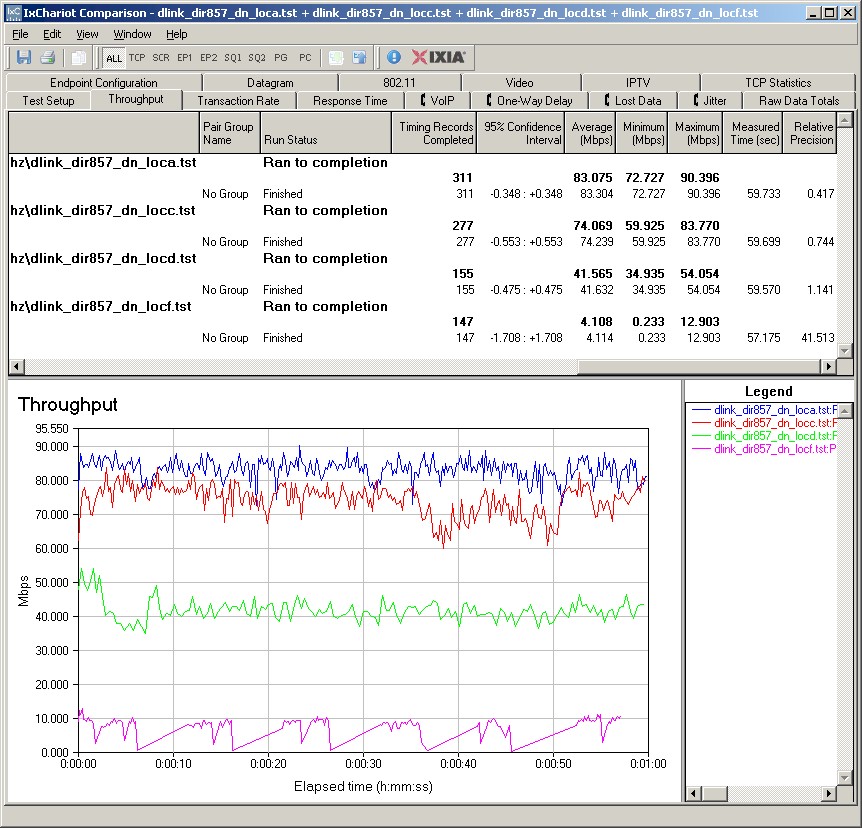
D-Link DIR-857 IxChariot plot summary – 2.4 GHz, 20 MHz mode, downlink, 3 stream
Here are links to the other plots for your reference.
- 2.4 GHz / 20 MHz uplink
- 2.4 GHz / 20 MHz up and downlink
- 2.4 GHz / 40 MHz downlink
- 2.4 GHz / 40 MHz uplink
- 2.4 GHz / 40 MHz up and downlink
Wireless Performance – 5 GHz, Two Stream
Moving up to 5 GHz, here is the Performance Table for 5 GHz, 2 streams. Although the ASUS takes three out of four comparisons, it doesn’t miss taking the fourth by much. If you look at the individual location results, you’ll see that the DIR-857’s 20 MHz mode performance isn’t really that much different from the Cisco and Buffalo in many cases. Put another way, it’s not that the D-Link is so bad, it’s more that the ASUS is that much better.
The IxChariot plot for 5 GHz, 20MHz mode downlink shows well-behaved throughput. You’ll see this general pattern in the other plots linked below, except for high Location C variation running downlink in 40 MHz mode.
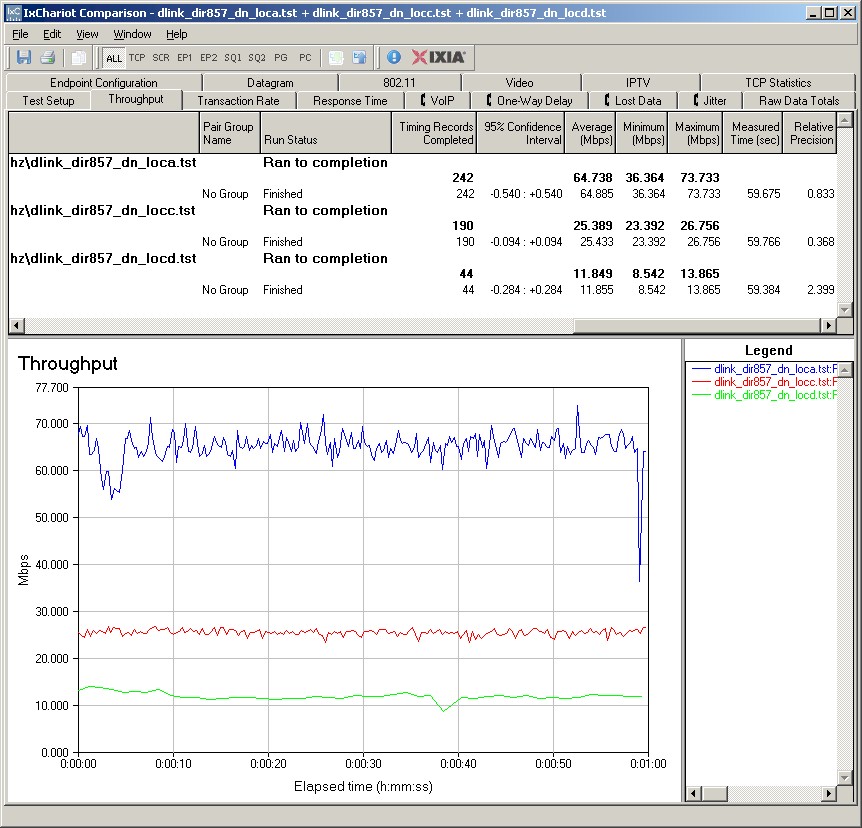
D-Link DIR-857 IxChariot plot summary – 5 GHz, 20 MHz mode, downlink, 2 stream
Here are links to the other plots for your reference.
- 5 GHz / 20 MHz uplink
- 5 GHz / 20 MHz up and downlink
- 5 GHz / 40 MHz downlink
- 5 GHz / 40 MHz uplink
- 5 GHz / 40 MHz up and downlink
Wireless Performance – 5 GHz, Three Stream
Last, but not least is the Performance Table for 5 GHz, 3 streams. Although the D-Link doesn’t get an overall win for any of the benchmarks, it manages to tie the Cisco in location A 20 MHz mode downlink and come up with almost 80 Mbps of throughput both up and downlink in 40 MHz bandwidth mode.
The humps and bumps you see in the IxChariot plot summary below for the location A run don’t appear in the other benchmark plots linked below. But I got similar results when I repeated the test a few times.
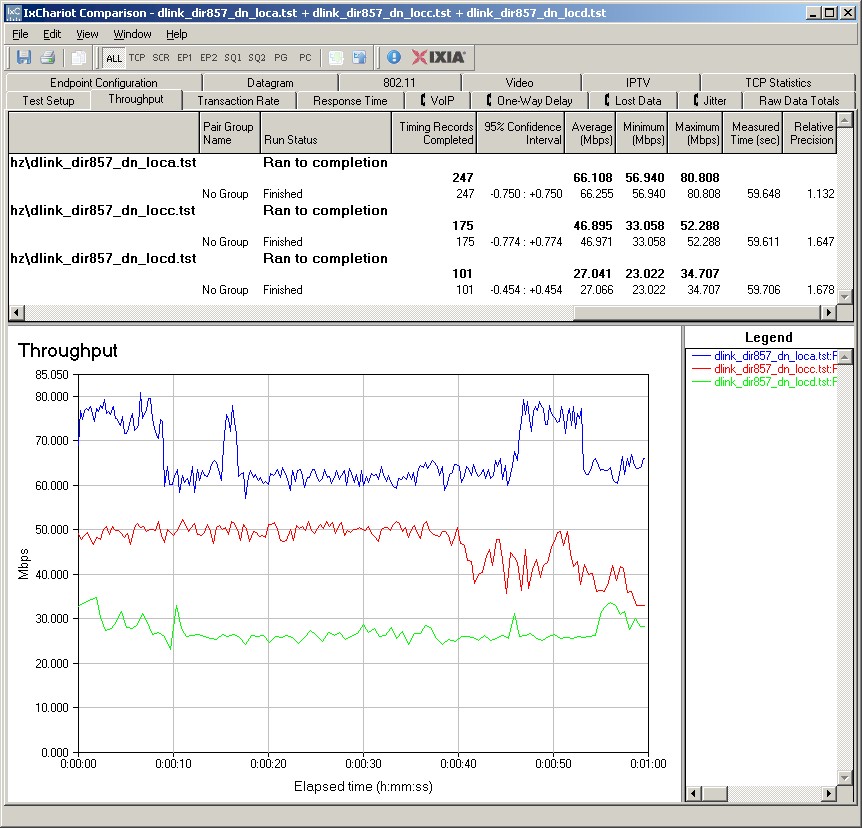
D-Link DIR-857 IxChariot plot summary – 5 GHz, 20 MHz mode, downlink, 3 stream
Here are links to the other plots for your reference.
- 5 GHz / 20 MHz uplink
- 5 GHz / 20 MHz up and downlink
- 5 GHz / 40 MHz downlink
- 5 GHz / 40 MHz uplink
- 5 GHz / 40 MHz up and downlink
Closing Thoughts
Simply put, D-Link is way late to market with an "N900" router that really doesn’t give folks looking to upgrade much of a reason to select it. The best argument for buying the DIR-857 is that it has high wired routing throughput. It is also one of the few routers you can buy that still uses Ubicom’s automatic QoS technology that is a boon to folks trying to wring the most out their woefully low internet upload bandwidth.
If your heart is set on one of the "HD Media" D-Links, I think the two-stream ("N600") DIR-827 is the better buy and slightly better performer. Check out this Performance Table and see if you agree.