

Introduction
In Part 1 of this ‘How To’ we converted your old Xbox hardware to prepare it for its new life as a full-featured NAS and file server. Then in Part 2, I showed you how to install a complete LAMP-based webserver and TorrentFlux client. In this final installment, we’ll add the ability to allocate bandwidth between BitTorrent and other Internet activities, and check out the file serving performance of what we’ve created.
|
When using your new Bittorrent client, you might find that, when downloading multiple files, your web browsing and other Internet functions slow down. This is because BitTorrent is incredibly efficient at using all the bandwidth available to it. Unfortunately, this leaves your web or SSH traffic stuck in a queue behind hundreds of BitTorrent packets, so the whole thing grinds to a halt.
This slowdown really affects only outbound traffic because most consumer Internet connections are alloted significantly lower outbound bandwidth than inbound (in the UK, 2048 kbps down and 256 kbps up is pretty common). What we need is a way to move the outbound BitTorrent queue from the ADSL modem/router to the Xbox, and to prioritize the traffic coming from our Xbox so that everything gets priority over the BitTorrent traffic. Fortunately, Linux provides us with a way of doing this!
Take a look at this document, and also this one, (the latter is specific to the Gentoo distro, but there are similarities to other Linux distros) to give you a good background of the tools and theory behind what we are going to do. All of the documents I found assumed that the Linux box was both the router and gateway. However, ours is not, so our configuration will be slightly more simple.
Upgrading the Kernel
First we need to upgrade the kernel to 2.6. The kernel is the core of the Linux OS that everything else depends on and can be likened to the conductor in an orchestra. This wiki page has quite a detailed tutorial in updating the kernel to 2.6 in Xebian (I think it’s very well written, but then I would say that because it’s written by me!). So have a look through it, as this is what I will be basing the kernel upgrade instructions on.
First we need to get the source code for the kernel. Go to http://www.kernel.org and have a look to see what the latest STABLE version of the source is. Then download it with something like:
cd /usr/src


wget http://www.kernel.org/pub/linux/kernel/v2.6/linux-2.6.14.3.tar.bz2


tar xfvj linux-2.6.14.3.tar.bz2


ln -s linux-2.6.14.3 linux
The last line creates a symbolic link – which is like a Windows shortcut – to the directory so that you don’t have to type in the full path each time.
Now we need to get the Xbox-Linux patch file that tweaks the source code for the Xbox. Go to the XBOX-Linux Homepage and download the patch that matches the version of the source code you just downloaded. For example:
wget http://kent.dl.sourceforge.net/sourceforge/xbox-linux/linux-2.6.14-xbox.patch.gz
(Once again, the wget command above is all entered on one line.)
tar xfvz linux-2.6.14-xbox.patch.gz

cp linux-2.6.14-xbox.patch linux/
Using the patch command we can use the information found in the patch file to modify the source code:
cd linux

patch -p1 < linux-2.6.14-xbox.patch
Hopefully this should work without any errors. The Xbox patch creates a config file for us to use, but we need to rename it:
cp kernel.config.config
Now we need to choose the options for parts of the kernel that we would like compiled:
make oldconfig
Adding Traffic Control and Packet Shaping – Options
Next we need to select the extra options that we will use in our traffic control:
make menuconfig
which will bring up a text-based menu system. You will need to select the following options:
Networking --->


Networking options --->


[*] Network packet filtering (replaces ipchains) --->


IP: Netfilter Configuration --->


<*> Connection tracking (required for masq/NAT)


<*> Userspace queueing via NETLINK


<*> IP tables support (required for filtering/masq/NAT)


<*> limit match support


<*> IP range match support


<*> MAC address match support


<*> Packet type match support


<*> netfilter MARK match support


<*> Multiple port match support


<*> TOS match support


<*> recent match support


<*> ECN match support


<*> DSCP match support


<*> AH/ESP match support


<*> LENGTH match support


<*> TTL match support


<*> tcpmss match support


<*> Helper match support


<*> Connection state match support


<*> Connection tracking match support


<*> Owner match support


<*> Packet filtering


<*> REJECT target support


<*> LOG target support


<*> ULOG target support


<*> TCPMSS target support


<*> Full NAT


<*> MASQUERADE target support


<*> REDIRECT target support


<*> NETMAP target support


<*> SAME target support


<*> Packet mangling


<*> TOS target support


<*> ECN target support


<*> DSCP target support


<*> MARK target support


<*> CLASSIFY target support


<M> raw table support (required for NOTRACK/TRACE)


<M> NOTRACK target support


<*> ARP tables support


<*> ARP packet filtering


<*> ARP payload mangling


QoS and/or fair queueing --->


<M> HTB packet scheduler


<M> SFQ queue


[*] QoS support


[*] Rate estimator


[*] Packet classifier API


<M> Firewall based classifier


[*] Traffic policing (needed for in/egress)
Now it’s time to compile the new kernel. This can take an hour or so you will need to be patient:
make clean


make


make modules


make modules_install
Make sure that there are no errors with each step before continuing. There may, however, be warnings. I just ignored them and everything worked out fine. If the compile completes successfully, there should now be a file called bzImage in /usr/src/linux/arch/i386/boot.
Adding Traffic Control and Packet Shaping – Testing the new Kernel
You now have a compiled kernel file, so let’s test that it works. The Cromwell BIOS uses a text file to decide where to boot from. Let’s launch vi to edit it:
vi /boot/linuxboot.cfg
It should contain the following:
title v2_4


kernel /boot/vmlinuz


append root=/dev/ide/host0/bus0/target0/lun0/part2 devfs=mount kbd-reset xbox=hdd


xboxfb y
Change it so that it looks like this:
title v2_6


kernel /usr/src/linux/arch/i386/boot/bzImage


append root=/dev/hda2 devfs=mount kbd-reset xbox=hdd


xboxfb y
title v2_4


kernel /boot/vmlinuz-2.4.31-xbox


append root=/dev/ide/host0/bus0/target0/lun0/part2 devfs=mount kbd-reset xbox=hdd


xboxfb y
default v2_6
Now save and quit the file and reboot your Xbox with reboot. If your Xbox isn’t attached to your television, then you will miss any error messages and warnings that might appear. If it booted successfully, then within a minute or two you should be able to SSH into it and your greeting message should reflect this new version of the kernel.
If it doesn’t work, then plug it back into your television, reboot it and keep an eye out for errors as to why it isn’t working. To boot back to your working 2.4 kernel you will need to use your USB keyboard to navigate to the boot menu in the Cromwell BIOS and select your old kernel which we named v2_4 earlier.
If the upgrade was successful, then you need to make your change more permanent:
cd /usr/src/linux/

make install
When prompted, answer no to creating a boot disk. This will copy your kernel image file into /boot/ and update your vmlinuz symlink file to point to your new kernel. You can now change your linuxboot.config file to look like the following:
title v2_6


kernel /usr/src/vmlinuz


append root=/dev/hda2 devfs=mount kbd-reset xbox=hdd


xboxfb y
title v2_4


kernel /boot/vmlinuz-2.4.31-xbox


append root=/dev/ide/host0/bus0/target0/lun0/part2 devfs=mount kbd-reset xbox=hdd


xboxfb y
default v2_6
By the way, I found that when I booted up after my upgrade to 2.6 some of the modules would not load. I am not entirely sure why some of them wouldn’t load since I definitely compiled them! One issue I found was that the keyboard and mouse modules changed names between 2.4 and 2.6. In 2.4 they were called mousedev and keybdev but now are called usbmouse and usbkeyb.
To change the name, edit the file /etc/modules.xbox and rename the appropriate references. Strictly speaking, we don’t need either of these modules since we have a headless install, but it does no harm to have them. The other ones that the kernel complained it couldn’t load I didn’t need, so I commented them out so my file looked like this:
loop


#input


usbkbd


#usbmouse


#joydev


sunrpc


lockd


nfs


#scsi_mod


#sd_mod


#hid


#xpad


#xir


#lirc_dev


#lirc_xir


#snd-intel8x0
Shaping the traffic
With all that out of the way, we can now finally create the script that will shape our traffic. I’m not going to go into the theory here, as it is all in the document you read earlier (you did read it all, right? )
You might want to play around with these settings once you get the hang of it. We are going to create three scripts, one for iptables to mark the packets based on their source port number, one for traffic control (tc) to give different priorities to the packets based on how they have been marked, and one to clear them both so you can reset it.
First let’s back up our current iptables:
cd /home/myname


mkdir shaping


cd shaping


iptables-save > blank_iptables
now create a text file:
vi marking_packets.sh
Mine looks a bit like this:
MARKPRIO1="1"
# Setting priority marks
iptables -t mangle -A OUTPUT -p tcp --sport 22 -j MARK --set-mark $MARKPRIO1
iptables -t mangle -A OUTPUT -p tcp --sport 80 -j MARK --set-mark $MARKPRIO1
iptables -t mangle -A OUTPUT -p tcp --sport 139 -j MARK --set-mark $MARKPRIO1
iptables -t mangle -A OUTPUT -p tcp --sport 138 -j MARK --set-mark $MARKPRIO1
iptables -t mangle -A OUTPUT -p tcp --sport 137 -j MARK --set-mark $MARKPRIO1
All this has done is mark SSH, HTTP and Samba traffic as the highest priority. Everything else is ignored. Save and quit the file and then make it executable with the following command:
chmod +x marking_packets.sh
Now create a file called iptables_quotas.sh which looks something like this:
#Constants


# Interface you want to do shaping on


# eth2, eth1 for direct connection; ppp0 or so for dsl


# and other dialup connections (check ifconfig)


IFACE=eth0
# Priority marks
MARKPRIO1="1"
# Rates
LAN_RATE="100mbit"
P2PRATE="200kbit"
PRIORATE4="100kbit"
# Quantum
QUANTUM1="1200"
QUANTUM4="150"
# Burst
BURST1="0k"
BURST4="0k"
CBURST1="0k"
CBURST4="0k"
# Set queue length for IFACE
ifconfig $IFACE txqueuelen 16
# Specify queue discipline
tc qdisc add dev $IFACE root handle 1:0 htb default 104 r2q 1
# Set root class
tc class add dev $IFACE parent 1:0 classid 1:1 htb rate $LAN_RATE burst $BURST1
cburst $CBURST1
# Specify sub classes
tc class add dev $IFACE parent 1:1 classid 1:101 htb rate $LAN_RATE ceil $LAN_RATE
quantum $QUANTUM1 burst $BURST1 cburst $CBURST1 prio 0
tc class add dev $IFACE parent 1:1 classid 1:104 htb rate $PRIORATE4 ceil $P2PRATE
quantum $QUANTUM4 burst $BURST4 cburst $CBURST4 prio 3
# Filter packets
tc filter add dev $IFACE parent 1:0 protocol ip prio 0 handle $MARKPRIO1 fw
classid 1:101
tc filter add dev $IFACE parent 1:0 protocol ip prio 3 handle $MARKPRIO4 fw
classid 1:104
# Add queuing disciplines
tc qdisc add dev $IFACE parent 1:101 sfq perturb 16 quantum $QUANTUM1
tc qdisc add dev $IFACE parent 1:104 sfq perturb 16 quantum $QUANTUM4
Now make it executable as before. Also if you need to reset iptables and tc, you can use the following script:
IFACE=eth0


tc qdisc del dev $IFACE root 2> /dev/null > /dev/null


tc class del dev $IFACE root 2> /dev/null > /dev/null


tc filter del dev $IFACE root 2> /dev/null > /dev/null


iptables-restore < blank_iptables
Now execute the two scripts with:
./marking_packets.sh
./iptables_quotas.sh
And that’s it! If you’ve done everything correctly, no warnings or errors should appear. You can check that traffic shaping is working by changing the LAN_RATE to something like 10kbit and then try copying a file to or from the Xbox over your network and see how slow it is! Also you might want to play with the rate for P2PRATE and PRIORATE4 depending on your connection. My uplink speed is 256k and these settings seemed to work quite well. Even though traffic shaping is only being applied to data traffic going to and from the modified Xbox, since you’ve now tamed the voracious TorrentFlux client, you should be able to use your Internet connection for other activities again!
Congratulations, you now a have a fully working powerful NAS and you will be the envy of all your (slightly geeky) friends! There are plenty of things you could do with this project. You could have two big hard drives instead of the 2.5″ drive. Perhaps software RAID it? Or if you add a switch and USB modem you could add routing capabilities to it. The world is your oyster!
Performance – Write
Previous to the Xbox, I had an external USB2 drive attached to my media center PC which stored all of the shared files. I have a wired 100 Mbps Ethernet and unfortunately there is no way to upgrade the networking on the Xbox to 1000 Mbps, otherwise I’m sure it would be the ultimate NAS.
As a very quick benchmark, I copied a 150MByte file with the following results:
- Computer A: internal drive to internal drive, same machine = 11 seconds
- Computer A: external USB2 hard drive to internal drive = 13 seconds
- Network copy, Xbox NAS to Computer A internal drive = 19 seconds
- Network copy, Computer B internal drive to Computer A internal drive = 19 seconds
Computer A: Athlon XP3200 Media Center PC with Windows MCE 2005 and 768MB RAM
Computer B: Athlon XP1600 Laptop, with Windows XP Pro, 512MB RAM
So reading from our converted Xbox is obviously slower than from a USB2 external drive, but about the same as reading from a networked XP share.
I also measured read and write file system performance for the device using the iozone tool as described here. All tests were run with the Media Center “Computer A” running iozone.
NOTE! How fast a computer can read or write data to a drive depends on many factors specific to the system running the test, so this test may not represent actual performance you’d see on your own system. The maximum theoretical data transfer rate one would expect to see on a 100Mbit network is around 12,000 kBytes/second, so any values that exceed that number appear as a result of caching behavior, not network speed.
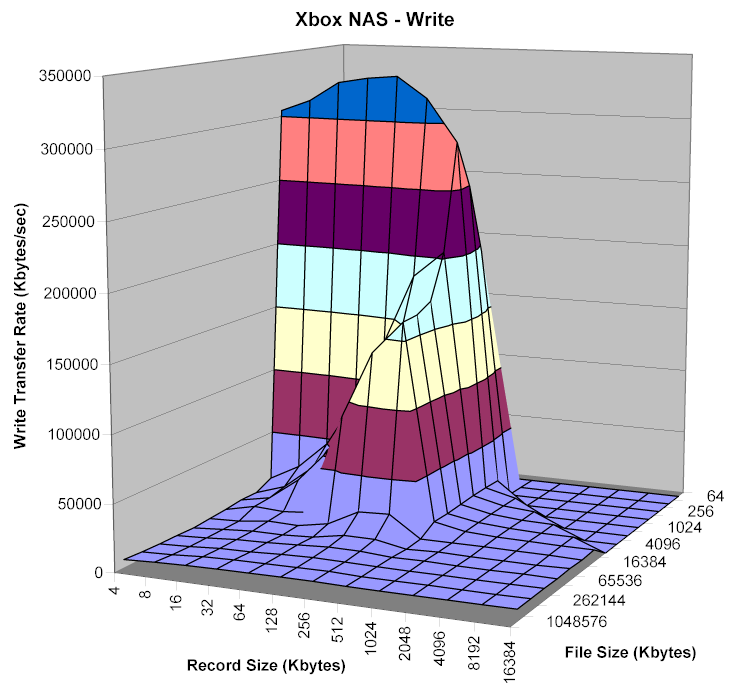
Figure 1: Xbox NAS Write performance
(click image to enlarge)
Figures 1 and 2 show write performance using the modified Xbox and a networked Athlon XP1600 Laptop running Windows XP Pro with 512MB RAM as the target drives being measured. While the peak cached speeds are both in the neighborhood of 300,000 kBytes/second, the Xbox maintains higher cached performance over a wider range of file and record sizes, giving it a write performance advantage.
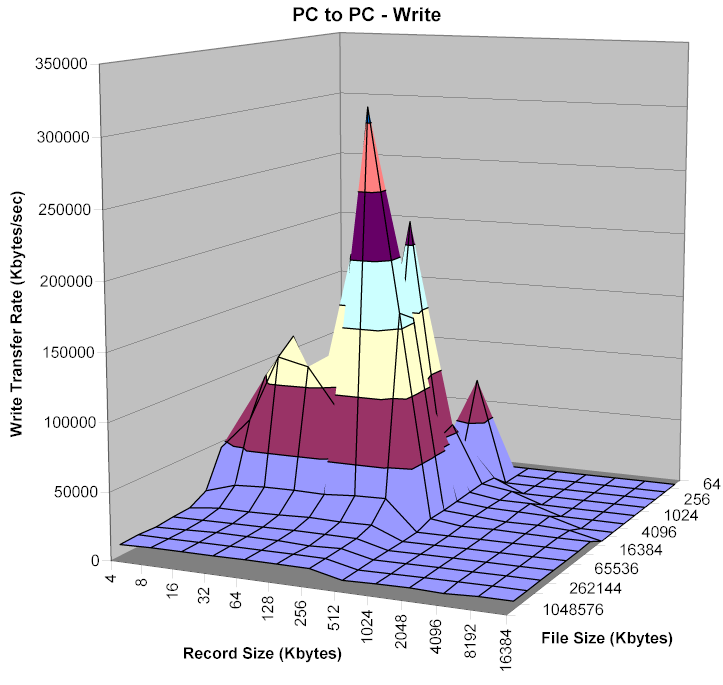
Figure 2: PC to PC Write performance
(click image to enlarge)
Performance – Read and Non-cached | Closing Thoughts
Figures 3 and 4 show the cached read performance of both drives.
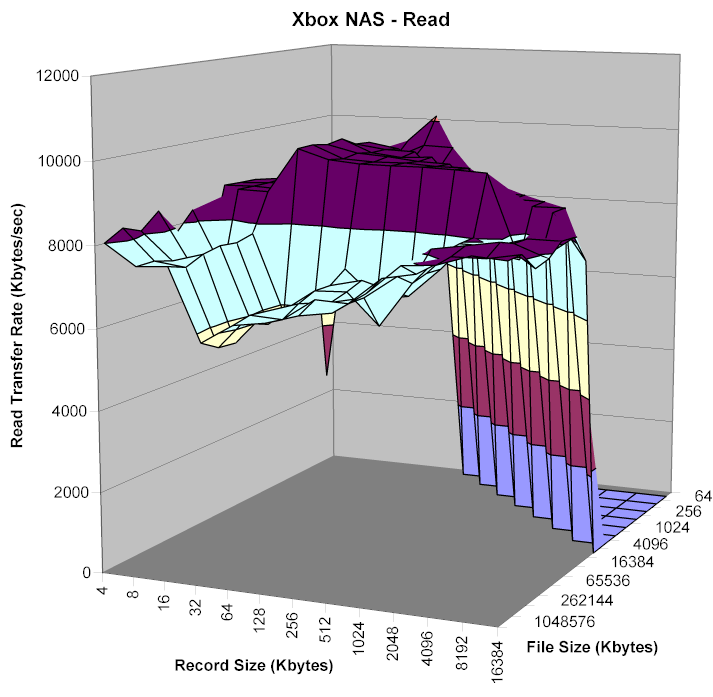
Figure 3: Xbox NAS Read performance
(click image to enlarge)
There’s essentially no difference in performance between the two, which supports the results I obtained with my file copy test.
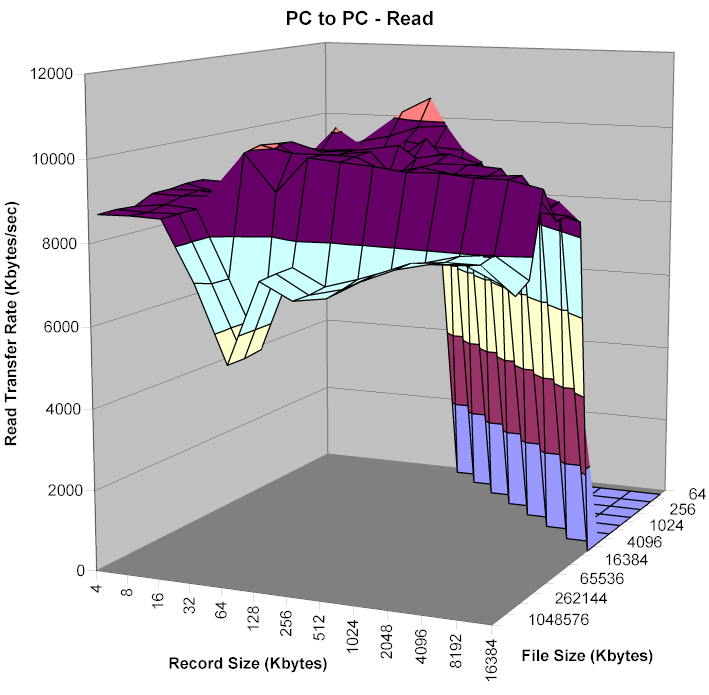
Figure 4: PC to PC Read performance
(click image to enlarge)
Since the above tests are dominated by caching performance, we need to look beyond OS-specific effects to the raw device performance. Experience with iozone has shown that most caching effects are gone with file sizes of 128MBytes and higher. So Figures 5 and 6 show comparisons of write and read performance of the modified Xbox and shared notebook drive using a 128MByte file size and record sizes from 64 to 16384 kBytes.
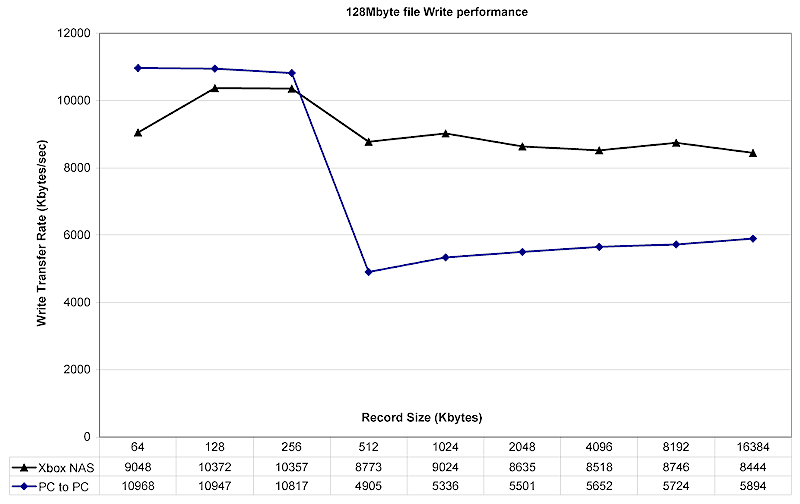
Figure 5: 128MB Write performance comparison
(click image to enlarge)
Figure 5 gives a slight advantage to the notebook drive for writing smaller record sizes, but the Xbox NAS’ more consistent performance wins out for record sizes above 512 kBytes.
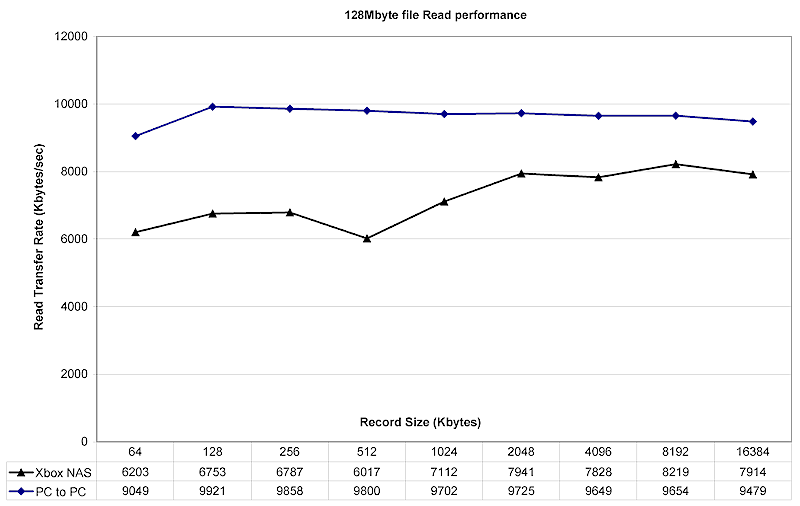
Figure 6: 128MB Read performance comparison
(click image to enlarge)
On the other hand, Figure 6 shows that the shared PC drive has both more consistent and higher non-cached read performance than the modified Xbox. But as my file-copy test showed, this advantage may not show up in real-life usage.
This brings us to the end of our adventures with our Xbox NAS. It’s been a bit of work, but well worth it. For not a lot of money, you can turn one person’s dust collector into a fast, flexible networked storage device that also can be made to perform additional tricks such as handling your BitTorrent downloads. And since you now have a nice little Linux-based server, even more mods are possible.