

Introduction
Watching the news these past few weeks, you would think that hackers have taken over our cellphones. From the Paris Hilton phone hack (which was not Bluetooth-based), to the unintentional release of Fred Durst’s (from the band Limp Bizkit) sex video – Wireless security has been thrust into the limelight. The proliferation of Bluetooth devices has made wireless communications easy and the Bluetooth group wants you to believe that this technology is safe from hackers. However, the guys from Flexilis, a wireless think-tank based in Los Angeles, beg to differ and they have a big freakin gun to “voice” their opinions.
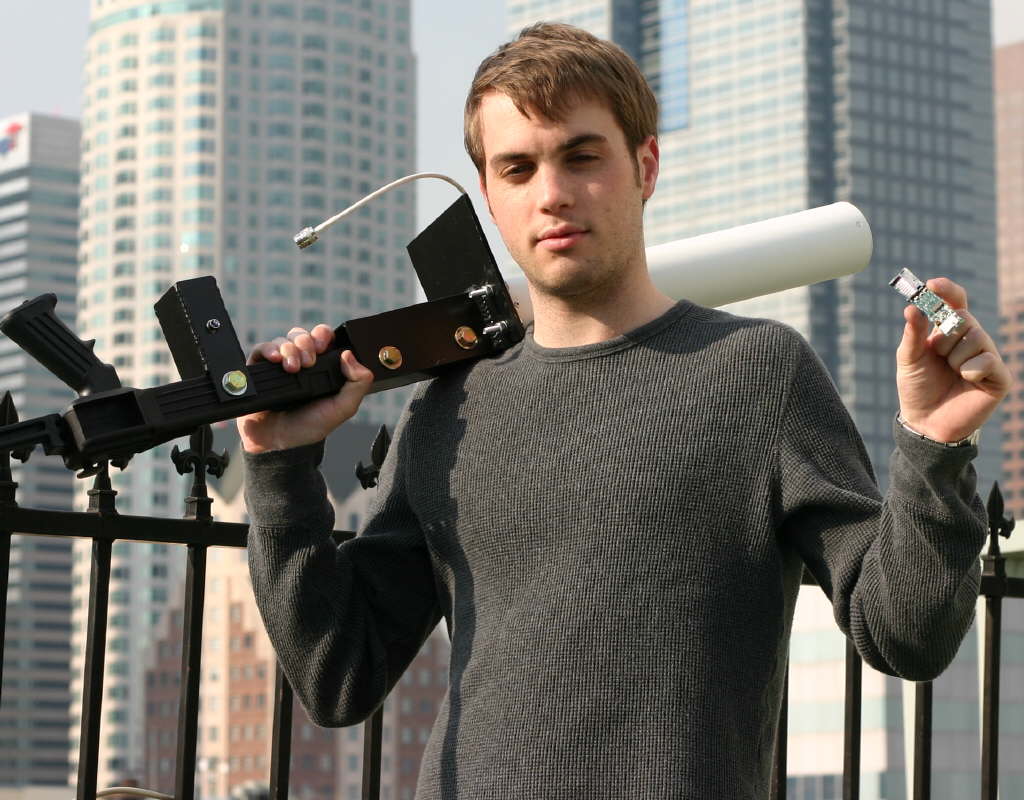
Figure 1: John Hering from Flexilis, with the new BlueSniper Rifle
(Click image to enlarge)
The gun, which is called the BlueSniper rifle, can scan and attack Bluetooth devices from more than a mile away. The first version of the gun showed up at Defcon 2004, a hacker/computer security convention held annually in Las Vegas. You can read about it in Tom’s Hardware show coverage report here.
While the early version was held together with tie-straps and rubber bands, this newest version has a much more professional look. The team at Flexilis learned a lot from making their previous gun, and have made many improvements. The gun is now bigger, stronger and more durable and the antenna is almost twice a powerful as the older model. It also has a small computer which eliminates the need for lugging around a heavy laptop just to gather data.
How hard was it to make this gun? John Hering, from Flexilis, says, “The parts are easily available for a few hundred dollars and you can make this gun in a long afternoon.” In fact, in this two-part article, we will show you how to build your very own Bluetooth sniper rifle. A complete parts list is provided and we will document each step of the manufacturing process. We’ll also report on our test “shoot” of some famous high-rise buildings in downtown L.A., namely the US Bank / Library Tower and the AON Tower.

Figure 2: US Bank / Library Tower in Downtown Los Angeles
Gathering the Parts” />
Gathering the Parts
Here is a suggested parts list with approximate prices for the Flexilis version of the gun. Some parts such as the antenna and computer can be substituted, and creative folks will probably figure out simpler ways to fabricate some of the metal parts that we describe.
|
– Parts List for BlueSniper Gun –
Folding Stock – About $50.00
Scrap metal for antenna coupler – Can use metalshop scraps, or a few bucks at Home Depot
Scrap metal for magazine holder – Can use metalshop scraps, or a few bucks at Home Depot
Mounting Hardware – Under five dollars at Home Depot
Radome Yagi Antenna of Your Choice – $60.
Pigtail Connector – $20.00
GumStix Embedded PC and Accessories – $200.00
<Electrical and Wiring for “Magazine” (Parts from Radioshack)
|
Basic metal working skills are helpful in making the BlueSniper rifle. But if you don’t feel confident working with metal, students at any high school or college metal shop will often be more than happy to help for a small fee. This is a good idea because they will get much needed practice, and often these shops will have metal scraps lying around, so you might not have to pay for some materials.
Here are the tools needed
- Drill Press
- Saw
- Welder
- Soldering Iron
- Sander – Mechanical is nice, but hand-sanding is acceptable.
Folding Stock
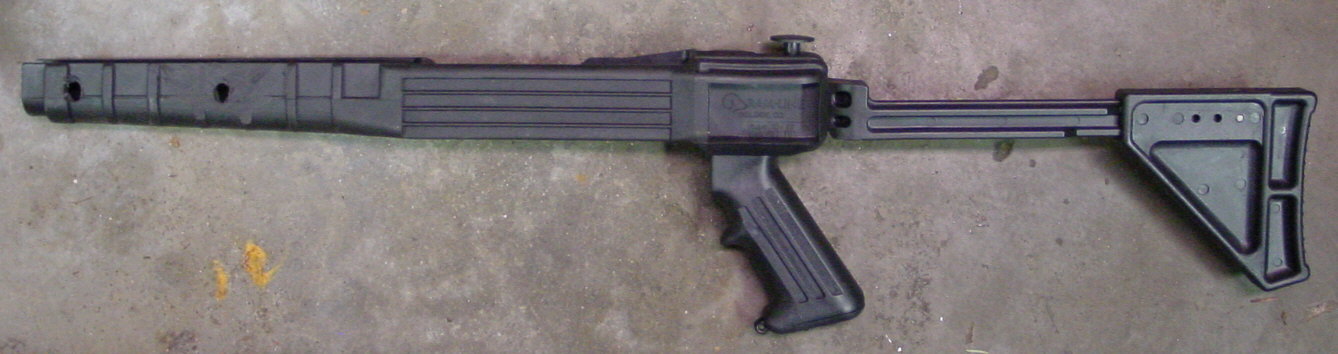
Figure 3: Ruger 10/22 Folding Stock
(Click image to enlarge)
You start out with a stock that all other components will be attached to. The guys at Flexilis decided on the Ruger 10 / 22 folding stock from Ramline, but you can use any stock you want. You can even make the BlueSniper without the stock, if you want to be more discrete about scanning Bluetooth devices. The stock just makes the BlueSniper look more menacing, not to mention really fun to hold.
The Ruger stock folds into a compact size, which can be stuffed into a duffle bag. Since it is plastic, you can take it through airport security without too many problems. In fact, the Flexilis staff has taken their BlueSniper kit past the watchful eyes of the Transportation Security Administration several times.
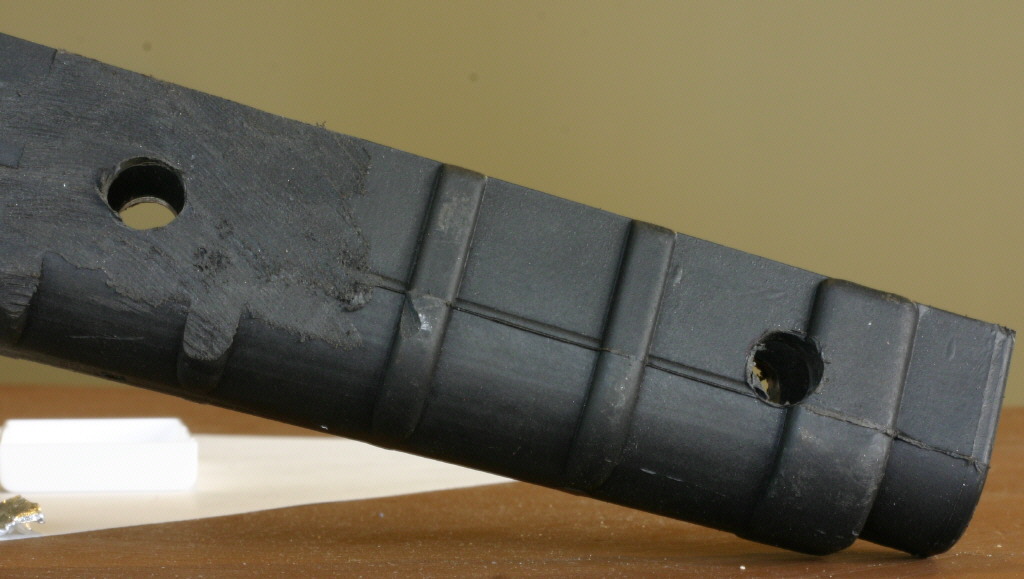
Figure 4: Sanded stock with holes drilled
(Click image to enlarge)
At the business end of the stock, you will need to drill two holes all the way through. Since the stock is plastic, you can use a hand power drill, or a drill press machine. The first hole will be about 1/2 inch (1.3 cm) away from the end, while the other hole will be 3 inches (7.6 cm) behind the first hole. You will also need to sand down the ridges, so the antenna coupler will have a secure fit.
Antenna
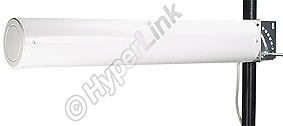
Figure 5: Randome directional antenna
Picture courtesy of Hyperlink
The first version of the BlueSniper rifle had a 12.9 dBi Yagi antenna. While that was plenty powerful, Flexilis chose a more intimidating-looking Hyperlink 14.9 dBi Randome directional antenna. This antenna can also be used for wardriving, since Bluetooth and 802.11b / g share the same frequency band (2.4Ghz). The directional antenna provides high gain (amplification) of the Bluetooth signal and is key to the rifle’s ability to operate at a long distance.
Since waving the BlueSniper around may look threatening, you may want to paint the normally-white antenna bright orange, similar to how toy guns are painted. While this won’t win you any awards for looking cool, it may help you avoid being on the receiving end of real gunfire if you use the rifle in rough neighborhoods. Just don’t use a metallic paint, since that would interfere with the Bluetooth signal.
Like many Wi-Fi antennas, the Hyperlink antenna comes with a short cable that is terminated with an N-Female type connector. However, the Gumstix computer uses a much smaller MMCX type connector, so you’ll need a short adapter cable – generally known as a “pigtail” – to successfully connect the two together.
Antenna Mounting Plate
The antenna attaches to the rifle stock via a custom-made antenna coupler, which we’ll describe shortly. But a mounting plate must be fabricated to adapt the antenna’s mounting holes to those on the coupler.
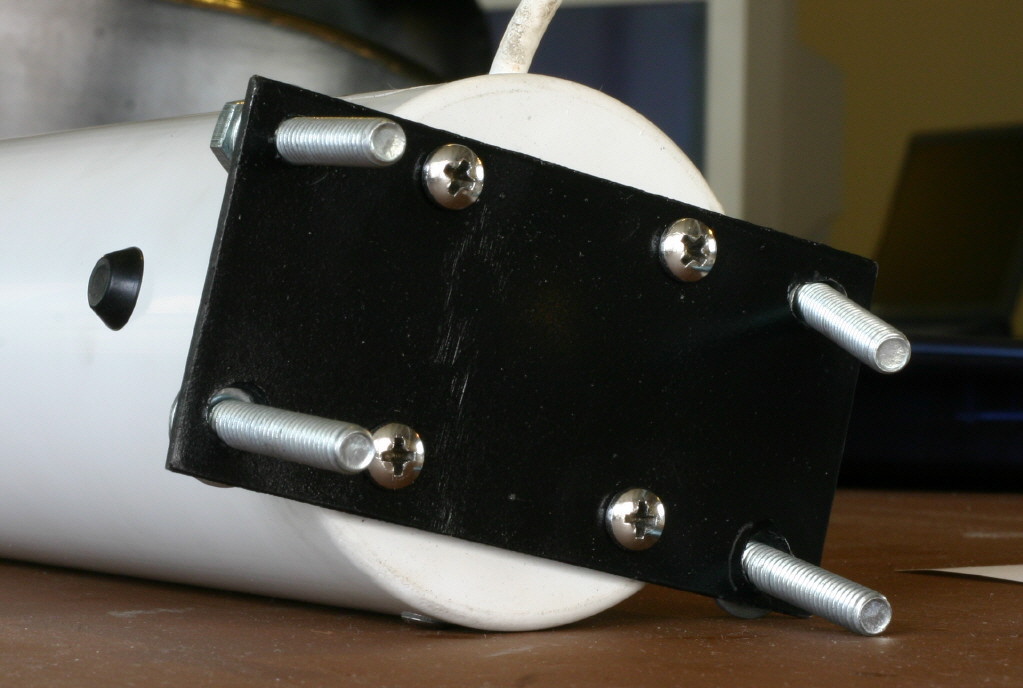
Figure 6: Antenna Mounting Plate attached to the back of the antenna
(Click image to enlarge)
Find a metal plate and cut a piece similar in size and shape to the picture – approximately 2 X 4 inches (5 x 10 cm). The plate that Flexilis used was 3/16th of an inch (~ 0.5 cm), but you can use any thickness. After cutting the plate, make sure you debur the edges so you don’t cut yourself later. The plate attaches to the antenna with four bolts and nuts or metal screws. So you’ll need to drill a total of eight holes – four to mount the antenna and four to bolt the plate to the coupler. You can also paint the plate black to give it a more finished look.
Making the Antenna Coupler
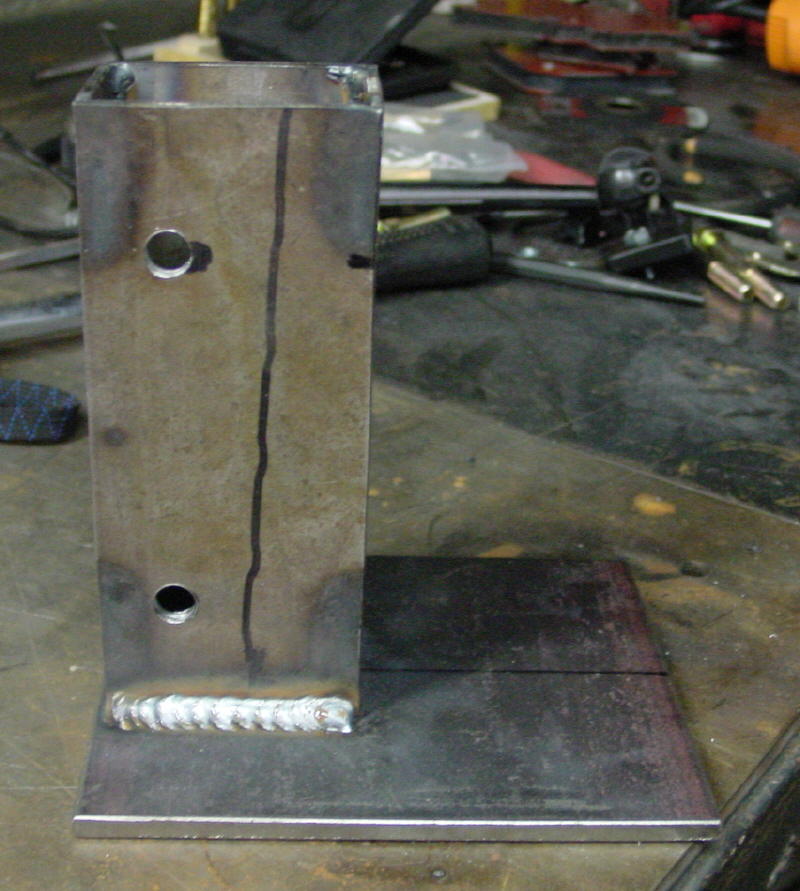
Figure 7: Antenna Coupler (look at the nice weld)
(Click image to enlarge)
The antenna coupler attaches the antenna and antenna plate to the gun stock and also serves as the mounting point for a tripod. The coupler consists of a rectangular box with a plate welded at one end. Approximate dimensions for the plate are 5 X 6 inches (13 X 15 cm) and 6 X 2.5 X 1.75 inches (15 X 6 X 4.4 cm) for the box.
Drill four holes into the plate, to match the four holes you drilled in the antenna mounting plate. Also drill holes in the box portion, which will correspond to the holes drilled into the rifle stock.
The metal for the coupler was easily found lying around a metal shop as scrap. When welding the plate and the box together, you should wear a good welders mask and use good technique. In the Figure 7, you can see great weld, which should be very strong.
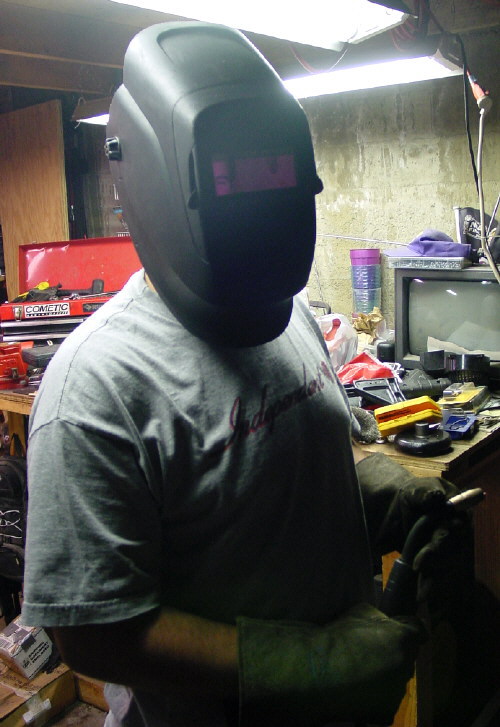
Figure 8: Always wear protection when welding!
(Click image to enlarge)
If you plan to mount your gun on a tripod, you will need to drill a hole on the bottom of the coupler. As with the mounting plate, you can paint the coupler black for a finished look. The coupler uses bolts, washers and nuts to mount to the stock and antenna mounting plate.
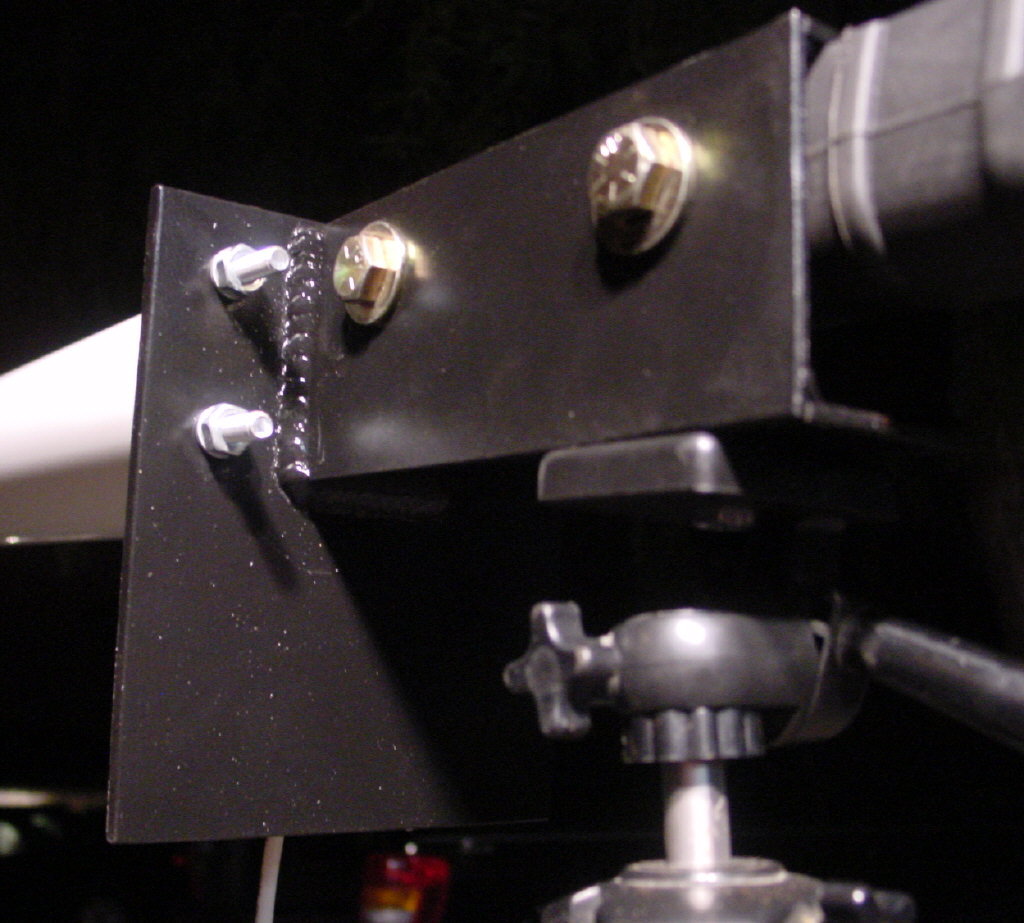
Figure 9: Finished antenna coupler
(Click image to enlarge)
Magazine Holder with Computer

Figure 10: The Magazine Holder
The magazine in a normal firearm would hold ammunition, but the magazine in the BlueSniper rifle holds something much more geeky – a gumstick-sized computer. You’ll need to make the box (Figure 10) about 1.75 X 2 X 3.5 inches (4.4 X 5 X 8.9 cm) with the two sides extended to 4.75 inches (12 cm) to allow for a through-bolt to attach the box to the stock. You will also need to drill a small hole for the LED that indicates when the computer is powered.
While the magazine holder doesn’t have to be big, it must be large enough to hold the small computer, wires and the on/off switch. The team from Flexilis chose to have the on/off switch inside the box, but you may find it easier to position it outside. Figure 11 shows how all the electrical parts are connected.
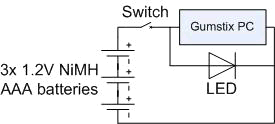
Figure 11: Wiring Diagram for the computer, batteries, LED and switch
In order to mount the magazine holder to the rifle stock, you will need to drill a third hole in the stock about 3 inches (7.6 cm) in front of the trigger. Like the other two holes in the stock, you need to drill all the way through one side and out the other. The magazine holder will bolt through this hole, as shown below.
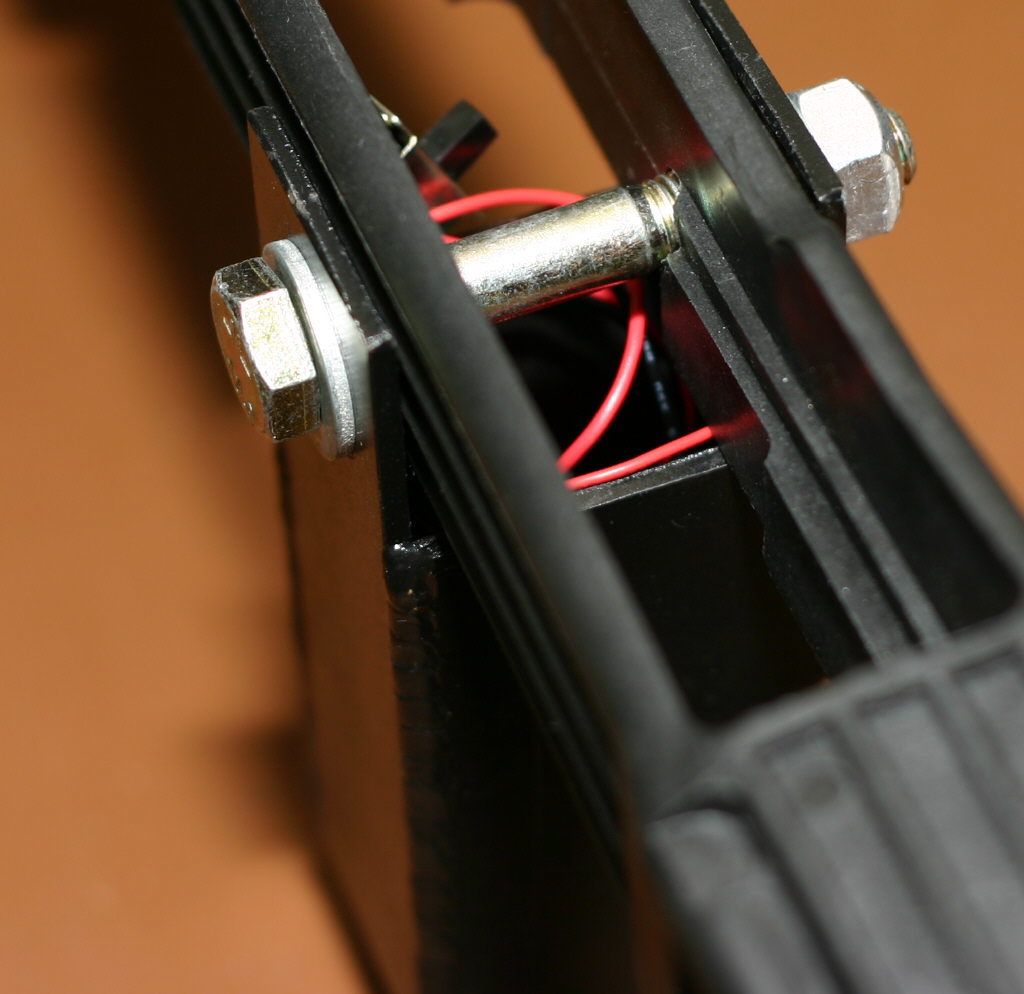
Figure 12: Top view of the magazine holder, wires and on/off switch
(Click image to enlarge)
If you followed our instructions, your gun should look similar to the one pictured in Figure 13. There is more than one way to make a Bluetooth rifle and John Hering encourages people to modify and improve the design. For example, different antennas can be used for longer range. Imagine the power of the rifle if you attached a 24 dBi parabolic dish! Of course, the BlueSniper would no longer look like a rifle, but rather a futuristic weapon that Marvin the Martian would carry.
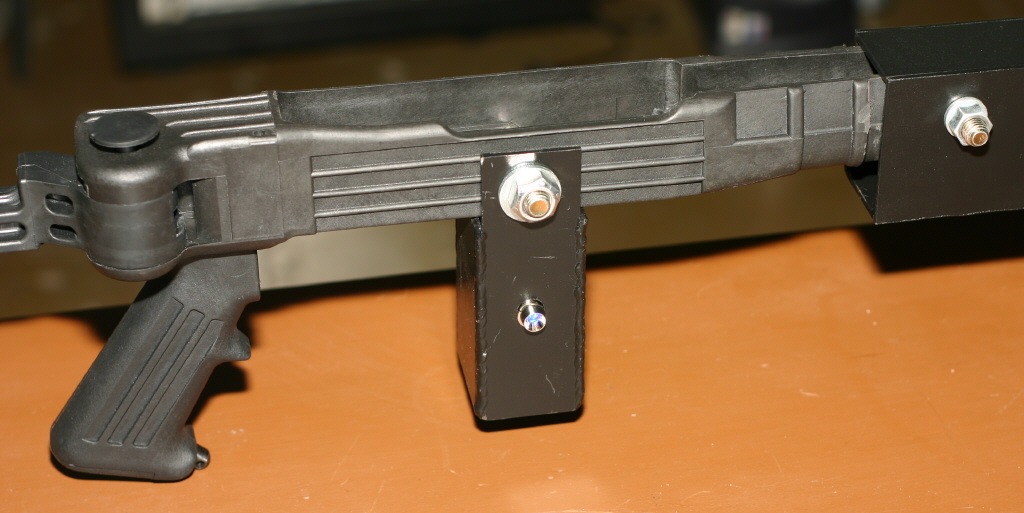
Figure 13: All finished!
(Click image to enlarge)
Gumstix Computer
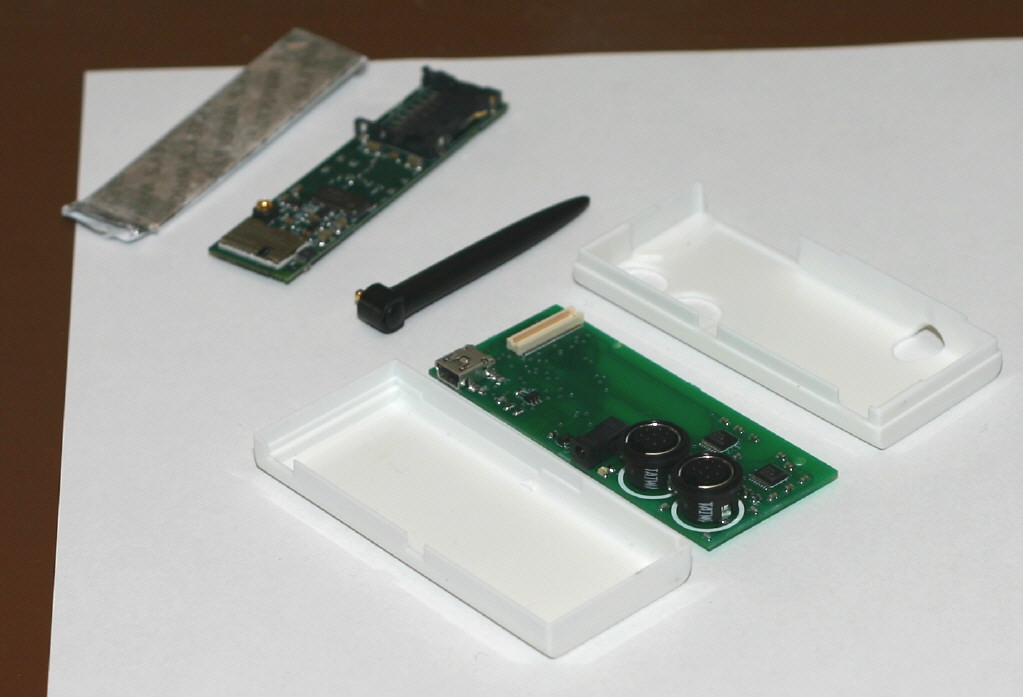
Figure 14: Gumstick computer (upper left) and Bluetooth module (center)
(Click image to enlarge)
The Gumstix computer is a wonderful piece of technology, worthy of its own article or review. As you can see from Figure 14, the computer is the same size as a stick of gum. The Bluetooth module is a separate piece, with both pieces fitting inside a white plastic chassis. The computer runs an embedded version of Linux (based on on the 2.6 kernel) and has an MMC flash memory slot for saving the results of your Bluetooth scanning.
Since the computer is so small and consumes little power (three AAA batteries provide 6-8 hours of runtime), other interesting Bluetooth scanning devices can be made. You could make a very small handheld Bluetooth sniffer that could be carried in your pocket or perhaps thrown in the bushes outside of a building. This could passively scan for devices until you retrieved it to look at the results.
Final Assembly
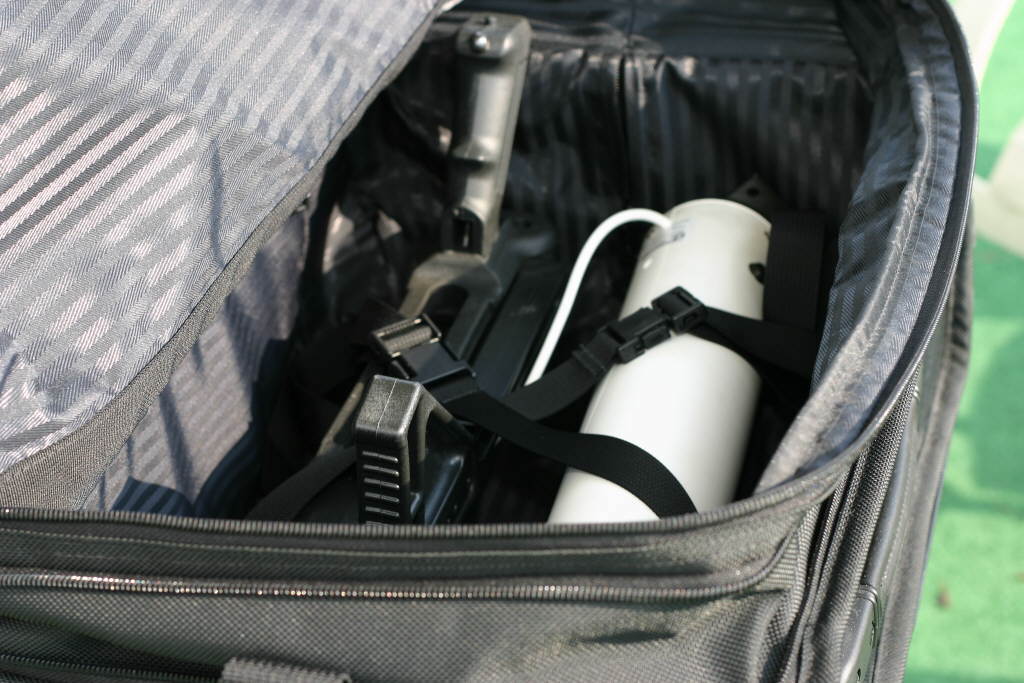
Figure 15: Small enough to fit into a bag
(Click image to enlarge)
The BlueSniper rifle was meant to break down into four main parts: the stock, the antenna, the magazine holder with computer and the antenna coupler. All of this can be fit into an average-sized duffle bag. The original BlueSniper rifle was carried around in a BushMaster rifle case, which attracted a lot of attention at Defcon 12. With duffle bag in hand, John and I took the elevator to the roof of Flexilis’ 14 story building in downtown Los Angeles.
It takes less than five minutes to put the rifle together and John says that it can be done in three minutes with practice. No tools are needed, as you can hand-tighten all the bolts. After everything is unpacked, the antenna coupler is attached to the stock (Figure 16).
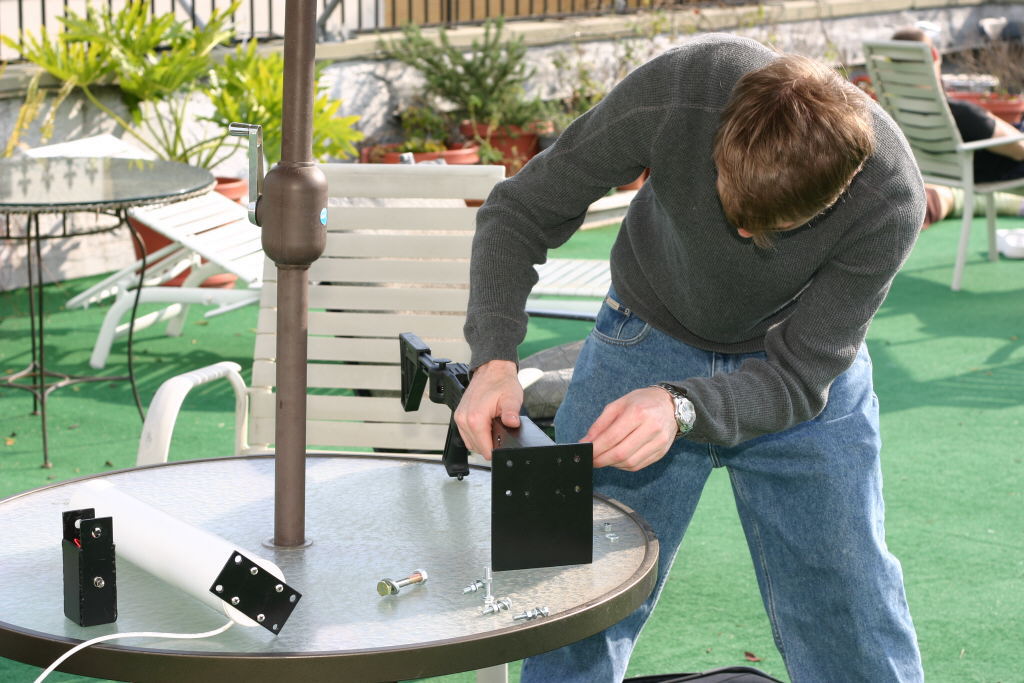
Figure 16: Attaching the antenna coupler to stock
(Click image to enlarge)
With the coupler in place, attach the antenna and its mounting plate to the coupler using four bolts (Figure 17).
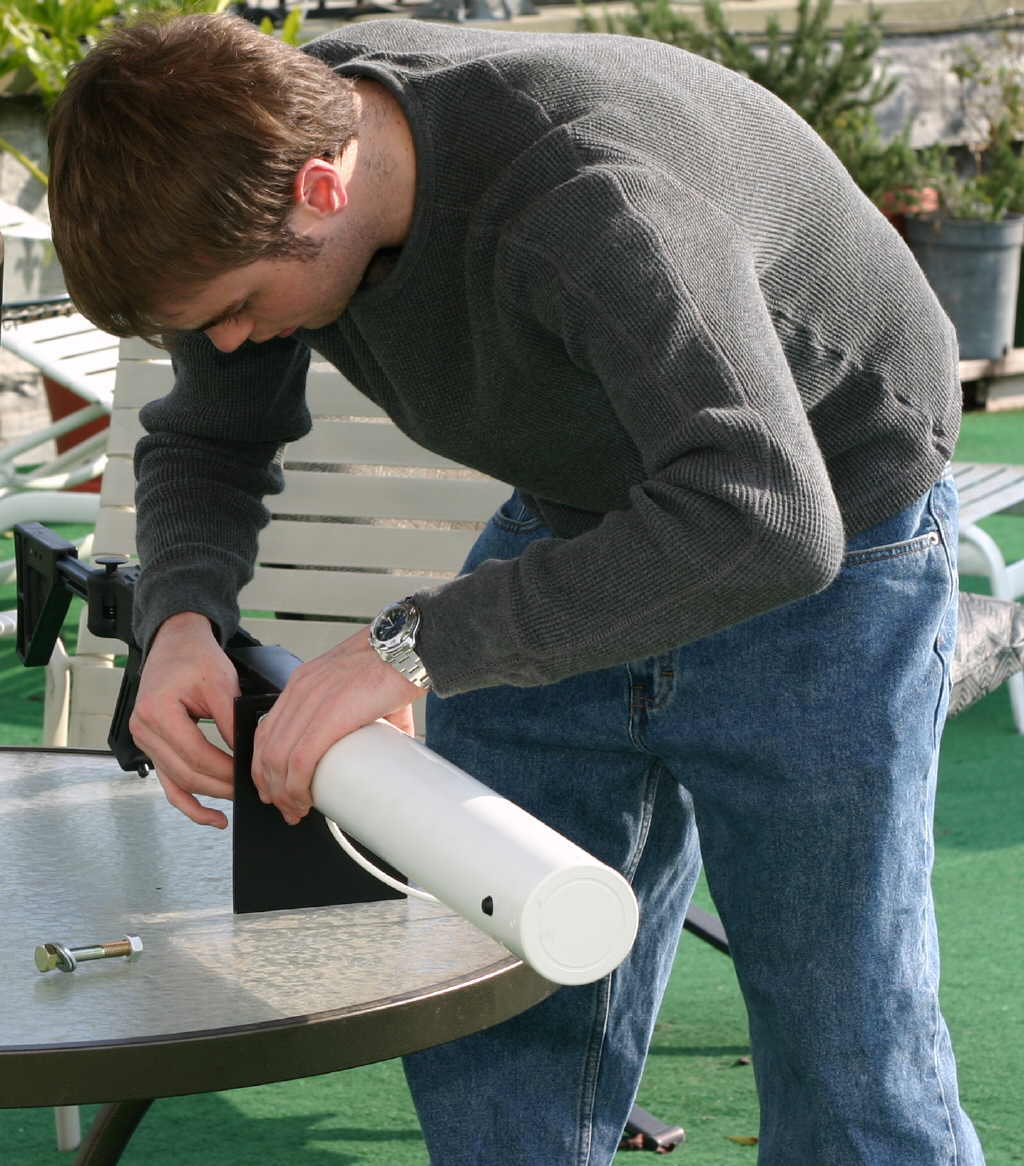
Figure 17: Attaching antenna to coupler
(Click image to enlarge)
Attaching the magazine holder to the stock and connecting the antenna to the computer is the last step (Figure 18). You can save a lot of time by transporting the computer, on/off switch and batteries already inside of the magazine holder. That way you don’t have to spend time cramming those small parts into the holder.
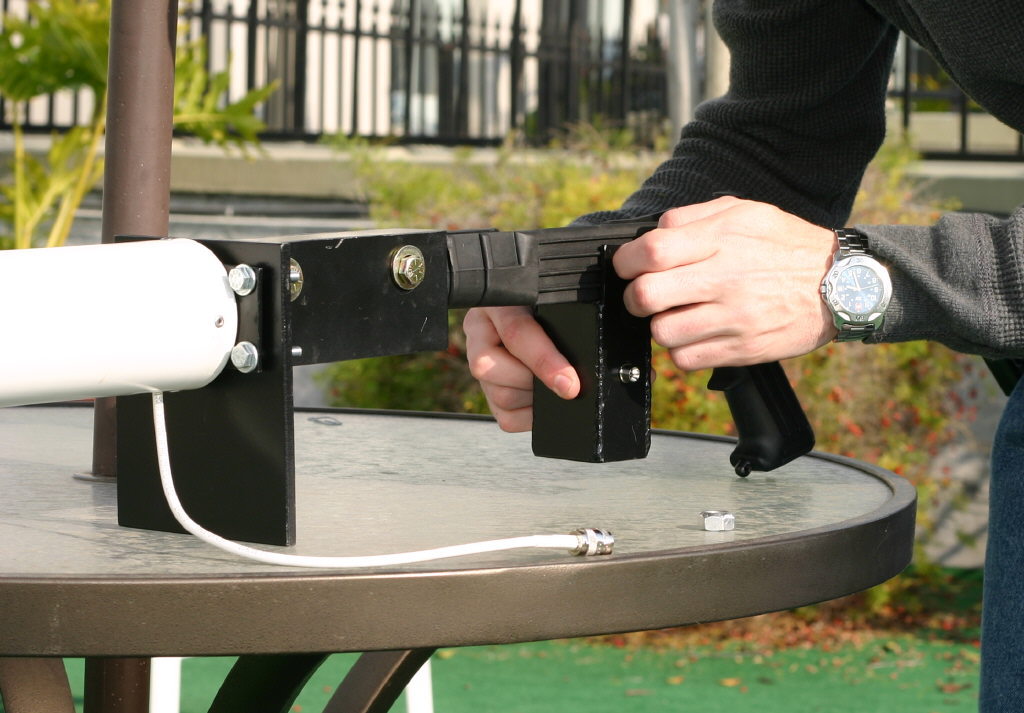
Figure 18: Finishing up. Attaching magazine holder with Gumstix computer inside
(Click image to enlarge)
BlueSniping Downtown Los Angeles

Figure 19: Beautiful Downtown Los Angeles
(Click image to enlarge)
The recent rains had washed away most of the smog from the usually murky Los Angeles skies, so we could easily see the giant high-rise buildings in the financial district. For the purposes of the shoot, we hooked up the BlueSniper gun to a laptop computer, instead of using the Gumstix computer. This allowed us to see in real-time the Bluetooth devices that were detected.
John pointed the BlueSniper at the AON building, which was 0.6 miles (just about 1 km) from our position (this distance was verified by GPS after the shoot).

Figure 20: Lining up a shot
(Click image to enlarge)
It didn’t take long for the MAC address of Bluetooth devices to appear on the laptop’s screen. After a few seconds, John pointed the gun at the Library Tower / US Bank Building, which is the tallest building in Los Angeles. The building was.75 miles (a little over 1 km) from our position.
As more Bluetooth devices started appearing, John said, “This building is full of Bluetooth! Look we got some Blackberries!” He also explained that, with multiple guns, it would be possible to track a single Bluetooth device as the person walked around. In less than a few minutes, twenty devices were detected – all at distances over a half mile away! We decided to quickly conclude the scan, given police activity in the area earlier in the day from a bomb scare.

Figure 21: Several Bluetooth devices found
Bluetooth SIG’s Reaction
The Wireless Security section of the Bluetooth Special Interest Group’s (SIG) website describes several types of Bluetooth attacks, but says Bluetooth devices must be within 10 Meters of each other for the attacks to occur. Given our ability to discover Bluetooth devices over a half-mile away, we contacted the Bluetooth SIG for their reaction of the BlueSniper rifle. Mr. Anders Edlund sent us this statement:
| “The Bluetooth SIG takes security very seriously. Members of the association are comprised of market leaders in their respective fields and as such work on security within the entire industry. There is a SIG Security Expert Group in place to address new and existing vulnerabilities and so far no security holes have been discovered in the Bluetooth specification itself.
Vulnerabilities that have come to light either exploit the Bluetooth link as a conduit, much like the Internet to the PC, or are a result of the implementation of Bluetooth technology within the device – as such, we constantly work with our members to assist in implementing Bluetooth technology more effectively. As within the PC industry, the security flaws that are revealed are typically solved by new software builds and upgrades. Attackers that stretch the typical range of Bluetooth radios and try to hack into users’ devices have received a fair share of press, but they are still going about the attack in one of the ways mentioned above. Roadmap enhancements continue to address security concerns to maintain and improve on the security of Bluetooth technology but we encourage consumers to play an active role in the secure operation of their devices. We recommend users pair their Bluetooth devices in private, use the non-discoverable mode of their device when in crowded areas, never accept unknown contact, and download anti-virus software for mobile devices as it becomes available. If they are concerned about that their device is vulnerable to security threats, check with manufacturers and possibly request a software upgrade to a version without vulnerabilities. Following this advice, they are in no more danger of exposure by a long range antenna than with a normal range hacking device. As a general rule, we also recommend that users not keep confidential information on mobile devices since the most common security threat is actually the many thousands of devices stolen or lost every day across the globe.” |
Conclusion
With some basic skills and a couple hundred bucks, you can build your own Bluetooth rifle, just like the guys at Flexilis. However, at this point, you are probably asking yourself, “Where do I get the software and how do I configure it?” In Part 2 of this article, we will explore how to install various open-source and never-before-released Bluetooth sniffing and attack tools on the Gumstix computer.
We will also interview the Flexilis staff on what their custom software is capable of doing. As John Hering says, “Our goal is to make the public more aware of wireless security issues and bad policies. Bluetooth is wide open and most people have no idea what can be done to their devices.”
Related Articles