

Introduction
The wireless networking world seems to have lost interest in 802.11a wireless LAN products. Although its advantages of operating in a quieter frequency band, significantly faster maximum data rate, and more non-interfering channels than 802.11b were attractive, its range problems and cost premium caused many prospective buyers to look, but not buy.
One of the best kept secrets of the WLAN world, however, seems to be the significantly improved performance of Atheros’ second generation 802.11a designs. I recently stumbled across this discovery while testing NETGEAR’s Atheros-based WAG511 dual-band, tri-mode CardBus card [reviewed here], and was so pleasantly surprised that I felt that it deserved an NTK of its own.
In The Beginning…
When it first started shipping in Spring 2002, 802.11a equipment was poised for big things, since it seemed to hit all the right buttons for Enterprise buyers, at least. First, it really did have about five times the best-case throughput of 802.11b products, although the typical equipment clocked at about 24-25Mbps vs. the advertised 54Mbps raw data rate. And second, all products operated on eight non-interfering channels in the 5GHz band, with some products offering five additional “high-band” channels. This not only moved WLAN activity to a less crowded and more interference-free part of the radio spectrum to improve reliability, but greatly simplified multiple Access Point installations.
The excitement seemed short-lived, however. Products were significantly more expensive than their 802.11b counterparts, but more importantly, didn’t deliver all that they promised. Review after review praised 11a products for their best-case speed, but complained that the products’ effective range wasn’t as great as that of 802.11b products’. Figures 1 through 3 below show typical results from my reviews of first-generation 11a products.
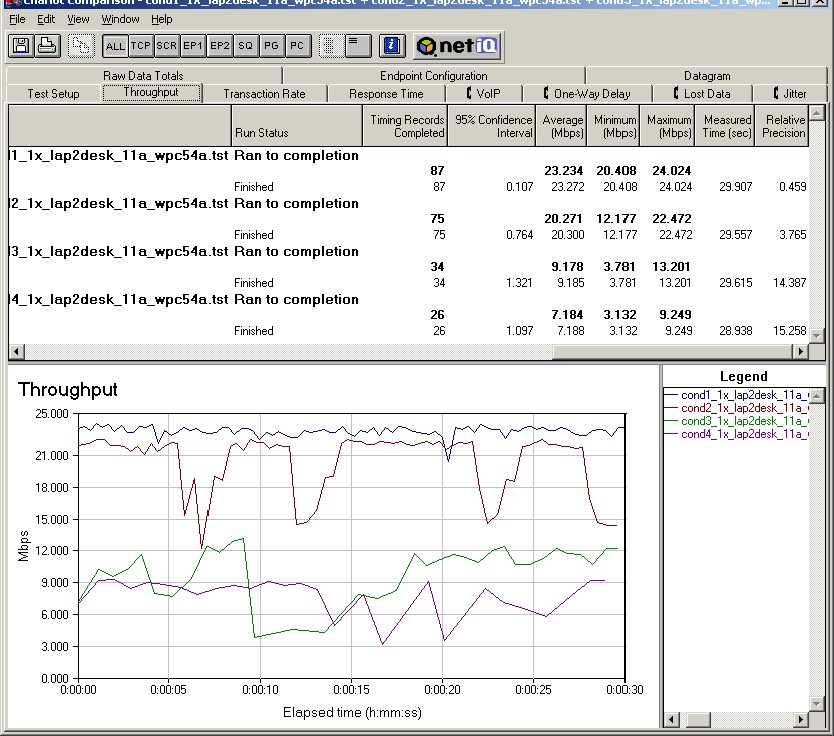
Figure 1: Linksys WAP51AB and WPC54A 802.11a throughput
(click on the image for a full-sized view)
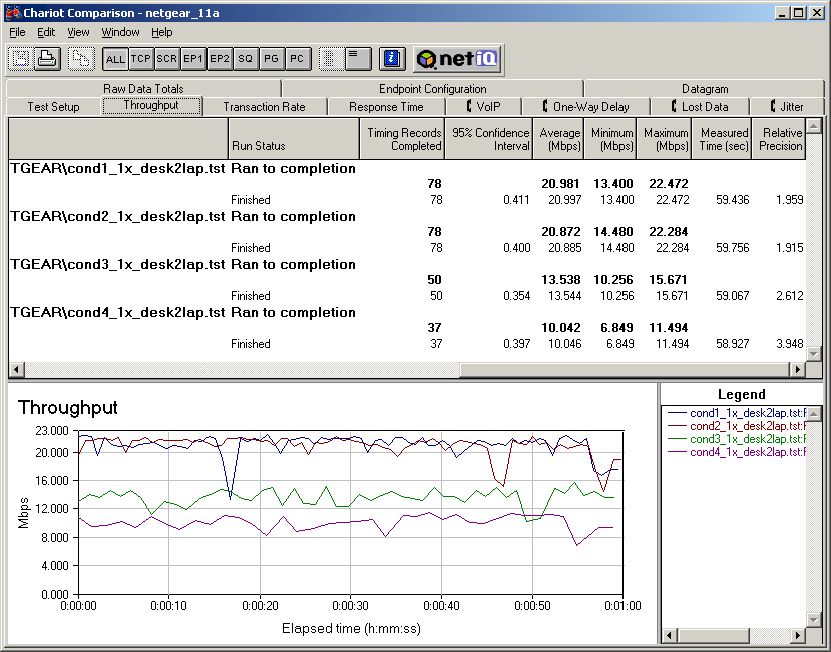
Figure 2: NETGEAR HE102 and HA501 802.11a throughput
(click on the image for a full-sized view)
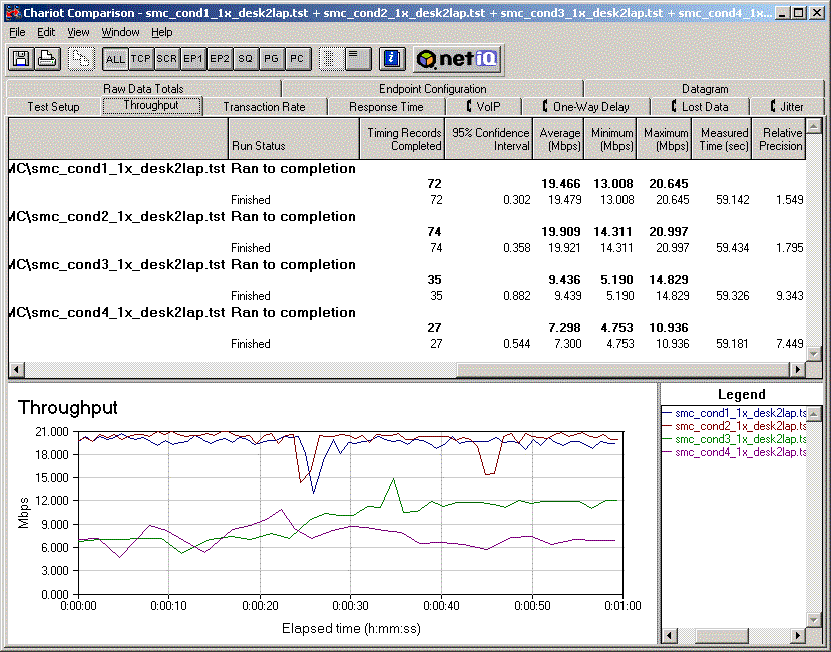
Figure 3: SMC 2755W and 2735W 802.11a throughput
(click on the image for a full-sized view)
In each plot, you can clearly see a significant difference in throughput between the close-range Condition 1 and 2 tests, and the longer-range tests under Condition 3 and 4. (See this page for a description of the test methodology and test conditions.)
A Step Sideways
It didn’t take long for WLAN equipment vendors to realize that 11a-only products weren’t going to kill off the still-growing 11b WLAN market. So about 6 months later, dual-band products started to appear. Unfortunately, although the Atheros dual-band CardBus client design had killer 11b performance, the first dual-band APs and routers out of the chute didn’t have second-generation 11a radios. Too bad, too, because I loved the NETGEAR WAB501‘s 11b radio performance in my review, but didn’t see any difference in 11a performance from my earlier 11a-only testing, as shown in Figure 4.
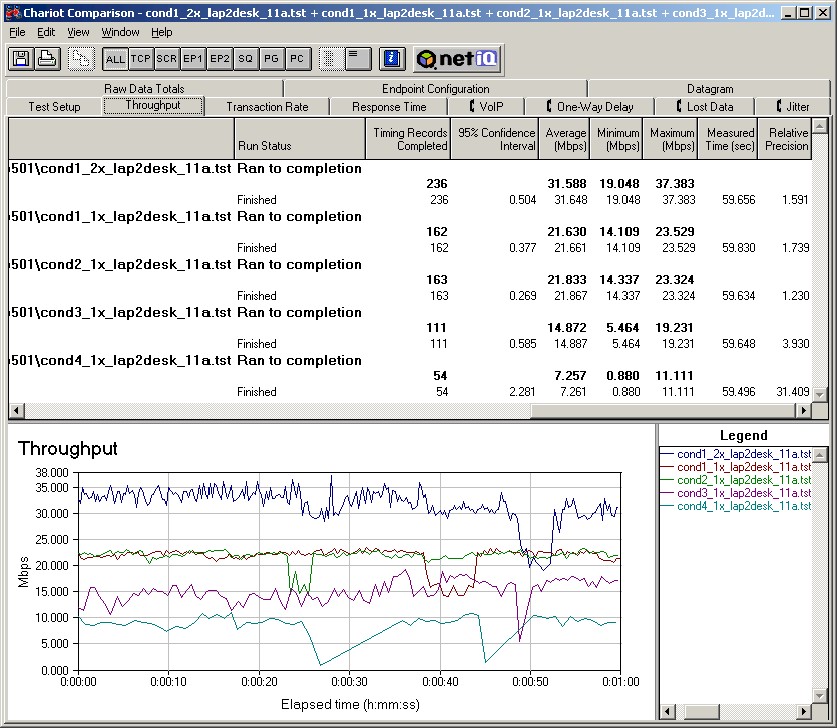
Figure 4: NETGEAR HR314 and WAB501 802.11a throughput
(click on the image for a full-sized view)
I should note that although Atheros’ proprietary “Turbo” mode raised throughput above 30Mbps (!), it worked well only under strong signal conditions. Even worse, it actually made connection speeds worse (vs. running without “Turbo” enabled) as wireless clients moved away from the AP. With what now seemed like two strike-outs with two times at bat, 802.11a seemed destined to sit on the bench as sales of 802.11b gear continued to grow like crazy.
11g – The Spoiler
Locked inside the new dual-band 11a/b client adapters, however, was Atheros’ second-generation AR5001 chipset – half of the solution required to give 802.11a gear its second chance. Unfortunately, the other half – APs and routers with radios that also used the next-generation design – didn’t appear until a few months after the client cards hit the shelves. By that time, most reviewers had already tested the clients with lash-ups of separate 11b and first-gen 11a APs and found the same 11a performance as before.
The real body-blow to 11a, however, was the Fall Comdex 2002 pre-emptive launch by Broadcom of WLAN products based on the draft version of the IEEE 802.11g standard. These long-awaited products promised the both the 54Mbps raw data rate of 802.11a, but with the added bonus of interoperability with existing 802.11b equipment, since they operated in the same 2.4GHz band.
As surprising as this announcement was, even more surprising was that draft-11g products actually started shipping in January 2003! Although they had their problems, these new products worked well enough, and – with a little help from Broadcom and Linksys’ marketing groups – captured consumers’ attention and this time left dual-band 11a/b products sitting on retailers shelves, joining their unsold 11a bretheren.
Hidden Dragon
I shook my head in disbelief when the rumors started surfacing in February of dual-band tri-mode (a/b/g) WLAN products. But a month later, I was looking at NETGEAR’s WAG511 CardBus card. Based on Atheros’ AR5001X+ chipset, it includes the same second-generation 802.11a capability found in the dual-band dual-mode (a/b) Atheros design, but with a new baseband/MAC chip that adds capability needed for 802.11g operation.
Once again, the client cards beat their matching APs to market. So when I went to test the WAG511, I had to use a combination of products to test all three of its modes. Since NETGEAR had been after me to check out their WAB102 Dual-Band Access Point, which they swore had much better 802.11a performance, I decided to use this opportunity to check out that claim, too.
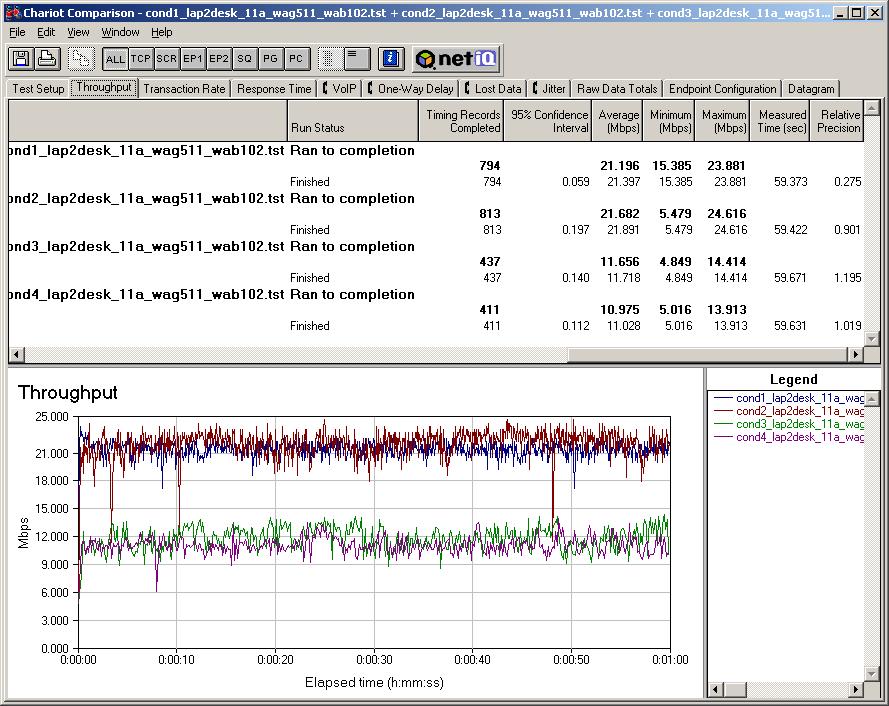
Figure 5: NETGEAR WAB102 and WAG511 802.11a throughput
(click on the image for a full-sized view)
Figure 5, which is taken from the WAG511 review, shows the 11a performance obtained from using both a second generation AP and client. If you compare it to the earlier plots, you’ll see that the average throughput in Conditions 3 and 4 is generally higher, but also more consistent. What you can’t tell from Figure 5, is the improved robustness of the connection. Let me give you a little help with another plot.
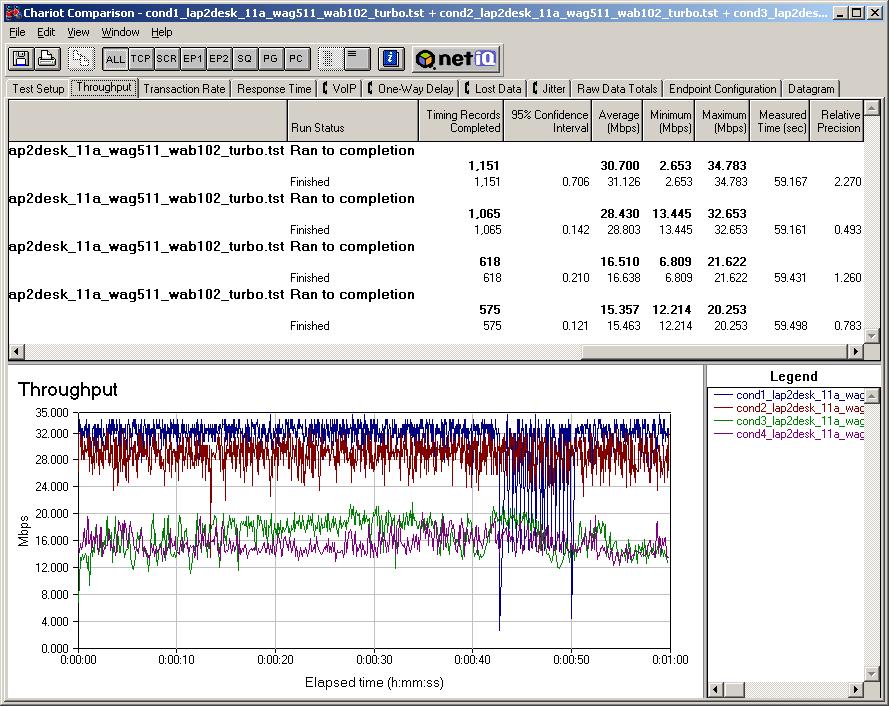
Figure 6: NETGEAR WAB102 and WAG511 802.11a “Turbo” throughput
(click on the image for a full-sized view)
Figure 6 shows the results of a test that I normally don’t bother running on 802.11a products, i.e. a four Condition throughput test with “Turbo mode” enabled. With first-generation 11a products, I’ve found that running “Turbo” with anything less than the strongest signal produces lower throughput and unreliable connections. But with the new generation, the connection is both reliable and faster than obtained with “Turbo” off – which I imagine is what Atheros had in mind in the first place!
Stealth Attack?
Given that the performance improvement in second generation 11a are real and significant, why aren’t Atheros and its customers doing more to get the word out? In reality, I think Atheros has been making some attempts, most notably via a recent series of whitepapers including one named 802.11 Wireless LAN Performance.
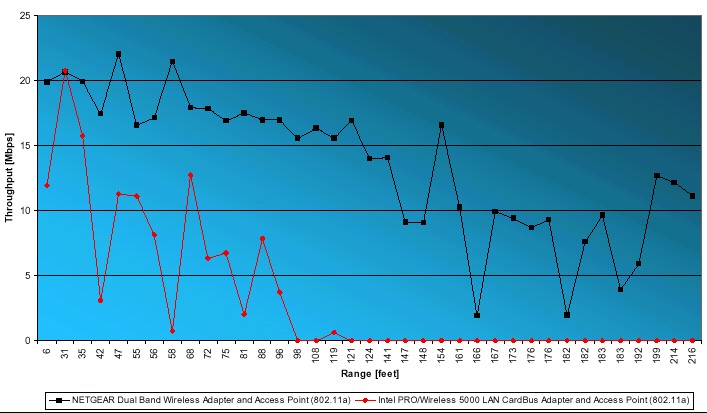
Figure 7: Comparison of 1st and 2nd generation 802.11a
(click on the image for a full-sized view)
From Atheros whitepaper 802.11 Wireless LAN Performance
Used by permission.
Figure 7, which is taken from that whitepaper, shows a comparison of throughput vs. range for a first (Intel PRO/Wireless 5000 AP and PC Card) and second (NETGEAR WAB102 AP and WAB501 CardBus card) generation 11a AP and card pair. Although I can’t directly compare the results from my tests made in a residential environment with Atheros’ which were conducted in a typical open-office environment, I will say that the 2nd generation products should provide a much improved user experience for both residential and Enterprise users.
Strangely enough, I think that 802.11a may come into its own once tri-mode, dual-band (a/b/g) products – or at least those with Atheros 11a radios – start to be deployed. Despite its improved speed, 802.11g won’t be the solution for everyone, due to its susceptibility to interference from 2.4GHz cordless phones, microwave ovens, and other neighboring 802.11b equipment. Since all tri-mode APs and routers with Atheros radios will use the second generation 11a chipset, many users’ first experience with 2nd generation 11a performance may come via their interest in 802.11g. Talk about riding in on a Trojan Horse!
Treasure Hunt
Atheros has some work to do, however, to help consumers identify gear that contains its 2nd generation 11a technology. Table 1 (supplied by Atheros) lists APs and routers with 2nd Gen 11a radios, but it’s by no means a complete one.
| 802.11a/b | |
| NETGEAR | • WAB102 Access Point |
|
802.11a/b/g
|
|
| D-Link |
• DI-774 Router |
| NETGEAR | • FWAG114 Router [review] • WAB102 Access Point (discontinued but still available as of March 2004) |
| Linksys | • WAP55AG Access Point |
|
Table 1: 2nd generation 11a products
|
|
The following rules of thumb may help in finding second generation 11a products:
- Dual-band, dual-mode (a/b) client adapters are all based on 2nd generation Atheros chipsets
- Same goes for integrated a/b mini-PCI cards in notebooks
- Most a/b APs and routers are not second-generation. The exception is NETGEAR’s WAB102.
- Single mode 802.11a products are virtually all first-generation
Summing Up
Although it probably won’t be the dominant wireless standard, I’m more positive about 802.11a’s future than I was a few months ago. Atheros’ second generation technology really makes a difference and, in my mind, makes 802.11a a viable alternative for WLAN building – even in home and small office settings.
The improved performance and availability of dual-band, tri-mode products should also help corporate purchasers overcome performance and interoperability fears (once 802.11g is finalized, of course). They’ll now be able to standardize on a single client type, build their network with whatever AP type fits their needs, and be able to use 11a’s non-interfering channels and 5GHz operating band to escape from tricky 2.4GHz installation problems.
It remains to be seen, however, whether Atheros will continue to be the dominant 802.11a solution provider, and whether the competition has equivalent, or better 11a stuff. The second chance that 11a is getting with tri-mode products will be quickly killed if tri-mode products with inferior 11a performance get shipped by any of the major equipment suppliers. So let’s hope WLAN gear manufacturers choose their 11a radio components carefully.
It’s also an open question whether Atheros cranks up their marketing machine and starts getting their 2nd gen message across. It’s not Atheros’ style to be flashy or loud, but in present WLAN product market, they’ll need more than whitepapers to be heard over the noise that Broadcom and its partners are making over 11g.
In the meantime, though, if you haven’t experienced what Atheros’ second generation wireless technology can do, I suggest you get some gear and check it out. You just may see 802.11a in a brand new way!