

Introduction

| Point Clark Networks ClarkConnect Gateway / Server | |
|---|---|
| Summary | Open source based firewall and server with easy setup, excellent web-based interface and many features |
| Update | None |
| Pros | • Linux power and stability plus easy configuration • Excellent web-based interface • Free |
| Cons | • Graphical interface, while nice, may be limiting for experienced Linux users |
Are you looking for a server operating system with the security and stability of Linux, but with the point and click convenience of Windows? If so, then you are not alone. Linux distributions have a great reputation for being a nearly bulletproof, normally requiring very little attention once configured properly. But then, there’s the problem for a lot of folks; how exactly do you get a Linux server set up in the first place?
Most people are perfectly comfortable with Windows’ familiar interface, but the thought of a Linux command line is not exactly welcoming. The folks at Point Clark Networks have addressed this problem by producing a Linux distribution called ClarkConnect that is designed to be administered via a web browser from the comfort of your own desktop. You can think of ClarkConnect as targeted at users who want all the great qualities of a Linux operating system, but without the hassle of mastering all of the rather cryptic commands and myriad options that complex software applications such as Apache provide.
Feature Overview
ClarkConnect is available in three editions. The Professional Edition includes firewall, VPN, and gateway tools, while the Office Edition includes everything in Professional and adds web, file, and print services. Both Professional and Office are reasonably priced ($55 and $65 respectively), and available with various support plans and web-based services, such as domain registration and DNS service. You can view a feature comparison table here.
The Home Edition, on the other hand, is completely free for non-commercial use. But in order to obtain updates for the Home Edition directly from ClarkConnect, you’ll need to register your system, which entitles you to free updates for a limited time. However, since ClarkConnect is based on RedHat Linux, obtaining updates and/or extending the functionality of the system is easy to do if you don’t mind getting your hands dirty.
The most notable feature of ClarkConnect is its excellent web-based administration interface. Once the installation is done, simply open a web browser from any computer on the same local network and point it to the ClarkConnect box. ClarkConnect includes some great software right out of the box, including the Samba file server, the Apache web server, and even a Photo Gallery application. But what sets ClarkConnect apart from other Linux distributions is the ease with which you can set up and configure these and other applications.
Installation
During installation, you’ll get the chance to select between standalone and gateway/firewall modes, with the latter requiring at least two network cards. In standalone mode, ClarkConnect works as a server, providing file, print, and other services as needed. In gateway/firewall mode, ClarkConnect adds Internet connection sharing and firewall functionality to the list, including inbound and outbound bandwidth control.
ClarkConnect Home Edition software can be downloaded here (the current version is 2.2). You can perform a network install, that is, boot a minimal install disk and download the necessary files from the Internet as you install them, but I elected to just download the complete ISO file and burn my own CD. Keep in mind that ClarkConnect system requirements are for a Pentium class processor, 64MB of memory, and 1GB of IDE or SCSI disk space, so not every old doorstop you have lying around will work.
Once you’ve created the bootable CD, you should be able to simply pop it in and boot it on most systems (you may need to get into your computer’s BIOS and modify the boot order setting). Older computers that can’t boot from the CD may require you to create a boot floppy to get things started. At any rate, once underway, the installation system is very reminiscent of a text-based Redhat install.
If you intend to install ClarkConnect to dual-boot with another OS on the same computer, then be aware that during the installation you’ll receive some rather dire warnings about wiping out your entire hard disk. But as long as you select custom partitioning when the time comes, you’ll get to safely create new partitions (or reuse existing ones) using Redhat’s familiar Disk Druid partitioning tool. If you ignore those warnings, the installation will automatically repartition your entire hard disk, effectively wiping it out. Other than that, the installation is very straightforward, and most common hardware, including network cards, will be detected and configured automatically.
TIP: ClarkConnect may have trouble configuring older 16-bit ISA-bus network cards. For trouble-free installs, try to use PCI-based network cards only.
Once the installation is completed, booting ClarkConnect will result in a very simple text-based interface intended to set up the basic configuration of the system. Once logged in as root using this interface, you’ll be able to configure the network connections and switch between standalone and gateway/firewall modes, but that’s about it. All of the remaining configuration is intended to be done through the web interface.
Features
As I mentioned earlier, the web interface is probably ClarkConnect’s most notable feature and is very slick, professional, and easy to use. To access it, just open up a browser on any computer on the same local network and point it to port 82 of the ClarkConnect box’s IP address. You’ll receive a prompt for your username and password. Login as root and you’ll be greeted with something similar to Figure 1.
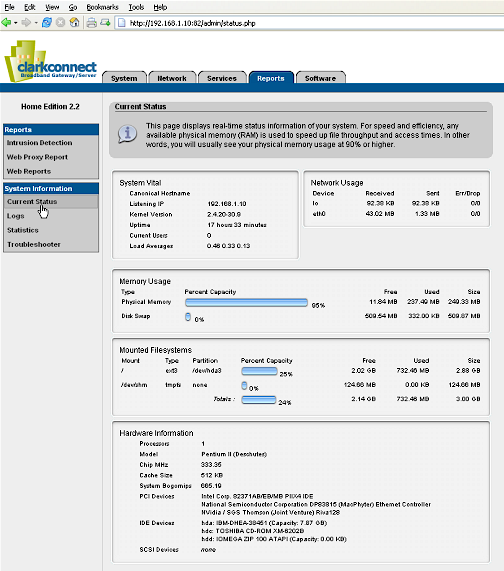
Figure 1: Current Status
(click on image for larger view)
Obviously, this page gives you information about well, current status. You can tell at a glance here how much disk space you have left, for instance.
One of the first things you should do with any newly-installed operating system is install updates. ClarkConnect makes this very easy. You’ll need to register online with the ClarkConnect company, but it’s painless and free. Once registered, you can select Register System under the Services tab and enter your information. Once your ClarkConnect box contacts the mother ship to make sure everything’s OK, you’ll be able to view and select from a list of critical updates (Figure 2).
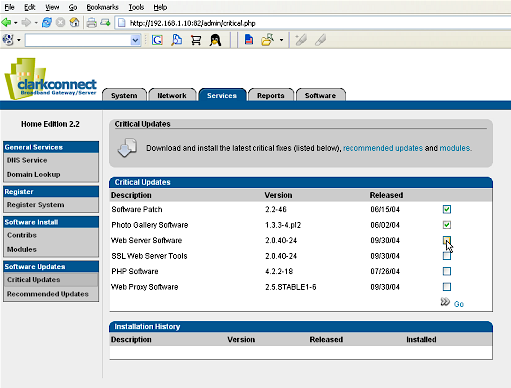
Figure 2: Critical Updates
(click on image for larger view)
Go ahead and check each update, then click Go and all the updates are installed automatically. Since you’re registered now, you can also view other available software for your system, such as recommended updates, contributed software, and extra modules. All of it installs with the same easy click-and-go simplicity.
Features – Managing Services
Once you’re satisfied with your installed software, hop on over to the System tab (Figure 3). From there, you manage basic system information such as the date and time, add and delete users, and decide which services are you want running.
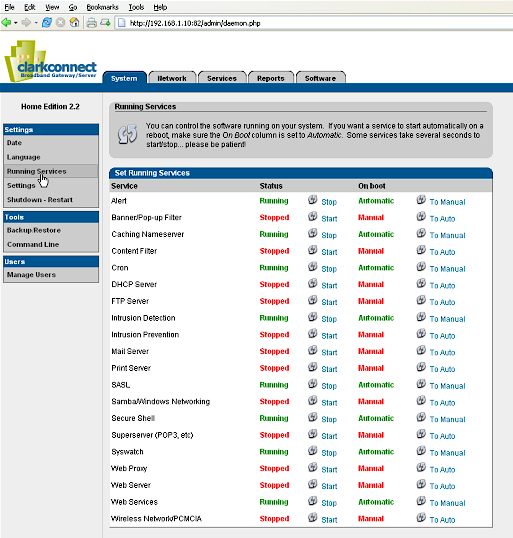
Figure 3: System Services
(click on image for larger view)
Again, very well designed and easy to use. Also from the System tab, you can access your ClarkConnect box using a command line access tool (Figure 4), just in case you get bored.
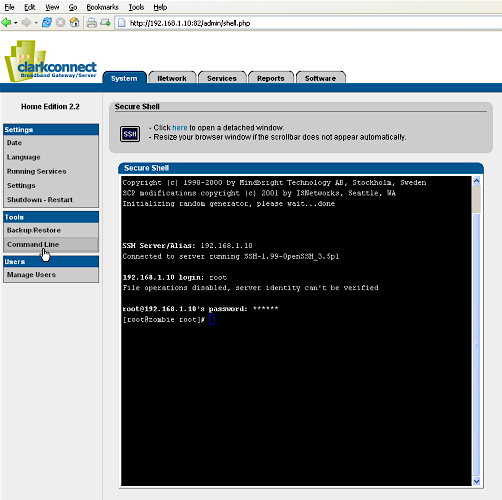
Figure 4: Command Line
(click on image for larger view)
From the Software tab, you can configure the various services available. The web interface presents a very simplified means of controlling what can be some very complicated software.
For instance, the Samba fileserver (for SMB-based file sharing) has more configuration options than I care to count, but the ClarkConnect interface for it is very simple and straightforward (Figure 5).
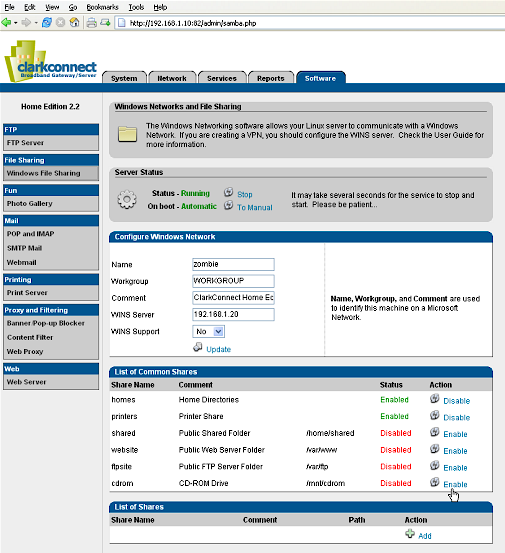
Figure 5: Windows File Sharing
(click on image for larger view)
Of course, this simplification means that you won’t have access to all of a programs functions through the web interface, but for a large percentage of users, what can be configured via this interface will be more than enough.
Features – Printing, Web Serving, Filtering
Printing with ClarkConnect is handled by the Common UNIX Printing System, or CUPS, and with good reason. The CUPS system includes its own web-based interface (Figure 6), which while not quite as slick as the ClarkConnect system, works well.
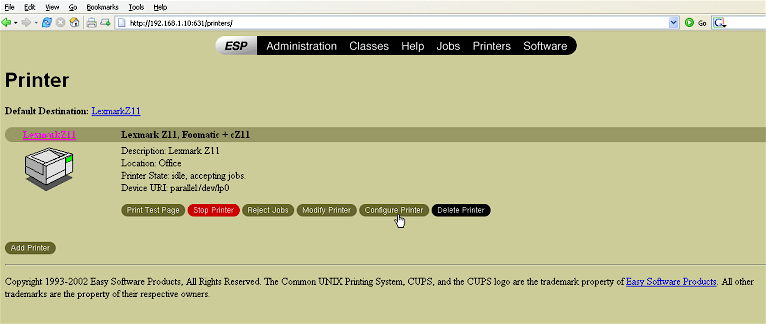
Figure 6: Print Server
(click on image for larger view)
I say that CUPS works well, and it does, provided you have a printer that’s supported. Sadly, because of poor cooperation from manufacturers, printer support is not an area where Linux currently shines. If your printer is supported though, then setting it up with the CUPS system is pretty simple.
ClarkConnect automatically adds a share for configured printers, so after restarting Samba (assuming you’re running it), your ClarkConnect printer should show up in the Network Neighborhood of your local Windows computers. Once there, of course, printing to it from Windows is simple.
Web serving is definitely an area where Linux excels. This is also another area where ClarkConnect takes a complex piece of software, in this case the Apache web server, and puts a simple, friendly face on it (Figure 7). Again, as with Samba, you only have access to a limited number of Apache’s functions through the web interface, but for a lot of users, that’s all they’ll need.
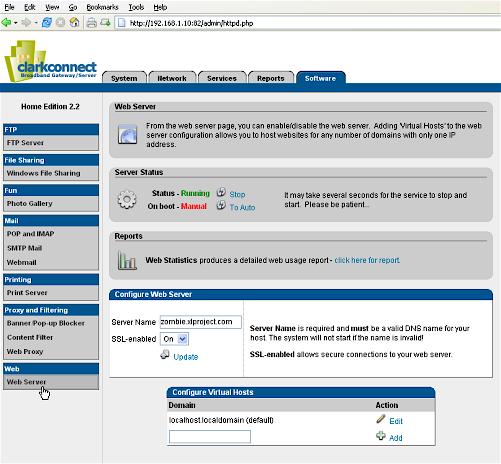
Figure 7: Web Server
(click on image for larger view)
ClarkConnect Home also includes other goodies, like a photo gallery, (based on Gallery) FTP server (ProFTPD), and mail server packages (postfix for SMTP, University of Washington IMAP toolkit for POP and IMAP). One useful feature of the mail server system is the “spam” filtering service (SpamAssassin). Spam, or junk e-mail filtering, is configured through another easy to use interface shown in Figure 8.
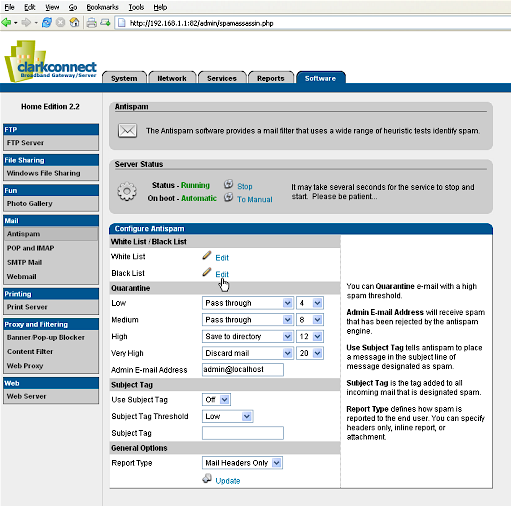
Figure 8: Spam Filter
(click on image for larger view)
Something that may be of special interest to web surfers these days is the “Proxy and Filtering” set of applications. These are separated into three items: web proxy (squid), banner/pop-up blocker(privoxy), and content filter (DansGuardian). Basically, a web proxy is a way of caching web objects locally for faster access – that’s a good thing. The pop-up blocker and the content filter both work with the web caching system to try and filter out some of the garbage the Internet throws at you. Again, these are all rather complex pieces of software with tons of configuration options, but ClarkConnect makes using them point-and-click easy for the average user. Figure 9 shows the Content Filter interface.
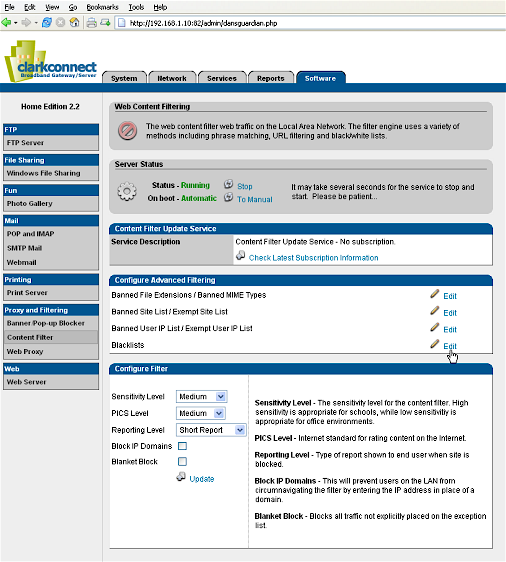
Figure 9: Content Filter
(click on image for larger view)
You’ll need a ClarkConnect subscription to update the content filter definitions via the web interface, but of course, it can be done manually through the command line if you want to bad enough.
Features – Firewall
Let’s say you have a nice cable Internet connection and several computers on your local network which all need Internet access. ClarkConnect can be your answer here too. You’ll need two network cards in the ClarkConnect machine – one connects to your cable modem, and the other plugs into your network hub or switch. When you install and configure ClarkConnect in “Gateway Mode”, the system automatically shares the incoming Internet connection with the local network, and sets up a firewall system that by default drops incoming connection attempts. You can configure the firewall with still another simple, yet effective interface (Figure 10).
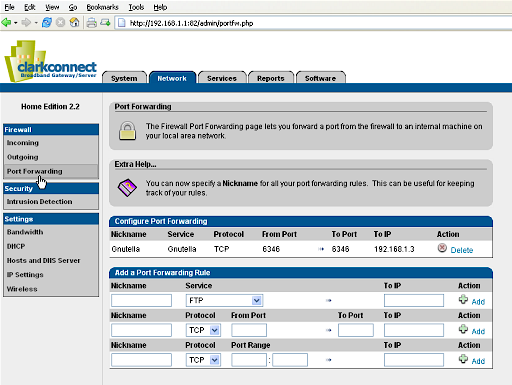
Figure 10: Port Forwarding
(click on image for larger view)
The firewall system allows you to open ports for requests from the Internet, or forward those requests to other systems on the local network as shown above. You can also block local systems from accessing certain ports, domains, or IP addresses.
Another interesting and useful feature of the firewall is bandwidth management. Using this feature – based on the CBQ.init project – you can place limits by port or by IP address on maximum upload and download speeds. For instance, if you’re running an FTP server that gets so popular one day that your local Internet access grinds to a halt, you can limit how much bandwidth is available on the FTP port. Other uses might include limiting the bandwidth that an abusive domain or even a particular user can consume. Managing bandwidth is also done through the simple interface shown in Figure 11.
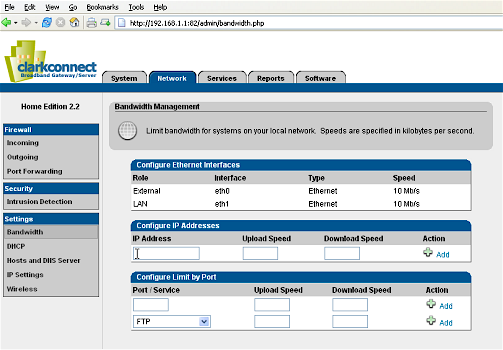
Figure 11: Bandwidth Management
(click on image for larger view)
Other useful features of the ClarkConnect system include a DHCP server, which automatically assigns IP addresses and network information to local computers, and intrusion detection system (Snort), which logs attempted security breaches. To cap everything off, there’s a very nice Statistics section (MRTG) (Figure 12) under the Reports tab, where you can view graphs of all sorts of system performance stats.
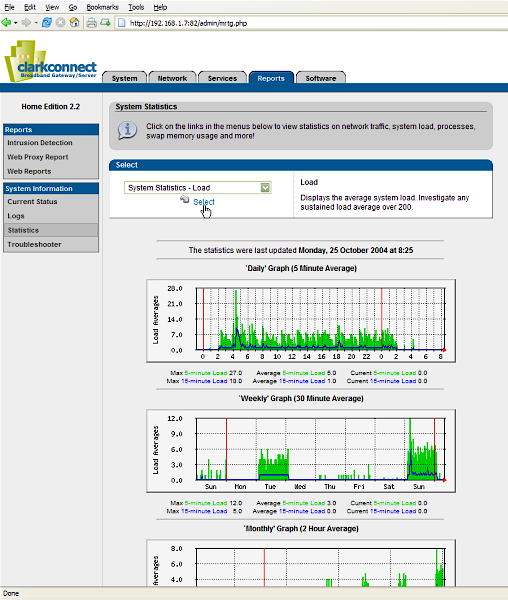
Figure 12: Statistics
(click on image for larger view)
Performance
Like nearly all Linux based operating systems, I’ve found ClarkConnect Home Edition to be highly stable. In fact, I have yet to see any part of the system crash, hang up, or otherwise fail over the past few months of testing. But again, what sets it apart from other systems I’ve tried is the configuration interface. About the only thing really missing is an online help system, but of course, this is the free version, and I suppose the company has to leave some things out in order to convince you to purchase the real thing.
Linux is a very efficient system, which is why you can use it even on older computers and still get good performance. My test platforms for this review were a Pentium II 333 with 256MB of memory and a Pentium II 400 with 512MB of memory. Both systems were very responsive and handled all the chores I assigned them easily.
I ran a throughput test using netperf on the PII 333 system with 3 network cards running in DMZ mode. There was one system, a K6II 233 running Debian Linux connected directly to the CC box DMZ card thru a crossover cable and running the netserver daemon, which is the endpoint component to netperf.
The best results I was able to achieve were obtained by pointing four other systems at the DMZ box using the command “netperf -l 30 -f M -H 192.168.1.20” on all four boxes to blast four TCP stream tests at the CC system under test. The four systems were two Pentium 75’s each running Debian, a Pentium 133 also running Debian, and a P4 2.6Ghz box running Gentoo Linux.
The throughput results were 2.29MBytes/sec, 1.80MBytes/sec, 2.26MBytes/sec, and 1.45MBytes/sec which is a total of 7.8MBytes/sec or 62.4Mbits/sec.
That’s slower than I expected, but the real limiting factor in this test was probably the unswitched network hub that I had connecting the 4 machines running the test. During testing, the lights on the hub were pointing to the obvious bottleneck in this case, collisions. All network cards and the hub were 100baseTX, but I’m positive that a network switch, which pretty much eliminates collisions, would show much improved results. However, as I pointed out in my previous article, the practical limits of 100baseTX are typically given at somwhere between 60 and 90 percent of the theoretical limit of 100Mbits/sec, so this is within that range.
Wrap Up
Keep in mind that although I’ve concentrated on ClarkConnect Home Edition basically in stock form for this review, even more is possible with this system. There’s a large community of ClarkConnect users, and with the underlying system being Linux, the possibilities for tweaking and extending the system are practically limitless.
For expert Linux administrators out there, the ClarkConnect system may not be what you want or need, and in fact, might even get in the way. But for many folks, ClarkConnect with its excellent web interface and extensive feature set will be just the ticket.