

Introduction
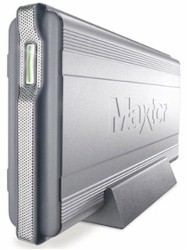
| Maxtor Shared Storage Drive (H01R300) | |
|---|---|
| Summary | Ethernet NAS similar to SimpleTech SimpleShare, but with fewer features.
Also available in 200GB capacity |
| Update | None |
| Pros | • Solid performance • Easy to use and set up • Attractive case |
| Cons | • Lacks backup software • Lacks advanced features |
I’ve looked at a number of Network Attached Storage (NAS) appliances from several different manufacturers over the last few months. Some were from networking product companies, others were from computer peripheral companies, but the one type of manufacturer missing was a disk drive manufacturer. A NAS seems a natural fit for drive manufacturers, since they have an obvious incentive to popularize this type of device and they should know how to optimize performance. In this review, I’m going to look at one such device, Maxtor’s Shared Storage (MSS).
The first thing you notice about the MSS is its size. The device is slender, and over 10 1/2 inches long – about 2 inches longer than other devices I’ve looked at. The body of the unit is stylishly constructed of heavy aluminum and can either sit horizontally on a desk, or vertically by slipping it into its black plastic stand. Even with the heavy aluminum case, the MSS opts to use a small fan to keep things cool.
The front panel sports a status LED and some small venting holes, while the rear has a single Ethernet port, power connector and two USB 2.0 ports. The ports enable the drive to connect and share two USB printers, two additional external hard drives, or one of each.
Maxtor markets two versions of the unit: one with a 200GB drive; and one with a 300GB drive. Both model drives spin at 7200 RPM, but the 200GB version has 8MB of cache and the 300GB version has 16MB. (For this review, I received the 300GB version.) The only operating system Maxtor officially supports is Windows, but in reality, other operating systems such Mac OS X and Linux work fine since they can use the Windows SMB network storage protocol.
Setting Up & Features
Getting going with the device was as simple as plugging in an Ethernet cable, power cable and letting it start up. Installation software was included, but a glance at the documentation indicated that the device was configured via a web browser. The installation software was really meant to find the DHCP assigned address of the device on the network and then spawn a web browser to connect to that address. Since I was using my Macintosh iBook, I accomplished the same thing by skipping the Windows-only CD and locating the IP address with a broadcast ping:
ping 192.168.1.255
I noted the new IP address, connected to it with my browser, and was greeted with a setup screen (Figure 1). The setup screens walked me through basics such as setting an administration password, time and date, Windows workgroup name, etc. Once these steps were finished, the device was ready to be used with a single “Public” network share.
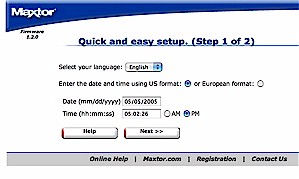
Figure 1: Initialization screen
Before I started using the MSS, I explored the advanced options to see what other features were available. The first option I looked at was the Account Management screen, which allowed me to create user accounts and assign passwords, but not to create any user groups. Next, I used the Share Management menu to create a new network share and assign users full access, read-only access or no access at all. Note, however, there is no ability to set user quotas.
A nice feature available under the Advanced Settings menu was Power Management. This screen allows setting a drive spin-down time for inactivity. (Figure 2) If you’re like me and only use network storage sporadically, the disk will spin down saving power and reducing noise.
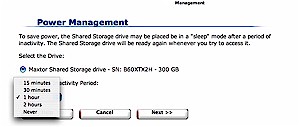
Figure 2: Setting the drive spin-down time
Also available under the Advanced Settings menu are a few other basic features such as setting standard network parameters, disabling disk shares and a diagnostic capability that appears to be SMART-based. These industry-standard diagnostics let you know if your drive is starting to have problems before it dies completely. There was both a short test, which lasts a few minutes and a complete test which runs for several hours.
Maxtor doesn’t provide documentation on the tests performed for each of these options, nor guidance on when or how often to run them. While the tests are running, the MSS is inaccessible, but at least a warning is issued before testing begins. I assume the tests uncovered no problems, but I don’t know how I would have been notified if it had found problems, since the included documentation has no reference to the tests at all.
If you run the Maxtor Windows-only installer, the MSS will support a feature that Maxtor calls “Drag and Sort” that automatically copies files to folders organized by file type. For example, when you drag a “.jpg” or a “.gif” file to the special Windows desktop icon created by the MSS installer, the files will be copied to a “Pictures” folder automatically created on the drive. To me, this feature seems of limited use. Maybe it would help some people, but with a 300GB drive, simple “Pictures”, “Music”, or “Video” folders just wouldn’t cut it. I’d want a much deeper folder tree organized by date, type, subject, etc.
There are features that I would rather have instead of “Drag and Sort”, but wan’t able to find among the MSS’ menus. Absent are the ability to force a drive format, any sort of logging, or FTP access to network shares. I also would have liked to receive notification of status and problems via email, which would have saved me from repeatedly checking the MSS while it was running its long diagnostics.
Other products in the MSS’ class typically have some sort of backup capability built in, or at least bundle third-party backup software. Yet others include the ability to back up the NAS drive to an external attached drive or other network share. But unfortunately, the MSS provides none of these options.
Printing & External Drives
The ability of the Shared Storage device to act as a network print server was a nice feature and getting set up was fairly simple. The first step was to go to the Printer Support Management menu under Advanced Settings and turn support on. It would have been nice if support were automatically turned on when a printer was plugged in, but I suspect that keeping the print server off unless you need it saves memory, which in turn should increase file sharing performance.
Once print server support was turned on, I plugged in my USB printer. On my Windows box, I simply connected to the Shared Storage device, selected the printer and added it in the normal Windows fashion. Under Mac OS X and Linux I just added a “Windows Shared Printer” using their standard configuration tools. In a matter of a few minutes, all of my systems were able to print to the network printer. In keeping with its no-frills design, however, I found the MSS lacked the ability to monitor, kill, or reorder print jobs in queue.
The USB 2.0 ports on the device can also be used for external storage, which I tested with three different USB Flash drives. Once a USB drive is plugged in, it automatically gets exported as a full-access network share – or at least that’s the way is it supposed to work. One of my three drives failed to be recognized even though all of my other systems could use it without problem and it was formatted with the required (and solely supported) FAT32 format. The drives that were recognized worked fine and I was able to use them like any other network share. To use external drives properly, you’ll also need to go into the Advanced menu to unmount the disk before unplugging it.
I found the physical design for the USB ports to be somewhat lacking. Both ports are on the rear of the device (Figure 3) and are located very close to the power connector, making it somewhat awkward to plug and unplug. For a permanent connection such as a printer, this wouldn’t be an issue, but if I were frequently using this feature to transfer data via a USB key, it would get old quickly.
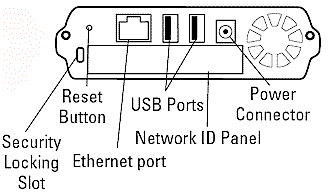
Figure 3: Rear Panel
Performance
I tested the MSS’ networked data read and write performance using the iozone tool as described on this page. The test was run under Mac OS X on my iBook which has 640 MB of RAM. File system performance, i.e. how fast your computer can read / write data to a drive, depends on many factors that are specific to the system running the test. To put the results in perspective, I also ran the same iozone tests against a Linksys NSLU2, a Buffalo Technology Kuro Box, a Simple Tech SimpleShare and a Synology Diskstation using the same parameters, network connections and iBook.
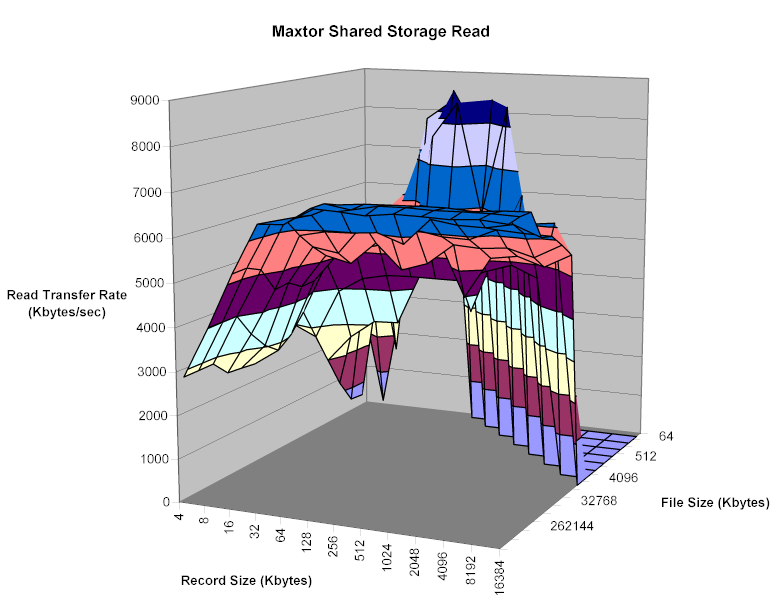
Figure 4: Read performance
(click for full resolution image)
The read and write profiles shown in Figures 4 and 5 show performance in the same ballpark as the aforementioned drives I’ve tested. Keeping in mind that the maximum raw data rate for 100Mbps Ethernet is 12500 kBytes/sec, it’s clear that the MSS only approaches the max when reading smaller file sizes.
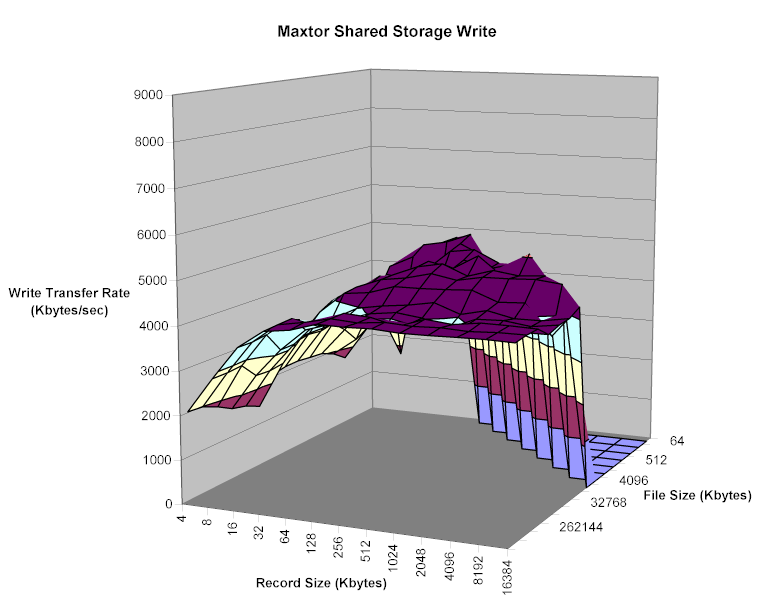
Figure 5: Write performance
(click for full resolution image)
Moving out to the flatter part of the curve past cache and buffering effects, Figures 6 and 7 allow a direct comparison of read and write performance with a 128MByte file size and varying record sizes.
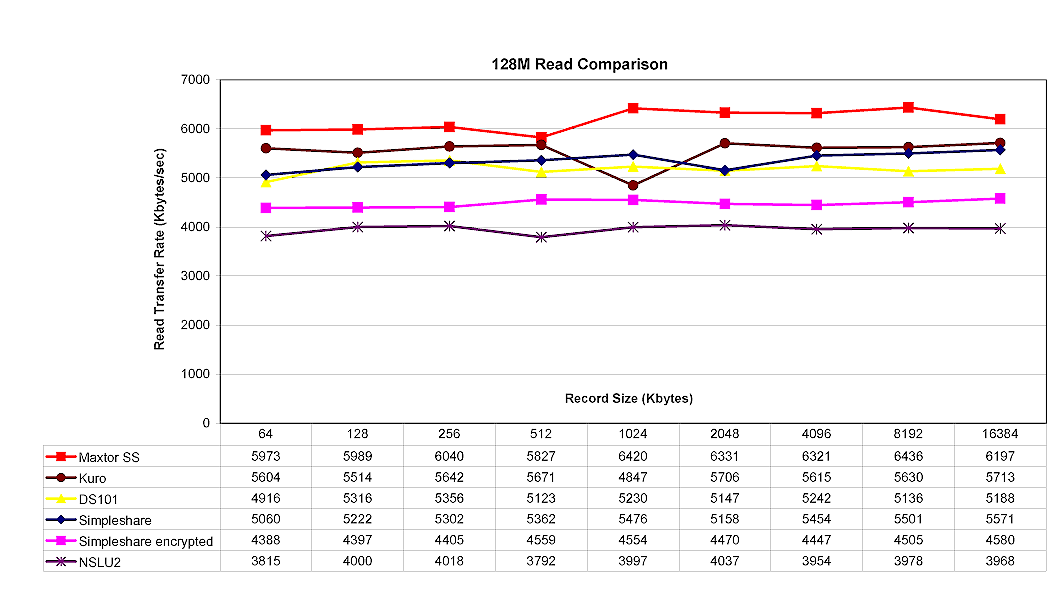
Figure 6: Comparative Read performance – 128MByte file
(click for full resolution image)
The MSS comes out on top for read performance, but falls in the middle of the pack when writing.

Figure 7: Comparative Write performance – 128MByte file
( click for full resolution image)
Under the Covers
When I took the device apart to photograph the electronics [Figure 8], I was impressed with its construction. The case was solid, heavy aluminum and the individual pieces fit tightly. All of the interior cables were of appropriate length and I saw no signs of board rework. It became immediately apparent why the Shared Storage is thinner and longer than other units in its class. Maxtor chose to put the main board at the end of the disk drive instead of sandwiched on top of it.
Looking at the board we can see a Broadcom BCM4780 which provides the main processor for the unit. The USB 2.0 support is provided by a Via vt6212 and the IDE controller is an ATP865-A.
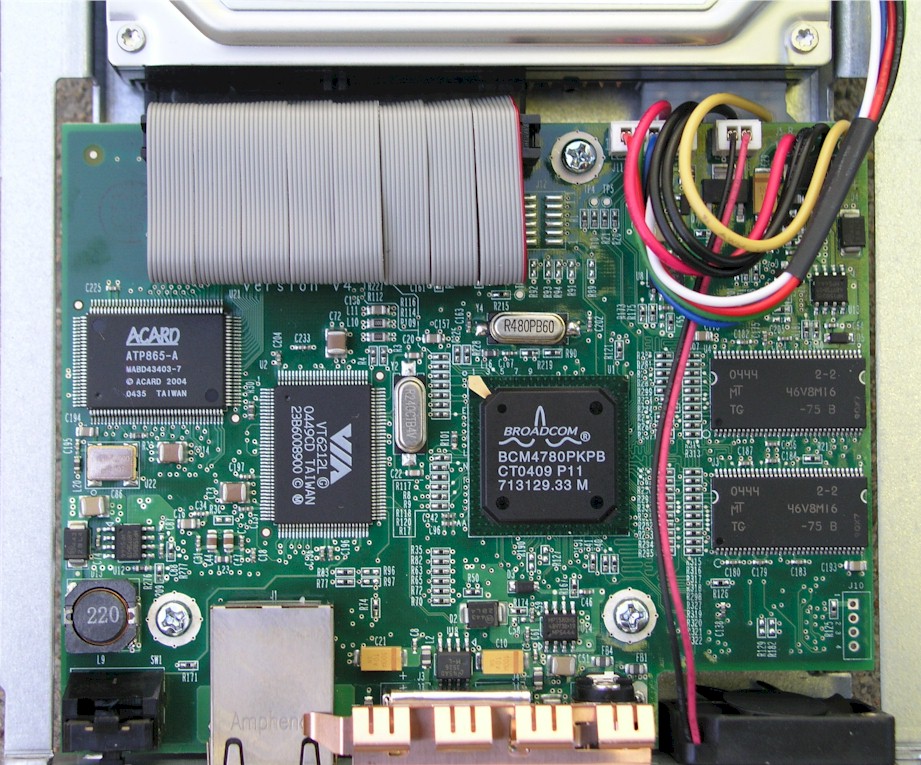
Figure 8: MSS Main Board
(click for full resolution image)
All of the NAS devices I’ve looked at recently are based on Linux, and the MSS is no exception. A quick search through the firmware image brought up a number of Linux and Broadcom related strings, indicating that Broadcom at least provided the reference platform. As further evidence, as I started this review I received an email from someone who already has root on his Shared Storage. He was able to attach a serial port to the main board, watch the boot process, log in and modify the flash so that a telnet daemon starts up at boot time.
We can see a number of details on the implementation from his page. The kernel version is 2.4.20, there is 32 MB of RAM, the filesystem used is Reiser, and the CPU is a 266 MHz Broadcom, MIPS derivative. All this leads me to conclude that the MSS appears to be based on the same reference platform that the SimpleTech SimpleShare uses.
Even though it uses the same reference platform as the SimpleShare, Maxtor has evidently chosen to create a simpler device and not make use of the advanced features such as NFS, RAID and encryption capabilities that the reference design provides. And, of course, Maxtor is using its own drive instead of the Hitachi 7200 RPM, 250GB drive with 8MB of cache used on the SimpleShare.
Since Maxtor is using a good deal of GPL licensed software in their box, I expected to see either a source download page or an offer to provide source as required by the GPL license. While source isn’t posted as I write this, Maxtor told me “the source code will be made available online on our support site shortly”, when I asked them about this.
Closing Thoughts
The Maxtor Shared Storage drive is a solid, well-engineered, and attractively styled NAS, but somewhat lacking in features. I would have liked to have seen logging and email alerts, and it seems a shame to not provide at least the encryption capabilities the separated-at-birth SimpleShare provides.
But the most curious omission is backup, especially given Maxtor’s success with the “One Touch” backup feature on its line of USB external drives. Perhaps this was too difficult to pull off with a networked vs. attached drive. But given the bundling of EMC Dantz’ Retrospect with its “One Touch” USB drives, you’d think Maxtor could have at least bundled it with the MSS too.
Performance is about on par with the other NAS products in its class that I’ve tested, with perhaps a slight edge in read performance. Another plus is that Maxtor is being aggressive on pricing, since I found the lowest online pricing for the 300GB MSS to be about the same as the 250GB Buffalo LinkStation (~$300) and about $90 below Buffalo’s 300GB model.
In the end, it’s likely that Maxtor wanted a simpler device – aiming at a different market segment than some of its competitors. Whether the tradeoff between simplicity and features is a winning strategy, however, only time will tell.