

Introduction
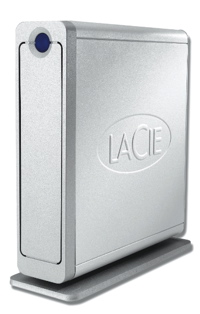
| LaCie Ethernet Disk mini | |
|---|---|
| Summary | 10/100 NAS that doubles as a USB external drive |
| Update | None |
| Pros | • Can be used as either a NAS or an external USB drive • Easy to use and set up • Attractive case |
| Cons | • Few advanced features • Lackluster perfomance |
Network Attached Storage (NAS) devices are a hot item these days, since with the popularity of digital media such as photographs, music and video, people are finding a need for extra storage space. NAS devices are convenient in that you can just plug them into your home network off in the corner somewhere, mount them remotely from your computer and then use them like any other drive.
The downside, however, is speed. If you need to back up a few dozen gigabytes of your home directory, or you need to do video editing with a lot of disk access on large files, then you might wonder if an external USB 2.0 or FireWire attached drive would be a better choice.
But what if you had the best of both worlds? What if for everyday use you could use the NAS on your 100 Mbps network, but when you had an occasional heavy-duty task, you could directly plug the same device into your high-speed 480 Mbps USB 2.0 port ?
That’s the approach taken by the LaCie Ethernet Disk mini. It’s a NAS, but it also doubles as a USB 2.0 attached external drive when you need the extra performance.
When I first received my mini, it appeared the same as other NAS I’ve looked at. The box proclaimed it was a 250 GB Network Storage device with 10/100 Ethernet and USB 2.0. Typically, this means you’ll plug the device into your network and then use the USB port to share an additional disk, a USB thumb-drive or a printer.
As I opened up the box I found a heavy-duty aluminum case with attractive, industrial-type styling that is typical of the other LaCie disks I’ve used. The box was taller than it was high, indicating that the internal drive was likely oriented on its end rather than on its side. The front of the device sported a blue LED that doubled as an on/off switch. On the back, along with a power-connector, there was a fan vent, an Ethernet port and a USB 2.0 port. Software-wise, along with installation code, a copy of the MacOS-only Silverkeeper backup utility was provided for the automation of backups to the mini.
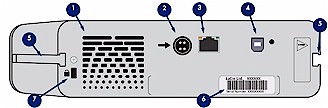
Figure 1: Back panel
The client-type USB port alerted me to the fact that the mini was different from other NAS I’ve tested. A quick check of the Quick Install guide informed me that the mini can be used either a NAS device or a USB external drive (only one at a time). If the mini detects a powered USB cable plugged in, it switches to USB mode to act as an external drive. Otherwise, it expects to function as a NAS via its 10/100 Ethernet port.
Setting Up
My quick read of the setup instructions indicated that the mini would be able to acquire an Ethernet address from a DHCP server, so I just let it power up. As it came on, I subjectively judged the noise level to be about “medium” – not as quiet as my most silent units, but also not as noisy as others I have tested. The fan was about as audible as the hard drive noise itself.
The installation instructions indicated that configuration is accomplished via a web browser directed to http://EDmini under Windows. But under MacOS and Linux, the IP address is used instead, i.e. http://192.168.3.22/, after discovering it via another mechanism. Since I was using my XP laptop, I used the EDmini name, connected to the device with my web browser, and was greeted with a configuration screen.
Basic configuration of the mini is fairly standard. Options are available for manually setting network information, changing the administration password, changing the work group name, setting the time, etc. But as I poked around in the menus, I noticed relatively few options as compared to other NAS devices I’ve reviewed. For example, although I could set the time, there was no option for setting the address of an NTP server that would make sure the time stayed correct. And for share management, there was only a single, predefined share, with no option for creating another (Figure 2).
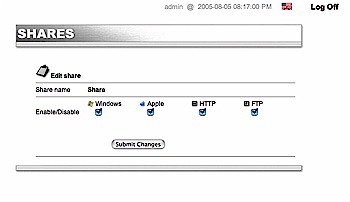
Figure 2: Share management
For user management, you can create user accounts, set passwords, and assign read/write privileges, but there are no options for creating and assigning groups, or for assigning disk space quotas to users. I also usually like to see an option for setting the spin-down time for the drive so that it will power down if not in use, but there is no option for this either. There also doesn’t seem to be any way to send email alerts for events such as when the disk was becoming full. In general, it appears that LaCie has decided to keep things pretty simple.
On the other hand, it’s nice to see several different protocols supported for accessing the share. Standard Windows SMB protocol, Apple AFP shares as well as HTTP and FTP are all supported. All except for HTTP can be disabled altogether if desired.
Under the Status menu, which shows the number of current clients, there is a “System Log” button which shows a very detailed log from the mini (Figure 3). It may be more information than a normal user would want to see, but for me it confirmed the inner workings of the box, which I’ll describe later. The log seemed to grow quite large after a few boots of the device, which resulted in a long load-time in the web page. If you were to make use of this log on a regular basis, you’d need to use the “clear log” button to keep it a manageable size.
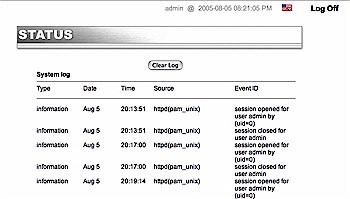
Figure 3: System Log
For multi-platform use, the documentation had sections for Windows, Macintosh and Linux, which is a bonus for users like me who have a heterogeneous network.
One interesting option I noticed was the disk format menu (Figure 4). By default, the mini’s internal disk is formatted in a least-common-denominator format of FAT32 so it can be directly accessed when USB-plugged into a Windows, Macintosh, or Linux system. But one downside to FAT32 is a file size limitation of 2GB.
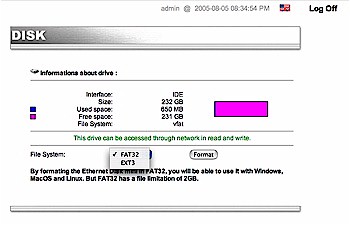
Figure 4: Disk Formatting
To get around this limitation, the mini allows you to reformat the disk with a Linux ext3 filesystem that supports larger files, albeit with reduced portability. For example, if you format the drive with ext3, you will no longer be able to use the mini as a USB external drive under Windows or Macintosh. It will still be usable as a network drive under all systems, you just won’t be able to directly plug it into the USB port of a Windows or Macintosh system. While this isn’t ideal, it at least gives options to users who need support for files over 2 GB.
USB Drive Mode
For my next test, I tried the device out as a USB external drive with my Macintosh iBook. Following the instructions, I powered the unit down by holding the front panel power button, removed the network cable, and connected a USB cable, which automatically powered the mini on. A short time later, a disk folder appeared on my desktop with a name of Edmini Login. When I opened up the folder, I was greeted with a driver-installation dialog which walked me through the process of installing a driver for the device.
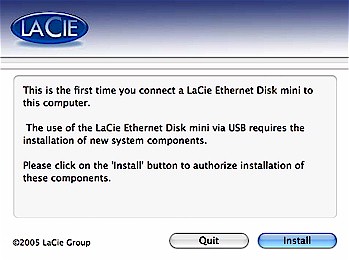
Figure 5: First time USB usage
This driver installation indicated to me that the mini wasn’t just acting as a standard external drive, which wouldn’t have needed any special drivers. When I finished the driver installation and re-opened the folder, there was a single program inside – “Edmini LogOn”. Executing this program brought up a dialog reminiscent of a standard network share login.
Using an account I had created earlier when using the mini as a NAS, I entered my info and hit “Submit”. I was then greeted with a “progress” dialog that indicated it may take up to 5 minutes to mount the folder (Figure 6).
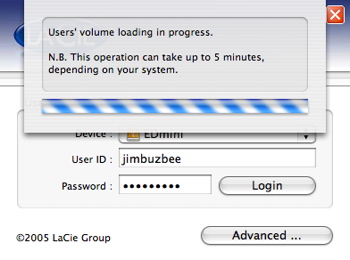
Figure 6: USB Login
At this point, it almost appeared as if the mini were re-booting in order to change into this USB mode. But after only 30 seconds or so, I was greeted with the single mini shared folder visible in NAS mode. Now that the mini was mounted as an external drive, it could be used like any other drive on my system. Since the login dialog sort of made the mini act as a network drive, even when plugged into the USB port, I wondered if it were running TCP/IP over the USB connection. But I could find no evidence of this. In addition, the USB share login was not the standard Macintosh authentication dialog.
To further confuse the issue, the USB login dialog has an “advanced ” menu that lets you configure the IP address to DHCP or static. After a bit of experimenting, this appeared to be just an alternate way to specify the IP configuration for when the drive was used in NAS mode. It had no effect on USB mode.
I also checked out the USB mode of the drive with my XP laptop and found it functioned similar to as it did with the Macintosh. A “Login” folder appears when the drive is plugged in, and inside that folder a “LogIn” application is present for logging into the mini and mounting the share. Once the share is mounted, it behaves like any other external drive.
Overall, this USB mode of the mini is a very nice feature. The login dialog provides some level of protection for data that is not normally found in an external drive. And while it certainly won’t deter someone really determined to get at your data, it might at least keep casual snoopers at bay.
Under the Covers
Figure 7 shows the main board of the mini. The large chip in the center is a Freescale MPC5200 running at 266 MHz and USB support comes from a Texas Instruments TUSB6250. Although it’s not pictured, the drive in the mini is a Western Digital 250 GB, 7200 RPM with 8 MB of cache.
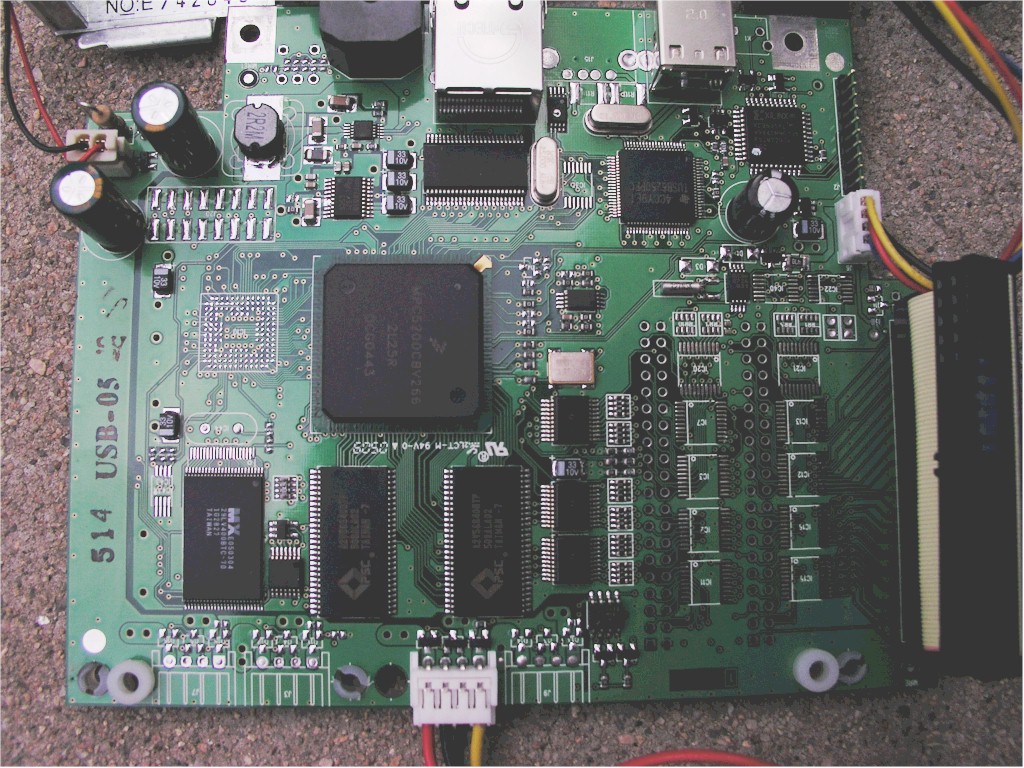
Figure 7: Main Board
(click image to enlarge)
Based on the Linux file system references and the system log messages, it was quite clear that the mini is running Linux internally. In particular, the log messages told me that it’s running Linux kernel version 2.4.25, based on a Yellow Dog Linux distribution – a common choice for Linux Power PC applications. The log also showed initialization of various filesystem drivers including XFS and a read-only version of NTFS.
The log messages also indicated there is an internal serial console available, so someone handy with a soldering iron – and no fear of warranties – could probably get direct access to Linux. Since most of the internals of the box appears to be licensed under the GPL, I was pleased to find source code on LaCie’s web site. The log also showed me that the mini was equipped with 64 MB of RAM, which is contrary to the documentation that specifies only 32 MB.
While I had the system apart to take the board photograph, I couldn’t resist plugging the hard drive into my Linux laptop to see what I could find. Along with the large data partition, I found a couple of mountable operating system partitions. One appeared to be the “off the shelf” partition and the other had just a few files that included the customizations I made from the user interface, such as new user accounts, etc. Overall, the layout of the file system followed standard Linux conventions with an “/etc/init.d”, “/lib” “/bin” etc.
A quick look at an executable confirmed the processor was a PowerPC. I hoped to find an SSH or a telnet daemon on the box that could be started up to give me run-time access to the mini, but found nothing. Since I have another PowerPC based Linux NAS, the Kurobox, I thought that maybe I could install the necessary components from it to give me run-time access.
So I copied the “inetd” server from the Kuro, that among other things, manages telnet sessions. I then copied over the telnet daemon itself and modified a standard mini startup script to kick off inetd, and when everything was re-assembled, fired up the mini. On my first attempt to telnet into the box, I was happy to get a “connect” message indicating that inetd was running and had opened up the port, but the connect was immediately followed by a disconnect.
The only visibility I had into the box was through the System log and searching it revealed an error from inetd regarding a missing library required by the telnet daemon. So I took everything apart, grabbed the library, re-assembled it all and tried again. I again got a “connect” followed by a “disconnect,” but this time there was nothing in the System log. This told me that inetd was happy, and the telnet daemon was complete, but there was still something missing.
I was running out of spouse-allocated time for tinkering with the box so I moved on, but this experiment at least told me that I could execute my own code on the box. So it wouldn’t take a lot more work to get a command prompt, install an iTunes server, or maybe even run a full-featured web server.
Performance – NAS mode
Since the mini can be used as an NAS or as a directly-connected USB device, I wanted to see the difference in performance and compare it to other NAS devices that I’ve tested. For the first run, I checked the networked data read and write performance using the iozone tool as described here.
The test was run under Windows XP on a Dell Inspiron 1000 laptop with 384 MB of RAM. How fast a computer can read / write data to a drive depends on many factors that are specific to the system running the test, so this test may not represent the performance you’d see on your own system.
NOTE: The maximum theoretical speed one could expect to see on a 100Mbps network is around 12,000 kBytes/Second, so any values in excess of this are due to caching.
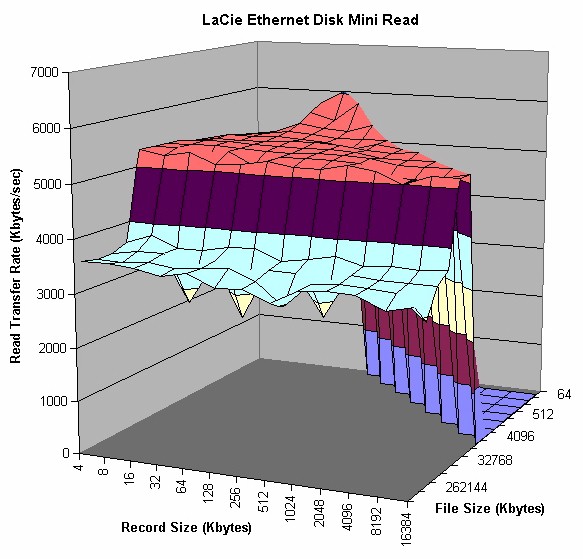
Figure 8: NAS mode Read performance
(click image to enlarge)
The NAS mode read performance shown in Figure 8, shows around 5 kBytes/sec speed for file sizes up to 32MB, dropping off to somewhere in the 3 kByte/sec range for larger file sizes. Figure 9 shows caching effects in the NAS write performance peaking around 200,000 kBytes/sec with a 1MB file size. Note that speed drops dramatically for all file sizes when record sizes are larger than 256 kBytes.
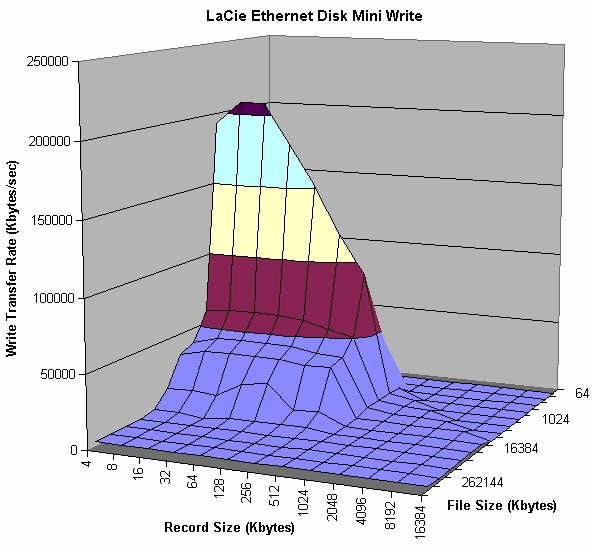
Figure 9: NAS mode Write performance
(click image to enlarge)
Performance – USB mode
Next, since the mini can also act as an attached USB drive, I ran the same iozone test with the device directly attached to a USB 2.0 port. In this mode, the best theoretical transfer one could possibly see would be around 58,000 kBytes/Second. Values in excess of this are once again caused by operating system caching.
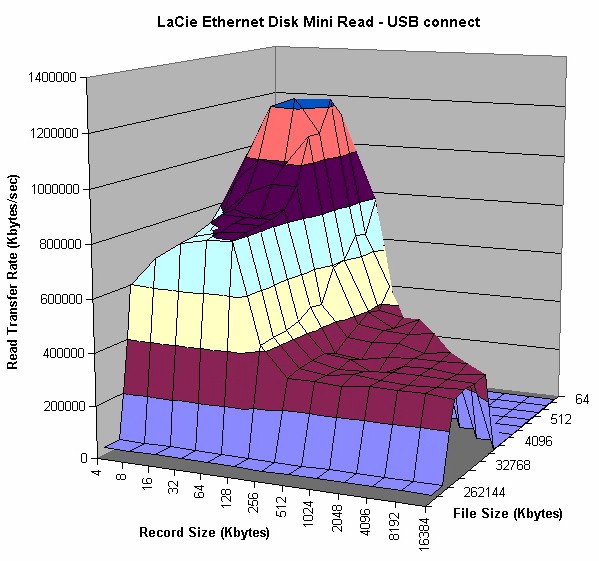
Figure 10: USB mode Read performance
(click image to enlarge)
This particular test caused me a bit of head-scratching. As you can see in Figure 10, the read test showed the mini taking advantage of operating system caching, but the write test did not. This was in contrast to a test run against a “standard” USB attached drive which showed caching effects for both reads and writes with values far in excess of 58,000 kBytes/Second.
After some additional testing and consultation with LaCie, it was theorized that the difference was due to the mini’s use of the FAT32 filesystem. When the mini was re-formatted with NTFS, performance increased and showed filesystem caching effects for both read and write. The downside to this “fix”, is that a NTFS formatted disk becomes read-only when the mini is used in NAS mode.
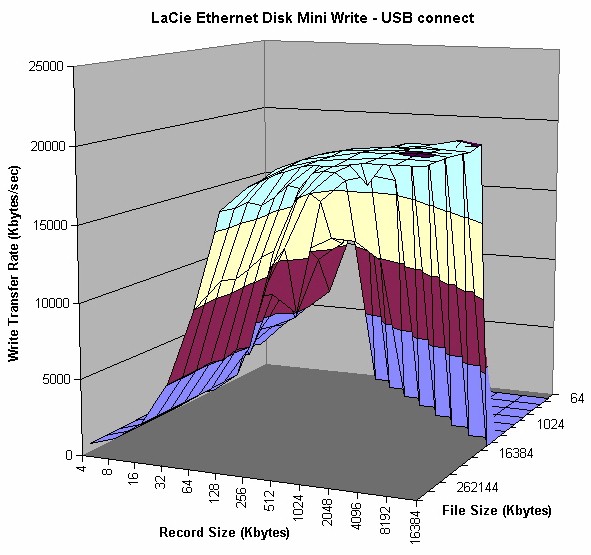
Figure 11: USB mode Write performance
(click image to enlarge)
Performance – Competitive comparison
Since caching effects vary among OSes and products, we compare competitive performance using a 128MByte file size, which tends to eliminate any caching effects.
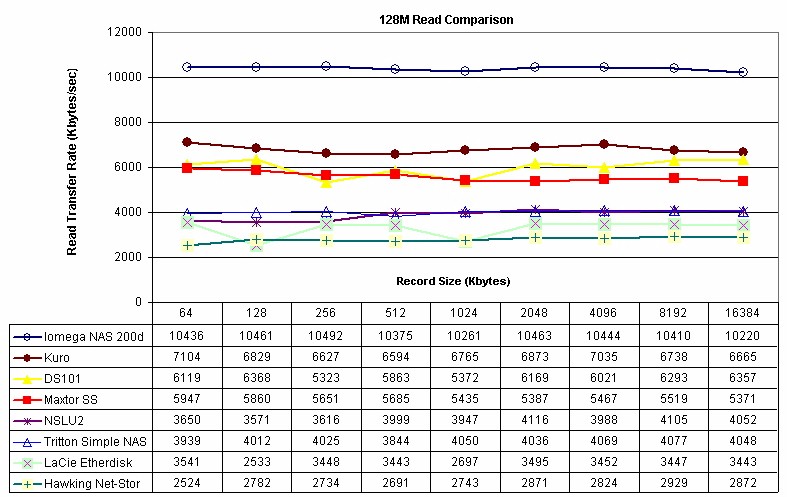
Figure 12: 128MB Read performance comparison
(click image to enlarge)
The plots in Figures 12 and 13 show read and write speeds respectively for a fixed file size of 128 MBytes and record sizes from 64 to 16384 kBytes. The plots contain not only the mini’s NAS mode results, but also those from previous tests of the Linksys NSLU2, Buffalo Technology Kuro Box, Synology Diskstation, Maxtor Simple Share, Tritton Simple NAS, Hawking Net-Stor, and Iomega StorCenter Pro.
As you can see, the mini ranks second to last among the products compared, besting only the Hawking Net-Stor BYOD NAS [reviewed here]. I suspect this could be due to the FAT32 filesystem used.
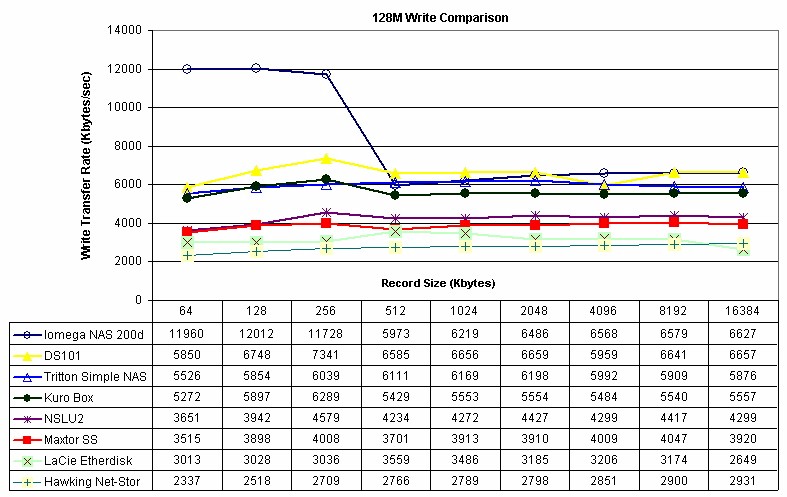
Figure 13: 128MB Write performance comparison
(click image to enlarge)
Closing Thoughts
The LaCie Ethernet Disk mini is the first NAS I’ve tested that can be either an NAS or a USB external drive. It’s a nice capability that gives consumers the flexibility to share the drive across the network, or for higher performance, plug it directly into a USB 2.0 port. This flexibility appears to cause a trade-off in performance, however, most likely due to the use of the FAT32 filesystem that provides compatibility across modes and client operating systems.
The mini isn’t the fastest consumer-level NAS I’ve tested, and it has a lot fewer features than others, especially when it comes to configuring shares. But its cross-platform compatibility and dual personality might outweigh those negatives and make it the right solution for you.