

Introduction
In Part 1, I was surprised at how little packet loss it took to affect video streaming, but was just as surprised at how hard it was to disturb files played using TCP/IP based protocols. Armed with this knowledge, I set out to see whether success in wireless video streaming was really as hard as I have been making it out to be.
We found in Part 1 that video streams can vary widely in their bandwidth needs and that there are two methods for playing video files across a network. Since I mainly wanted to explore the largest uncontrollable factor in wireless streaming – neighboring WLANs – I decided to use one test file and one play method. I chose an uncompressed VOB (MPEG2) test file with a bandwidth profile shown in Figure 1. The bandwidth was measured using Hoo Technologies’ Net Meter.
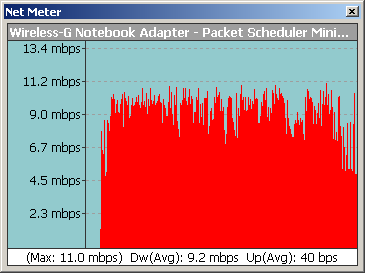
Figure 1: Test file bandwidth profile
The four-minute test file has plenty of action in it, which accounts for the fairly high average bandwidth. These figures are above the 5 Mbps or so bandwidth number that I’ve heard thrown around in IPTV-related discussions with equipment vendors, but aren’t out of the question for downloaded or ripped content. For comparison, Figure 2 shows the bandwidth profile of a short HD movie trailer.
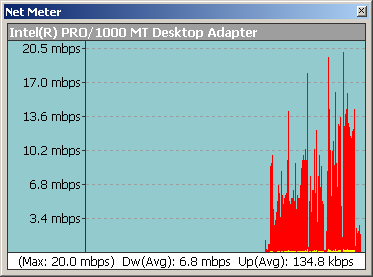
Figure 2: Quicktime HD 720p file bandwidth profile
Note that this is a 720p file in Quicktime HD, which uses the very bandwidth-efficient H.264 codec. While the average bandwidth (the one that most vendors will quote, of course) of the HD file is lower than the test file’s, the peaks are more than 3 times higher.
I chose UDP streaming as the play method because it is the most likely to be used by both network-based content providers and for in-home network play of downloaded and stored content by devices using UPnP AV and DLNA protocols.
Test Setup
I started out with a simple test two-WLAN setup, figuring that I could always make it more complicated if I needed to (Figure 3). I used two Linksys WRT54G routers configured as access points (see this link for a quick how-to). Using them as access points ensured that I wouldn’t encounter any of the routing problems that the v5 router has. Plus, the lack of NAT firewalls made it easy for the IxChariot console to control everything.
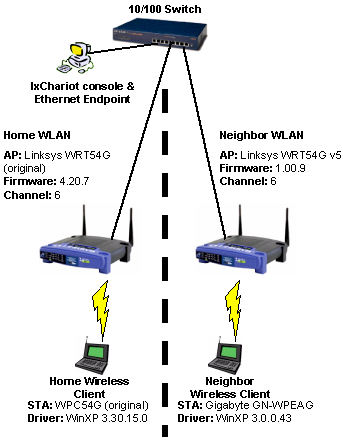
Figure 3: Test setup configuration
I mixed things up a bit on the client side because I didn’t have two WPC54G notebook cards. So the “Neighbor” client used the Gigabyte GN-WPEAG mini-PCI card that I had added to my Fujitsu S2020 Lifebook awhile back. The Gigabyte card uses an Atheros Super-G chipset, which had no problem working with the Broadcom-based radios in the Linksys routers. The “Home” client is my trusty Dell 4100 Inspiron with 1GHz Celeron and 576MB of RAM, running Windows XP Home SP2.
To simulate the worst case of two WLANs on the same channel, both routers were set to Channel 6. I left all the other settings at their defaults (Figure 4) and no encryption was used.
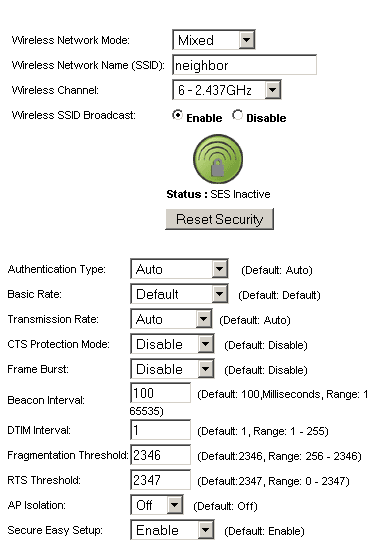
Figure 4: Wireless settings for Linksys WRT54G’s
To put a little distance between me and my potentially interfering WLAN, I set up the “Neighbor” WLAN as shown in Figure 5. The walls are 2×4 sheetrock with no ducting or metallized insulation in them. This setup attenuated the “Neighbor” WLAN’s signal somewhat, but the “Home” client still reported an “excellent” signal when I temporarily connected it to the “Neighbor” WLAN AP.
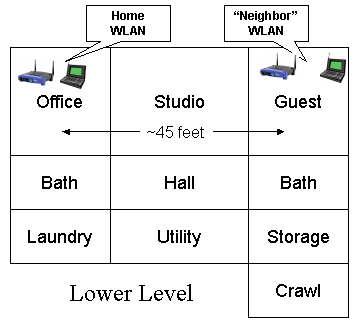
Figure 5: Test area floor plan
Bandwidth Requirements
It may be obvious – however judging from some of the mail I get on the subject it may not be – but the key rule for successful wireless streaming is:
The available bandwidth of the connection must be sufficient to support the bandwidth required by the content.
Figures 6 and 7 illustrate the rule, showing IxChariot plots of a single wireless connection between the “Home” WRT54G and WPC54G client card. Figure 6 starts out with an IxChariot throughput.scr script running TCP with a file size of 100,000 Bytes. You can think of this as simulating a long file download. After about 45 seconds, I started streaming the test video over the same connection to the same client.
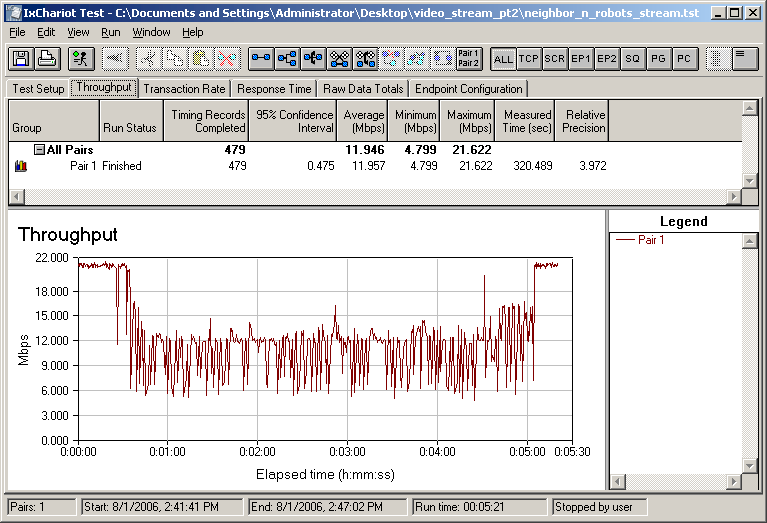
Figure 6: Shared data and video stream – 11g WLAN
While it’s not a one-to-one match, if you take the bandwidth profile of the test file in Figure 1 and flip it upside down, it corresponds reasonably well to the “bite” taken out of what would otherwise be a straight 21 Mbps throughput line. Another check is that the throughput drops by about 9 Mbps – the average throughput of our test video file.
What was surprising here is that the video stream takes all the bandwidth it needs, dropping the speed of the IxChariot throughput script, i.e. our file download. This happened with the Wireless Quality of Service (QoS) / WMM mechanism in both routers disabled and with no sign or QoS or WMM in the client card properties or settings. So it appears that the available bandwidth for streaming in this particular WLAN is the total bandwidth. This polite behavior isn’t guaranteed to occur, however, especially in WLANs that use a mix of clients and APs.
Because there is enough bandwidth to support the video stream, the video plays with no problems – as if there were nothing else happening on the WLAN. But if you were little Susie, running your nightly BitTorrent session, you would notice the drop in Torrent download speed.
Of course, if there isn’t enough bandwidth to go around, miracles don’t occur. Figure 7 shows what happens when the Linksys router is forced to run in 802.11b mode.
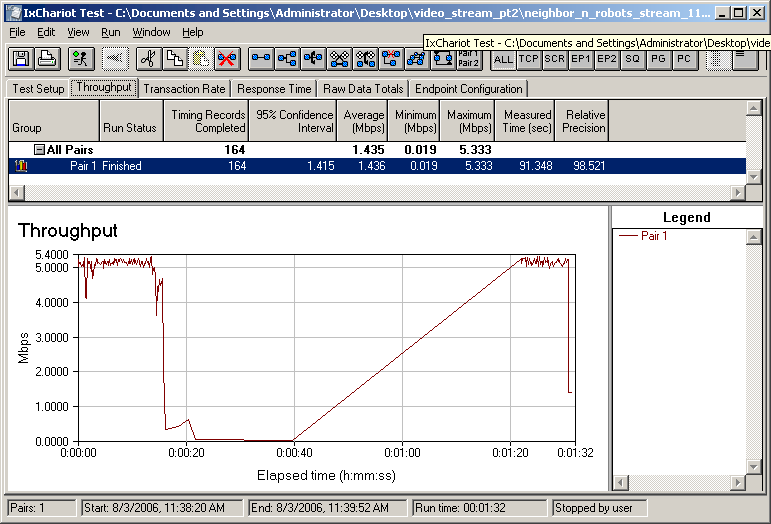
Figure 7: Shared data and video stream – 11b WLAN
This time, the IxChariot script gets only about 5 Mbps of bandwidth, typical of an 11b connection. So when I start streaming the video – which needs an average of 9 Mbps or bandwidth – at about the 15 second mark, the result is not surprising. The stream tries take as much bandwidth as it needs, but comes up short and an unwatchable video results (Figure 8).

Figure 8: What happens when you run out of bandwidth
Good Neighbors Are Hard To Find
But the more interesting question is what happens to available bandwidth when there are neighboring WLANs in range that you have no control over. My first “neighbor” simulation used the two-WLAN setup that I described previously. But this time the IxChariot data went to the “Neighbor” WLAN and the video stream to the “Home” WLAN. I thought of this as an almost best case scenario since all but one of the products in the WLANs come from the same vendor and use the same Broadcom chipset that doesn’t get too fancy with proprietary throughput enhancement tricks.
But Figure 9 below reveals significantly different behavior from that in Figure 6. In this setup, the “Neighbor” WLAN didn’t politely give up the bandwidth needed by the “Home” WLAN video stream. The result was an unwatchable video that nonetheless managed to play completely to the end. This is behavior more like I would expect, with each WLAN battling for airtime and bandwidth.
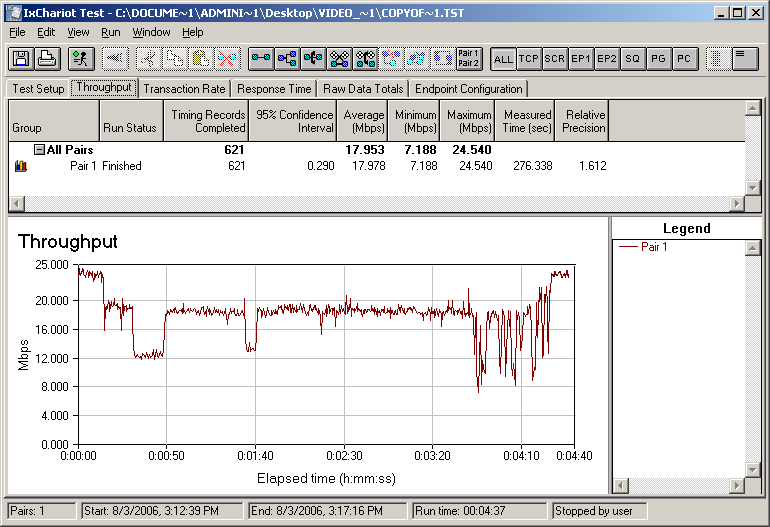
Figure 9: Linksys “Home” LAN video w/ mixed “Neighbor” WLAN
I next moved on to see how a Super-G neighboring WLAN would affect the home WLAN. Super-G technology has maintained its “bad neighbor” reputation, despite Atheros’ many attempts to redeem it. I pulled out a Netgear WGU624 Dual-Band router, which I last used in my Do Extended WLAN technologies deliver article, upgraded it to the latest 2.0.1.1 firmware and substituted it for the Linksys WRT54G in the “Neighbor” WLAN. I shut off the 802.11a radio and adjusted the settings on the 11g radio as shown in Figure 10.
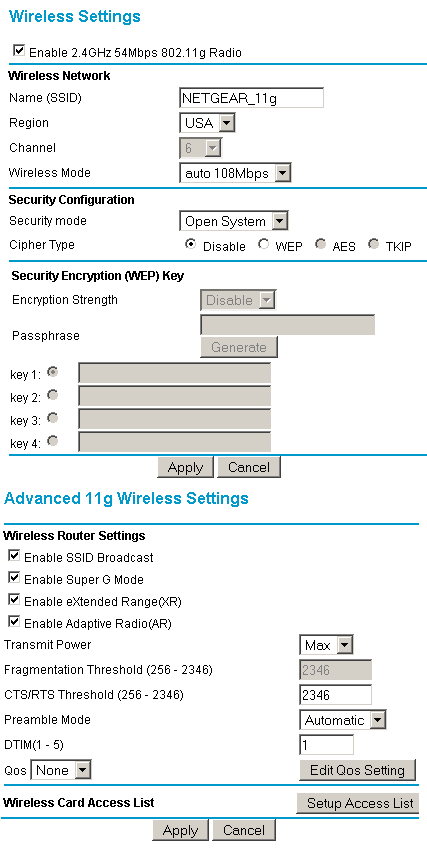
Figure 10: Netgear WGU624 wireless settings
According to Netgear’s help screens, these settings should have put the router into its most neighbor-friendly mode and kept it from switching into its neighbor-killing channel bonding mode with non Super-G WLANs in range. But the behavior shown in Figure 11 shows why Super-G still maintains its reputation as the technology of choice for wreaking WLAN revenge.
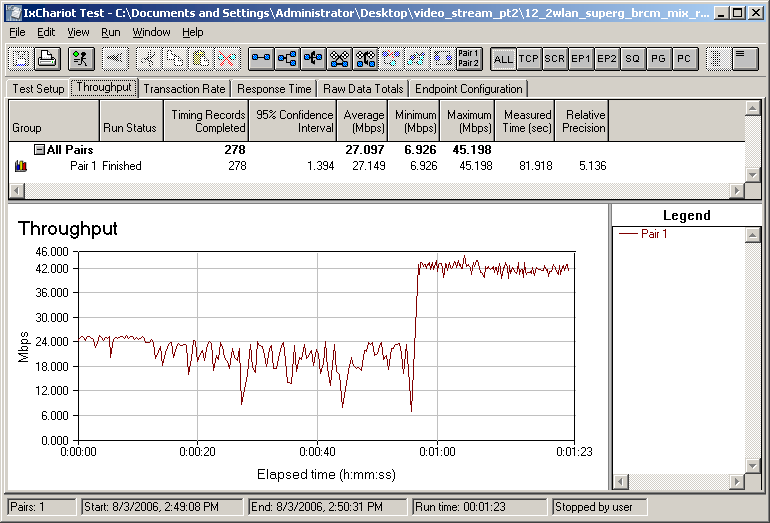
Figure 11: Linksys “Home” LAN video w/ Super-G “Neighbor” WLAN
The plot shows that not only does the Super-G WLAN battle the home WLAN streaming video (and win) for bandwidth during the early part of the plot, but that it does switch into channel bonding mode shortly before a minute has elapsed. Looks like Atheros’ “Adaptive Radio” feature – that is supposed to prevent this from happening – still needs work. Needless to say, the result on the “Home” WLAN was that the video wouldn’t even start.
By the way, sharp-eyed readers might note QoS set to “None” in Figure 10. I actually tried it both ways, didn’t see any difference in behavior and left it off.
So how does a Super-G WLAN work if it’s your WLAN? Quite well, actually, as Figure 12 shows. I got a little more thoughput than with the Linksys / Broadcom WLAN, even without channel-bonding and the video played without problems.
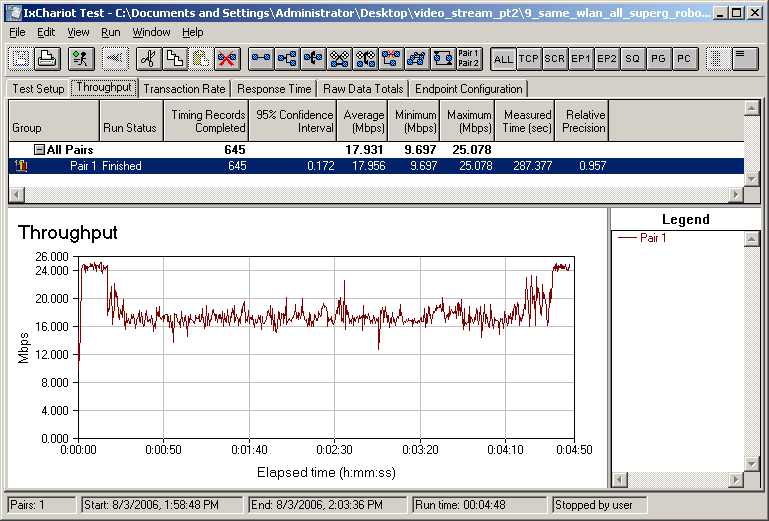
Figure 12: Shared data and video stream – Atheros SuperG AP and Client
Curiously, I didn’t see the Super-G WLAN switch into channel-bonding mode when the Linksys / Broadcom WLAN was idle – behavior that I would have expected given the fact that it would switch when the Linksys / Broadcom WLAN was active!
MIMO To The Rescue?
Airgo’s True MIMO appears to be the current high-bandwidth WLAN technology of choice, given the mess that its competitors have made of the whole draft 802.11n market. It’s easy to see why Airgo is getting designed in, since its technology has good range vs. throughput performance without having to resort to havoc-wreaking channel bonding techniques. It also has reasonable interoperability with legacy 11b/g clients in mixed WLANs, although its throughput sharing tends to be better for downlink than uplink.
NOTE: Any positive comments regarding Airgo’s MIMO technology don’t apply to Airgo’s Gen3 technology, which uses channel-bonding techniques that do not properly accommodate legacy clients.
So I once again made a substitution on the “Neighbor” WLAN, bringing in a Belkin F5D8230-4 Wireless Pre-N Router and F5D8010 Wireless Pre-N Notebook Network card. I set the router into AP mode (using its handy built-in “Use as AP” feature) and installed the card into the Fujitsu notebook. The drivers and firmware haven’t been updated in awhile, so the 1.01.03 firmware in the router and 1.2.0.80 driver for the card were still good to go.
Figure 13 shows plenty of bandwidth to handle both the IxChariot throughput script and the test video sent between the Belkin router and client. I even did a quick walk around both levels of my home with the video streaming and had only an occasional hiccup. Note that having the AP in the Guest room (my test Location 2) moved it closer to my normally troublesome test locations 4 and 5 and gave me whole-house streaming capability.
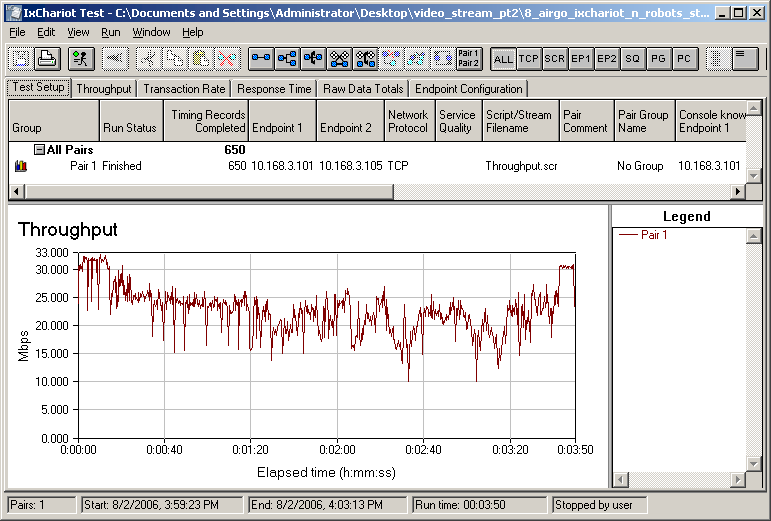
Figure 13: Shared data and video stream – Airgo True MIMO WLAN
Having an Airgo-based WLAN (non Gen3) as a neighbor can be both good and bad news, however. If you can move off the channel that the Airgo WLAN is on, you’ll never see it, since it achieves its high throughput and good range without using channel bonding. But if you have to battle it on the same channel for bandwidth, you’re likely to lose since it competes fiercely as shown in Figure 14 and rendered the video unwatchable.
>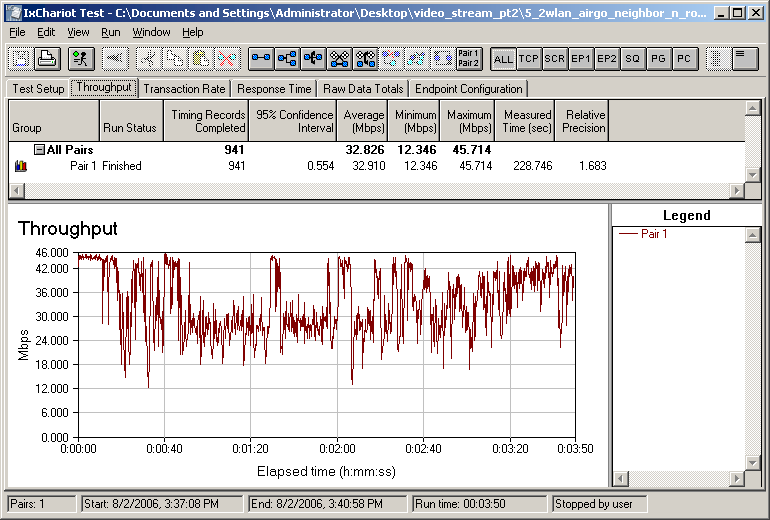
Figure 14: Linksys “Home” LAN video w/ Airgo “Neighbor” WLAN
Checklist For Wireless Streaming Success
I don’t feel that I’ve really revealed any deep secrets here, as those of you who have attempted wireless streaming will probably agree. But since consumer WLAN product manufacturers continue to hype 2.4GHz-based products for wireless streaming, I guess there are still folks out there who haven’t gotten the message that vendors are selling a “solution” that has little chance of working for a large percentage of its likely customers.
What I did learn from this exercise is that, contrary to what I previously thought, throughput variation doesn’t matter. By “variation”, I mean most of the wiggles you see in the IxChariot throughput plots that I’m so fond of. Even variation in the 10-20 Mbps range doesn’t matter, as long as they are short (milliseconds). “Dropouts” – where throughput drops to near-zero for multiple seconds – are still a bad thing and will affect your viewing pleasure.
The other surprising discovery was how all the products tested automatically yielded bandwidth to the video stream in the same WLAN tests, with QoS features disabled. This could be due to the nature of UDP vs. TCP, but at any rate it’s a plus for multimedia streaming.
So to sum up, here are the key take-aways:
- You must have enough available bandwidth at the location that is receiving the streamed content
Using a free tool like iperf or jperf to check your bandwidth will give you a more accurate indication than running a long stream of pings and using the speed meter built into some wireless client utilities. But if you’re not comfortable with iperf or jperf (and they do take some figuring out to use), go ahead and use the ping method. It will tend to give a lower reading than the bandwidth you actually have, but it’s better than nothing.If you use your WLAN for other activities, be sure to do your testing with the other activities running, especially any downloading activity.
- You must have a clear (enough) channel
If you live in an apartment building, dorm or neighborhood with closely-spaced single-family homes or adjoining townhouses, you can safely assume that there is someone else within range with a wireless network. The best approach is to work out a channel allocation scheme with your neighbors to try to minimize interference. Trying to “out shout” your neighbors with wireless boosters, or “bad neighbor” wireless gear is not a recommended path of action since payback is a bitch and so is Karma. Check this HowTo for more suggestions for dealing with colliding WLANs.Don’t forget non Wi-Fi interference sources such as cordless phones, microwave ovens and even Bluetooth gear. These sources can be very disruptive since they tend to occupy more than one Wi-Fi channel’s worth of bandwidth.
If you don’t have a clear 2.4GHz (11b/g) channel, your best option is to move to 802.11a (5 GHz). Unfortunately, manufacturers are more focused on hyping their messed-up draft 11n gear than they are in providing real streaming solutions. So be prepared to have to hunt for gear and don’t forget to check eBay.
Keep in mind that you aren’t shooting for perfection here. All you need, besides keeping your cordless phones and microwave ovens at bay, is to have your AP’s signal that is received by your streaming client to be stronger than those from neighboring WLANs. 20dB will probably do the trick, but you may be able to get by with less. Invest $100 in a Wi-Spy spectrum analyzer and you’ll be able to actually do the measurement yourself.
- Know your content’s bandwidth requirements
Investing $20 or so in a tool like Net Meter and doing some test streams over an Ethernet connection will let you know what you need. Video is generally encoded with a variable bit rate, so you need to know the peak bandwidth requirements, since they are the most likely to cause picture glitches. - Re-encode if needed
If the peaks exceed the available bandwidth, you can try re-encoding the content to use less bandwidth. Many encoders have a bandwidth-limiting feature that ensures that the encoded file doesn’t exceed a set value. But as good as current codecs are, you still might not like the trade-off in image quality that the lower-bandwidth encoding produces. If that’s the case, you’ll need to step up to gear that can produce the bandwidth you need at the location you want.