

Introduction
In Part 1, I described the options I’ve tried for "convenient" Internet access away from the office and my decision to switch from using prepaid 802.11 access to trying Verizon Wireless‘ EVDO service. Part 2 then described how to set up a Mac laptop to connect to Verizon’s BroadbandAccess service through a Treo 700p.
I’ll now conclude the series by presenting connection speed results for:
- Bluetooth EVDO access (laptop connects to Treo 700p using Bluetooth)
- USB EVDO access (laptop connects to the Treo 700p using USB)
- 802.11 access (laptop uses 802.11a/g to connect to the Internet)
To measure speed, I used the tests available through Speakeasy.net because of the site’s convenience and test presentation. To run a speed test against a connection, all I needed to do was point a Web browser to http://www.speakeasy.net/speedtest and choose one of the eight servers, which are labeled by the test location.
For example, to run a speed test in Chicago, click the CHICAGO, IL option under CHOOSE A SERVER. The test starts automatically after your selection, measuring the download speed first, and then, the upload speed.
Figure 1 shows the Speakeasy screen with a choice of eight server locations for running a test.
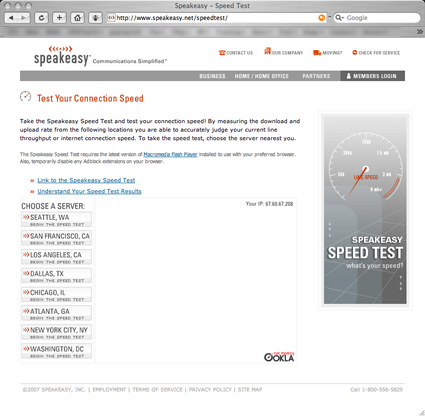
Figure 1: Speakeasy.net’s Speed Test Starting Screen
After the test completed, I recorded the Kilobytes per second (KB/sec) data points. Figure 2 shows some data point examples (located in the screen’s lower left corner under Last Result).
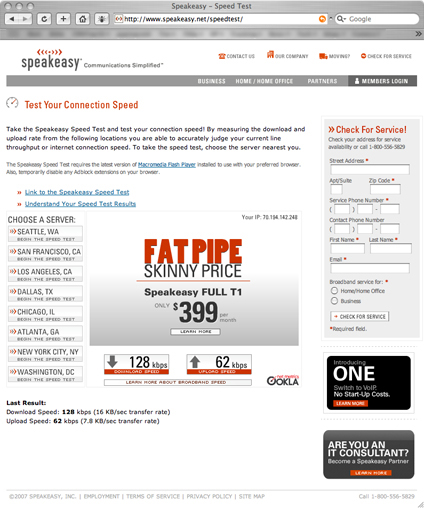
Figure 2: Speakeasy.net Speed Test Output
Speed Test Data
Table 1 summarizes the speed data for Bluetooth EVDO (Option 1), showing the average upload and download speeds and the number of data points in each location. I ran tests against Speakeasy’s Chicago, Seattle, and Atlanta servers from three airports, one rental car bus, two houses, and one restaurant. I chose these three server locations to balance the throughput readings since the locations spanned the United States.
The benchmarks were run a total of 29 times yielding an average download speed of around 38 KB/sec and average upload speed of about 13 KB/sec. As I recall, in 2004 I was happy to get a download speed of 15 KB/sec with my tethered Sprint phone—so, downloading at 40 KB/sec isn’t bad, but, it isn’t high-speed Internet either.
| Bluetooth EVDO | Locations | Data | Airport | BudgetBus | Residence | Restaurant | Total Average |
|---|---|---|---|---|---|
| Average Down (KB/s) | 39.61 | 30.77 | 34.19 | 47.93 | 37.87 |
| Average Up (KB/s) | 12.68 | 16.23 | 10.50 | 14.20 | 12.53 |
| Count of Down | 14 | 3 | 9 | 3 | 29 |
Table 1: Summary Data Speeds Across Locations
To investigate if access speed can be increased, I went back to EVDOinfo.com and EVDOforums.com. Since many posts there claimed that the bandwidth capacity of the Bluetooth radio limits the access speeds to the EVDO network, I decided to experiment with USB to see if it could offer faster access than Bluetooth.
In the above sites I also found references to Mobile Stream‘s USB Modem, which allows a USB cable to be used for the laptop-to-phone connection and EVDO network access for Treo 700p, 680, 650, and 600 phones. For information on setting up your laptop and Treo 700p for use with the USB Modem, refer to their User Guide (PDF link).
Note: Mobile Stream also offers Windows, Linux, and Mac OS X-compatible versions of USB Modem.
Once I had USB EVDO access (Option 2) working, I ran side-by-side access speed comparisons of Bluetooth EVDO (Option 1), USB EVDO (Option 2), and, if possible, 802.11 access (Option 3) to gauge my "cost" in not using "Air Coffee."
Table 2 compares the 802.11, Bluetooth EVDO, and USB EVDO access options by showing their average upload and download speeds and the number of data points taken.
| Locations | ||||||
|---|---|---|---|---|---|---|
| CommType | Data | Airport | BudgetBus | Residence | Restaurant | Total Average |
| 802.11 | Average Down (KB/s) | 140.77 | 733.28 | 143.50 | 496.82 | |
| Average Up (KB/s) | 117.60 | 51.33 | 36.87 | 61.69 | ||
| Count of Down | 3.00 | 9.00 | 3.00 | 15.00 | ||
| Bluetooth EVDO | Average Down (KB/s) | 39.61 | 30.77 | 34.19 | 47.93 | 37.87 |
| Average Up (KB/s) | 12.68 | 16.23 | 10.50 | 14.20 | 12.53 | |
| Count of Down | 14.00 | 3.00 | 9.00 | 3.00 | 29.00 | |
| USB EVDO | Average Down (KB/s) | 96.90 | 44.12 | 103.67 | 80.43 | |
| Average Up (KB/s) | 12.71 | 10.48 | 15.63 | 12.46 | ||
| Count of Down | 9.00 | 6.00 | 3.00 | 18.00 | ||
Table 2: Average Speed Comparison of 802.11, Bluetooth EVDO, and USB EVDO
The test results in the Table 2 show not surprisingly that 802.11 access (Option 3) is the fastest of the three. The data also shows that 802.11 access is lot faster in residences than in public (no big surprise there, either).
The data are by no means definitive. But the results may still be of interest and provide insight to people in small business that are exploring options for Internet access away from the office. Because of the small sample sizes, averages will change with additional data.
USB vs. Bluetooth
Table 3 compares the maximum speeds achieved by Bluetooth and USB EVDO and it’s clear that using a USB connection can provide a significant download speed boost.
| Locations | ||||||
|---|---|---|---|---|---|---|
| CommType | Data | Airport | BudgetBus | Residence | Restaurant | Best Case |
| Bluetooth EVDO | Max Down (KB/s) | 72.50 | 45.40 | 62.30 | 54.90 | 72.50 |
| Max Up (KB/s) | 16.00 | 16.50 | 16.40 | 15.60 | 16.50 | |
| Count of Down | 14.00 | 3.00 | 9.00 | 3.00 | 29.00 | |
| USB EVDO | Max Down (KB/s) | 211.00 | 65.40 | 119.90 | 211.00 | |
| Max Up (KB/s) | 16.10 | 16.40 | 15.80 | 16.40 | ||
| Count of Down | 9.00 | 6.00 | 3.00 | 18.00 | ||
Table 3: Max Speed Comparison of Bluetooth EVDO and USB EVDO
Tests run in Terminal C at Chicago O’Hare International Airport using a Bluetooth / EVDO gave me typical download speeds—27.1 KB/sec, 35.5 KB/sec and 29.9 KB/sec from the Speakeasy Chicago, Seattle and Atlanta test servers, respectively. But switching to a USB connection (Option 2) gave me up to 7 times (!) the download speeds (211.0 KB/sec from Chicago, 190.0 KB/sec from Seattle, and 198.8 KB/sec from Atlanta).
But why the higher download speeds using the USB connection? A quick look at the following information from Bluesoleil should help:
"The gross data rate of Bluetooth 1.1 is 1 Mbps. The protocol splits that bandwidth to support both voice and data communication. Bluetooth can support an asynchronous data channel, up to three simultaneous synchronous voice channels, or a channel that simultaneously supports asynchronous data and synchronous voice.
Each voice channel supports a 64 Kbps synchronous (voice) link. The asynchronous data channel can support an asymmetric link of up to 721 Kbps in either direction, while permitting 57.6 Kbps in the return direction or a symmetric link up to 432.6 Kbps."
So assuming that both the Treo and the Mac aren’t supporting EDR (the Mac might, but the Treo probably doesn’t and both need to support it to achieve EDR rates) this limits the connection to the 1.1 rates described above. A symmetric link bandwidth of 432.6 Kbps would be 54 KB/s down and up, while an asymmetric link would yield 90 KB/s down and 7.2 KB/s up.
The max speeds in Table 3 don’t exceed 90 KB/s down but they are higher than 7.2 KB/s up. So it’s likely some combination of asymmetric and symmetric communication is being used. But since no download speeds are above 90 KB/s, Bluetooth does indeed appear to limit the speed.
Note that using a USB connection did not improve upload speeds during any of my tests and download speed improvement was inconsistent. For example, a test at the Detroit Metro Airport didn’t yield speedier downloads, but in a Panera restaurant near Toledo, Ohio, USB speeds were 2X Bluetooth’s! So if download speed is important in your business, USB tethering may help, and in certain cases, a USB connection may help a lot!
EVDO vs. Wi-Fi and Conclusions
Whether EVDO is better than 802.11 depends on your needs. If your business provides data to others on the Internet and how fast it is uploaded matters, test results show that 802.11 will almost always make you happier than EVDO. However, the Achilles heel of public 802.11 systems is the difficulty of purchasing one-time access. Service providers would much rather you sign up for a service that generates monthly recurring fees.
One more 802.11 story: While in the Detroit Metro Airport, I tried to pay the $7.95 one-time-fee for a single-use of the 802.11 network. However, since I had previously logged in to the network there and paid for a one-time use, I was unable to use it a second time. When I tried to authenticate with the account I previously created, the system said "Roaming Denied" and dumped me out. I emailed support and they told me, "It is easy to get one-time access!" Shades of T-Mobile all over again. It’s easy for everyone to gain access… just not me.
If upload speed is important, and you’re frequently in areas with Wi-Fi hotspots (for example you travel by air weekly), and you’re working for a large company that doesn’t care about expenses, you can probably justify the $30/month fee to access the "monthly-fee-802.11-cartel." However, unless all three conditions hold, 802.11 access can be hit or miss. ( If you can get to a Barnes & Noble, you can use AT&T’s excellent 802.11 service.)
However, EVDO is better than 802.11 when you’re in the bus on your way to the rental cars, or at your in-laws’ house, or sitting in an airplane on the runway, waiting in Indianapolis for 5 hours, hoping for a landing slot in Chicago. EVDO probably performs about the same as 802.11 if you’re in Chicago O’Hare International Airport a lot and all you need is fast downloading. If the terminal is empty when you’re there, rock on!
Internet access away from the office is getting better, and EVDO service is responsible for a lot of the improvement. However, access away from the office is not just about download or upload speeds. It is also about companies being willing to make Internet access convenient enough to fit into the many constraints of travel and about users being able to gain Internet access without dealing with giant bureaucracies.
No one wants to feel like a chicken trampled over by an elephant, but it still happens. For example, you can still get terminated as a Verizon Wireless "bandwidth criminal" if you use more than 5 GB of bandwidth in a month (using EVDO for videoconferencing). But, the "Secret Trap Doors of Destruction" are fewer in number than in 2004.
EVDO is waking up the "Bell heads," who run our cell service bureaucracies, to the existence of the Internet. The cellular technology trail for accessing the Internet, which I walked in 2004, is gradually widening as more users find their way. Today, the "cowpath" is almost ready to be paved. I could almost call it a sidewalk. When I’m in my local Verizon Wireless Store, asking questions, a crowd of people gathers around when they see my laptop connecting to the Internet through my phone. Today people ask for cards. In 2004, people didn’t notice the laptop surfing the Internet through a phone.
Historically, telephone people have seen Internet access as "wasting half of a perfectly good circuit." Today, when you walk out of the store with your Treo 700p and EVDO access, you are only two steps away from Internet access. But you need to learn the "gotcha" extra service subscriptions you need from Sprint, or Cingular, or Verizon Wireless. And then you have to set up your software on the computer and phone to connect to the network.
At the very least, the wireless companies are no longer telling you not to access the Internet. And now, with this series and Google at the ready, you can become your own technical support and make it happen.