

Introduction
5 March 2010: Note added about improved performance
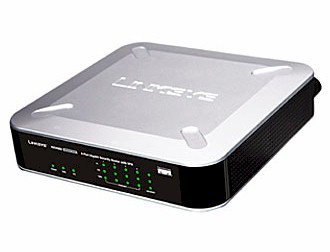
| At a Glance | |
|---|---|
| Product | Linksys 4-Port Gigabit Security Router with VPN (RVS4000) |
| Summary | Multi-featured router w/ gigabit WAN and LAN and supporting 10 IPsec connections, but unbalanced up and download speeds |
| Pros | • Up and download QoS w/ bandwidth mgmt • Level 2 gigabit managed switch • Full set of routing features • IPv6 support • IPsec client included |
| Cons | • Grossly unbalanced up and download throughput • Enabling IPS function cuts download throughput by ~40% • IPsec settings for QuickVPN clients are not shown in the admin interface • Low IPsec tunnel throughput |
This is our first Linksys review since fall of 2005 and we’re happy to welcome them back. So with the niceties taken care of, let’s dive into a look at the RVS4000. The 4-Port Gigabit Security Router with VPN is part of the company’s "business series" product line. This line is aimed as small businesses who are ready to move beyond the consumer networking products available at their local retailer, but who are not quite ready to move up to Cisco "big iron".
The RVS4000 comes in an attractive silver and black squarish box that’s 6-7" on a side. It has screw mounting slots on the bottom and indentations on the top to allow stacking of similarly-sized products. The front panel indicators are shown in Figure 1 and the rear panel connectors are found in Figure 2. Nothing out of the ordinary for either one.
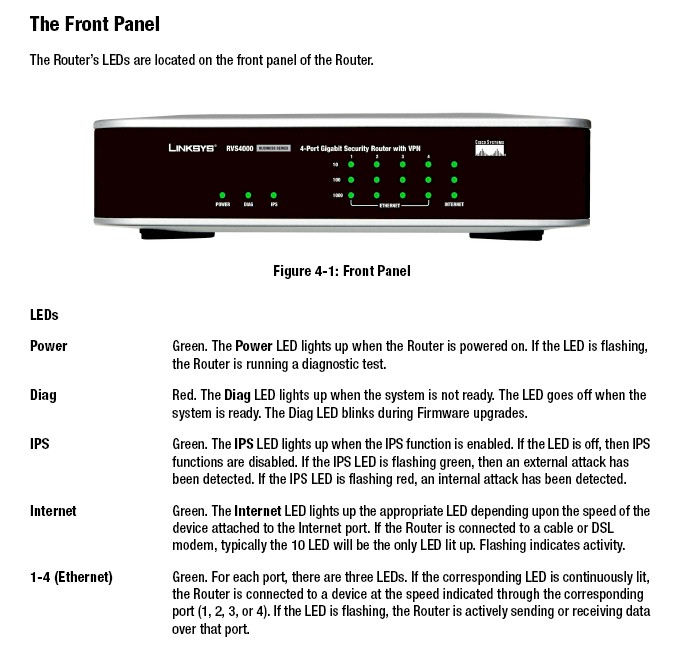
Figure 1: RVS4000 Front Panel
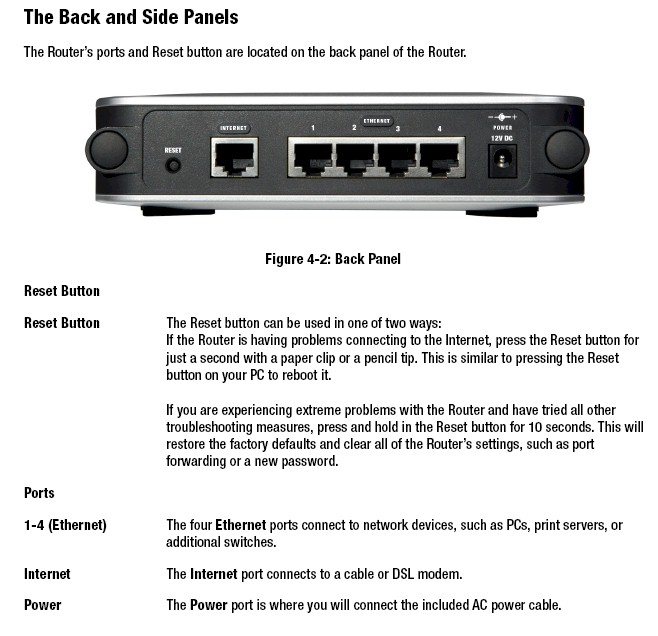
Figure 2: RVS4000 Rear Panel
Figure 3 provides a look at the 4000’s board, which is based on a Star Semiconductor STR9202 Broadband Home Gateway Processor SoC. The product description says that the 9202 includes a "Layer-7 Content Inspection Engine, which is a powerful hardwire in-line signature matching accelerator". This engine apparently provides the 4000’s IPS (Intrusion Prevention System) features.
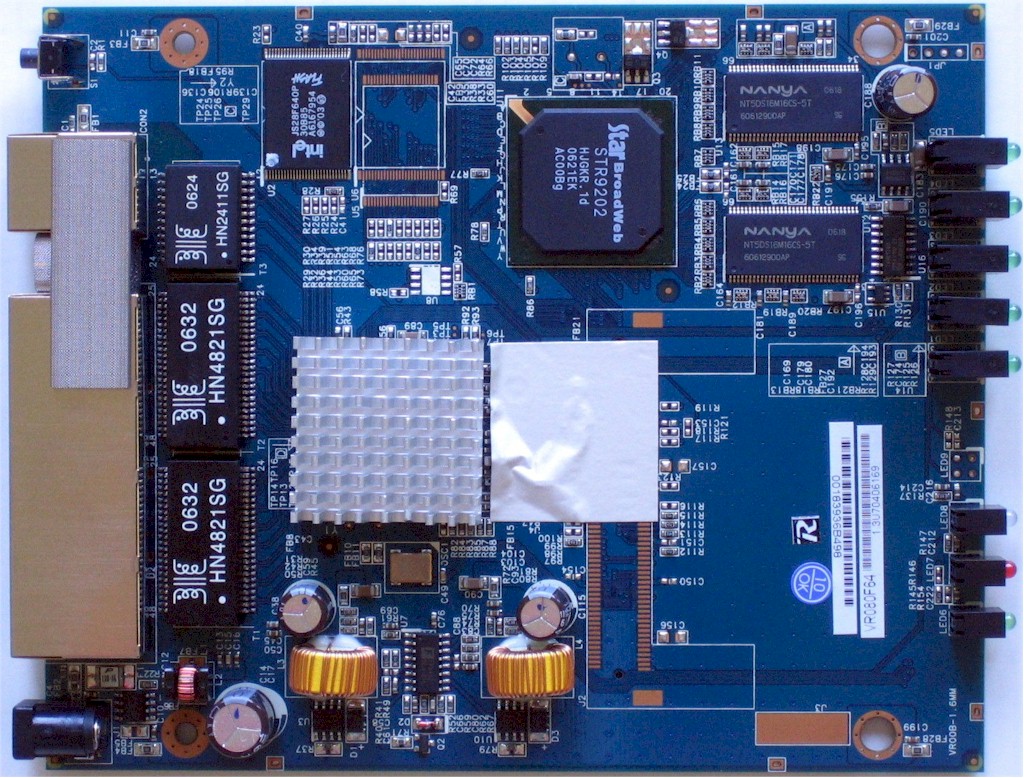
Figure 3: RVS4000 Inside view
The gigabit switch is safely hidden under a heatsink, which I didn’t disturb. But a little sleuthing outed it as a Vitesse VSC7385. 64 MB of RAM and 8 MB of flash are the other major components.
 Check out the slideshow for a detailed admin interface tour of the RVS4000.
Feature Analysis and Comment
In an effort to save both you, the reader, and me, the reviewer, some time, I’ve created a slideshow of nearly all of the admin screens that should give you a good tour of the 4000’s feature set. Of course in some cases, the slides and captions don’t tell the whole story, so I’ll provide commentary and analysis here for some of the unique features and bugs that I found.
Check out the slideshow for a detailed admin interface tour of the RVS4000.
Setup is uneventful and you reach the admin interface at 192.168.1.1 or by clicking the UPnP icon that will appear in the Windows System Notification Area (Tray) if you have the right UPnP settings. (Navigate to Network Connections > Advanced > Optional Networking Components > Networking Services and enable Internet Gateway Device Discovery and Control Client and UPnP User Interface).
The interface was generally peppy enough and saved settings pretty quickly. But sometimes the admin interface would hang for a bit for no apparent reason and then come back. Secure admin access via HTTPs is supported only for remote (WAN side) access, which I found a bit odd, but better than no secure access at all. Management via SNMP is also supported (I didn’t try it) if you’re into that method of management.
You can also define eight different administrator usernames and passwords, but I didn’t see any way to assign per-user permissions. Multiple admin logins are allowed with no warning issued, so there is no logout function. I’ll also note a personal pet peeve: the inability to change the admin idle logout time which appears to be about 5 minutes.
Other admin features include a Diagnostics screen with Ping, Traceroute and Cable Diagnostic functions. You also get configuration backup and restore, reset to defaults, reboot and firmware upgrade functions.
The Firewall has a pretty good set of features including Java, Cookie, ActiveX and Proxy blocking enables, inbound and outbound port filters (the "IP Based ACL" feature), 15 single port forwards and 10 sets each of port range and triggered port forwarding. The port filters and "Internet Access Policies" (domain and keyword blockings) are schedulable and the blocking is smart enough to not be worked around by using IP addresses for at least the domain blocking.
I was happy to see that, unlike products based on Ubicom’s StreamEngine technology, the 4000 believes that downstream QoS is as important as upstream. All the 4000’s QoS features including Bandwidth Management and Port, CoS and DSCP based QoS support both directions. Unless you have experience with configuring Priority / Queue based QoS methods, you’ll probably stick to using the easier to configure Bandwidth Management QoS flavors (Rate Control or Priority based).
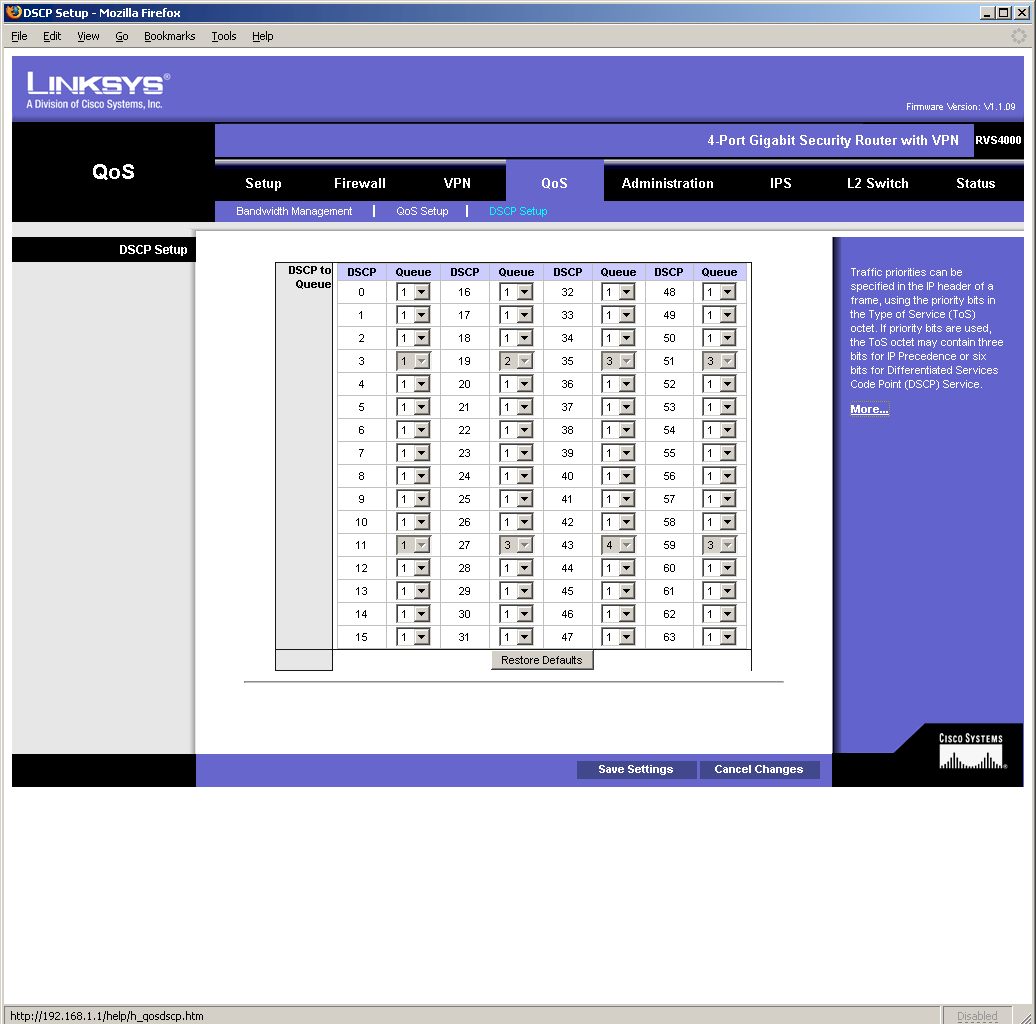
Figure 4: Experienced users only, please
I did note problems with setting the Trust Mode and Default CoS/Port Priority selectors in the QoS setup screen with Firefox 1.5.0.11 that were solved by using IE 6.0.X. All other settings worked fine.
Logging was not too bad, with the ability to control the level of messages logged and sending to a syslog server. But new messages were added to the bottom of the file, which means that you’ll spend time scrolling to see new entries. I wasn’t able to get the Email Alerts feature to work, probably due to authentication issues with my ISP’s SMTP server. I appreciated the "E-mail Log Now" button to use for testing, but didn’t like the lack of any log entries regarding the success or failure of emailing.
One of the most pleasant surprises in the RVS4000 was that in addition to the IPsec and QoS goodies, it also contains a pretty full-featured Level 2 managed switch! While the switch is only four ports, those ports can be configured into VLANs, have 802.1X / RADIUS authentication enabled, have link speed and mode set (including disabled), be mirrored for debugging and analysis and redundantly connected while protected by RSTP (Rapid Spanning Tree Protocol). The only common "smart switch" feature I noted missing was link aggregation.
VPN Annoyances
I had bigger problems with the VPN features, however. Actually, "annoyances" is probably a better description than "problems", but you can be the judge. Most of the problems annoyances centered on Linksys’ QuickVPN application. QuickVPN is a free IPsec client that is downloadable from Linksys to be used with the RVS4000, RVL200 and other Linksys IPsec-enabled routers. All you need to enter on the RVS4000 is a username and password; no IPsec settings are required. You just then install QuickVPN on a Windows machine, launch it, enter the username and password and click to connect.
QuickVPN is a "blackbox" application that uses wget and openssl to set up an IPsec client-to-gateway connection. From looking at the text files that are created in the QuickVPN directory (the only debugging aids available), it looks like wget is first used to open an HTTPs connection to the RVS4000 to exchange IPsec setup information. Then openssl is used to set up the IPsec tunnel.
I had some false starts due to old versions of router firmware and QuickVPN and the fact that I had tried to enter IPsec tunnel information into the 4000 (old habits die hard, I guess). I also found that enabling DMZ appears to prevent any QuickVPN client connections.
But after resetting the router to factory defaults, reinstalling QuickVPN on my client and correctly answering a confusing popup during login, the QuickVPN client told me that I was connected. But every minute or so, it would pop up a "The remote gateway is not responding" box that led me to believe that something was broken.
So I first checked the IPsec VPN Setting Status section of the 4000’s Setup Summary page, which told me that no tunnels were used. Hmmm. I then turned to the VPN Summary page that also looked like no tunnels were up. It wasn’t until I looked closely at the VPN Clients Status section of that page where I finally found a connection with my name on it.
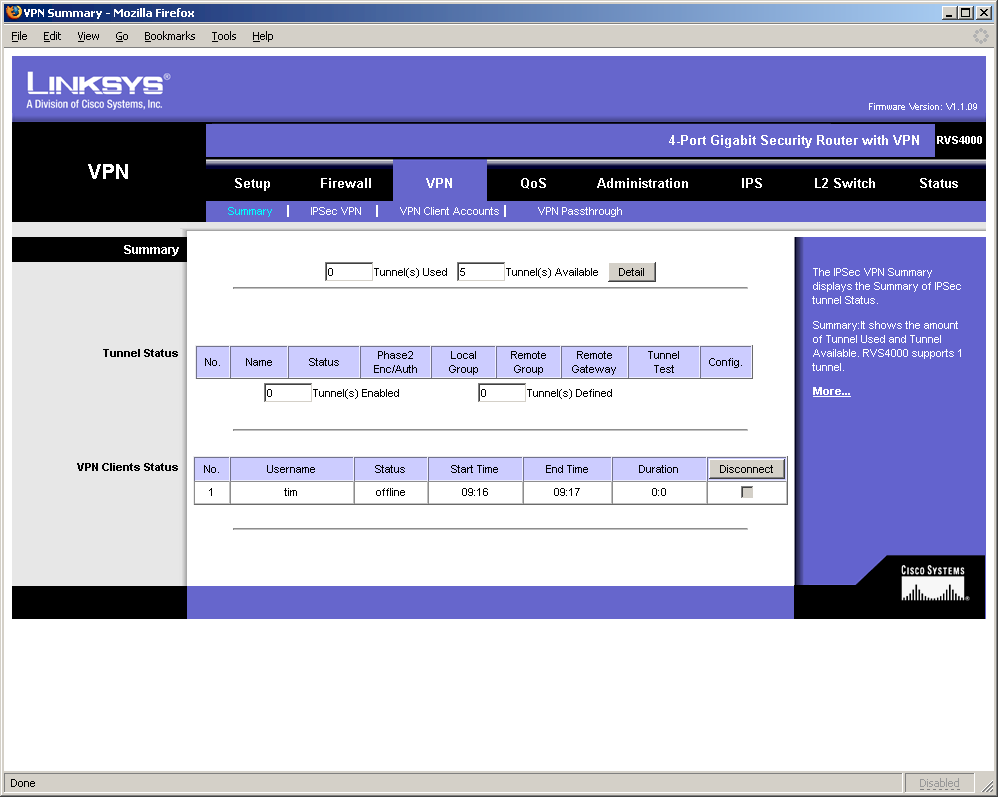
Figure 5: Can you find the VPN connection?
It seems that the 4000 treats gateway-to-gateway and client-to-gateway connections very differently—at least from a status point of view. The 4000 actually supports a total of 10 IPsec tunnels: 5 gateway-to-gateway and 5 client-to-gateway. A fact, again, not obvious from looking at the status screens, or even any of the marketing material!
The other thing notable about using QuickVPN is that it does not provide you with documentation of the IPsec configuration that it is using. And don’t bother checking the IPsec VPN page on the 4000, because its settings to support QuickVPN clients aren’t visible. For the record, however, Linksys said the QVPN Client makes the following proposals to the RVS4000 in the Phase-1 IKE:
1. 3DES, SHA1, DH2, PSK, SA Lifetime = 28800 sec
2. 3DES, MD5, DH2, PSK, SA Lifetime = 28800 sec
3. DES, MD5, DH1, PSK, SA Lifetime = 28800 sec
Finally, clicking the Disconnect button on the 4000 for the IPsec connection did not appear to kill the connection. At least the QuickVPN client showed no sign of being disconnected. Other than that, using QuickVPN was a breeze…really!
I should also note that you may have a difficulty debugging problem IPsec connections. As noted earlier, new log entries get added to the bottom of the logfile, so you have to scroll a lot. I didn’t find the log entries particularly helpful and with Firefox I couldn’t get the log pop-up screens to go behind the main window (IE was again, ok).
Performance
Given the 4000’s wealth of features, I hoped to find routing speed that would put it near the top of our Router Charts. But the story here is surprisingly mixed. I started by running an IxChariot simultaneous up and downlink test, the results of which are shown in Figure 6.
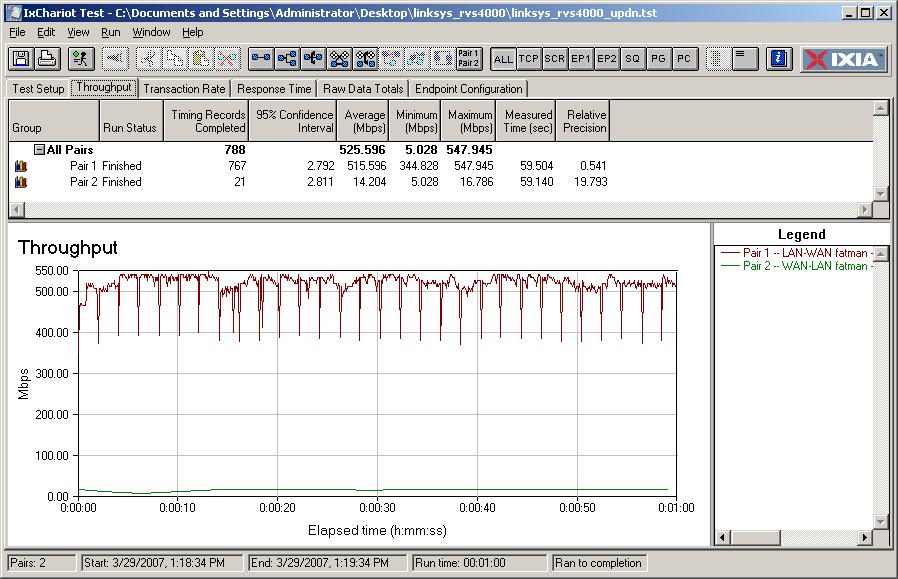
Figure 6: RVS4000 Simultaneous Up and Download throughput
The upload (LAN to WAN) throughput of 516 Mbps(!) is a new high for the SmallNetBuilder test bench, and was obviously obtained using gigabit connections on both WAN and LAN sides. But the 14 Mbps download (WAN to LAN) throughput, while sufficient for many cable, T1 and DSL connections, isn’t on par with latest-generation products like the Buffalo WZR-AG300NH that provide >100 Mbps wire speed for both up and download.
Actually, to get the results shown in Figure 6, I had to change the default settings and disable the Firewall and IPS features (of the two, disabling IPS had the bigger effect). With the Firewall and IPS enabled, download speed fell to around 11 Mbps. I checked with Linksys to make sure I was seeing expected performance, and they confirmed the speeds that I was seeing. Checking the forums over at DSLReports also turned up complaints of the RVS4000 limiting download speed on fiber connections.
The results for number of simultaneous connections supported won’t make P2P users very happy either. I was able to get at best 48 simultaneous connections, and that was with the Firewall and IPS disabled. With those features enabled, the number dropped to 32.
IPsec tunnel performance was even more disappointing. Linksys wasn’t able to provide a pair of RVS4000’s so that I could test gateway-to-gateway tunnel throughput. So I had to resort to testing client-to-gateway speed. Figure 7 shows simultaneous tests in both tunnel directions yielding a total throughput of around 1.6 Mbps. I also checked each direction separately and got about the same results.
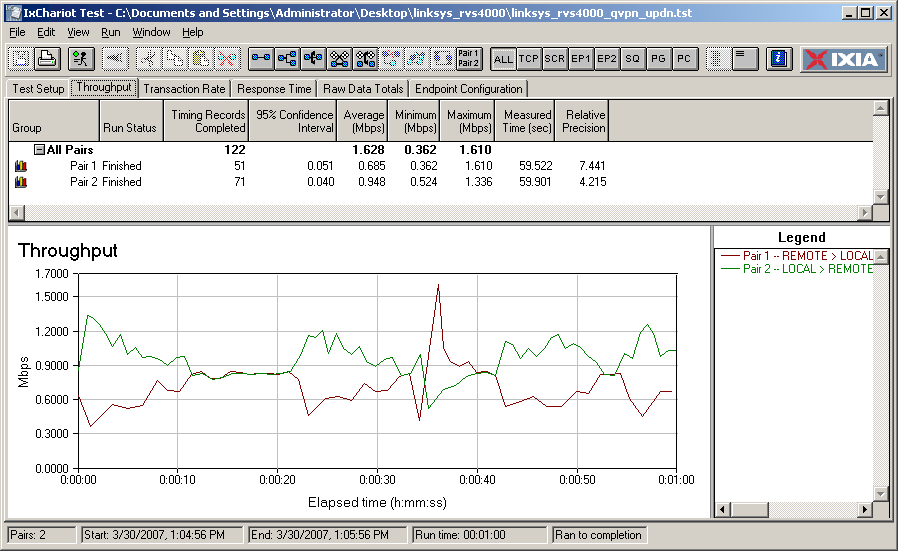
Figure 7: RVS4000 Simultaneous Up and Download IPsec throughput
This is pretty disappointing, particularly for a "business class" product that might be expected to have multiple telecommuters connecting in simultaneously. Checking email and doing small file transfers might be ok, but any large file transfers or bandwidth-hungry applications would probably notice the lack of bandwidth.
Closing Thoughts
I have to wonder why Linksys is ok with having such a mismatch in up and downlink throughput in this (or any, for that matter) router. The Star processor obviously sucks up a lot of processing power crunching its IPS checks. But even with those features disabled, download throughput doesn’t even match its bread-and-butter WRT54G and is more on par with products a few generations back.
While 10 Mbps+ connections are still in the minority in the U.S., there are plenty in other places around the world. If you happen to have one of them, you’ll probably want to look elsewhere for a router that lets you take full advantage of that bandwidth that you’re paying good money for. It’s too bad, because otherwise the RVS4000 has a lot going for it. Where else can you get a four port gigabit Level 2 managed switch with jumbo frame support for around $125?