

Introduction
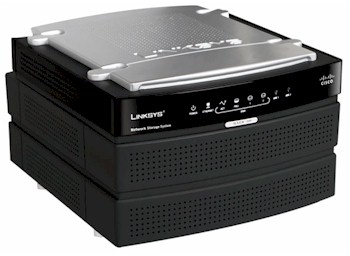
| At a Glance | |
|---|---|
| Product | Linksys Network Storage System with 2 Bays (NAS200) |
| Summary | Two-drive SATA BYOD NAS with decent feature set, but relatively slow performance. |
| Pros | • Aggressively priced • UPnP AV server • Supports individual, JBOD, RAID 0 and RAID 1 • Bundled client backup software |
| Cons | • No gigabit Ethernet • Relatively slow • No auto-backup of internal drive |
In the three years since Linksys launched its only consumer-level NAS product—the NSLU2—the company has watched its competition walk away with this growing and profitable market. And while it recently has gotten back into the NAS game with its enterprise-grade NSS line, Linksys seemed content with letting the "Slug" (as it is known in the hacking community) lead its consumer NAS charge.
Well, folks, the wait is over and Linksys is finally shipping the new two-drive BYOD NAS that it showed back at January’s CES. The good news is that the NAS200 is aggressively priced, supports two SATA drives in individual, JBOD, RAID 0 and RAID 1 modes and has built-in UPnP AV and FTP servers. The bad news is that it’s slow—slower on the average than even the NSLU2, and that’s without the overclocking hack that is commonly applied.
Figure 1 provides the details on the 200’s front panel indicators. All the icons except for Power are backed with green LEDs that are sufficiently bright to be seen at a distance. The Power LED is green or orange, flashing or steady, depending on what it’s trying to tell you.
Note that the Backup button works along with the bundled NTI Shadow backup client (fully functional, unlimited clients), but there is no built-in ability to automatically back up the 200’s internal drives.
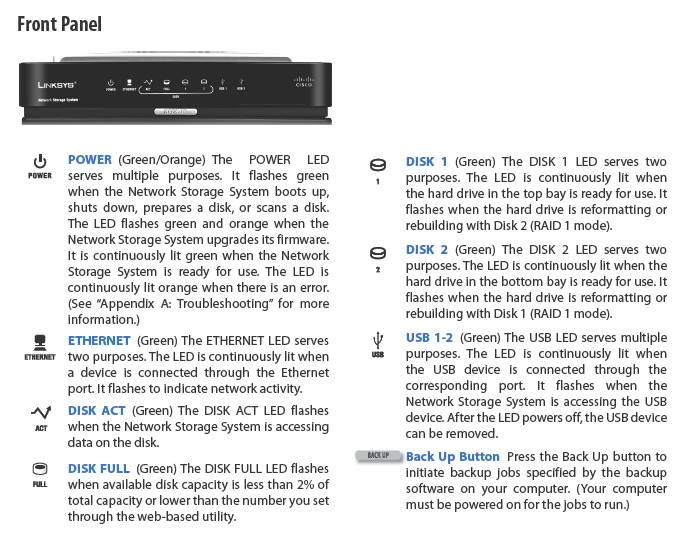
Figure 1: Front panel
Figure 2 describes the back panel connectors, which include two USB 2.0 ports. The ports are pretty close together; too close to allow both to be used if you have a wide-ish flash drive plugged into one of the ports.
The buttons beside each port do not initiate a copy of the plugged-in drive’s contents to an internal folder. They’re just for safely "ejecting" attached USB devices. In keeping with the low-cost focus of the 200, the Ethernet port is 10/100 only.
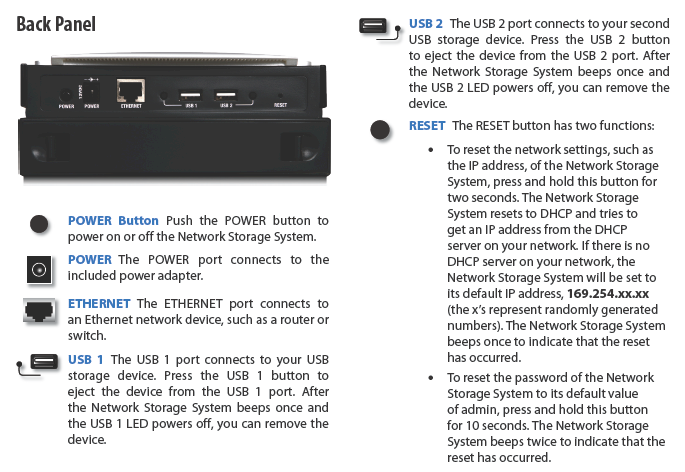
Figure 2: Rear panel
Construction Details
The 200 doesn’t use the Marvell Orion storage processor that gives many other current-generation NASes their zip, nor does it use the Intel IXP420 Network Processor used by the Slug. Instead, Linksys opted for the RDC R3210, clocked at 133 MHz. I find this a very odd choice for CPU; I’ve seen it used on only one other NAS, the Trendnet TS-I300. Oddly enough, the Trendnet also bests the NAS200 in our NAS Chart performance tests.
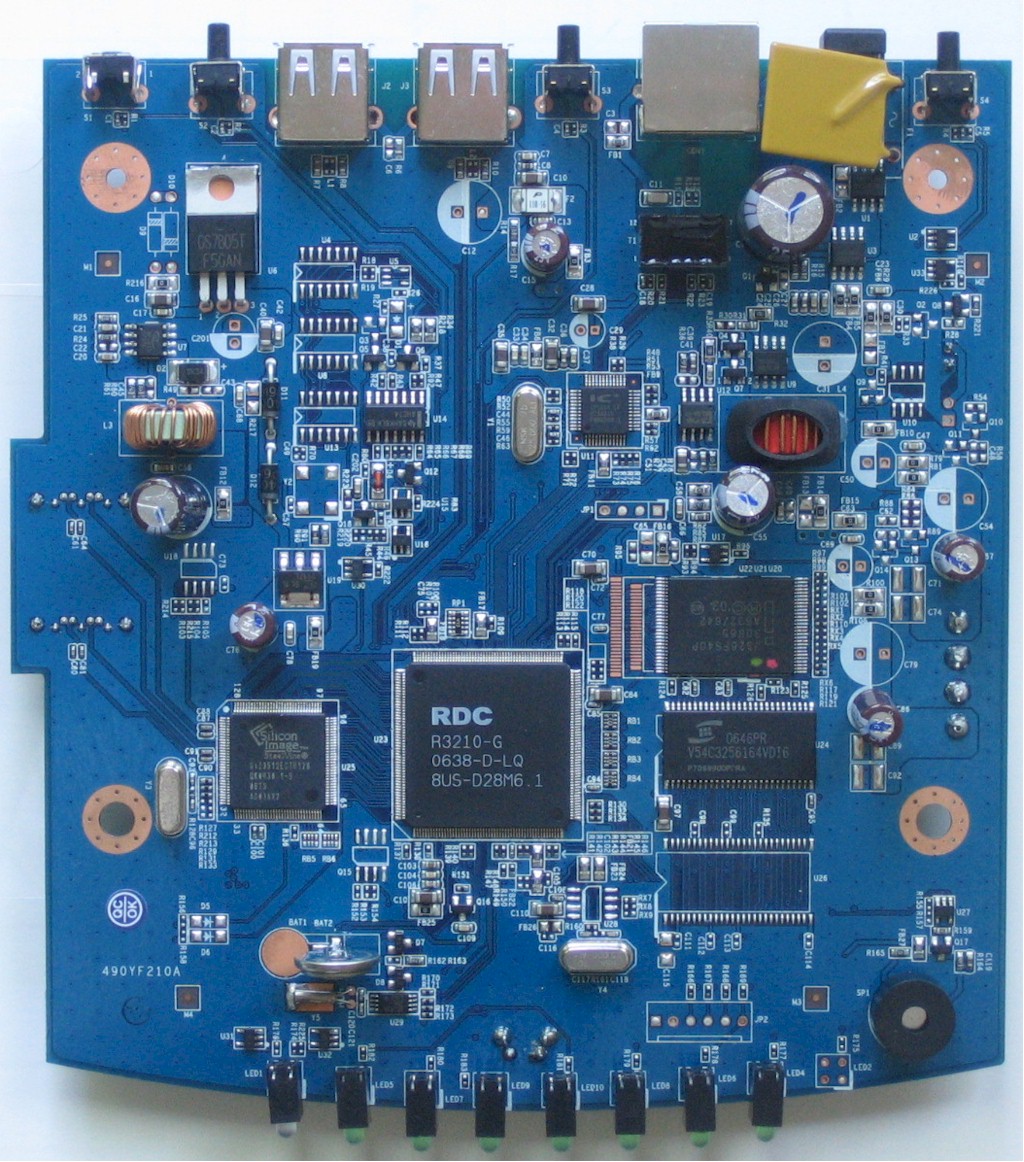
Figure 3: Board top view
The RDC R3210 is paired with a Silicon Image SiL3512ECTU128 SATA controller and the same 32 MB of RAM and 8 MB of flash as the Slug.
The NSLU2-Linux folks have already started an NAS200 page, so you can peruse the bootlog there, which indicates a Linux version 2.6.19 kernel. With the help of the hints on the Wiki, I got the 200 completely apart and posted the photos in the slideshow.
 Check out the slideshow for more admin screens and internal details
Features
The 200’s feature set covers the basics and will be fine if your needs are simple. I’ve included captures of all screens in the slideshow and will just touch on the highlights here. Figure 4 shows the login landing page you get when you hit the 200’s URL, which gives you options of entering the Admin pages or read-only access to your files. Note that secure HTTPS access isn’t available.
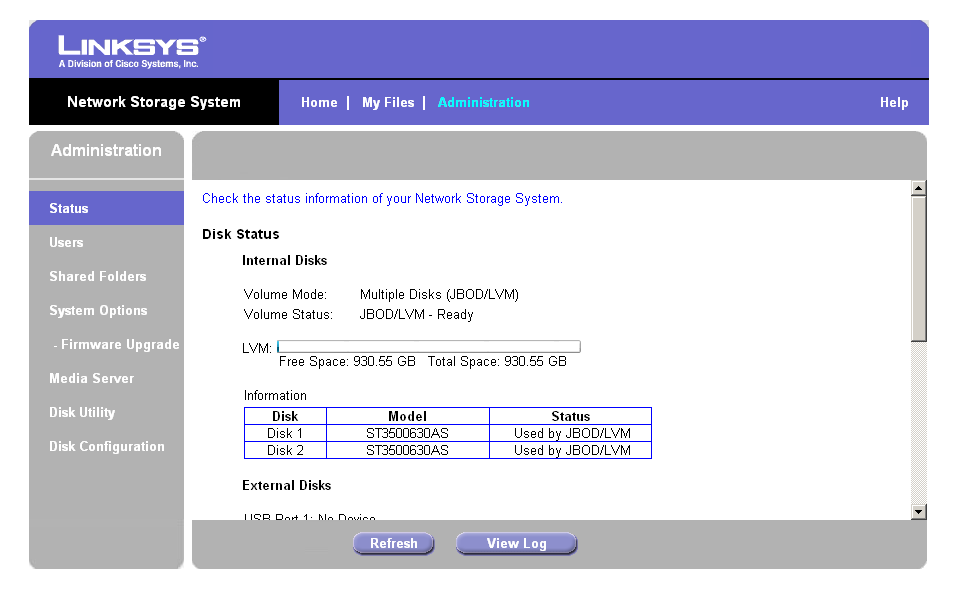
Figure 4: Login page
Figure 5 shows the Status page and general layout of the admin interface. The interface has a fixed-height scrolled frame design that isn’t the most convenient to use, but that gets the job done.
Figure 5: Status page
The 200 provides User accounts, but no groups, with folder-level access control. USB disks are mounted with all folders read/write and a share name that is assigned for you. As is typical for consumer NASes, external drives must be formatted FAT or FAT32 for read/write access. Using an NTFS formatted drive gets you read-only access.
The only network file system supported is SMB/CIFS; sorry, no AFP or NFS. The 200 won’t join an AD or NT domain to get user account information, either.
As far as services, you get HTTP for file browsing, which can’t be disabled, but you can change the port number. FTP access to User accounts is enabled by default, and you can enable anonymous FTP. There’s a UPnP AV Media server, with controls for specifying which folders to scan and how often. But there’s no iTunes server, as is starting to appear more often on other NASes and no USB print server. However, in a nod to easier remote access, Linksys has included a client for TZO’s Dynamic DNS service, which comes with a one-year trial account and discounts for Linksys users who sign up after the trial expires.
The 200 lets you configure the drives as two separate disks (which earns a "Recommended" notation for some reason) or as a JBOD, RAID 0 or RAID 1 array. Disk Utilities include formatting, scandisk, and S.M.A.R.T. tests. Note that if you choose to go with RAID 1, it takes about 8 hours to fully sync / rebuild an array. The shares are available during syncing, but at reduced performance.
For those who like to minimize power usage on your NAS, buried down deep in the System Options frame, you’ll find the Scheduled Shutdown (but not startup) control. And if you go scroll to the bottom of the Disk Utility frame, you’ll find the Standby controls that provide a choice of putting the drives in standby after 10 or 30 minutes of inactivity. You can also shut the fan off 10, 20 or 40 minutes after the drives go into standby, or just let the little bugger keep running.
Performance
The most disappointing things about the NAS200 are its performance and lack of gigabit Ethernet, especially since most current NASes come with it. You can use the NAS Chart tools to make your own comparisons, but I ran some plots to get you started.
NOTES:
- Firmware version tested was 3.4R62
- Keep in mind that the maximum raw data rate for 100Mbps Ethernet is 12500 Kbytes/sec and 125000 Kbytes/sec for gigabit
- Full test setup and methodology are described here.
Figure 6 is a plot generated with the new chart "Compare Benchmarks" feature, which lets you plot throughput vs. filesize for up to six of all available benchmark test results. We also recently added RAID 1 benchmark plots for dual-drive NASes, which are shown along with JBOD mode results.
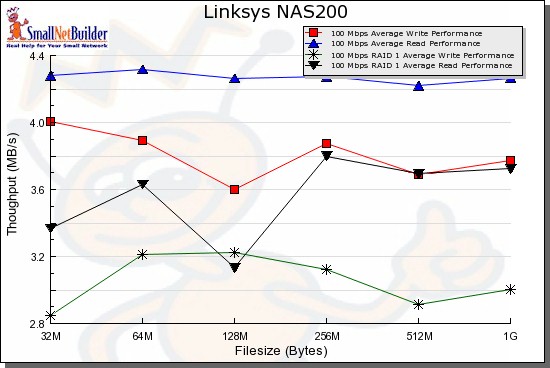
Figure 6: All Benchmarks
But to put the performance in perspective, Figure 7 shows a comparison of 100M JBOD write performance for the NAS200, Linksys NSLU2, D-Link DNS-323 and Synology DS-207. All except the NSLU2 are dual-drive products that support RAID 1.
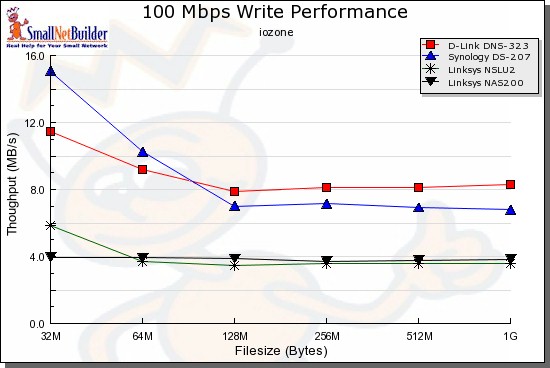
Figure 7: 100M Write performance comparison
Figure 8 compares RAID 1 performance, so the NSLU2 drops out. But once again, the NAS200 runs a distant third. And remember that both the DS207 and DNS-323 support gigabit Ethernet and have fast enough processors to take advantage of it.
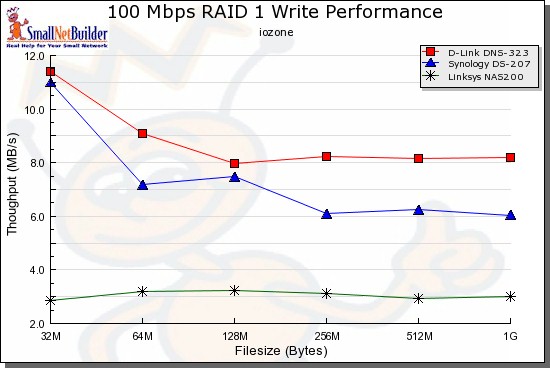
Figure 8: 100M RAID 1 Write performance comparison
Closing Thoughts
It’s probably obvious, but I’m puzzled as to why Linksys chose to come back to the consumer NAS party with a low performance product that doesn’t support gigabit Ethernet. It may be because Linksys views the NAS200 as an "entry level" NAS and that they have a higher-performance consumer NAS waiting in the wings. But if the NAS200 is "entry level" what does that make the NSLU2?
It’s not that Linksys is totally in the dark about the current NAS competition. If they were, they wouldn’t have included the built-in file download option. But on the other hand, it doesn’t handle torrents, which is usually the main thing that users want to be able to download without tying up a computer.
The important thing that Linksys has done right, however, is pricing. Using Pricegrabber, I just got lowest prices of $120, $171 and $329 for the NAS200, DNS-323 and DS-207 respectively. With that, their brand recognition and retail shelf space presence, I’m sure Linksys will sell a ton of ’em.
Check out the slideshow for more admin screens and internal details