An Inconvenient Truth
Updated 10/10/2007 – Postscript added with 100 Mbps test results
Despite a certain networking publication’s enthusiasm for the still not-fully-baked draft 802.11n wireless LAN technology, you can safely continue to install CAT 5e cabling without fear of wasting your hard-earned money. Wired Ethernet is not going to be replaced by 802.11n or any other wireless technology on the horizon anytime soon, if ever.
How do I make such a bold statement? Well, the facts really speak for themselves. Figures 1 and 2 are taken from our Wireless Performance Charts and show downlink and uplink throughput vs. path loss curves for three draft 11n products, representing the three major draft 11n chipsets.
The Netgear WNR854T uses Marvell’s TopDog, the D-Link DIR-655 represents Atheros’ XSPAN while the Netgear WNR834Bv2 has Broadcom’s Intensi-fi inside. Note that the WNR834B has only 100 Mbps WAN and LAN Ethernet ports, while the other products have gigabit Ethernet.
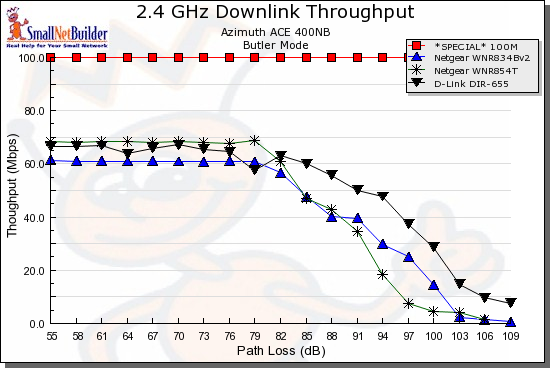
Figure 1: Downlink Throughput – 20 MHz bandwidth mode
It’s clear to see that none of the products even approaches 100 Mbps of TCP/IP throughput in either up or downlink directions. Note that these plots have the devices configured in their "out of the box" condition, which is with no encryption and using the 20 MHz bandwidth mode which ensures peaceful coexistence with existing 802.11b and g networks.
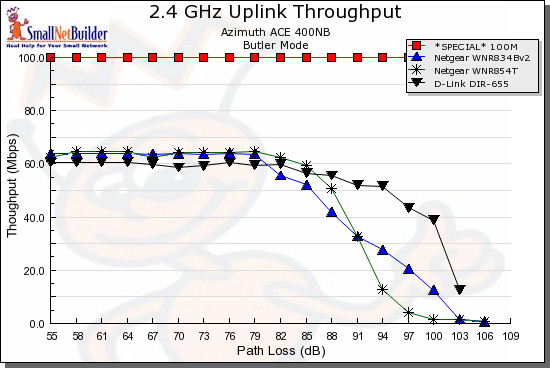
Figure 2: Uplink Throughput – 20 MHz bandwidth mode
But say that you don’t give a damn about messing up existing WLANs and change the devices to use the 40 MHz bandwidth mode. Figure 3 shows that only one product—the Netgear WNR854T— provides throughput equivalent to 100 Mbps Ethernet.
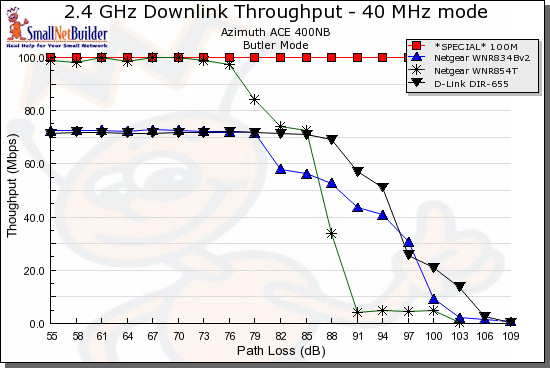
Figure 3: Downlink Throughput – 40 MHz bandwidth mode
Unfortunately, that high throughput doesn’t last very long. According to my correlation study with real-world performance, the ~80 dB of path loss where performance starts to sharply drop corresponds to about 50 feet through a few sheetrock walls or about 25 feet through a residential wood-frame floor.
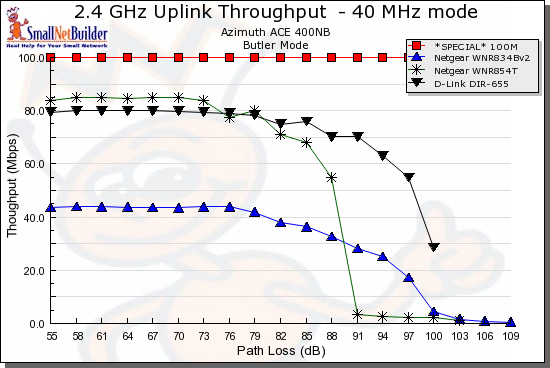
Figure 4: Uplink Throughput – 40 MHz bandwidth mode
Figure 4 shows that the two products with Marvell and Atheros chipsets provide around 80 Mbps of TCP/IP throughput in the uplink direction. But the Netgear WNR834Bv2 using the Broadcom chipset actually loses around 20 Mbps of throughput when running uplink.
Secure but Slow
But let’s say that you’re happy with having to sit right next to your draft 11n router and are ok with your wireless neighbors surrounding your home carrying torches and pitchforks because you’ve switched on the 40 MHz bandwidth mode. What happens when you enable wireless security to keep the bad guys away?
First, you can forget about throughput if you need to use WEP to accomodate any legacy clients (actually you can forget about throughput with or without security if you need to run a mixed network, but that’s another story). Since WEP won’t be part of the final 802.11n spec, manufacturers haven’t spent much time tuning its performance.
My testing has shown a 28 to 75% reduction in throughput with WEP enabled, with the Atheros chipset turning in the highest reduction (Figure 6) and the Marvell the least (Figure 5).
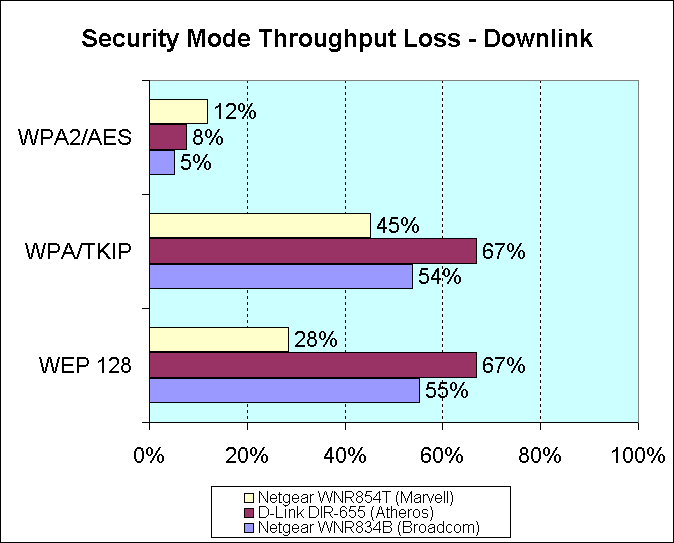
Figure 5:Security mode throughput loss – downlink
But since no one would even consider running WEP today, what happens if you use WPA/TKIP? Unfortunately, draft 11n equipment makers seem to have decided to also make that an unattractive option, with throughput hits of 35 to 77%. The Atheros and Marvell chipsets again turn in the highest and lowest throughput reductions respectively (Figure 6).
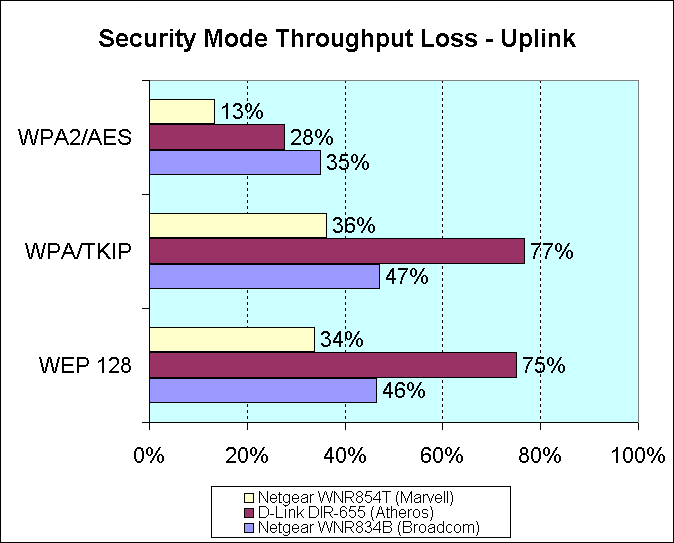
Figure 6: Security mode throughput loss – uplink
So it would seem that WPA2/AES is the only way to go for draft 11n wireless security. But, even then, you’ll still pay to play. WPA2/AES also throws in an additional curve with significantly different performance for down and uplink for two of the three chipsets.
The most consistent performer in both directions was the Marvell chipset coming in around 12% loss. The largest difference, 5% loss down, 35% loss up, was found with the best performer—the Broadcom chipset. The Atheros was more like the Broadcom, with 8% loss down and 28% up.
The sad thing about this is that manufacturers long ago built hardware encryption engines into their baseband/MAC chipsets in anticipation of the tougher number-crunching required by WPA/WPA2. But something seems to have been lost in the rush to 11n, and once again, the end-user pays a premium price for, in some cases, a leap backwards in performance.
I hope that this data brings anyone who is even thinking about going with an all-wireless draft 802.11n LAN to his or her senses. When the transition to 11n is finally over in 5 years or so—including a shift to the more spacious 5 GHz band for high-bandwidth applications—I’m sure the birds will be chirpier and the sun shinier. But if you need a reliable, high-bandwidth network, then wired will continue to be the only way to go.
Postscript: 100 Mbps Ethernet Performance Tests
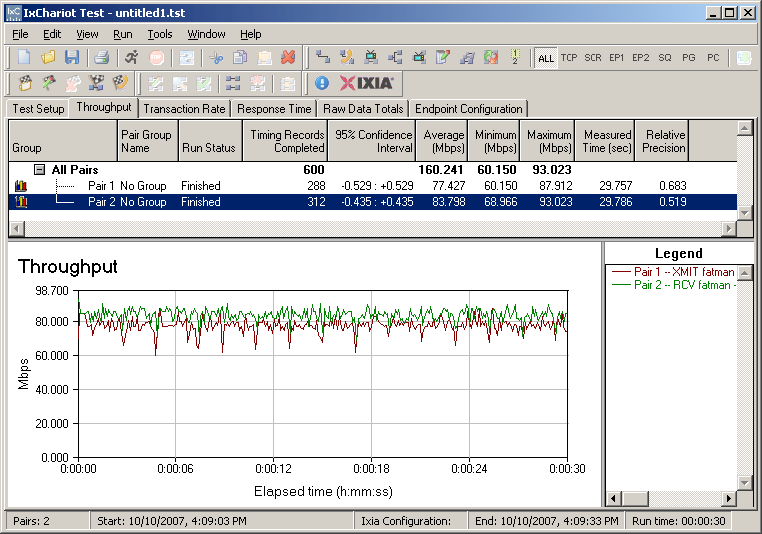
Since a few alert readers complained that I did not use real 100 Mbps throughput test results in the throughput vs. path loss comparison plots, here is the data.
I ran a few quick IxChariot tests using two machines running Win XP SP2. One is a 2.4GHz P4, the other an Athlon 3000+. Both have Intel PRO/1000 MT gigabit desktop adapters, plugged into 100 Mbps switch ports which autonegotiated 100 Mbps full-duplex connections.
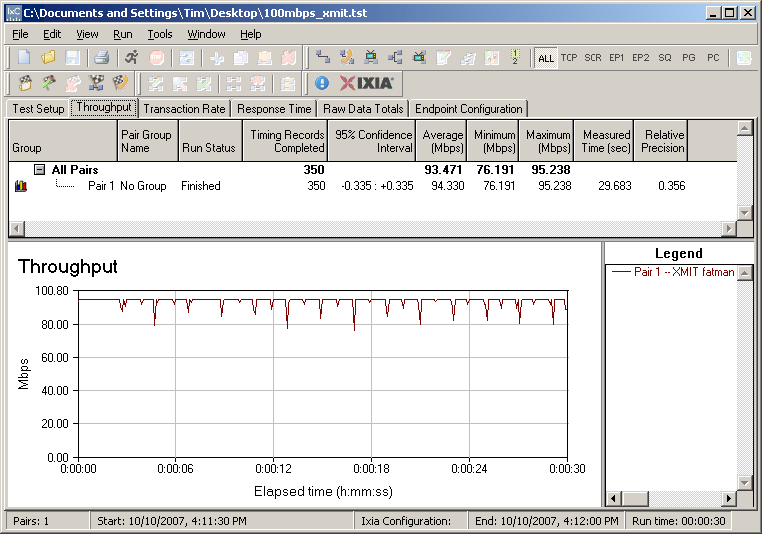
Figure 7: 100 Mbps Ethernet – Transmit
If the 100 Mbps line in Figures 1-4 bugs you that much, just subtract 7 Mbps. The story and my position on the subject don’t materially change.
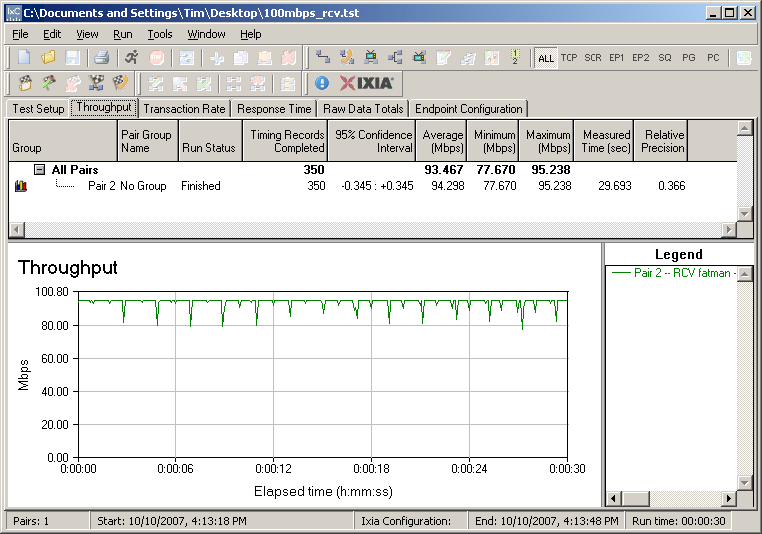
Figure 8: 100 Mbps Ethernet – Receive
And for the sake of completeness, Figure 9 shows test results with simultaneous receive and transmit tests run. The Windows Task Manager Networking tab showed 100% network utilization, but the Performance tab showed CPU Usage in the 20s.