

Introduction
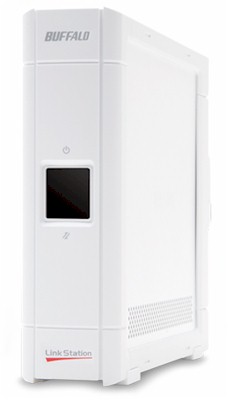
| At a Glance | |
|---|---|
| Product | Buffalo LinkStation EZ (LS-L500GL) |
| Summary | Low cost networked storage drive designed to be a simple to install and use as a direct-attached drive |
| Pros | • Good value (capacity for the price) • Dead simple to set up and use |
| Cons | • Disappointing performance • No flexibility or expandability |
Buffalo Technology is obviously familiar with the Network Attached Storage market, being one of the top producers, with a wide product line. One product they recently decided to add in order to expand their customer base is a low-cost, single-drive NAS that is as simple to use as an external direct-attached drive.
In other words, Buffalo set out to produce a product with the installation simplicity of a direct-attached hard drive, but the flexibility of a networked drive. While they achieved the goal of low cost and ease of use, they did make a serious tradeoff to get there.
The rear panel of the EZ (Figure 1) houses the power button (the small black button near the top), a recessed reset button, the fan grille, the 10/100/1000 Ethernet port, a slot for a locking cable and the socket for the power cable.
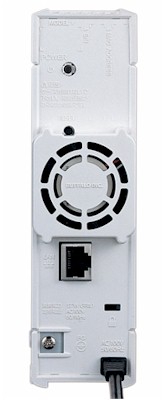
Figure 1: Rear view of the LinkStation EZ
The EZ includes a setup guide, power "brick," setup CD, and an Ethernet cable. It also comes with fairly easy-to-use backup software that has useful features such as multiple file versions and data encryption.
Setup
Setup of the EZ is, as expected, exceedingly simple. It comes with a Quick Setup Guide, but even without this, all you need to do is put the CD in and follow the instructions. If you can’t find the CD, you can download the NAS Navigator from Buffalo’s website, but you’ll be missing the Memeo backup software.
You can still access the EZ without any of these things, but you won’t be able to change any of the settings. However, since there is no password by default, if you weren’t planning to change any of the settings anyway, there’s no reason to install the NAS Navigator software (Figure 2).
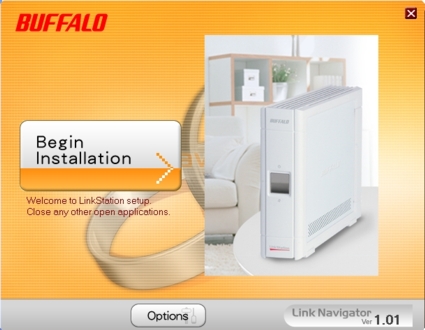
Figure 2: Installation of the Buffalo NAS Navigator software and setup of the EZ
The Setup Guide states that the EZ and NAS Navigator will work with a Mac, and although I have no doubt that it does, I didn’t have access to a Mac with which to test it.
Features
Owing to its “EZ” nature, the LinkStation EZ does not have many features. When the website says “Just run the Wizard and you are ready to go. There is nothing else to configure,” what they really mean is that nothing else can be configured. Many companies seem to think that simple and user-friendly mean that a product can’t have any options. Most people involved in technical or user support would probably agree that the best way to keep a device working is to ensure users can’t change any settings. Buffalo has taken the first approach.
However, it would have been nice to see a little bit more flexibility with the EZ. The only settings you can change are the IP address (and DHCP configuration), the administrator password, the time, and whether or not to password protect the share; all of this is accomplished through the NAS Navigator (Figure 3). You can also run a disk check, and format the disk.
You can’t set the Workgroup (it’s stuck at WORKGROUP), manage users or groups, change the default share name (share) or workstation name (LS-LGL plus the last three characters of its MAC address). Also, the EZ does not support email alerts, logging, telnet, SSH, FTP, or web access or administration. It also goes without saying that there are no media servers, etc. Servers require configuration, which is a design no-no for the EZ.
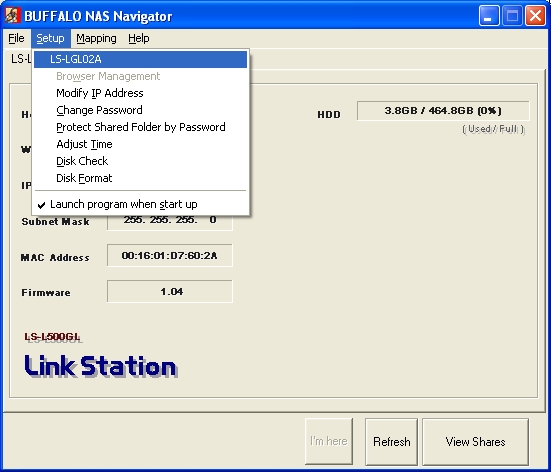
Figure 3: Functions and settings available through the Buffalo NAS Navigator
A nice thing about the EZ is that it comes with Memeo AutoBackup (for the PC), shown in Figure 4, and Memeo LifeAgent (for the Mac). Although Memeo touts the software as being easy to use, it seemed to be harder than necessary to operate.
Memeo states that if you use the SmartPicks feature (which they recommend), "The initial backup process can take a considerable amount of time." That could explain some of the results discussed later. After the initial backup, AutoBackup only performs Incremental backups and does not need to index your files further, which means other backups will not take nearly as long.
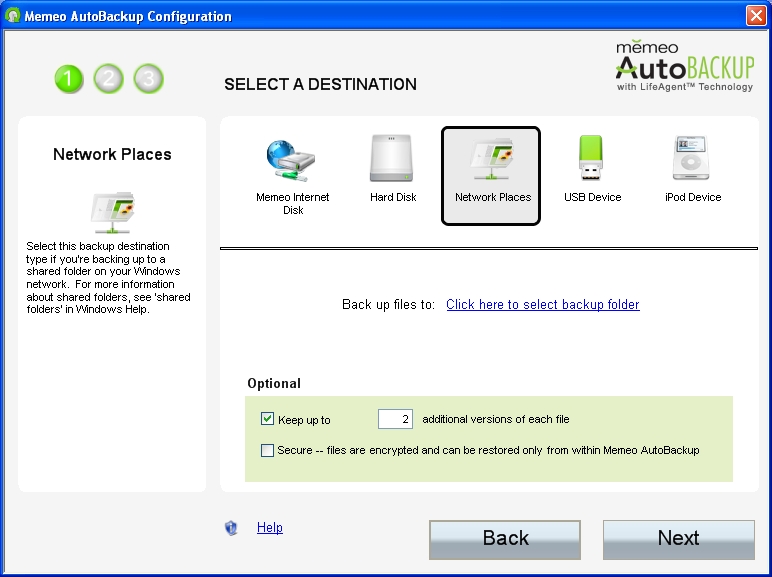
Figure 4: Memeo AutoBackup Configuration Wizard
Memeo also allows you to select how many versions of each file you want to archive. If you choose to allow Memeo to load on startup, this means your files get backed up as soon as they change. This is nicer than the Shadow Copy feature in Windows 2003 and Vista, because it is per-file and not per-volume.
Another good feature of AutoBackup is that you can choose to include the Memeo OneClick Restore program along with your backup, so that you can restore your archives on another computer (or the same computer, in the case of hard drive failure) without having to install the Memeo software. Finally, AutoBackup allows you to password-protect your backups using 128-bit encryption.
Internal Details
Internally, the LinkStation EZ runs a Marvell 88FB6082 Media Vault processor (ARM926EJ) with 16MB of RAM and 256K of Marvell Flash memory, and an 88E1112 Ethernet controller (Figure 5).
From an examination of its software, it’s clear that the EZ runs Linux 2.6 and BusyBox 1.1.1 with ash. The Samba version is 3.0.24. The internal filesystem is formatted as EXT3, while the NAS share is XFS.
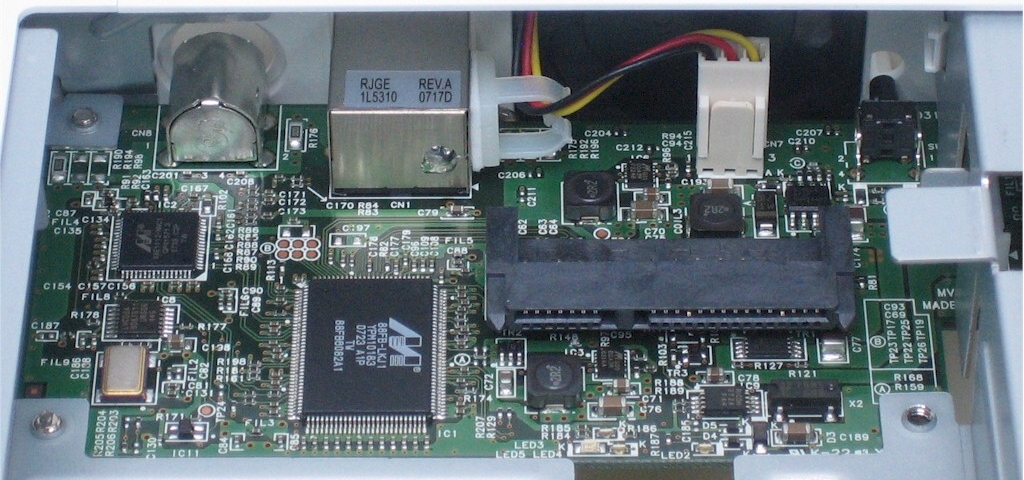
Figure 5: Mainboard of the LinkStation EZ
The hard drive of the EZ is a Samsung HD501LJ Spinpoint T166 500 GB SATA drive (Figure 6). The fan runs constantly, with no way to shut it off, and it’s fairly loud. There is also no way to set a spin-down time for the hard drive.
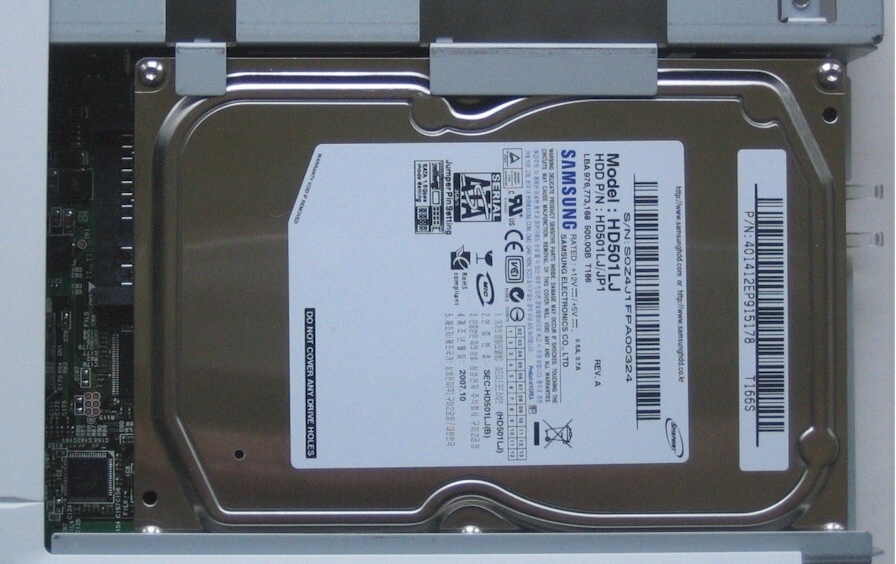
Figure 6: Samsung HD501LJ Spinpoint T166 500 GB SATA drive
While it’s possible to hack the EZ to enhance its features, the limited memory and processing power make it a poor candidate. You can explore this NAS-Central forum if you’re interested. Source code can be downloaded here (look for the "LS-GL series" links).
 See the slideshow for more internal photos
Performance
As mentioned previously, the performance of the LinkStation EZ is rather disappointing. This can probably be attributed to the lower-performance Marvell processor and small (16MB) memory. As you can see from the NAS Charts, the EZ ranks near the bottom overall, and certainly sits at the bottom of the recent Buffalo NAS line. Of course, it’s meant to be the bottom of their line, so that’s not really much of a surprise.
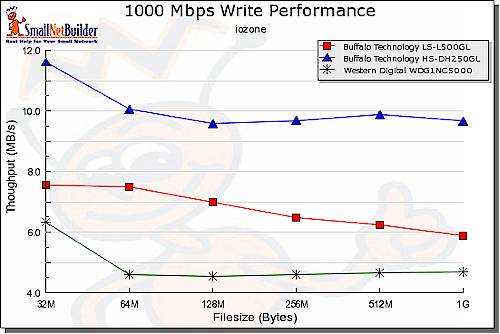
Figure 7: Write performance comparision – 1000 Mbps LAN
Figures 7 and 8 compare write and read performance with a gigabit LAN connection for the EZ, Western Digital My Book World Edition and previous-generation Buffalo Technology LinkStation Live. These were chosen because they are currently all available at similar price points (although the LinkStation Live is the 250 GB model).
The EZ falls between the WD My Book and LinkStation Live for both Read and Write. Performance with a 100 Mbps LAN connection yields lower results, but the same relative positions, except for 100 Mbps Read, where the EZ actually does better than the Live at some file sizes.
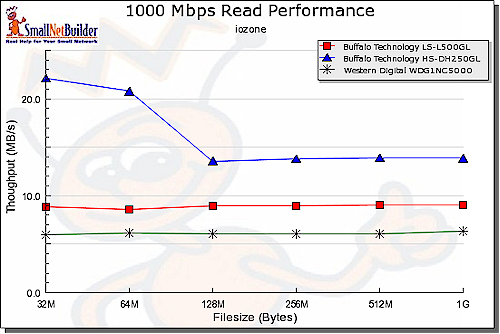
Figure 8: Read performance comparision – 1000 Mbps LAN
For the busy or non-technical users the EZ is aimed at, its performance might not be much of a problem. However, don’t be fooled into thinking you can pick it up for its low price and use it as anything other than a simple file-sharing or backup device. Even with its gigabit Ethernet and SATA drives, it’s not very fast.
Performance – more
In Figure 9, you can see the results of the "top" command in Linux, obtained by telnetting into the EZ, using the acp_commander tool from the NAS Central. Although it’s not an altogether fair test, since some resources are used by the top command and by logging into the EZ, you can see that simply performing a Windows Backup to the EZ uses around 87% of the CPU and leaves only 560K of memory free.
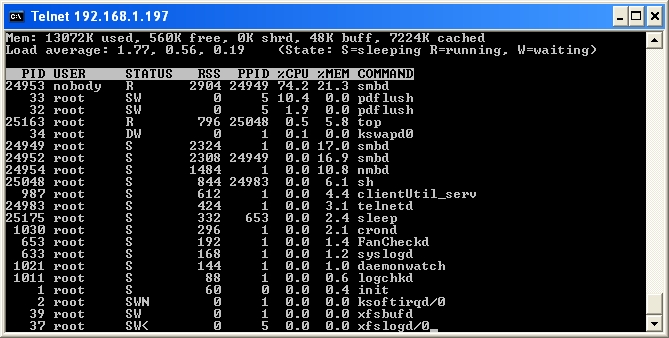
Figure 9: Top command during a Windows Backup operation
Although it’s not really Buffalo’s fault, the included Memeo AutoBackup software took an incredible amount of time to perform its initial backup. It took literally over 48 hours to back up around 14 GB (around 14,500 files and 250 directories) of data. I don’t know the exact amount of time because I wasn’t in front of the computer when the backup finished.
Even if it copied the data twice, verified it, and copied it again, there’s still no justification for that amount of time. One can only imagine how long it would take to back up a whole computer, let alone multiple computers.
On the plus side, copying a directory (1.26GB, 282 files) via Windows Explorer took only about 10 minutes. Backing up the same directory with Windows Backup took 7 minutes and 19 seconds. Memeo only took 14 minutes and 37 seconds for this directory.
Conclusion
The Buffalo LinkStation EZ comes with a 500 GB hard drive and, as I write this, costs from $146–$220. This segment of the NAS market has relatively little competition, with most of the other devices either low-end BYOD boxes or lower-capacity older models.
There are NASes out there that perform better, have more features, and provide better data security. There are even some NASes for around the same price that do more and have better hardware. However, there aren’t any comparable NASes that don’t have to be configured at all and don’t have any settings for users to mess up.
The LinkStation EZ is more like a USB hard drive that works on a network. If you can attach a USB hard drive to a computer and share it over the network, you can use the EZ—with the added bonus that you don’t have to turn on a computer to make it available.
Although it would have been better if the EZ were a little more configurable, or if Buffalo hadn’t locked down the device so that advanced users could tweak it, the EZ is not trying to accomplish any of those things. The EZ is trying to provide non-expert users with the NAS advantage without any of the hassles, and it, at that, it succeeds.