

Introduction
| At a Glance | |
|---|---|
| Product | HP mv5150 Media Vault Pro (mv5150) |
| Summary | Two drive Linux-based system with support for RAID 0,1 with built-in media servers and web photo/file access. |
| Pros | • Handsome, rugged industrial design • Easy access to Root for those who want to tinker • Built-in DLNA multimedia server, iTunes • Good offering of network protocols |
| Cons | • Easy access to Root for those who want to tinker • Drives not hot-swappable • No email/SMS notification • No jumbo frame support • Sluggish user interface |
At CES in January of this year, HP announced three new storage products. Each of HP’s new Media Vault NASes is built on Linux rather than on the Windows Home Server platform as the Media Smart server is.
The entry point of the new Media Vault line is the mv2120. Aimed primarily at the home user, this dual-drive NAS features 500 MB of storage and is priced at $299.99. The next step up is the $599.00 Media Vault Pro mv5140 with 1TB of storage. And the top of the line mv5150, our review unit, features 1.5TB of storage with a price tag of $799.00.
The mv2120 ships with a single drive, but you can add capacity with the purchase of a second drive. The mv5140 and mv5150, the “Pro” versions, both ship with two drives (500GB and 750GB respectively).
As with virtually all dual drive NAS products, each of HP’s new Media Vaults support RAID 1 (mirroring) to provide fault tolerance for your data. Additionally, the storage on each media vault can be expanded using the 2 included USB 2.0 ports. All of the new Media Vault NASs have a built-in DLNA media and iTunes servers and feature file and photo sharing via the Internet.
Product Tour
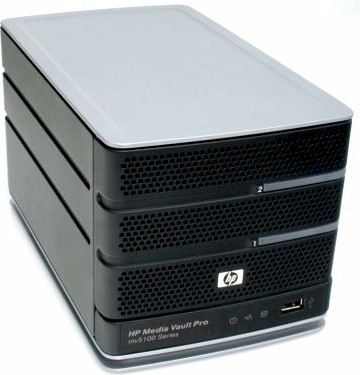
The Media Vaults ship in a handsome black metal housing that measures 5.472 (W) x 5.374 (H) x 9.623″ (D). The top grey panel provides a nice accent color. On the front panel there’s a “light bar” drive status indicator for each drive, one of the Media Vault’s two USB 2.0 ports and three LED status indicators along the bottom of the front panel.
The LEDs indicate network activity, power, and health. Through system preferences, you can set the LEDs for on, dim or off. When “off” is selected, the power LED stays illuminate. Interestingly, the drive status LEDs do not show drive activity – only status. The perforated holes on the front panel not only give the Media Vault a nice look, but also help provide ventilation to keep the drives cool.
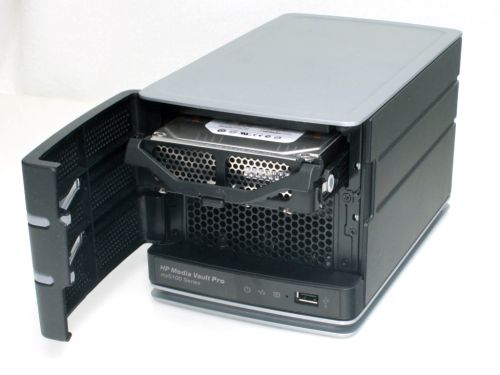
Figure 1: Media Vault with front panel open
The front panel opens to reveal the two drive bays (Figure 1). The drive in the top bay mounts in a tray and is easily removed. The other “system” drive requires the removal of four screws in order to get access to the drive.
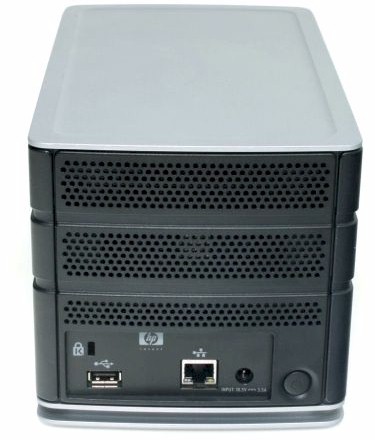
Figure 2: Media Vault rear panel
The rear panel is quite simple (Figure 2). There a power switch, power connector, the second USB 2.0 port, security slot for a standard Kensington cable lock and an RJ45 10/100/1000 Ethernet jack. Though the Media Vault supports Gigabit Ethernet, it lacks support for jumbo frames found on competing devices such as Buffalo’s LinkStation Pro Duo, (reviewed) QNAP’s TS-209 Pro (reviewed) or Synology’s DS-207 (reviewed).
Component Details
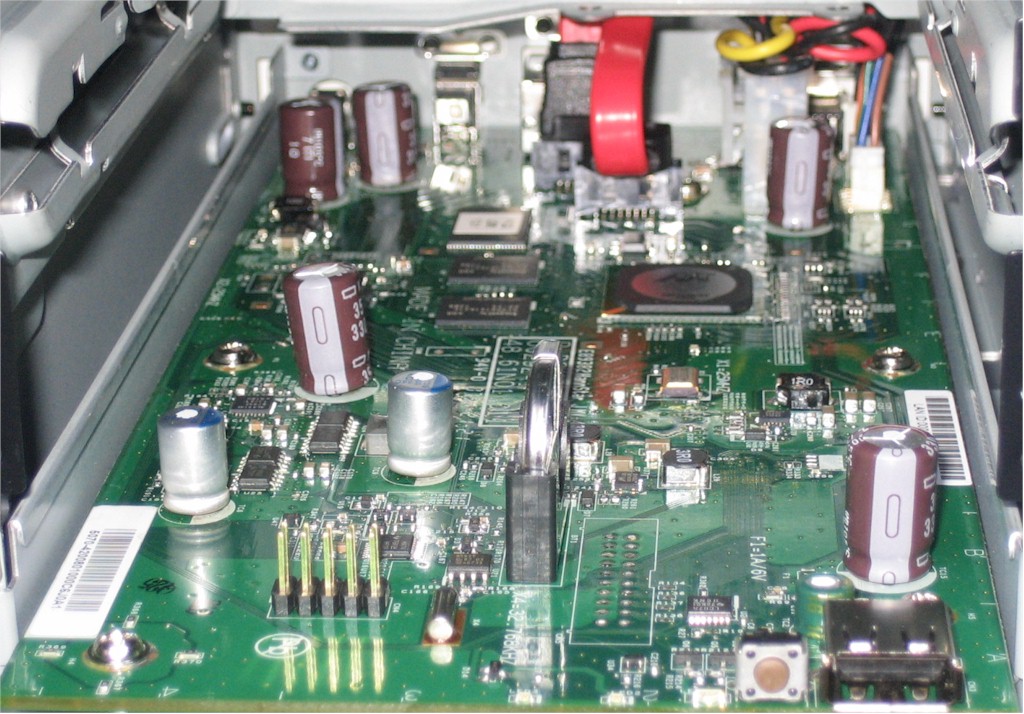
Figure 3: Media Vault main board
The Media Vault is powered by a Marvell 88F5182-A2 Orion processor and 128 MB of RAM. A Marvell 88E1188 gigabit Ethernet controller, found in most gigabit NASs, provides the network connectivity.
 See the slideshow for more admin screens and internal details.
Installation
HP has made the setup and installation of the Media Vault a fairly painless procedure. A large (16” X 33”) two-sided setup poster guides you through the process. The poster tells you what’s in the box, shows you how to connect the power and network cables, instructs you to run the installation software and illustrates each of the major features of the Media Vault.
The installation wizard installs the HP update program, any missing components of Microsoft.NET 2.0, the HP Media Vault Pro control center and backup software from NTI (more on backup later.)
The setup poster instructs you to place your firewall software in “learn” mode, as a number of programs need to access the network. That’s good advice, as on several of my computers, each running a different firewall, I allowed access to all of the programs being installed. Yet the first time through, neither computer could find the Media Vault on my network. But the second time I tried, the Media Vault was found by both systems. Of course, by that time, I already had learned the IP address of the media vault from Network Magic running on one of my systems, and had logged into the management console.
Features
Once the installation is complete, you launch the HP Control Center (Figure 4) from an icon in the System Tray.
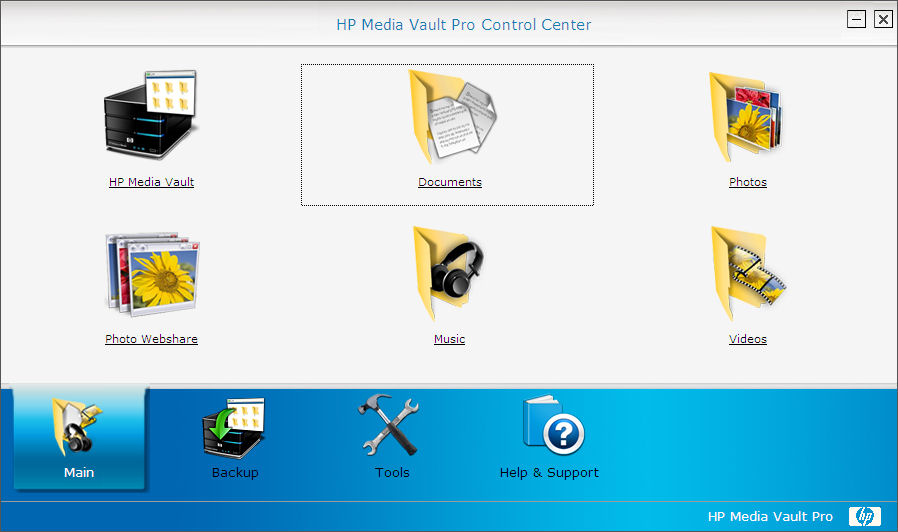
Figure 4: HP Media Vault Pro Control Center
The Center has four tabs across the bottom. As you select a tab, options for that tab will appear in the top portion of the screen. For the “Main” tab each of the options above will take you to the root of one of the pre-defined shares on the Media Vault. Clicking on HP Media Vault icon will show you all of the shares on the device.
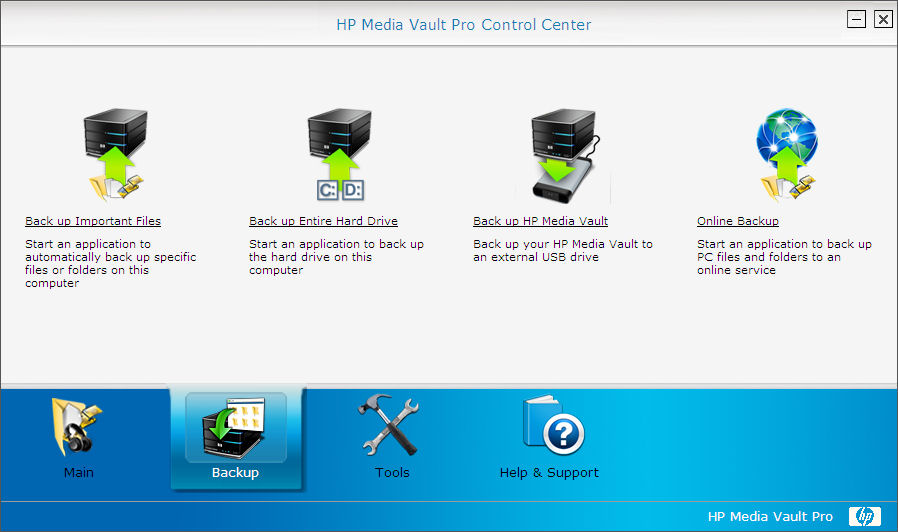
Figure 5: Media Vault Control Center Backup
The Media Vault provides four ways to back up your data (Figure 5). First, it ships with OEM versions of NTI’s Drive Shadow (Version 3) and NTI’s DriveBackup 4. (The non-pro mv2120 does not include Drive Backup.)
Drive Shadow (Figure 6) lets you create simple backup jobs for popular file types (Music, video, photos, documents and your desktop) or create custom jobs that include specific directories. You can also specify how frequently to backup and the number of file revisions (none, all or user specified) to keep. As you create the job, you select a volume/directory on the Media Vault as the backup target destination. My test jobs ran as expected.
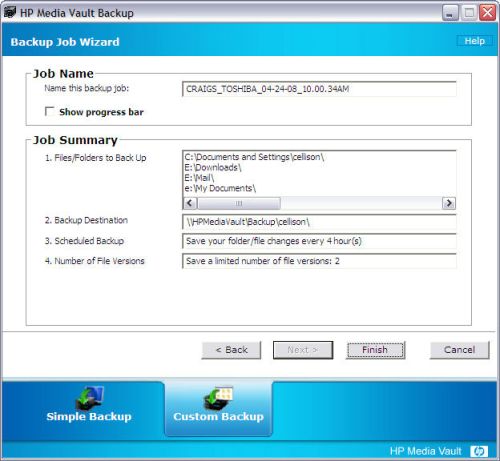
Figure 6: Drive Shadow custom backup job summary
Features – more
DriveBackup (Figure 7) lets you create a disk image of each partition on your local hard drive. In the case of a hard drive failure, you can restore the image(s) to a new hard drive and all of your applications, settings and data files will be restored. You don’t even need to start with “bare metal” (a blank, formatted drive) and reload the operating system and applications or restore data.
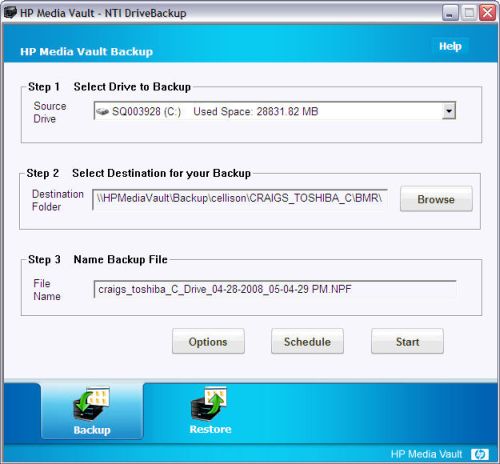
Figure 7: NTI DriveBackup job summary
This “Bare Metal Restore” saves a significant amount of time if you experience a hard disk failure. To restore, you merely reboot the computer using a Linux-based CD and restore the image from your Media Vault to a new hard drive.
To test this, I created images of my “C” and “D” drives on my test notebook. I then blew away system files on the C drive. Using the boot disk, I ran the restore utility. Interestingly, my options were to restore the C drive, or the C and D drive, but not the D drive individually. And, I couldn’t select the “C and D” drive option. Fortunately, I was able to restore the C Drive without incident and the system booted properly.
I also tried to create an image of a second notebook using the NTI scheduler. It kicked off at the scheduled time, but aborted 7 minutes later with a General error (code 64) – whatever that is….
The Media Vault Pros (again, not the mv2120) also come with a subscription for online backup through HPs partner, Spare Backup. The subscription is for 2 GB of data and up to 25 users. Of course, you can pay for more storage.
I installed the client and ran some test backups. I found the user interface to be a bit confusing, but a call or two to tech support, who answered quickly, resolved the issues. 2 GB is not a lot of storage, but it is included. But before buying more, I’d investigate a few other online storage services, such as Mozy (reviewed), and compare features and ease of use.
Note, however, that Spare Backup lets you back up network shares (as mapped drives) and external drives, while Mozy Home does not. This lets you use Spare Backup to back up shares on the mv5150 itself instead of only client machines.
The fourth option is back up to an external USB drive. A click on that tool takes you to the USB Backup tab in the web administration interface (Figure 8). There, you’ll see the USB drive as well as each share and how much space has been used on each share. The Media Vault reformats the USB drive using the EXT3 filesystem before creating the backup.
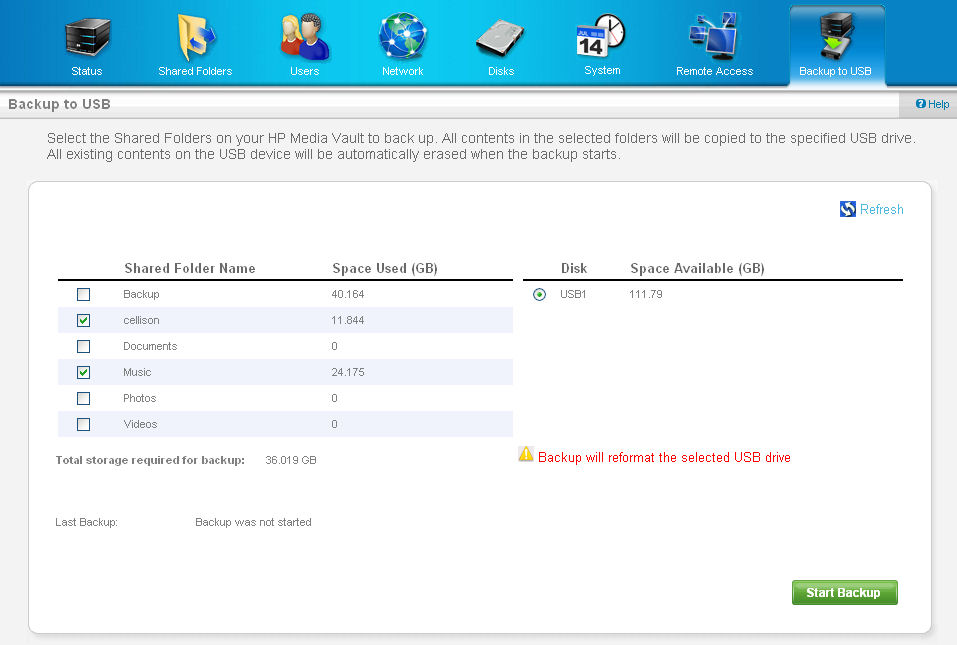
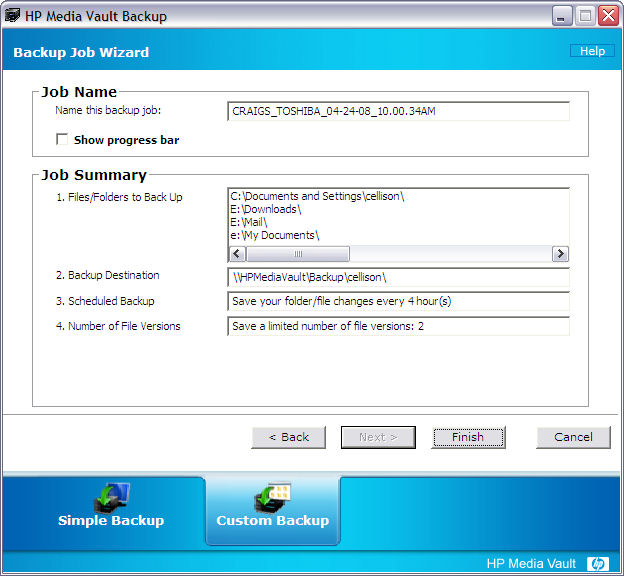
Figure 8: Media Vault Backup to USB screen
Tools
Tools is the third major tab on the Media Vault Control Center (Figure 9).
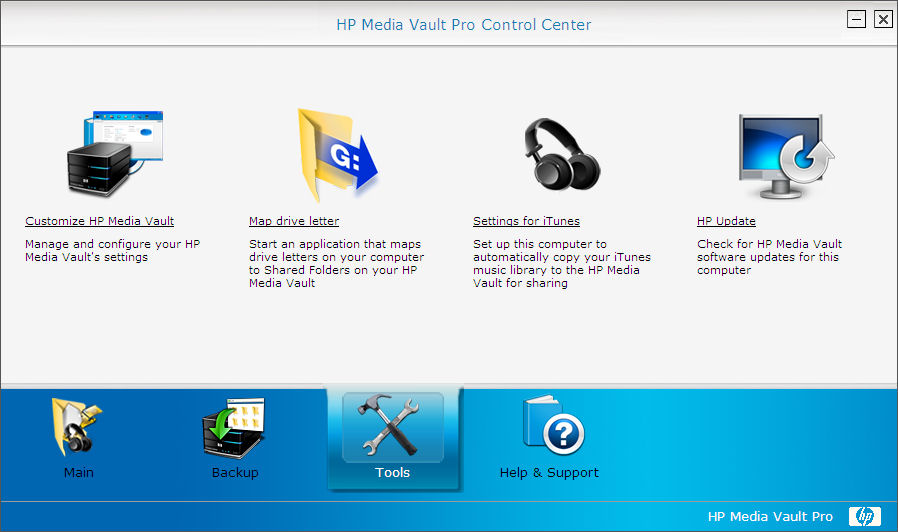
Figure 9: Media Vault Control Center Tools
The tools on this tab let you map drive letters to shares on the Media Vault, take you to the main administration web page for the Media Vault and set up your computer for copy your iTunes library to the Media Vault. You can also check for updates from HP. The Customize HP Media Vault icon takes you to the Media Vault’s Web Administration, which I’ll cover next.
Web Administration
The Media Vault was designed to be a simple device, and as such, there are relatively few configuration options compared to some of the other NASes on the market. I’ll touch on each menu item only briefly.
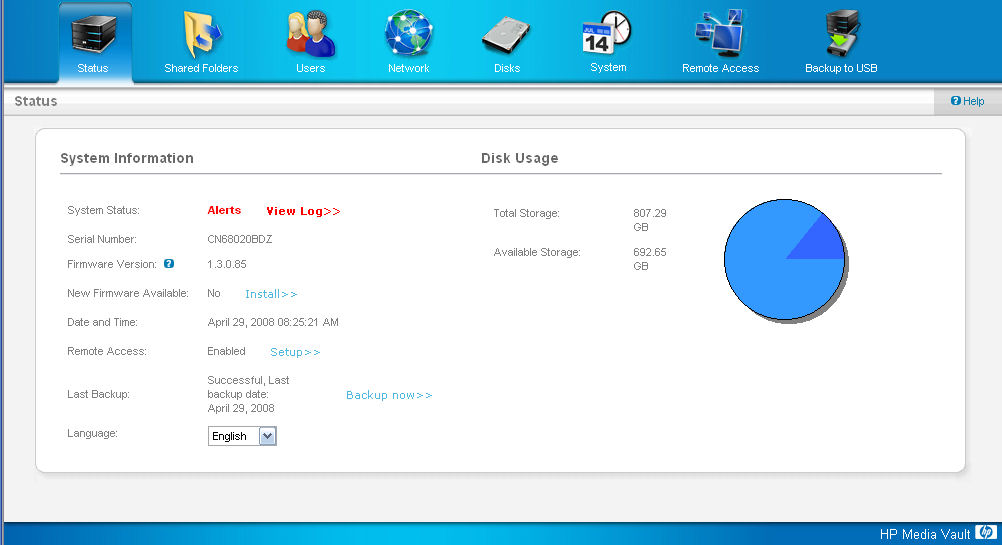
Figure 10: Media Vault Pro home administration page
Status – This is the home landing page after you log into the Media Vault’s configuration page (Figure 10). Here you’ll see the status of the device as well as a pie chart showing free and used space. The total space includes any external USB drives.
Shared Folders – This menu tab lets you create, edit or delete shared folders. By default, the five folders created by the system are public and cannot be deleted. However, they can be password protected or set to be private shares.
Shares that you create can be either public or private. Private folders require a user name/password. By default, all connected USB drives are public, but you can change them to private, or password protect them. For each volume, you can enable or disable media streaming.
Users – Here you create users and assign rights (RW, RO or none) to shares that you have created. You can also designate a user as Photo Webshare manager. The Media Vault does not support groups, nor is there any Active Directory functionality.
Network – In this tab, your choices are limited to setting the workgroup name, entering static IP address information or enabling the DHCP client. You can also enable secure HTTP (HTTPS) for remote access.
Disks – On this screen (Figure 11), you can add/remove drives, check disk usage for each drive and view drive status. (More on this later)
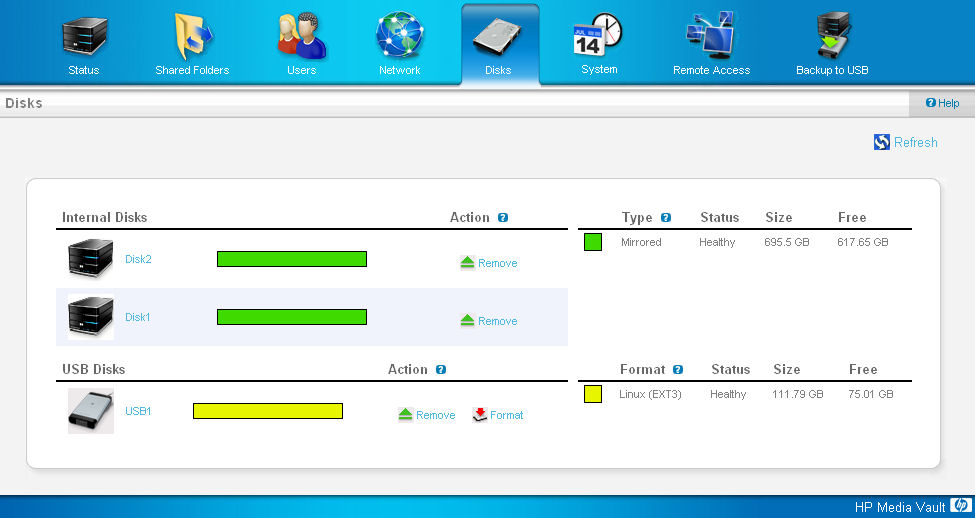
Figure 11: Media Vault Disks page
System – This menu allows you to change the Media Vault’s name, set the admin password, control the front panel LEDs (On, Off, Dim), set the drive spin down time and set the system time/date. You can either synchronize it with your browser, or input your favorite NTP time server.
Remote Access – This is where you set up the Media Vault for remote access. Once enabled, you have secure web access to your private files as well as HP’s photosharing application.
The Media Vault comes with a subscription to TZO’s dynamic DNS service. DDNS ensures that your domain name will resolve to the public IP address assigned to you by your ISP that, for most people, changes from time to time. The supplied domain is gotomyhp.com.
I registered a gotomyhp.com name and my public address instantly resolved to that domain name. The setup was seamless and took only minutes to accomplish.
In order to have remote access to a Media Vault behind a router, you also need to set the router to forward port 80 (and 443 if you enabled secure HTTP) to the IP address of your Media Vault. You can either do that manually, or, if you have a router with UPnP enabled, let the Media Vault configure your router for you. As a security measure, I disable UPnP on my router, so I set it up manually.
Backup to USB – previously covered. However, I should mention that after creating a backup of selected volumes, the disks page showed the correct USB disk usage, but this tab showed the total volume of the USB drive. Perhaps that’s because each backup reformats the external drive, i.e. this his function doesn’t do incremental backups. Since the Media Vault ships with NTI’s Shadow, you have much more control using client-based backup than this integrated function.
Multimedia / Remote Access
The Media Vault includes a UPnp AV / DLNA media server as well as an iTunes server. To test the iTunes server, I set the notebook with my iTunes library to copy its library to the 5150. I expected the library to appear in iTunes shortly after the file copy completed, but it didn’t.
HP advised me to reset the media server (system tab) and that solved the problem. After that, the Media Vault appeared in both PC and Mac versions of iTunes on my various test systems. The server includes a function that is designed to let you aggregate your iTunes content from multiple computers. However, that utility doesn’t “de-dupe” your library.
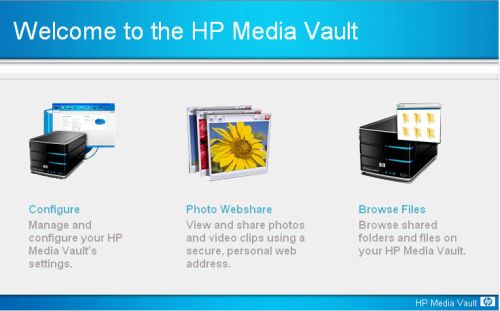
Figure 12: Media Vault Home Page
Figure 12 shows the landing page when you access the Media Vault’s IP address– either remotely or locally. The Media Vault includes a Photo Webshare application, which, as an avid photographer, I was looking forward to using. After all, I have close to 30,000 images stored on my server. However, I was disappointed with the feature.
In order to upload photos into Webshare, you must use a browser. If you use IE, there’s an active X control that will let you upload multiple picture. But if you’re using Firefox, you’ll upload them one at a time!
Note that there is a public \\photos share that is created by default, but it doesn’t appear to be where the Photo Webshare files live. When I mounted that share, after having uploaded numerous photos, it was completely empty. I also copied a folder with jpeg files to the \\photos share and then logged into Photo Webshare. No album was there!
After the tedious upload process, the Media Vault processes the images and creates thumbnails. However, I found that if I uploaded more than about a dozen images at a time, my album would disappear. HP is looking into my problem.
By contrast, I have found that Synology NASes, such as the DS207 (reviewed), have a much simpler solution to photo sharing. You merely copy files/folders into the pre-defined share named “Photo” and the Synology NAS creates the thumbnails – uploading through a browser is unnecessary.
Moving on, clicking on Browse Files takes you to another login screen. You must log in as a registered user – there is no guess access. Once you’ve logged in, you have access only to private folders that you have rights to (Figure 13). You can’t access any of the public folders, which, according to HP, was a design decision.
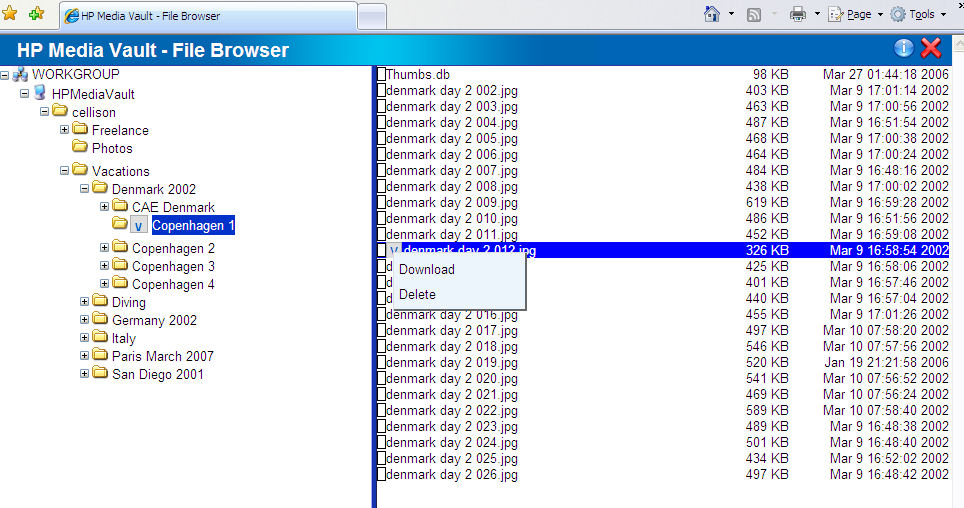
Figure 13: Remote File Browser
Nor is there way to make data in public folders accessible remotely – at least not through the HP Management utilities – unless you change the share to a private share.
With all of this focus on security, you would think that HP would tightly lock down the Media Vault. But HP has left an SSH service running. All you need to do is to login via SSH using the administrator username and password that you set up for normal admin access and you have root access! There are several sites that will help you customize your Media Vault including www.k0lee.com/HPMediavault and www.myhomeserver.com.
Fail Recovery
Of course, one of the reasons you purchase a RAID system is for fault tolerance. For my fail recovery test, the Media Vault was configured for RAID 1. I had previously copied about 60GB of data and was copying an additional 4GB when I pulled the top drive (2) out. Within about 8 seconds or so, the health indicator light turned red. Shortly thereafter, the light bar adjacent to Drive 2 went out.
As expected, the Media Vault remained online, and my file copying continued without a hitch. I logged into the admin console and the only notice on the home page was “alerts – view log”. But in viewing the log, I found confusing information. The log indicated that both drives failed (Figure 14).
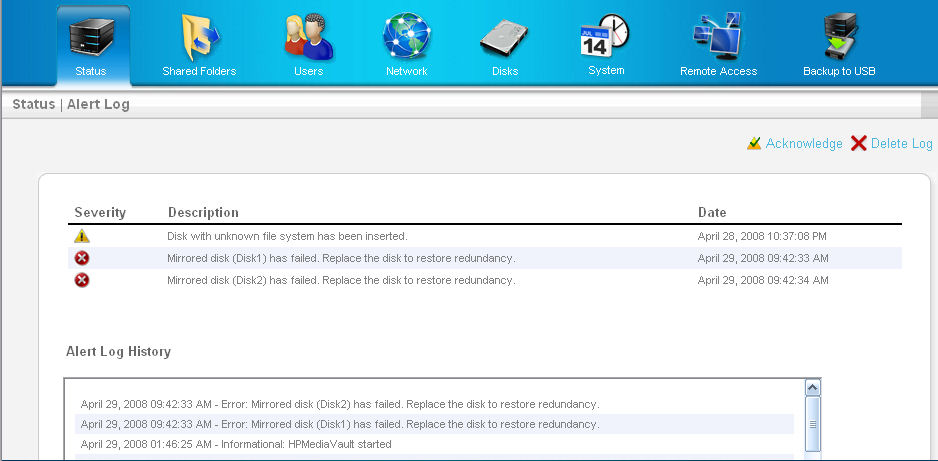
Figure 14: Alert log showing both drives failed
However, the “Disks” page reflected what was really going on (Figure 15).
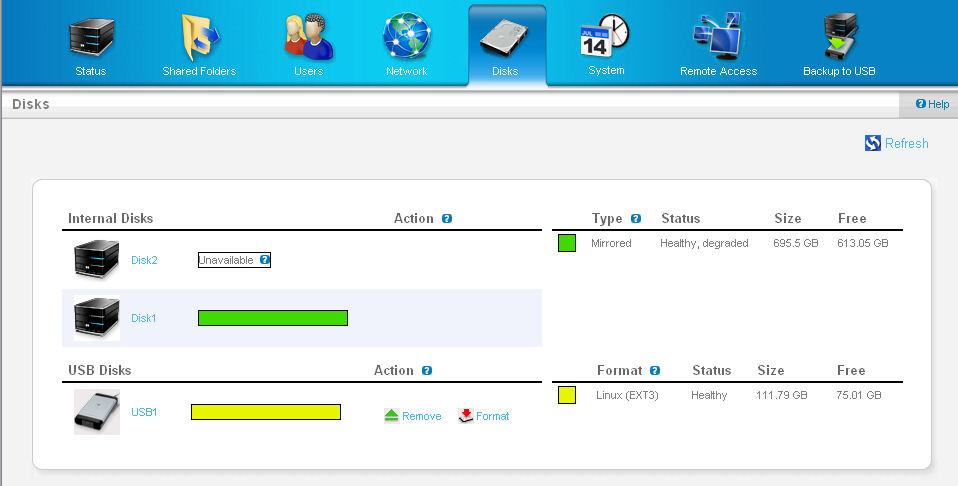
Figure 15: Disks page showing disk 2 unavailable
Since the Media Vault doesn’t “officially” support hot swap, I shut it down, re-inserted Drive 2, re-booted and found the Drive 2 “light bar” showed purple. According to the User’s Guide this means that "a hard drive has been installed, but has not been initialized". When I logged into the device, the RAID still showed as degraded on the disk page.
I clicked on the small “fix” icon and the mirror started rebuilding with an estimated 10 hour of rebuild time (which actually turned out to be 6-7 hours). Interestingly, shortly after the rebuild started, the health indicator return to normal blue status, as did the light bar next to Drive 2! This would indicate that the drive was back to fault tolerant mode. However, a check of the disk status page showed that the array was only 5% rebuilt! This is a very misleading situation and HP should fix this as soon as possible.
Performance
Tim already included some NAS Chart throughput vs. file size plots in the slideshow. For my charts, I decided to look at all dual-drive NASes since that’s the primary competition for the Media Vault. Read and write charts for a 1000 Mbps LAN connection are shown in Figures 16 and 17. Of course, you can drill down deeper by selecting other tests and products to compare.
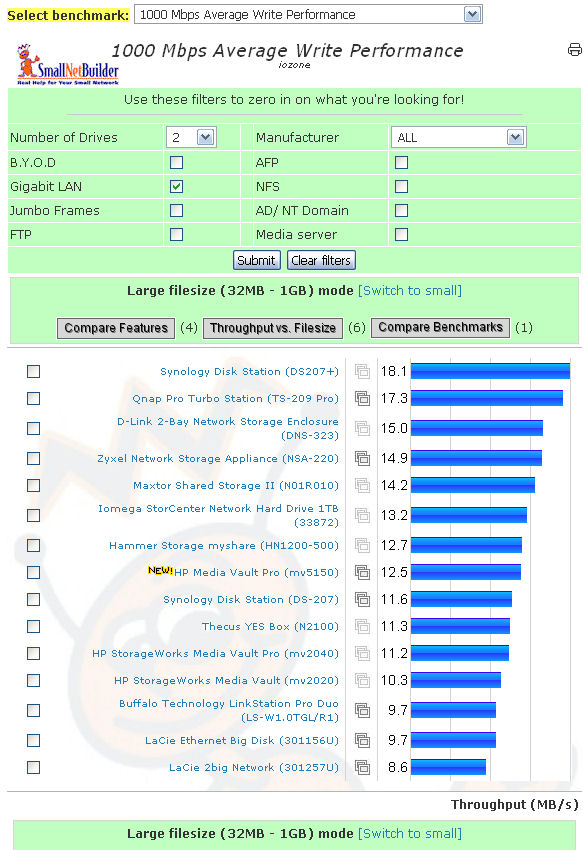
Figure 16: 1000 Mbps Average Write Performance ranking
For writes, you can see that the Media Vault’s performance is right in the middle of the pack.
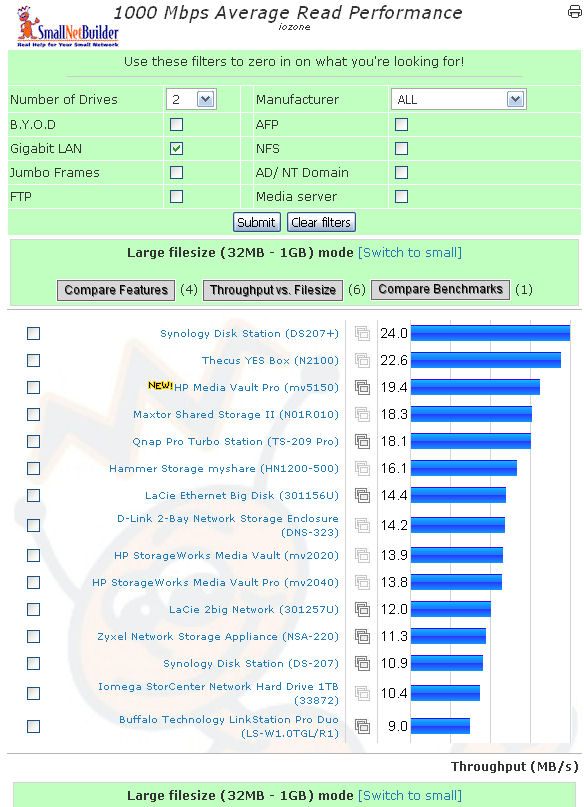
Figure 17: 1000 Mbps Average Read Performance ranking
For reads, the mv5150 did much better, placing near the top of the charts for two-drive NASes.
The throughput vs. filesize plots in the slideshow compare the 5150 with earlier-generation mv2020, mv2040 Media Valuts and the EX475 Media Smart Server. For non-RAID mode with a 1000 Mbps LAN connection, the write speed of all of the Media Vaults is virtually the same and there is not much difference for read.
Closing Thoughts
The revamped Media Vault line seems to be trying to satisfy both home and small-business users and misses the mark on both. All three models use identical hardware with the only difference being the installed hard drives. And even though they use the high-performance Marvell "Orion" processor and 128 MB of RAM, there seems to be little performance improvement vs. the previous-generation Media Vaults that have only 64 MB of RAM and use the Broadcom 4785 processor.
The only functional differentiation that the mv5150 "Pro" has, is in its bundled software for drive-level and online backup. But there are better alternatives for these applications and you probably already have your own favorites. So even if I owned a Media Vault, I probably would choose different applications.
From a small business prospective, the Media Vault lacks many features needed to be a viable business NAS, such as (in no particular order):
- Support for Active Directory
- Hot Swappable drives
- Support for UPS for automated safe shutdown
- NAS to NAS backup capabilities
- FTP and secure FTP
- Jumbo Frame support
- Email/SMS notification of events (or classes of events)
- Logging of remote access sessions
- Integrated disk scan and defrag utilities
- Volume quota restrictions
While you might disagree with some of these items, at least some of them are found on most competing "business" NASes. And even if you can forgive the lack of these features, the inability to change the web service ports, lack of web access to "public" shares and the security breaches possible from root-level access via SSH are additional arguments against serious business use.
As a personal or home server, the Media Vault was easy to set up and the default shares were immediately available to all users – without the annoying login prompt that greets users on some other products. And, once I performed the iTunes server restart, it ran without a hitch during my time with the product.
But the web photo sharing application is, at best, annoying to use and, at worst, broken (I never did successfully create an album with 100 images). And it pales in comparison to what’s available from Synology and other manufacturers.
On a more positive note, the Media Vault has a handsome, rugged industrial design that befits a company with HP’s reputation. It supports HTTPS, and if enabled, automatically redirects HTTP requests. Setup of remote access with TZO’s DDNS service was quite easy and making the Media Vault visible on the web using a personalized domain name took only a few minutes. And, of course, for the tech savvy, with root access you can modify it to your liking.
Though I like the design, and despite the power of HP’s brand, I encountered enough problems and the Media Vault is missing enough small business features that I wouldn’t recommend it to my small business consulting clients. And, as a home-based NAS, I prefer either Synology or QNAP NASes that offer built-in LAMP server capability as well as better photo sharing applications (although at a significantly higher price).
But if you like what you see in the Media Vault Pro, I’d advise buying the mv2120 instead and "upgrade" it with your own 500GB SATA drive and your favorite backup applications. You’ll come out hundreds of dollars ahead and have the backup apps that you prefer.