

Introduction
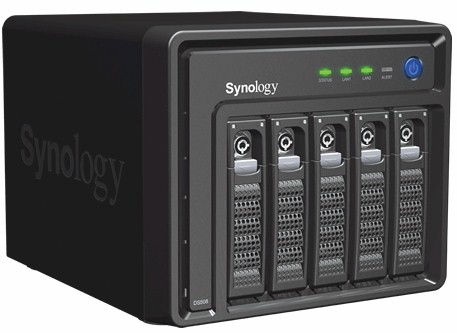
| At a Glance | |
|---|---|
| Product | Synology Disk Station (DS508) |
| Summary | Five drive BYOD SATA RAID 5 NAS with multiple server functions |
| Pros |
• 2 Gigabit Ethernet ports with jumbo frame support • RAID 1,5 and RAID expansion • Hot Swappable drives • Built-in servers for Web, FTP, iTunes, Printer, UPnP AV, Photo sharing, Backup, and Bit Torrent download. • Direct recording from IP-based cameras • High performance |
| Cons |
• Very expensive • Status indicators didn’t show drive rebuild • No home page alert or status page status showing RAID in degraded mode • Very limited documentation for using built-in web server/MySQL |
Over the course of the last year, we have reviewed many Synology NASes ranging from the single drive DS107 to the dual drive DS207 and finally the four-drive CS407. We found that each of these products offered an excellent set of features in an easy-to-use package.
Synology recently added three new products to the top end of its product line. Two of the products are rack mounted servers and the third is the DS508. The 508 is a desktop five-drive BYOD SATA NAS , which, like its siblings, is loaded with features.
We have already posted a slide show, performance charts, and preview of the DS508, so I’ll focus primarily on the new features, as well as the new user interface.
 See the slideshow for more Feature info and internal photos
Synology enables virtually all of its software features in each of its products. However, differences in hardware obviously impact performance and, in some cases, provide additional capabilities on higher end products.
For example, the DS508 comes with dual gigabit Ethernet ports that each support up to 9K jumbo frames. Each port can be connected to the same subnet or to different subnets. Currently, the DS508 doesn’t support trunking or failover, but those features may be added in the future.
For the energy-conscious consumer, the DS508 is also the first Synology product to offer scheduled power on. Other Synology products offer scheduled power off, but you have to manually turn them back on.
For businesses that require high availability, the DS508 is the first Synology product to offer hot-swappable drives. Even though the CS407 has RAID 5 capabilities, it requires a power down cycle to change out a defective drive. For the security-conscious administrator, the DS508 also has individual locks that secure the drives in their bays. Finally, the DS508 has an eSATA port on the rear panel for connecting an external SATA drive for storage expansion.
In March, Synology released the new DSM 2.0 (Disk Station Manager) management interface. Based on AJAX, the new management console provides a slick, responsive interface to all of the functions on the server.
The release of this new interface also added new features that are now common to all of the Synology products. If you have an older product, check the Synology support site to see if your device can be upgraded. I upgraded my D107+, and it’s difficult to tell the interface apart from the one on the DS508.
Like all Synology products, the web management portal is on port 5000. Optionally, you can manage the NAS over HTTPS on port 5001. Through the UI, you can also direct HTTP requests to be automatically forwarded to the secure port.
The new UI lets you log into the Management console, the File Station, Audio Station and Surveillance Station from a single place (Figure 1) – a definite improvement over the previous UI that required separate logins. However, the Photo Station requires a separate login and the user list is separate from the system user list.
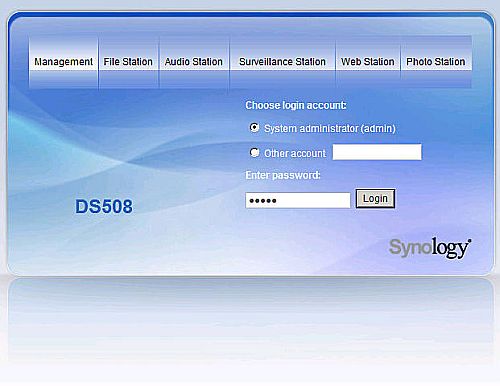
Figure 1: DSM 2.0 login page
New Interface Tour
Once logged into the management console, you’ll find each of the server’s functions arranged in a collapsible tree on the left side of the interface (Figure 2). The large window contains wizards for six commonly used features. You can also drag up to 10 of your most frequently used functions to the “My Favorites” section in the center of the screen. The interface is also scalable, so you can resize it to fit your personal preferences.
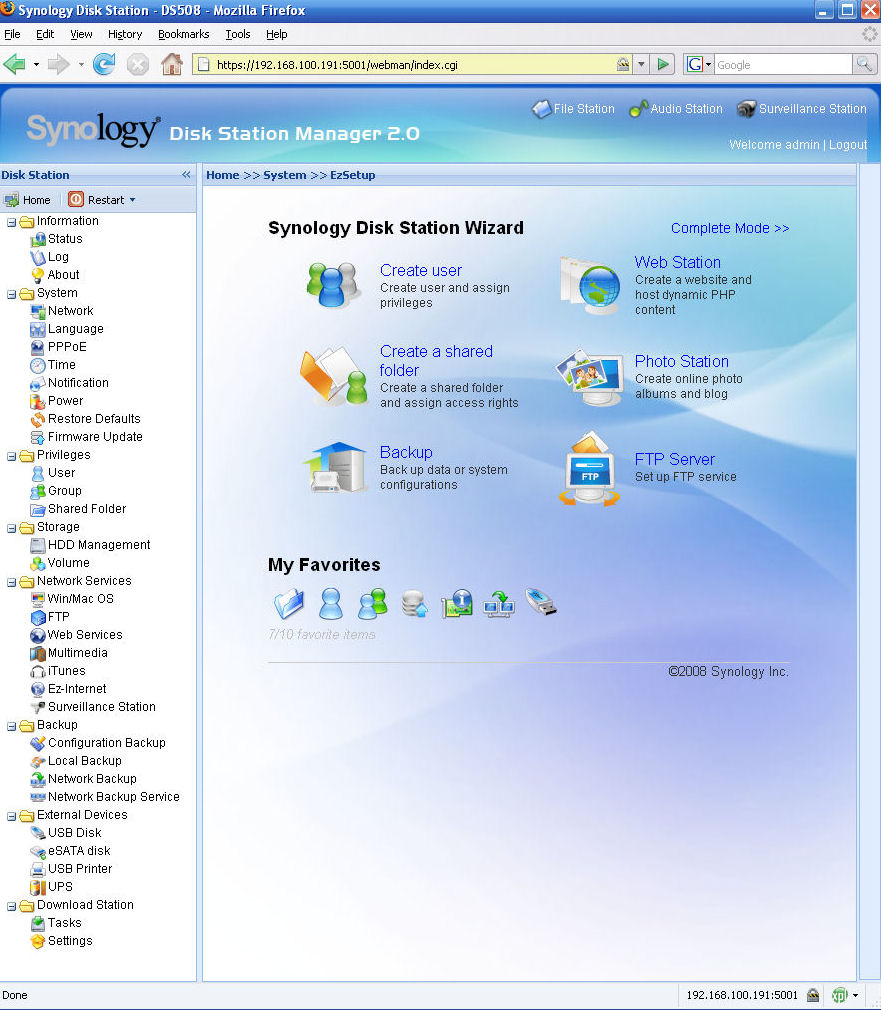
Figure 2: Disk Station Manager 2.0 web interface
For those who don’t like the Wizard mode, you can switch to the Complete mode which provides an icon and description for each item in the left hand pane. (Figure 3). The new interface also provides easy access to restarting the server as well as switching between supported languages. I switched the UI to French, and the entire process took just a few seconds.
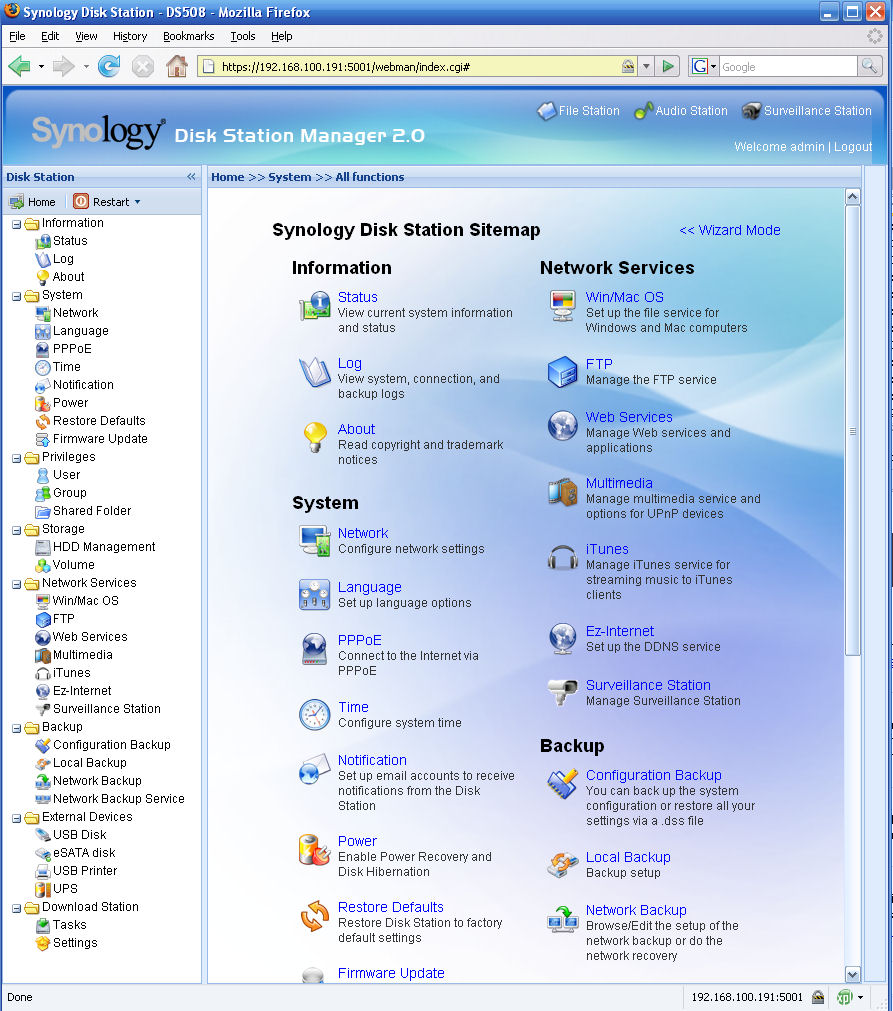
Figure 3: Disk Station Manager 2.0 Complete Mode
The previous software included on Synology products featured full LAMP server capabilities as well as Photo Station 2, a photo sharing application, network and local back up applications, an audio station for playing Internet radio, an iTunes server, an iPod interface and a remote file sharing application. All of those legacy applications have been kept in DSM 2.0, but like the user interface itself, several applications have received a slick new interface.
Most notable is the upgrade from Photo Station 2 to Photo Station 3 as well as the Audio Station. In addition, a completely new feature has been added – Surveillance Station. When used with a supported IP network camera, you can turn your Synology NAS into a powerful video surveillance system. Since this is the major new feature (other than the user interface) of the new software, I’ll spend a little more time describing the feature and my experience with the Surveillance Station.
Surveillance Station
By default, each Synology product ships with a license for one camera. If you want to use more than one camera, you’ll have to purchase additional licenses for $50.00/camera. This seems a bit stingy, considering that the DS508 sells for around $1000!
The number of cameras supported varies with the product. With its faster processor and 512 MB of memory, the DS508 can support up to 10 cameras. Lower end products support as few as 1 camera. Yet my DS107+ with 128 MB of memory can handle 5.
For my tests, I set up the Panasonic BL-C1A camera provided by Synology. (Available online for less than $100). I installed the Panasonic software – primarily to discover the IP address of the camera and to set the camera name and password. While the Pansonic camera includes a nice application, you don’t use it at all. All of the management is done through the Synology Surveillance Station interface.
To set up the Surveillance Station, you just enable it in the DSM 2.0 interface. Enabling the service automatically creates a share named \surveillance. Files are stored on this share in directories named for each camera.
To set up the camera, you merely fill in a camera name, the IP address and select the camera model from a drop down list (Figure 4). Then you enter the admin name/password for the camera. When you test the camera for the first time, an active X component will install in your browser to allow for viewing.
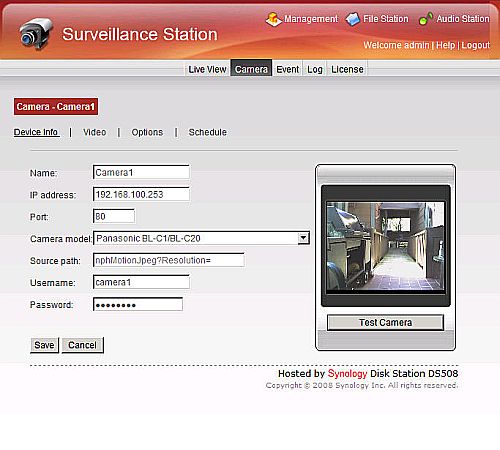
Figure 4: Camera Setup for the Surveillance Station
Under Options, you set the folder name, archive retention and maximum size to be used by the archive. You can also enable motion detection and set motion detection sensitivity.
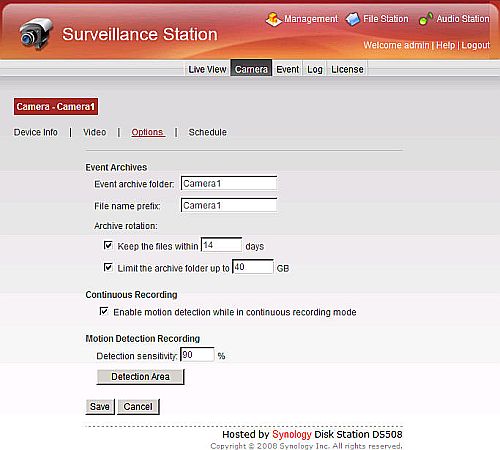
Figure 5: Set Camera Options
For this test, I set the camera to monitor my front door. I set the trigger area to trip on motion along the entrance walkway to my front door (Figure 6).
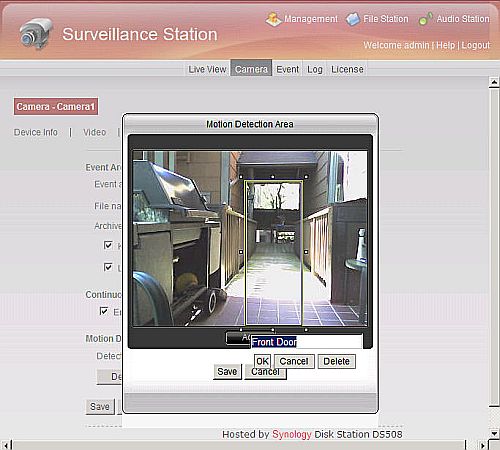
Figure 6: Setting motion detection trigger area
Surveillance Station – more
For each camera, you can schedule continuous recording, motion detection recording or disable monitoring in one hour increments. In Figure 7, the camera is set to detect motion between 7:00 AM and 9:00 PM 7 days/week.
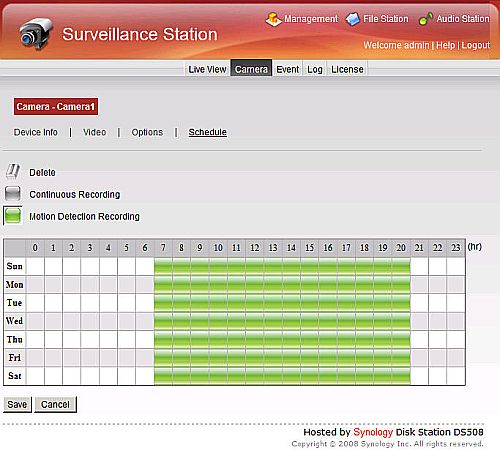
Figure 7: Surveillance Station schedule for Camera 1
The Surveillance Station provides a nice Event Monitor (Figure 8) that you can filter based on camera name, recording mode and time/date. You can also select multiple events to delete, lock events to prevent deletion or export the video. I wish there had also been a file size filter, though.
I discovered that changing sunlight/shadow patterns tripped the motion detector and resulted in numerous 6-7 second recordings. I suspect that tweaking the motion detection sensitivity might have cured that problem.
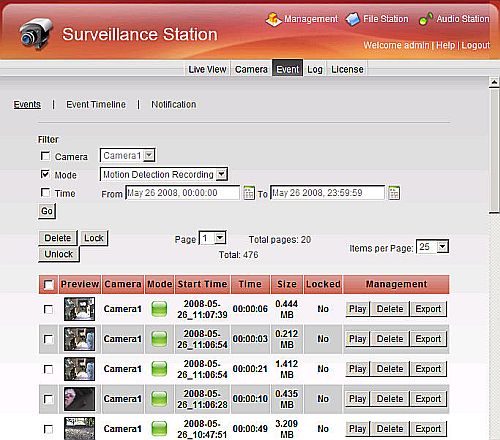
Figure 8: Event monitor for Surveillance Station
To view the events for an entire day, the Surveillance Station provides an Event Timeline view (Figure 9). In this view, you can see the recording activity of the camera displayed graphically on a 24 hour graph. When you open this view, events start playing automatically in sequence. You can, however, drag a slider on the time line to jump forward or backwards.
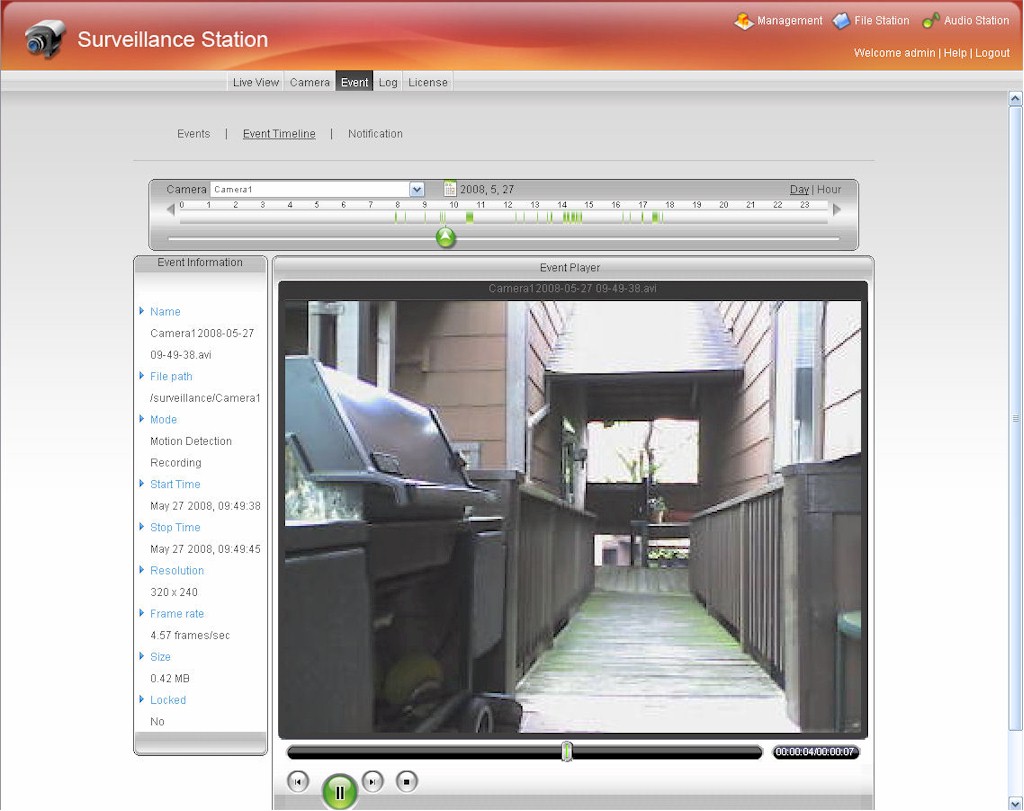
Figure 9: Surveillance Station Event Timeline view
Photo Station 3
The new DSM 2.0 software includes the updated Photo Station 3 web photo sharing service (Figure 10). Like its predecessor, when you enable photo sharing, a share named \photo is created. To publish photos, you merely copy directories of images into the \photo share. Photo Station 3 then automatically indexes and creates thumbnails of your images.
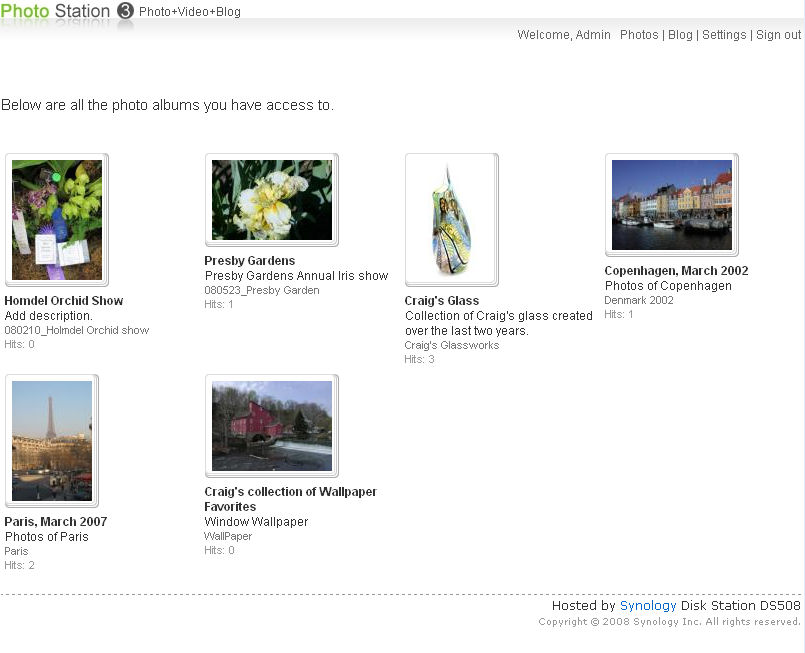
Figure 10: Photo Station 3 home page
Albums can be either private or public. Public albums are viewable by everyone who connects to the server. To view private albums, you have to log into the Photo Station. Of course, you have to enable port forwarding and set up Dynamic DNS, called EZ Internet by Synology, to enable access from the Internet.
In my tests, I set up the DS508 to operate on an additional web port of 8080 as I have another web server operating on the standard port 80. So access to the photo share would be in the format, http://domainname:8080/photo. Unfortunately, the user list for the Photo Station is separate from the user list for the rest of the functions of the NAS. Synology said that it designed the Photo Station to have a separate user list because of security concerns, but may revisit the issue to have a single, unified user database.
You can run a slide show for any album (Figure 11). And, you can set any photo within an album to be the cover photo for the album. EXIF information is also shown for logged in users.
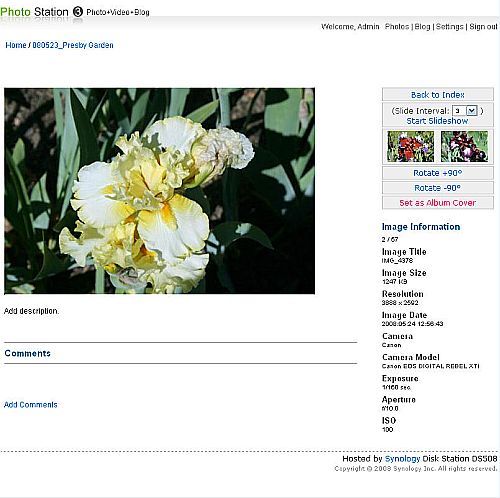
Figure 11: Photo Station Slide show
Photo Station 3 also includes basic blogging software. It’s intended primarily as a private blog., so only the administrator can create a post and only logged in users can comment on posts.
Though anonymous users can view the blog, there’s no facility for them to request login credentials. Frankly, there are much better free blogging sites available on the web, so I wouldn’t waste my time with the built-in blog.
Audio Station
The Audio Station interface has a fresh new look (Figure 12), but the basic functions are the same as in the previous version. You can create playlists from the music library hosted on the NAS, listen to Internet radio stations, or, if you connect your iPod to one of the NAS USB ports, listen to your iPod.
The Audio Station comes pre-populated with over 60 Internet radio stations, but you can add your own favorites. For many months, I’ve been listening to my favorite jazz station, KCSM, San Mateo using the Audio Station with my DS107+.
Like earlier versions of Synology NAS products, music is streamed to supported USB speakers connected to a USB port on the NAS.
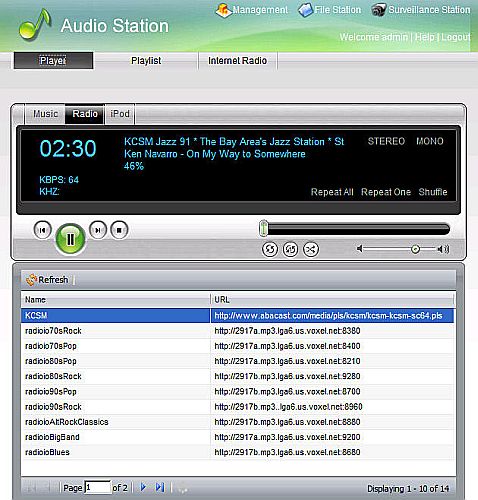
Figure 12: Audio Station
Web Server
The DS508, as with all other Synology products, includes a LAMP server. When you enable web services, a share named \web is automatically created. As with previous versions of Synology software, there’s relatively little documentation included on how to set up the MySQL and PHP components. Apparently the assumption is that if you are going to use this feature, you are already well versed in MySQL and PHP.
By default, there isn’t any MySQL management software included, but a FAQ on Synology’s support forum guides you through downloading and installing phpMyAdmin. I downloaded and installed the package, and it launched normally. I also copied some static pages from a web site I designed sometime ago, and the DS508 served up the site properly.
Network Backup
Though not a new feature, I also tested the Network backup feature. This feature allows you to back up shares to another Synology NAS or to a server running rsync. The network backup function is strictly a “push” function, i.e. the DS508 can only make a backup to another device.
I configured the DS508 to back up the \photo and the \web share to my DS107+. The Backup wizard (Figure 13), available from the Synology DSM 2.0 home page, guides you through the steps required to schedule backups. The backups ran daily as scheduled. This feature alone almost makes me want to purchase a second Synology NAS!
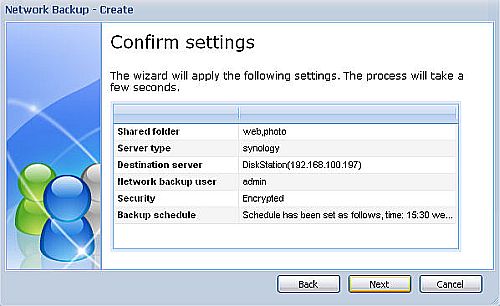
Figure 13: Network backup wizard confirmation screen
RAID Fail Test
Up to this point, I’ve primarily discussed the new features of the new DSM 2.0 software as well as the additional hardware features unique to the DS508. However, as with all multiple drive NASes that I review, I always test the fault tolerance capabilities.
Initially, the NAS was configured for RAID 5 with drives 1,2,3 and 5 making up the volume. To test the fault tolerance as well as the hot swappable feature of the DS508, I started copying a directory full of images to the \photo share and then, during the copy, I pulled out drive 5.
Immediately, both the status light and the alert light started flashing. In addition, the DS508 started beeping. Since I had enabled email notification, I also received an email stating,
Dear user,
Volume 1 on DS508 is in degraded mode. Please identify the cause of degradation and take corrective action.
Sincerely,
Synology Disk Station
I logged onto the DSM 2.0 management interface and was disappointed that the home page lacked any alert or notification of a disk problem. In addition, the status page showed drives 1,2,3 operating normally as part of Volume 1. Drive 4 showed as initialized and Drive 5 appeared as not installed.
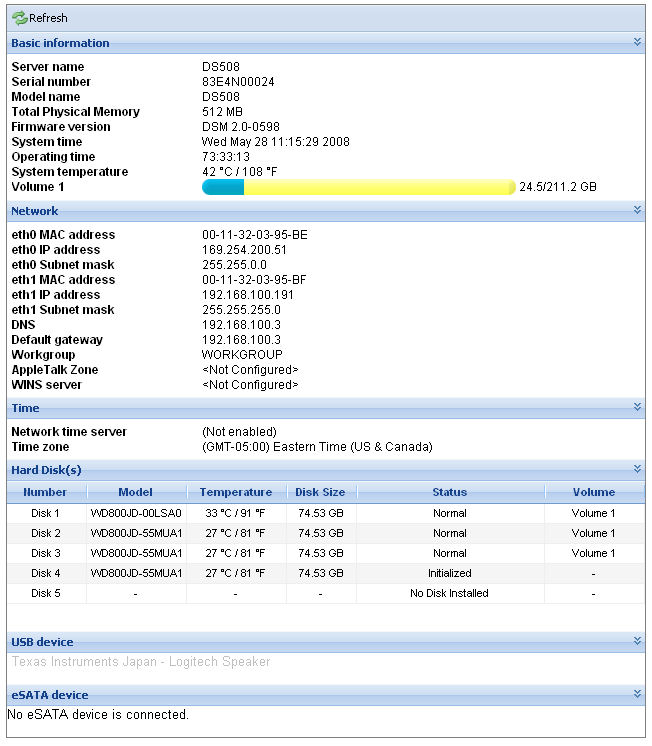
Figure 14: System Status page without RAID degradation indication
I reinserted drive 5 while the system was still powered up, and the status page recognized the drive as not initialized. I then went to the Volume tab on the management interface, and here the Volume showed as running in a degraded mode. Fortunately, this page had an icon to turn of the beep, which, by this time, was getting to be annoying.
A click on the Repair icon launched a repair volume wizard. The wizard showed the disks (4 and 5) that were available for repair. I selected drive 4 and confirmed my choice. The volume status changed to Repairing.
I was somewhat surprised that the status light returned to normal (solid green) and that the alert light stopped blinking during the RAID volume rebuild; there wasn’t a physical indication that the RAID was still operating in a degraded mode.
At the end of the rebuild, I received another email indicating that the RAID rebuild had completed. The system log also recorded each step of the problem, including drive removal, drive insertion and the rebuild start and completion (Figure 15). Surprisingly, the RAID rebuild was very quick. The rebuild only took about 20 minutes for the 80 GB drive. The Volume had approximately 24.5GB of data.
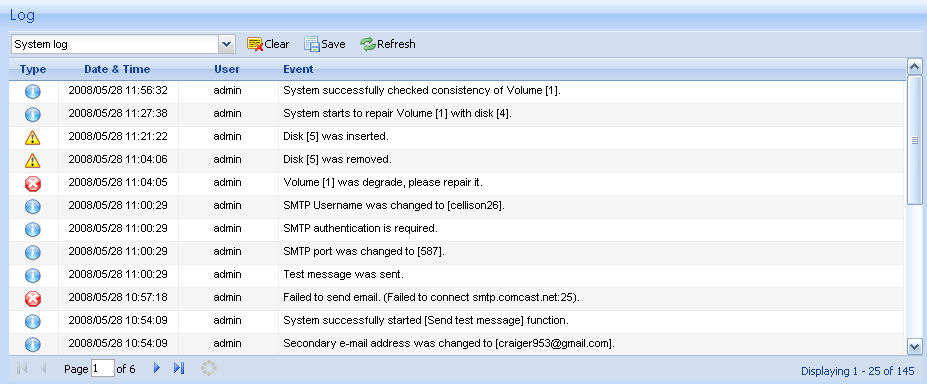
Figure 15: System log showing drive removal, re-insertion and RAID rebuild
Performance
It’s not often that you get the chance to say that the device you’re reviewing tops our performance charts. Yet, that is the case with the DS508. In both the 1000 Mbps RAID 5 large file read and large file write performance tests, the DS508 topped the performance charts with average performance of 40.2 MB/s and 40.1 MB/s respectively.
Figures 16 and 17 show a throughput vs. file size comparison of the current top four RAID 5 performers with a gigabit LAN connection in our NAS Charts: the DS508, Iomega StorCenter Pro 200rL (rackmount) [reviewed], Thecus 1U4500 (rackmount) [reviewed] and Thecus N5200 [reviewed].
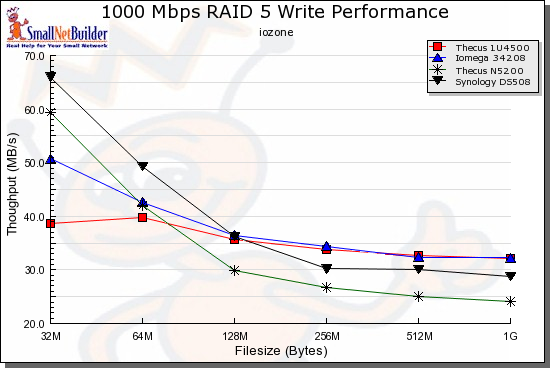
Figure 16: RAID 5 Write performance comparison – 1000 Mbps LAN connection
Actually, all of these products are similar in write performance, with the DS508 getting a boost in its average performance over these filesizes with its higher performance with the 32 and 64 MB files.
Figure 17 shows more of a spread in read performance, with the DS508 once again edging out the others at smaller file sizes.
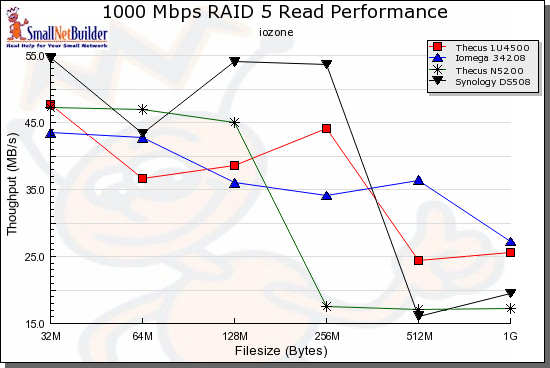
Figure 17: RAID 5 Read performance comparison – 1000 Mbps LAN connection
Of course, you can run your own comparisons using the interactive NAS charts.
Closing Thoughts
One of the challenges of upgrading a product is not to break anything, and, of course, to add new features and improve performance. Synology gets high marks on all points for its upgrade of the user interface to the new DSM 2.0 and transition to a Freescale MPC8543 CPU from the Marvell 5281 that powers Synology’s previous top-of-the-line CS407.
The AJAX based UI is a much needed and well-executed upgrade. And the fact that Synology is providing the UI upgrade for products dating back to 2006 shows that they support customers with legacy products.
I, for one, was thrilled that my DS107+ now has the new UI and the Surveillance Station feature. The Surveillance Station is a great new feature, and one that sets it apart from other NAS products.
The main downside is that Synology is charging a premium price for the DS508’s feature set and performance. This should come as no surprise, as it continues the model that the company has set with its other products.
For about the same amount of money, you could buy a 2TB 4-drive TeraStation from Buffalo or put together your own server, with drives and an open source distro. But the Buffalo’s feature set pales by comparison with Synology’s and you might not be up for the, uh, fun of rolling your own server and equipping it with an equivalent set of features.
Instead, Synology does it all for you and, when you think of it as an alternative to that Windows server you may have been thinking of upgrading or retiring, the price doesn’t seem that bad.
Yes, the DS508 is the complete package. It has all of the features you could want, with a slick, new, responsive interface and performance that tops the charts. Such a deal, no?