

Introduction
In Part 1, I looked at how pfSense could be used to monitor and control bandwidth use. But not everyone is up for installing and learning an open source router distro, no matter how powerful it might be. So this time, we will look at two Linksys routers that you can purchase off-the-shelf to limit bandwidth for both incoming and outgoing traffic.
All Linksys consumer-grade routers have simple priority-based QoS controls. But, unfortunately, they only work on outgoing traffic flowing from your LAN to the Internet. This can help to manage the small uplink pipe that most of us get from our "broadband" ISPs. But it will do nothing to control heavy downloaders or streamers. For that, you have to fork over a bit more money to step up to Linksys’ small business routers.
We previously reviewed the RV042 and RVL200, both of which provide bandwidth controls in both directions. The RV042’s Bandwidth Management features include both Rate Control and Priority methods, but you can’t mix the two.
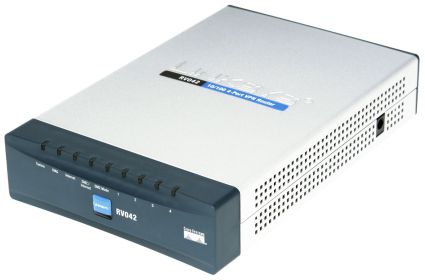
Figure 1: Linksys RV042 4-Port VPN Router
The RVL200 includes all of the RV042’s Bandwidth Management features. But it also adds a variety of QoS services, including the ability to prioritize traffic queues based on Class of Service (CoS) and Differentiated Services Code Point (DSCP) markings.
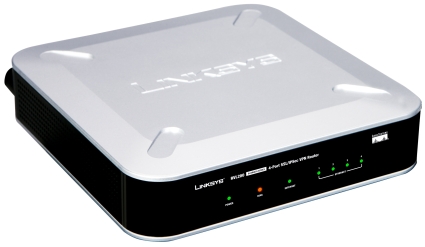
Figure 2: Linksys RVL200 4-Port SSL/IPSec VPN Router
My focus here is on getting bandwidth use under control as quickly and easily as possible. So I’m only going to cover the Bandwidth Management features of both products. Figure 3 shows the Bandwidth Management screen, which is under the System Management menu on the RV042 and the QoS menu on the RVL200.
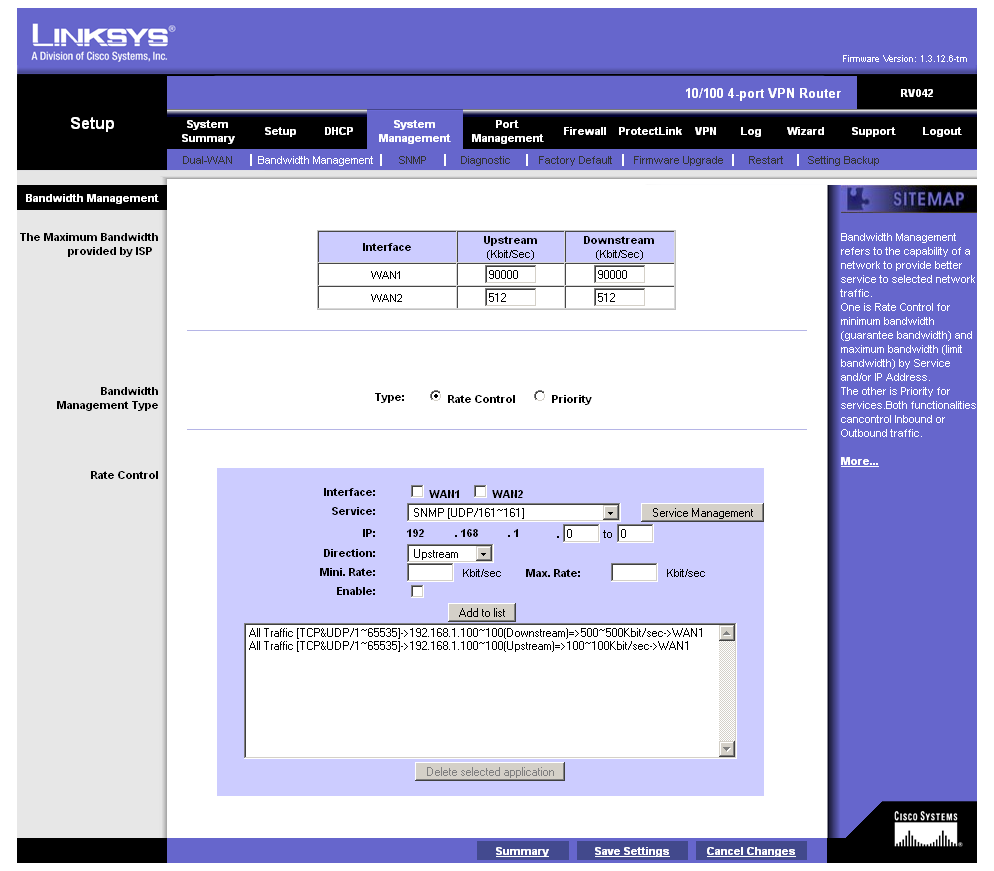
Figure 3: RV042 Bandwidth Management screen
The RV042 has two WAN ports and you get independent bandwidth control on both ports. The Service selector comes pre-populated with common services such as FTP, HTTP and Telnet, but not gaming or P2P apps. For any applications that aren’t in the list, you click the Service Management button, enter the port range and select TCP or UDP protocol, or select IP and enter a protocol number (Figure 4).
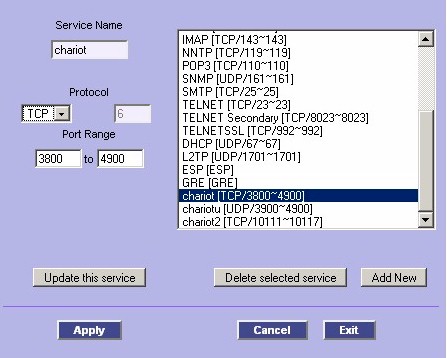
Figure 4: Service Management screen
After you select the service, you enter a single IP or range of IPs that the restriction applies to, and select the Upstream or Downstream direction. You then enter the Minimum and Maximum limits in Kbits/sec, check the Enable box and click the Add To List button. Nothing takes effect, however, until you click the Save Settings link at the bottom of the page, which you may have to scroll down to see, so it’s easy to miss.
Testing
To test things out, I set up an IxChariot test using the FTPget script. This script emulates an entire FTP session including logon, download and logoff. I found that bandwidth control worked as you might expect, although there were a few oddities.
I first took a baseline measurement using the 512 Kbps WAN Up and Downstream Bandwidth settings and no applications set for rate control. Figure 5 shows that the FTP script clocked in around 65 Mbps.
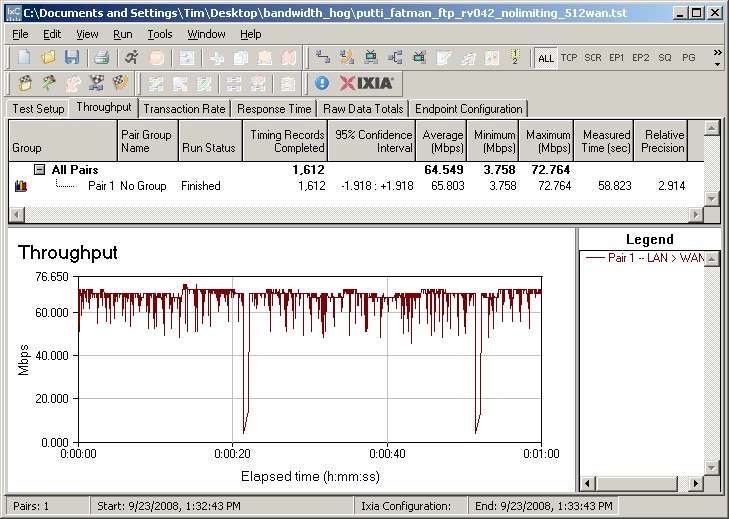
Figure 5: FTP download with default settings (no bandwidth limit)
Since I was doing testing locally on my LAN, I then entered 90000 Kbps (90 Mbps) for the Upstream and Downstream values. These are a little below the typical 100 Mbps Ethernet performance that I measure with IxChariot. (It would be handy if an "auto" option were included like D-Link’s Ubicom Stream Engine based products have, but no such luck.)
But something didn’t like those settings, as Figure 6 illustrates. Download throughput was initially limited to around 5 Mbps, not 500 Kbps and then jumped back up to the previously-measured unlimited value.
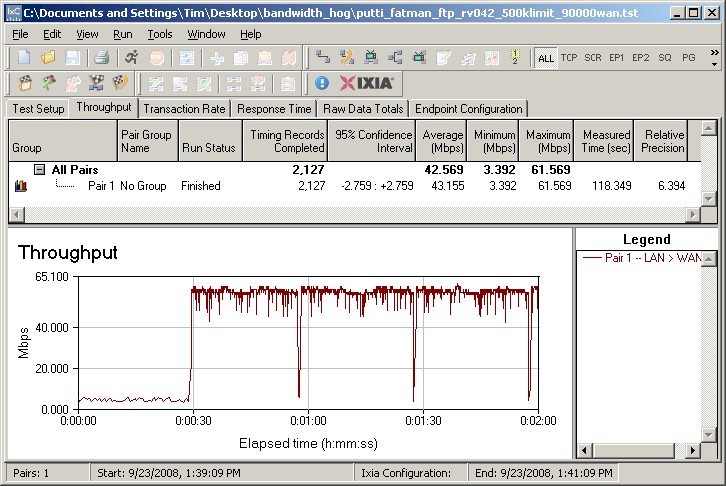
Figure 6: FTP download – 500 Kbps limit, 90000 Kbps WAN
So I moved the WAN bandwidth settings back to the default 512 Kbps settings and finally got the desired limiting, as shown in Figure 7. Although it’s not exactly 500 kbps, it’s sure close enough for me!
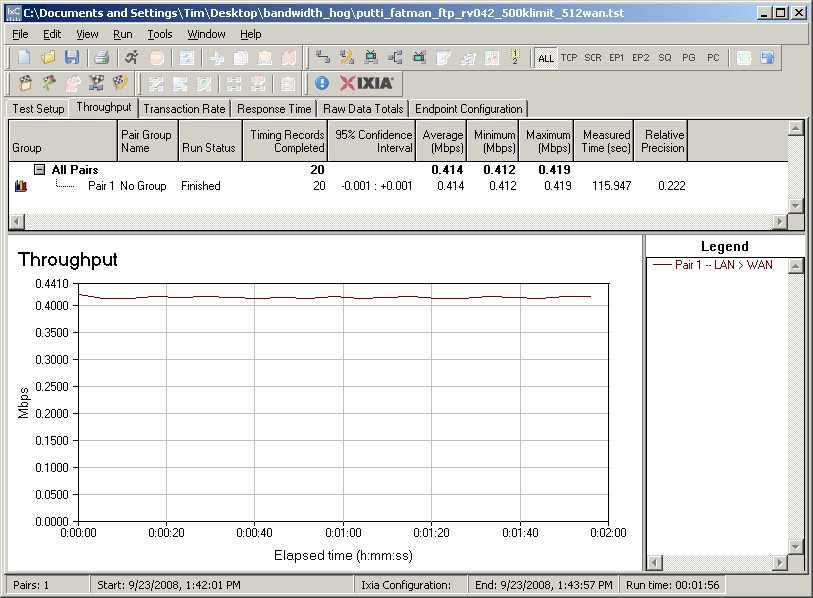
Figure 7: FTP download – 500 Kbps limit, 512 Kbps WAN
I tried the same experiments on the RVL200 and got similar results. Default FTP throughput was around 31 Mbps with the RVL200’s default WAN bandwidth of 512 Kbps. Setting 500 Kbps rates and the WAN bandwidth to 90000 Kbps produced throughput of around 20 Mbps. It wasn’t until I set the WAN bandwidth back to 512 Kbps that I got the desired throughput of slightly above 500 Kbps. So it looks like the best thing to do is to leave the default bandwidth values alone!
Closing Thoughts
I am surprised that there aren’t more (and less expensive) off-the-shelf options for managing download bandwidth. The lowest price for the RVL200 as I write this is $138 and the RV042 is closer to $150. While these aren’t outrageous costs, they are about 4X what you’d pay for a simple 100 Mbps wired-only router. And you have to accept VPN and other features that you may not want or need.
The other weaknesses of the Linksys options as compared to pfSense are the absence of session monitoring and control and real-time bandwidth graphs. The ability to monitor (and kill) active sessions is very helpful when you are trying to track down a bandwidth abuser. And while there are other ways to get bandwidth graphs, having the feature built in provides a quick and easy way to confirm that your settings are doing what you intended them to do.
But for those who don’t get their kicks from setting up DIY routers, it’s nice to know that you do have store-bought options when you need to clamp down on bandwidth piggies.