

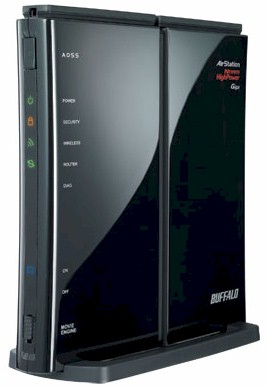
| At a glance | |
|---|---|
| Product | Buffalo Technology Nfiniti Wireless-N High Power Router & Access Point (WZR-HP-G300NH) [Website] |
| Summary | Single-band draft 802.11n router with Gigabit WAN and LAN ports and higher transmit power than other products with USB storage sharing |
| Pros | • Gigabit WAN and LAN with fast routing • Higher power than other draft 11n routers • Multiple SSIDs with individual security settings • Secure browser-based remote access • Full-featured USB NAS w/ BitTorrent download |
| Cons | • No VLAN-separated wireless Guest Zone • No transmit power adjust |
Typical Price: $69 Buy From Amazon
Introduction
Wireless products from Buffalo Technology had all but disappeared from the market in the US due to a suit from an Australian company named CSRIO (Commonwealth Scientific Research and Industrial Organization). But in December of 2008, a federal judge stayed the permanent injunction that prohibited Buffalo from selling wireless products in the United States. More recently, in July 2009, Buffalo announced a settlement to the patent infringement suit. With their legal problems behind them, Buffalo is now back in the U.S. market with several new “NFiniti” draft-N products as well as their legacy Wireless-G High Power Router and Access Point (WHR-HP-G54).
This review focuses on the of Buffalo’s U.S. wireless line, the single band draft 802.11n Nfiniti Wireless-N High Power Router & Access Point (WZR-HP-G300NH). While the WZR-HP-G300NH has a list price of $119.99, almost double that of its less powerful $69.99 WHR-G300N draft-N sibling, it has a few additional features that could well justify the premium price. Figure 1 shows Buffalo’s comparison of their single-band wireless offerings.
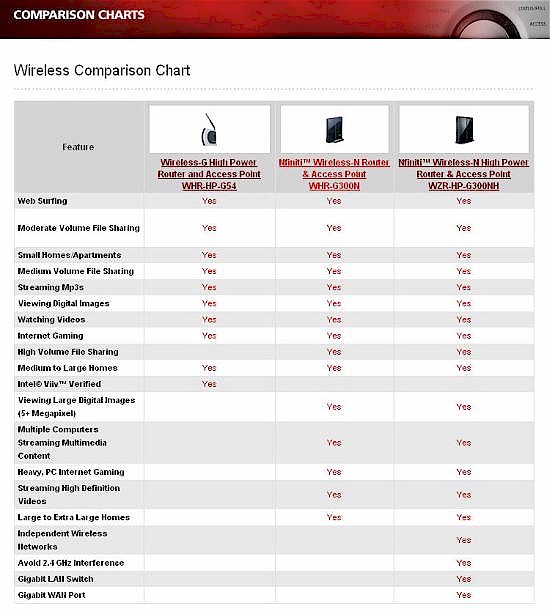
Figure 1: Buffalo wireless product comparison chart
Product Tour
The case on the WZR-HP is designed to sit either vertically with the use of an included snap-on plastic base, or horizontally. You could also mount it to a wall using the supplied mounting screws. The black glossy case is stylish looking, but is also prone to fingerprint smudges.
Sprouting from the top of the case are two moveable wireless antennas. Frankly, rotating them probably won’t change the performance much – the WZR-HP already has great coverage due, in part, to its high power output. Figure 2 shows the front panel with all of the LED indicators illuminated.
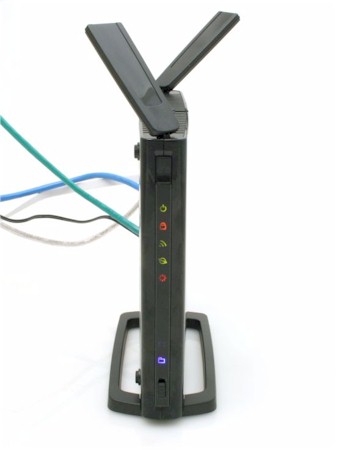
Figure 2: Front view of the WZR-HP
Above the column of indicator LEDs, there’s a push button switch to initiate Buffalo’s proprietary AOSS (AirStation One-Touch Secure System) or WPS (Wi-Fi Protected Setup) wireless security. If your client adapter doesn’t support AOSS or the WPS push-button method, the router also supports the WPS PIN method.
The LEDs include:
- Power (green power symbol)
- Security (lock symbol – illuminated when wireless security has been enabled)
- Wireless (blinks when there is wireless activity)
- Router mode (illuminated when WZR-HP is configured as a router)
- Diagnostics (illuminated during bootup)
Below the LEDs are two additional indicators to show if the "Movie Engine" on the WZR-HP has been enabled. When the "Movie Engine" is enabled, the QoS engine and IPV6 pass through are enabled, the wireless multicast rate is increased, and TCP Rwin is limited for "an improved multimedia experience", according to Buffalo. I didn’t test these claims. Labels for each of the LEDs are on the adjacent side as shown in the opening photo.
Figure 3 shows the rear panel of the WZR-HP. The Internet or “WAN” port is color coded blue. All ports, including the WAN port, support Gigabit Ethernet, and each port has a link/activity indicator. There’s a single USB port that you can use to attach a single USB drive to turn the WZR-HP into a simple NAS for sharing files on your network. You can’t, however, connect a USB hub to this port, nor can it be used for print sharing.
Adjacent to the USB port, there’s a switch for dismounting an attached USB drive. At the extreme right in the photo, there’s a three position switch that controls the operating mode of the WZR. You can select on (Router), off (Access Point) or Auto. In the default Auto mode, the WZR-HP operates as a router. If it detects another router on the network, it switches to AP mode.
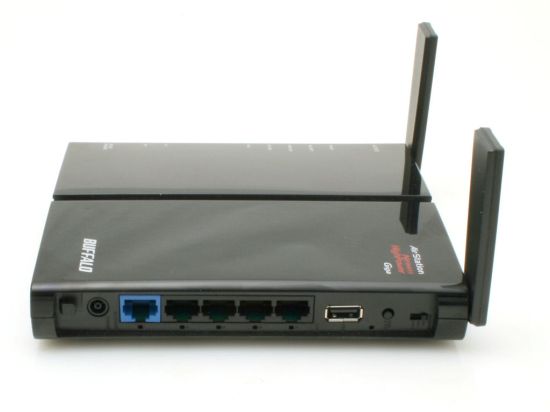
Figure 3: WZR-HP rear panel
On The Inside
As the full product name indicates, the WZR-HP is a high power router/AP. The WZR-HP is built around an Atheros AR9132 Wireless Network Processor, which includes the wireless BB/MAC functions. The radio is an AR9103 3×3 2.4 GHz 802.11n. The WAN port and four LAN ports are handled by a Realtek RTL8366SR Gigabit switch that appears to have jumbo frames enabled for up to 9K (confirmed via testing).
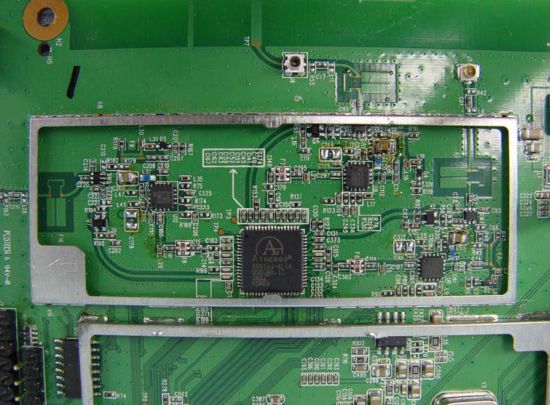
Figure 4: Portion of the interior of the WZR
Since Buffalo specifically claims that the WZR-HP has higher transmit power than other draft 11n routers, we checked. Figure 5 shows a comparison of the peak power output tables from their FCC ID Test Reports for the WZR-HP and D-Link’s DIR-655 (A4).
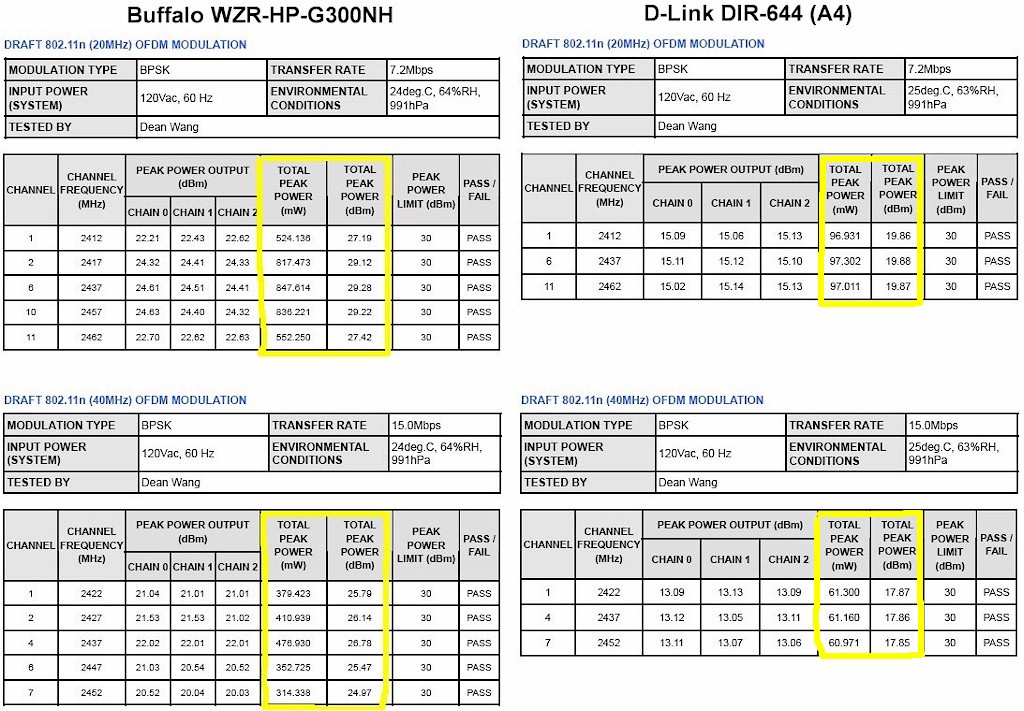
Figure 5: Peak Power Output comparison
Note the WZP-HP’s transmit power varies depending on the channel used, with the highest power of 847 mW obtained on Channel 6 and using the default 20 MHz channel bandwidth mode. By comparison, the popular D-Link DIR-655 (A4)’s peak transmit power is 97 mW. Looking at the transmit power in dBm, the WZR-HP peaks at 29.28 vs. the DIR-655’s 19.88. So Buffalo’s claims of higher power certainly are true.
We’ll see later if this extra power makes a difference in performance. But in the meantime, keep in mind that each 3 dB (or dBm) represents a doubling of power and 10 dB is 10X the power. There is also a rule of thumb that a 6 dB change in transmit power will double range in an outdoor (no obstacle) environment.
Setup
The WZR-HP comes with a quick setup guide with instructions for using either the CD or for configuring it using the web configuration. A Windows-based installation wizard on the CD guides you through all of the steps required for basic operation including changing the administrator’s password. Figure 6 shows one of the screens from the installation wizard. For more advanced configuration, such as setting up the NAS feature, you need to use the web UI.
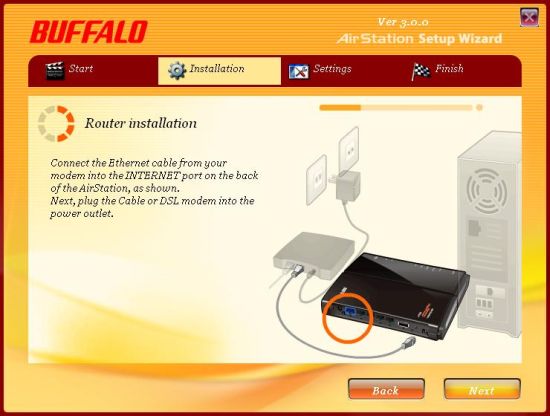
Figure 6: One of the steps in the WZR-HP setup wizard
If you’ve ever configured a Buffalo device in the past, you’ll appreciate the improvements found in the new web interface. Figure 7 shows the landing page for the web UI.
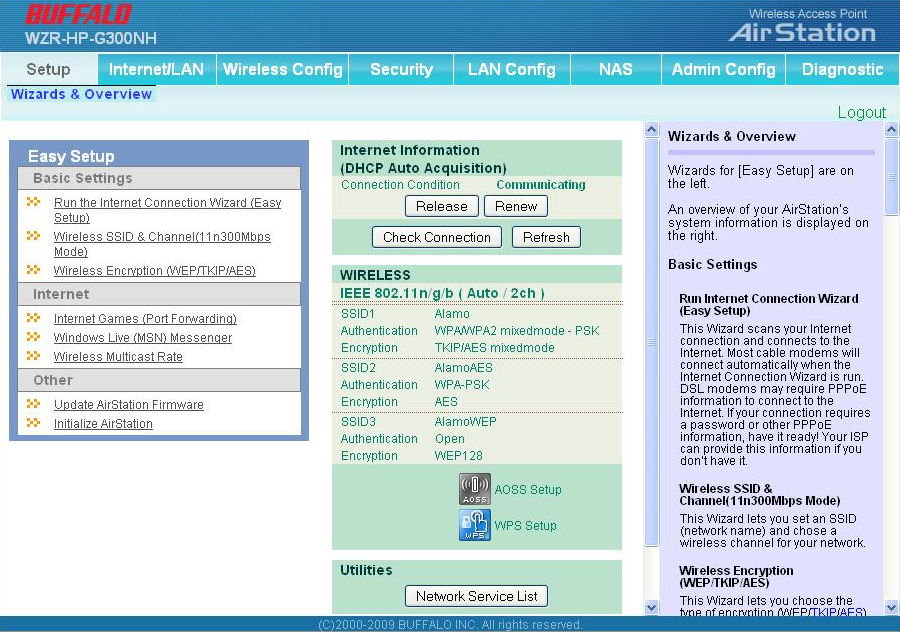
Figure 7: Landing page on the WZR-HP web interface
Across the top are tabs for each major function. For each tab, one or more smaller tabs will appear for individual configuration options. All pages are split into two frames with configuration options on the left, and in a separate scrollable frame, descriptions of each item that appears on the page.
Feature Tour
Many of the features of the WZR-HP are standard features found on all routers, so I’ll comment briefly on unique features for each of the tabbed sections:
Setup – This tab provides easy access to a number of built-in wizards that can help assist you with configuration. It also gives you a quick summary of your Internet connection as well as your wireless configuration.
Internet/LAN – This tab is a bit confusing, as there is also another tab named LAN Config. However, options on this tab allow you to configure your Internet connection, set up Dynamic DNS (DynDNS or TZO), change your LAN and DHCP settings, enable/disable NAT, and create static routes. The WZR-HP supports DHCP reservation, and you can change the DHCP lease period.
One unique feature, also found in other legacy Buffalo routers, is a built in VPN server. Using PPTP, the VPN server provides layer 2 access for up to 5 remote clients. While PPTP is generally considered insecure and has been superseded by L2TP/IPSEC, it still is found in use because it’s easy to configure.
All versions of Windows dating back to Windows 95 have a built-in PPTP client, as does Mac OS X. For a home environment, it’s an easy and free way to set up a VPN. Note that the PPTP user list is a separate list from the user list for the NAS function. Figure 8 shows the sub-tabs for the Internet/LAN tab as well as the PPTP configuration page.
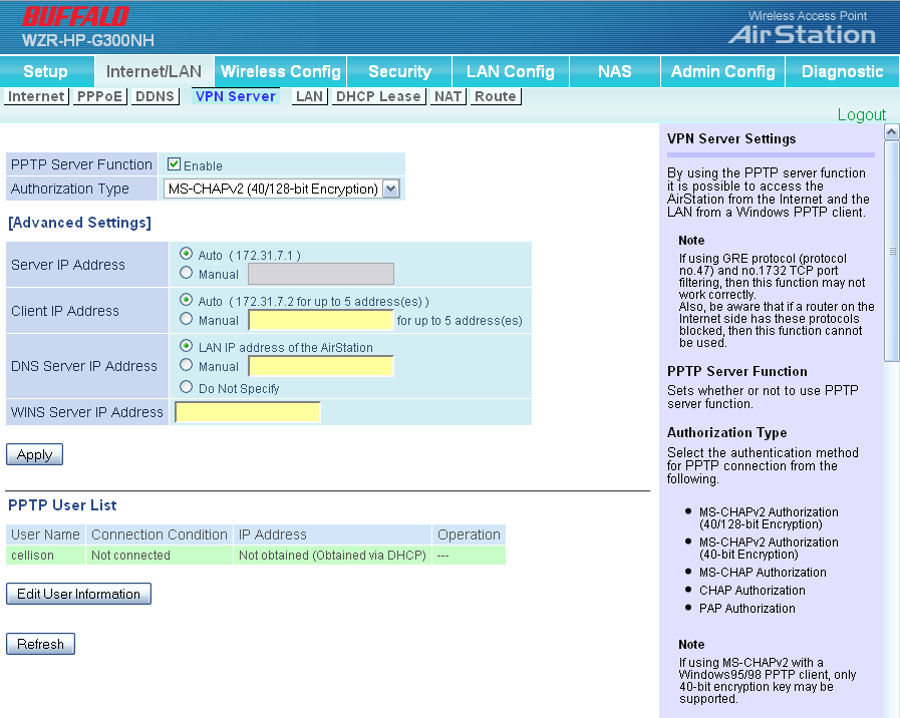
Figure 8: PPTP VPN configuration
Wireless Config – This tab allows you to configure virtually all wireless settings. You can enable/disable the radio, change the operating channel or let the AirStation pick the best channel for you and disable SSID broadcast. While all of these features are fairly standard, the WZR-HP has a unique “Multi-Security” feature that’s worth talking about (Figure 9). When enabled, you can configure up to three wireless security profiles, each with a separate SSID and wireless security setting.
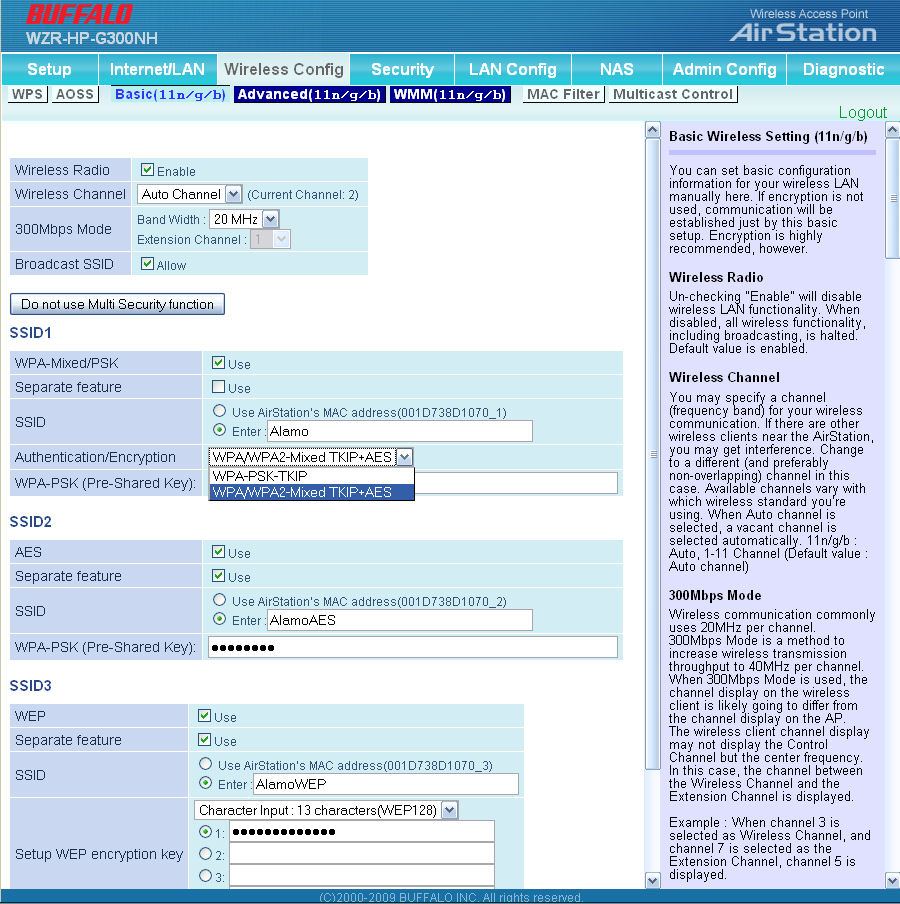
Figure 9: Wireless Multi-security setup
But you don’t have free reign for how you set wireless security for the three WLANs. For SSID1, you have a choice of WPA or WPA/WPA2, SSID2 supports WPA2/AES only and for SSID3, WEP is the only choice. This allows you to have the security of WPA/WPA2, but also provides backwards compatibility with legacy wireless devices that only support WEP. All three profiles connect to the single wired LAN and single DHCP server. Note that only the PSK forms of WPA are supported. If you need the Enterprise (RADIUS) version, you’ll have to take a pass on the WZR-HP.
Checking the Separate Feature box in an SSID will block traffic between wireless clients only. The blocking works both for clients associated with the same SSID and also between SSIDs. Each WLAN, however, has free access to wired LAN clients. This means that if the weakest wireless security link, WEP, is compromised, all wired clients could be compromised.
While I like the multiple security feature, I think I prefer the “Guest” feature found in many D- Link routers. The Guest WLAN feature allows you to provide wireless access on a separate VLAN that has access only to the Internet.
Security – There not too much to say about this tab. The major feature found here is the ability to set up IP filtering rules. Up to 32 rules are supported.
Lan Config – In this tab (Figure 10) you set up port forwarding to forward traffic from the Internet to a specific LAN IP address. Ports for common services are pre-populated as shown.
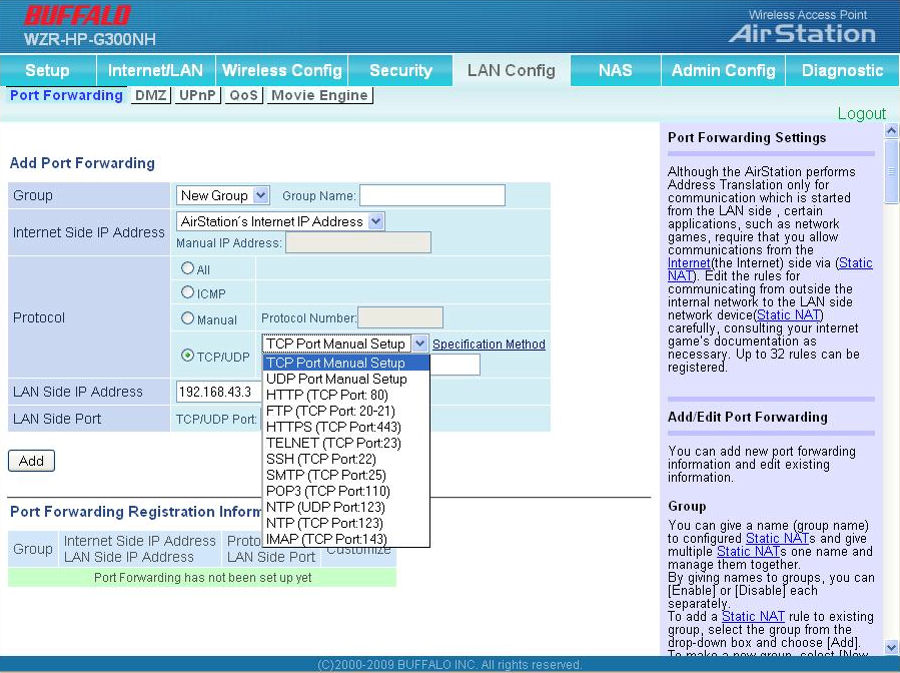
Figure 10: Port Forwarding
The QoS sub-tab lets you set low, medium or high priority for various types of traffic (port based) being sent to the Internet only. There is no downlink QoS, nor is there an automatic QoS feature like that found on most D-Link routers.
Other functions on this tab include setting up the IP address for the DMZ, enabling / disabling UPnP, and configuring the Movie Engine options. Note: you must enable the Movie Engine using the switch on the front panel – you can’t enable it through the web UI.
Feature Tour – more
NAS – One of the most significant features of the WZR-HP is the ability to use it as a simple NAS device. Buffalo has a lot of experience with NAS technology, and it shows in the implementation.
To share a USB flash or hard drive, you simply plug it into the port on the back of the router and the disk is automatically mounted. By default, everyone has access to the drive, but you can limit access by creating user accounts. The disk is mounted as a single share, and, unlike most full-featured NAS boxes, you can’t create multiple shares. But for simple, shared storage, the NAS feature on the WZR-HP is a good solution. To help you fill up the storage, there’s also a BitTorrent client built into the router that will download Torrents without having a computer connected.
Buffalo also included their browser-based secure remote access feature found on most of their NAS products. Using either a DDNS provider or Buffalo’s free www.buffalonas.com service, you can use your web browser to remotely connect to files stored on the drive connected to the router.
We covered Web Access extensively in the LinkStation Pro Duo review, and the functionality is the same. But web access is even easier with the disk connected to the router – you don’t have to do any port forwarding like you do with a separate NAS device. Figure 11 shows the web access setup screen.
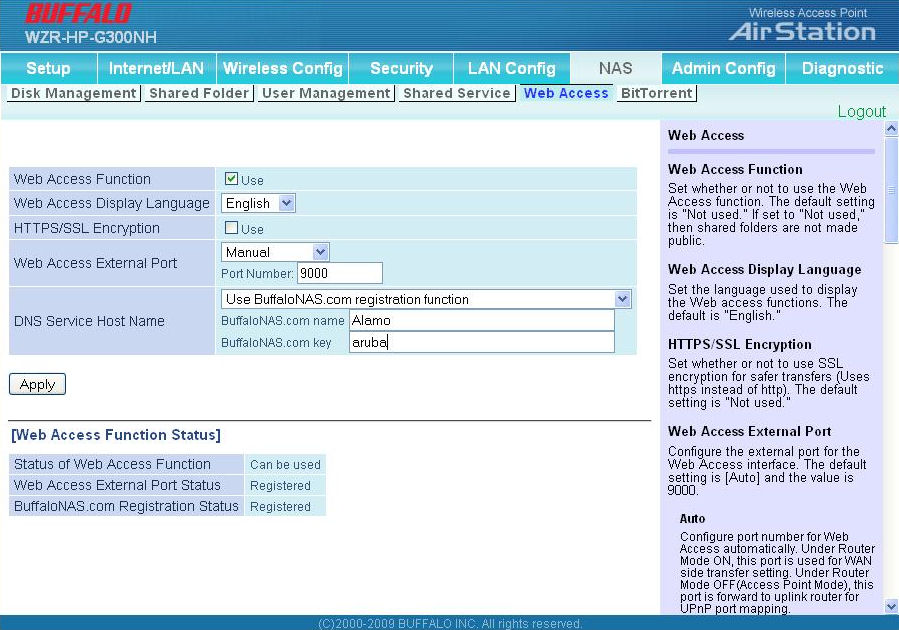
Figure 11: Web Access setup for BuffaloNAS.com
Admin Config – Using the functions in this tab, you perform administrative functions such as naming the router, changing the admin password, updating the firmware and setting the time. Many of these functions could have been combined on a single page rather than having numerous sub tabs each with only a couple of configurable options.
Though the WZR-HP supports retrieving time from an NTP server, it’s interesting to note that there’s no support for Daylight Savings Time. Thus, to get the time stamps to be accurate for Eastern Daylight Time, I had to set the time zone to Atlantic Standard. Figure 12 shows the time zone configuration.
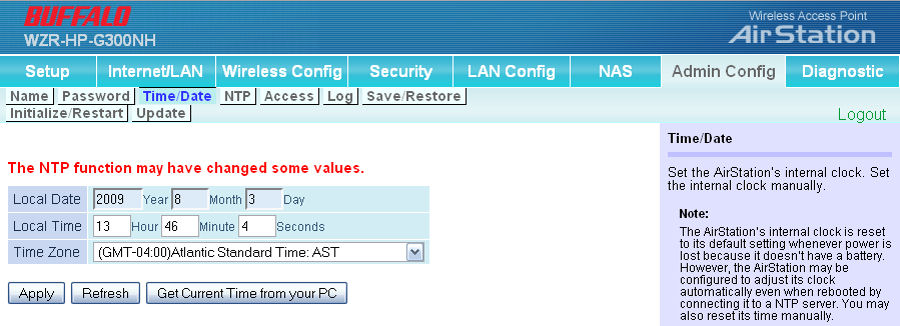
Figure 12: Time zone and time setting
Diagnostic – It may have been more appropriate for this tab to have been named “Status”. In this tab, you can see a summary of important configuration options, retrieve a list of connected clients, check LAN, WAN and WLAN traffic statistics and view logs. Figure 13 shows a summary of my test WZR-HP.
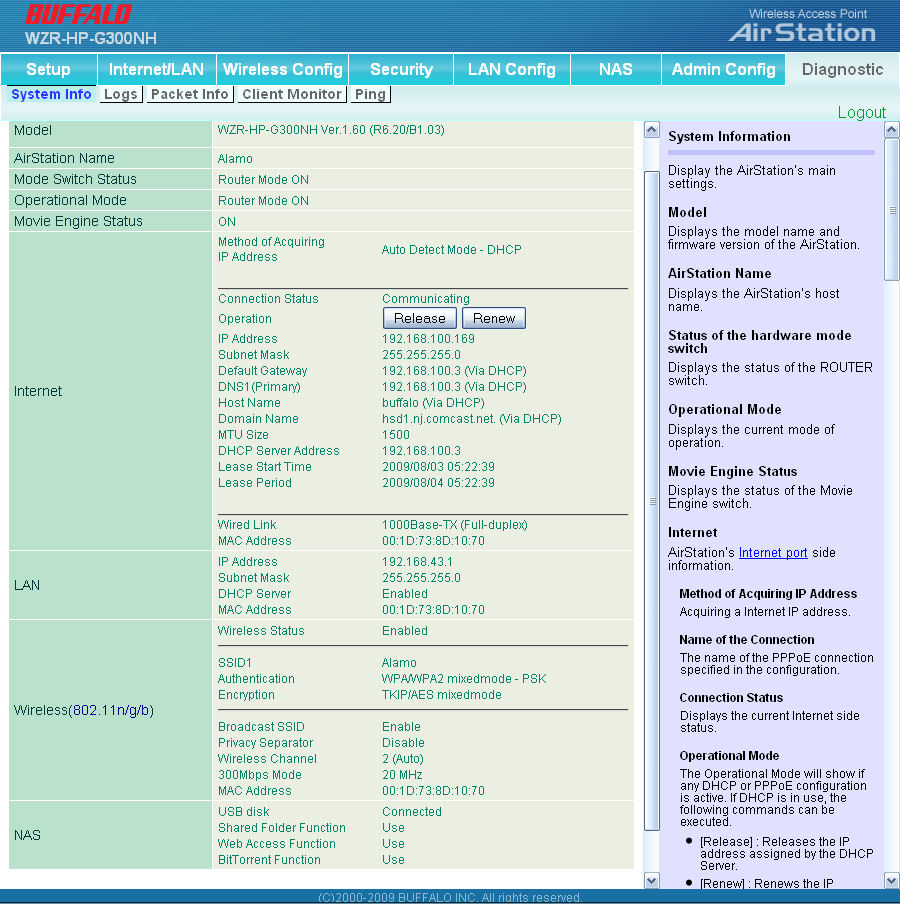
Figure 13: System information
The AirStation also has good logging capabilities. You can check individual items to monitor. You can save the logs for review in the future, or if you have a Syslog server, you can send the logs to it. The log does not appear, however, to monitor web access activity or PPTP VPN connections – an oversight that hopefully Buffalo will fix in a future release. Figure 14 shows the log as well as all of the selected options.
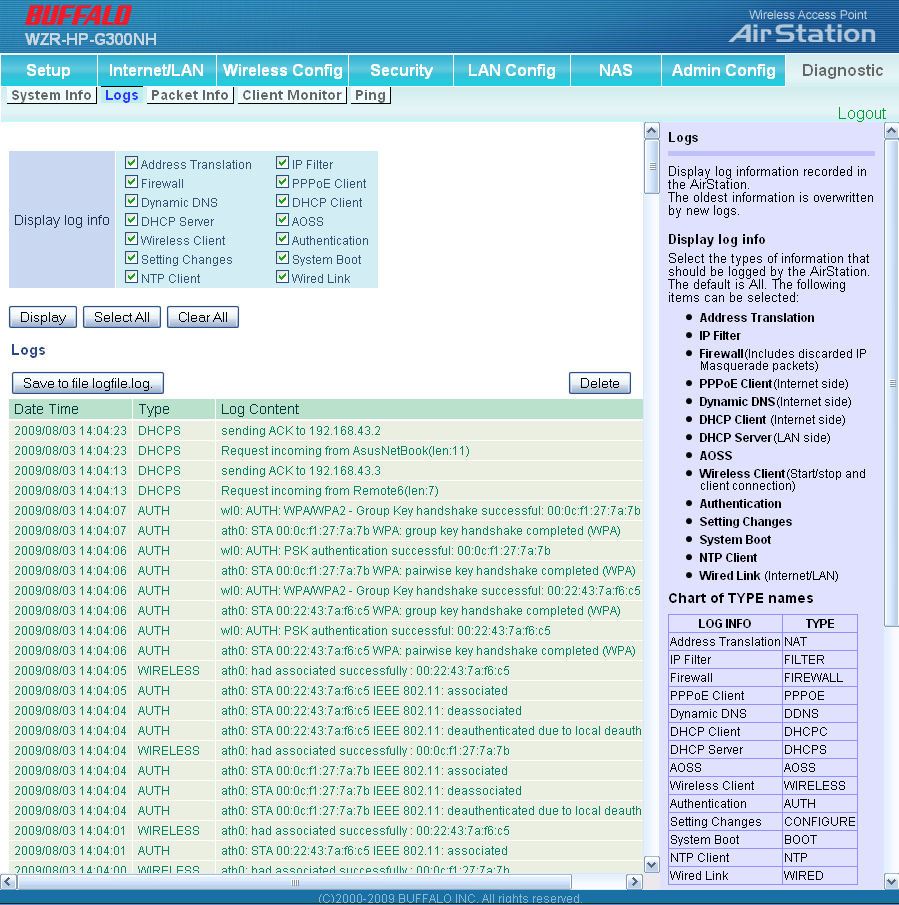
Figure 14: Log page
Routing Performance
Testing and analysis by Tim Higgins
Routing performance for the WZR-HP using our standard test method and 1.60 firmware is summarized in Table 1. WAN to LAN measured 165.8 Mbps, while LAN to WAN came in at 183.6 Mbps. While these routing speeds don’t take full advantage of the Gigabit WAN port, they rank the WZR-HP above most current-generation Cisco / Linksys routers, but below many of D-Link’s.
However, routing speed should be fast enough for most Internet connections. And the router had no problem maxing out our simultaneous connection test limit at 200 connections.
| Test Description | WZR-HP-G300NH Throughput – (Mbps) |
|---|---|
| WAN – LAN |
165.8
|
| LAN – WAN |
183.6
|
| Total Simultaneous |
173.3
|
| Maximum Simultaneous Connections | 200 |
| Firmware Version |
1.60
|
Table 1: Routing throughput
Figure 15 is a composite plot of the three routing tests, which shows relatively steady routing throughput. Use the Router Charts to further compare the WZR-HP’s routing performance.
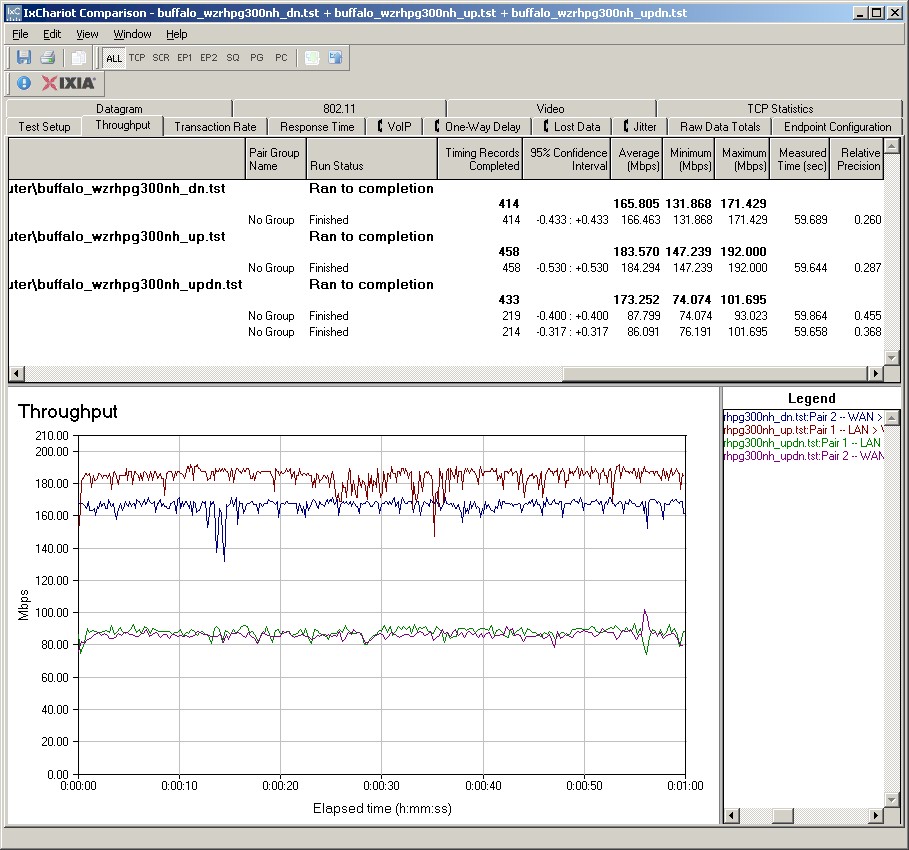
Figure 15: Buffalo WZR-HP-G300NH Routing throughput composite plot
Wireless Performance
Testing and analysis by Tim Higgins
I used the open air test method described here to test the WZR-HP’s wireless performance. Testing was done using the SNB standard wireless test client, an Intel Wi-Fi Link 5300 AGN mini-PCIe card and 12.4.0.21 driver in a Dell Mini 12 running WinXP Home SP3. I left all client-side defaults in place except for enabling throughput enhancement (packet bursting) and changing the 802.11n Channel Width (2.4 GHz) setting from its 20 MHz default to Auto, so that the adapter would support 40 MHz channel bonding mode.
The router had the latest 1.60 firmware and all factory default settings in place, except setting channel 1.
Figure 16 shows a composite of throughput tests made at the six test locations using 20 and 40 MHz channel widths. Each column represents the average throughput from a one minute test. Best case downlink throughput of 97.2 Mbps was measured at Location A using a 40 MHz channel. This is quite good and higher than what I see from most draft 11n routers.
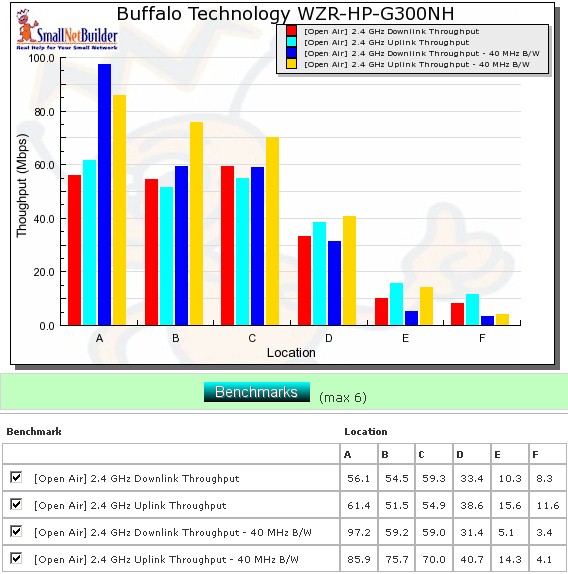
Figure 16: Six location wireless throughput summary
The real story, however, is the throughput in my most difficult test locations E and F. Since I have been using the Intel WiFi Link 5300 AGN test client, I have been able to successfully connect and get low, but usable throughput in these locations. But the throughput I obtained from the WZR-HP is 2 to 3X what I normally see, except for the 40 MHz downlink tests.
So it would appear that the router’s higher power does help improve throughput vs. range performance. And although I didn’t test to see if the WZR-HP would connect at longer distances, I’m pretty sure it would, given its significantly higher transmit power.
Figure 17 shows a composite of the actual IxChariot test results running downlink 2.4 GHz w/ 20 MHz channel. Throughput variation is a mixed bag, with some locations nice and smooth and others, most notably Locations A and B, displaying seconds-long throughput dropouts. This had the result of forcing the average throughput for the 1 minute run to a lower value.
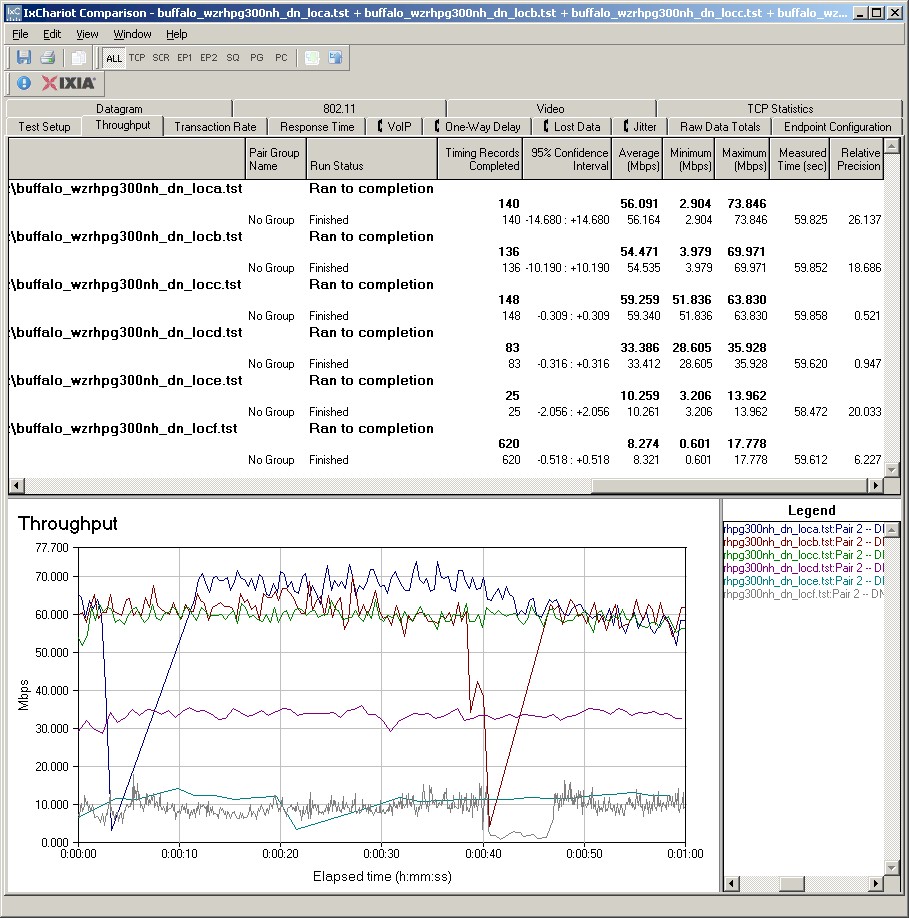
Figure 17: Six location wireless throughput – 2.4 GHz, 20 MHz channel, downlink
I saw these dropouts in other tests, as you can see in the IxChariot plots (20 MHz up, 40 MHz down, 40 MHz up). I’m not sure of the exact cause, which could be in the router, the client or a combination of the two.
Wireless Security Throughput
Testing and analysis by Tim Higgins
Because link rates are supposed to be limited to 802.11g (54 Mbps) speeds (as per 802.11n) when using WEP and WPA/TKIP wireless security, I’m no longer showing the IxChariot plots and just confirming whether products conform. I ran the checks and the WZR-HP properly limits speeds to 11g rates,which results in best case throughput around 20 Mbps.
Wireless Performance – Competitive Comparison
For the competitive comparison, I chose two other similarly-priced, single band draft 11n routers with Gigabit WAN and LAN ports: the D-Link DIR-655 (A4); and Linksys WRT310N. Figure 18 compares their downlink throughput in the default 20 MHz bandwidth mode.
Most likely due to its high throughput variation, the WZR-HP doesn’t turn in the highest throughput in the stronger signal locations. But it easily out-performs both the D-Link and Linksys in my most difficult test Locations E and F with 8 Mbps vs. 1 or less Mbps in Location F.
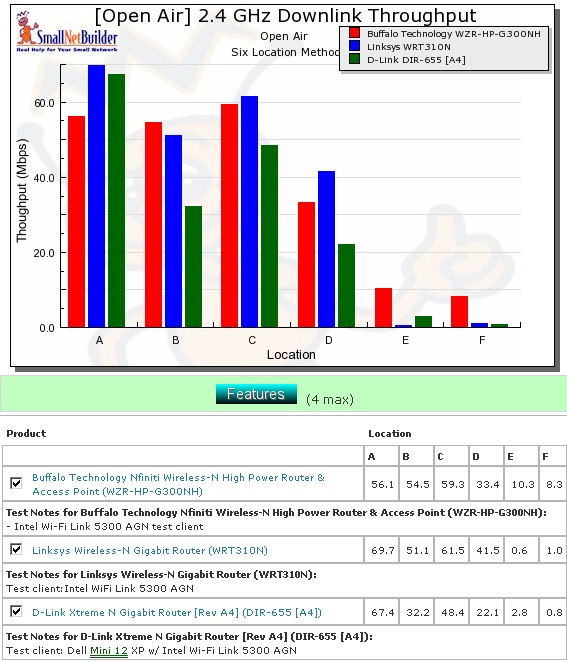
Figure 18: Competitive comparison – 20 MHz channel, downlink
The throughput summary tables (Tables 2 and 3) will help you easily compare products across the four combinations of bands and modes tested. Instead of just putting an X in the winning product’s box, I’m trying something new this time.
The charts are generated by going through each six-location comparison plots and putting the throughput value in the product’s box that had the highest throughput for each test. If throughput differs by 1 Mbps or less, then both products get the throughput entered. This provides a bit more data for your analysis pleasure.
| Product | 2.4GHz /20 | 2.4GHz / 40 | ||||||||||
|---|---|---|---|---|---|---|---|---|---|---|---|---|
| A | B | C | D | E | F | A | B | C | D | E | F | |
| Buffalo WZR-HP-G300NH | 54.5 | 10.3 | 8.3 | 97.2 | 59.2 | 59.0 | 31.4 | 5.1 | 3.4 | |||
| Linksys WRT310 | 69.7 | 61.5 | 41.5 | |||||||||
| D-Link DIR-655 (A4) | ||||||||||||
Table 2: Best downlink throughput summary
A quick glance shows that the WZR-HP-G300NH is the clear winner among the three for both up and downlink.
| Product | 2.4GHz /20 | 2.4GHz / 40 | ||||||||||
|---|---|---|---|---|---|---|---|---|---|---|---|---|
| A | B | C | D | E | F | A | B | C | D | E | F | |
| Buffalo WZR-HP-G300NH | 61.4 | 51.5 | 54.9 | 38.6 | 15.6 | 11.6 | 75.7 | 70.0 | 40.7 | 14.3 | 4.1 | |
| Linksys WRT310 | ||||||||||||
| D-Link DIR-655 (A4) | 62.4 | 54.4 | 100.1 | |||||||||
Table 3: Best uplink throughput summary
Closing Thoughts
The WZR-HP is Buffalo’s current top-of-line draft 11n router. And it’s packed with features including a built-in PPTP VPN server, Web Access to files stored on an external USB drive attached to the router, an AP mode, and an easy-to-use NAS – features not found on most competing routers.
But arguably, the most important feature is its high power radio. With peak power almost ten times that of the D-Link DIR655 (A4), you would expect better coverage. And the good news is that the WZR-HP actually does provide significantly higher throughput at weak signal locations where other draft 11n routers only squeeze out a Mbps or so. And although we didn’t test for increased range, we’re pretty confident that it will deliver.
But no product is perfect and the WZR-HP has a few shortcoming that might limit its appeal. First, there is no way to control the RF power output. In some applications, you might want to reduce the output power to either minimize interference with other wireless networks, or to reduce the range to your immediate working area.
For small businesses, the lack of RADIUS authentication (WPA Enterprise) could limit its usefulness. And the multiple-SSIDs for wireless security don’t provide the protection that VLAN-based "Guest" wireless modes on other products provide. Even if Buffalo stays with the multiple SSIDs, they should add a checkbox to keep WLAN traffic restricted to Internet access only.
Those caveats aside, the WZR-HP-G300NH is a solid router worthy of your consideration – especially if you have dead spots that other routers can’t reach.
Buy Nfiniti Wireless-N High Power Router & Access Point from Amazon