

Introduction
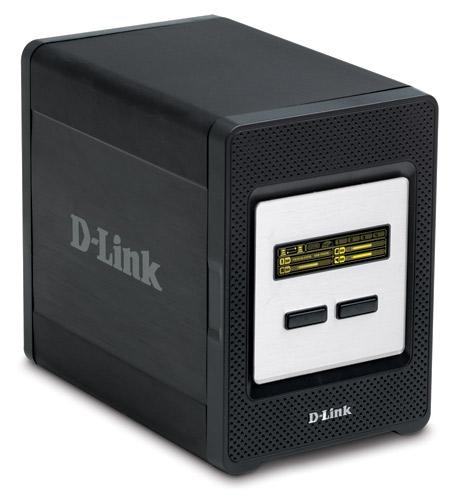
| At a Glance | |
|---|---|
| Product | D-Link 4 Bay Network Storage Enclosure (DNS-343) |
| Summary | Four drive, RAID 5 version of D-Link’s popular dual-drive RAID 1 NAS |
| Pros | • Good performance • Up to 9k jumbo frame support • Supports separate drives, JBOD, RAID 0, 1, 5 • FTP, iTunes, UPnP AV servers • Quiet |
| Cons | • No logging • Tricky RAID fail recovery |
This isn’t going to be a very long review because, if you’re familiar with D-Link’s DNS-323 [reviewed] or 321 [reviewed] dual-drive RAID 1 NAS, then you basically know the DNS-343. Take the 323’s feature set, add two drives, RAID 5 and a fancy OLED front panel display, then subtract BitTorrent downloading and there you have it.
Speaking of the front panel OLED display, it’s actually pretty useful. Figure 1 shows a composite of the three screens that you rotate through by pressing really hard on the Next front panel button.
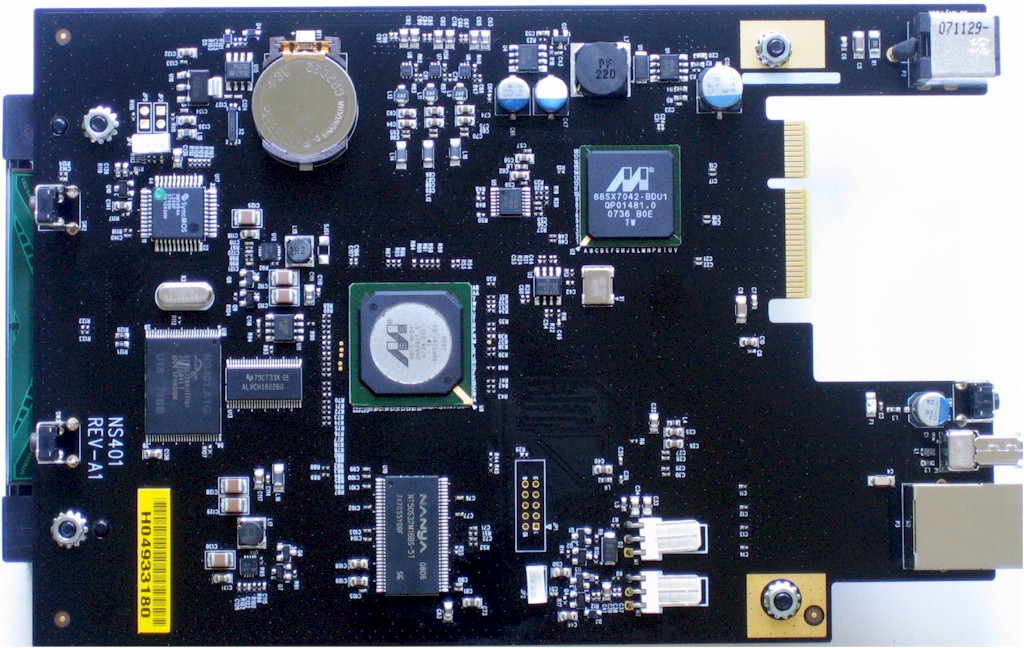
Figure 1: DNS-343 Main board
The three OLED screens are (top to bottom): System Information; Hard Drive Status; and Server Status. It’s nice that if the network connection drops, the whole screen flashes a connection dropped message. I just wish something similar was done when a drive fails!
On the System Info screen, the drive icons flash to indicate access and the arrows between the two computers also flash to indicate network activity. The Hard Drive Status page shows space used and changes to show rebuild status during RAID resyncs or drive formatting. Note the little "R5" next to the 1 (indicating the volume number), which indicates the volume mode. Server Status shows USB printer connection and up/down status for the UPnP AV, iTunes and FTP services.
Internal Details
The slideshow has a few more shots of the 343’s innards. But I’ve grabbed a photo of the main board in Figure 2 below. The CPU is a Marvell 88F5281-D0 C500, the same as used in the DNS-323, while a Marvell 88SX7042 is used for the SATA ports and a Marvell 88E1118 provides the Ethernet port. There is also 128 MB of RAM, 16 MB of flash and a SyncMOS SM5964A 8 bit micro controller.
Figure 2: DNS-343 Main board
Jumbo frames up to 9k are supported on the 10/100/1000 Ethernet port. Controls consist of an enable and MTU selector of increments of 1000 from 3000 to 9000.
Features and Functions
The 323 review does a good job of describing most of the 343’s features and you can find a description of the Download feature in the 321 review. Just remember that BitTorrent downloads are currently not supported, although D-Link told me that they are considering adding it, but don’t have a definite schedule for doing so.
The 343 comes with UPnP enabled, so it will pop up an icon in the Windows Notification area (tray) if you have UPnP discovery enabled. But there is something funky in the UPnP code, because when I clicked on the icon to get to the admin web page, I frequently saw duplicate entries (Figure 3). These duplicates appear to be temporary and shrink down to a single entry after a few minutes or so, however.
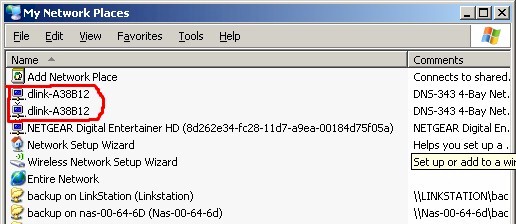
Figure 3: Duplicate UPnP entries
RAID Options
The main thing that the 343 brings to the party is RAID 5 capability. Figure 4 shows that the 343 (along with the 321 and 323) allows you to create two volumes if you like using the Custom Configuration option. You just select the primary volume (RAID 0, 1 or 5), set its capacity and the remaining space will become a JBOD volume.
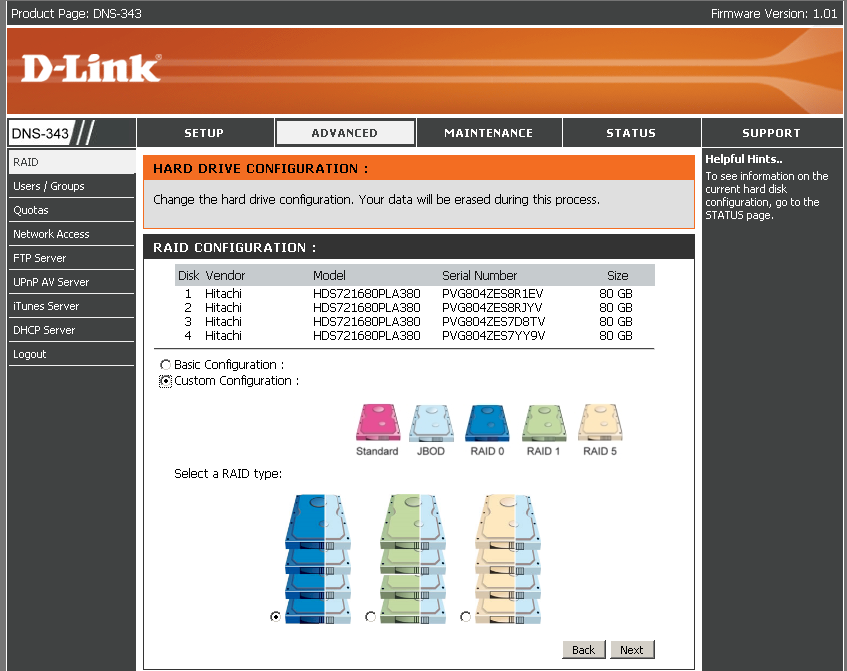
Figure 4: RAID Custom Configuration
There are two subtle oddities to the RAID options. First, RAID 0 isn’t an option in the Basic RAID Configuration menu (Figure 5). You get RAID 0 only via the Custom Configuration.
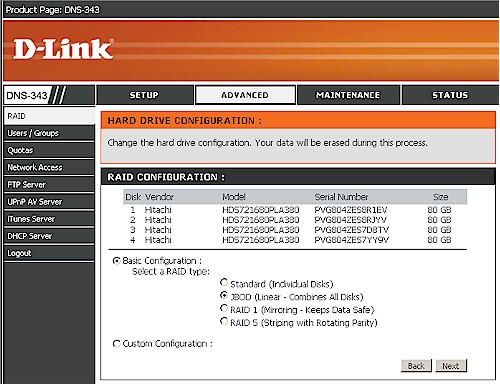
Figure 5: RAID Basic Configuration
The other "hidden" option is that if you have four drives and select RAID 1 in the Basic Configuration menu, two separate RAID 1 volumes are automatically created. This acutally took me two tries, since formatting quit at the 94% point on the first try. So I shut down, rebooted and repeated the RAID 1 Basic Configuration selection and then got my two RAID 1 arrays.
RAID Fail Test
With my recent experience with the DNS-321’s touchy RAID recovery, I wondered if the 343 would perform similarly. In short, it did… with a few other twists.
I first set up email alerts and found that they worked just like those on the 321. I would get short "drive failed" messages when I pulled a drive, but nothing indicating rebuild start or finish.
I started a long file copy and first pulled the top drive (#1). The only failure indication on the OLED panel was that the drive icon disappeared. Since the 343 doesn’t have a beeper, I thought D-Link would have taken advantage of the screen and flashed a message to make it obvious that something was wrong. Unfortunately, they don’t, so you need to be very observant to notice that something is amiss.
As with most NASes, the admin interface makes you go hunting to find a problem. But at least you can navigate right to the Status screen, which showed a proper Degraded status.
Since hot-swap isn’t supported, I powered down the 343, plugged the "failed" drive back in and rebooted. But when I logged in, there was no warning of drive failure and I found that the Status screen still showed as degraded. So I navigated to the Tools > RAID screen to start the rebuild, but found only the option to Re-configure All Existing Hard Drive(s). Not good.
The 343’s User Manual says that the 343 is supposed to prompt you to format a replacement drive. But, as with the 321, since I wasn’t using an unformatted drive, it didn’t recognize it and offer the option. Unfortunately, this time, I didn’t have another SATA drive around, so couldn’t test that it would be properly recognized and used to rebuild the array.
To be fair, this test doesn’t simulate what happens in an actual failure (since you wouldn’t be reinserting the same drive). But we run the same test on all RAID products and the D-Link NASes are the only products we’ve encountered that don’t properly rebuild the array.
When I tested the 321, I found that failing the second drive caused a different behavior. So I had the 343 rebuild the array and then I pulled drive #3. But upon powering down, reinserting the drive and rebooting, I encountered the same "Re-configure All Existing Hard Drive(s)" option.
So I decided to have some fun and reinserted drive #3, didn’t rebuild the array, started a file copy and pulled drive #4, forcing a second drive failure. To my surprise, the filecopy continued for about 10 seconds before Windows finally threw up the error box shown in Figure 6. It wasn’t until after I shutdown and rebooted the 343 that the volume finally disappeared.
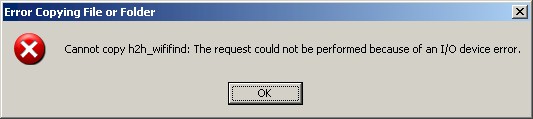
Figure 6: Filecopy error from a degraded volume
The 343 offers two options not present in the DNS-321. There is a Scan Disk option under the Maintenance menu and you can choose between EXT2 ("Best Performance" according to the D-Link selector) or EXT3 ("Most Stable") filesystems.
Performance – Benchmark Comparison
I put the 343 through our standard NAS Chart tests in JBOD and RAID 5 modes with 100 Mbps, 1000 Mbps and 1000 Mbps w/ 4k jumbo frame LAN connections. To ensure connection at the intended speeds, the iozone test machine and the 343 were manually moved between a NETGEAR GS108 10/100/1000Mbps switch for gigabit-speed testing and a 10/100 switch for 100 Mbps testing.
NOTES:
- Firmware version tested was 1.01
- Drives used were four Hitachi Deskstar HDS721680PLA380 80GB 7200RPM 3.0 Gb/s SATA hard drives with 8MB of cache supplied by D-Link
- Keep in mind that the maximum raw data rate for 100Mbps Ethernet is 12500 Kbytes/sec and 125000 Kbytes/sec for gigabit
I first used the Compare Benchmark chart feature to plot throughput vs. file size for the various benchmark tests. Figures 7 and 8 show the 1000 Mbps and 1000 Mbps w/ 4k jumbo frames Write and Read results respectively.
Write performance is remarkably flat, showing no sign of the write caching at smaller filesizes that we typically see. And jumbo frames make a big difference in performance, more in JBOD than in RAID 5. But, most significantly, going from JBOD to RAID 5 will cut throughput about in half.
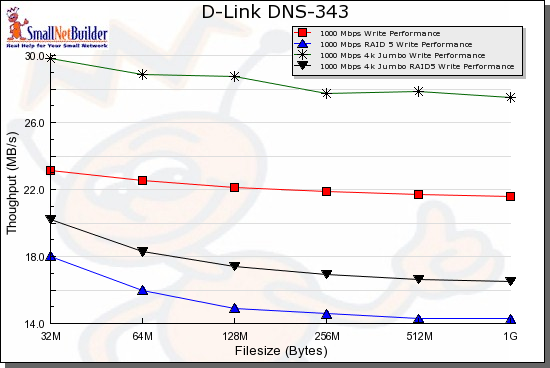
Figure 7: 1000 Mbps Write benchmark comparison
For read, jumbo frames don’t make much difference. But you again see a significant—but not 50%—throughput reduction going from JBOD to RAID 5.
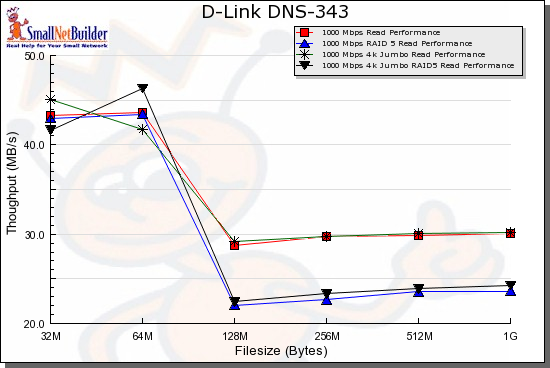
Figure 8: 1000 Mbps Read benchmark comparison
Performance – Product Comparison
So how does the 343 stack up against similar RAID 5 products? Actually, not badly. The 343 was included in the comparison group for the Thecus N3200 review that I recently posted. And it turns out that the same grouping still holds for this review: the N3200, Qnap TS-409 Pro [reviewed] and Synology CS-407 [reviewed].
Figure 9 is a comparison of RAID 5 write performance with a 4k jumbo frame gigabit LAN connection. The 343 cruises steadily along, ranking last at the smaller two filesizes, but first at the largest two filesizes.
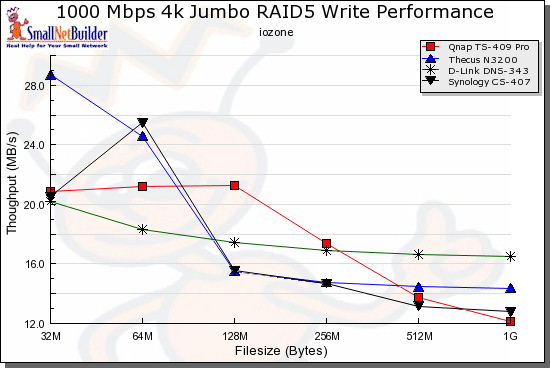
Figure 9: Competitive comparison – RAID 5 write, 1000 Mbps 4k jumbo LAN
So we’ll have to turn to the average write performance rankings (Figure 10), where you can see that the four products are very similar in performance for large file sizes.
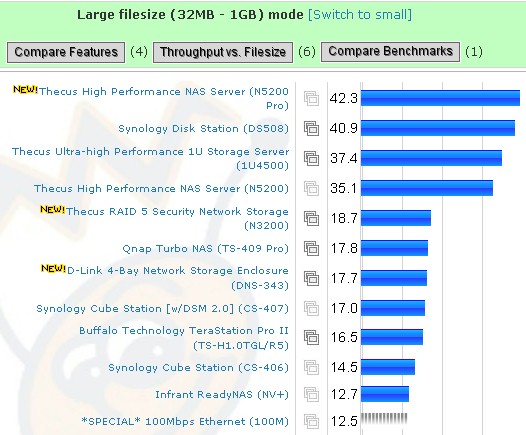
Figure 10: Average large filesize throughput – RAID 5 write, 1000 Mbps 4k jumbo LAN
Switching to read performance under the same conditions for the same set of products, Figure 11 shows that it’s tough to call a clear winner.
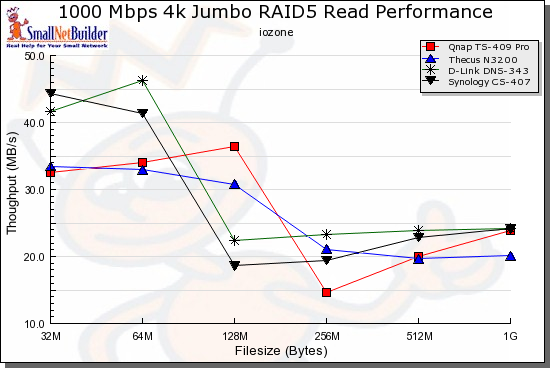
Figure 11: Competitive comparison – RAID 5 read, 1000 Mbps 4k jumbo LAN
So, once again turning to average performance rankings (Figure 12), we see that read performance is again close. The 343 comes out on top of the group, but not by enough margin to be noticeable in actual use.
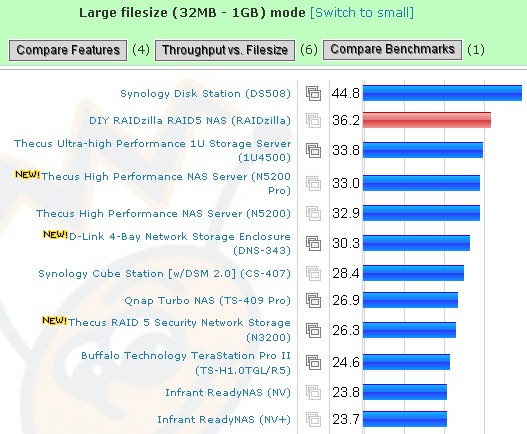
Figure 12: Average large filesize throughput – RAID 5 read, 1000 Mbps 4k jumbo LAN
Closing Thoughts
D-Link has been very successful with its DNS-323 two-drive NAS, even though it hasn’t been the lowest-cost BYOD option. But price, performance, brand name and wide availability have all combined to make it a top seller.
Table 1 (borrowed from the N3200 review) shows that D-Link isn’t taking the lowest-cost approach with the DNS-343 either. But the same combination of factors that has made the 323 so popular, will probably help the 343 along, too.
| Product | Price Range | Avg. Price |
|---|---|---|
| Qnap TS-409 Pro | $599.00 | $599.00 |
| Synology CS407 | $469.99 – $687.19 | $579 |
| D-Link DNS-343 | $383.88 – $497.00 | $440 |
| Thecus N3200 | $385.40 | $385 |
Table 1: Pricing summary (Source: Pricegrabber 7/29/08)
The NAS market is a lot more crowded than it was when the DNS-323 was introduced. And the 343 is essentially an almost two year old design—an eternity in consumer electronics. So the 343 doesn’t have the same clear advantages as the 323 had when it hit the market.
Performance is actually still competitive. But I would liked to have seen D-Link advance the ball a bit further with the 343, particularly in terms of more robust (and automatic) RAID recovery, logging and maybe on on-line access / backup option.
Still, the DNS-343 is a good (and needed) addition to D-Link’s NAS product line and will be just the thing for buyers who are looking for a good all-around RAID 5 NAS with a familar name on the box.