

Introduction
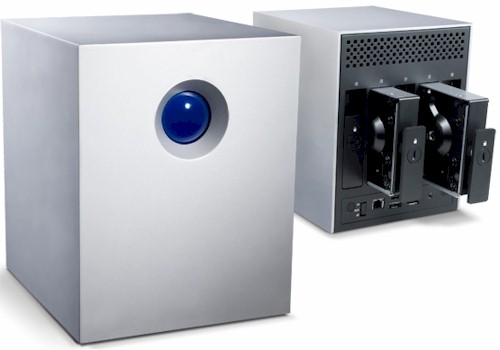
| At a Glance | |
|---|---|
| Product | LaCie 5big Network (301354U) |
| Summary | 5 SATA Drive RAID 5/10 NAS primarily focused on file serving and backup |
| Pros | • Gigabit LAN w/ jumbo frames • Smooth RAID failure recovery • Quiet • Three eSATA ports for storage expansion |
| Cons | • Low performance compared to other five-drive NASes • No media or print servers • Unhelpful logging, email alerts • No idle power down |
Take the basic features of LaCie’s 2big Network NAS, expand the number of drives from 2 to 5, add RAID 5, 6 and 10 (each with spare drive auto-failover), put it in a case that could be mistaken for a small sub-woofer and you have the 5big Network.
Craig Ellison’s 2big Network review and the 5big’s slideshow do a good job of describing the 5big’s feature set. So this review will primarily focus on performance and just hit the highlights and differences of the 5big.
Product Tour
The 5big has LaCie’s trademark monolithic look and perhaps takes the "clean" design look a bit too far. The case is heavy-duty aluminum, but eschews the heatsink fin look of the 2big for a smooth look. There are no visible fasteners and I have to admit that I couldn’t figure out how to get it open for internal photos!
The front has a big button similar in size and function to that on the 2big, which blinks patterns of blue and red colors to convey status. It also serves to start the automatic copying of an inserted USB key to a folder. Under normal conditions, the button glows blue and doesn’t blink to indicate network or drive activity. For that, you have to turn to the rear drive status lights.
Figure 1 shows the rear panel features. Link speed and activity LEDs are built into the single 10/100/1000 Ethernet port, which supports jumbo frames with 4000 and 9000 byte fixed settings.
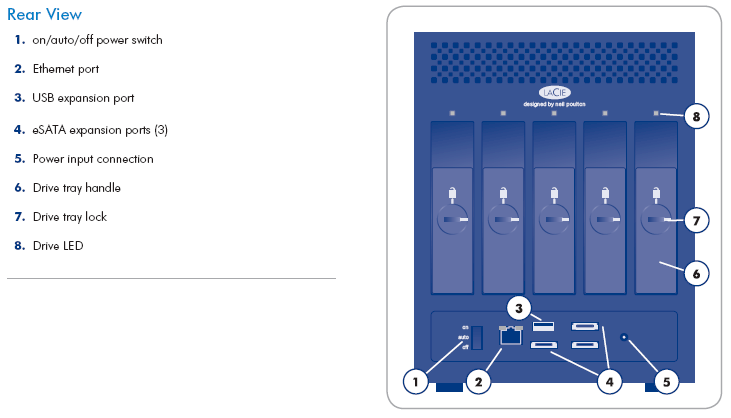
Figure 1: Rear view of the 5big
There is only one USB 2.0 port, but three eSATA ports that are usable only for attaching external storage—the 5big lacks UPS support and does not include a print server. External drives formatted with FAT32, NTFS, HFS+, EXT3, REISERFS or XFS can be mounted by the 5big. But any external drive used to back up the 5big must be formatted in XFS, which is the filesystem used by the internal drives.
Drives are locked into position using a screwdriver, coin or plastic "2-in-1 RAID mode change and drive lock tool" that LaCie throws in. The drive carriers don’t have locking levers, so these locks are the only thing that holds the drives seated into their backplane connectors.
The three-position power switch (on/off/auto) functions the same as on the 2big. If the on/auto/off power switch on the 5big is set to "On", the Shut Down button in the web admin interface will restart the 2big, not shut it down. If set to "Auto", the system will enter Standby mode.
Due to the multiple RAID modes supported by the 5big, it doesn’t use the physical mode change switch used on the 2big. Instead, you configure the RAID mode using the web admin interface. Figure 2 shows the RAID modes that the 5big supports.
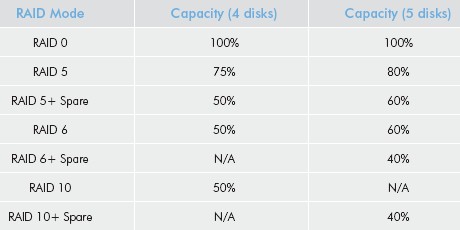
Figure 2: RAID modes
Internal Details
As I noted above, I couldn’t figure out how to get the case open. But pulling out all the drives gave me enough of a look at the main board that is mounted below the drives to be able to determine the components used.
Not surprisingly due to its relatively low performance among five-drive NASes, the 5big uses a Marvell 88F5182 "Orion" processor (@ 500 MHz). Memory is on the low side, too at 128 MB or RAM and 4 MB of flash. Due to the large number of drives there is also a Marvell 88SX6081 8-port SATA II, 3 Gbps PCI-X host controller.
The single 10/100/1000 Ethernet port is provided by a Marvell 88E1118, which supports 4K and 9K jumbo frames.
The 2.5 TB model that LaCie provided for review came with five Hitachi Deskstar P7K500 500GB drives (HDP725050GLA360 7200 RPM 16MB Cache SATA 3.0Gb/s).
A single 4.5″ fan is mounted above the drives and pulls air in the top perforated opening and exhausts it down over the drives and main board and out the perforated bottom of the case. Drive and fan noise is low and power draw was measured at 43 W. There are no power save features.
In Use
The slideshow will walk you through most of the 5big’s admin screens. The 5big is primarily focused on file serving, so you won’t find any media servers. Curiously, however, you do get a download manager, but it does Torrent downloads only. If you’re looking for print serving, you also won’t find it, nor will the 5big hook up with your UPS so that it can shut down safely in the event of a power failure.
On the positive side, and as you would expect given LaCie’s history, the 5big is both Windows and Mac OS friendly. It supports AFP, which is enabled by default and both Windows and Mac OS flavors of Apple’s Bonjour. And for client backup, LaCie throws in 3 licenses each of Genie Backup Manager Pro for Windows and Intego Backup Manager Pro for Mac OS. You can also browse, upload, download and delete files using a web browser, which could be handy for remote access. And since the 5big supports HTTPS for both admin and file browsing, your access can be secure.
Since the 5big doesn’t have features aimed at consumers, it’s reasonable to assume that the 5big is after small-biz and home office buyers. But aside from being able to use Active Directory (which I didn’t test) for user authentication, the product is missing key features that serious storage buyers need.
Scheduled backups are supported, but only to shares on internal or external attached drives. There is no over-the-network backup or synchronization for keeping data safe from physical damage, theft and controller and power-supply failure.
While there are email alerts, I wasn’t able to get them to work. I don’t know what the problem is, since the log was unhelpful for debugging this issue and, frankly, in general. The 5big’s manual says that it has its own SMTP server, but it’s a black box with nothing you can tweak. The manual offers this note, however:
"The 5big has an integrated SMTP server that sends emails through port 25. This service is thus disabled if port 25 is blocked (as with Livebox, Orange, and France Telecom). As many ISPs block this port, you must configure your router to authorize traffic through this port in order for this service to work."
I bolded that last part, since it makes no sense to me that opening a port for an outbound service would help or even be required.
Drive Fail Test
In his review, Craig found that the 2big handled drive failure and recovery without incident and I’m happy to report that the 5big behaves nicely in this department, too. I did my testing in a RAID 10 + spare configuration and first started by starting a large folder copy and pulling one drive.
After a short time, the System > RAID screen showed a RAID type of RAID 10 (instead of RAID 10 + spare) and that it it had automatically started syncing the former spare drive into the RAID 10 array (Figure 3). Meanwhile the file copy continued without a problem.
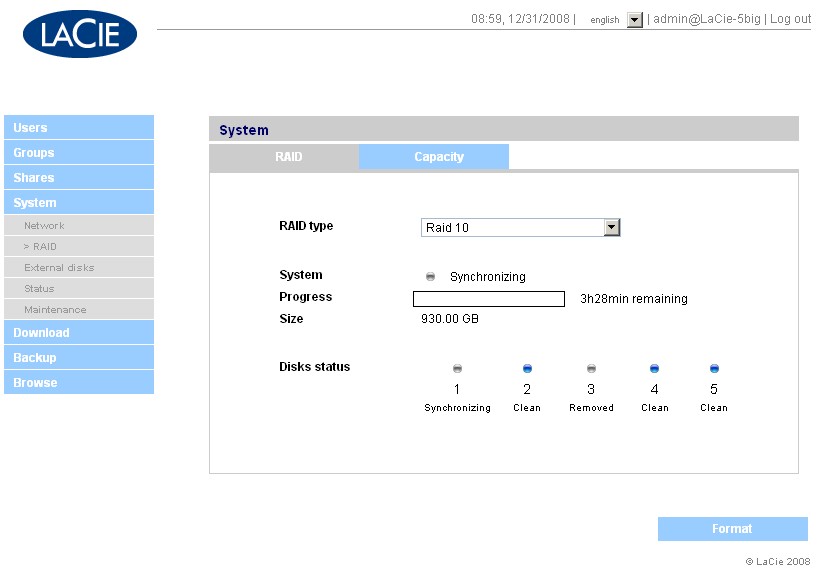
Figure 3: Single drive RAID 10+spare mode failure
However, the big ol’ front panel light continued to shine steady blue, offering no indication that anything was amiss. While it’s true that the RAID 10 array was chugging right along with the spare drive automatically swapped in, a drive had failed after all. So I think that some indication of failure should be shown when a spare drive is swapped in so that the bad drive can be replaced.
I then shut down the system before the resync was complete, reinserted the original drive and powered back up. The 5big once again automatically detected the change and indicated that it was resyncing, but with the RAID type changed back to RAID 10 + spare. However, this time the front panel light did blink to indicate that an array was rebuilding. The original spare drive was now part of the RAID 10 array and the drive I had first pulled now marked as the spare.
The second test consisted of starting another large folder copy then pulling two drives after I let the synchronization from my first test fully complete. Once again, as Figure 4 shows, the RAID type changed to RAID 10. But this time an odd message was displayed next to the System indicator (Figure 4).
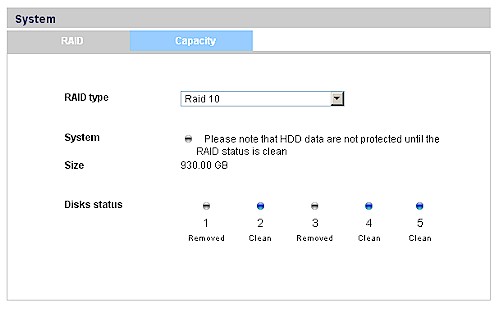
Figure 4: Two drive RAID 10+spare mode failure
The good news is that it indicates that something isn’t right. But it doesn’t really properly describe what has happened and what the person seeing the message needs to do! I completed the test by stopping the file copy, which had continued without so much as a hiccup, shutting down the system and reinserting the two drives.
After the system finished booting and I was able to log in, I once again found that the system had gone back to RAID 10 + spare mode and had started another slightly over 2 hour resync.
Even though the status indicators were not that clear and at times confusing, I give the 5big two thumbs up for smooth and automatic recovery from drive failure.
Performance
I used IOzone to test the file system performance on the 5big (the full testing setup and methodology are described on this page). I tested with 2.1.1 firmware in RAID 0, 5 and 10 modes with 100 Mbps, 1000 Mbps and 1000 Mbps w/ 4k jumbo frame LAN connections.
Figure 5 shows write benchmarks plotted for RAID 0, 5 and 10 with a 1000 Mbps, 4K jumbo frame LAN connection. Average throughput for the large file sizes from 32 MB to 1 GB measured 20, 16.9 and 21.8 MB/s respectively. You can see the performance boost that the combination of striping and mirroring used in RAID 10 provides over RAID 5.
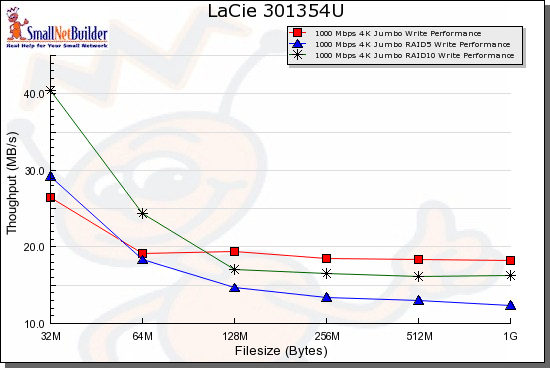
Figure 5: Write benchmark comparison – 1000 Mbps, 4k jumbo
Figure 6 shows the read results for the same tests, with averages of 32.9, 27.9 and 28.4 MB/s recorded for RAID 0, 5 and 10. This time the overhead for RAID 5 and 10 is about the same, with both coming in slower than RAID 0.
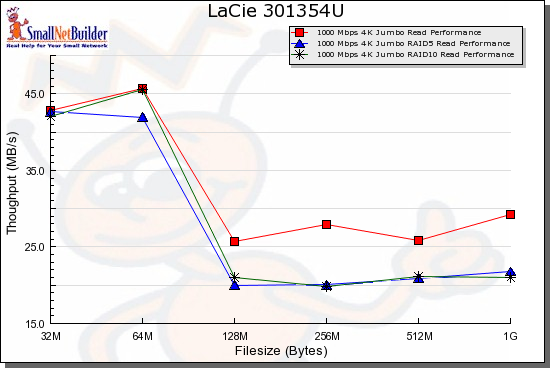
Figure 6: Read benchmark comparison – 1000 Mbps, 4k jumbo
For RAID 5 write performance, Figure 7 shows that the 5big isn’t in the same league as the other current crop of 5 drive NASes. The Thecus N5200 Pro, Synology DS508 and even the older Thecus N5200 all use more powerful Intel or Freescale general purpose processors than the 5big’s Marvell "Orion" NAS SoC and have more memory.
Average write throughput for the 32 MB to 1 GB "large" file sizes measures 42.3, 40.9, 35.1 and 16.9 MB/s for the N5200 Pro, DS508, N5200 and 5big, respectively.
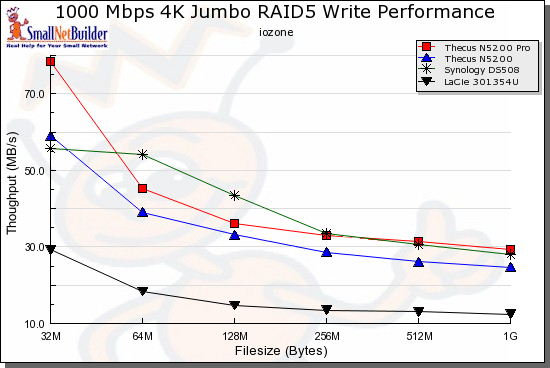
Figure 7: RAID 5 write competitive comparison – 1000 Mbps, 4k jumbo
Figure 8 shows a different story for reads, however, especially for larger file sizes, where performance tends to even out. Average throughput came in at 44.8, 33, 32.9 and 27.9 MB/s for the DS508, N5200 Pro, N5200 and 5big, respectively.
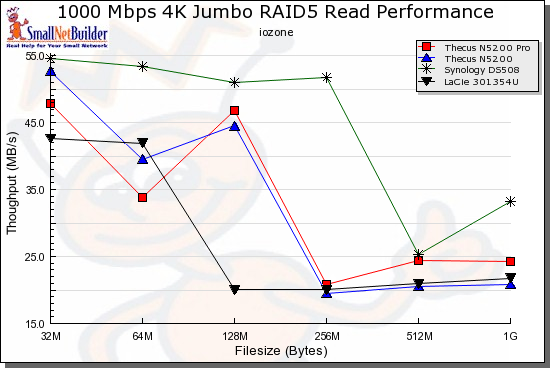
Figure 8: RAID 5 read competitive comparison – 1000 Mbps, 4k jumbo
Run your own comparisons using the NAS Charts.
Final Thoughts
The LaCie 5big has an odd mix of pluses and minues. While it strikes me as a more of a "business" than "consumer" NAS, it isn’t really isn’t a "best in class" offering for either market.
Where the 5big does shine, however, is in value. At around $750 it’s the least expensive five drive NAS that you can currently buy and that includes 2.5 TB of storage! The Thecus N5200 and N5200 Pro, Synology DS508 and QNAP TS-509 Pro are all BYOD and (except for the N5200) are priced $100 to $200 higher.
So if throughput and media serving isn’t a high priority and you’re looking for a lot of Windows and Mac OS-friendly RAID 5, 6 or 10 storage for your money along with smooth and automatic drive failure recovery, the LaCie 5big could be worth a look.
 See the slideshow for an admin interface tour.