

Introduction
| At a Glance | |
|---|---|
| Product | Synology Disk Station (DS409+) (DS409) |
| Summary | Latest, faster versions of four-bay multi-function BYOD NASes |
| Pros | • Many features including full LAMP webserving • Fast attached backup to USB and eSATA drives • High performance |
| Cons | • No iSCSI |
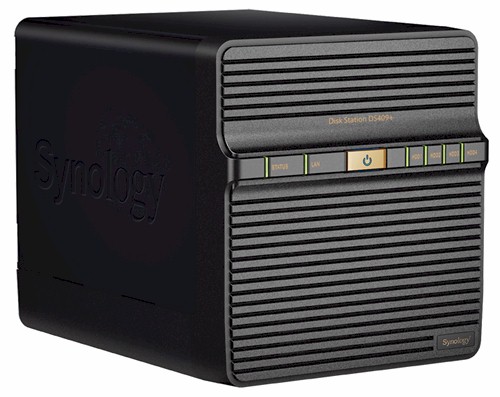
Synology’s DS409, 409+ pair are basically four-bay versions of their DS109 / 109+ that I looked at not too long ago. The duo have the same feature set as the 109s, plus support for basic, i.e. separate drives, JBOD, RAID 0/1/5/6, and RAID 5+Spare volumes. So after a brief look at the physical features and internals, I’ll hit the performance highlights and wrap up the review.
The 409s come in identical black cases except for the different names and color of the control and indicator labels (the 409 uses white; the 409+ green). The front panel has been restyled for a cleaner look, but the enclosures’ dimensions are the same as their older CS407 / 407e "Cube Station" siblings (9" X 6.6" X 7.25" or 230mm X 168mm X 184mm).
Figure 1 shows the front and rear panels. The front holds indicators and the Power button, but no USB ports, while the rear has two USB 2.0 ports, one eSATA and a Gigabit Ethernet port that supports jumbo frames up to 9K.
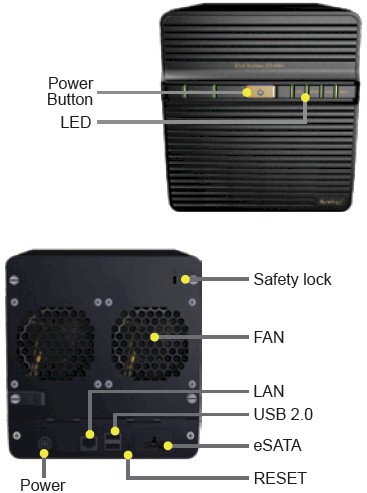
Figure 1: Front and rear panels
Both 409s have two small, quiet fans, but you’ll hear the four drives whirring in a quiet room. The 409+’ power consumption measured 46 W active and 27 W with drives spun down, while the 409 drew 36W active and 21 W with drives spun down.
Both 409s have the ability to spin down the drive after idle times from 10 minutes to 5 hours and have a shutdown / startup schedule set for further power savings.
Internal Details
Figure 2 shows the inside of the DS409+, with the cover removed and backplate swung down. Note that cabled connections are used to carry power and data to the four 3.5" SATA drives. The complete list of supported drives includes 3.5" SATA, 2.5" SATA, 2.5" Solid State Drives (SSD).
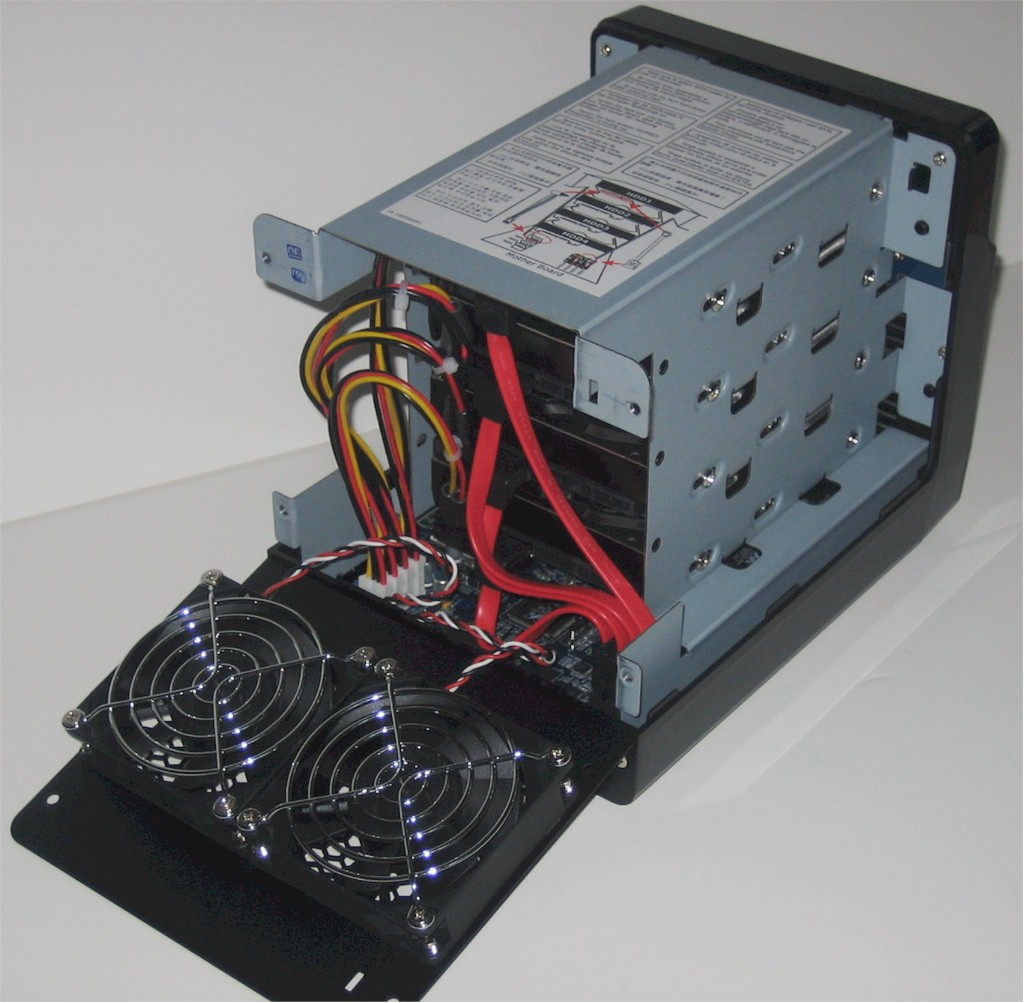
Figure 2: DS409+ inside
Figure 3 is a shot of the DS409+’ board, which requires complete disassembly to access. So I just removed the drives and shot what I could. The CPU hidden under the heatsink is a Freescale MPC8533 @ 1.06 GHz and that’s a 512 MB SoDIMM that will void your warranty if you choose to upgrade it. There is 4 MB of flash.

Figure 3: DS409+ board
The 409+’ design is unusual in that it uses both the Silicon Image Sil3132 SATALink PCI Express to 2-Port Serial ATA II Host Controller used in the DS109+ and a Marvell 88SX7042 4 Port SATA controller! Other components are the same as used on the 109+’ motherboard including an NEC D702102GC USB 2.0 controller, Marvell 88E8001 Yukon Gigabit Ethernet controller, Microchip PIC16F627 CMOS FLASH-based 8-bit microcontroller and a Lattice 4032V CPLD under the "Syno V1.01" sticker at the back left of the photo.
The inside of the DS409 (Figure 4) reveals a cleaner, cable-less design with drives mounted on plastic carriers and plugging into a backplane.
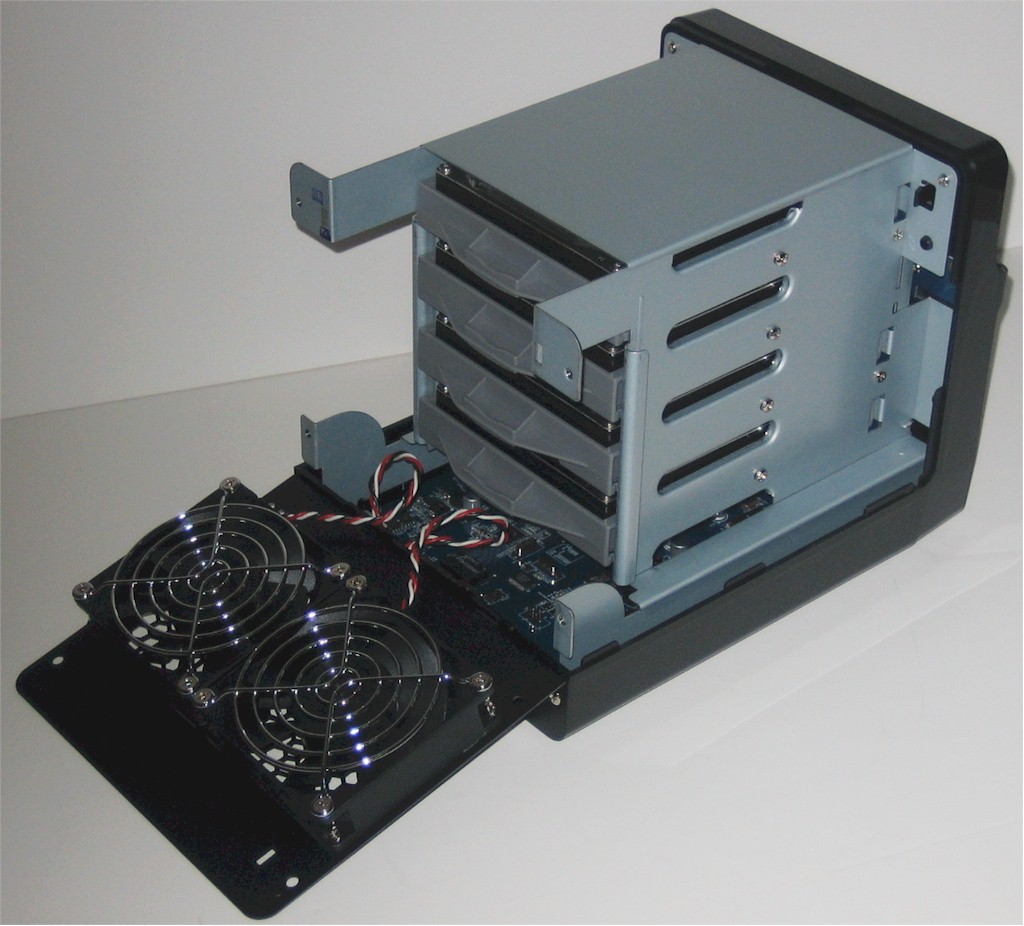
Figure 4: DS409 inside
Once again, getting complete access to the board requires full disassembly, so you also get only another partial board photo. The board, shown in Figure 5, uses many of the same components as the DS109. The CPU is Marvell’s new "Kirkwood" 88F6281, clocked at 1.2 GHz. Synology was a bit more generous with memory, giving the 409 256 MB vs. the 109’s 128 MB.
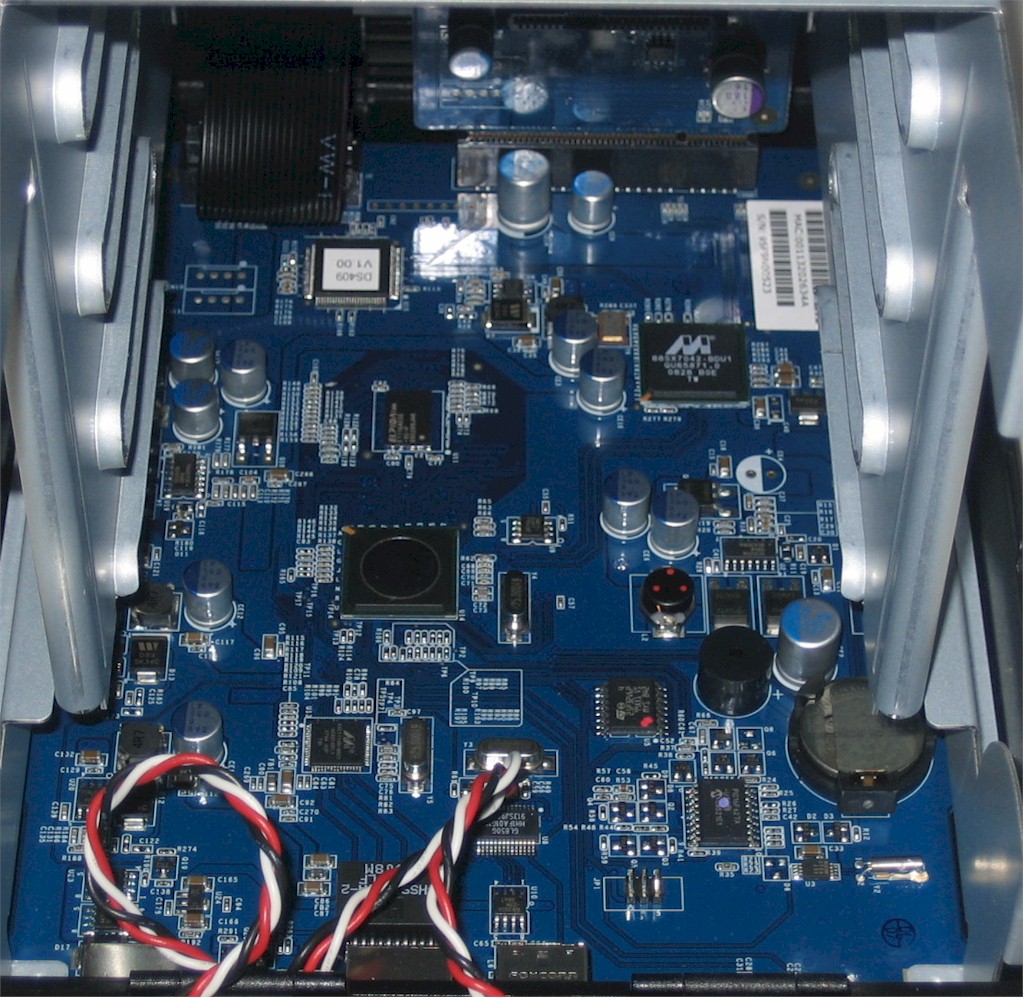
Figure 5: DS409 board
Other components include 4 MB of flash, Marvell 88E116R Gigabit Ethernet controller and Microchip PIC16F627 CMOS FLASH-based 8-bit microcontroller. There is no separate USB hub, probably because the Marvell processor handles the two USB 2.0 ports.
Performance
The 409s were tested with our standard test process. I used the latest firmware in both products, DSM 2.1-0844 for the 409+ and DSM 2.1-0845 for the 409. Both products had four Samsung HD753LJ 750 GB drives installed by Synology. Tests were run with 1000 Mbps and 1000 Mbps with 4k jumbo LAN connections in RAID 0 and 5 modes.
Backup
I first checked backup performance to an Iomega UltraMax Pro Desktop Hard Drive configured in RAID 0 attached via both USB 2.0 and eSATA. The test copies a 4.35 GB ripped DVD test folder that I use in the NAS Chart Vista SP1 file copy tests from the NAS to the attached drive.
The results are summarized in Table 1. Note the 409’s higher USB backup speed. But the 409+ clearly outperforms the 409 when backing up to an eSATA drive.
| Product | Synology DS409+ Backup Throughput (MBytes/s) |
Synology DS409 Backup Throughput (MBytes/s) |
|---|---|---|
| USB – FAT32 | 17.10 | 20.20 |
| USB – EXT3 | 17.78 | 23.62 |
| eSATA – FAT32 | 42.11 | 36.59 |
| eSATA – EXT3 | 66.63 | 43.76 |
Table 1: Attached backup throughput test summary
I also tested NAS-to-NAS backup between the 409 and 409+. Table 2 summarizes the results, for full backups without and with the encryption option enabled. Speeds using an unencrypted connection are lower than backing up to an attached USB drive. And you really better want the added security of the encrypted connection, because you’ll pay around a 70% speed penalty.
| Product | Synology DS409+ Backup Throughput to DS409 target (MBytes/s) |
Synology DS409 Backup Throughput to DS409+ target (MBytes/s) |
|---|---|---|
| NAS-NAS | 14.88 | 18.92 |
| NAS-NAS (encrypted) | 4.79 | 5.22 |
Table 2: Networked backup throughput test summary
Don’t forget to use the new backup benchmark NAS Charts if you want to compare backup speed to other products.
Benchmarks
Figure 6 presents a summary of the benchmark tests run for the DS409+. Moderate cache effects are present up to 256 MB file size for writes while throughput is reduced ~20% going from RAID 0 to 5 for writes and less than 10% for reads.
RAID 5 performance with a 1000 Mbps LAN connection averaged over the 32 MB to 4 GB file sizes and with cached results above 125 MB/s removed from the average comes in at 47.7 MB/s for writes and 60.4 for reads.
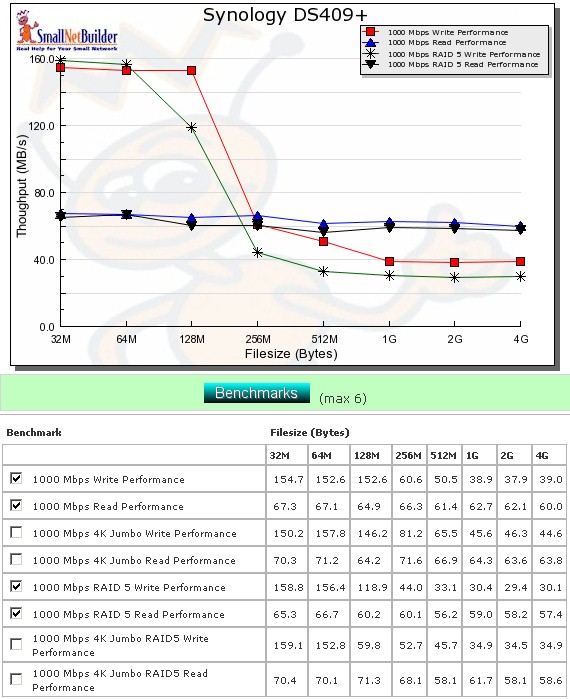
Figure 6: Performance benchmark summary – DS409+
Figure 7 presents a summary of the benchmark tests run for the DS409, which are surprisingly similar to the 409+ once you get past the cache effects at the lower file sizes. RAID 5 performance with a 1000 Mbps LAN connection averaged over the 32 MB to 4 GB file sizes and with cached results above 125 MB/s removed from the average comes in at 61.9 MB/s for writes and 59.9 for reads.
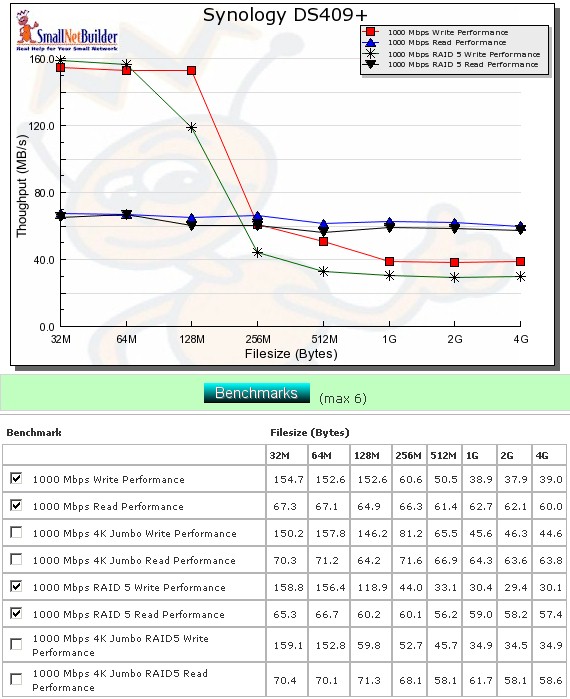
Figure 7: Performance benchmark summary – DS409
Performance – Competitive
For the competitive comparison, I included the 409+, 409, Buffalo TerStation III, QNAP TS-439 Pro, NETGEAR ReadyNAS NVX and Synology CS407 (for a previous-generation comparison).
As usual, the higher cache values compress the vertical scale in Figure 8, so you’ll have to go to the table of values to really see what is going on. It’s pretty clear that the NETGEAR is at the top of the heap, even at the larger cache-effect-free file sizes. The QNAP comes in in second place, maintaining a low-to-mid 40 MB/s speed from 512 MB file size on up.
In contrast, the 409+ stays right around 30 MB/s in the same file size range, while the 409 stays in the mid-20 MB/s. The Buffalo comes in last among the new-generation NASes across all file sizes and maintains a speed in the low-20MB/s range from 512 MB file size on up.
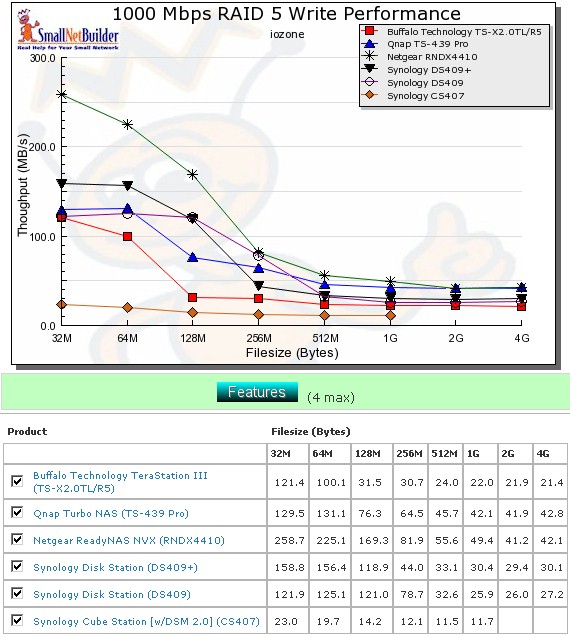
Figure 8: Competitive RAID 5 write comparison – 1000 Mbps LAN
Figure 9 compares the read performances, where, once again, the NVX produces the best results, ranging from 84 MB/s to 64 MB/s. The middle group is tougher to tell due to the significant performance drops shown by the Buffalo and DS409 as file sizes increase. But going by the calculated averages, the TS-439 Pro edges out the 409s with 64.3 MB/s vs. 60 MB/s. The Buffalo again brings up the rear with an average of 53 MB/s due to the very large drop in performance above the 256 MB file size.
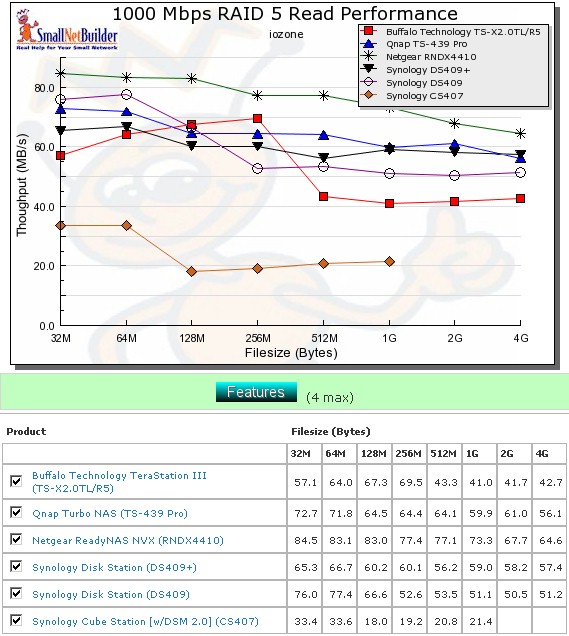
Figure 9: Competitive RAID 5 read comparison – 1000 Mbps LAN
Performance – File Copy
The Vista SP1 1000 Mbps RAID 5 file copy write results in Figure 10 once again show that iozone results aren’t the final word when it comes to measuring NAS speed. While the rankings are approximately the same, write speeds seem a bit lower and the NETGEAR NVX and QNAP TS-439 Pro swap #1 and #2 positions.
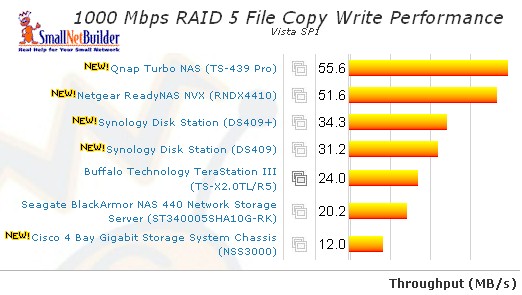
Figure 10: RAID 5 Vista SP1 File Copy Write
Figure 11 shows the 1000 Mbps RAID 5 File Copy read. Rankings are again the same as obtained using iozone, but speeds are generally higher, with the NVX topping the ranking at almost 100 MB/s!
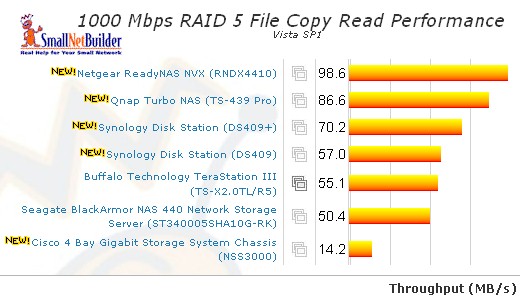
Figure 11: RAID 5 Vista SP1 File Copy Read
Use the NAS Charts to further explore performance.
Closing Thoughts
The new crop of RAID 5 NASes is making it tougher for NAS buyers in that the performance range is getting narrower, even though the hardware platforms are growing more diverse. Synology has stuck with Freescale for its higher-performance products, but the much-improved performance of the new Marvell-based platform is closing the gap between "economy" and "performance" versions.
In this case, I’m not sure that the $160 price premium for the 409+ is worth it. RAID 5 write performance is close enough to be a wash and you probably would not notice a difference if you were doing large backups to both products. On the other hand, you probably would see the difference in read performance if you were doing a lot of large file copies from both products. But if your reading is mostly in the form of HD video streaming, either product will do just fine.
I usually ding Synology for charging a premium price for its products. But this time, I have to say that both the 409 and 409+ are relative bargains, even when compared with the usual value leader: Buffalo. The least expensive price for the 2 TB Terastation III is $933 as I write this. If you subtract $240 for four WD 500GB Caviar Blue drives, that produces $693 for the base NAS. This is $100 higher than the $594 I find for the 409+ and $250 more than the 409, both of which are better performers.
If I do the same math for the NETGEAR NVX, which many say is overpriced, I subtract $640 for four Seagate Barracuda ES.2 1TB drives from the $1649 lowest price and get around $1000. This is almost a 170% premium over the 409+ and over a 225% markup from the 409. Although you do get a significant gain in RAID 5 performance from the NVX, you pay dearly for it.
The toughest choice could be between the 409+ and QNAP TS-439 Pro where the QNAP premium is around $200, RAID 5 file copy writes are better than the NVX’s and reads are a significant step up from both 409s. And if iSCSI is on your must have list, then the QNAP has it, while the Synologys don’t.
It’s a tough choice all right, but kudos to Synology for making it that way with both the price and performance of its new 409s.