

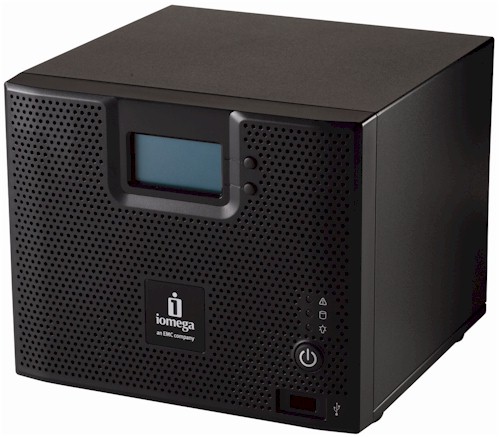
| At a glance | |
|---|---|
| Product | Iomega StorCenter ix4-200d NAS Server (34563) [Website] |
| Summary | Marvell-based four drive RAID 5/10 NAS with iSCSI, backup to/from rsync targets and CIFS shares, secure remote access and media services. |
| Pros | • Can back up to and from CIFS/SMB shares and rsync target • iSCSI target support • VMware and XenServer certified for NFS and iSCSI • Supports Apple Time Machine |
| Cons | • Not as fast as other Kirkwood-based NASes • Some funkyness when browsing for network backup shares • No eSATA port • Drives not hot-swappable |
Typical Price: $1095 Buy From Amazon
Introduction
Iomega is on a mission to remake its StorCenter NASes into better combatants in today’s bare-knuckled NAS competitive arena. If the StorCenter ix4-200d is any indication, it’s going to be a fairer fight than it has been.
Our last look at an Iomega StorCenter NAS was the ix2, which Jim Buzbee found to be a pretty good value, even though it didn’t have chart-topping performance or the biggest feature set in town. The ix2 did, however, have EMC’s new Linux-based LifeLine OS, which brought a nicely-redesigned management interface and new features that made it a big improvement over its predecessor, the now-defunct StorCenter Network Hard Drive.
The ix4 also runs LifeLine and so shares the ix2’s features. But it also brings a few new tricks of its own, including the ability to perform immediate or scheduled backups to and from attached drives, rsync servers and SMB/CIFS network shares. Yep, you read that correctly. This means that NETGEAR’s ReadyNASes are no longer the only NASes that can do the backup to/from network share trick.
Figure 1 shows the front of the ix4, with all callouts explained in the larger image. The front panel LCD display is a nice touch and rotates between showing the date and time, IP address and volume Free / Used.
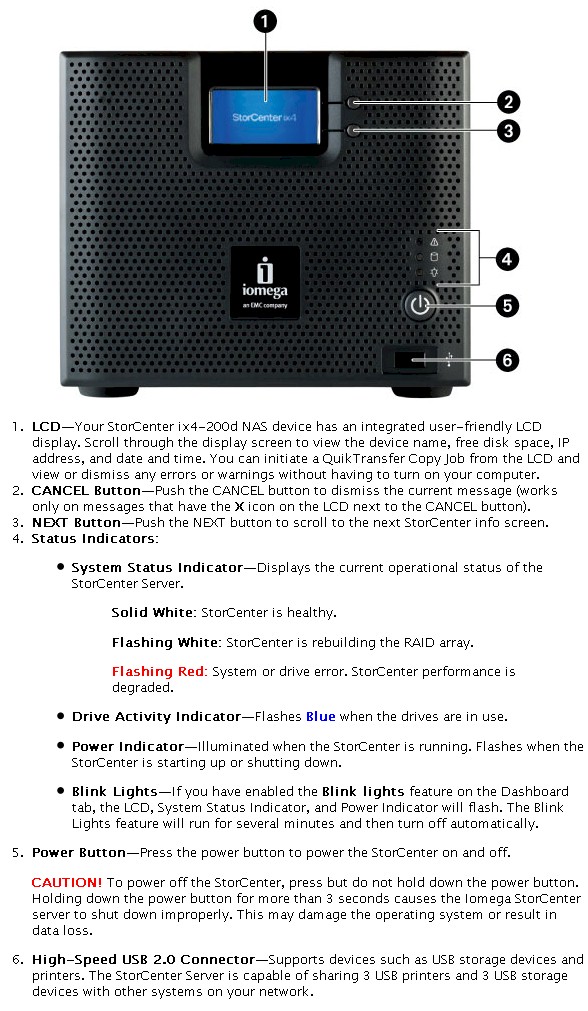
Figure 1: ix4-200d Front Panel
Figure 2 shows the rear panel, where You can see two USB 2.0 ports (for a total of three), power connector, dual gigabit Ethernet ports with support for 4000 and 9000 Byte jumbo frames, failover and 802.3ad aggregation, and a nice, quiet fan. Unfortunately, there is no eSATA port to attach external drives for speedier storage expansion or attached backup.
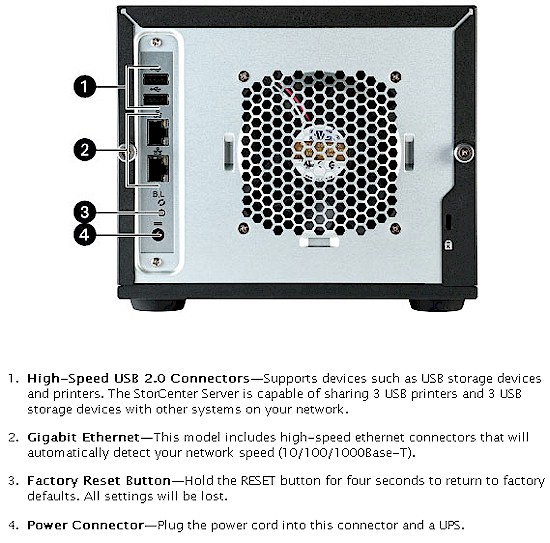
Figure 2: ix4-200d Back Panel
While the ix4 was running it drew a fairly low 35 Watts, and was surpringly quiet for a four-drive NAS. When the programmable drive spindown kicked in (5, 15, 30, 45, 1hr, 6 hr), power dropped to 13 W.
As with the ix2, a configuration wizard walks you through the basic configuration steps of setting the password time zone, network parameters, etc. during the first login or when invoked from the Settings > Device Setup tab. Note that although it’s undocumented, the admin interface is also available via secure HTTPS. But it won’t auto-forward you to HTTPS if you connect via HTTP.
Setup software is provided for both Window and Apple users and Linux users are directed to the web interface for their setup. If you have simple requirements, the Wizard does everything you need and the device can be used with a couple of default shares, “backup” and “public”. But if you want to configure further, there are plenty of options. Figure 3 shows the main configuration screen which is accessed through a secure HTTPS connection.
Internal Details
Figure 3 shows the ix4’s main board, which is based on Marvell’s 88F6281 "Kirkwood" clocked at 1.2 GHz supported by 512 MB of soldered-on DDR2 RAM and 64 MB of flash. Two Marvell 88E81116Rs provide the dual Gigabit Ethernet ports and a GL850A USB 2.0 hub supports the three ports. SATA II interface for the four drives is handled by a Marvell 88E6121 controller.
The 8 TB version that Iomega shipped for review came with four Seagate Barracuda LP 2 TB (ST32000542AS) drives that are internall formatted with the XFS file system.
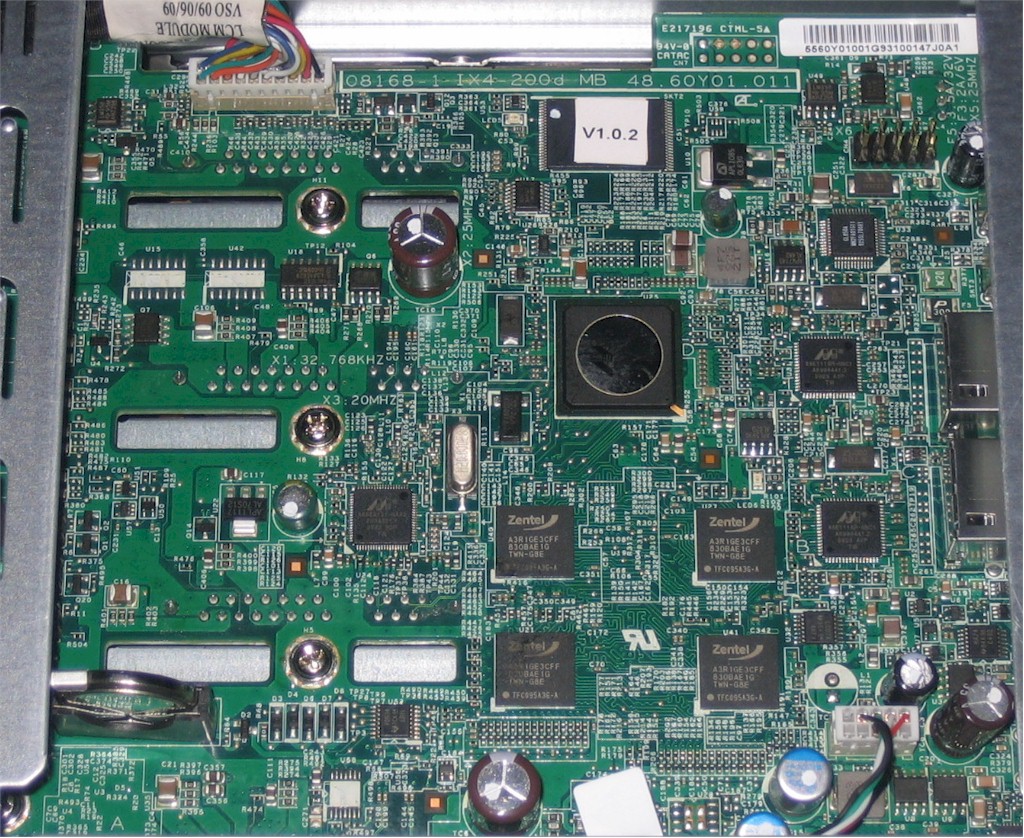
Figure 3: ix4-200d board
Figure 4 shows the drive bay on the left side of the system, with the drives mounted in plastic carriers. Although the drives are not hot-swappable, they are easily reached by loosening two thumbscrews on the back and sliding off the cover.
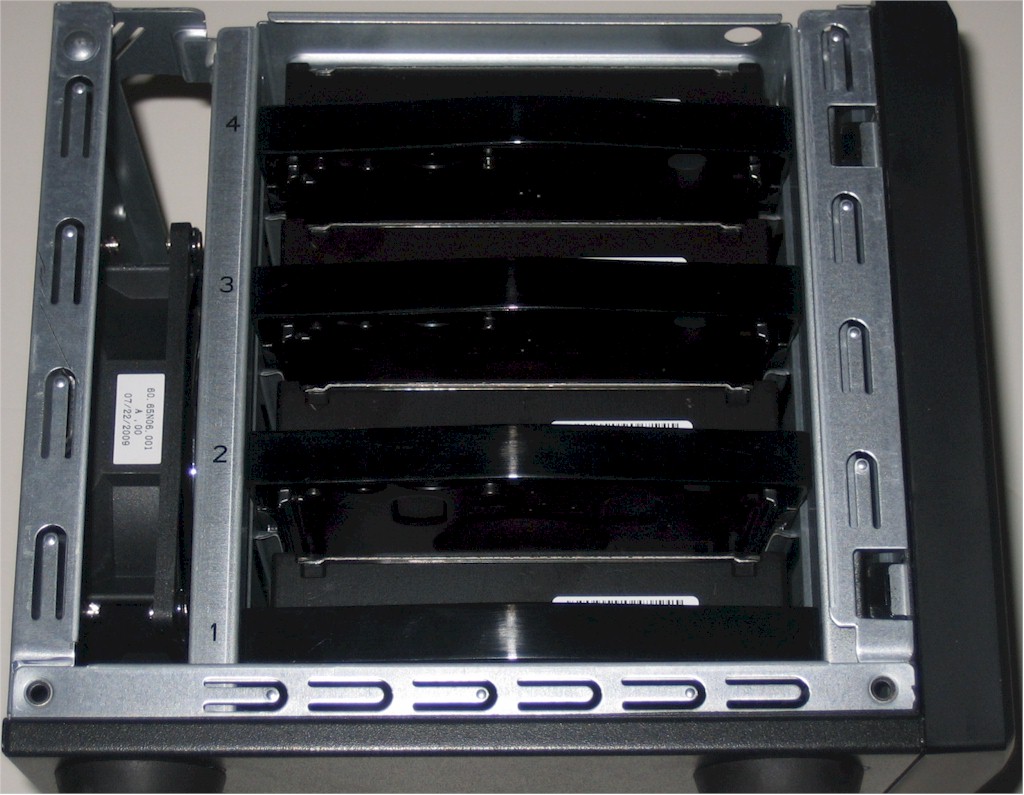
Figure 4: ix4-200d drive bay
Features
As noted earlier, the ix4 takes the earlier ix2’s feature set and builds on it, adding a few more features to better appeal to business users. Here’s a summary of the ix4’s key features, with the ix4’s new features in italics.
- Network file sharing via SMB/CIFS, NFS, AFP
- Single JBOD, RAID 5, 10 volume
- XFS drive formats
- Volume space can be allocated among SMB/NFS/AFP shares and iSCSI targets
- FTP
- HTTP / HTTPs file and admin access
- Joins NT Domain / Active Directories for account information
- VMware Certified: HCL certified NAS (NFS) and iSCSI storage for VMware
- User quotas
- Email alerts
- Logging
- Network Backup: Schedulable (smallest interval is one day) to / from rsync targets and SMB/CIFS shares
- Unlimited Retrospect Backup clients for Windows and Mac OS
- Supports Apple Time Machine backup
- Auto file copy from PTP-enabled digital cameras
- File upload via Bluetooth
- Secure Web-based remote access (locally hosted)
- USB printer serving
- UPS shutdown synchronization via USB
- Recording and viewing of up to five Axis IP cameras
- UPnP AV / DLNA media server (Twonky Media)
- Photo slideshow (uses Cooliris)
- iTunes server
- BitTorrent downloader
This is a useful feature set, with a balance of business and consumer features. But there are a few things that are missing that you might not notice:
- Only a single volume is configurable, and you can’t configure a three-drive RAID 5 volume and set the fourth drive as a spare. RAID 0 and 1 modes aren’t supported and you can’t migrate between RAID levels or expand the RAID volumes while they are online.
- The FTP server doesn’t have a secure mode.
- You can limit access to shares by user and/or group. But you can’t control access by service. So you can’t shut off FTP access to certain shares, for example
- The remote access service doesn’t use a hosted portal, but instead requires you to forward the proper ports to the ix4.
A basic 12 month subscription to TZO’s dynamic DNS service is bundled, but you’ll have to pay after that or right away if you want to use your own domain name. (The 12 month bundled service is only for a limited set of domains such as yourname.IomegaLink.com or yourname.MyIomega.com).
Features – more
Figure 5 shows the ix4’s Settings menu which has some new icons since we last saw it in the ix2, namely, iSCSI, Quotas, Remote Access, Security and Torrent Download. Also note that the Backup icon is now Backup and Restore. All except iSCSI have since been added to the ix2 via firmware update.
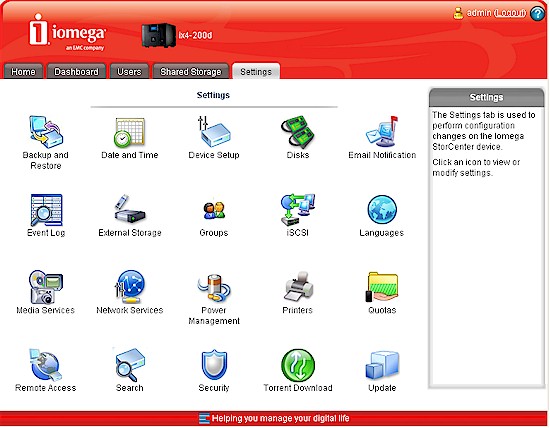
Figure 5: ix4 Settings page
I’ll cover only the details of the new features here; check the ix2’s review for a walkthough of the previous features.
Figure 6 shows that you can now add iSCSI targets via the Shared Storage Add button. You can only change the target name for each volume. The Settings iSCSI menu is where you enable iSCSI, choose discovery method (local or external iSNS server) and enable two-way authentication (Mutual CHAP). These settings apply to all targets.
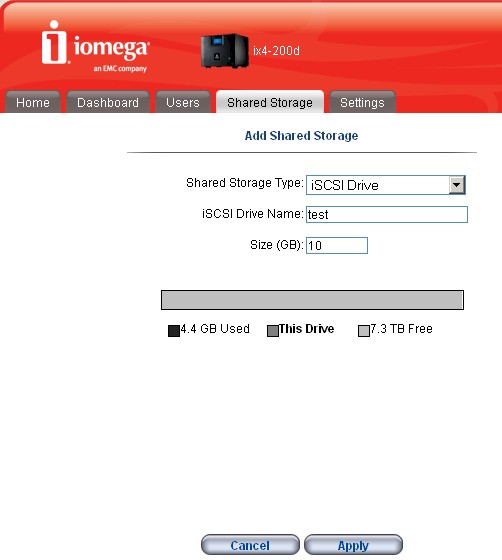
Figure 6: Creating an iSCSI target
Figure 7 shows the Shared Storage summary page with one iSCSI target created and the other in the midst of being created. Remember that once you configure the target, you need to connect to it using an initiator on the client system and format the drive with a filesystem that the client can use.
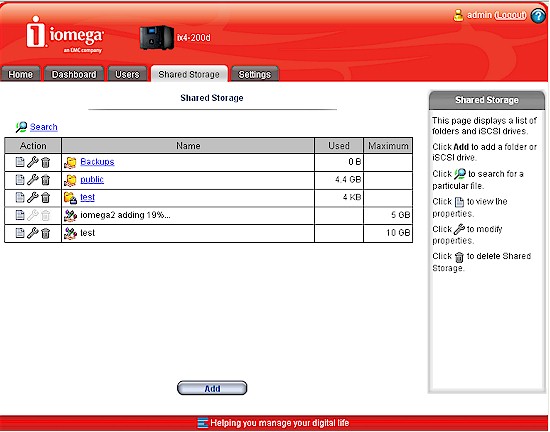
Figure 7: Share list including two iSCSI targets
The other big improvement that the ix4 brings is the addition of backup to and from CIFS/SMB network shares and rsync targets in addition to attached USB drives. You can even use the ix4 to copy directly between two networked shares instead of to or from its own storage. Figure 8 shows a copy job from an internal share to an rsync target called test on a Synology NAS.
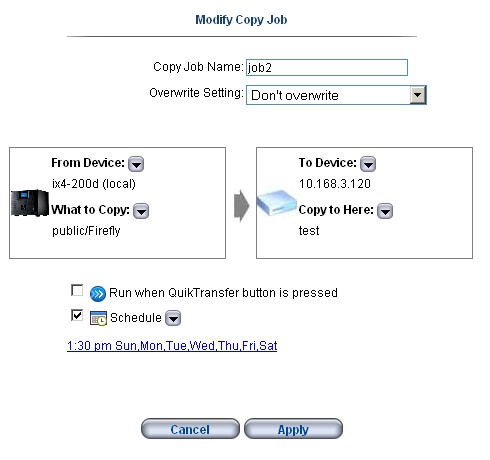
Figure 8: Copy job from internal to network share
As soon as you select the Device, a new window pops up and presents the appropriate controls depending on the device. Figure 9 shows the available shares on one of my Windows systems.
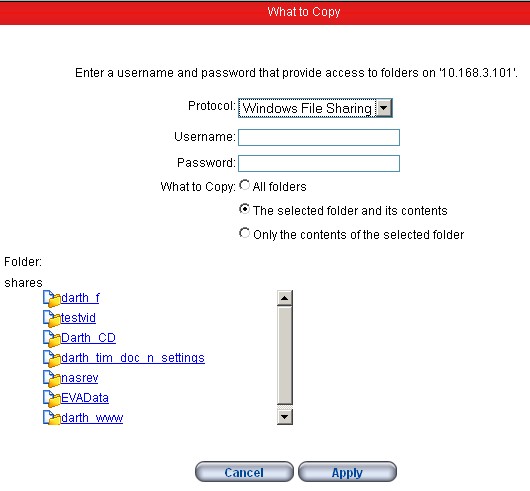
Figure 9: Copy folder selection for CIFS (Windows) shares
And Figure 10 shows what happens when I selected a QNAP NAS with multiple rsync targets (I filled in the username and password).
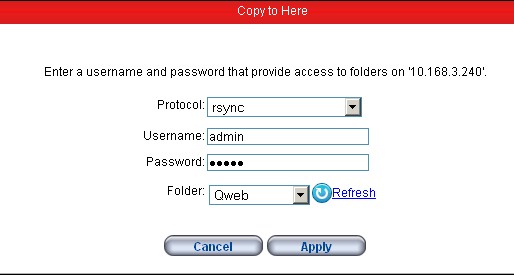
Figure 10: Copy folder selection for rsync targets
As noted earlier, until now only NETGEAR ReadyNASes had the ability to perform these tricks. But now folks looking for NAS backup flexibility have another option. I need to note, however, that I first had problems with browsing backup shares. But after consulting with Iomega, the problem was traced to a name resolution problem.
It seems that Iomega has found that client name resolution doesn’t work with all routers and it looks like I am using one of them (a D-Link DGL-4300). But the workaround was simple—I just used the device IP address instead of relying on the pick lists that the ix4 presented. Iomega is looking into changing the method they use for network share discovery so that this problem goes away at some point.
Disk Configuration
The ix4 leaves a bit to be desired when it comes to configuring its drives. You can choose only between JBOD, RAID 5 and RAID 10 volumes, which Iomega calls Without Data Protection, Mirror and Parity, respectively.
You can create only one volume with all drives in the volume and you have to delete all data from all shares before you change volume types. There also isn’t the ability to do online expansion by swapping in one larger drive in at a time.
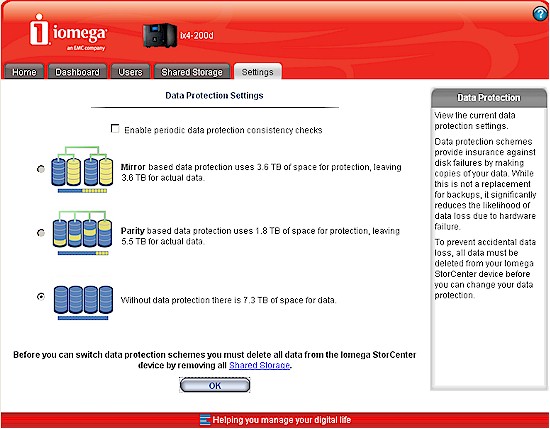
Figure 11: Volume creation options
The good news is that the drives are user serviceable. But Iomega doesn’t support your pulling out all the drives and swapping in larger ones.
I didn’t run our usual pull-a-drive RAID failure test because the one that Jim previously ran did so well.
Performance
The ix4 was tested with our standard test process. I used the latest 2.1.9.46472 firmware and ran tests with 1000 Mbps and 1000 Mbps with 4k jumbo LAN connections in JBOD, RAID 5 and 10 modes. Note that it took 24 hours to build an 8 TB RAID 10 array. I didn’t time RAID 5 creation since the ix4 came configured in that mode. But I expect that a full RAID 5 build and sync would take the same time. As is typical, JBOD volume creation took only a matter of minutes.
Backup
I first checked backup performance to an Iomega UltraMax Pro Desktop Hard Drive configured in RAID 0 attached via USB 2.0. The test copies a 4.35 GB ripped DVD test folder that I use in the NAS Chart Vista SP1 file copy tests from the NAS to the attached drive. The results are summarized in Table 1.
| Product | Iomega ix4-200d Backup Throughput (MBytes/s) |
|---|---|
| USB – FAT32 | 14.9 |
| USB – NTFS | 4.4 |
Table 1: Attached backup throughput test summary
The good news is that you can back up to an NTFS formatted drive. But the bad is that it won’t be very speedy. FAT-formatted speed was about 5 MB/s slower than I’ve found with most current-generation NASes, with the highest performing products able to get over 20 MB/s.
I also tested NAS-to-NAS backup to the QNAP TS-239 Pro RAID 0 target that I have started to use as a standard rsync backup target and measured 14.9 MB/s. While I don’t have a big comparison set, this was the same as I got with a Synology DS409+ backing up to a Synology DS409.
iSCSI
I ran the Vista SP1 filecopy test on a 10 GB iSCSI target configured above and measured 31.3 MB/s write and 34.8 MB/s read. This ranked the ix4 next to the bottom for write and at the bottom for read for the four, four-drive NASes that I have data for. (Say that three times fast!)
Write / Read
Figure 12 presents a summary of the benchmark tests with the write tests plotted. Write cache boost is quite moderate at the low end, with no values exceeding the speed of the Gigabit Ethernet connection. Once the 1 GB and higher file sizes are reached, write speed settles in at the mid 20 MB/s range for JBOD and low 20’s for RAID 5 and 10.
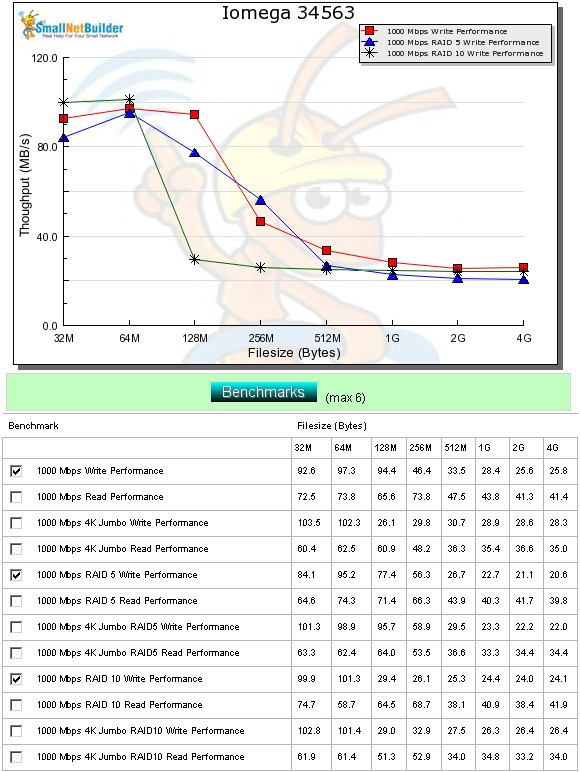
Figure 12: Write performance benchmark summary
Read results for JBOD, RAID 5 and 10 are plotted in Figure 13 and show speeds around 40 MB/s for the 1 GB and larger file sizes.
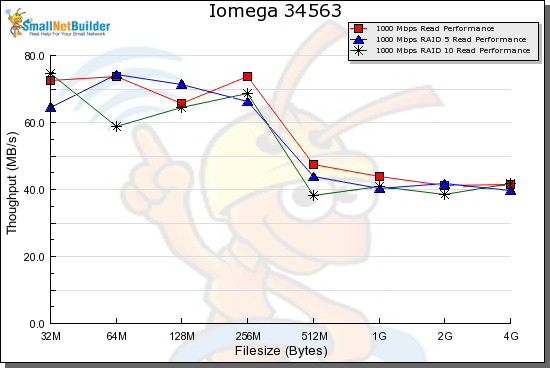
Figure 13: Read performance benchmark summary
Average RAID 5 speeds over the 32 MB to 4 GB file sizes with cached results above 125 MB/s removed from the average measured 50.5 MB/s for write and 55.3 MB/s for read.
Performance – Competitive
For competitive comparison, I chose four other current-generation four-drive NASes near the top of the NAS Charts: the QNAP TS-439 Pro; NETGEAR ReadyNAS NVX, Synology DS409 and Seagate BlackArmor 440.
Figure 14 shows the RAID 5 write comparison, where the ix4 ranks at the bottom of the pack, virtually tied with the Seagate BlackArmor and close to the DS409 in the low to mid 20 MB/s range.
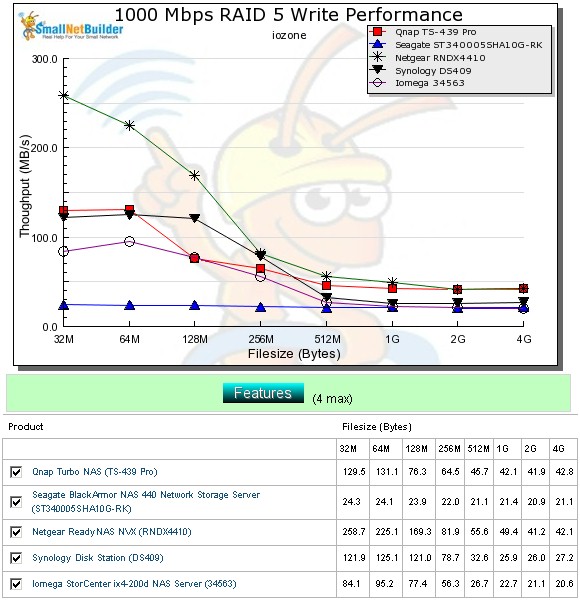
Figure 14: Competitive comparison – RAID 5 write
Figure 15 shows the RAID 5 read comparison, which has a wider spread. This time the Seagate takes the bottom slot in the low 30 MB/s range, followed by the ix4 for the larger file sizes with about 40 MB/s throughput. The performance ranking pretty much follows the processors used, ranging from the Intel Tolapai in the NVX, Intel Atom N270 in the QNAP and 1.2 GHz Marvell Kirkwood in the Synology, Iomega and Seagate.
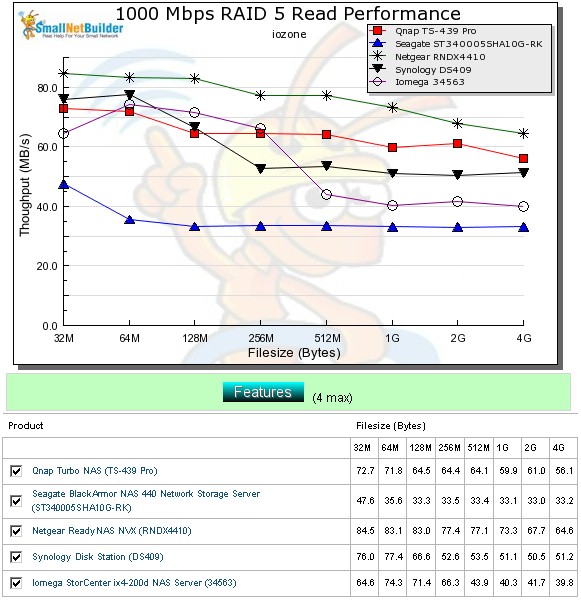
Figure 15: Competitive comparison – RAID 5 read
Performance – File Copy
The Vista SP1 1000 Mbps RAID 5 file copy write results in Figure 16 again show the ix4 and Seagate BlackArmor 440 near the bottom of the four-bay RAID 5 NASes we’ve tested at about 20 MB/s. Even the DS409 does considerably better at 31.2 MB/s.
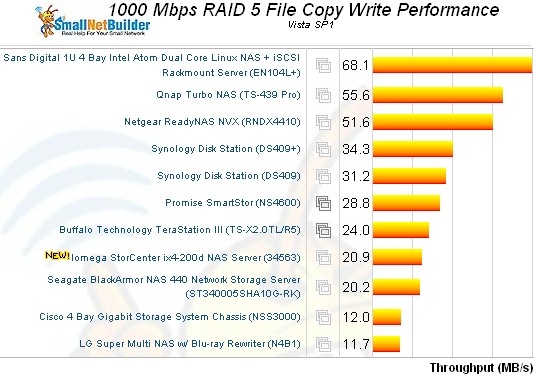
Figure 16: Vista SP1 File copy – RAID 5 write
1000 Mbps RAID 5 File Copy read results are shown in Figure 17, and the ix4 is again at the bottom and again beaten by the Synology DS409 and, surprisingly, the Seagate.
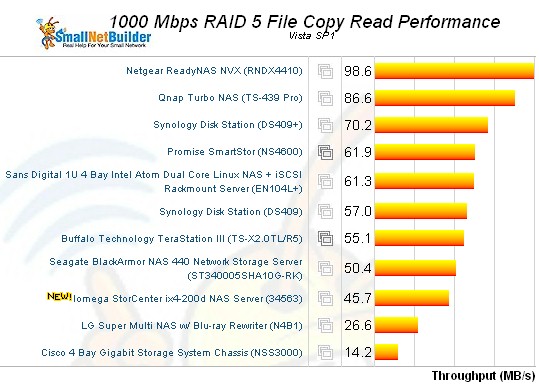
Figure 17: Vista SP1 File copy – RAID 5 read
Use the NAS Charts to further explore performance.
Closing Thoughts
The ix4 is Iomega’s best NAS yet, feature-wise, but its performance is lower than I would expect from a Kirkwood-based NAS. Maybe the difference is the XFS file system, or more likely some tuning in the EMC Lifeline OS.
Value-wise, however, it’s a pretty good deal with pricing around $1600 street for the 8 TB model. And comparing 4 TB configurations, the ix4 at around $760 is also a much better deal than the similar-performing Seagate BlackArmor 440 at around $1000. If you want more performance, however, you’ll pay more, since the QNAP TS-439 Pro goes for almost $800 and that’s without drives.
The ix4’s main attraction for many will be its flexible network copy features, which are rivaled only by the much more expensive NETGEAR ReadyNASes (unless you want to opt for the previous-generation Duo or NV+). To my eye, that seems to be the ix4-200d’s "secret sauce".