

Introduction
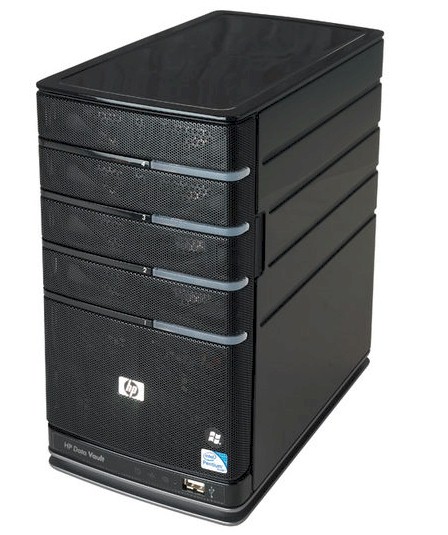
| At a Glance | |
|---|---|
| Product | HP StorageWorks Data Vault X510 (Q2051A) |
| Summary | Business version of HP’s Windows Home Server based four-bay NAS with 2.5 GHz Intel Pentium CPU and 2 GB RAM. |
| Pros | • Simple to set up and use • Flexible storage expansion with no need to save / restore data • High performance • Automatic media import • Bundled backup software for Windows and Mac OS |
| Cons | •10 user limit • Jumbo frames not supported from HP interface |
HP recently updated its MediaSmart series with the introduction of the EX490 and EX495. Both have upgraded processors from the EX487 we last looked at about a year ago—a 2.2 GHz Celeron and 2.5 GHz Pentium, respectively.
HP has figured out that its Windows Home Server-based NAS makes a nice entry-level networked storage product for small businesses as well as homes. So it has re-badged the beefier EX495, added 2 and 3 TB versions and included it in its SMB StorageWorks line as the X510.
Figure 1 shows the front and rear panels with callouts for the controls and indicators. Instead of an LCD panel like other higher-end NASes have opted for, the X510 sticks with its simpler backlit indicators.
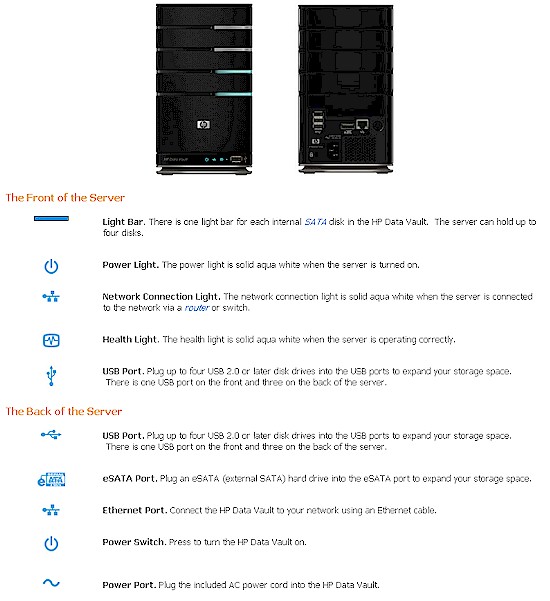
Figure 1: X510 front and back panels
On the back panel, note the single eSATA port, which can support a single drive or SATA port multiplier. This is a good move on HP’s part since eSATA drives will provide higher bandwidth storage expansion than the four USB 2.0 ports.
The X510 is very quiet in operation, with no fan or drive head noise—just a low-pitched drive motor whir. The 2 TB Q2051A configuration that HP sent for review drew 45 W with two Seagate Barracuda ST31000528AS 7200.12 1 TB drives spinning. There is no idle drive spindown feature for power saving. But you can schedule a daily sleep period (or put it to sleep on command), during which the server draws below 1 W of power. Waking the server from the Windows Home Server tray app worked without a hitch.
Internal Details
The x510 looks like it uses the same chassis as the EX487, so I didn’t bother with disassembly. You can look at the EX487 pictures if you want the inside view. The processor board looks like it’s also dominated by heatsinks, so no picture for that, either. But I used Remote Desktop to log in and take a shot of the Device Manager, expanded to show key components.
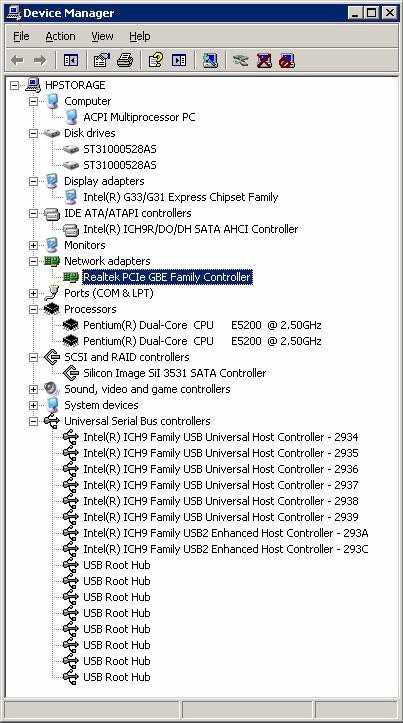
Figure 2: X510 device manager
Judging from what I can see in Figure 2, it looks like the main board is pretty much the same as the EX487’s except for the Intel E5200 dual core Pentium CPU. There is a single 240 pin 2GB DDR2-800 DIMM for RAM, Intel G33 Northbridge, Intel 82081 Southbridge, 256 MB of flash and Realtek RTL8111 for Gigabit Ethernet.
Figure 3 shows the settings available via the Realtek adapter’s Advanced properties. Jumbo frames are disabled by default, but can be set for up to 9K in 1K increments.
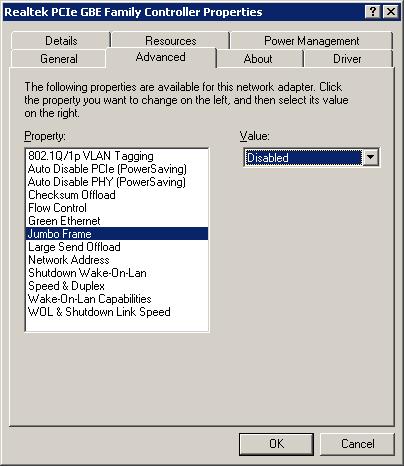
Figure 3: Network Adapter properties
What’s New
HP looks like they tweaked the user interface a bit and I like some of the changes. Gone is the redundant and confusing MediaSmart Control Center app. Instead, the WHS Connector installer places HP Data Vault and Shared Folders on Server shortcuts on your desktop. Clicking on the former takes you to the browser page shown in Figure 4.
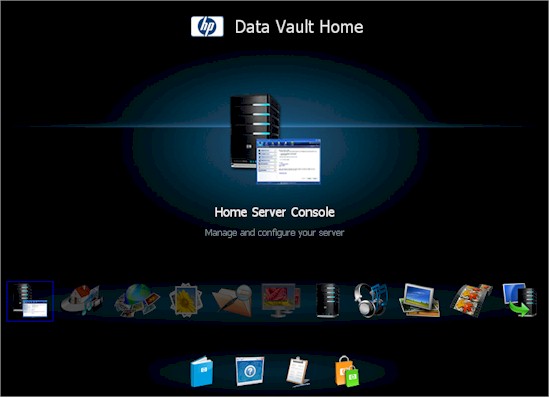
Figure 4: Data Vault Home page
Unfortunately, the top row of icons have links with an .ashx extension, which requires something to understand how to execute.NET. Firefox 3.5.6 was able to get the job done. But not without throwing up a What should Firefox do with this file? prompt for each link. I just left the Open with HPHomeClient (default) selected and the folder shortcuts properly opened.
I should also note that the Windows Home Server Connector install wouldn’t run on my Vista SP1 NAS testbed system. But I purposely keep this system from downloading updates so that it maintains a known configuration. So there could have been a required.NET update or something that prevented the installer from running. So I just installed the Connector on an XP SP3 system and enabled public folder sharing and Guest accounts that were disabled by default.
The WHS Console also looks like it’s been tweaked a bit (Figure 5). But the preponderance of Media-related options seems to run counter to the X510’s positioning as a business NAS.
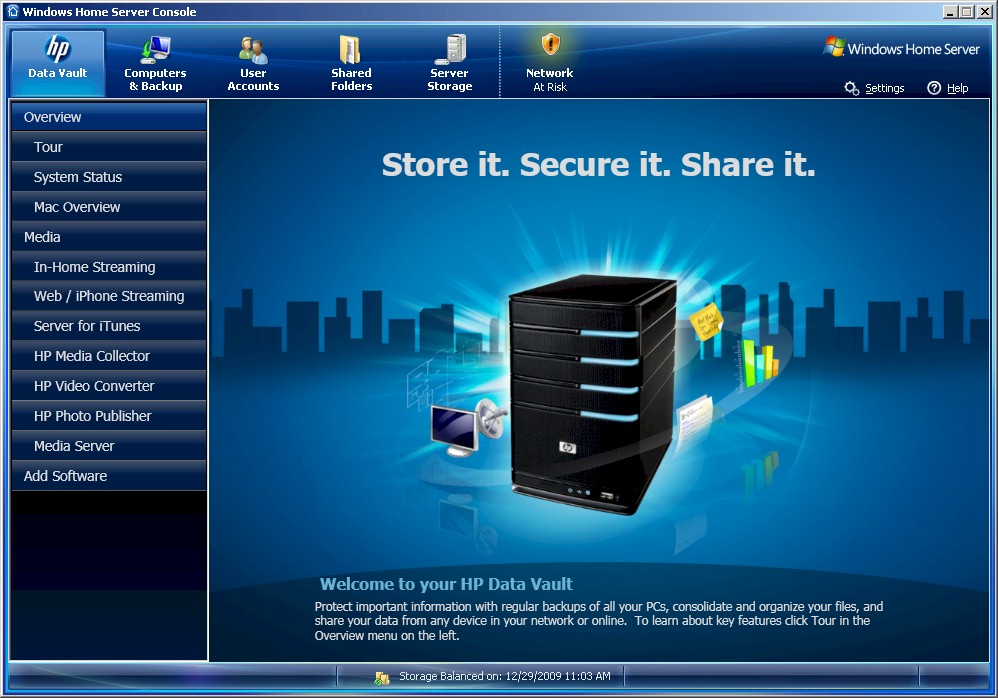
Figure 5: WHS Console
I think HP should have done more work here and at least hidden the media options. Better yet, why not install some third party add-ins, most notably those for Backup, Disk Management and Log / Event viewing? The only Add-in bundled with the X510 is the McAfee Total Protection Service for virus protection. And the Add Software button just eventually takes you to an HP page with two disk defraggers (who runs those anymore?) and a "Coming Soon" where there should be a link under the heading of Online Backup for added peace of mind.
HP has apparently rethought its bundling of the add-in for Amazon S3 Web Services that came with the EX487. But given the foot-dragging of most NAS vendors in bundling online backup (except for NETGEAR and its ReadyNAS Vault service), I can’t ding HP too much for this omission.
If you want a run-through of the other features, hit the EX487 review.
Storage Expansion and Backup
WHS-based systems don’t use RAID to enhance data robustness. Instead, WHS copies folders (you select which ones) to alternate locations on its connected drives as a background task. You can’t control when this task runs (at least not from the WHS Console). But you can track the status of this process by looking at the Status Bar at the bottom of the Console window. You’ll see Balancing Storage if the duplication process is running or Storage Balanced on: with a date and time if it’s not.
You can designate drives that you add to the system to be used to increase storage space or as backup space (Figure 6). WHS will copy files in folders marked for duplication to a different physical drive. But you can’t control the target location, i.e. which drive when you enable duplication for folders. The default configuration of the dual-drive review system was that the second drive was not designated as backup storage.
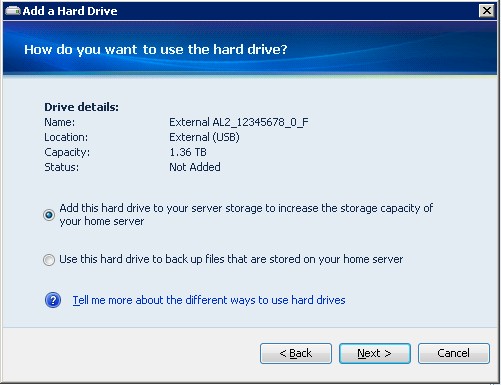
Figure 6: Adding a drive
This system may seem like it’s not as robust as RAID. But actually, it has some advantages. First, WHS drives are formatted with NTFS, which means they can be moved to another Windows system and mounted in the event you need to manually recover files from a crashed system. And second, given that you designate external drives for backup, you get data security similar to backing up a RAID system to an external, attached drive.
The downside of the WHS system, however, is that it won’t be easy to find the duplicated files. WHS keeps track of them in an internal database and not by mirroring the exact file and folder structure of the primary data store.
The other big WHS advantage vs. RAID is the ability to add storage incrementally, without undergoing a lengthy, one-drive-at-a-time RAID expansion process. Just plug in a drive, add it to the storage pool and you’re done.
The main disadvantages of WHS are the inability to designate a drive for OS use only and control the rebalancing process. By default, WHS will take the largest drive and partition it for OS and Storage use. Figure 7 shows that 20 GB of the first 1 TB drive has been used as the SYS partition.
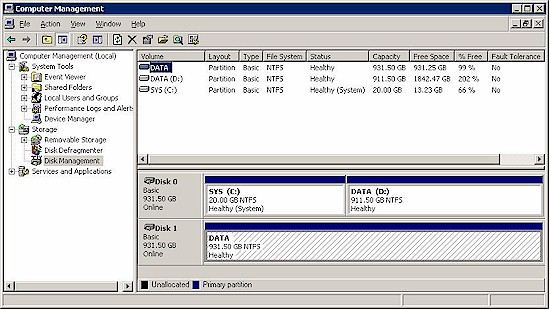
Figure 7: Drive partitions
Note that, unlike many RAID systems, if Disk 0 goes down, the system just stops because the OS is gone. But if Disk 1 were to go belly-up, the system would keep running, with possible data loss, depending on whether it had been used for duplication or primary data storage.
The inability to control the rebalancing process may make a WHS system unusable for video streaming. WHS users have seen system throughput go south during rebalancing, resulting in unwatchable video streams.
Drive Pull Test
I decided to finally see how WHS handles drive failure by doing a simple drive-pull test. I started with the second drive on a system that was virtually empty. Pulling the drive caused no audible alarm, nor any alert in the WHS tray app. And since there is no email alert feature, I didn’t get any of those. Instead, the System Health light on the X510’s front panel turned red almost immediately.
When I logged into the WHS Console, I had to navigate to the System Status screen before I had any indication that something was amiss. But had I not looked carefully, I might have missed the subtle indication that I’ve highlighted in Figure 8. Note also the -1.0 byte Free Space indication in the right-hand column and lack of storage use graphic.
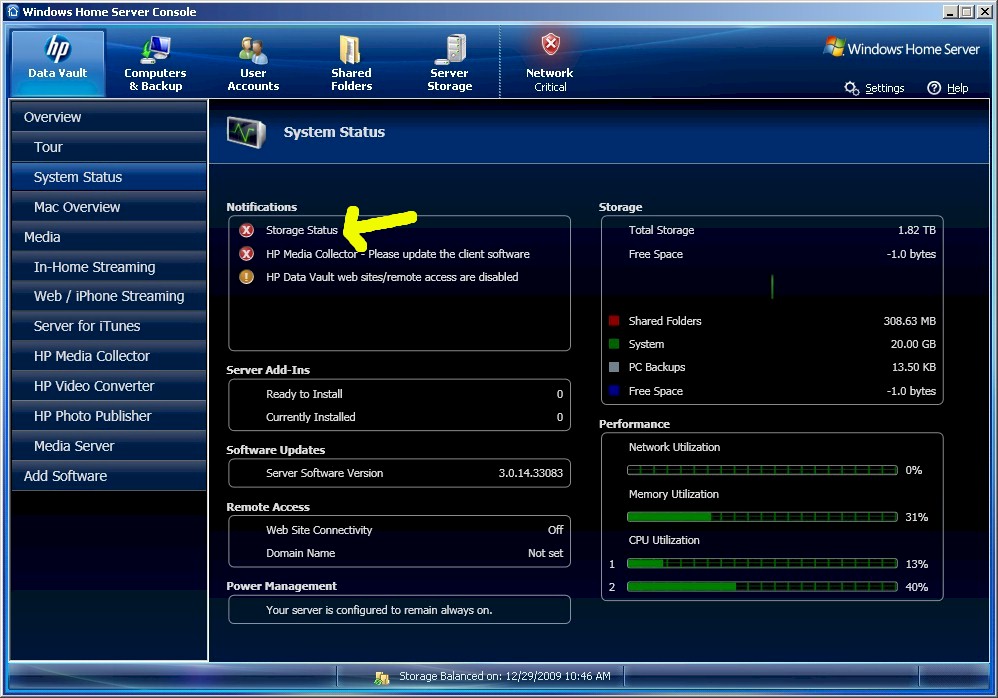
Figure 8: Drive failure indication
When I clicked on the Server Storage icon on the top menu bar, I found a proper Missing status for the second drive. But the Server Storage pie chart wasn’t there, replaced by the Calculating sizes graphic shown in Figure 9. This eventually went away and was replaced by a proper pie chart.
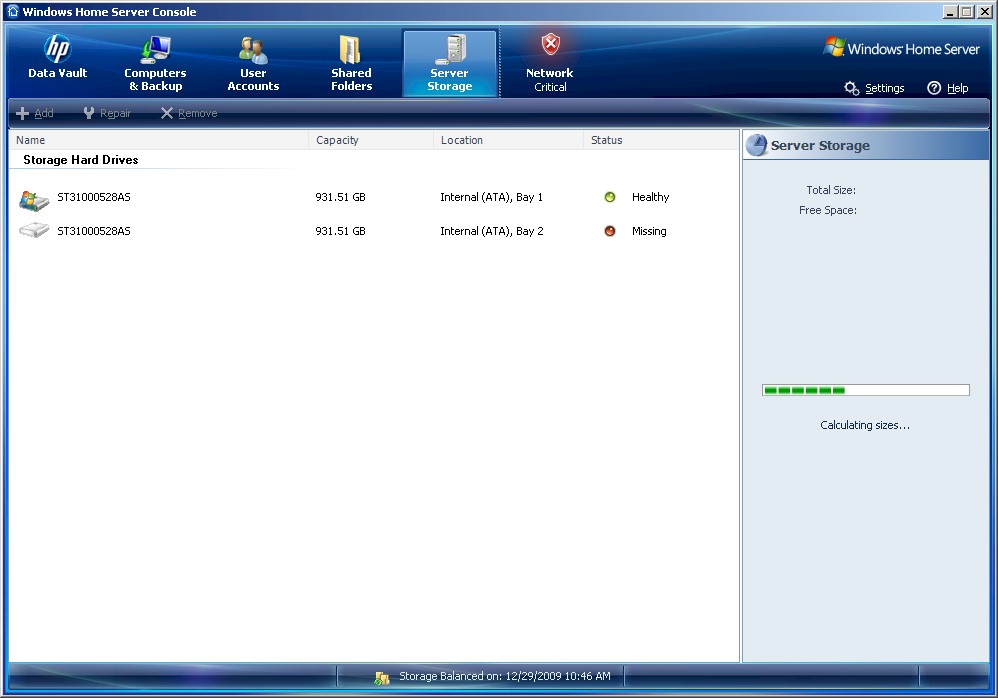
Figure 8: Drive failure indication
But on a second pull of the #2 drive, an incorrect pie chart showing 1.8 TB of available space remained in place and I couldn’t find a way to refresh it. When I pushed the drive back in, the Missing indication was replaced by Healthy shortly after the drive spun up and all was well again.
I next turned the locking latch that secures the primary drive (carrying the OS) in place and then pulled it. This time, the WHS Console threw an alert that it had lost contact with the server, the System Health light once again turned red and, as you might expect, share access went away. When I replugged the OS drive, however, the system didn’t come back up and I had to shut it down and reboot. Fortunately, once I did this, the OS was intact.
I realize that this wasn’t a very hard test of WHS’ robustness. Had the system been actively writing data when I pulled a drive, I might have lost the OS or at least some unduplicated data. Despite WHS’ ease of use advantages over RAID and its ability to automatically copy data to external drives, you should still never trust data to any single device.
Performance
The X510 was tested with our standard test process. I used the latest 3.0.14.33083 firmware and ran iozone and Vista file copy tests to the Public folder with a Gigabit LAN connection. I did not run tests with 4K jumbo frames enabled, because this requires Remote Desktop connection, which I consider equivalent to root console access on Linux-based NASes, i.e. not part of the supported feature set.
Figure 9 shows a summary of iozone benchmark results. Write cache boost is significant and doesn’t go completely away until the 1 GB file size. Read speed is steadily in the mid 80 MB/s range, dropping to the mid-to-high 60 MB/s range for the 2 and 4 GB file sizes.
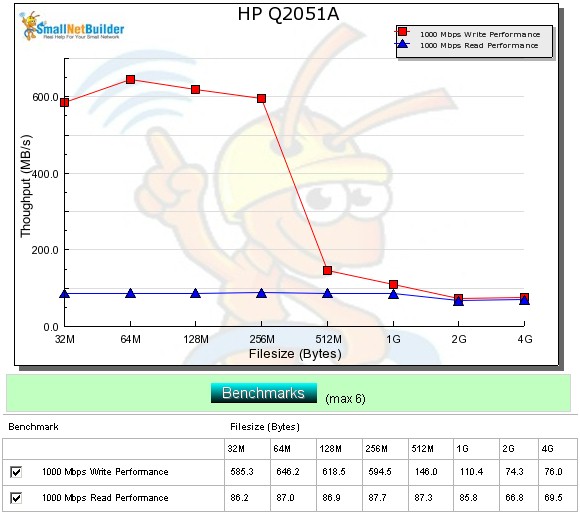
Figure 9: HP X510 benchmark comparison – 1000 Mbps LAN
Average write speed over the 32 MB to 4 GB file sizes with cached results above 125 MB/s removed from the average measured a chart-topping 86.9 MB/s for write and second-place 82.1 MB/s for read.
Results from the Vista SP1 file copy test pushed the X510 lower in the write chart (Figure 10), to 71.9 MB/s. I suspect that’s because the X510 acts like a single-drive NAS vs. the multi-drive RAID 0 configurations of the higher-ranked NASes. Note that the X510 gets only a moderate write advantage over the older EX487 and even the entry-level single-drive LX195.
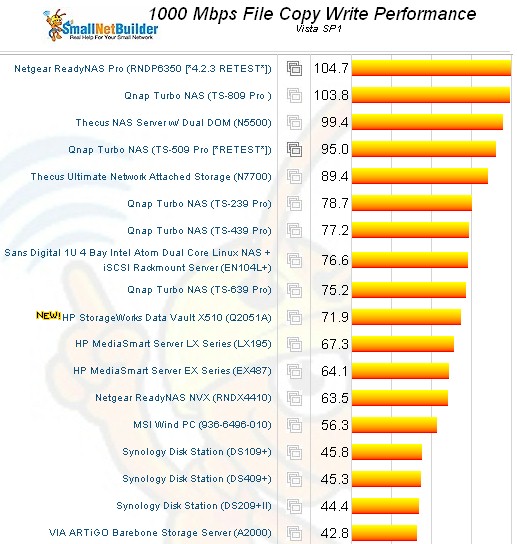
Figure 10: HP X510 Vista SP1 Filecopy Write
Figure 11, which displays file copy read results, shows the X510 achieving 99 MB/s—pretty much the maximum I’ve seen from any NAS.
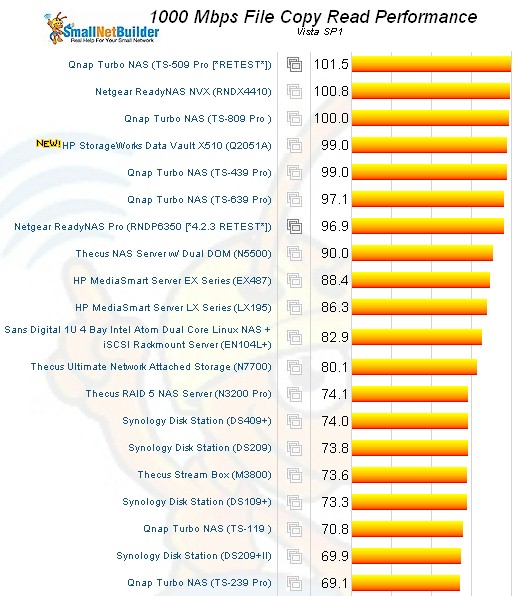
Figure 11: HP X510 Vista SP1 Filecopy Read
Use the NAS Charts to further explore and compare the X510’s performance.
Closing Thoughts
If you’ve been looking for a bit more performance in a quad-drive WHS-based NAS, the X510 (or MediaSmart EX495) will fill the bill. There are no revolutionary advances here, just a nice speed bump for a solidly designed and built and attractively-styled NAS.