
Wednesday, May 22nd

You are here: NAS NAS Reviews New To The Charts: Synology DS210j

New To The Charts: Synology DS210j

Print E-mail

Synology DS210jThe Synology DS210j has been added to the NAS Charts.

The 210j is Synology's least expensive dual-bay NAS. It takes the same approach as the DS110j, which posted to the NAS Charts a few weeks ago, but copies the DS209 (vs. the DS109) with a slower processor.

The hardware platform is based around a Marvell 88F6281 Kirkwood SoC clocked at 800 MHz with 128 MB of RAM. Other components include 4 MB of flash, Genesys Logic GL850G USB Hub 2.0 controller, Marvell 88E116R Gigabit Ethernet controller and Microchip PIC16F627 CMOS FLASH-based 8-bit microcontroller.
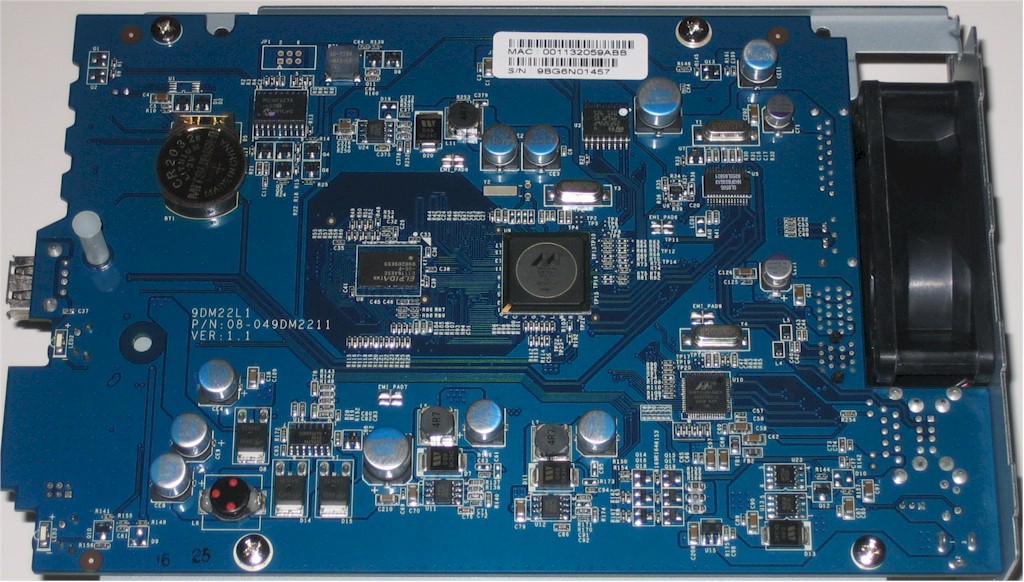
Synology DS210j board
Click to enlarge image

Figure 1: Synology DS210j board

A comparison of the DS210j (Figure 1) and DS209 (Figure 2) boards reveals that they are not the same board (note the different board numbers at the mid-left above and top left below). But the designs are basically the same, except for the different speed Kirkwood processors.
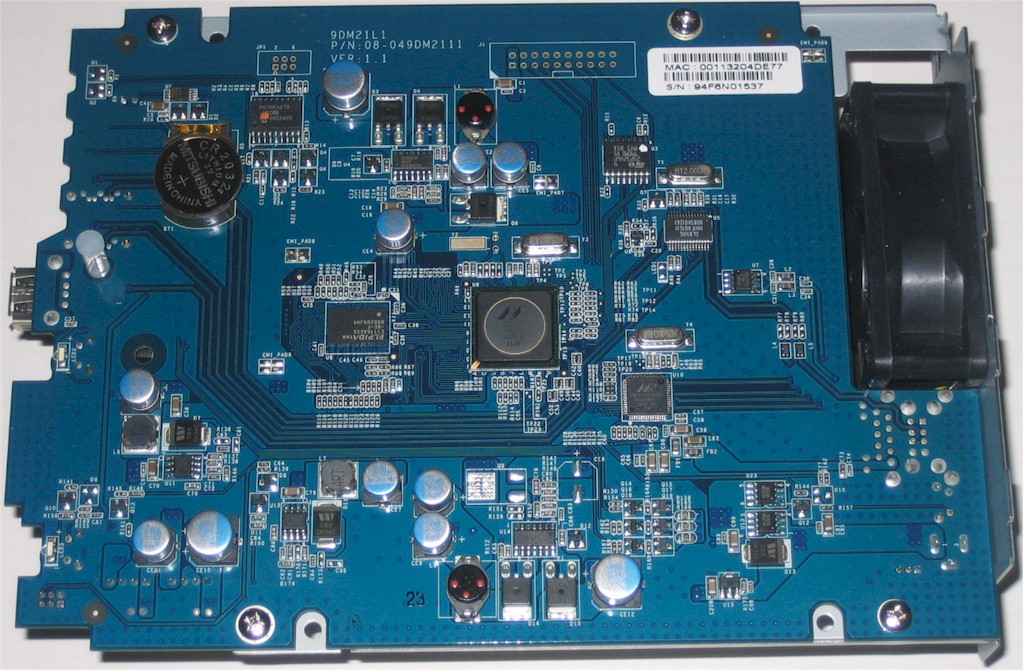
Synology DS209 board
Click to enlarge image

Figure 2: Synology DS209 board

The 210j came with two Seagate ST31000528AS Barracuda 7200.12 1 TB drives installed, which yielded a total power consumption of 21W with the drive spinning and 10 W with it spun down via the programmable power save feature. The single fan was nice and quiet, so the 210j's noise level rating is "very low".

Like all Synology NASes, the 210j supports Synology's the entire DSM 2.3 OS feature set. Backup options include USB, rsync targets and Amazon S3 and there are plenty of media serving options including iPhone/Mobile access, Photo web server and UPnP / DLNA support.

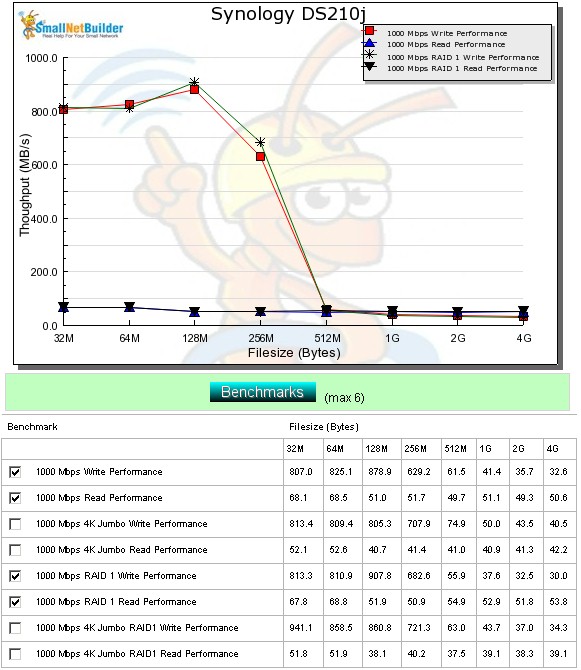
Tests were run with DSM 2.3-1157 firmware using our standard test process. Write performance using iozone with a Gigabit LAN connection showed very high write caching speeds. For file sizes 512 MB and up, writes drifted down from 62 and 56 MB/s to 33 and 30 MB/s for RAID 0 and 1, respectively. Read speeds were steady in the low 50 MB/s range for both RAID 0 and 1.
DS210j throughput vs. file size

Figure 3: DS210j throughput vs. file size

Average RAID 1 write performance using a Gigabit Ethernet connection measured 39 MB/s for file sizes between 32 MB and 4 GB, with cached behavior not included in the average calculation. Average read performance was significantly higher, measuring 56.6 MB/s. This ranks the 210j below both the DS209 and DS209+ for write and read.

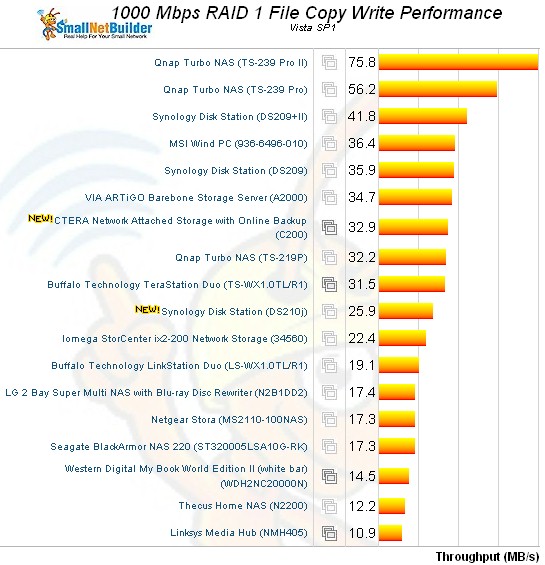
As with the DS110j, RAID 1 write file copy performance using our Vista SP1-based test showed the price paid for using the slower Kirkwood SoC. Figure 4 shows the 210j providing just shy of 26 MB/s while the more expensive DS209 came in at 36 MB/s. RAID 1 Read file copy rankings again placed the DS209 and 209+II in the 70 MB/s range significantly above the DS210j at 53 MB/s.
DS210j file copy performance - write

Figure 4: DS210j file copy performance - write

I also tested backup to an attached USB drive and speeds measured 16.9, 23.6 and 6.3 MB/s for FAT, EXT3 and NTFS, respectively. Network backup to a QNAP TS-239 Pro II rsync target measured 15.5 MB/s, essentially the same as the DS110j. Finally, write and read speed to a 10 GB iSCSI target measured 27.3 MB/s and 30.5 MB/s.

Synology's feature set has been already covered in other reviews, so there won't be a full review. Use the NAS Charts to further explore the DS210j's performance and compare it to other products.

User reviews

Average user rating from: 4 user(s)

NOTE! Please post product reviews from actual experience only.
Questions, review comments and opinions about products not based on actual use will not be published.

User Rating    [Back to Top]
Overall: 
 
4.7 Features :
 
5.0 Performance :
 
4.0 Reliability :
 
5.0
 
Ratings (the higher the better)
Features*
 
Performance*
 
Reliability*
 
Comments*
    Please enter the security code.


Great machine

Overall rating: 
 
4.3
Features:
 
5.0
Performance:
 
3.0
Reliability:
 
5.0
Reviewed by Nuby Oz
August 09, 2010
Report this review
 

Works great.
Love the standard features and extensibility (in case you actually need it).
Great UI, simple but also allows great control.
Reliability is 100% so far, no resets, no outage, no drops in performance.
Only performance could be better.
First was very slow, about 10-12 MBytes/s read and write using 2 WD20EARS in RAID1 .
After reading up I reformated using latest firmware (1167), now is at about 25MBytes/s.
Back to external USB was SLOW, until I reformated to EXT3, now is about 25MBytes/S as well.
So performance I would classify as acceptable, but would prefer bit more if possible.
Do not hesitate to recommend it.


Sweet Machine

Overall rating: 
 
5.0
Features:
 
5.0
Performance:
 
5.0
Reliability:
 
5.0
Reviewed by znetadmin
June 03, 2010
Report this review
 

I looked hard for a SOHO NAS unit. Coming from a pathetic experience with a "Mirra Personal Server" I was hard pressed to get a quality device. I have had for about a month now, and I am totally pleased with this unit. No problems at all!

Thanks Synology


Great little machine

Overall rating: 
 
4.7
Features:
 
5.0
Performance:
 
4.0
Reliability:
 
5.0
Reviewed by Mike D
May 11, 2010
Report this review
 

I use this in a home office & it serves multiple uses: Backup target, archiving, media server, bit torrent client & of course file sharing. As I'm a home user I don't take use or take advantage of many of the more advanced features DSM offers like the mail & FTP servers.

One of the best features is the media server. I migrated my iTunes library to the music share on the DS210j, I copy my HD movies to the Video share, and store my digital images on the Photo share. Using my PS3 as a media client I can listen to anything in music library, stream HD movies flawlessly, or display a slide show when friends & family visit. Additionally any Windows 7 PC can access the same media files with WMP. I'm told the XBox 360 can also access though I don't have one so can't comment on it.

I purchased the Synology to replace an aging Buffalo Linkstation. The Synology is infinitely better than the Buffalo in every aspect. In particular the user interface & regularity of firmware updates. In the 3 years I had the buffalo there was exactly 1 update released by Buffalo. The Synology has had two in just a couple of months (one was feature enhancement, the other a bug fix). I really like the fact that the OS runs on the HDD rather than in a chip on the MB. The benefit is that the feature set & management interface is common across the product line, and from one year to the next. So if I need to upgrade in 2 years time I won't have to relearn the management of the unit.

And the price is great for such a versatile little NAS. I would strongly recommend for anybody looking for a home or small office NAS.


Work Great!

Overall rating: 
 
4.7
Features:
 
5.0
Performance:
 
4.0
Reliability:
 
5.0
Reviewed by Jake
May 08, 2010
Report this review
 

This thing has worked great for me so far.