

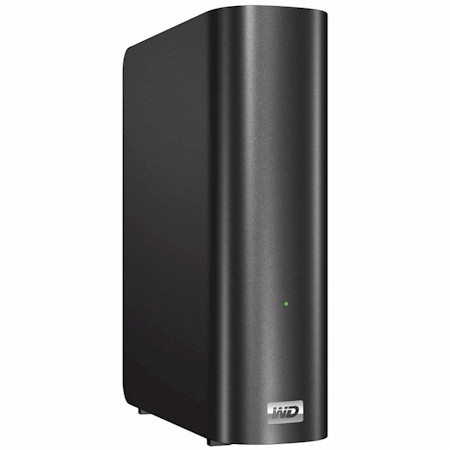
| At a glance | |
|---|---|
| Product | Western Digital My Book Live (WDBACG0020HCH) [Website] |
| Summary | Faster, simplified feature single drive My Book NAS with new admin GUI and no USB or eSATA ports. Based on 1 GHz Applied Micro APM82181. |
| Pros | • Virtually silent • Low Power consumption • Improved performance |
| Cons | • Doesn’t provide 100 MB/s reads in our testing • No USB ports |
Typical Price: $119 Buy From Amazon
Introduction
Updated 3/20/2013: Added spec comment and link to Duo review
Updated 11/1/2010: WD performance comment, misc spec updates
WD has single-drive NAS fans all worked up over the performance claims for its latest single drive consumer NAS, the My Book Live. As shown in Figure 1, WD is claiming "read speeds up to 100 MBps", which would be a first for a single-drive NAS.
While our testing found that the My Book Live is faster than its My Book World Edition ("white bar") sibling [reviewed], I wasn’t able to substantiate WD’s performance claims.
Updated 11/1/2010:
See the Performance section for how WD came up with its 100 MB/s read spec.
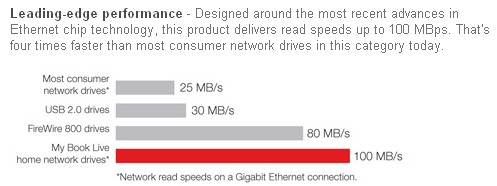
Figure 1: WD My Book Live performance claim
The My Book Live is housed in the My Book’s familiar bull-nosed "book" form factor, but clothed in a subdued matte charcoal grey vs. the glossy white of earlier My Book NASes. The front panel carries only a lone, tiny light that changes colors and blinks to alert you of its many moods.
Figure 2 shows the rear of the Live, which you’ll note is devoid of either USB or eSATA ports. So if you’re looking for a NAS that can copy to / from external drives either on demand or on schedule, or share an external drive, you had best look elsewhere.
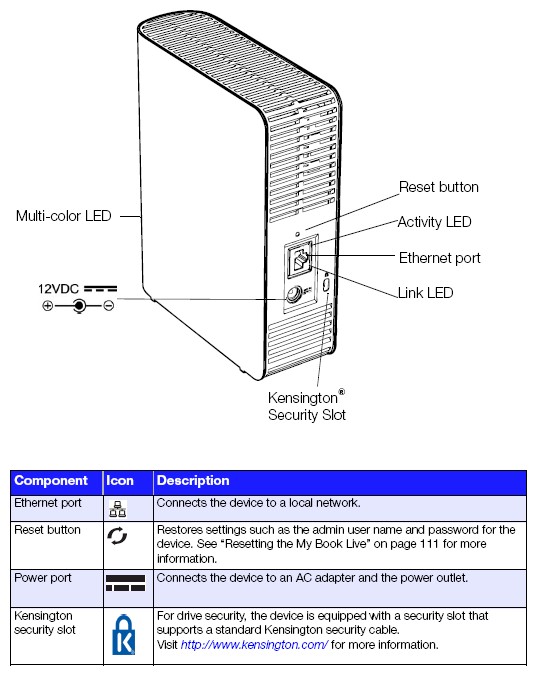
Figure 2: WD My Book Live rear panel
The My Book Live draws only 10 W when active and 4 W when drive spindown occurs after the Energy Save mode kicks in, which is programmable from 10 to 60 minutes in 10 minute increments. There is no fan, so the My Book Live runs very quietly, with only occasional muted drive noise.
Inside
WD doesn’t talk about the processor or even the memory complement of the Live, so I had to open it up to take a look-see myself. Figure 3 shows the inside of the Live once the cover is pried free of its rear latches and slid off.
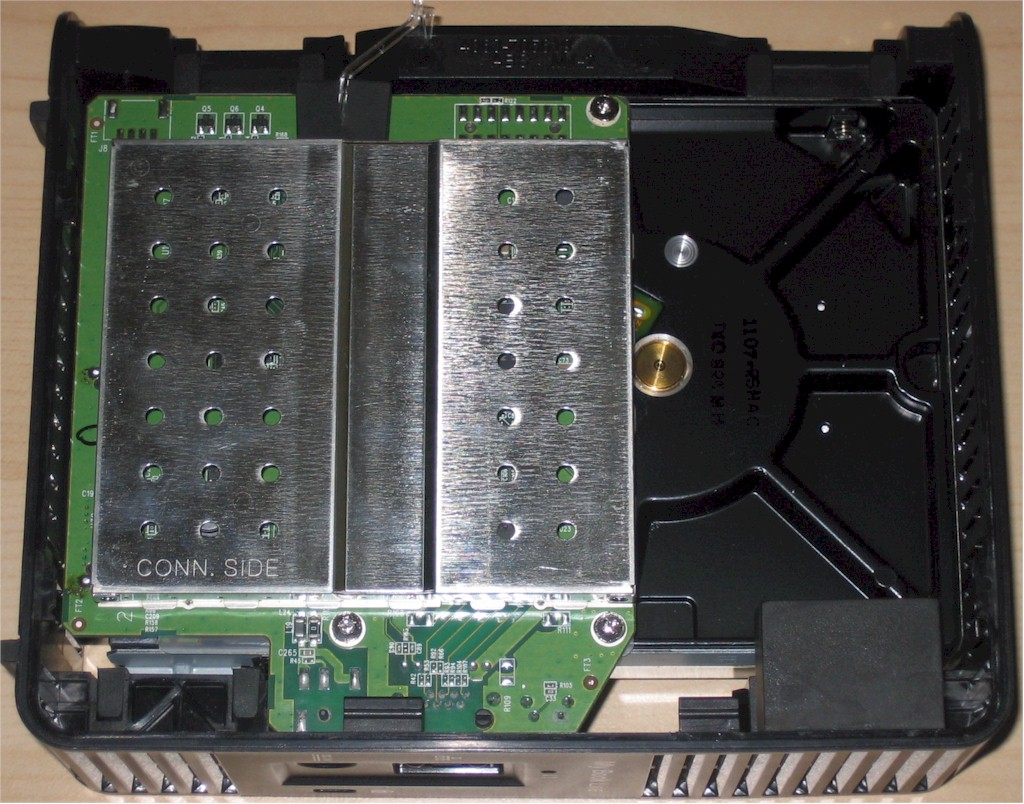
Figure 3: WD My Book Live inside
The metal shield was easily popped off to reveal the board’s components shown in Figure 4, which I’ll get to in a moment. The Live is designed for low-cost manufacture with its only "chassis" comprised of rubber-cushioned metal brackets which attach to the hard drive case and slip into slots in the flexible plastic case.
Since the hard drive was completely covered by a metal shield, I had to remove the assembly from the case and remove four screws to pop off the shield before a WD Caviar Green 2 TB drive (WD20EARS) was revealed. It’s probably safe to assume that a Caviar Green drive is also used in the Live’s 1 TB version.
WD seems to go its own way when it comes to processor choice in its My Books. The My Book World "White Bar" uses an Oxford OXE810DSE and 128 MB of RAM. The Live continues the WD tradition by using a 1 GHz Applied Micro APM82181 Embedded Power Processor and doubles RAM capacity to 256 MB.
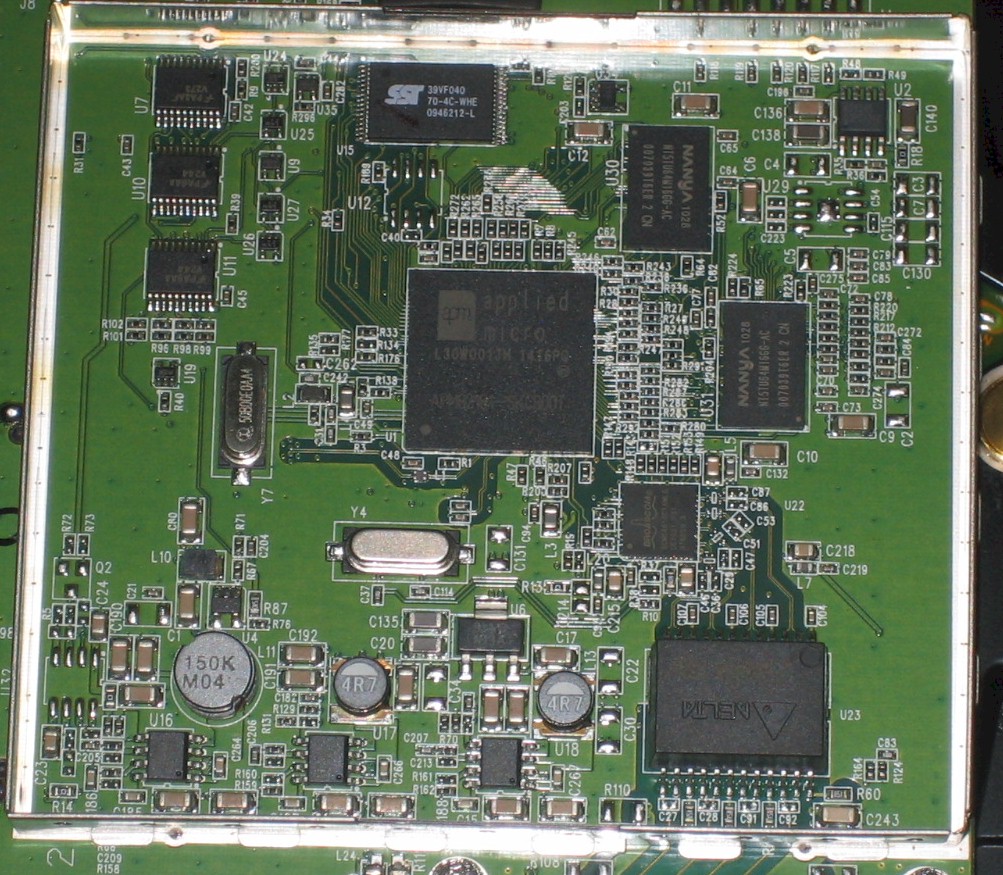
Figure 4: WD My Book Live board
Other key components are 512 KB of flash and a Broadcom BCM54610 10/100/1000 Mbps Ethernet transceiver.
Figure 5 shows the My Book World "white bar" board for comparison.

Figure 5: WD MBW "white bar" board
Features
To appeal to consumers who aren’t familiar with NASes and to simplify its marketing message, WD has trimmed down the My Book Live’s feature set. You won’t find printer sharing, NAS backup, USB drive copy, Domain / AD support or even jumbo frame controls. You do get the following, however:
Updated 11/1/2010
- SMB/CIFS network filesystems
(no NFS or AFP)AFP is supported (has to be for Apple Time Machine). NFS supported only to default Public mount - FTP server
- User level permissions (no groups, no quotas)
- HTTP only web administration
- iTunes and UPnP AV / DLNA (TwonkyMedia) server
- Email alerts (w/ built-in SMTP service for no-hassle setup)
- Remote access to shares via MioNet Web service
- WD Photos i0S photo viewer app (requires MioNet service)
- Apple Time Machine support
- SmartWare for Windows bundled client backup application, unlimited licenses
Given the media focus of the product, it’s odd that WD left off the My Book World’s HTTP and FTP download manager. But I suppose they didn’t want to get into how customers acquire their content.
Note that photos are the only media type that the Live remotely supports via a mobile app.
There’s a slick, although a bit slow, revamped interface that uses sliding AJAX-based panels for configuring your Live. Figure 6 shows the login landing page. The Secure Your Device icon in the upper right will stay there until you change the default login password.
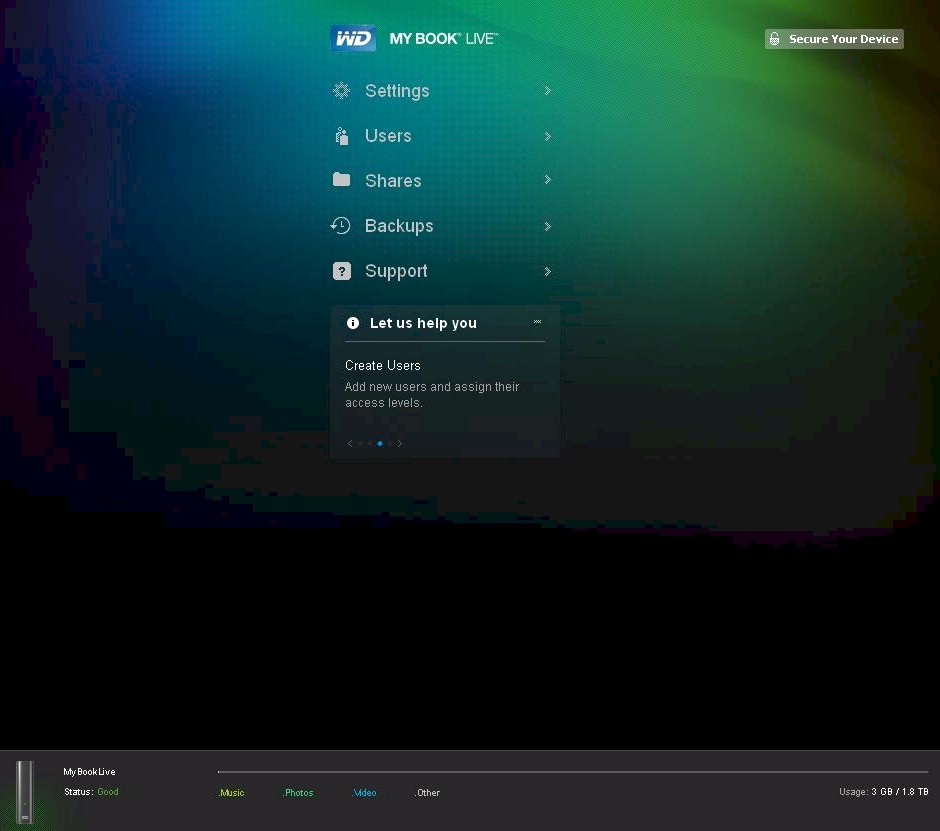
Figure 6: WD My Book Live admin home page
The Let Us Help You panel is always there to guide new users through essential tasks (Register Your Device, Access Your Media, Create Users, Create Shares). Don’t click on the WD My Book Live logo at the upper left unless you want to go to WD’s website.
Note the panel at the bottom of the screenshot. It’s shown in its expanded form, which provides a breakdown on file use by media type. There’s no big magic here; just a toting up of files in the Shared Music, Shared Pictures and Shared Photos folders that come configured on the Live. Everything else goes into the Other category.
The Settings section holds five key function areas. The System tab shown in Figure 7 includes the Energy Saver panel, which is enabled and set to 10 minutes by default.
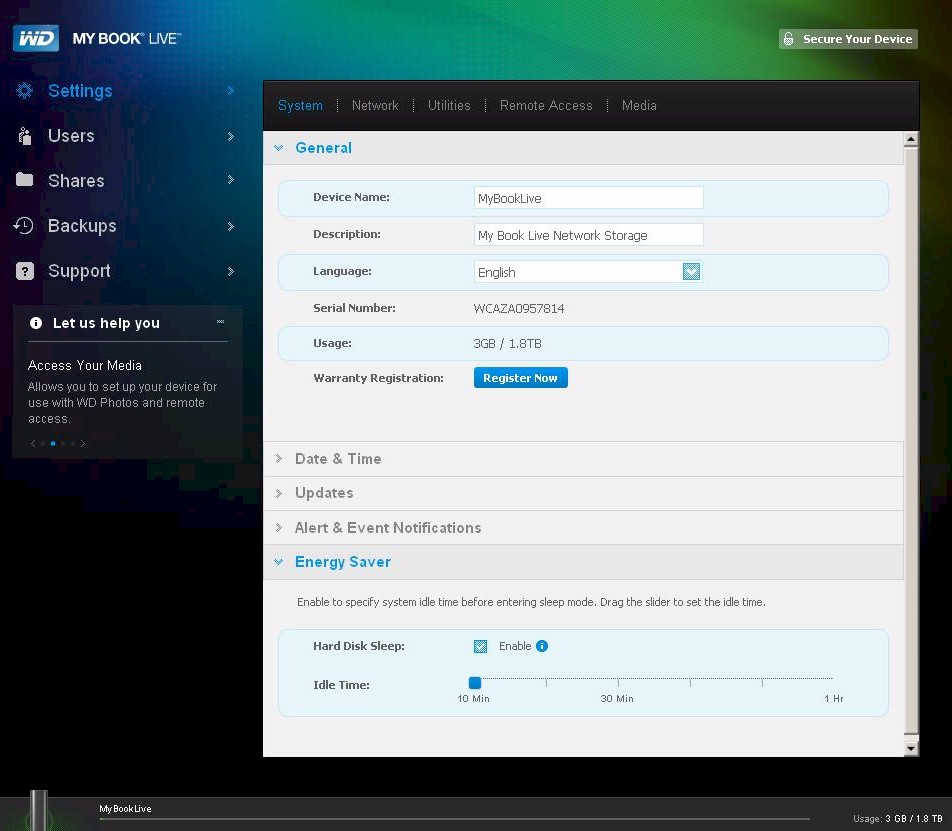
Figure 7: WD My Book Live System page
The Media Tab (Figure 8) holds Twonky and iTunes panels. WD makes no attempt to hide the fact that they use PacketVideo’s TwonkyMedia server and even have a link to the TwonkyMedia site.
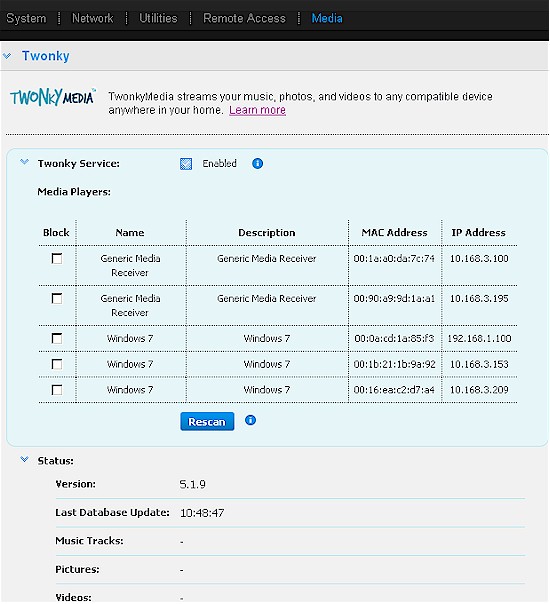
Figure 8: My Book Live Media Tab, Twonky panel
The Twonky panel echoes some of the functions that you can get by directly accessing the Twonkymedia server admin page itself at port 9000 (Figure 9).
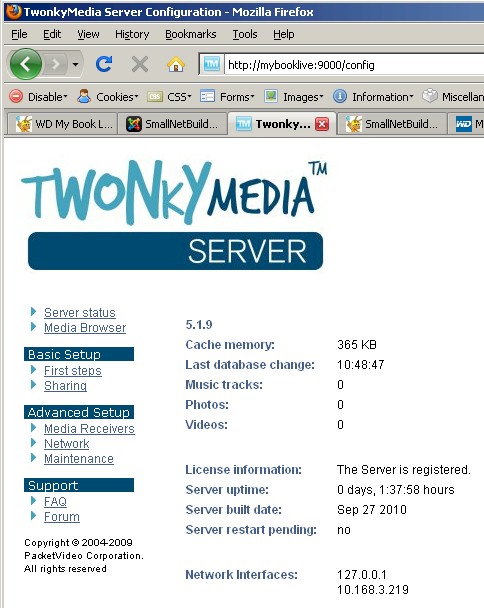
Figure 9: TwonkyMedia server access
MioNet Remote Access (version MioNet 4.3.0.8) looks about the same as the last time I looked at it on the WD ShareSpace. The only feature out of the ones shown in Figure 10 that you get for free is remote access to files stored on the Live. Everything else requires a $8 monthly or $80 yearly subscription.
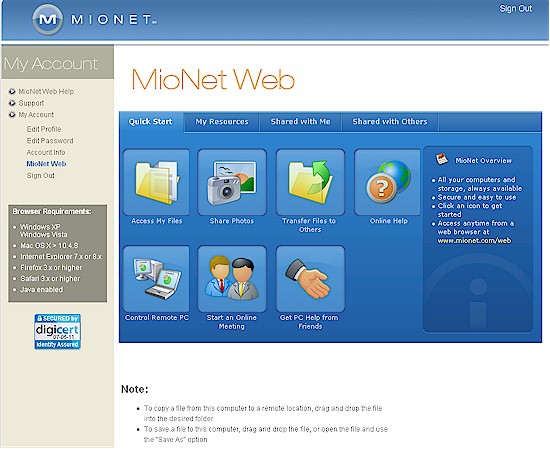
Figure 10: MioNet Web
Performance
The My Book Live was tested with 01.02.03 firmware using our latest Revision 4 NAS test process. Tests were run using a 1000 Mbps LAN connection.
The new Benchmarks NAS Chart feature was used to generate the benchmark summary for the Live shown in Figure 11.
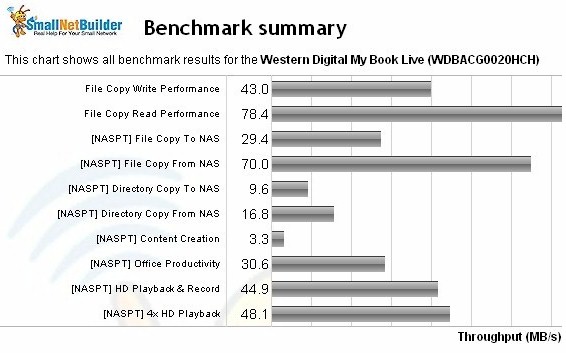
Figure 11: My Book Live NAS Benchmark summary
As noted earlier, I couldn’t get performance anywhere near the 100 MB/s that WD claims for reading. Highest read throughput was 78.4 MB/s from the Windows (7)-based File copy test, which is mostly large sequential file transfers. Win 7 has numerous file copy enhancements which usually show NASes in their best possible light. While 78.4 MB/s reads ain’t bad, they aren’t 100 MB/s, as WD claims.
Updated 11/1/2010
In a follow-up telcon, WD said it used Copymark to transfer single 5 GB and 22 GB test files to achieve the 100 MB/s read spec. The machine used was an i7, Windows 7 32 bit with the files coming from a WD Black 2 TB drive. WD also said that they got read performance very similar to my test results when they read smaller (1 GB) files.
So, that solves the mystery. If you have a machine with a fast CPU, Win 7 (or OS with equivalent file copy optimizations), PCIe based Gigabit Ethernet and a fast enough hard drive to support > 100 MB/s transfers, and you are transferring 5 GB + files, then you’ll get 100 MB/s.
The Intel NASPT File Copy tests are usually lower than the Windows file copy results and are here, too. NASPT File Copy From NAS (read) clocked in at 70 MB/s.
I couldn’t perform backup performance or iSCSI tests because the My Book Live doesn’t support those features.
To see how the Live fares against other single-drive NASes, I ran Windows Write (Figure 12) and Read (Figure 13) File copy charts.
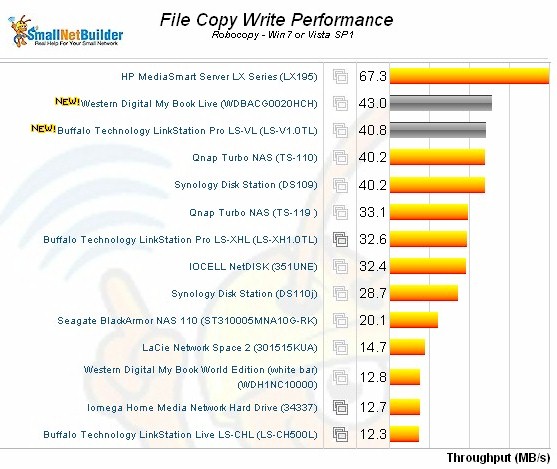
Figure 12: My Book Live File Copy performance comparison – write
The Live is almost four times faster than the My Book World "white bar" for write and about 2.5 times as fast for read. But it also beats Buffalo’s new Marvell-powered LinkStation Pro VL slightly on write and by a good 10 MB/s for read.
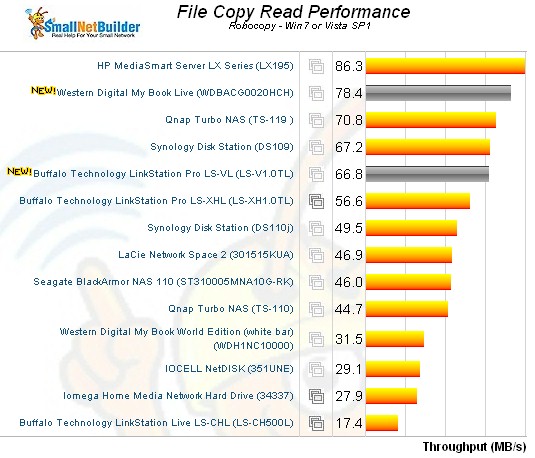
Figure 12: My Book Live File Copy performance comparison – read
Use the NAS Charts to further explore performance.
Closing Thoughts
If you can live with the Live’s simplified feature set and lack of USB ports, then it’s a pretty good buy for a single drive NAS. The 1 TB version is currently selling for around $150
