

Background
You probably have heard of WD’s new Red drives by now, which the company says are designed specifically for use in NASes. The primary claim to fame for these drives is improved reliability and broader NAS compatibility than its competitors. Power consumption is lower, too, but not as low as WD’s Green drive family. And like WD’s Green drives, the Reds’ spin rate is lower than 7200 RPM.
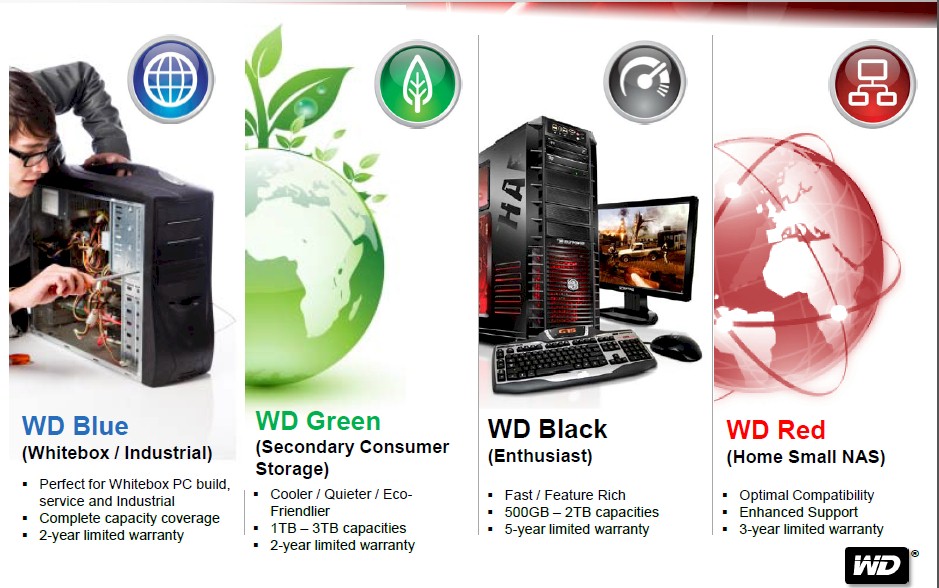
WD Consumer hard drive families
If you follow WD’s plan, you’ll no longer use its Green drives in your NASes. As the chart below suggests, you’ll use Reds for consumer NASes and its RE drives for heavier duty / business use.
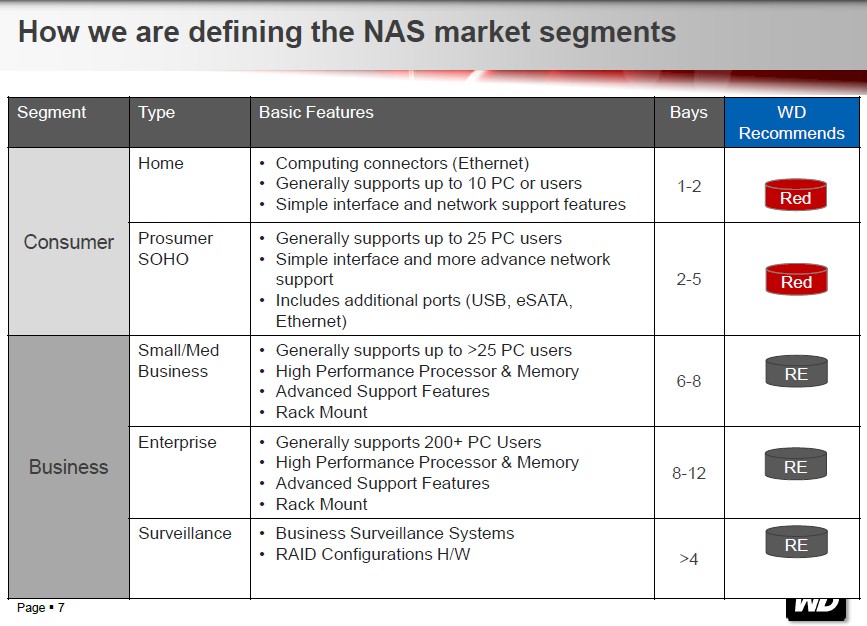
WD NAS market segment definitions
SNB readers often wonder which drive they should be using in their NASes. Our last stab at this question over five years ago concluded that it didn’t make much sense to put high-performance drives in your NAS, at least in hopes of improving NAS performance. At that point, NASes were simply too underpowered to come anywhere near bumping into limits imposed by hard drive performance.
How things have changed in five years! Some of today’s NASes built on multi-core Intel processors with multi-gigabytes of RAM easily overrun the bandwidth of even dual aggregated Gigabit Ethernet ports. But by throwing in a 10 GbE adapter, the connection bandwidth limit moves out to 1.25 GB/s, well above the 150 MB/s transfer rates of many of today’s even moderate-performance hard drives. WD’s SKU chart below shows that Red drives fit this bill with Host to/from buffer throughput of 145 – 150 MB/s.
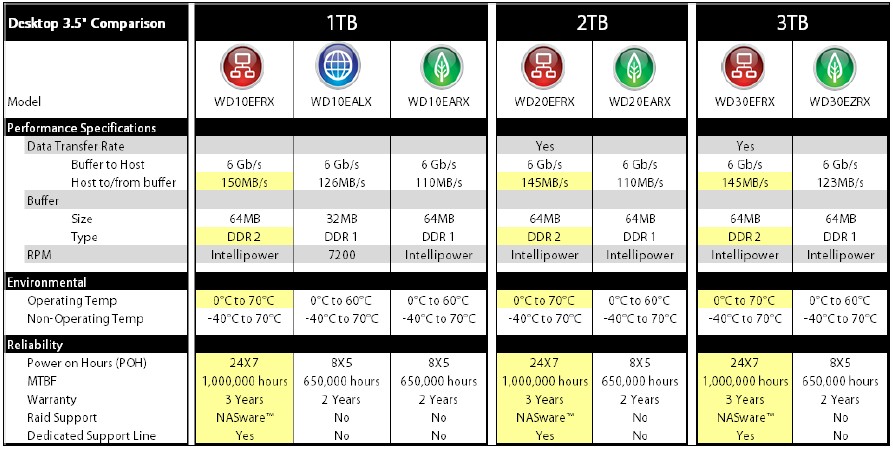
WD Desktop hard drive spec summary
The Test
I originally thought I wasn’t going to have to write this review when Storage Review published its excruciatingly comprehensive review of the 3 TB Red drive (WD30EFRX). But it seems they performance-tested the Red every way possible except to run a simple comparison between how a NAS performed using it and another similar performance drive. So that’s what I did.
WD provided four 3 TB Red drives and it so happened that I had two suitable Thecus NASes in for review: the N4800 and N6850 "Top Tower". The relevant specs of the two NASes are summarized in the table below.
| Component | Thecus N6850 | Thecus N4800 |
|---|---|---|
| CPU | Intel Pentium G620 @ 2.6 GHz | Intel D2700 Atom @ 2.13 GHz |
| RAM | 2 GB DDR3 DIMM | 2 GB DDR3 SoDIMM |
| Network Connection | 1 Gbps Ethernet | 10 Gbps Ethernet |
Table 1: Key component summary and comparison
The N4800 test case is meant to see if there is a performance change using a NAS that might be limited by its network connection from fully taking advantage of the Red drives’ full performance. With the N6850 test platform, however, there are no such limits. Network bandwidth, CPU power and internal bus architecture are all sufficient to let the bytes flow unimpeded to and from the drives.
Both NASes were configured with four drives in RAID 5 using Thecus’ defaults, which include the EXT4 filesystem and 64 KB stripe size. The test used our standard NAS testbed and consisted of running through the standard Windows filecopy and Intel NASPT benchmarks three times and calculating the average of the three test runs.
The tests were run once using four 3 TB WD Red drives (WD30EFRX) and once using four 1 TB Seagate Barracuda 7200.12 (ST31000524AS) drives that Thecus had provided for the normal NAS review. Table 2 summarizes key specs for the two drives. The five performance measures come from TomsHardware’s 2012 NAS Charts and show that the Red has some performance advantage over the Seagate drive, at least for sequential file reads and writes.
| Component | WD Red | Seagate 7200.12 |
|---|---|---|
| Interface | SATA 6 Gb/s | SATA 6 Gb/s |
| Cache | 64 MB | 32 MB |
| Rotation speed | Intellipower (5000 RPM) |
7200 RPM |
| [01] Read Throughput Average: h2benchw 3.16 Sequential Transfer Rates (Average) |
112.45 | 101.91 |
| [04] Write Throughput Average: h2benchw 3.16 Sequential Transfer Rates (Average) |
112.29 | 100.85 |
| [24] IOMeter 2006.07.27 Streaming Reads | 152.30 | 123.99 |
| [25] IOMeter 2006.07.27 Streaming Writes | 151.80 | 122.80 |
| [09] Interface Performance: h2benchw 3.16 Maximum Interface Bandwidth [MB/s] |
368.40 | 237.80 |
Table 2: Key spec summary and comparison
I originally wanted to use WD’s Green drives for comparison, since they are the logical alternative to the Red and cost around $10-$50 less, depending on capacity. But the word I got back from WD’s PR person was that WD’s official policy now is that Green drives are no longer sent out for NAS review purposes. I didn’t want to spend $600 for four 3 TB Greenies, so the Seagates would have to do.
I used a single Gigabit link between the testbed and N4800. For the N6850, two Intel X520-DA2 10 GbE boards were used. One board went into the PCIe x8 slot in the NAS, the other into the testbed in the ASUS P7H57D-V EVO motherboard’s PCIe 2.0 x 16 5GT/s slot to form a single 10 Gigabit Ethernet link.
The N4800 results below show little significant difference between the two sets of drives except for the video streaming tests. This would seem to reflect the spec differences that the TomsHardware testing showed.
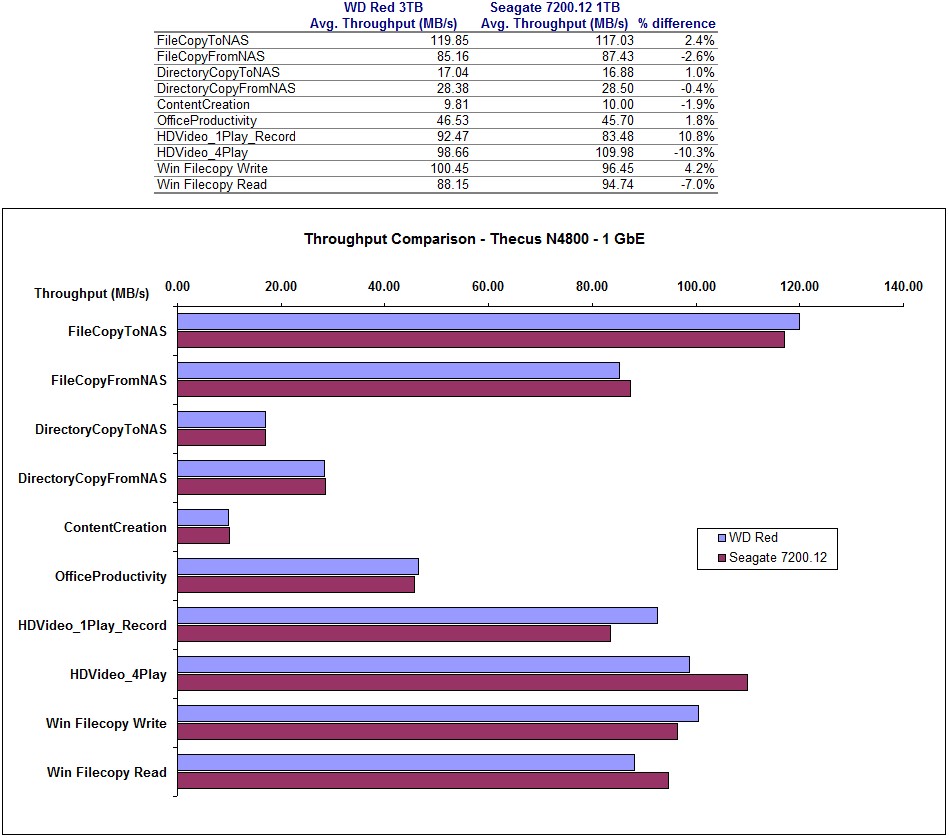
WD Red vs. Seagate 7200.12 – Thecus N4800 – 1 GbE
The N6850 results seem to tell a slightly different story. The File Copy to NAS test seems to show a significant improvement with the Reds. But I calculate the standard deviation for each test and it was high on both test runs for that test. So I wouldn’t put a lot of faith in that result.
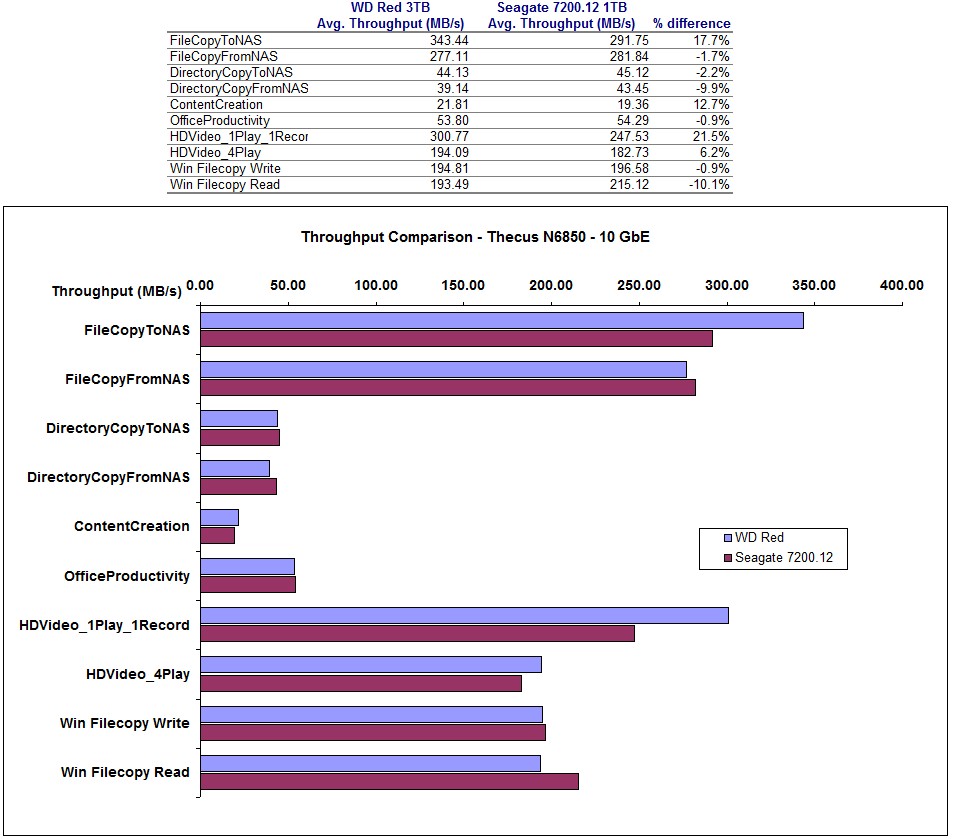
WD Red vs. Seagate 7200.12 – Thecus N6850 – 10 GbE
Same goes for the HD Video_1Play_1Record test. It had very high standard deviation (24) on the Red drive run and moderately high (11) with the Seagate drives.
My conclusion is that I would not put a lot of faith in seeing a significant performance advantage from using the Reds, even in a NAS that should be able to squeeze every bit of performance from them.
Closing Thoughts
The good news is that it doesn’t look like you will sacrifice any performance by using WD’s new Red drives. But on the other hand, you won’t gain anything either and will pay a premium for them. I suspect that the real advantage of the Reds will come from improved reliability, mainly from tweaks made in drive error recovery firmware aimed at keeping drives from unnecessarily falling out of RAID volumes due to excessive error recovery times. But only time and user experience will tell whether these changes really do improve reliability in WD’s "made for NAS" drives.