

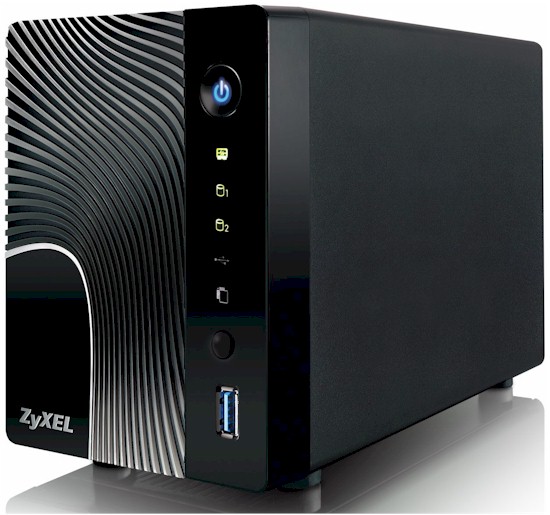
| At a glance | |
|---|---|
| Product | Zyxel 2-Bay Power Plus Media Server (NSA325) [Website] |
| Summary | Dual-drive Marvell-based NAS with USB 3.0 port, lots of upload/download options and support for add-in modules. |
| Pros | • Lots of features – highly configurable via packages • Eco friendly with hibernation, power spin down modes • Time Machine support • USB 3.0 port for faster backup • Low noise smart fan design |
| Cons | • No front panel indication of degraded RAID • Drive not hot swappable • No email notification of drive failure • CPU seems to saturate easily during file copies |
Typical Price: $150 Buy From Amazon
Introduction
If you’re in the market for a NAS device (Network attached storage) you have a few choices to make: How much storage do you need? How many drives do you want? Do you want the drives pre-installed, or do you want to by a bare chassis and supply your own drives?
For many SmallNetBuilder readers, the BYOD option is often the best bet. Though there are quite a few NASes from manufacturers such as Buffalo Technology, Seagate, Iomega and Western Digital that come with drives pre-installed, often you’ll find that BYOD NAS products offer you a lot more features.
With drive sizes now at 4 TB, a two drive NAS can be a great choice for home user. Unless you’re a media junkie, it will take you a long time to fill up 4 TB and the option of RAID 1 mirroring can provide a bit more peace of mind for data security. Of course, you’ll also need a separate backup device, preferably off-site, for true data security.
All dual drive NASes offer the option of RAID 1 (mirroring) to provide in-NAS data redundancy. Some, like the ZyXEL NSA325 in this review, even provide you with root access. Linux guys can go crazy without having to hack in.
Product Tour
The NSA 325 is an attractively designed NAS measuring 4.25” X 8.07” X 5.79”. The removable front panel features a molded in design which makes it look a little different than the traditional “black box” NAS. The front panel is attached to the case with three tabs and two small magnets hold the panel in place. The figure below shows both the front and rear panel configuration.
On the front panel, there are status indicator lights for hard drives, the front panel USB 3.0 port, Copy and a System status light. The rear panel includes two additional USB 2.0 ports for additional storage, UPS monitoring or print sharing. Indicator lights on the Gigabit Ethernet port show traffic and link speed.
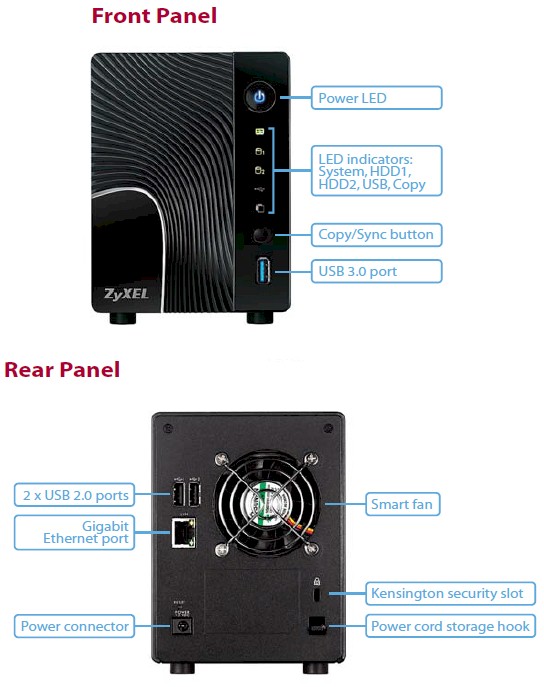
ZyXEL NSA 325 front and rear panel layout.
The figure below shows you a description for each of the status indicator’s colors and states.
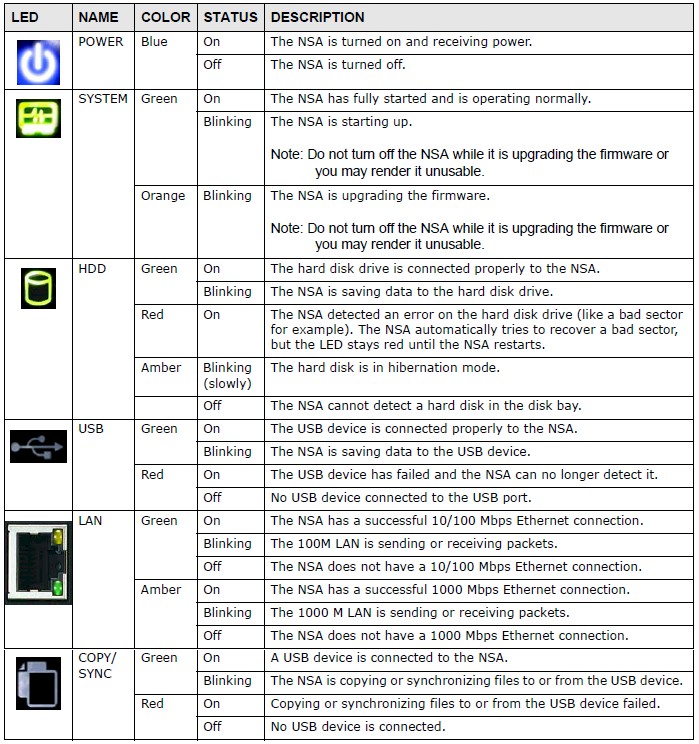
ZyXEL NSA325 LED status indicator description
Inside
The NSA 325 is powered by a 1.6 GHz Marvell Kirkwood SoC (88F6282A1C160) and is supported by 512 MB of Nanya RAM. The Gigabit Ethernet controller, which supports jumbo frames, is the Marvell 88E1318 “Alaska” Gigabit Ethernet Transceiver. Rounding out the hardware complement is 128 MB of flash and a NEC D72022F USB 3.0 interface.
This hardware lineup compares favorably to what you’ll find in the similarly priced D-Link DNS-325 which has a 1.2 GHz Kirkwood 88F6281 processor and supported by 256 MB of RAM. The figure below shows the main component side (top) of the NSA 325’s circuit board.
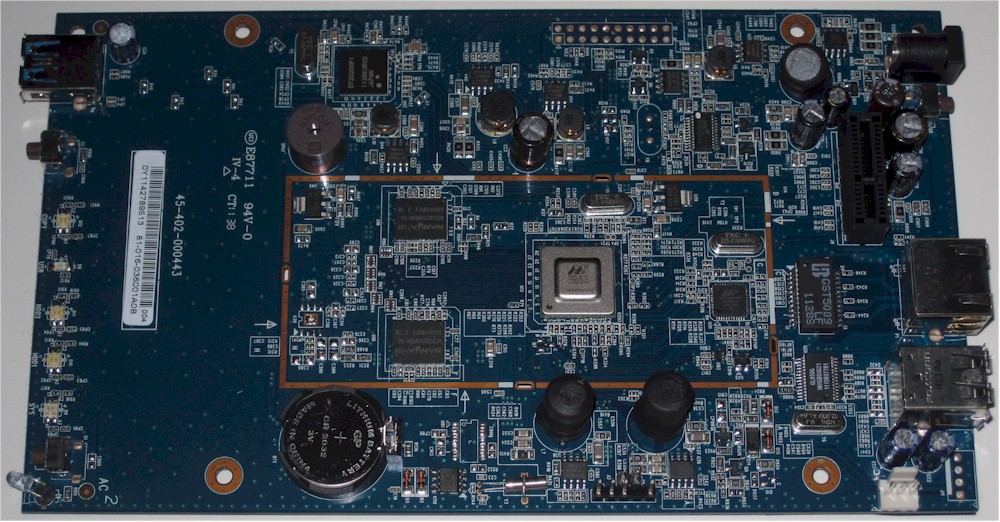
NSA 325 circuit board – top view
The device is powered by an external wall transformer which has a rated output of 12VDC@ 5A. For those of you who worry about power consumption, the NSA325 is a “green” device. The next figure shows you the power control page. Here’s you’ll find the setting for hard disk spin down UPS setting (if attached) rules for what to do after a power failure, Wake on LAN and a Power control schedule.
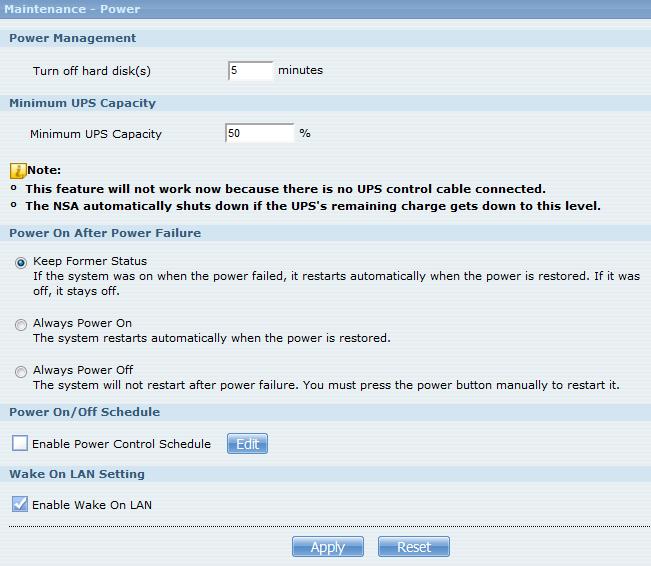
ZyXEL NSA 325 Power Management
You could, for example, reboot the device the first day of every month at midnight. With the two 2 TB Seagate Barracuda 7200.14 drives (ST2000DM001) supplied by ZyXEL for testing, it consumed 23-24W during a file copy, 18W while idle and dropped back to 8W with the drives spun down. With the device plugged in and running, the Power Factor measured 0.56.
Setup
Before you can set up your NSA325, you first have to install one or two hard drives. If you are going to mirror your disks to achieve fault tolerance, be sure to purchase two drives of the same capacity. Otherwise the capacity on the larger drive that exceeds the capacity of the smaller drive will be wasted.
Installing the drives is really quite simple. First, you remove the front cover by pulling slightly on the left side of it. Next, you install rails onto the top and bottom of your drive as shown below. Slide the drive/rail assemblies into the drive slots and replace the cover. Next, connect the NAS to the power supply and your network and press the power switch on the front panel. Observe the system status LED and wait for it to turn solid green. It should take a little over two minutes.
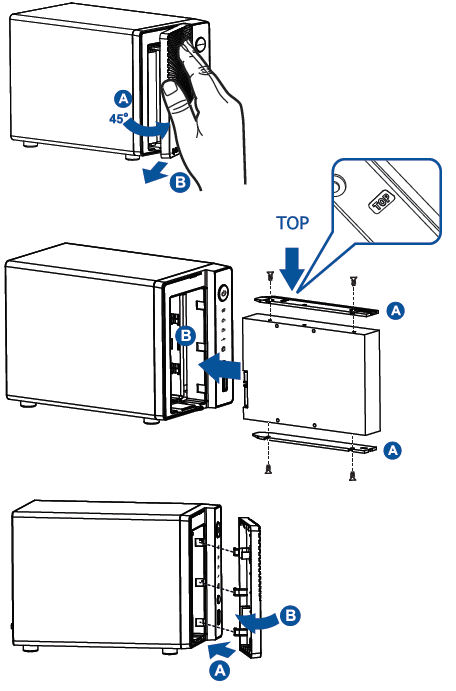
ZyXEL NSA325 drive installation
Setup is performed using software provided on an included CD. When you launch the NAS Setup Utility, you will land at a screen similar to the one below. On first installation, there will be and additional icon that lets you run the installation wizard. When I ran the installation and setup on a Win 7 system, it was fairly straightforward.
Initially, rather than seeing “Online” status, my status showed the NAS as “Unreachable” – even though I could ping it and log into it with a web browser. I suspected that my security package (Kaspersky) had intercepted the program. It had, graded it as a low risk threat and disabled it.
Most likely, that was due to the fact that the NSU program wasn’t digitally signed. Within Kaspersky, I made NSU a trusted program and moved into a non threat group, but it still reported “Unreachable” Finally, by disabling the Windows firewall, I was able to use the program. I also installed NSU on an XP computer that had Norton 360 installed, and didn’t have any problems.
The icons across the bottom of the screen are shortcuts to locations within the browser-based UI for items you may want to set up initially.
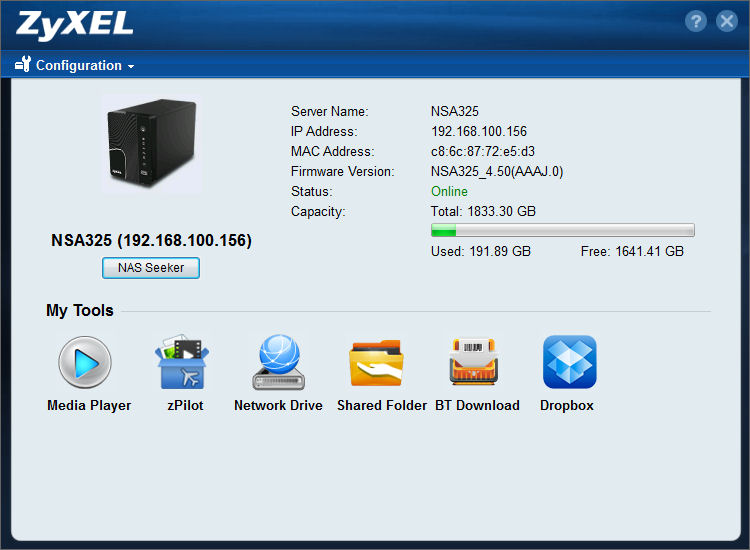
Network Setup Utility
The “Media” icon takes you to the home landing page shown below. From there, you can view music, photos, movies, favorites, browse files and applications and further set up the device.
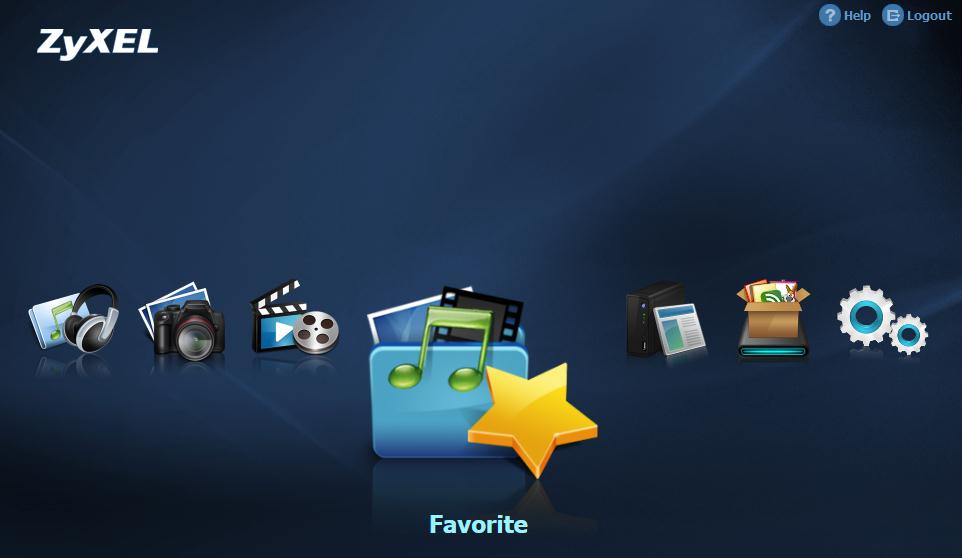
NSA325 The Home Page is a gateway to most functions
Hands On
When you click on the setup (gears) icon above or go to the IP address of the NSA325 and log in as admin, you land at the page below. This landing page is also the status page and you can see that it chock full of information. Arranged vertically along the left side of the screen, you’ll find major groupings of features in an expandable/collapsible tree. Many of the features are common to virtually all NASes products, so I’ll just highlight a few that I think are noteworthy on the NSA325.
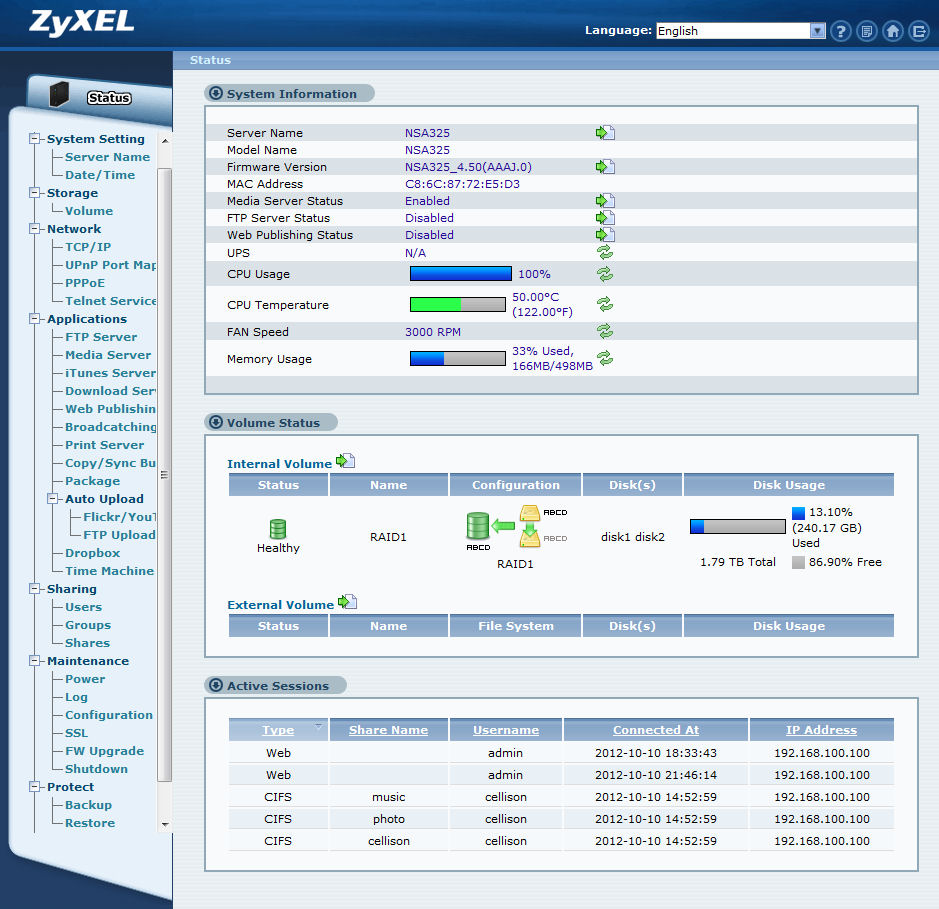
NSA 325 Administrative home page
Network > Telnet
By enabling Telnet, you have root access to the NSA325 using the admin password. No hacking required!
Applications
• FTP – you can enable FTP an separately enable/disable anonymous FTP access. You can also individually set a maximum upload and download rate.
• Media Server – if you enable the Media server, you have access to the Twonky Media Server console on http://NAS_ipaddress:9001. The NSA325 is currently running TwonkyServer Premium version 7.0.9
• Broadcatchting – you can have the NSA325 automatically download frequently updated items like podcasts and RSS feeds
• Copy/Sync – this menu lets you select the volume on the NAS to be used for either copying or syncing with an external USB device. Press and release the button on the front panel to copy. Press and hold the button until you hear a beep to synchronize.
• Package – This is one of the best features of the NSA325. It lets you customize your NAS with additional features and functions by installing packages from the ZyXEL. Click “Retrieve List” from Internet to get the latest available packages. Not shown on the screenshot below are: SqueezeCenter (for Logitech’s Squeezebox); Syslog; Tftp support (on port 69); WordPress; eMule (P2P file sharing) and pyLoad.
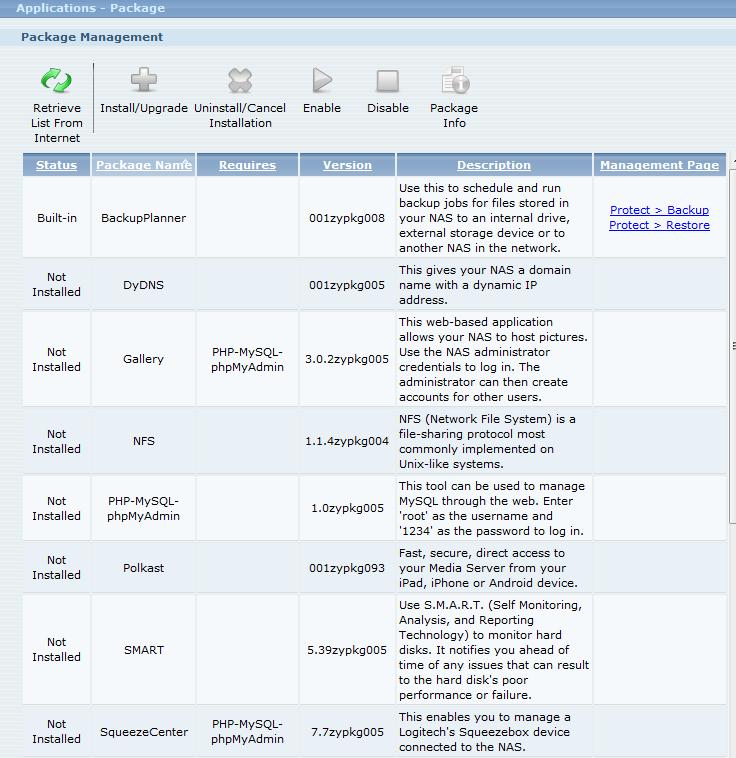
Packages add additional features to your NSA325
Auto Upload > Flickr/YouTube
Here you can create “watch folders” on the NSA325 that are automatically uploaded to either Flickr or YouTube.
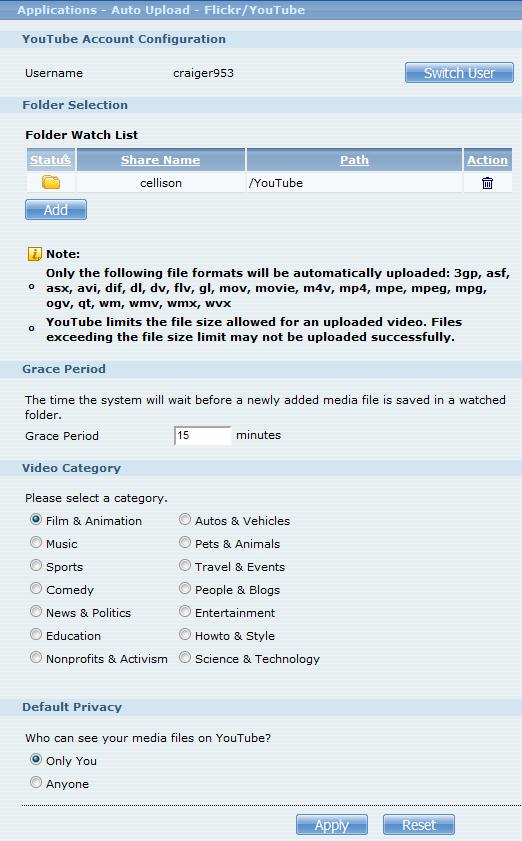
The NSA325 can automatically upload files to Flickr, YouTube or FTP sites
Time Machine
Mac users will appreciate that the NSA325 can be used as a Time Machine Target. I successfully configured my Mac (Lion 10.7.5) to use the NSA and created the initial full image of my Mac.
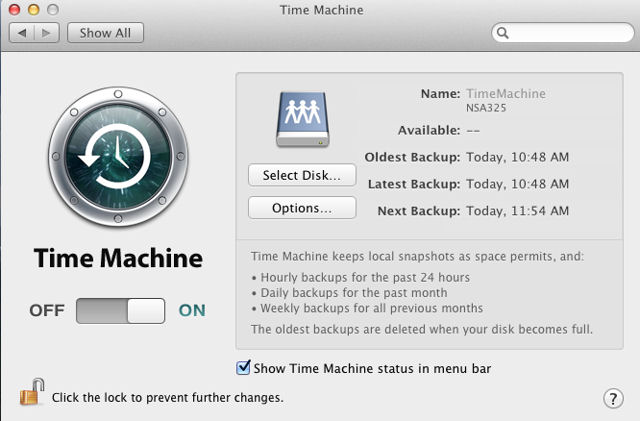
The NSA325 can be configured as a Time Machine target
Sharing > Users/Groups/Shares
These three menus let you create users and groups and then assign privileges to top level shares using those groups and users. Private shares are not automatically created when you create a user – you have to create private shares, if desired, in the Shares menu. The Shares menu also lets you enable/disable a share, enable a recycle bin, or publish a share to the Media Server. There are no user or group quotas. There are predefined shares for video, photo and music as well as a built-in public share and a built-in private share for admin.
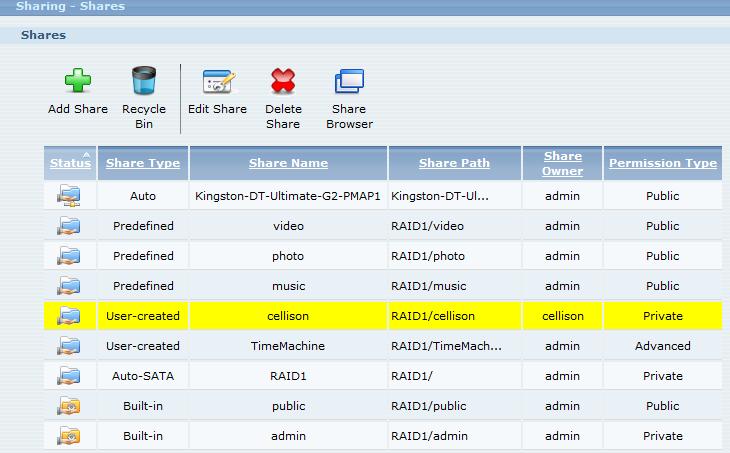
You can assign user or group rights for each share
Maintenance > SSL
In addition to the standard maintenance items of logs, firmware updates, saving configuration, the NSA325 lets you easily install a downloaded certificate, edit a self-signed certificate, or create a certificate to be authorized by your own Certificate Authority. You must do this if you want to enable HTTPS access to the web admin or to enable secure FTP.
Protect > Backup/Restore
These menus let you create one or more backup jobs to backup (full or incremental) or synchronize shares, files or folders to another NSA NAS, onto a different target on the same NSA325, or to an attached external USB drive. Note that network backup to a standard rsync server is not supported. Like Buffalo, ZyXEL has elected to allow network backup only to another of its own NASes.
Media
From the default home page, you have access to the photos, movies and music in the predefined shares that are published by the Twonky DLNA media server. And, if you enable the iTunes server, shared content as well as playlists and ratings will also appear in iTunes under “Shared”.
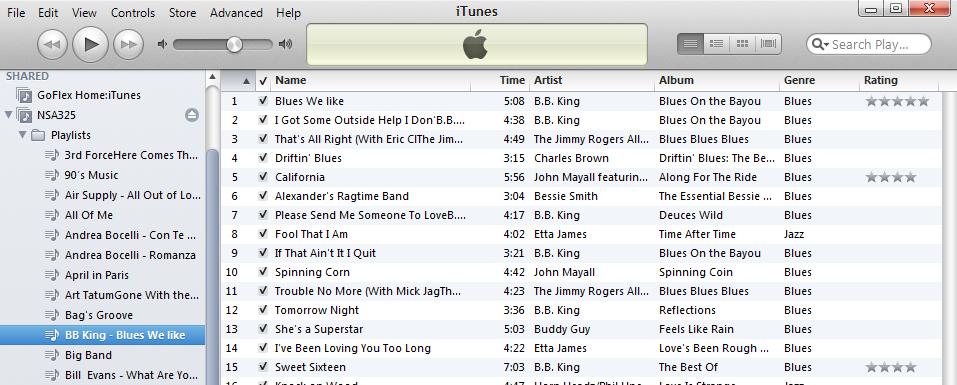
The NSA325 iTunes server publishes to iTunes, if enabled
If you click on the Music icon, you’ll discover that you can view the published music by Folder, Artist, All or by the current playlist. Missing, however, is the ability to view by Album or Genre.
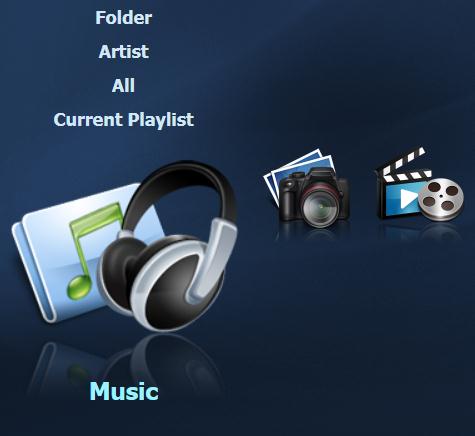
Clicking on the Music icon reveals your sorting choices
Similarly, if you click on Photo, your choices are Folder, Date or all. Typically, you’ll use the folder view. The image below shows the thumbnail view of a subfolder. If you click on an image, you can view it or start a slide show. Your slide show can be within a window or full screen. If enabled, you can also use the “Ken Burns” zooming view for your slideshows.
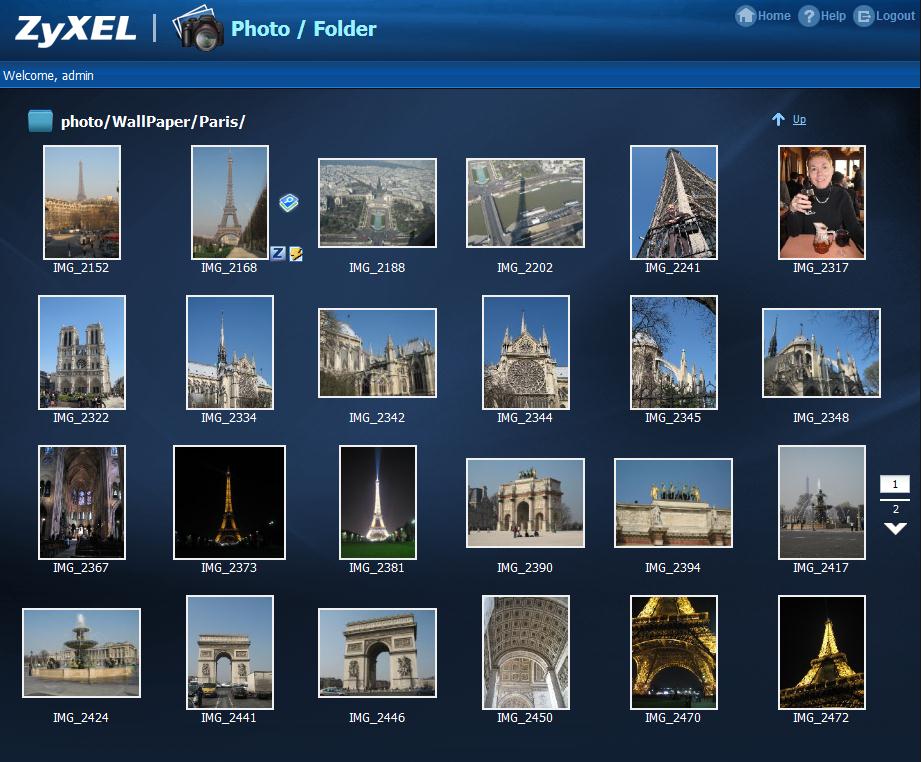
Browser-based thumbnail view of DLNA published photos
For video, you can only browse by folder. If you use the file browser feature, you can download, upload, rename, delete files and folders and create folders from a web browser. Mobile features are also available for your Android or iOS device if you install the Polkast application on the NSA325 and install a Polkast client on your mobile device. (We reviewed Polkast for Windows last year.)
Drive Pull
We always like to do a drive pull test to see how a NAS handles a sudden “disk failure”. While normally I plan the event, in this case, it happened somewhat accidentally. I tipped the device forward onto the front panel to inspect for an FCC label. The drives aren’t mechanically locked into place and one of the drives disengaged and its corresponding red light illuminated. It looked like the weight of the drive was sufficient to pull it out of the SATA slot.
I reinserted the drive and its drive status light returned green. Curiously, there was no visual indication that there was a disk problem or that the RAID was running in a degraded condition. So I logged back in and found the Storage page showing”Unknown” for disk 1. I tried to shut down the device through the UI, but it didn’t shut down, so I pressed the power button and it finally gracefully shut itself down.
I can’t fault the NSA325 for not recognizing the re-inserted drive – the specs don’t say that drives are hot-swappable, but it would be nice if they were.
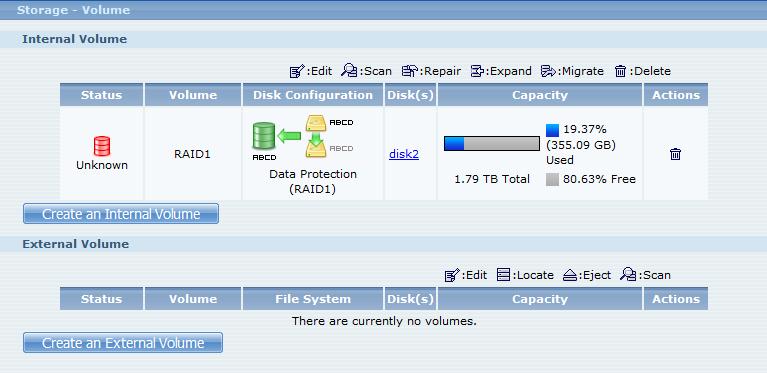
After reinserting the disk “hot”, its status appeared as “Unknown”
I powered up again, and both the status page and the storage page showed the RAID as degraded. You have to manually start the repair. There is no front panel light showing that the RAID is degraded or that the array is being rebuilt. Nor is there email notification or an audible alert. Both of these notifications would be easy to implement. The multi colored System LED could change to a different color to indicate a failure and could blink to show rebuild status. Even though I had enabled email logs and “storage” was one of the alerts, I didn’t get an alert email. (A test confirmation email did work, however.).
In order to rebuild the array, you have to cycle power and click on the repair icon in the far box under “Action”. Though it doesn’t show the presence of disk1, the Repair Volume icon only appears if there’s a disk in place to rebuild.. The rebuild process took about 4 1/2 hours for a RAID 1 array of two 2 TB drives. All my data was intact and I was able to continue to access the shares during rebuild.
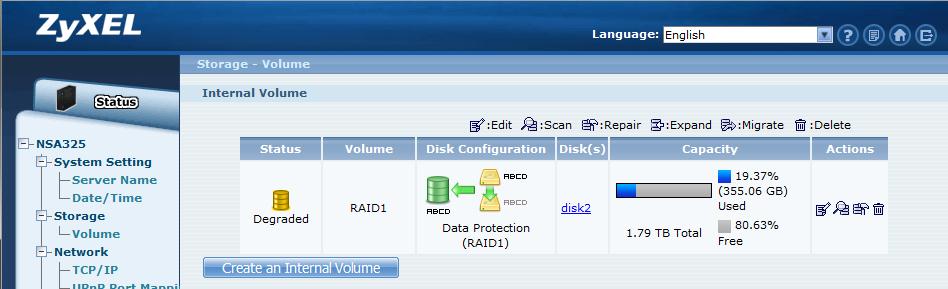
You have to manually restart the RAID rebuild by clicking on the repair icon.
Here’s the status page showing the rebuild progress after 2:02 of rebuild time. While initially the CPU utilization hovered near 100%, as it did for intense file copies, after the process started running for awhile, the utilization droppe off. Without seeing process details on the CPU utilization, however, it’s hard to know what other processes are running that might be consuming the CPU.
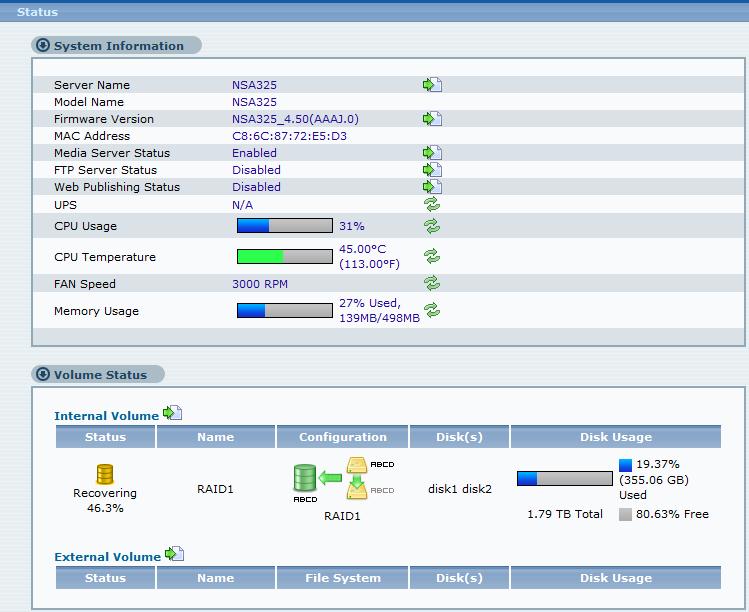
RAID rebuild progress after about 2 hours
Performance
The NSA325 was tested with NSA325_4.50(AAAJ.0) firmware using our standard NAS test process. The Benchmark summary below shows Windows File copy write tests running significantly lower than their equivalent Intel NASPT benchmarks. But read results between Windows File copy and NASPT are pretty much the same. This isn’t unusual, since the two benchmarks use different files.
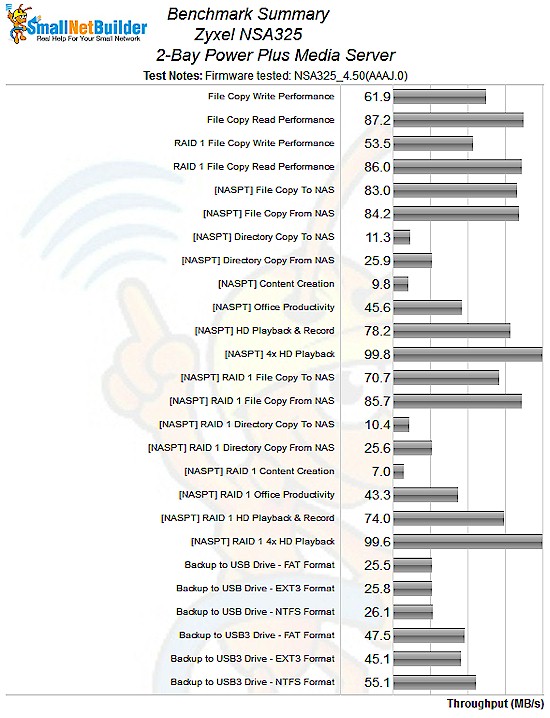
ZyXEL NSA325 Benchmark Summary
As mentioned earlier in the review, probably the closest comparison for the ZyXEL NSA325 is D-Link’s DNS-325. We highlighted that the ZyXEL had a processor that is about 30% faster than the D-Link and it also has double the RAM. As you’ll see from the charts below, the faster hardware clearly translates into better throughput in almost every performance category. To filter the chart, I selected only NAS devices with two drives.
The first image shows File Copy Write Performance (RAID 0) where you’ll see that the ZyXEL NAS is 1.72 times faster than the D-Link (62 MB/s vs. 36 MB/s).
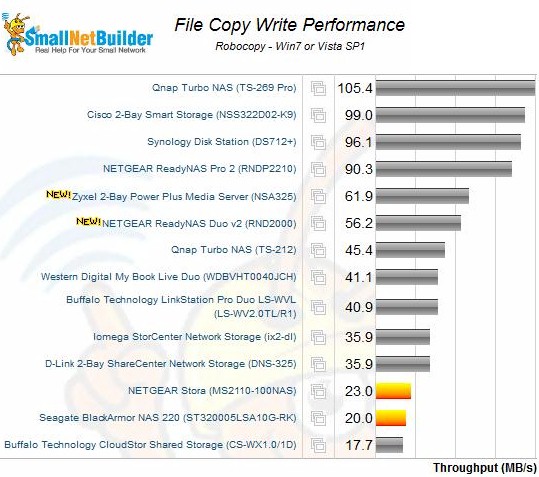
File Copy Write Performance – the ZyXEL NSA325 was 1.72 times faster than the D-Link DNS-325
If you compare RAID1 File Copy Write Performance, you’ll see almost the same performance difference between the ZyXEL and the D-Link. The ZyXEL is 1.76 times as fast (54 MB/s vs. 30 MB/s).
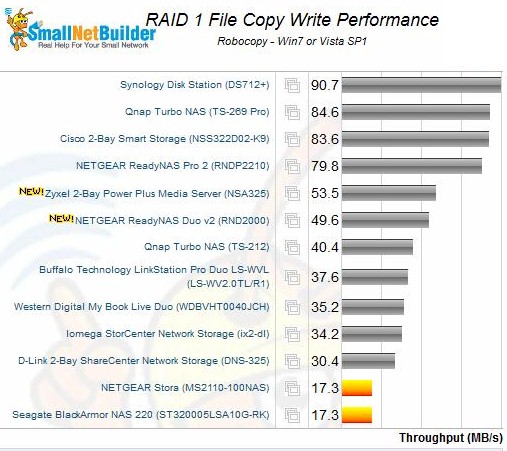
RAID 1 File Copy Write Performance – the ZyXEL NSA325 was 1.76 times faster than the D-Link DNS-325
Read performance is a slightly different story. For the File Copy Read performance, the NSA325 was only about 20% faster than the DNS-325 (87 vs. 72 MB/s).
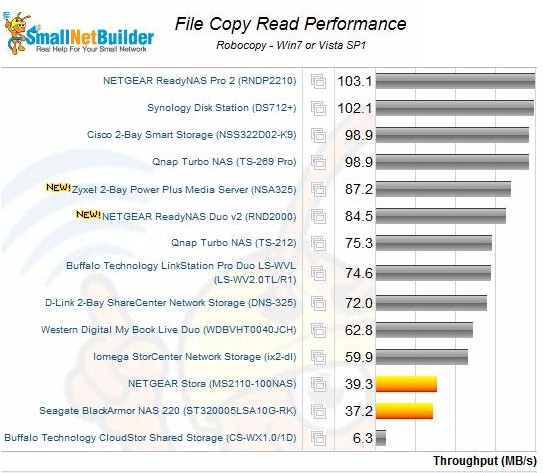
File Copy Read Performance – of the four comparisons, this was D-Link’s best
However, for RAID 1 File Copy reads, the ZyXEL turned in almost twice the performance of the D-Link (86 vs. 45 MB/s).
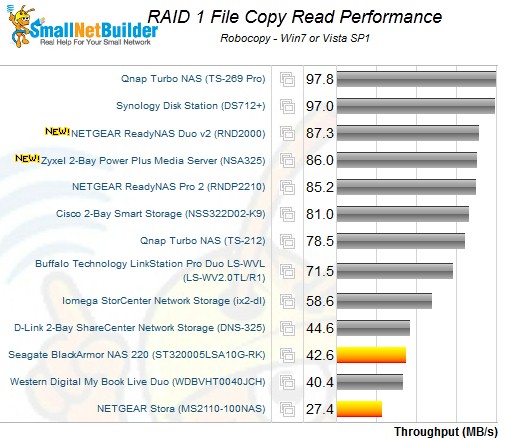
RAID 1 File Copy Read Performance
We were able to get attached backup results for FAT32, NTFS and EXT3 formats, courtesy of the NSA325’s built-in formatter. The formatter also can create EXT2, ReiserFS and XFS volumes. Backup throughput to our Startech USB 3.0 eSATA to SATA Hard Drive Docking Station (SATDOCKU3SEF) containing a WD Velociraptor WD3000HLFS 300 GB drive essentially maxed out the USB 2.0 connection with throughput in the mid-20 MB/s range.
The Marvell processor had enough power to produce higher backup throughput using the USB 3.0 connector, turning in best throughput of 55 MB/s using an NTFS formatted drive. We were not able to measure networked backup because we didn’t have a second ZyXEL NAS on hand. As noted earlier, like Buffalo, ZyXEL has elected to allow network backup only to another of its own NASes.
The NSA325 doesn’t support iSCSI, so there are no test results to report.
Closing Thoughts
There’s a lot to like about the NSA325. It’s easy to setup and configure, though neophytes might find it a bit challenging and might opt for a NAS with drives already installed and configured. It supports RAID 0, RAID1 and JBOD – what you’d expect in a two drive NAS.
Its price on Amazon currently hovers around $174, making it one least expensive dual drive BYOD NASes on the market. That doesn’t mean that it’s short on features however. It comes with a built-in DLNA/iTunes server, USB 3.0 port for faster backup, one touch file copy or sync, web publishing, automatic downloads and automatic uploads to YouTube or Flickr. With the purchase of a couple of 2 TB drives for about $110 each, you can have a 4 TB (or 2 TB if you use RAID 1) fully-featured NAS for under $400.
If you’re on the fence between the NSA325 and D-Link’s DNS-325, my vote is for the ZyXEL. It has higher performance, more features and faster backups via its USB 3.0 port for about the same money.
My favorite feature of the NSA325 is the downloadable packages. Using downloads supplied by ZyXEL, you can add additional features to an already fully-featured NAS. The DLNA (TwonkyServer Premium) server worked as expected and crunched through indexing close to 4000 images, 8400 songs and 1200+ videos in about 15 minutes. I was a bit disappointed that the web-based media UI didn’t let me search by album or Genre, but was happy that the iTunes server seemed to work well.
My biggest disappointment was with the handling of a hard drive failure. Though I realize that the device doesn’t claim to be hot swappable, there should be some kind of front panel notification that the RAID has been degraded. Email notification of drive removals/failures would also be a real plus. I’d like to see the rebuild process be a bit more user friendly, though admittedly, the people who will purchase this device probably won’t have much of an issue with resynching the volume. Bottom line, I didn’t lose any data during either of my two drive pull tests and the array resynched in what I consider to be a reasonable amount of time.
I’m the kind of guy who likes a lot of configuration options, so the NSA325 really appeals to me. I frequently grow frustrated with more “consumer friendly” NAS products because there just isn’t enough control for my taste. Offering a great value, good performance, expandability and control, the NSA325 is a great choice for a dual bay BYOD NAS. I could even see it replacing one of my other NASes.