

Introduction
Updated 5/12/2008 – Freshened links, updated DD-WRT info.
I received an email a few weeks back that asked me to see whether I could determine whether Linksys’ WRT54G V5 wireless router is really as bad as users seem to have found it to be. For those of you unfamiliar with the situation, here’s a short synopsis.
Linksys, like most consumer networking companies, constantly evolves the design of its products. Some changes are for cost reduction, others for performance reasons and others for reasons known only to the company. At any rate, these companies seem to think that consumers need not be concerned with the changes, since they in most cases don’t change the model number of the product.
The WRT54G wireless router is probably one of Linksys’ top five most popular products, with sales volumes in the “hundreds of thousands per month” according to this LinuxDevices article. It is Linux-based and also is probably the #1 “hacked” consumer networking product, with numerous alternative firmware distros available including Sveasoft, FreeWRT, DD-WRT, OpenWrt and Tomato.
Although loading any of them voids the product warranty, enough users have found the risk worth it due to the features they provide. Some simply provide access to transmit power settings, while others add features not available with Linksys’ code.
For whatever reason, with the V5, Linksys decided to remove the hackability “feature”, switching to the proprietary VxWorks embedded operating system that is used in other consumer networking products. The V5 also halves the amount of both RAM and flash memory to 8 and 2 MB respectively, which according to the LinuxDevices article lets Linksys come out ahead in cost reduction even with the additional cost of the VxWorks license fee. The reduced memory also serves as a deterrent for hackers who might want to find a way around the new bootloader.
The change didn’t sit well with enough of Linksys’ customers that the company responded to the outcry and created the WRT54GL (L for “Linux”), which is still loadable with alternative firmware. At the time of announcement, Linksys said it wouldn’t guarantee how long the “L” would be available. But apparently it’s popular enough that it has progressed to a “V1.1” version.
Internal Details
Let’s take a quick inside look at the G V5 and GL V1.1. Figure 1 shows a photo of the WRT54G V5 board. That’s a Broadcom BCM 5352 processor with embedded 10/100 switch and the radio is under the shielding at the lower left of the photo. As mentioned earlier, RAM and flash have been cut in half and weigh in at 8 and 2 MB respectively.
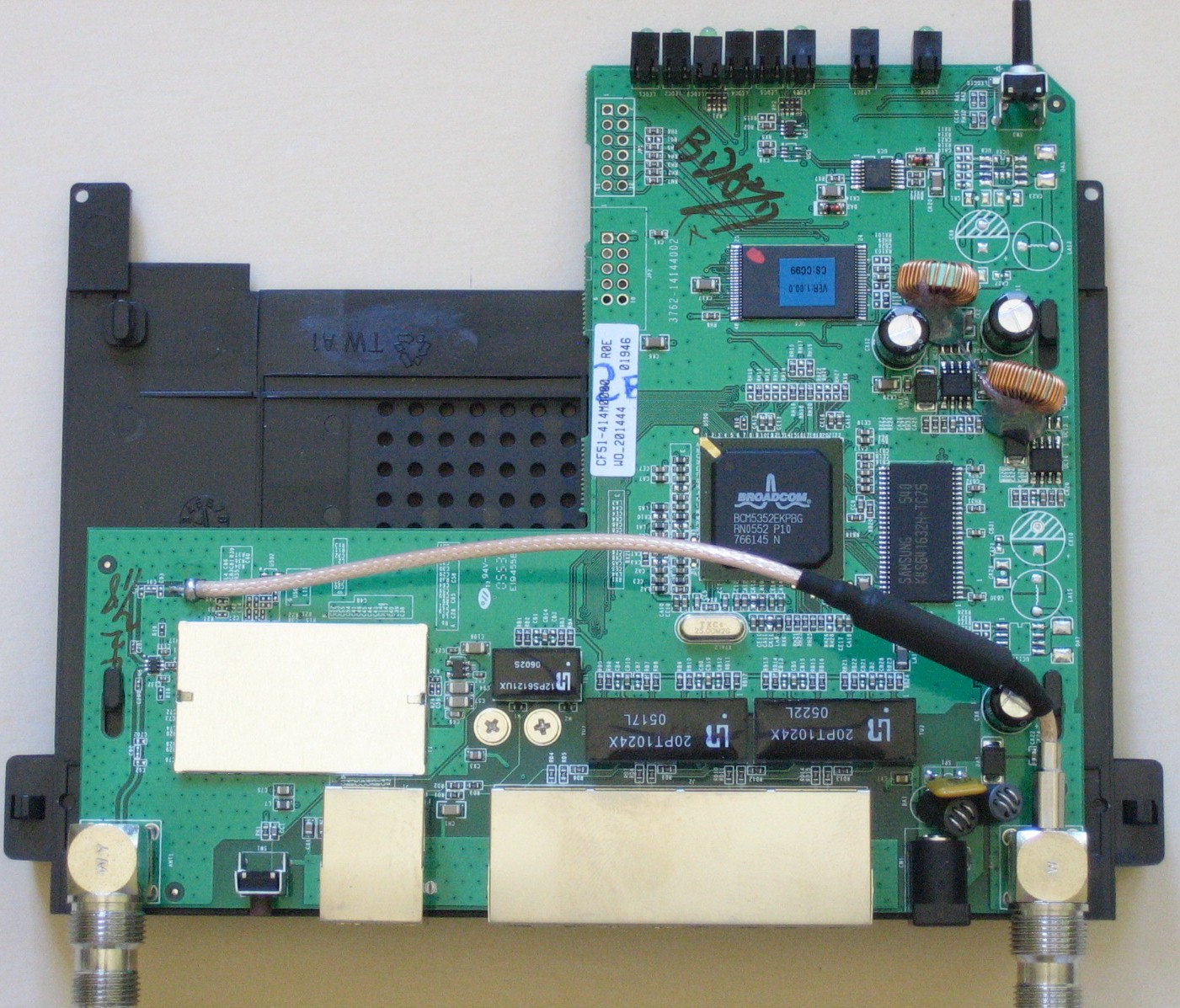
Figure 1: Linksys WRT54G V5 Board (click to enlarge)
The WRT54GL V1.1 board in Figure 2 is very similar to the G V5, uses the BCM5325 processor and has 16 MB of RAM and 4 MB of flash.
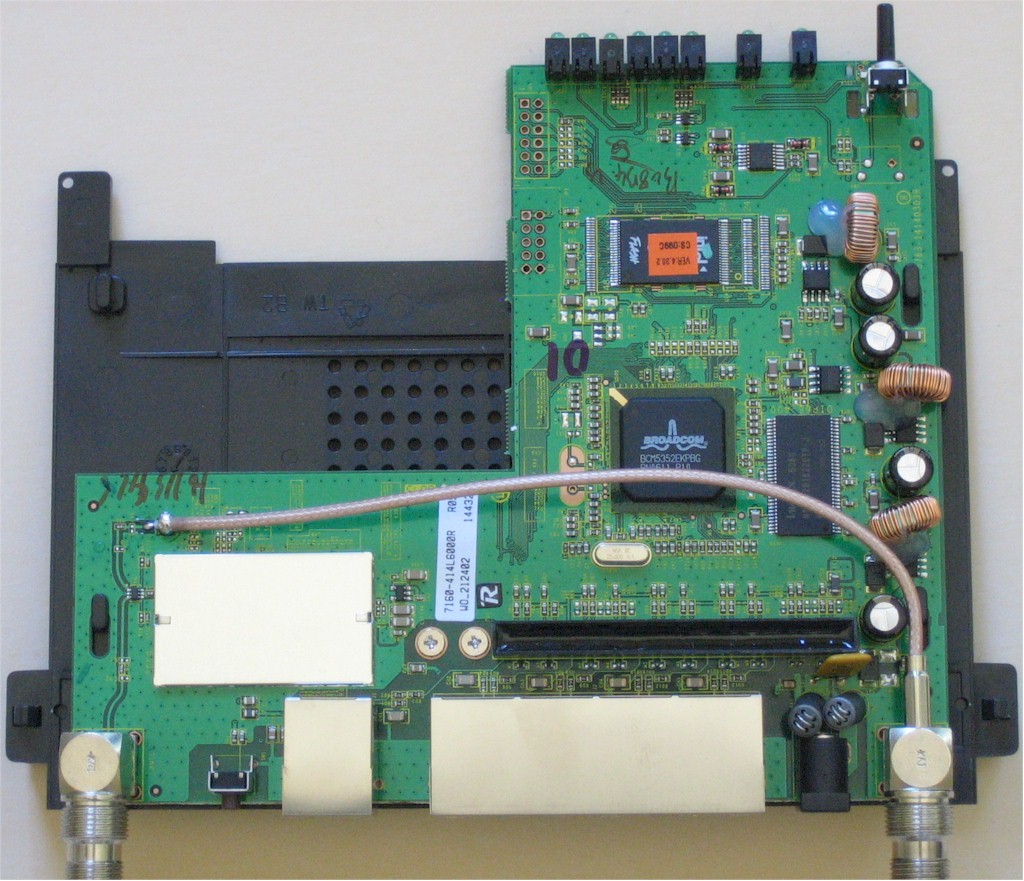
Figure 2: Linksys WRT54GL V1.1 Board (click to enlarge)
And so that you can see how far the WRT54G has come, here’s a shot of my original WRT54G (now called V1) board. Note the mini-PCI card radio and Broadcom BCM4702 processor. There’s a separate ADMtek ADM6996 switch chip that handles both WAN and LAN Ethernet ports because the BCM4702 doesn’t have an embedded switch. By the way, if you’d like the component details of the other versions, check out OpenWrt’s TableOfHardware.
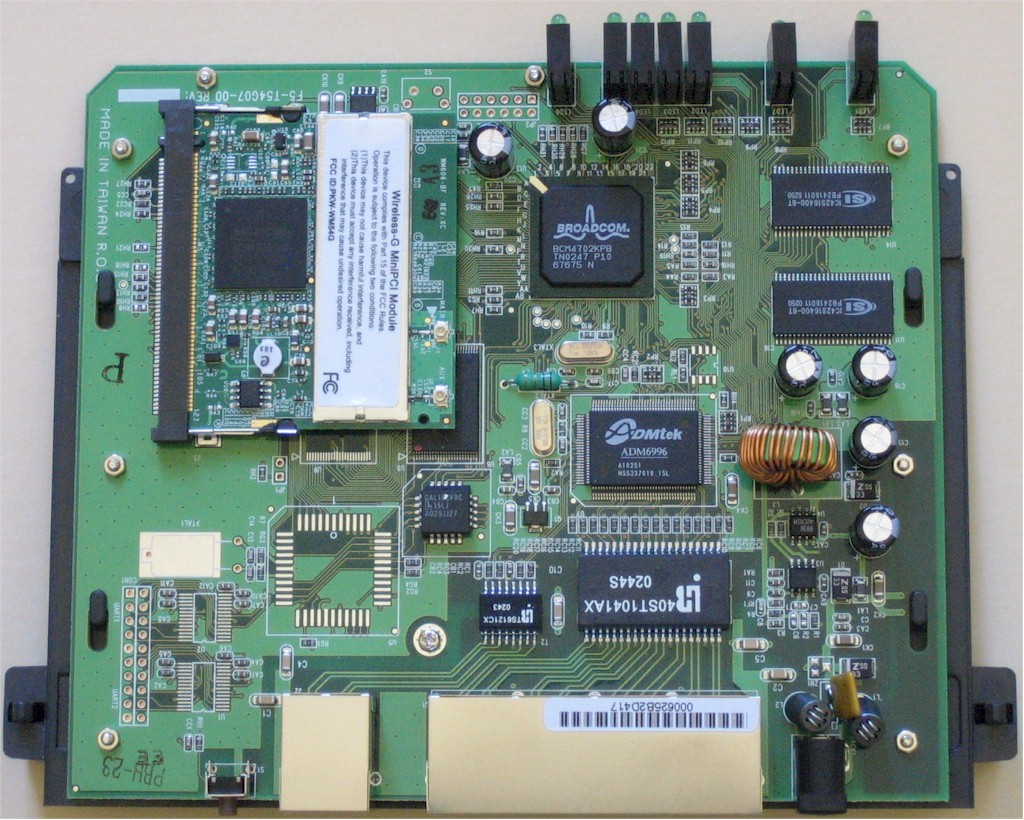
Figure 3: Original WRT54G Board (click to enlarge)
So you now know the background for the change. Let’s see if the V5 really is a step backward in terms of performance and reliability.
V5 Up And Down Throughput
I first checked to make sure that both the G V5 and GL that I purchased from an online retailer had the latest firmware. The GL was fine with its 4.30.2 firmware, but I had to update the V5’s firmware from 1.00.6 to 1.00.9.
Since I don’t have access to the wide variety of broadband connections out there in the big, wide world, I had to limit my testing to what I could do on a private LAN. So I fired up my trusty copy of IxChariot and started out with simple upload and download throughput tests.
The two test computers were a Dell Inspiron Notebook with 1GHz Celeron, 576 MB RAM and WinXP Home SP2 and a Fujitsu S2020 Notebook with AMD Athlon XP-M 2100+, 496 MB RAM and WinXP Home SP2. I used the IxChariot throughput.scr script with TCP/IP protocol and modified the default 100,000 Byte file size parameter to 1,000,000 Bytes.
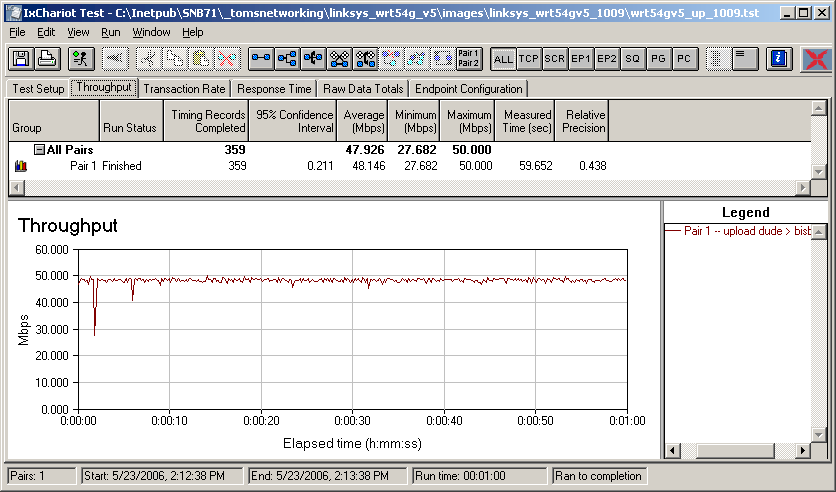
Figure 4: Linksys WRT54G V5 Upload Throughput (click to enlarge)
Figures 4 and 5 show upload and download throughput, which at 48 and 54 Mbps respectively are each over twice what the original V1 could do. Note that the “Abandoned” Run Status in Figure 5 isn’t any fault of the V5, but just means that I had to manually stop the test. The IxChariot console can’t retrieve test results from its endpoints through some SPI+NAT firewalls, and the V5 is one of them. I normally can get past this by putting the LAN machine in DMZ and disabling SPI. But neither the V5 nor GL provide SPI enable/disable controls and putting the LAN machine in DMZ didn’t do the trick for the V5.
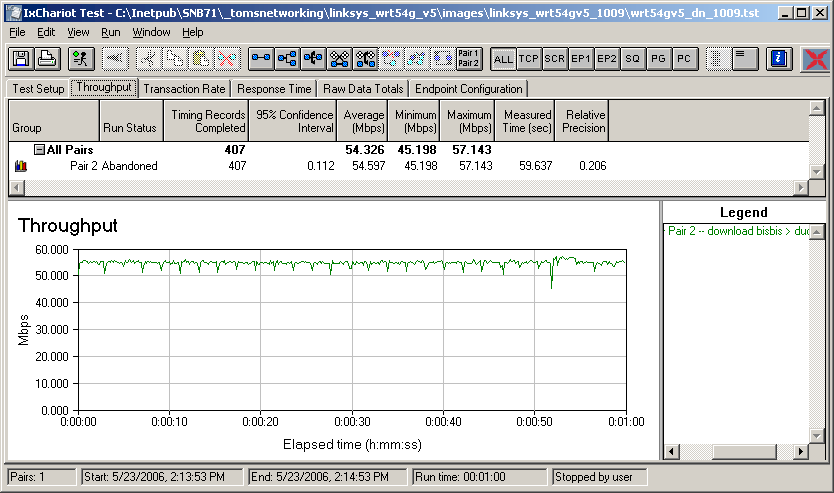
Figure 5: Linksys WRT54G V5 Download Throughput (click to enlarge)
I’ve recently started to run simultaneous up and download throughput tests because the latest-generation routers have routing speeds that can outrun the 100 Mbps LAN ports that most of them have. Figure 6 shows the results of such a test on the V5. The glitches from time to time are probably due to IxChariot, since I ran into them when testing the RangeMax 240 wireless router awhile ago. Also note a slight drop in the total up/down throughput from the 54 Mbps download throughput, which is typical of what I see when running multiple test streams.
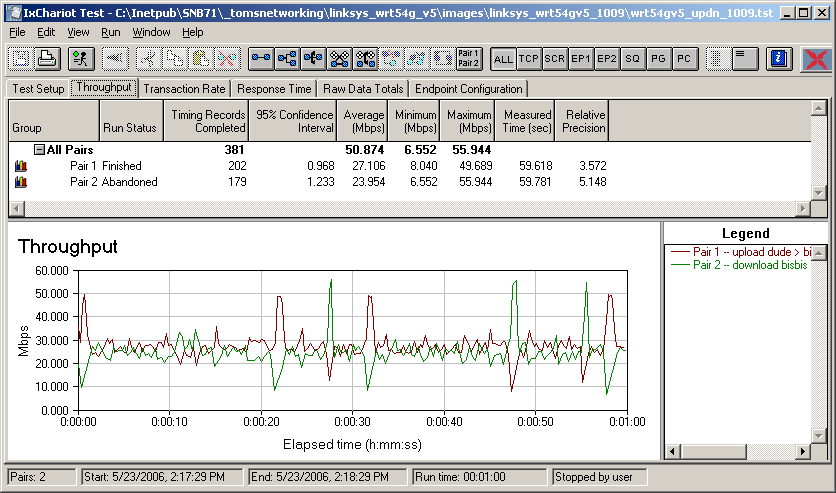
Figure 6: Linksys WRT54G V5 Simultaneous Up and Down Throughput (click to enlarge)
GL Up And Down Throughput
Figures 7 through 9 are the upload, download and up/down plots for the GL, which show throughput a little more closely matched between up and down than the V5 produced.
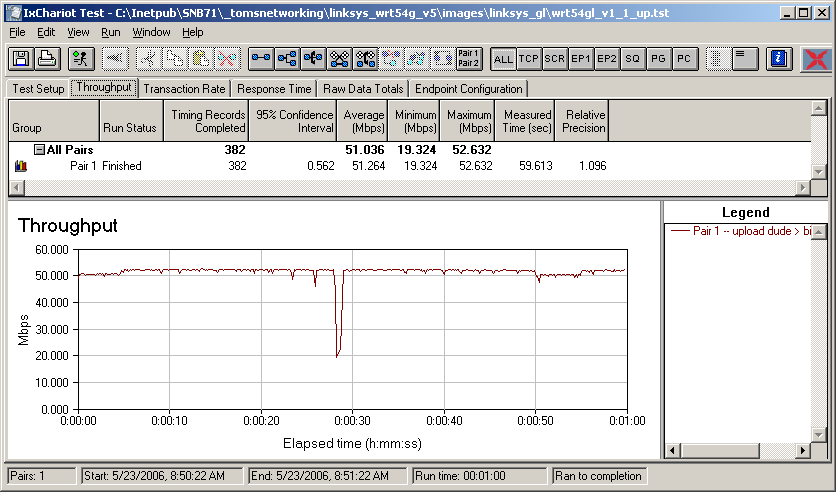
Figure 7: Linksys WRT54GL Upload Throughput (click to enlarge)
The interesting thing in Figure 8 is that I didn’t have to manually stop the GL’s download test. So, for whatever reason, the GL’s SPI+NAT firewall implementation and IxChariot are able to work things out, while the V5 can’t.
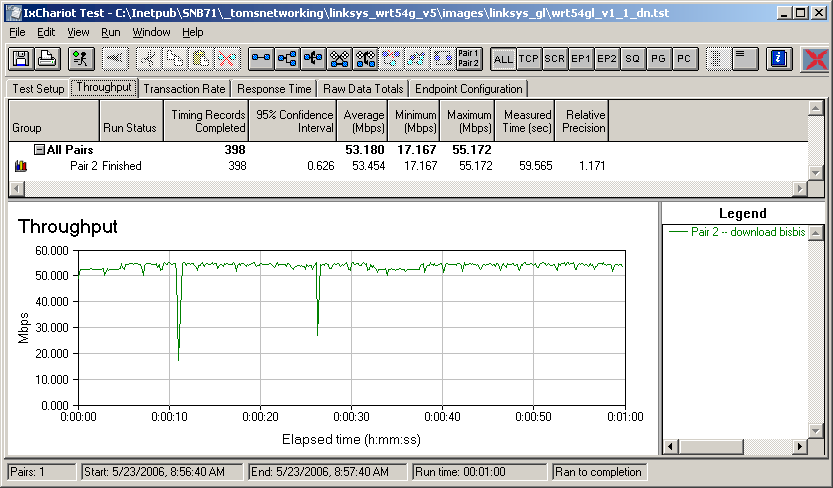
Figure 8: Linksys WRT54GL Download Throughput (click to enlarge)
Figure 9 shows another surprise – terrible performance for simultaneous up and download streams. So it appears that the V5 actually is much more well-behaved in this regard. Since the GL has the same code-base as its predecessors, I upgraded my original V1 and ran the same tests to see how it did. I found that it also didn’t handle simultaneous up and download traffic very nicely with a plot very similar to Figure 9, but with lower throughput.
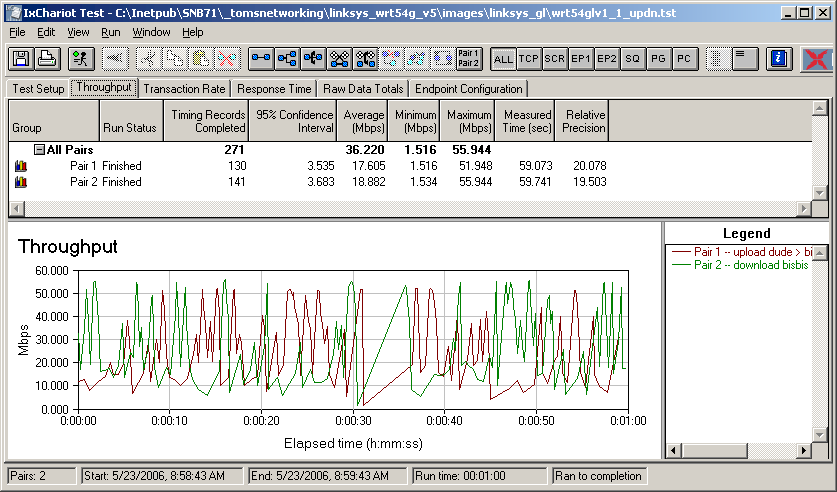
Figure 9: Linksys WRT54GL Simultaneous Up and Down Throughput (click to enlarge)
We Have A Failure To Communicate
I also recently changed my router test procedures to see how many simultaneous sessions routers will support. You usually won’t find this parameter specified by any consumer router manufacturer, but it is important for both online gaming and for P2P file sharing applications. In spite of the negative connotation that P2P currently has, the recent BitTorrent / Warner Brothers Home Entertainment announcement is just a precursor of things to come. Router manufacturers would be smart to make sure their products can handle P2P since it is likely to soon be an important part of a legitimate digital entertainment distribution system.
Since the complaints I saw about the V5 included packet loss and problems with P2P, I figured that I would see how the GL and V5 performed with my simultaneous connection test. The test used the same two computers that I used for the previous tests and also the same modified IxChariot throughput.scr script.
I first ran a one-hour test with 180 connections (the maximum for my IxChariot license) between the two computers connected via a 10/100 switch to make sure that the computers themselves could handle the traffic. The 180 tests were evenly split with 90 test pairs for receive and transmit each. The test passed with no problems and Figure 10 shows a portion of the test results including a plot that shows well-behaved and evenly-shared throughput.
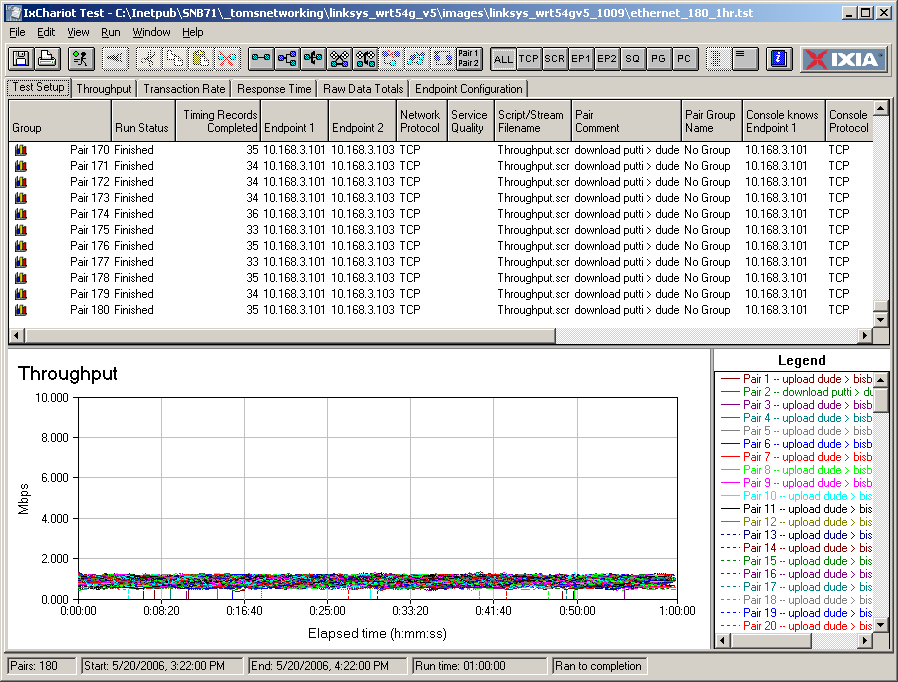
Figure 10: Results of one hour 180 pair throughput test (click to enlarge)
I then took the basic up / down throughput test and duplicated up/down pairs to expand the number of simultaneous connections in the test. All tests ran for one minute, which did not include the time it took IxChariot to establish communication between all test endpoints at the start of each test. Table 1 summarizes the results of the test and confirms that the WRT54G V5’s problems with P2P applications are not due to users’ imaginations!
| Test (# of connections) | WRT54G V5 | WRT54GL V1.1 |
|---|---|---|
| 1 pair (2) | Passed | Passed |
| 4 pair (8) | Passed | – |
| 8 pair (16) | Failed | – |
| 16 pair (32) | Failed | Passed |
| 32 pair (64) | Failed | Passed (30 mins) |
| 64 pair (128) | – | Failed |
Table 1: Summary of Simultaneous Connection test
(“-” = Test not performed)
Even though the V5 appears to be more well behaved than the GL with a single simultaneous up/down pair (compare Figures 6 and 9), it fails miserably when attempting to handle upwards of 16 simultaneous continuous connections! The good news is that the V5 didn’t lock up entirely and need to be rebooted after failing.
To make matters worse, when the V5 is managing to handle multiple connection streams, its throughput sharing among streams is terrible as shown in Figure 11, which shows 16 connections.
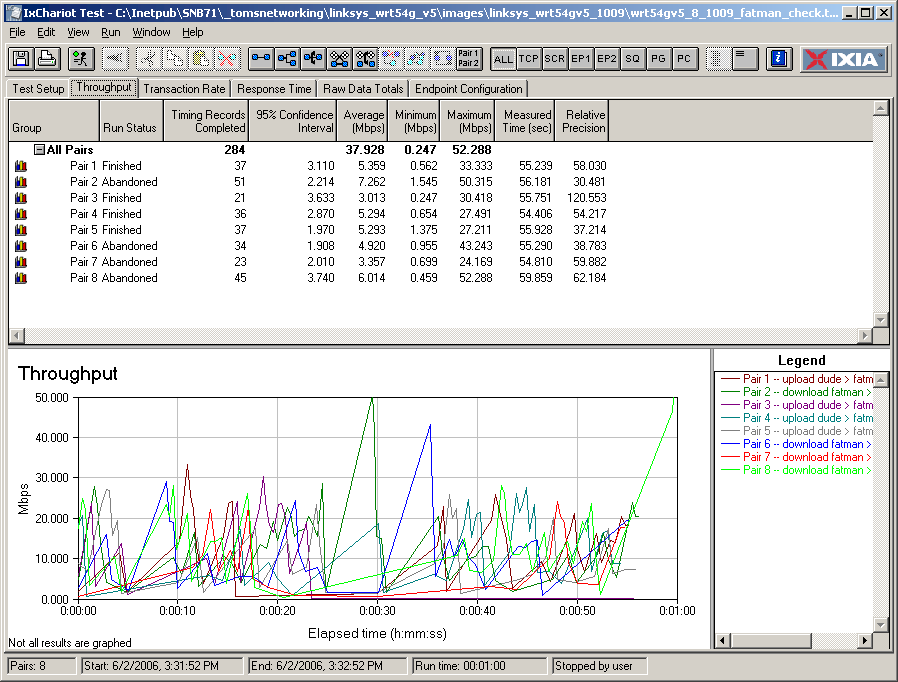
Figure 11: V5 16 connection throughput sharing (click to enlarge)
As a point of comparison, Figure 12 shows how the GL does with 32 simultaneous connections.
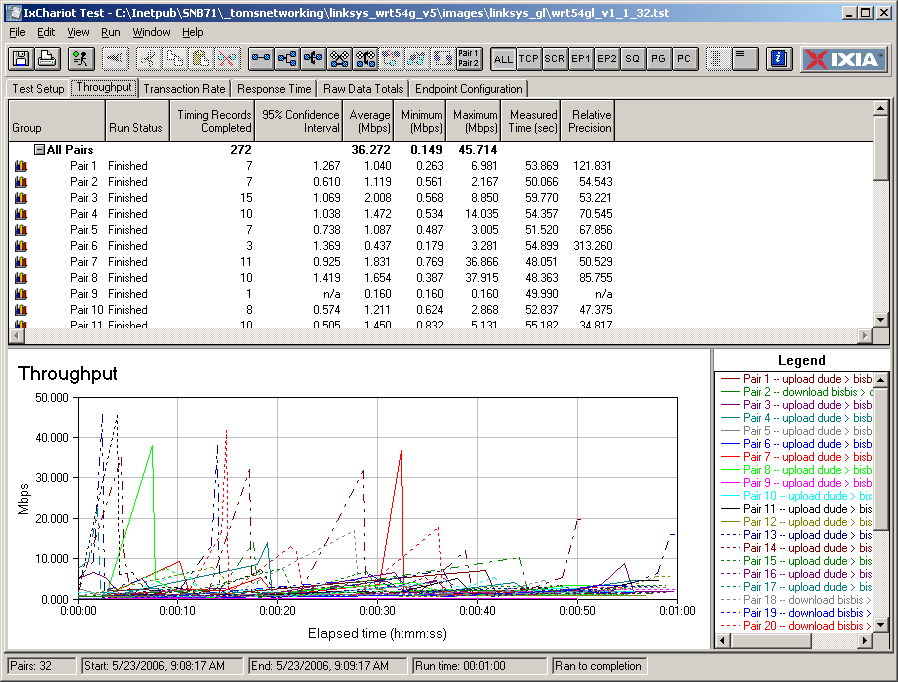
Figure 12: GL 32 connection throughput sharing (click to enlarge)
While the GL’s ability to evenly distribute throughput among multiple connections isn’t anything to write home about, it certainly does a better job than the V5. But I’ve seen much less expensive routers such as Zonet’s ZSR0104CP do a better job, as shown in Figure 13.
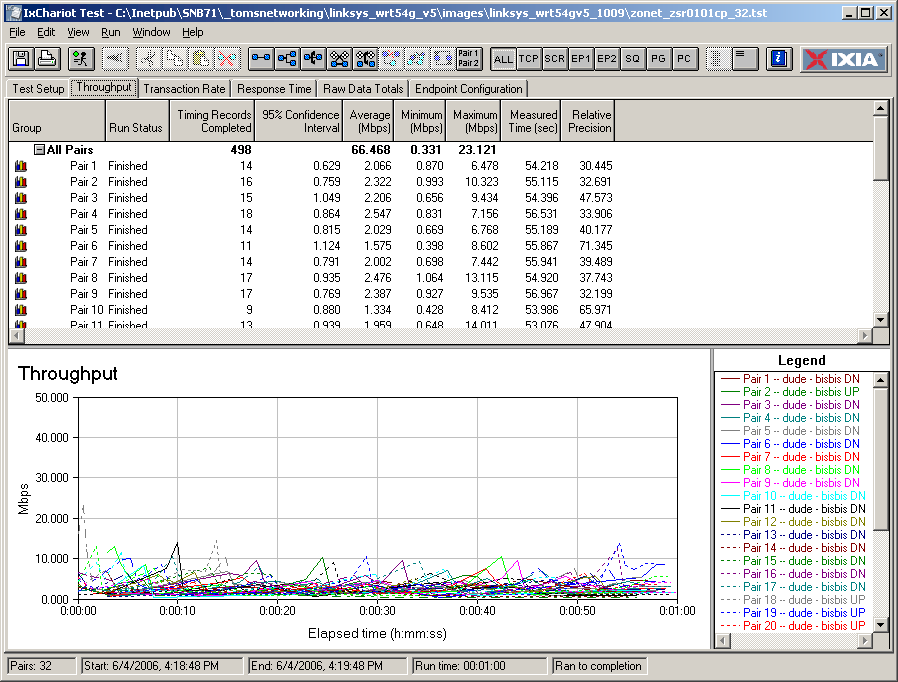
Figure 13: Zonet ZSR0104CP 32 connection throughput sharing (click to enlarge)
Final Thoughts
When I started this investigation, I really didn’t know how hard I would have to look to find an explanation for the WRT54G V5’s growing reputation as a botched product. As it turned out, I didn’t have to look very hard. I can’t say for sure that the V5’s inability to support more than 16 simultaneous connections is at the heart of what ails most unhappy purchasers of this product. But I do know that for a router to be successful in today’s market, it had better be able to handle as many simultaneous connections as its design will allow and the higher the number the better!
The sad part of this (besides all the unhappy purchasers of the V5) is that we’ve been through this before. Long-time Linksys users probably all-too-well remember the long, hard road it took for the company to learn the ins-and-outs of designing and debugging router firmware. It took well over a year and almost two for Linksys to work the bugs out of its original BEFSR11 and BEFSR41 wired routers. And other products have had similar long learning curves.
The let-the-users-pay-to-debug-our-product approach might have been ok for the up-and-coming scrappy company that Linksys once was. But those days are long gone. Linksys has been “a division of Cisco Systems, Inc.” for more than three years now and frankly, Cisco knows better. But maybe the company is just content to let Linksys’ past reputation and retail ubiquity keep bringing in the money from consumers while Cisco repositions Linksys for the main reason it purchased it: to get a foothold into the lower end of the small business market.
At any rate, if you still want to give Cisco your money, get the WRT54GL and even try out one of the alternative firmware distros if you’re adventurous. But if you’re a heavy P2P user you’ll probably do better with one of the routers at the top of our router chart, where Linksys is definitely in the minority.