

Introduction
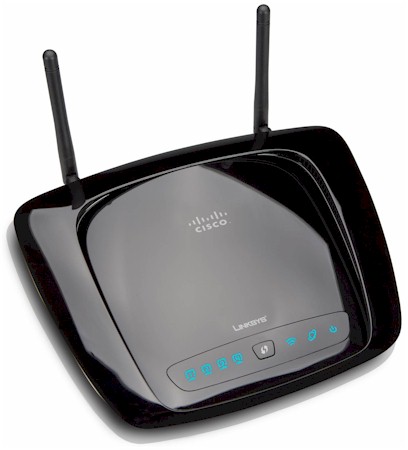
| At a Glance | |
|---|---|
| Product | Linksys Wireless-N Broadband Router with Storage Link (WRT160NL) |
| Summary | Hackable Atheros-based draft 802.11n router running Linux OS with upgradeable external antennas and USB drive sharing. |
| Pros | • Upgradeable antennas • Linux-based for your hacking pleasure |
| Cons | • No alternative firmware available yet • Unstable downlink throughput |
The demand for 802.11g routers will eventually die (or try to be killed off by the coming onslaught of single-stream 802.11n routers). But there will always be the crowd who think that alternative firmware is the only way to go for their wireless router. So to satisfy those who want both draft 11n and hackability, Cisco has released a draft 802.11n version of its beloved WRT54TGL—the WRT160NL. But if my testing is correct, Cisco has some work to do to improve wireless throughput stability.
The rear panel shown in Figure 1 reveals some features that Cisco has put into the 160NL that may extend its popularity beyond devotees of alternative firmware. As the name indicates, the Storage Link feature that allows you to turn an attached USB flash or hard drive into a NAS has been brought back and the feature set sweetened by the addition of UPnP AV media server (more later).
Note also the two RP-SMA antenna connectors, which enable upgrading the two included 2 dBi dipoles to higher gain alternatives. I have seen no appreciable loss of performance from the internal antennas that Cisco has switched to in its UFO / Stingray cased wireless routers. But there are those who swear that external antennas are the only way to go. And since the 160NL’s main feature is its firmware hackability, Cisco wisely decided to also include antenna hackability.
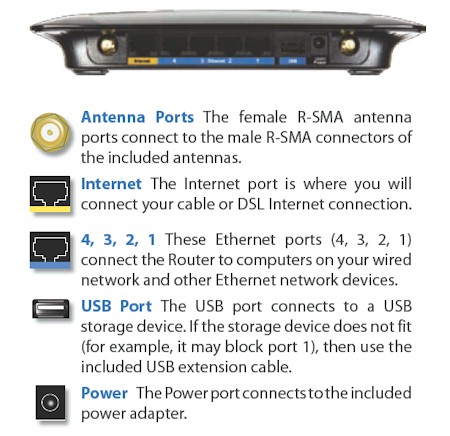
Figure 1: WRT160NL rear panel
Internal Details
If you’re thinkin’ that the 160NL is just a tweaked version of the 160N with more RAM and flash, then you’d be wrong. The two 160N’s are entirely different inside. Figure 2 shows the 160NL‘s board, which is based on Atheros’ AR79130 400MHz Wireless Network Processing Unit joined with an AR9102 single-band 2×2 MIMO 802.11n Radio. A Realtek RTL8306SD provides the four 10/100 switch ports and single WAN port. 32 MB of RAM and 8 MB of flash finish up the design.
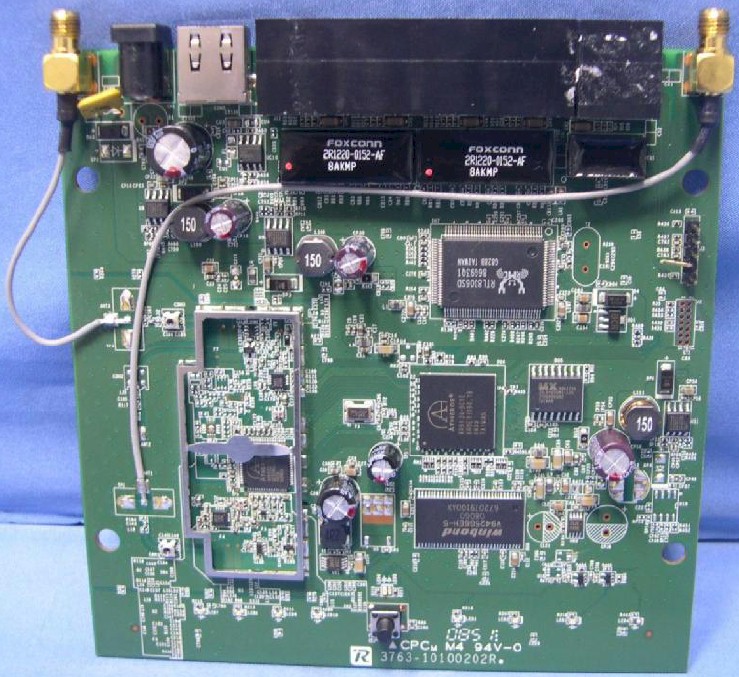
Figure 2: WRT160NL board
In contrast, the 160N has used both Broadcom (original and V3) and Ralink (V2) based designs. The V3 is shown in Figure 3 and uses the Broadcom BCM4716 Intensi-fi XLR 802.11n 2.4 GHz Router System-on-Chip and BCM5325 10/100 switch. Under the shield are two SiGe 2528L 2.4 GHz power amps.
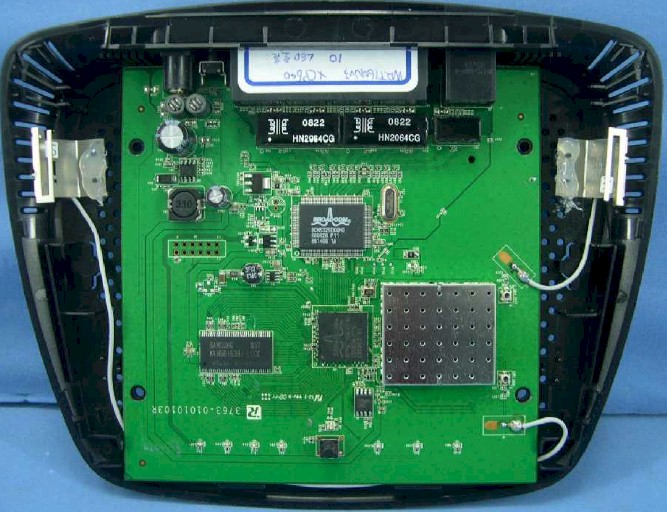
Figure 3: WRT160N V3 inside
Given the Atheros design, as near as I can tell, none of the alternative firmware distros yet support the 160NL. So if you’re buying it for the main purpose of replacing the factory firmware, you might want to hold off.
Routing Features
The 160NL implements the standard Linksys router feature set that includes:
- DHCP, Static, PPPoE, PPTP, L2TP, Telstra Cable WAN types
- Built-in Dynamic DNS clients for TZO and DynDNS
- Static and dynamic routing
- SPI firewall disable, multicast, WAN ping and IDENT filtering and Proxy, Java, ActiveX and Cooking blocking
- IPsec, PPTP and L2TP VPN passthrough (enabled by default)
- Single port forwarding and Port Range forwarding and triggered ports
- HTTPS admin access, remote management (HTTP / HTTPS) enable with IP range restriction and port setting
- Logging with support for Linksys Logviewer recording
- Access Restrictions with 10 deny or allow-based policies, each with its own list of clients and day/time schedule
- Uplink (LAN to WAN) only QoS with High, Medium, Normal or Low Priority that can be applied to specific applications (divided into Application, Online Game and Voice Device groups), physical switch ports or specific MAC addresses.
- WMM (Wireless MultiMedia) (enabled by default)
If you need further details, check the WRT600N review and its slideshow.
Since I haven’t documented the Storage Link features in previous reviews, here are the screens. The Disk screen (Figure 4) is where you mount and dismount the USB drive, format it (FAT32) and create shares.
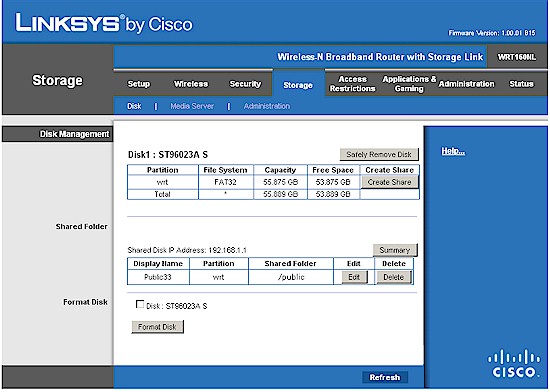
Figure 4: Storage Link Disk screen
I found the share creation process (Figure 5) somewhat confusing and won’t try to untangle it here. I’ll just say it took a couple of tries and a reformat of the USB drive before I was able to successfully create a share with read/write permissions and access it to perform storage performance tests.
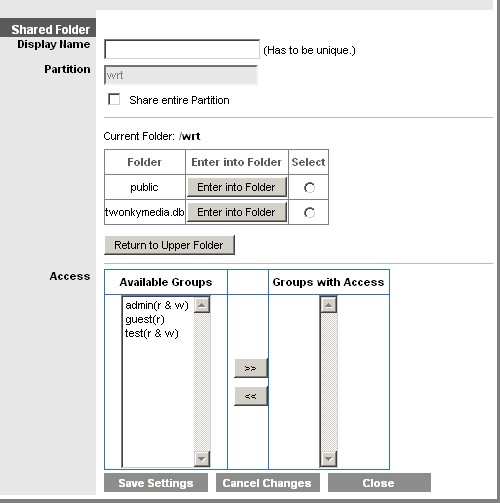
Figure 5: Storage Link Share creation screen
Note the reference to twonkymedia.db in Figure 5, which apparently is the UPnP AV media server that Cisco has bundled in. I tried to access the Twonkymedia admin directly on port 9000, but got a red screen with only an Access is restricted to MediaServer configuration! message. The Media Server controls are shown in Figure 6. I ran a quick check and it didn’t look like the server supports iTunes.
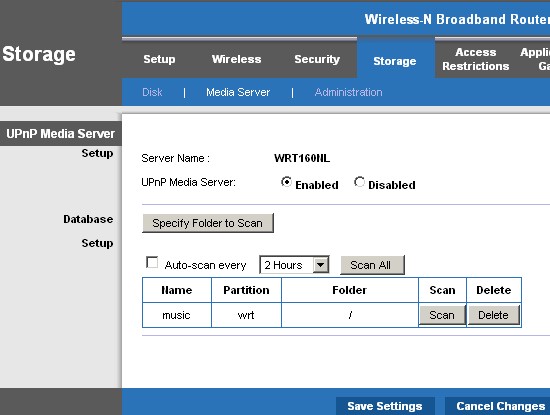
Figure 6: Media Server controls
Figure 7 shows the last Storage page, Administration, where you can add and edit Users and Groups and set the server name and Windows Workgroup.
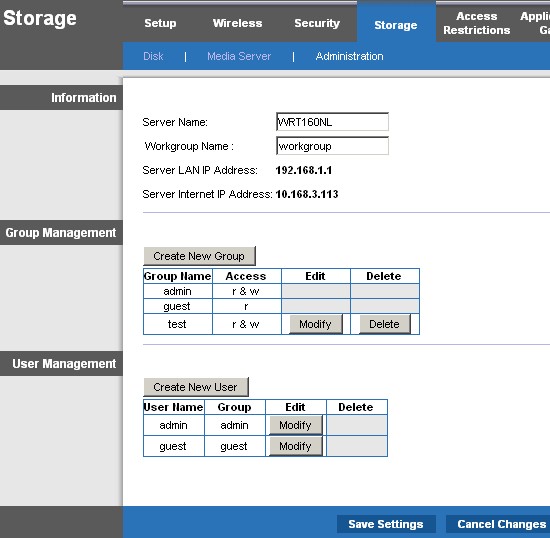
Figure 7: Storage Admin screen
I ran a quick performance check by plugging in a 2.5" USB drive and running iozone and the Vista SP1 filecopy test from my NAS test suite. I was not surprised at all to find that the Vista filecopy showed around 7 MB/s write and read and slightly less with iozone after cache effects were ignored. This is notably better than the 4 to 5 MB/s that I measured for the Storage Link in the WRT350N and 600N, but still nothing to write home about (or back up large files with).
Routing Performance
Routing performance for the 160NL using our standard test method is summarized in Table 1, along with the 160N’s (V1) test results for comparison. WAN to LAN measured 93.4 Mbps, while LAN to WAN came in at 93.5 Mbps. Both are essentially 100 Mbps "wire speed" and slightly higher than produced by the original 160N.
The 160NL did much better than the V1 160N, however, achieving 180 simultaneous connections vs. 96.
| Test Description | WRT160NL Throughput – (Mbps) |
WRT160N V1 Throughput – (Mbps) |
|---|---|---|
| WAN – LAN |
93.4
|
87.9
|
| LAN – WAN |
93.5
|
84.6
|
| Total Simultaneous |
111.9
|
92.8
|
| Maximum Simultaneous Connections | 180 | 96 |
| Firmware Version |
v1.00.01 B15
|
v1.02.2
|
Table 1: Routing throughput
Figure 8 is a composite plot of the three routing tests, which shows nice, steady routing throughput. Use the Router Charts to see how the 160NL stacks up against other routers.
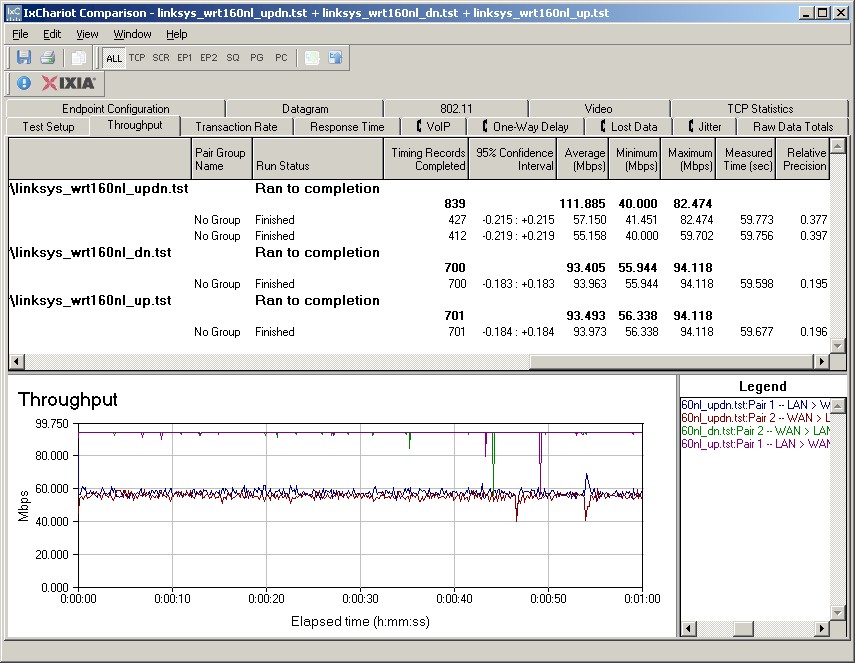
Figure 8: WRT160NL Routing throughput composite plot
Wireless Features
As with its routing features, the 160NL’s wireless features are Linksys standard. Figure 9 shows the Basic Wireless settings once you switch from the default Wi-Fi Protected Setup (WPS) mode to the Manual setting mode. Network Modes are Disabled, Mixed (default), BG-Mixed, Wireless-B only, Wireless-G only and Wireless-N only.
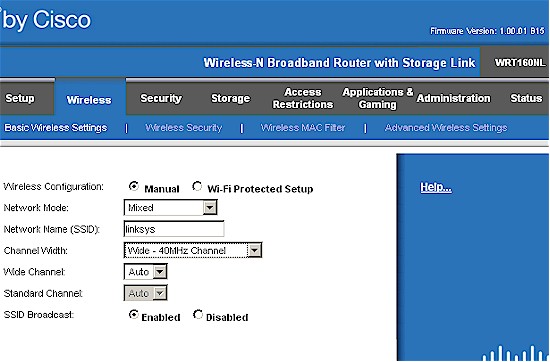
Figure 9: Basic wireless settings
Channel and Channel Width selection is simple. You can select channels only when in 20 MHz only Channel Width mode. When the Auto (20 or 40 MHz) Channel Width mode is selected, the channel selector is forced to Auto.
I successfully made a WPA2 / AES connection to the 160NL using the WPS PIN method supported by my standard Intel 5300 AGN WiFi Link test client using the Intel PROSet Wireless Connection Utility (version 12.2.0.0).
Figure 10 shows the Advanced Wireless Settings that include Transmit Rate and AP Isolation, which keeps wireless clients from communicating with each other, but no Power settings.
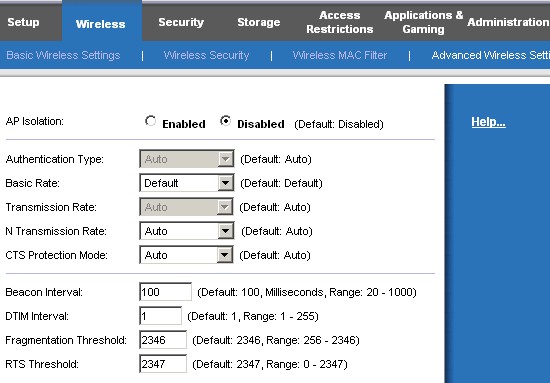
Figure 10: Advanced Wireless Settings
Wireless Performance
I used the open air test method described here to test the 160NL’s wireless performance. Testing was done using the SNB standard wireless test client, an Intel Wi-Fi Link 5300 AGN mini-PCIe card and 12.2.0.11 driver in a Dell Mini 12 running WinXP Home SP3. I left all client-side defaults in place except for enabling throughput enhancement (packet bursting) and changing the 802.11n Channel Width (2.4 GHz) setting from its 20 MHz default to Auto, so that the adapter would support 40 MHz channel bonding mode.
The router had the latest v1.00.01 B15 firmware and all factory default settings in place, except setting channel 1.
Figure 11 shows a composite of up and downlink throughput tests made at the six test locations with both 20 and 40 MHz channel width modes. Each column represents the average throughput from a one minute test. Best case throughput of 80.3 Mbps was measured running downlink with a 40 MHz channel bandwidth at Location A.
Note, however, that downlink bandwidth is generally very poor and averaged only around 4 Mbps running downlink in 40 MHz mode at Location B!
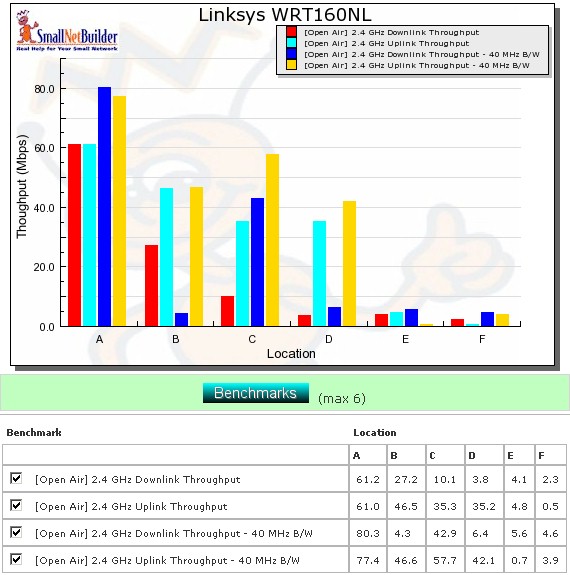
Figure 11: Six location wireless throughput summary
The IxChariot plot in Figure 12 shows that high throughput variation is the reason for the low average throughput. Something in the 160NL needs tuning because I saw the link rate constantly changing during the tests that had low throughput.
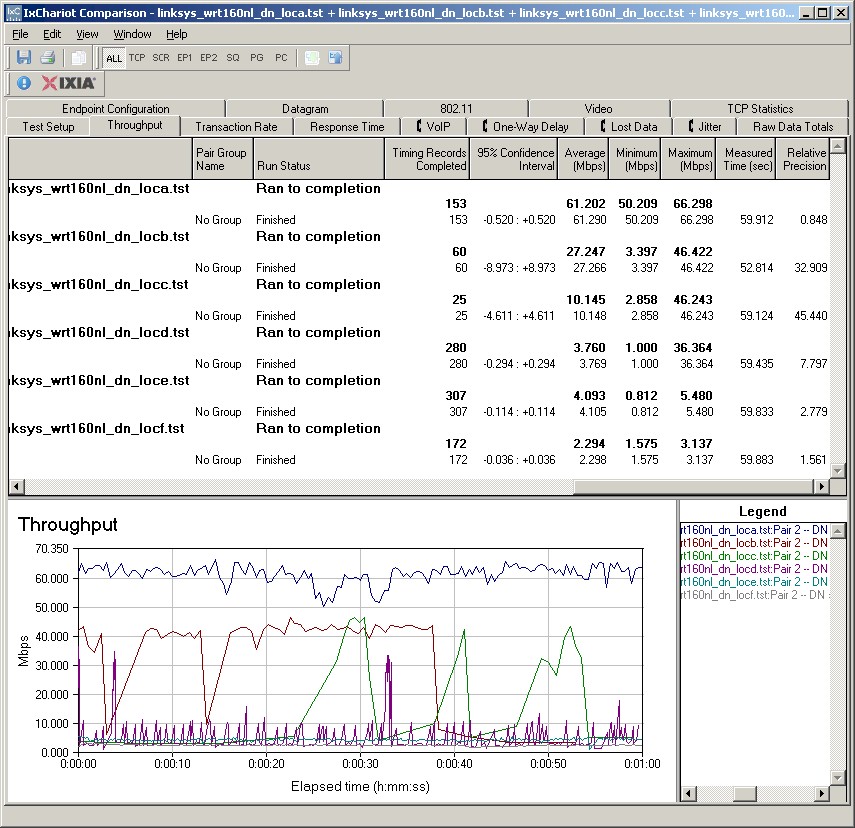
Figure 12: Six location wireless throughput – 2.4 GHz, 20 MHz channel, downlink
If you’d like to see the other IxChariot plots just click the links: 20 MHz uplink, 40 MHz downlink, 40 MHz uplink.
Wireless Security
I recently learned that the reduction in throughput with WEP or WPA/TKIP enabled that I have been observing is actually behavior that is mandated by the draft 802.11n spec. Draft 802.11n’s higher link rates are only supposed to be enabled when either no security or WPA/AES security is in effect. Otherwise, link rates only up to 54 Mbps (802.11g) can be enabled.
Figure 13 shows that the 160NL properly limits performance to 11g speeds with WEP and WPA/TKIP enabled and choosing WPA2/AES security has no measurable effect on throughput.
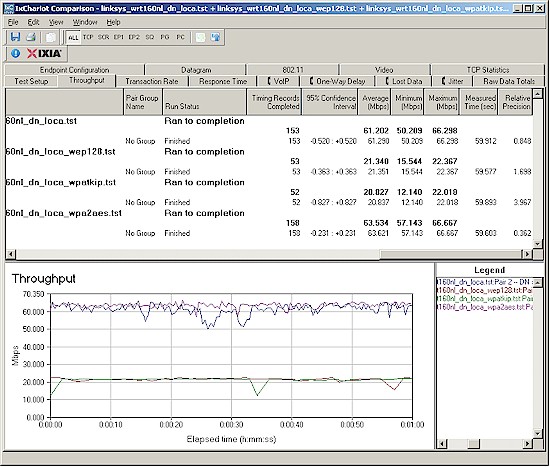
Figure 13: Security mode comparison – 2.4 GHz, 20 MHz channel, downlink
Wireless Performance – Competitive Comparison
I don’t have open-air method test results for the 160N, so couldn’t include it in the competitive comparison. Instead I chose two other single-band routers that had been tested with the Intel client, to eliminate different clients as a source of performance variation: the Linksys WRT310N and D-Link DIR-655 [A4].
Figure 14 shows a comparison of downlink, 20 MHz bandwidth mode tests, with the 160NL clearly the runt of the litter.
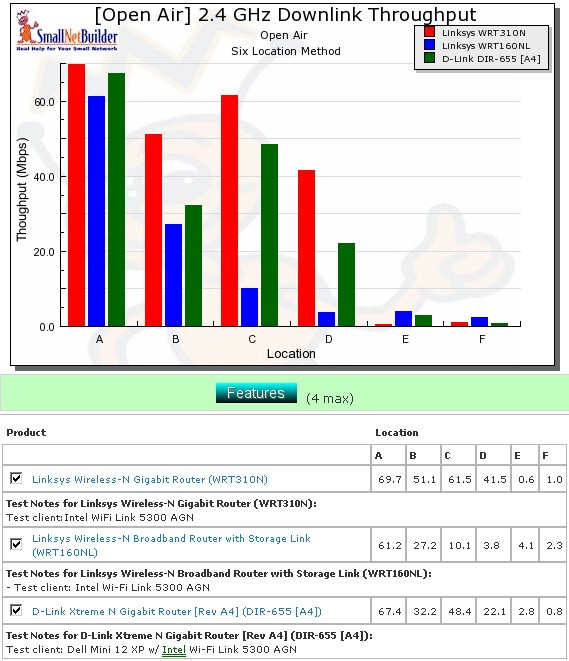
Figure 10: Competitive comparison – 2.4 GHz, 20 MHz channel, downlink
Table 2 summarizes the highest downlink throughput product in each location for the two modes tested and Table 3 compares uplink results. The chart was generated by going through the six-location comparison plots and putting an X in the product’s box that had the highest throughput for each test. If values are within 0.5 Mbps of each other, they each get an "X".
| Product | 2.4GHz /20 | 2.4GHz / 40 | ||||||||||
|---|---|---|---|---|---|---|---|---|---|---|---|---|
| A | B | C | D | E | F | A | B | C | D | E | F | |
| Linksys WRT310N | X | X | X | X | X | X | ||||||
| Linksys WRT160NL | X | X | X | X | ||||||||
| D-Link DIR-655 [A4] | X | X | ||||||||||
Table 2: Best downlink throughput summary
Adding up the checkmarks for each product shows that the DIR-655 and WRT310N are essentially tied for both up and downlink, with the DIR-655 having only one more checkmark. But the 310N is the winner for downlink, while the DIR-655 is the best running uplink.
| Product | 2.4GHz /20 | 2.4GHz / 40 | ||||||||||
|---|---|---|---|---|---|---|---|---|---|---|---|---|
| A | B | C | D | E | F | A | B | C | D | E | F | |
| Linksys WRT310N | X | X | X | |||||||||
| Linksys WRT160NL | X | X | X | |||||||||
| D-Link DIR-655 [A4] | X | X | X | X | X | X | X | X | ||||
Table 3: Best uplink throughput summary
Closing Thoughts
The WRT160NL presents a great opportunity for the alternative firmware crowd to show that their distros really can improve product performance as well as add more knobs and switches to play with. Because something in the 160NL needs tweaking to fix the squirrely downlink performance.
But until other firmware becomes available, I don’t know why anyone would want to pay 2x the price of the WRT160N and $10 to $20 more than much-better performing routers (with gigabit switches no less) just to get external antennas and turn a spare USB drive into a pretty slow NAS.