

Introduction
Updated 5/11/2010: Posted results for new Max. Simul. Connection test
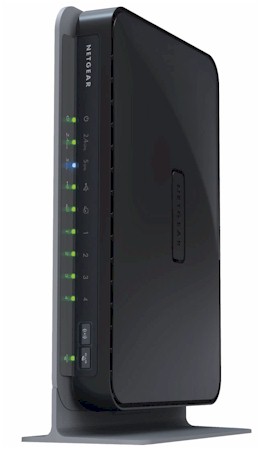
| At a Glance | |
|---|---|
| Product | NETGEAR RangeMax Dual Band Wireless-N Gigabit Router (WNDR3700) |
| Summary | Atheros-based dual-radio, dual-band 802.11n router with Gigabit ports and media-enabled USB drive sharing. |
| Pros | • Very high routing performance • Very high aggregate wireless bandwidth • Wireless Guest networks • WDS Repeating / bridging • Good wireless throughput stability • USB drive sharing with UPnP AV / DLNA server |
| Cons | • No innovation in 5 GHz range |
My preview of NETGEAR’s first real "simultaneous" (dual-radio), dual-band 802.11n router already covered most of its constuction and feature set. So after a brief feature set update, I’ll get right to the performance.
Features
The 3700 comes in a new form factor that can sit horizontally on a desk or vertically on a supplied stand. There are also wall-mounting slots on the bottom. The internal printed circuit "metamaterial" antennas used in previous NETGEAR 11n routers are still used, however. But, contrary to what some may think, they don’t negatively affect wireless performance.
Figure 1 summarizes the front panel indicators and controls. The wireless on/off switch (7) is a nice touch. Too bad there isn’t one for each radio.
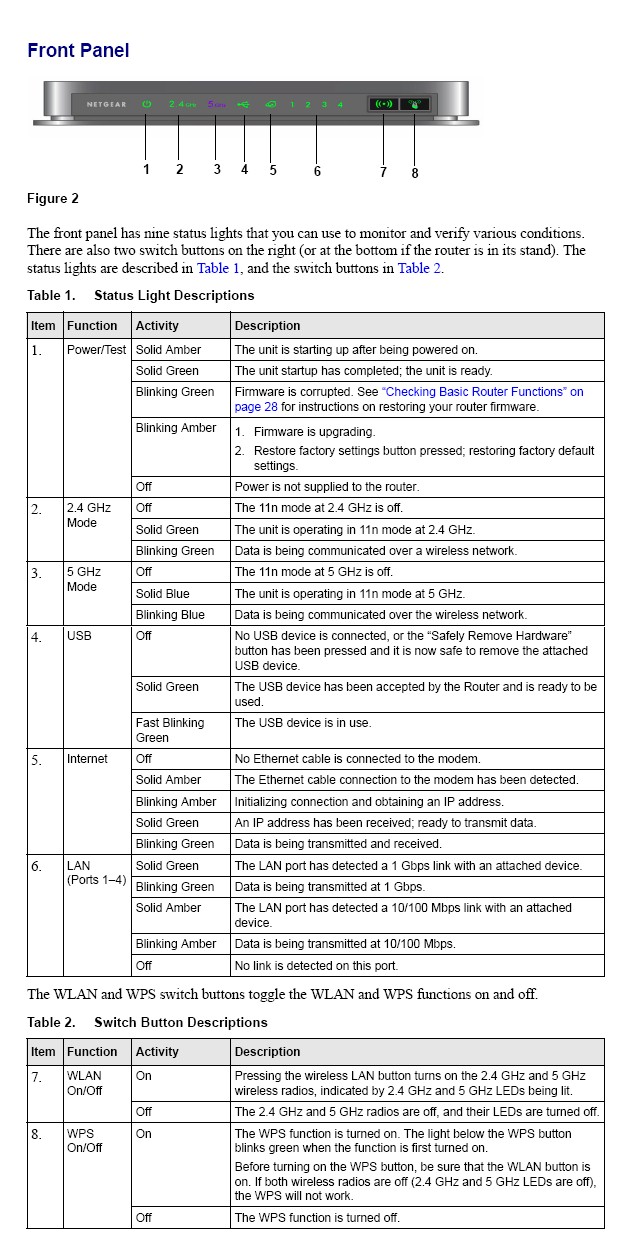

Figure 1: WNDR3700 Front panel
The back panel (Figure 2) has the Gigabit WAN and LAN ports and USB port for the USB drive ReadyShare feature.
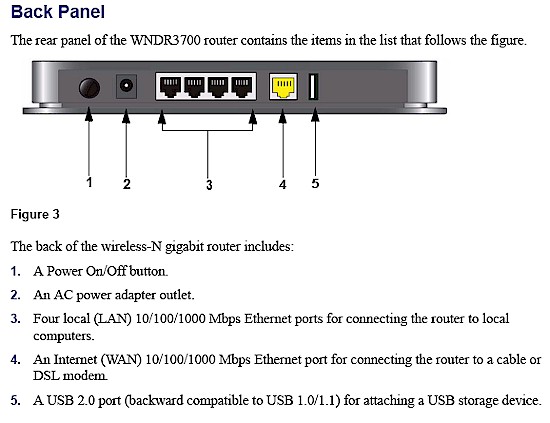
Figure 2: WNDR3700 Rear panel
The 3700 implements the standard NETGEAR router feature set with a few new tweaks:
WAN Support – Types handled include Static and Dynamic IP, Other (static and dynamic IP), PPTP (static and dynamic IP) and BigPond. There is no specific PPPoE setting, so you might be better off using the Setup Wizard to set up your WAN connection. WAN MTU is set separately from the connection type (WAN Setup page) and applies to all WAN options. WAN port MAC address spoofing is supported only for Static and Dynamic connection types.
Firewall – The SPI+NAT firewall is pretty basic, although you can disable SPI. Both port forwarding and triggered port forwarding are supported. You get a rather short pick list of services in the Port Forwarding add screen, but you can specify the port numbers and protocols directly for both the outbound trigger port and inbound port range.
Ports can also be opened automatically via UPnP NAT Traversal (enabled by default), but at least you can log into the admin interface and see the automatically opened ports in the UPnP Portmap table. A single DMZ IP is also supported and you can disable the SPI portion of the firewall.
The WAN Setup page holds the SPI Firewall Disable (default unchecked), DMZ, Respond to Ping on Internet Port and MTU settings. There is also a NAT Filtering option (default “Secured”) that isn’t explained very well in either the online help or user manual.
The Block Services (outbound port filters) can be applied to all, one or a range of IP addresses, but not MAC addresses. They also can be controlled by a single rudimentary schedule (checkboxes for days of the week and one set of start / stop times).
The Block Sites feature is keyword-based and applies to web traffic only. You get an attention-grabbing red and black “Web Site Blocked by NETGEAR Firewall” page when you trigger the block and the ability to have one “trusted” IP address that can bypass any blocking.
Dynamic DNS clients – Only Dyndns.org is supported
Logging and Reporting – Logging seems mainly focused on logging web traffic. Everything goes into one log, with no filtering provided. You can clear or email the log, but there is no syslog or SNMP trap support. Email authentication has been added, but there is still no Test email button or ability to handle SMTP servers using secure connections or to specify an alternate SMTP port.
Other features – The DHCP server can be disabled and allows IP address reservation by MAC address. RIP direction and version (1, 2B, 2M) can be controlled and static routes set.
QoS: Simple four-level priority-based QoS for upload (Internet-bound) traffic has been added. You must specify the uplink bandwidth. QoS priority can be set by Ethernet port, client MAC address or application port. There are 18 pre-built QoS Policies for applications or you can define your own rules.
Note that this is not Automatic Quality of Service, as NETGEAR claimis on the 3700’s web product page (Overview tab).
Features – more
 Wireless Repeating: WDS repeating and bridging (Figure 3) can be enabled separately for each radio. Note that you must set the channels manually when using repeating (no Auto mode). This feature wasn’t mentioned in the Preview, since it wasn’t in the Beta manual in the FCC ID filings.
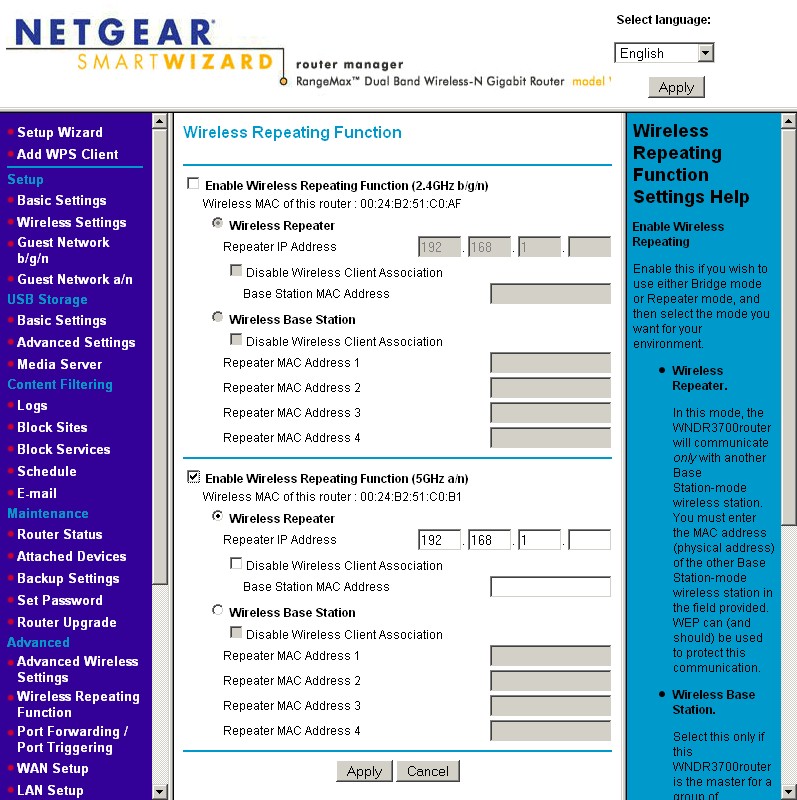
Figure 3: WNDR3700 Wireless Repeating
Guest Networks: Separate wireless "guest" networks can be enabled for each radio, with their own security mode and SSID. Figure 4 shows the settings for the 5 GHz radio, which includes an Enable Video Network checkbox. The manual describes this: "When this option is selected, the router uses Video reliability algorithms to reduce jitter and packet loss during video presentations". The Video Network option also appears on the main 5 GHz network settings. It’s not an option on the 2.4 GHz radio
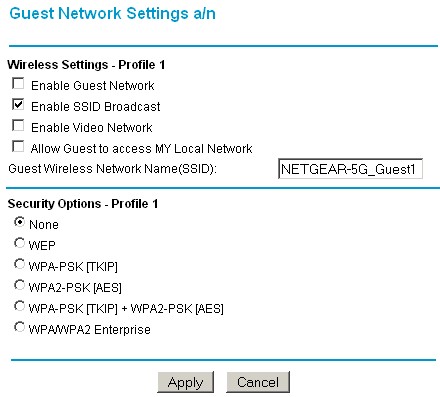
Figure 4: Wireless guest network
Traffic Meter: Keeps track of Internet bandwidth use in case your ISP is trying out bandwidth-based pricing. More here.
What’s not here:
No Router / AP mode switch – If you already have a router and just want to use the wireless section, see this article.
Secure remote access – Remote access is HTTP only, but you can limit access by IP address range and set the port number.
Admin idle timeout adjust – One of my continuing personal annoyances with NETGEAR’s routers. The timeout seemed to be about one minute!
No reboot button – The only way to get the router to reboot is to power cycle it.
Routing Performance
Routing performance for the 3700 using our standard test method is summarized in Table 1. While I wasn’t able to verify NETGEAR’s claim of "High WAN to LAN throughput of over 500 Mbps" (stated on the product web page Overview), the upload, download and simultaneous up / down throughput all measured over 400 Mbps using TCP/IP. This should be plenty for even fiber connections and earned it the #2 slot, right below the D-Link DIR-685 in the Router Charts.
| Test Description | WNDR3700 Throughput – (Mbps) |
|---|---|
| WAN – LAN |
408.9
|
| LAN – WAN |
422.3
|
| Total Simultaneous | 473.8 |
| Maximum Simultaneous Connections | |
| Firmware Version |
1.0.4.35NA
|
Table 1: Routing throughput
The Simultaneous connection test maxed out at my test limit of 200 on the first try. I’m sure that it can handle plenty more.
Updated 5/11/2010: Posted results for new Max. Simul. Connection test
I finally got around to running the new Maximum Simultaneous Connection test on the WNDR3700 with newly installed V1.0.4.55NA firmware. The best results out of three runs showed that the router only supports 4096 simultaneous connections. This is the next-to-lowest result (the lowest is the D-Link DIR-825 B1) of all the routers that I have tested or retested since changing to this new test method. Still, 4K connections should be plenty for P2P or gaming applications.
Figure 5 is a composite plot of the three routing tests, which shows relatively steady routing throughput.
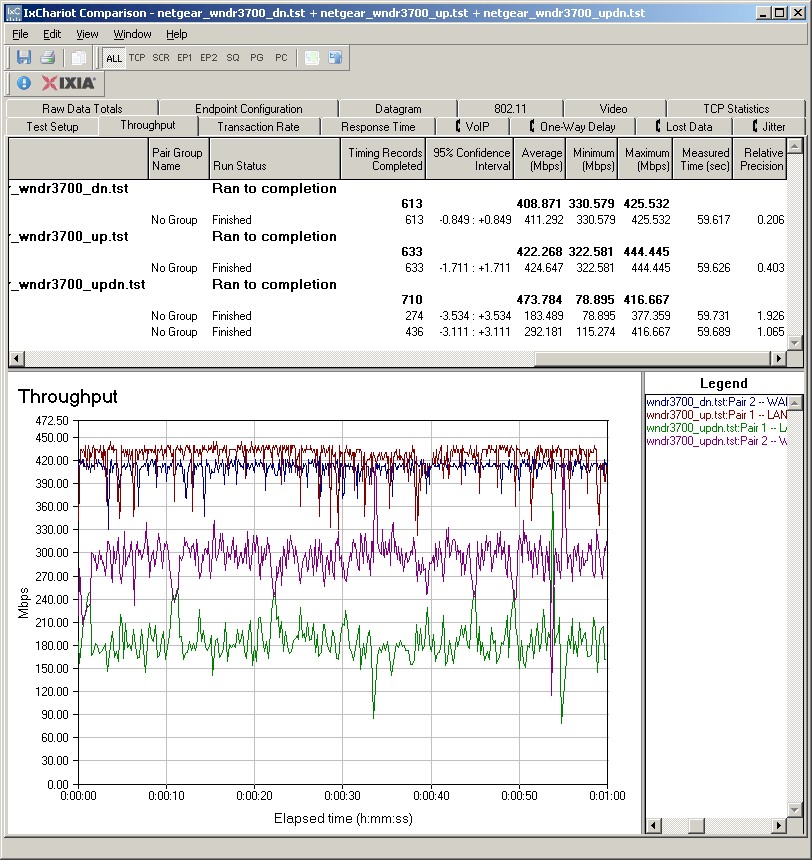
Figure 5: WNDR3700 routing throughput composite plot
Although NETGEAR doesn’t spec jumbo frame support for the 3700, I know that the Realtek RTL8366SR supports them. So I ran a quick check on the switch using 9K jumbo frames, which it passed with no problems.
ReadyShare
The 3700 includes the ability to network-share an attached USB drive, which NETGEAR has dubbed ReadyShare. But even with the nod to NETGEAR’s popular ReadyNASes, ReadyShare is no substitute for a real NAS.
To test performance, I plugged in the Iomega UltraMax Pro dual-drive NAS that I use for NAS backup testing and ran the Vista SP1 filecopy test from my NAS test suite. Write speed was 11.4 MB/s and read measured 9.8 MB/s—not bad for a router-based NAS. Note that this is much faster than the 2.8 MB/s reported in the Preview article, which could be due to my use of Vista SP1.
As far as ReadyShare functioning as a UPnP / DLNA server, Windows Media Player 11 seemed to recognize it ok. But I have neither an XBox 360 nor PS3 to test it otherwise. I should note, however, despite clicking the Scan Now button multiple times, WMP 11 never showed the uncompressed ripped DVD that I had uploaded to the default USB_Storage share. It didn’t display a.wmv or Quicktime.mov file either.
Wireless Controls
A quick run through the 3700’s basic wireless settings page (Figure 7) shows SSID, Channel, Mode and Wireless security settings all present and accounted for. NETGEAR has opted for a simple approach to Mode settings, with Up to 54 Mbps, Up to 130 Mbps and Up to 300 Mbps the only options for both radios. The 5 GHz radio can be set to channels 36, 40, 44, 48, 149, 153, 157, 161 and 165.
NETGEAR pointed out that this is its first consumer 11n router to support WPA / WPA2 Enterprise (RADIUS) mode.
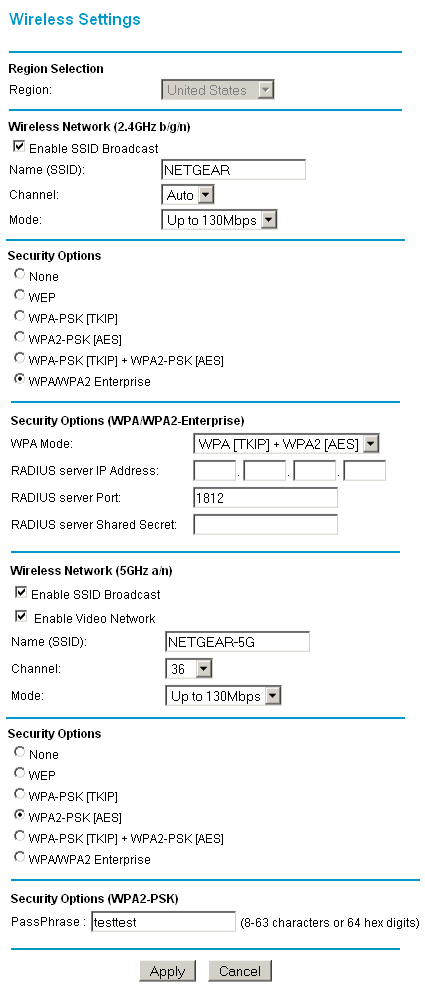
Figure 7: Basic wireless controls
Figure 8 shows the Advanced Wireless Settings that include Transmit Power Control for each radio (25% clicks). Note that there is no way to set the maximum transmit rate on either settings page, nor is there a control to keep clients from communicating with each other.
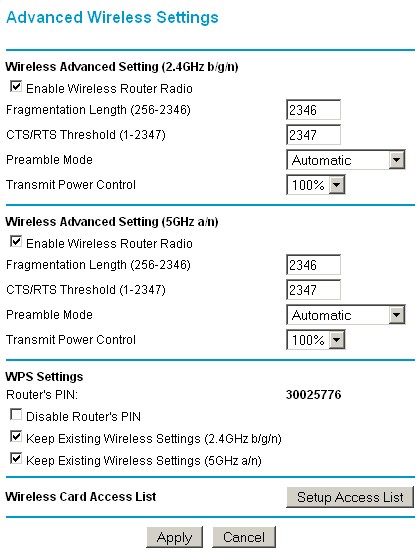
Figure 8: Advanced Wireless Settings
Wireless Performance
I used the open air test method described here to test the 3700’s wireless performance. Testing was done using the SNB standard wireless test client, an Intel Wi-Fi Link 5300 AGN mini-PCIe card in a Dell Mini 12 running WinXP Home SP3. I left all client-side defaults in place except for enabling throughput enhancement (packet bursting).
I periodically check to see if Intel has updated the 5300 driver and found they had. So I upgraded to version 12.4.3.9 before I started range testing. The router had the latest 1.0.4.35NA firmware and all factory default settings in place, except setting channel 1 for the 2.4 GHz mode tests and channel 36 for the 5 GHz tests.
Figure 9 shows a composite of downlink throughput tests made at the six test locations in four wireless modes: 2.4 GHz, 20 MHz channel; 2.4 GHz, 40 MHz channel; 5 GHz, 20 MHz channel; and 5 GHz, 40 MHz channel. Each column represents the average throughput from a one minute test. Best case downlink throughput of 91.8 Mbps was measured using a 40 MHz channel in the 2.4 GHz band at Location A.
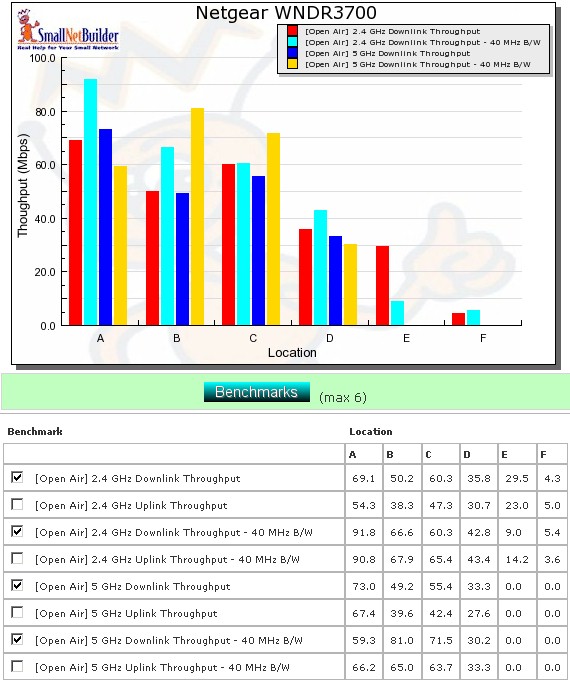
Figure 9: Six location downlink throughput summary
As is typical with all dual-band draft 11n routers tested to date, I wasn’t able to connect in Locations E and F to the 5 GHz radio using either a 20 or 40 MHz channel width. Speeds in the 2.4 GHz band were actually a bit better than I’ve seen with other routers in Locations E and F, even using 40 MHz channel bandwidth.
Figure 10 shows a composite of the actual IxChariot test results running downlink in 2.4 GHz w/ 20 MHz channel width. Although not perfect, throughput stability seemed better than I have seen in most other N routers.
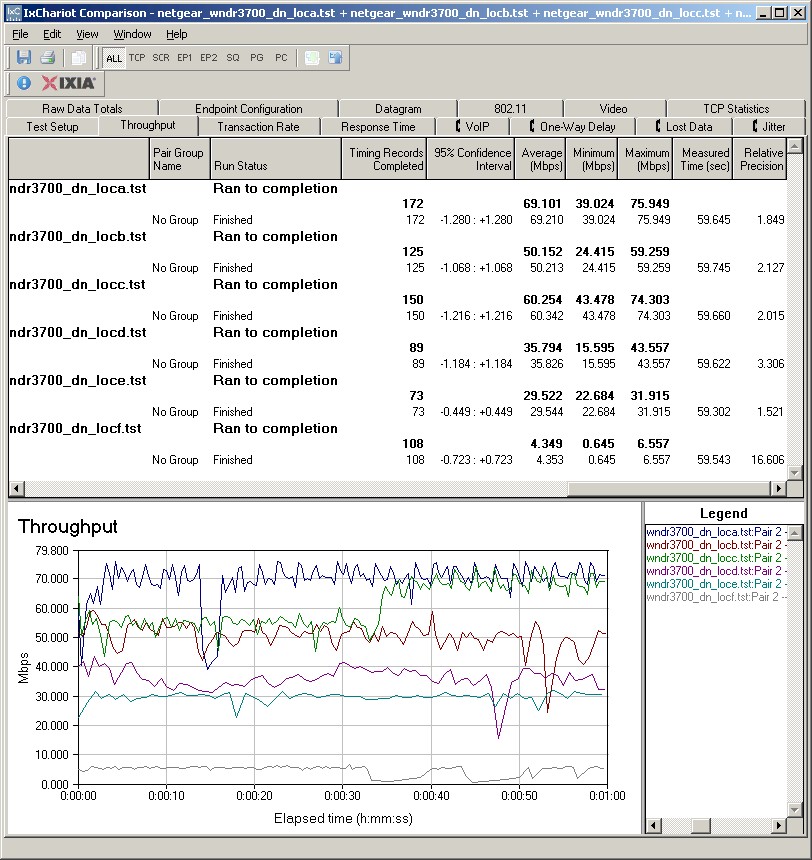
Figure 10: Six location wireless throughput – 2.4 GHz, 20 MHz channel, downlink
Figure 11 shows the six location plot for the uplink direction, with best case uplink throughput of 90.8 Mbps measured using a 40 MHz channel in the 2.4 GHz band at Location A.
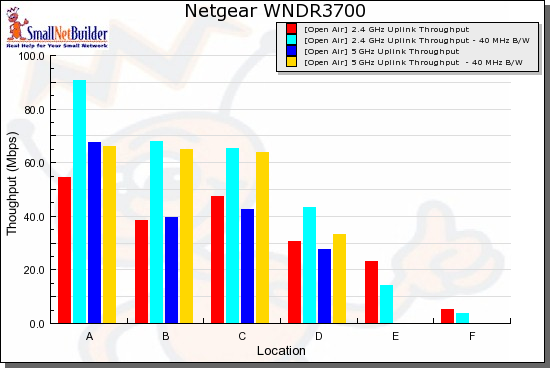
Figure 11: Six location uplink summary
The IxChariot uplink plot is similar to the downlink, showing moderately high variation. Here are the other composite IxChariot plots if you’d like a peek:
The most unstable throughput is shown in the 2.4 and 5 GHz / 40 down plots in Location A. Based on my discussion with NETGEAR, I suspect there is some receiver overload causing this, even with the 3700 and test client 10 feet apart.
Wireless Performance – Maximum Throughput
In the Preview, I pooh-poohed NETGEAR’s press-release claims of "real-world Transmission Control Protocol (TCP) throughput of up to 350 Mbps combined", since I’ve never seen any 802.11n product come anywhere near that. Well, it turns out that I was right…and wrong.
After the Preview article, NETGEAR sent me a copy of its test data, which was taken using IxChariot, running IxChariot’s High Performance Throughput script (which reduces overhead a bit) and using TCP/IP. Data was taken using Intel 5300, Atheros XB72 / XB92 (PCIe reference design modules) and NETGEAR WNDA3100v2 clients.
Figure 12 shows that NETGEAR switched from Atheros to Broadcom for the new version of its dual-band USB client adapter. So the NETGEAR data reflected performance with three commonly-used 802.11n client chipsets.
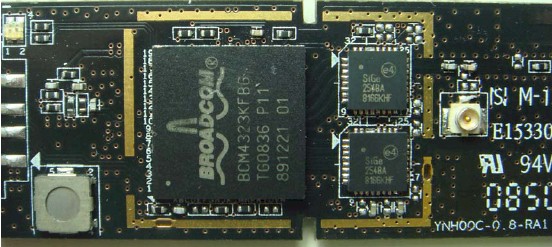
Figure 12: NETGEAR WNDA3100v2 board
NETGEAR’s data did indeed show throughput of ~200 Mbps for each radio running separately and over 300 Mbps with both radios running simultaneously. The trick was that each radio was running four simultaneous connections. I always run a check with a single up and downlink stream running concurrently. But I’ve never tried running more than one stream in a single direction.
So, I set up a second notebook using the NETGEAR WNDA3100v2 client connected to the 5 GHz radio and my standard Intel 5300-equipped notebook connected to the 2.4 GHz radio and ran some tests with multiple streams. Both clients were in the same room, within 10 feet of the router and both radios were set to Up to 300 Mbps (40 MHz channel bandwidth) mode.
Figure 13 shows 252 Mbps of total bandwidth running four downstream connections between each radio and client. Running the same setup upstream yielded a slightly better 262 Mbps of aggregate throughput. (Here’s the upstream plot.)
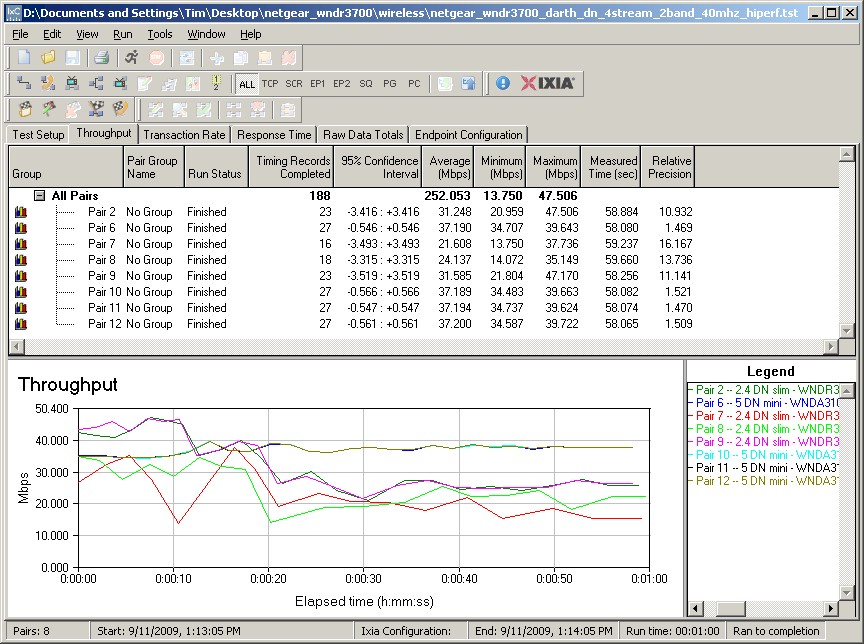
Figure 13: WNDR3700 aggregate wireless throughput – downlink
But since I previously had not run this measurement, maybe there were other simultaneous dual-band routers that could also deliver this much aggregate throughput. The only other dual-band, dual-radio router with Gigabit ports that I had on hand was a D-Link DIR-825 [A1] (original version), so I gave it a shot.
The 825 [A1] uses a Ubicom IP5170U processor clocked at 350 MHz and mini-PCI radio modules with Atheros AR9160 BB/MAC and AR9103 3T3R 2.4 GHz radio on one and AR9160 and AR9106 2.4/5 GHz 3T3R radio on the other.
Figure 14 shows that it managed only 187 Mbps total downlink throughput with the same test setup. Uplink was slightly better (upstream plot) at 227 Mbps of aggregate uplink throughput.
![D-Link DIR-825 [A1] aggregate wireless throughput - downlink](/myincludes/image_page.php?/images/stories/wireless/netgear_wndr3700/dlink_dir825_4stream_2band_40mhz_hiperf_dn.jpg "D-Link DIR-825 [A1] aggregate wireless throughput - downlink")
Figure 14: D-Link DIR-825 [A1] aggregate wireless throughput – downlink
These results show that I was right that totaling the throughput from single connections on each radio didn’t add up to 300 Mbps. But if you have a busy WLAN, the 3700 really can provide around 300 Mbps of real, usable throughput—if all your clients are within 10 feet or so of the router in the same room and with no other WLANs in range.
NETGEAR told me that the 3700 can actually support more than a thousand simultaneously-connected clients using WPA2 / AES encryption and around 350 using WPA / TKIP. So the 3700 looks like it could function very nicely as the centerpiece of a busy small-business WLAN.
And for those of you who have been asking about a test of D-Link’s DIR-825 [B1] (I’m looking at you, claykin…), I’ve asked D-Link to send one. It will be interesting to see if the B1 matches the 3700’s performance, since it uses the same Atheros AR7161, AR9220, AR9223 design, but sells for about $100 vs. the 3700’s $160.
Wireless Security
I successfully made a WPA2 / AES connection to the 3700 on the first try, using the WPS PIN method supported by my standard Intel 5300 AGN WiFi Link test client using the Intel PROSet Wireless Connection Utility (version 12.4.0.0). I also verified that the 3700 dropped to a maximum 54 Mbps link rate when using a WEP or WPA / TKIP connection.
Video Network
When I went looking for the dedicated video network in 5 GHz band for streaming high-quality HD video feature mentioned on the 3700’s web page, I completely missed the Enable Video Network checkboxes on the 5 GHz Wireless Settings and Guest Network a/n pages. But NETGEAR pointed them out to me.
I couldn’t find a description of what this feature did anywhere in the online help, printed documentation or NETGEAR online support site. And my query to NETGEAR brought only an intentionally vague description (lest they give away the recipie to their "secret sauce") about optimizations to lower latency and improve video streaming.
So I ran a quick check using a 720p movie trailer with and without the mode enabled to see if I could detect a difference. Since Atom netbooks don’t handle HD video smoothly, I used my Fujitsu P7120 notebook connected to the 3700 with a WNDR3100v2 adapter and played the Quicktime HD 720p.mov test file using the VLC open source media player.
While I played the file, I moved the notebook to a location where the video started to occasionally break up during fast motion scenes with Video Network mode disabled. Once I found a spot, I then enabled Video Mode and replayed the file. I didn’t do extensive testing, but enabling Video Mode seemed to reduce playback problems.
I tried some IxChariot tests using full-speed TCP/IP streams, but didn’t see any difference in throughput variation. I also tried some with and without runs using the IxChariot IPTVv script running at 30 Mbps and UDP. With this test file, enabling the Video Network mode seemed to reduce the UDP streaming errors.
All I can say is that if you’re having trouble with your video streaming, you can try enabling the Video Network mode (if you’re using 5 GHz clients). Just don’t expect miracles.
Wireless Performance – Competitive Comparison
The only fair comparison for the 3700 is with other simultaneous dual-band routers with Gigabit ports, which means the Cisco / Linksys WRT610N and D-Link DIR-825 [A1]. Although I also have reviewed the D-Link DIR-855, I don’t have open air test results for it.
Figure 15 shows all three turning in good speed in Location A, but the DIR-825 [A1] fading fast with distance. And the 3700 clearly has the throughput edge in the weak signal Locations E and F.
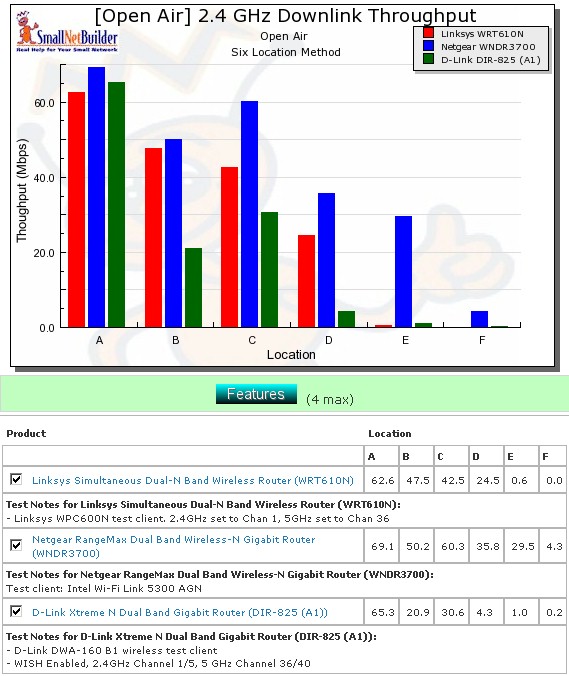
Figure 15: Competitive comparison – 2.4 GHz, 20 MHz channel, downlink
Tables 2 and 3 summarize the highest downlink throughput product in each location for the four combinations of bands and modes tested and Tables 4 and 5 compare uplink results. The chart was generated by going through the six-location comparison plots and putting and entering the test result in the product’s box that had the highest throughput for each test. If values are within 1.0 Mbps of each other, they both get their throughput entered.
| Product | 2.4GHz /20 | 2.4GHz / 40 | ||||||||||
|---|---|---|---|---|---|---|---|---|---|---|---|---|
| A | B | C | D | E | F | A | B | C | D | E | F | |
| Linksys WRT610N | ||||||||||||
| NETGEAR WNDR3700 | 69.1 | 50.2 | 60.3 | 35.8 | 29.5 | 4.3 | 66.6 | 60.3 | 42.8 | 9 | 5.4 | |
| D-Link DIR-825 [A1] | 94 | |||||||||||
Table 2: Best downlink throughput summary – 2.4 GHz
| Product | 5GHz / 20 | 5GHz / 40 | ||||||||||
|---|---|---|---|---|---|---|---|---|---|---|---|---|
| A | B | C | D | E | F | A | B | C | D | E | F | |
| Linksys WRT610N | 76.9 | |||||||||||
| NETGEAR WNDR3700 | 73 | 49.2 | 55.4 | 33.3 | 81 | 71.5 | 30.2 | |||||
| D-Link DIR-825 [A1] | ||||||||||||
Table 3: Best downlink throughput summary – 5 GHz
Adding up the entries for each product shows that the 3700 is the runaway winner in both the 2.4 and 5 GHz bands for downlink and uplink.
| Product | 2.4GHz /20 | 2.4GHz / 40 | ||||||||||
|---|---|---|---|---|---|---|---|---|---|---|---|---|
| A | B | C | D | E | F | A | B | C | D | E | F | |
| Linksys WRT610N | 69.5 | 45.8 | 46.2 | |||||||||
| NETGEAR WNDR3700 | 47.3 | 30.7 | 23 | 5 | 90.8 | 67.9 | 65.4 | 43.4 | 14.2 | 3.6 | ||
| D-Link DIR-825 [A1] | 68.9 | |||||||||||
Table 4: Best uplink throughput summary – 2.4 GHz
| Product | 5GHz / 20 | 5GHz / 40 | ||||||||||
|---|---|---|---|---|---|---|---|---|---|---|---|---|
| A | B | C | D | E | F | A | B | C | D | E | F | |
| Linksys WRT610N | 72.2 | 79.3 | ||||||||||
| NETGEAR WNDR3700 | 39.6 | 42.4 | 27.6 | 65 | 63.7 | 33.3 | ||||||
| D-Link DIR-825 [A1] | ||||||||||||
Table 5: Best uplink throughput summary – 5 GHz
Closing Thoughts
NETGEAR had somehow managed to generate a lot of excitement around the WNDR3700 before it shipped, with some folks hardly able to wait to get their hands on it. This always carries the risk of the actual product not living up to the hype, however.
But it turns out that the WNDR3700 actually manages to deliver the goods and will get NETGEAR seriously back into the N router game—at least the competition for top-of-line dual-band simultaneous routers.
The WNDR3700 handles the basics well, with routing speed well above what most of us can use, plenty of simultaneous sessions and steady throughput. The routing feature set isn’t much different from NETGEAR’s other consumer routers, but should handle most home and SOHO needs just fine.
The real benefits that the 3700 delivers on the wireless side include "guest" networks on both radios as well as WDS bridging and repeating. And wireless performance improvements include significantly higher throughput at weaker signal locations in the 2.4 GHz band and relatively low throughput variation in both bands. This is counterbalanced, however, by no improvement in 5 GHz range, although I will say that 5 GHz throughput seems to hold up better with medium-low signal strength (my Location D) than other products I’ve tested.
Yes, the WNDR3700 really can deliver 250 – 300 Mbps (depending on whose numbers you believe) of aggregate wireless throughput. But think of this as a "fatter pipe" that can deliver higher speeds to multiple users vs. really high speed for single-user HD video streaming.
At any rate, it looks like there is finally some serious competition to put a dent into Cisco’s dominance of the dual-band simultaneous N router market. Watch out WRT610N, the WNDR3700’s comin’ to get ya…