

Introduction
| At a Glance | |
|---|---|
| Product | ASUS Multi-functional Gigabit SuperSpeedN Router (RT-N16) |
| Summary | 2.4GHz, Broadcom-based 802.11n router with HTTP / FTP / BitTorrent download, USB drive sharing and Gigabit Ethernet |
| Pros | • Gigabit WAN and LAN ports • DD-WRT compatible • 2 USB 2.0 ports for sharing storage or printer |
| Cons | • Low file sharing speed • Middle of the pack wireless performance • Help and documentation for advanced features needs improvement. |
When you hear the name ASUS, your first thought is probably of netbooks, desktop computers or, if you’re a DIY kind of person, motherboards. Wireless routers from ASUS don’t immediately come to mind. Although previous ASUS routers may not have appeared on your radar screen, the new, full-featured RT-N16, appropriately named ” Multi-Functional Gigabit SuperSpeedN” is worth a look.
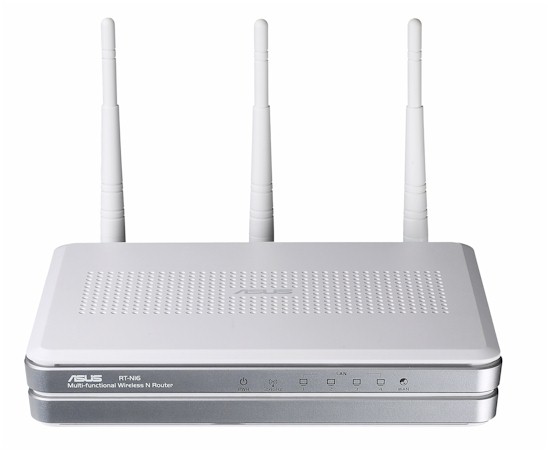
The RT-N16 is a single band 802.11N Wi-Fi Certified router with Gigabit Ethernet WAN and LAN ports and two USB 2.0 ports for sharing a USB printer, or USB storage devices. Housed in an 8.5″ X 6 3/8″ X 1.6″ plain white plastic case with gray trim, the RT-N16 is likely to appeal to Mac users who tend to like white devices. It’s quite a bit larger than a similarly-featured D-Link DIR-655 that measures 7.6″ X 4.6″ X 1.2″.
The front panel has blue LEDs for power/status, link/activity for each of the four LAN ports, and an LED for wireless status/activity. The top and bottom of the case is loaded with ventilation holes to ensure that the device stays cool. Figure 1 shows the configuration of the rear panel.
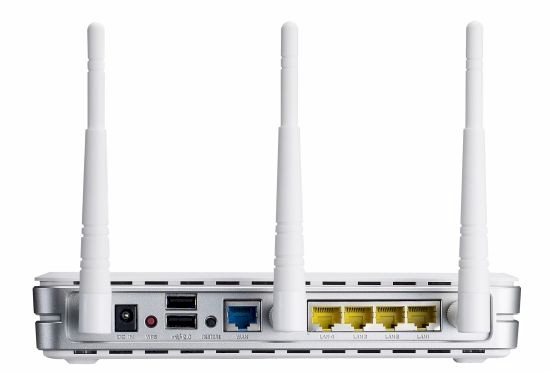
Figure 1: ASUS RT-N16 rear panel
The rear panel has RP-SMA connectors for the three supplied 2 dBi antennas, a power receptacle, a WPS (Wi-Fi Protected Setup) button, two USB ports, a reset button, one WAN port and 4 LAN ports. Though the ports are color coded (WAN=Blue, LAN=Yellow), the quick start guide doesn’t take advantage of, or mention the color coding for the initial configuration. Power is supplied by a 100-240V 50/60Hz auto switching “wall wart”. With two computers and two USB devices connected, the RT-N16 consumed 8 W.
On the Inside
Figure 2 is an FCC ID doc shot of the the board with the heat sinks and RF shields removed.
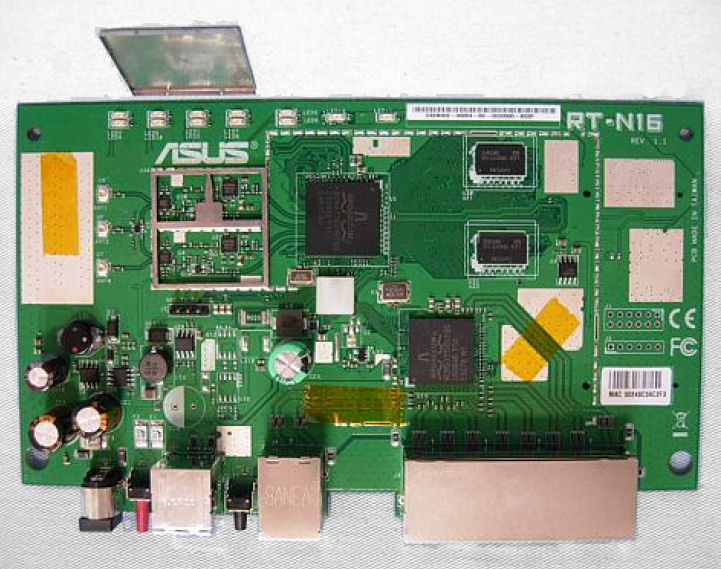
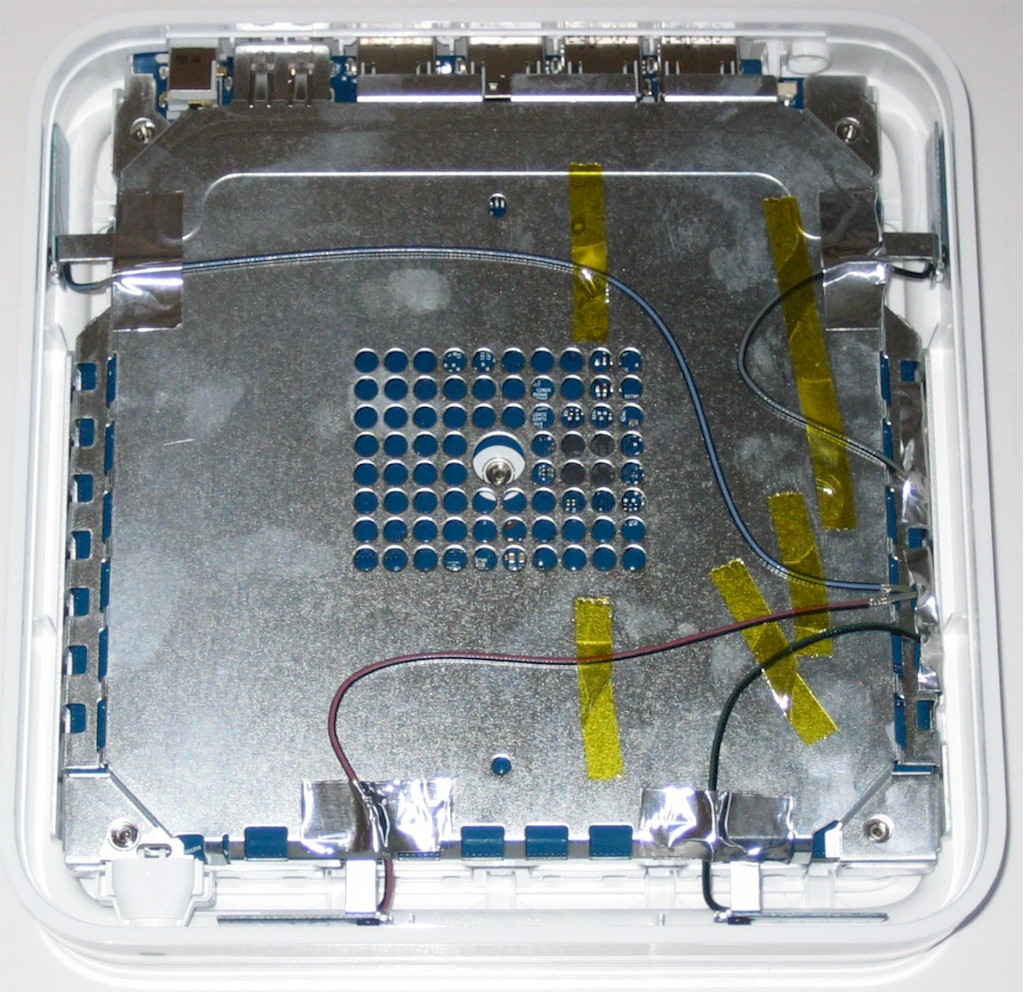
Figure 2: ASUS RT-N16 board
ASUS made an interesting choice for their component selection. The RT-N16 is powered by a Broadcom BCM4718 Intensi-fi XLR 802.11n Simultaneous Dual-Band (2.4/5 GHz) Router System-on-Chip. This chip combines the baseband, MAC, 533 MHz CPU and radio modules and includes the USB support found on the RT-N16.
Although the BCM4718 has a 5 GHz radio, ASUS didn’t put the circuitry in to support it. So even if you load up the DD-WRT distro, you won’t get a dual band router.
The Gigabit WAN and four Gigabit LAN ports are supported by a Broadcom BCM53115 which provides a full 5 Gbps switching fabric and built-in QoS. 128MB of RAM and 32 MB of Flash round out the design.
The switch device is spec’d to support up to 9K jumbo frames. But ASUS doesn’t spec jumbo frame support and we didn’t check to see if jumbo frame support is enabled.
Setup
Like most routers, the N16 doesn’t require a lot of configuration to get you up and running. You merely connect an Ethernet cable from the WAN (blue) port to your cable/DSL modem and plug a computer into one of the Gigabit (yellow) LAN ports. Then the RT-N16 will automatically try to determine your internet connection type.
By default, the router is configured for the 192.168.1.0/24 network and has an IP address of 192.68.1.1. The built-in DHCP server is pre-configured to assign 253 addresses starting with 192.168.1.2. You can also connect wirelessly to configure the router. The default SSID is “ASUS”, and wireless security is disabled.
If your ISP assigns you an IP address automatically, you’ll see a screen as shown in Figure 3 when you first launch your browser as the N16 intercepts your web request and routes you through its QIS wizard.
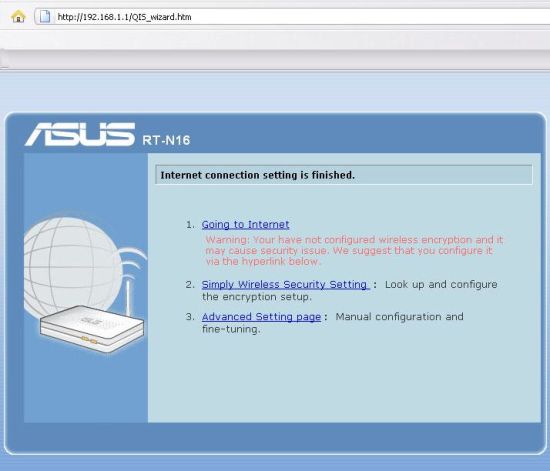
Figure 3: Quick Internet Setup completed
I was a bit disappointed that there wasn’t a better configuration wizard. Some of the major brands like Linksys and D-Link have animated wizards that walk you through connecting cables, the power up sequence, testing Internet connectivity and configuring basic wireless security settings. Some router configuration wizards also force you to change the default admin password—a really good idea. Unfortunately, the ASUS wizard didn’t force you do to what you already know you should do. Thankfully, changing those additional security settings is fairly simple.
Feature Tour
The user interface is fairly easy to navigate, which you can see for yourself using ASUS’s online RT-N16 simulator. There are five major categories of settings shown along the left side of the screen. The landing page shown in Figure 4, shows these major categories on the left, a network map in the center, and details about the object selected in the network map on the right.
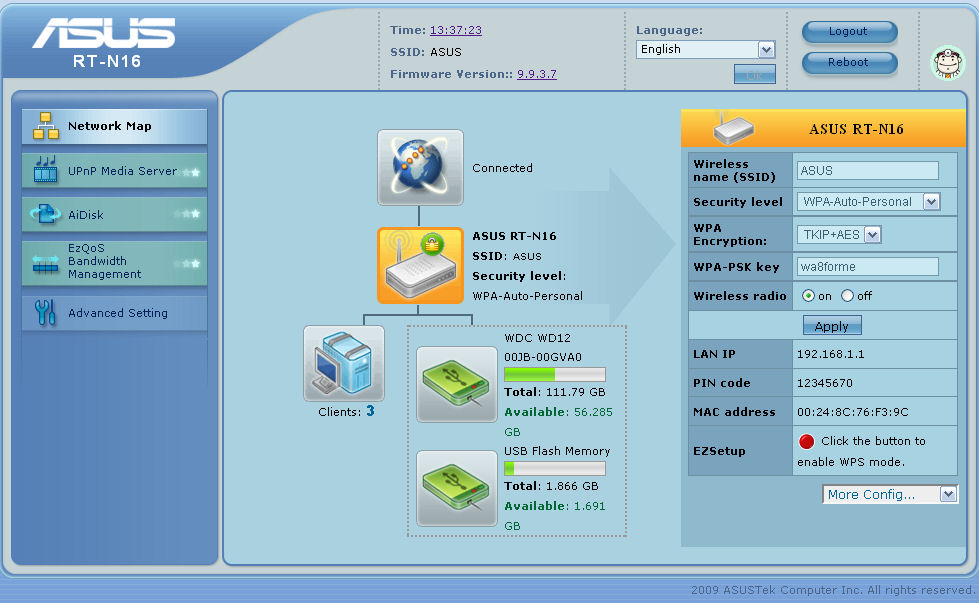
Figure 4: Network Map page
The network map shows that the router is connected to the Internet, that there are three clients currently attached, and that there are two USB storage devices attached. Clicking on any of the boxes in the network map brings up additional detail about that object.
In the next sections I’ll briefly comment on important entries in the submenus of each major category.
Media Server
If you have storage attached to one of the USB ports that contains multimedia content, the UPnP AV media server can serve that content to a UPnP compatible device. Figure 5 shows that the only configuration option is enable / disable.
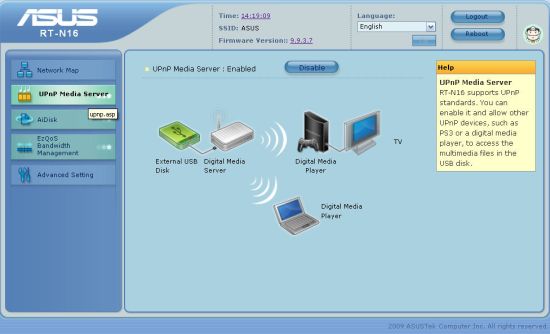
Figure 5: UPnP AV Media server page
Note that the N16’s media server is not DLNA certified. So it might not properly serve content to an XBox 360 or PS3.
AiDisk
The RT-N16 allows you to remotely access the files stored on USB attached storage devices via FTP, but secure FTP is not supported. You have a choice of anonymous, admin or user account access. For each top level folder, you can set read only, read write or no access if you specify limited user access.
If you allow anonymous users access, they have full R/W access to the shares. Figure 6 shows a file transfer through a windows-based FTP client. Unfortunately, though the RT-N16 has a number of different logs, it doesn’t log FTP sessions or file transfers.
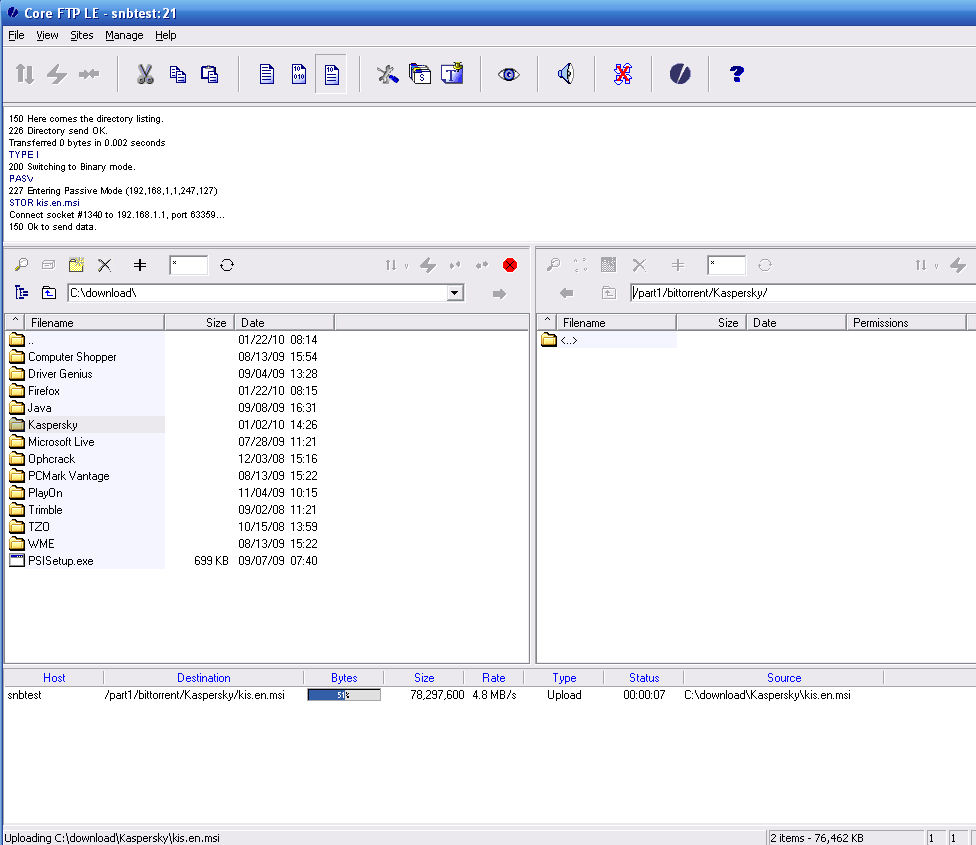
Figure 6: FTP in progress
EzQoS Bandwidth Management
This feature provides a simplifed interface for QoS settings. As you click the individual boxes, less bandwidth is reserved for P2P file transfers. Figure 7 shows QoS configured for streaming media. Additional settings for QoS can be made under Advanced Settings, WAN.
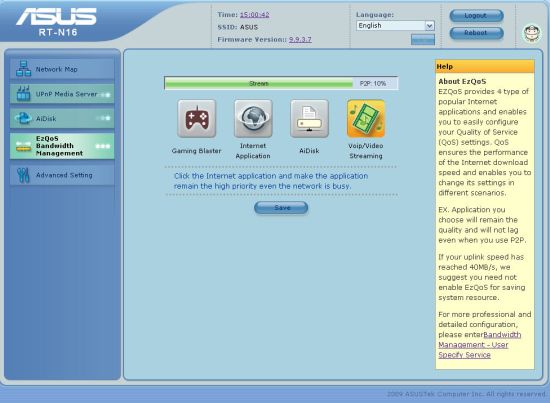
Figure 7: EzQoS bandwidth management showing priority given to Voip/Video streaming
Advanced Setting
This button provides a convenient mini site map showing all of the seven sub menus as shown in Figure 8.
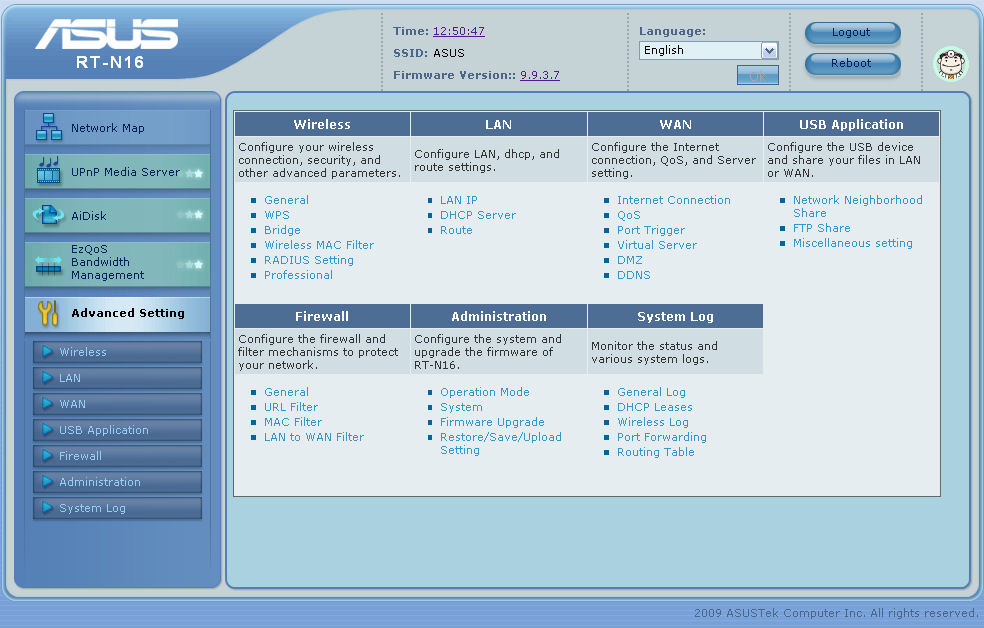
Figure 8: Advanced setting screen
Wireless
Figure 9 shows the Wireless > General tab, which contains the majority of the available wireless settings. The N16 supports a full range of wireless security methods including WPA/WPA2, AES, TKIP and WPA Personal and WPA enterprise.
I’ll note that the N16’s "out of the box" settings include 40 MHz wide channels. Although the N16 has been recently Wi-Fi certified, this is in violation of Certification requirements. We’ve asked ASUS if there is a more recent firmware than the Version 9.9.3.7 beta currently posted that properly defaults the wireless channel bandwidth to 20 MHz, but are still waiting an answer.
As with all current Wi-Fi certified devices, the RT-N16 supports WPS using either the PIN code or the push button method for configuring security. It also supports WDS (Wireless distribution system) bridging / repeating. You can bridge between other APs in the WDS mode or choose the so-called “Hybrid” mode in which you can both bridge to another AP as well as service wireless clients. You are somewhat on your own to figure out how to do this however as the built-in help is a bit sketchy here.
MAC filtering lets you accept or reject wireless clients based on their MAC address. An interesting feature found on the “professional” sub menu lets you determine a global time range for each day of the week to enable wireless access. This would be handy if, for example, you wanted to shut off wireless access between, say, 10:00PM and 8:00AM. One “nit” to pick – I would have preferred to have my WPA key obscured rather than being shown in open text.
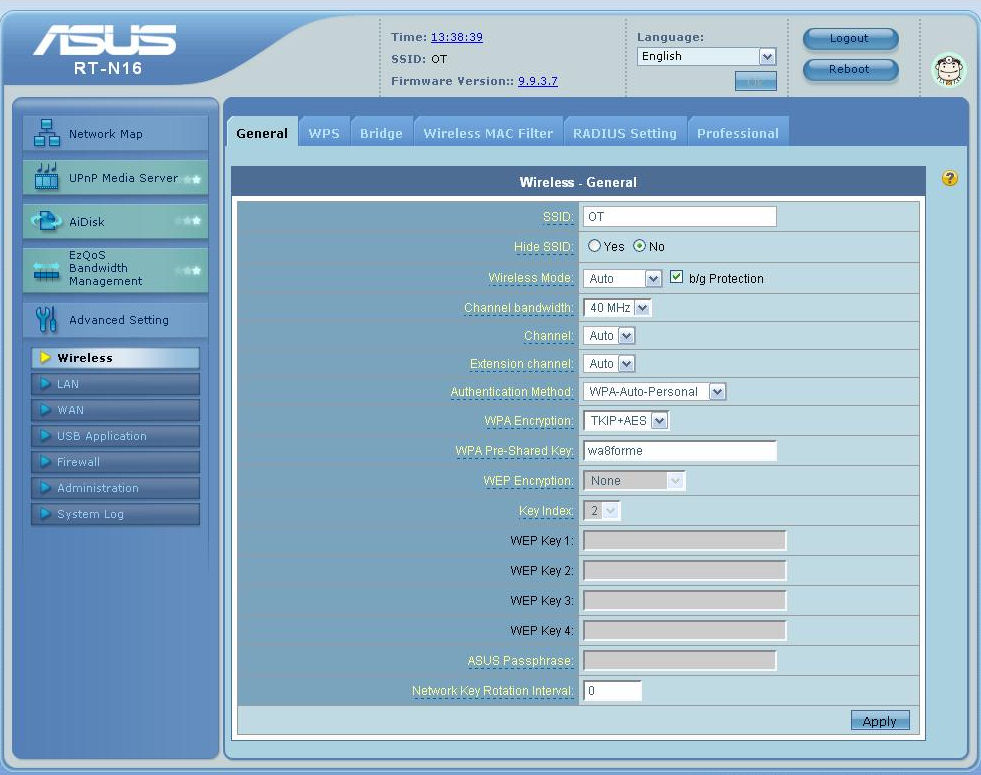
Figure 9: Wireless settings
LAN
There’s really not much to configure in this submenu. You can change the default network address, change the DHCP range of address that server will assign, and set the DHCP lease time. The DHCP server does support DHCP reservation, but the implementation isn’t nearly as slick as what you find on D-Link routers.
On the RT-N16, you have to figure out the MAC address of each client you want to add to the table. You can find the MAC address by hovering over the client name in the client list on the network MAP, but you can’t cut and paste the MAC address. On D-Link routers, the current DHCP clients are listed along with their current IP and MAC addresses. From there, you can easily add a reservation with a single click.
WAN
Here you configure your WAN connection type, advanced QoS settings, Port triggering, Virtual server, DMZ and DDNS. I was a bit disappointed in pre-populated applications and services found under port triggering and Virtual Server (port forwarding). While the router undoubtedly has the capability to perform those functions, a larger list pre-populated with more games and services would ease configuration for non-experts.
Another place where a pre-populated list of applications would help is the QoS settings. Figure 10 shows that you need to fill in your own port numbers and set one of three priorities (High, Normal, Low) for each service that you want to prioritize. Note that priority control is for LAN > WAN (uplink) traffic only.
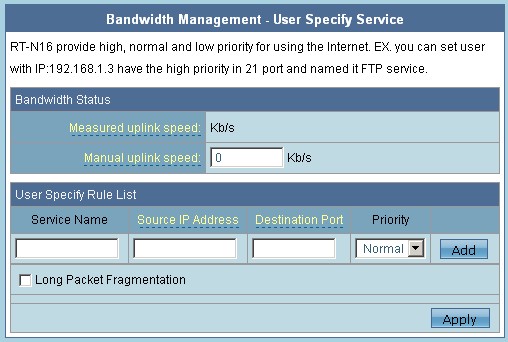
Figure 10: DDNS options
The N16 supports multiple Dynamic DNS (DDNS) services as shown in Figure 11. The RT-N16 supports a free DDNS service hosted by ASUS as well as services from DYNNDS, TZO and ZONEEDIT. I tested the free ASUS DDNS service.
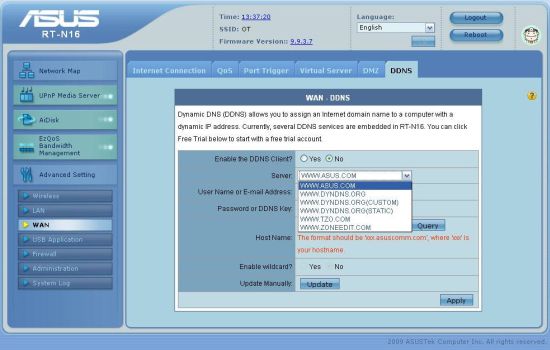
Figure 11: DDNS options
In my configuration, the N16 is behind another router which is connected to the Internet. The IP address resolved by the ASUS DDNS is a private address on my WAN port (192.168.100.199 – the address assigned by my router), not my public IP address. However, I suspect if the ASUS router were connected directly to my cable modem and had a public IP address, there would be no problem.
I also tried re-configuring DDNS using the TZO service. After inputting the information and key provided by TZO, I retested to see if the registered domain properly reflected my public IP address – it did. So if you’re configuring DDNS with a RT-N16 behind a second router, or your ISP provides you with a private address, TZO’s service works behind a double NAT. I didn’t test the others.
USB Application
In this menu, you configure preferences for USB storage devices that you have attached to the RT-N16. For this test, I attached an external drive formatted with NTFS and a 2 GB Flash drive formatted FAT32. Both mounted without incident.
You can either choose to share with everyone, create user accounts and set sharing preferences for each individual folder or disable sharing. Sharing is done via SMB / CIFS, so the shares should appear when you browse your network from systems running Windows, Mac OS, Linux or practically any other OS.
Figure 12 shows the two devices and the access rights I configured for user cellison.
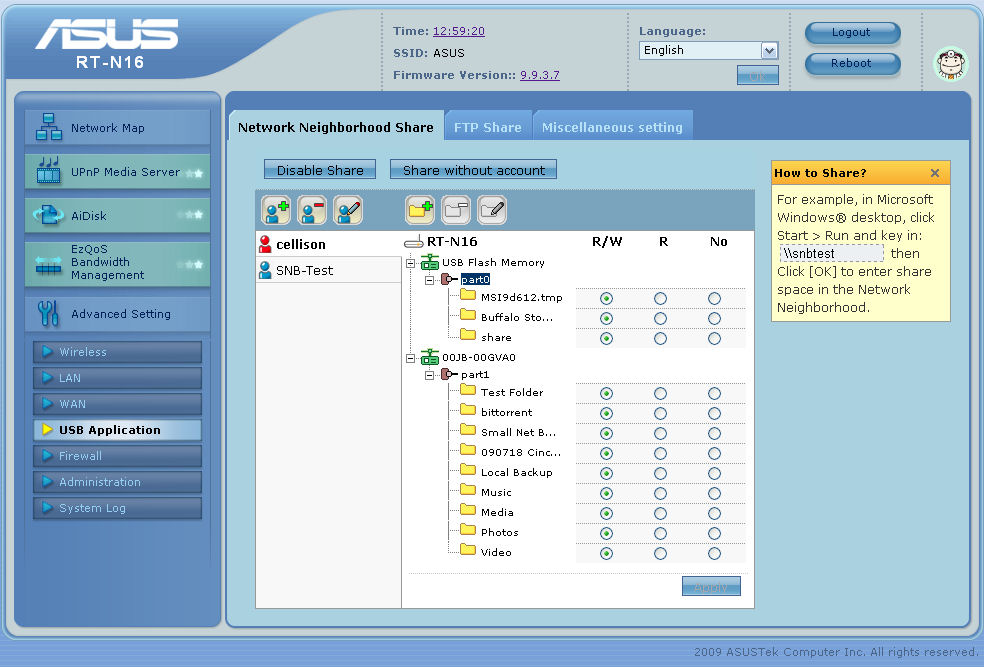
Figure 12: USB storage access rights
Interestingly, when you browse your network, each of the top level folders appears as a share under a single SMB share name (RT-n16, in this case) as shown in Figure 13. You can’t really tell which folders reside on which USB device, or, for that matter, how many devices there are. You configure FTP access for limited users using the same method in the FTP Share sub menu.
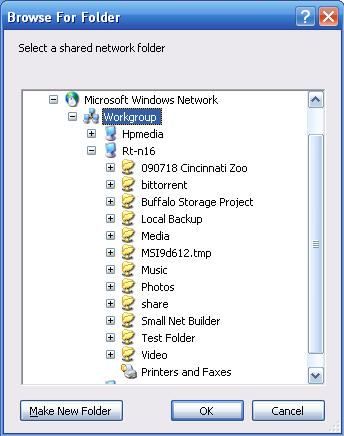
Figure 13: Windows Explorer view of SMB shares
Like most USB drive sharing features bundled into routers, the N16’s file sharing performance is pretty poky. Tim measured only 2 MB/s for write and 5 MB/s for read to a FAT 32 volume using the Vista SP1 file copy test.
Firewall
This menu lets you set up firewall rules and filters. You can also allow or deny remote administration access, specify a port for remote admin, and disable ping response on the WAN port as shown in Figure 14.
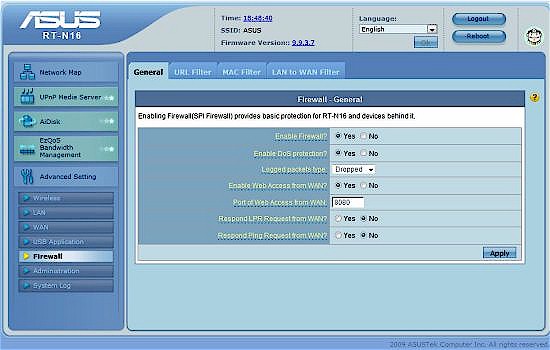
Figure 14: Firewall settings
There are also a few interesting features in this submenu: URL filtering and LAN to WAN filtering. Each of these filtering methods allows global time restrictions to control access to the Internet. For URL filtering, you could block access to URLs containing entered keywords Monday-Friday 8:00AM to 5:00PM (Figure 15). Similarly, you could block access to the Internet for a specific IP address or a range of IP addresses on a specific port or a range of ports.
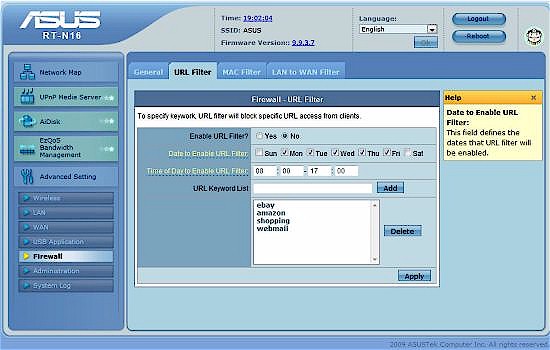
Figure 15: URL keyword filter
Administration
This menu holds typical admin functions for changing the admin password, firmware updates, setting the time zone and NTP time server, restoring to factory defaults and saving/restoring the router’s configuration.
The one interesting item on this menu is operating mode (Figure 16). You can choose from Broadband Sharing mode (typical use for a home router), Router mode (for use with and existing router – you’ll need to enter a static route in your upstream router), or as an access point (NAT, firewall and broadband sharing disabled, all ports bridged).
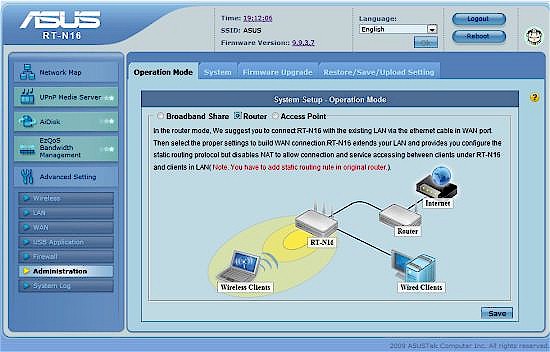
Figure 16: Operation mode
System Log
As mentioned before, there isn’t a log of FTP activity. The general log does, however, show some interesting things. For example, it looks like the N16 goes out to the specified NTP time server every two hours to update its internal clock (Figure 16), which seems a bit excessive to me.
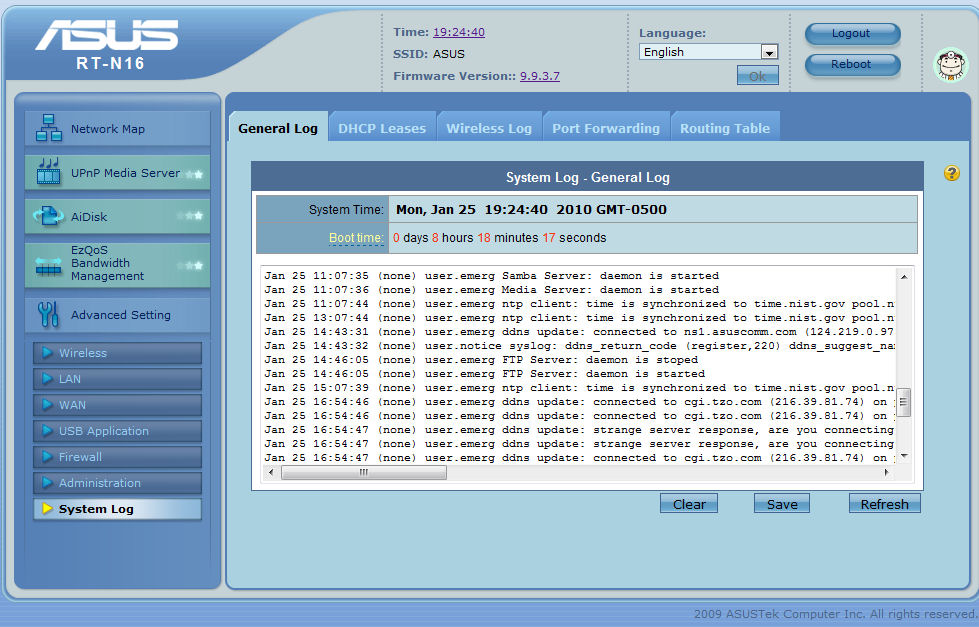
Figure 16: System log
The DHCP Leases tab does show the current leases, but in seconds. Knowing that a lease has 71364 seconds remaining isn’t really very helpful. The wireless log shows client MAC addresses, but not the names of connected clients, and only that they were connected. It doesn’t show when the connection was made, or authentication or encryption used. Again, it’s good information, but it’s not as useful as it could have been. The port forwarding and routing tables do, however, show useful information.
Routing Performance
Testing and analysis by Tim Higgins
Table 1 summarizes the results of the N16’s routing tests, which show it to deliver slightly over 140 Mbps in each direction. Maximum simultaneous sessions hit our test limit of 200 on the first try.
| Test Description | Throughput – (Mbps) |
|---|---|
| WAN – LAN | 141.1 |
| LAN – WAN | 143.3 |
| Total Simultaneous | 155.9 |
| Max. Connections | 200 |
| Firmware Version | 1.0.0.6 |
Table 1: Routing throughput
Figure 17 shows the IxChariot aggregate plots for WAN to LAN, LAN to WAN and simultaneous routing throughput tests, which have a bit more variation than we’ve seen in current-generation N routers. Still the N16 should have enough routing power to keep up with fast cable, DSL and even fiber connections.
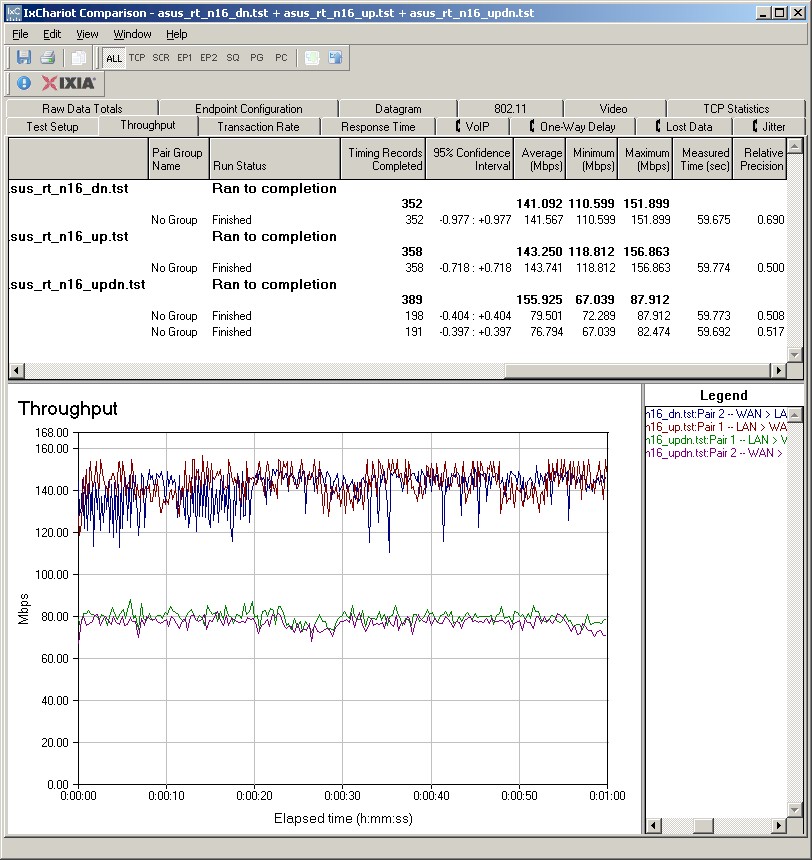
Figure 17: ASUS RT-N16 routing throughput
Wireless Performance
Testing and analysis by Tim Higgins
I used the open air test method described here to test the N16’s wireless performance. Testing was done using our standard wireless test client, an Intel Wi-Fi Link 5300 AGN mini-PCIe card in a Dell Mini 12 running WinXP Home SP3 and version 12.4.3.9 of the Intel drivers. I left all client-side defaults in place except for enabling throughput enhancement (packet bursting).
I tested the N16 back in October using 1.0.0.6 firmware. All factory default settings were left in place, except setting channel 1 for the 2.4 GHz band.
Figure 18 shows the IxChariot aggregate plot for all downlink tests using 20 MHz channel width. Throughput variation is relatively high, even in the stronger signal test locations. The other plots can be viewed via these links: uplink- 20 MHz BW; downlink 40 MHz BW; uplink 40 MHz BW.
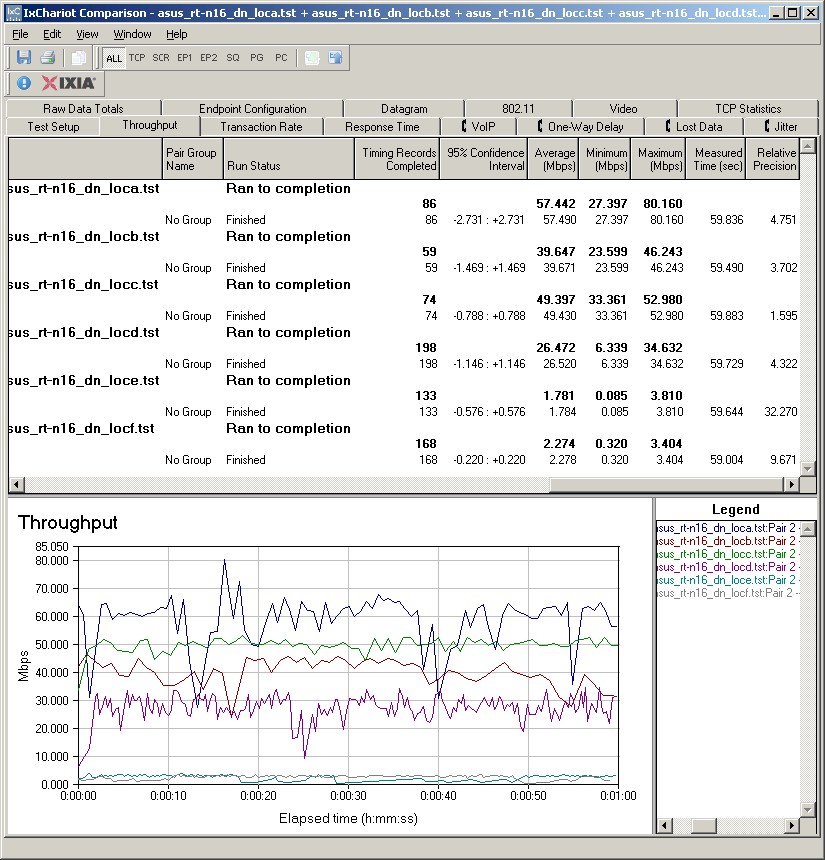
Figure 17: ASUS RT-N16 routing throughput
Wireless performance from the Broadcom-based radio wasn’t particularly impressive for speed, although it did reach all six of our test locations in both 20 MHz and 40 MHz bandwidth modes. Average throughput across all six test locations was only 29.5 Mbps and 37.2 Mbps running downlink in 20 MHz and 40 MHz bandwidth modes and 27.4 and 42.3 Mbps uplink. Maximum throughput was 84 Mbps running uplink in Location A in 40 MHz bandwidth mode.
But our Wireless Location Performance Table provides a much better look at comparative performance. I chose two other popular single-band N routers, the D-Link DIR-655 [A4] and Cisco / Linksys WRT310N and the RT-N16’s less-expensive (but much better performing) sibling, the RT-N13U.
The Performance Table gathers all the average throughput test results for the selected adapters into a single table. It then highlights the highest throughput value in each Test location for each benchmark test. If results are within 1.0 Mbps of each other then both products’ results are highlighted. Finally, the number of highlighted results are tallied for each test group and the product name with the most highlighted values is then highlighted.
It’s easy to see that the N16 lost to its less-expensive sibling, except running uplink in 40 MHz bandwidth mode, where it tied.
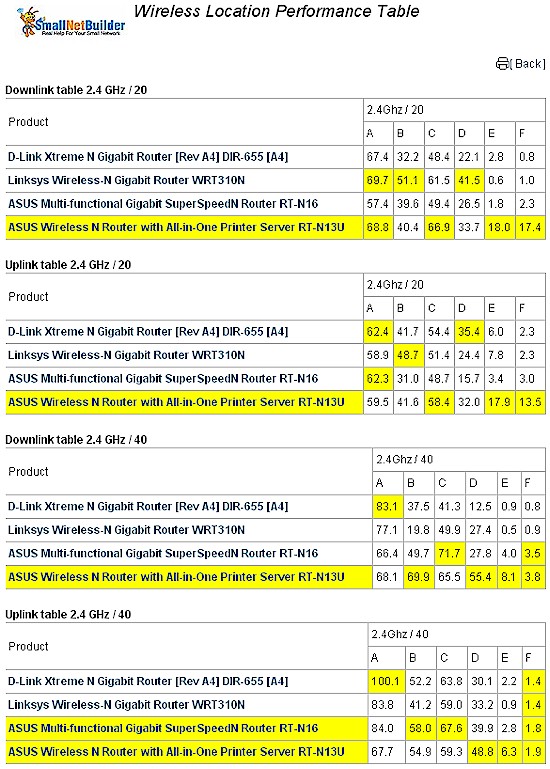
Figure 18: Wireless Performance Comparison Table
These results don’t show that the N16 is a particularly bad 2.4 GHz N router. Just not a particularly outstanding one.
Closing Thoughts
With a list price of $99.99, the RT-N16 finds itself right in the thick of the competition for single band, Gigabit-port 802.11N routers. It’s a fairly full-featured router that can also double as a WDS bridge / repeater or an AP. And I like that I can attach USB storage and share it via SMB on my local network. If I didn’t already have several NASes on my network, the RT-N16 could be a viable, albeit slow, option for network storage.
But I found the virtual server and port triggering features lacking in comparison to the venerable DIR-655. And from a performance standpoint, it features middle-of-the-pack routing joined with middle-of-the-pack wireless performance.
In reading the message boards, there seems to be a lot of excitement about the RT-N16 as a hardware platform. Apparently, there’s a fairly good DD-WRT implementation for it. So for devotees of alternative router firmware, that fact alone might push you toward the N16.
The N16 tends to be in short supply at many stores, so its price tends to stay up near its suggested list. If you’re strapped for cash, this could push you toward a Cisco WRT310N, which can be had for around $45 if you’re ok with a refurbed unit.
In the end, the RT-N16 is worth a look if you’re looking for an alternative to D-Link’s DIR-655, which used to be our go-to single-band N router. But until D-Link gets its firmware troubles sorted out, you might want to see what ASUS has to offer.